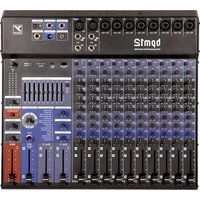
MP6D2 - Audio Mixer YORKVILLE - Free user manual and instructions
Find the device manual for free MP6D2 YORKVILLE in PDF.


User questions about MP6D2 YORKVILLE
0 question about this device. Answer the ones you know or ask your own.
Ask a new question about this device
Download the instructions for your Audio Mixer in PDF format for free! Find your manual MP6D2 - YORKVILLE and take your electronic device back in hand. On this page are published all the documents necessary for the use of your device. MP6D2 by YORKVILLE.
USER MANUAL MP6D2 YORKVILLE
325 Watt 6 Channel Powered Mixer
TYPE:YS1014

This lightning flash with arrowhead symbol, within an equilateral triangle, is intended to alert the user to the presence of uninsulated "dangerous voltage" within the product's enclosure that may be sufficient
magnitude to constitute a risk of electric shock to persons.
RISQUE DE CHOC ELECTRIQUE, NE PAS OUVRIR

The exclamation point within an equilateral triangle is intended to alert the user to the presence of important operating and maintenance (servicing) instructions in the literature accompanying the appliance.

Instructions pertaining to a risk of fire, electric shock, or injury to a person
CAUTION: TO REDUCE THE RISK OF ELECTRIC SHOCK,DO NOT REMOVE COVER (OR BACK).
NO USER SERVICEABLE PARTS INSIDE.
REFER SERVICING TO QUALIFIED SERVICE PERSONNEL.
Read Instructions: The Owner's Manual should be read and understood before operation of your unit. Please, save these instructions for future reference and heed all warnings.
Clean only with dry cloth.
Packaging: Keep the box and packaging materials, in case the unit needs to be returned for service.
Warning: To reduce the risk or fire or electric shock, do not expose this apparatus to rain or moisture. Do not use this apparatus near water!
Warning: When using electric products, basic precautions should always be followed, including the following:
Power Sources
Your unit should be connected to a power source only of the voltage specified in the owners manual or as marked on the unit. This unit has a polarized plug. Do not use with an extension cord or receptacle unless the plug can be fully inserted. Precautions should be taken so that the grounding scheme on the unit is not defeated. An apparatus with CLASS I construction shall be connected to a Mains socket outlet with a protective earthing ground. Where the MAINS plug or an appliance coupler is used as the disconnect device, the disconnect device shall remain readily operable.
Hazards
Do not place this product on an unstable cart, stand, tripod, bracket or table. The product may fall, causing serious personal injury and serious damage to the product. Use only with cart, stand, tripod, bracket, or table recommended by the manufacturer or sold with the product. Follow the manufacturer's instructions when installing the product and use mounting accessories recommended by the manufacturer. Only use attachments/accessories specified by the manufacturer
Note: Prolonged use of headphones at a high volume may cause health damage on your ears.
The apparatus should not be exposed to dripping or splashing water; no objects filled with liquids should be placed on the apparatus.
Terminals marked with the "lightning bolt" are hazardous live; the external wiring connected to these terminals require installation by an instructed person or the use of ready made leads or cords.
Ensure that proper ventilation is provided around the appliance. Do not install near any heat sources such as radiators, heat registers, stoves, or other apparatus (including amplifiers) that produce heat.
No naked flame sources, such as lighted candles, should be placed on the apparatus.
Power Cord
Do not defeat the safety purpose of the polarized or grounding-type plug. A polarized plug has two blades with one wider than the other. A grounding type plug has two blades and a third grounding prong. The wide blade or the third prong are provided for your safety. If the provided plug does not fit into your outlet, consult an electrician for replacement of the obsolete outlet. The AC supply cord should be routed so that it is unlikely that it will be damaged. Protect the power cord from being walked on or pinched particularly at plugs. If the AC supply cord is damaged DO NOT OPERATE THE UNIT. To completely disconnect this apparatus from the AC Mains, disconnect the power supply cord plug from the AC receptacle. The mains plug of the power supply cord shall remain readily operable.
Unplug this apparatus during lightning storms or when unused for long periods of time.
Service
The unit should be serviced only by qualified service personnel. Servicing is required when the apparatus has been damaged in any way, such as power-supply cord or plug is damaged, liquid has been spilled or objects have fallen into the apparatus, the apparatus has been exposed to rain or moisture, does not operate normally, or has been dropped.
SUVEZ TOUTES LES INSTRUCTIONS
Thank you for purchasing the Yorkville Sound MP6D powered Mixer. We have coupled our extensive experience in the development and production of powered mixers, (with state of the art, computer assisted design technology) to create the smallest, lightest, and most powerful combination mixer/amplifiers available. We at Yorkville Sound are confident that you will find your new MP6D to be an efficient and versatile solution to your mixer needs. This manual contains information to help you get the maximum performance from your MP6D. We hope you'll take the time to read it.
TAPE/CD/LINE IN
TAPE/CD/LINE IN
Input Channels
1. Microphone & Line Inputs
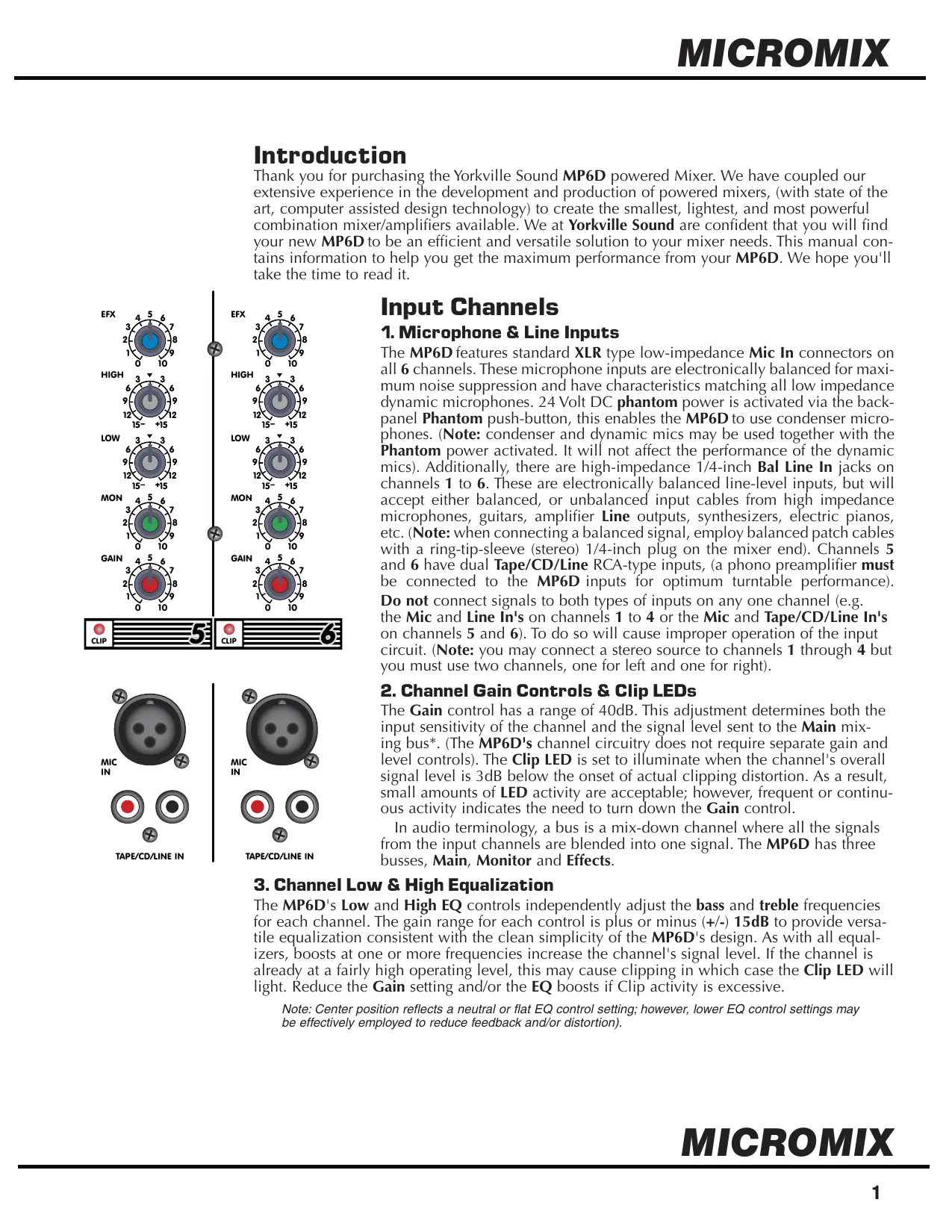
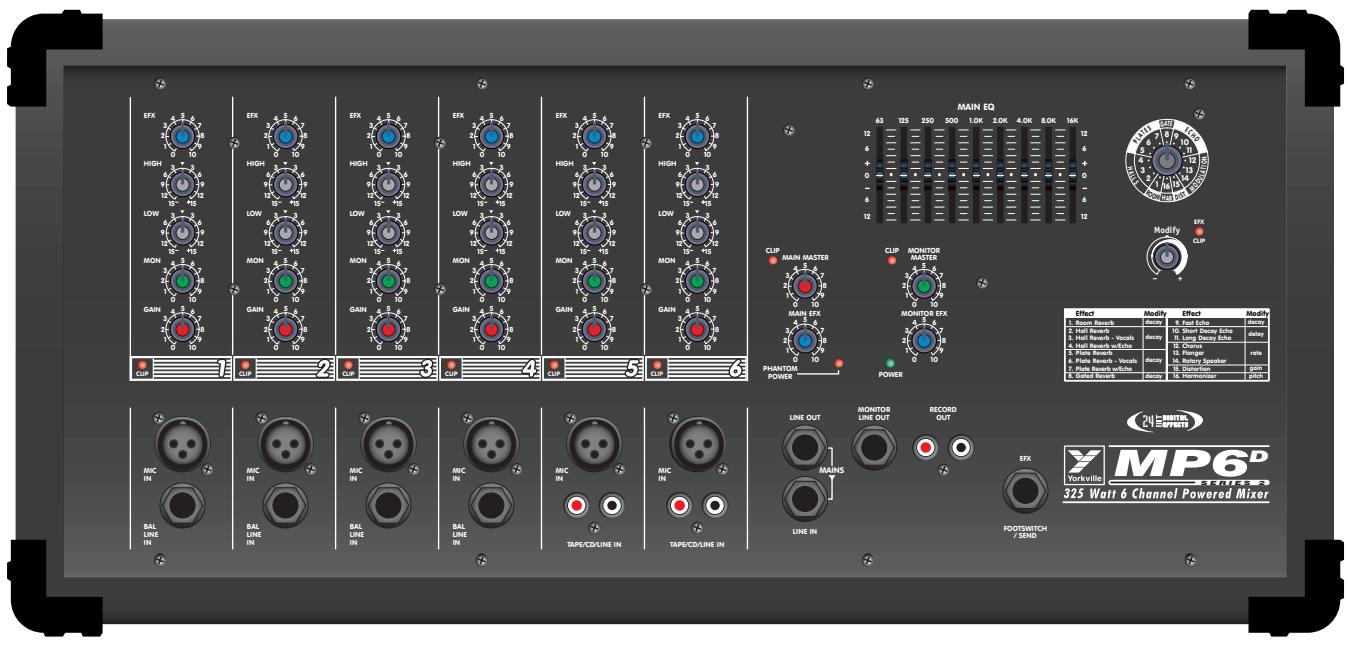
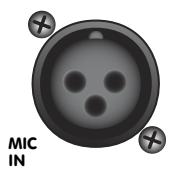
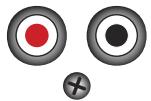
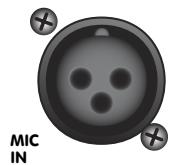
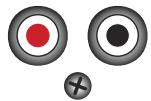
The MP6D features standard XLR type low-impedance Mic In connectors on all 6 channels. These microphone inputs are electronically balanced for maximum noise suppression and have characteristics matching all low impedance dynamic microphones. 24 Volt DC phantom power is activated via the backpanel Phantom push-button, this enables the MP6D to use condenser microphones. (Note: condenser and dynamic mics may be used together with the Phantom power activated. It will not affect the performance of the dynamic mics). Additionally, there are high-impedance 1/4-inch Bal Line In jacks on channels 1 to 6. These are electronically balanced line-level inputs, but will accept either balanced, or unbalanced input cables from high impedance microphones, guitars, amplifier Line outputs, synthesizers, electric pianos, etc. (Note: when connecting a balanced signal, employ balanced patch cables with a ring-tip-sleeve (stereo) 1/4-inch plug on the mixer end). Channels 5 and 6 have dual Tape/CD/Line RCA-type inputs, (a phono preamplifier must be connected to the MP6D inputs for optimum turntable performance).
Do not connect signals to both types of inputs on any one channel (e.g. the Mic and Line In's on channels 1 to 4 or the Mic and Tape/CD/Line In's on channels 5 and 6). To do so will cause improper operation of the input circuit. (Note: you may connect a stereo source to channels 1 through 4 but you must use two channels, one for left and one for right).
2. Channel Gain Controls & Clip LEDs
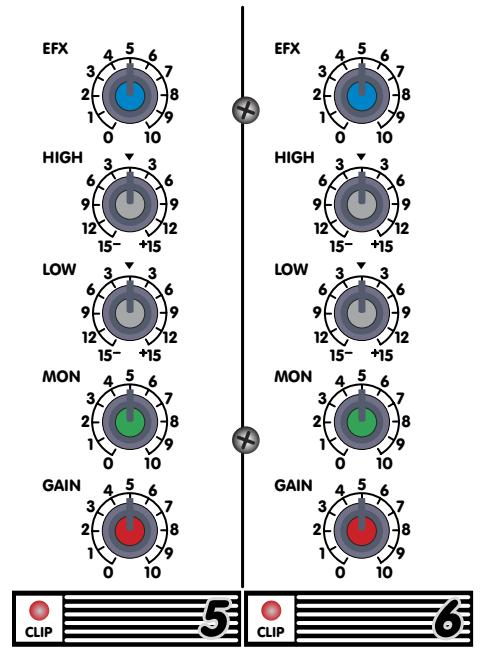
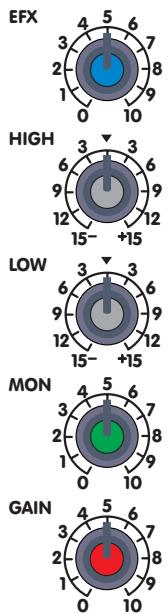
The Gain control has a range of 40dB. This adjustment determines both the input sensitivity of the channel and the signal level sent to the Main mixing bus*. (The MP6D's channel circuitry does not require separate gain and level controls). The Clip LED is set to illuminate when the channel's overall signal level is 3dB below the onset of actual clipping distortion. As a result, small amounts of LED activity are acceptable; however, frequent or continuous activity indicates the need to turn down the Gain control.
In audio terminology, a bus is a mix-down channel where all the signals from the input channels are blended into one signal. The MP6D has three busses, Main, Monitor and Effects.
3. Channel Low & High Equalization
The MP6D's Low and High EQ controls independently adjust the bass and treble frequencies for each channel. The gain range for each control is plus or minus (+/-) 15dB to provide versatile equalization consistent with the clean simplicity of the MP6D's design. As with all equalizers, boosts at one or more frequencies increase the channel's signal level. If the channel is already at a fairly high operating level, this may cause clipping in which case the Clip LED will light. Reduce the Gain setting and/or the EQ boosts if Clip activity is excessive.
Note: Center position reflects a neutral or flat EQ control setting; however, lower EQ control settings may be effectively employed to reduce feedback and/or distortion).
4. Channel Mon Control
Each channel has a Mon (monitor send) control which varies the amount of channel signal being tapped off and sent to the monitor bus in the MP6D. The Mon signal is pre-fader and pre-EQ, in other words it is taken before the Gain and EQ controls so that the main mix can be EQ'd independently of the monitor mix. As a result, channel EQ settings do not affect the sound of the monitor signals, nor do the channel Gain controls regulate their volume. (Note: with an independent monitor mix, it may be beneficial to connect a graphic equalizer to the Monitor output for feedback control. Also, remember that to turn a channel off completely, you must turn off both the Gain and Mon controls).
5. Channel EFX Control
Each channel has an EFX (effects send) control which adjusts the level of the channel signal being tapped off and sent to the MP6D effects bus. This signal is post-fader and post-EQ; in other words both the channel EQ controls and the channel Gain control affect it. Normally, the output signal from the effects bus is internally routed to the Digital Effects Processor. In this situation, the EFX control would regulate the intensity of the built-in effects as it is heard on that channel's sound through the main PA system and the Record Out jacks. In standard operating mode with the built-in effects working, you would connect a regular on/off
footswitch (e.g. Yorkville model IFS-1A) to the EFX Footswitch/Send jack to turn the internal effects on and off. See the section on this feature later in the manual for more information. Alternatively, this signal can be connected to the input of an external effects unit and returned via channel to any channel. If the effects unit uses 1/4-inch plugs, you would connect the output of the unit to any one of the Balanced Line In jacks. In this mode, the internal effect is not bypassed, so if you are not planning to use an internal effect, you must turn down the Main Effects and Monitor Effects Master controls. Also, if you do not require any effects at all, the effects bus output signal can be connected to the input of an additional monitor system or other amp/speaker system via the EFX Footswitch/Send jack using a standard shielded patch cord. In this case, the EFX controls would act as send controls to achieve a semi-separate mix (remember the channel Gain controls will also affect this signal).
Master Section
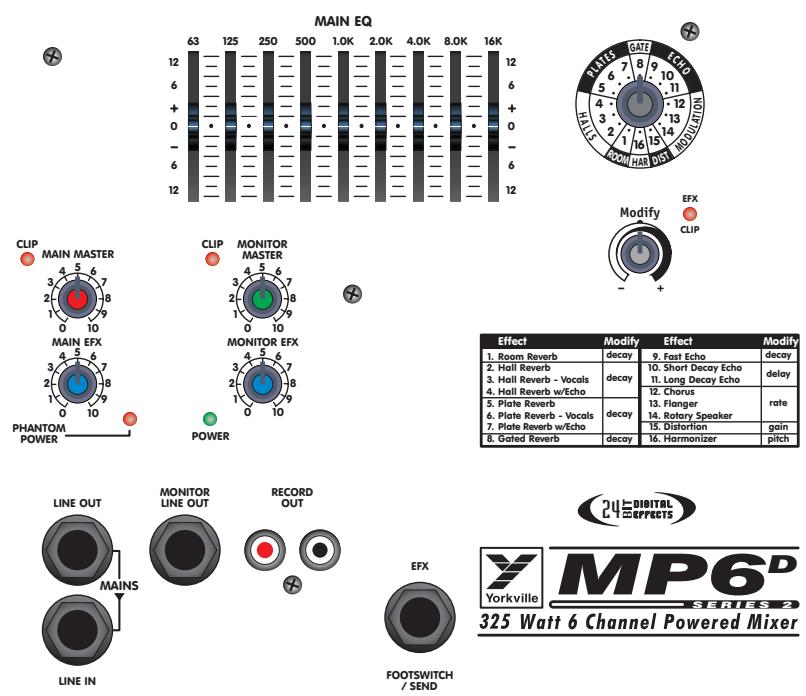
1. Main Master Control & Clip LED
The Main Master control adjusts the overall level of the main mix and the PA volume. Beside this control is a Clip LED that indicates high signal levels within the main mixing bus. Reduce the Main Master or the channel Gain settings if the Main Clip LED is more than slightly active. (Note: to ensure maximum signal headroom and clarity, operate the mixer with the Main Master set at around 7 or so. This way, you will be running the channel Gain controls at lower settings, which helps to ensure that the channels do not clip).
2. Monitor Master Control
The overall level of the monitor mix is adjusted with the Monitor Master control. Beside it is a Clip LED that indicates high signal levels within this bus. Reduce the Monitor Master or the channel Mon levels if the Monitor Clip LED is more than slightly active. (Note: as with the Main Master, keep the Monitor Master at a relatively high setting to prevent clipping the bus).
3. Main Effects Master Control
The Main EFX master control regulates the amount of signal going from the output of the internal Digital Effects Processor to the Main mixing bus where it is mixed with the dry signals direct from the channels. It controls overall effects intensity on the Main Line Out signal and Record Out signal, as well through the main PA speakers.
4. Monitor Effects Master
The Monitor EFX master control regulates the amount of signal going from the output of the internal Digital Effects Processor to the Monitor mixing bus where it is mixed with the dry signals direct from the channel Mon send controls. It controls overall effects intensity of the Monitor Line Out signal.
5. Main Line Out
This jack can serve a variety of patching and routing purposes. It positioned in the signal path after the MP6D's main graphic equalizer and is therefore affected by it (i.e. they are post-EQ). The main bus signals are available at line level (not speaker level; use the Speaker outputs on the back panel to drive speakers) from the Line Out jack. Taking a signal from this jack has no effect on the operation of the MP6D's built-in power amplifiers. It is, therefore, possible to feed an external power amplifier or even several interconnected power amps, with the Main output signal, while the internal power amplifier is also functioning (although, it is not necessary to have speakers connected e.g. if you want to use the MP6D strictly as a mixer).
The Line In jack is a direct input to the built-in power amplifier. This is a switching jack, and when you plug into the Line In, you interrupt the internal flow of signals going from the outputs of the main mixing bus to the inputs of the built-in power amp. This allows you to insert a signal control device such as a speaker processor, an additional equalizer, or a compressor/limiter into the Main signal path. This is accomplished by connecting a patch cable from the Line Out jack to the device's input jack and another patch cable from the device's output jack to the MP6D's Line In jack. If you are using an external power amp for the main PA speakers, you may run a short
patch cable from the Monitor Line Out jack to the Line In jack and simply connect your monitor speakers to the MP6D's Speaker outputs on the back panel. It is even possible to connect another mixer to the MP6D's power amplifier via the Line In jack. This slaves the amplifier to that mixer's signals (i.e. it no longer receives the built-in mixer's signals), which means that you could use the built-in mixer to do another, totally separate, mixing job. For example, you could patch the MP6D's Line Out signal to an input on another mixer connected to amps driving a PA speaker system while using the MP6D's amplifier to power control room speakers.
6. Monitor Line Out Jack
The monitor bus output signal is available at line level (not speaker level) from the Monitor Line Out jack and would normally be patched to the input of a mono power amplifier, or one channel of a stereo amp driving monitor speakers. Keeping in mind that there is no internal equalization for the monitor mix, you might want to patch a graphic equalizer between the Monitor Line Out jack and the input of your monitor power amplifier to help regulate feedback. As mentioned under the previous section, the monitor mix signal can alternately be patched to the internal amplifiers via the Line In jack. Ask your dealer about the Yorkville Beta-150EQ power amplifier, it has a built-in graphic equalizer.
Patching something between things, in this case, means connecting the MP6D's Monitor Line Out jack to the input of an EQ and the output of the EQ to the input of a monitor power amp or the Line In jack.
7. Record Out Jacks
These phono connectors carry the pre-EQ (not affected by the Main EQ) main mix signals. Record Out signal levels are not regulated by the Main master. This allows the level to the speakers to be reduced without lowering the levels to the Record Out jacks. Using phono-to-phono patch cords, connect the Record Out jacks to the Aux. (line-level) inputs on the tape deck. Actual recording levels would now be adjusted using the tape deck's record level control/s.
8. EFX Footswitch/Send Jack
This jack may be used to connect a standard on/off footswitch for the internal Digital Effects Processor or alternately, as an effects send jack. In this latter function, it would send the signal so that you could connect an external effects unit. If it is stereo, you would connect the unit's left and right
outputs to the dual RCA inputs on channel 5 or 6 (please note that the channel inputs are not in stereo and that the stereo effect would be summed into a mono mix). Here you would need to keep the Gain level of that channel fairly low and make sure that its EFX control is turned off. If the effects unit uses 1/4-inch plugs, you could connect the output of the unit to any one of the Balanced Line In jacks. As another alternative, the EFX Footswitch/Send jack may be used to deliver line-level signal to the input of an auxiliary amp/speaker system, or a tape deck. Here,
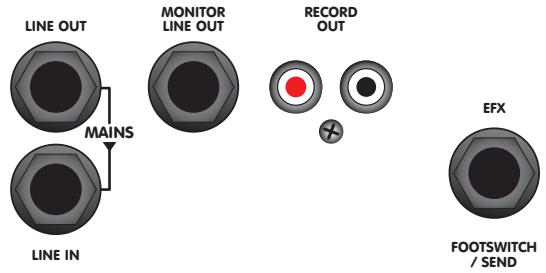
the channel EFX controls would act as secondary level controls. Also keep in mind the channel EFX send controls are post-Gain, so changes in the Gain settings will affect these levels as well.
9. Power LED & Switch
The Power LED lets you know that the MP6D is plugged in and turned on. The AC power on/off switch is on the rear panel of the unit.
10. Phantom Power
The Phantom power LED indicates that 24 volts of DC phantom power is present on all the XLR microphone inputs to power condenser microphones. Regular dynamic mics may be connected while the Phantom Power is activated without encountering problems. The Phantom Power push-button is located on the rear panel.

Phantom Power
Digital Effects Processor
1. Select and MODIFY EFX Controls
Use the EFX Selection control to choose from the sixteen 24-bit digital reverbs, delays and other effects. This control rotates continuously, which lets you rotate clockwise or counterclockwise to select the desired effect. For convenience, a table of the effects and their variables appear later in this manual and on the front panel of the MP6D.
Parameters for each of the effects can be changed using the MODIFY control which is located next to the Selection control. For example, if a Hall reverb has been selected, the MODIFY control will let you adjust the decay parameter. Choosing the Chorus effect allows the chorus rate to be adjusted.
Note: The signal sent from the internal Digital Effects Processor to the MON mix is independent from the MON send controls on the channel strips. When a channel's EFX control routes a signal to the internal Effects processor and the MON level control (for that channel) is turned off, the channel's wet effects will still be audible in the monitor bus (if the EFX to MONitor return level is turned up).
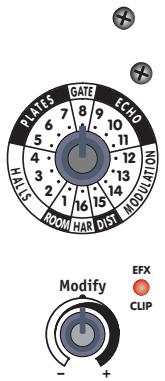
| Effect | Modify | Effect | Modify |
| 1. Room Reverb | decay | 9. Fast Echo | decay |
| 2. Hall Reverb | decay | 10. Short Decay Echo | delay |
| 3. Hall Reverb - Vocals | 11. Long Decay Echo | ||
| 4. Hall Reverb w/Echo | 12. Chorus | rate | |
| 5. Plate Reverb | decay | 13. Flanger | |
| 6. Plate Reverb - Vocals | 14. Rotary Speaker | ||
| 7. Plate Reverb w/Echo | 15. Distortion | gain | |
| 8. Gated Reverb | decay | 16. Harmonizer | pitch |
2. Effects CLIP LED
Situated to the right of the MODIFY EFX control, the CLIP LED indicates that the digital processor is receiving an input signal
that's too strong, resulting in distortion. For optimum performance, the CLIP LED should never flash. If there is clipping activity, turn down the channel EFX controls appropriately.
3. Effects Tables
See rear inside cover for the Series 1 effects tables.

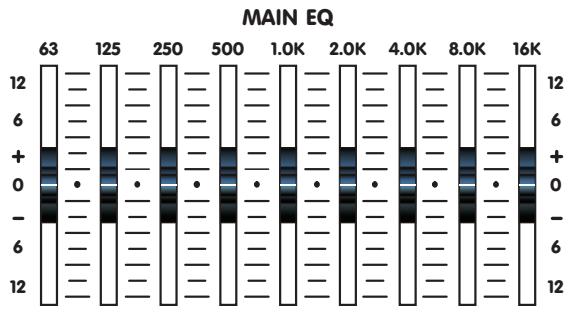
Built in 9-Band Graphic Equalizer
General
This, like any graphic equalizer, represents a set of limited-range (+/-12dB) gain controls. In this case there are nine sliders, each one operating over a one-octave portion of the overall band of sound frequencies. Please note that equalizers can have an effect on the gain of the main system as well as its frequency response. Once adjusted, you may need to turn down the Main Master level if the Clip LED beside it becomes very active.
There Are 3 Main Functions for the Graphic EQ
-
To adjust the system for feedback reduction, the normal technique is to turn the main system up to the point of feedback and move the EQ sliders, one at a time, to determine which frequency band is causing the feedback. (Remember to push them back up to center position if they don't stop the feedback). When isolated, the offending band is then pushed down about 3 to 6 dB. Usually only 2 or 3 bands can be reduced before the feedback elimination process begins to affect the sound quality.
-
To adjust for deficiencies in the speaker system's bass response, the most common adjustment is to boost the 63Hz about 6 dB and the 100Hz about 3 dB. However, use of the graphic EQ to extend the deep bass frequency response of a speaker cabinet does use up a lot of the available system power, so this technique should be used with caution to avoid distortion and possible speaker damage. On the other hand, in applications where it is appropriate to sacrifice deep bass for higher overall sound output, the 63Hz slider should be taken down 6 dB below centre. You may now increase the Main level for added volume.
-
The third use of the graphic equalizer is to adjust the sound character for artistic reasons. Each frequency is adjusted until the sound is what the musicians feel sounds best. The best sound system operators, however, usually strive to use a minimum of equalization for this purpose, or for boosting the bass. Instead, they use very minimal sound-shaping adjustments to ensure that the threat of feedback and distortion will also be minimal.
MP6D Rear Panel
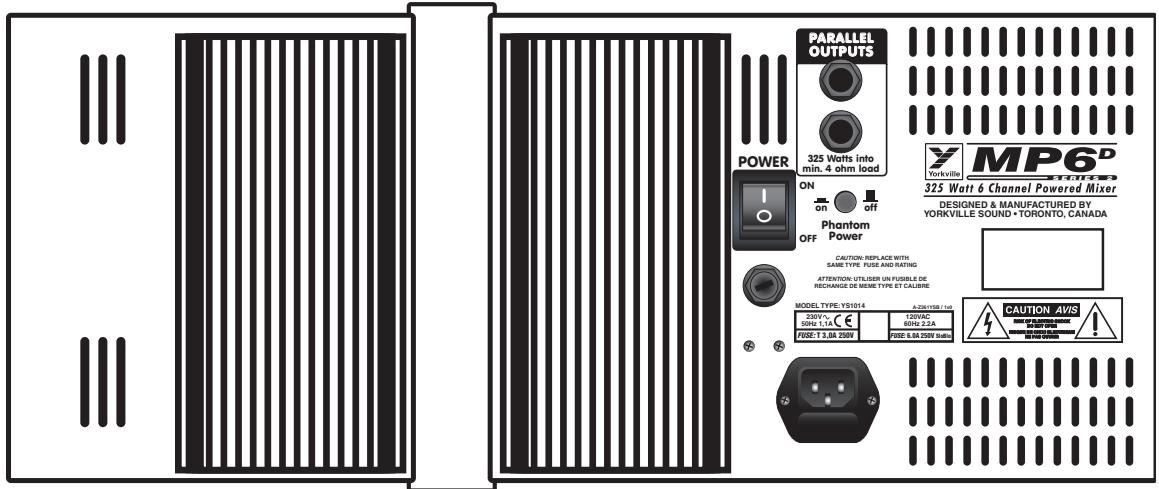
1. Speaker Outputs & Heatsinks
The MP6D's power amplifier has two 1/4-inch jacks for speaker connections. You may connect one 8-ohm speaker cabinet to each jack or a single 4 ohm speaker to either jack. Connecting two 4-ohm speakers (i.e. a 2-ohm load), will not harm the MP6D, but the output power may be limited, and if the amp overheats, the built-in thermal breaker will shut the amplifier off until it cools down (Usually, in a few minutes).
Do not obstruct the flow of air around the heatsink fins on the rear of the MP6D as this too may cause the power amplifier to overheat. After the MP6D cools down, operation will be restored automatically. This should never happen if adequate ventilation is provided at the back of the unit, and the total connected speaker impedance is not less than 4-ohms.
2. AC Power Switch & Fuse
The power switch and fuse are located on the back panel. If you must replace the fuse, always replace it with the same type - a 6.0A 250V slo-blo (T3.0A 250V in 220-240V export models). Do Not replace the fuse with the wrong type or wrap foil around the old one, as this may cause serious damage. If replaced fuses keep blowing, take the unit to your Yorkville dealer for service.
General Operating Instructions
- Connect the AC power cord to a 120 VAC grounded outlet (220~240 VAC on export units).
- Turn the Main and Monitor Master controls to 0 for now, then switch on the Power.
- You can connect low-impedance microphones to the 3-pin XLR type Mic inputs.
- Connect mono, line-level signal sources (i.e. amplifier line outputs, the output of a mono mixer, an electric instrument, an external effects unit, etc.), to the 1/4-inch Bal Line In jacks on channels 1 to 6. Do not connect more than one signal source to any of these channels, that includes stereo outputs (if you try to connect a stereo source to a mono channel using a Y adapter, you may get distortion).
- Connect stereo sources (tape deck, CD player, stereo keyboard instrument, an external effects unit, etc.) to channels 7 and/or 8 via the dual RCA (phono) type inputs. Once again, connect only one signal source per channel, and use shielded patch cords for all pre-amp connections.
- Using 18-gauge, or heavier, speaker cables (never use shielded patch cords to connect speakers, they cannot handle the high current and will waste power by heating up), connect one or two 8-ohm main PA speakers to the Speaker outputs on the back panel.
6a. If you are employing a separate power amplifier for the monitor speakers, connect the main speakers as in (6) then run a shielded patch cord from the Monitor Line Out jack to the input of the monitor power amp. If you are employing a separate graphic equalizer for the monitors, run a shielded patch cord from the Monitor Out jack to the input of the Equalizer. (A good idea: remember there is no channel EQ on the monitor signals and the built-in graphic EQ is only for the main PA sound). Then, another patch cable from the EQ's output to the input of the monitor power amp (the Yorkville Beta-150EQ power amp has a graphic equalizer built in).
7. Position your main PA speakers at the front of the stage, pointing directly out at the audience. Position your monitor speakers on the stage floor, in front of the mic stands, pointing up at the backs of the mics. (Remember to use cardioid or uni-directional mics to reduce the threat of monitor feedback).
8. During a sound check, with the band playing, or other sources feeding the mixer inputs, make the following control adjustments:
i. Begin with setting all your controls to their nominal positions. Turn the Main Master, Monitor Master, the Main EFX and Monitor EFX controls to zero. Position the Graphic EQ sliders and the channel Low and High EQ controls to center.
ii. Where a channel input is used, turn up the channel's Gain control slowly until the channel Clip LED begins to illuminate, then back down the control a bit.
iii. Turn up the Main Master control until you get the desired the room level.
iv. Adjust the relative levels of the channel Gain controls so that all instruments and vocals can be heard. Lower or raise the Main Master if necessary, to maintain the room level.
v. Adjust the each channel's Low and High EQ controls to get the best sound on that channel. Usually, vocal channels will have the Low EQ set in the -9 to -15 region to cut out 'popping.'
vi. Set the channel Mon controls to the same setting as the Gain, then turn up the Monitor Master until the performers can hear themselves at adequate volume levels without feedback.
vii. Adjust the relative levels of the channel Mon controls to each performer's preference. Lower or raise the monitor master if necessary, to maintain the monitor level.
viii. Turn up the EFX controls on those channels requiring effects. Usually this would be the lead and harmony vocal channels. Reverb may be used on other channels or on recorded music, but at low levels.
ix. Turn up the Main EFX control until you have the desired amount of effects in the room mix.
x. Turn up the Monitor EFX control if you want effects in the monitor mix. This tends to increase the tendency for feedback in the monitors, so use as little as possible.
xi. If there is feedback or ringing (the sound you get just before feedback) in the main mix, use the Main EQ sliders to reduce the level of the frequency that is causing the feedback. Low sounds are on the left, higher to the right. Pushing each slider up, then down will allow you to find problem frequencies that may feedback later.
9. Feedback during a performance is usually caused by one of the monitors. The main PA is less likely to feed back because the mics are so far away from the main PA speakers. Therefore, if you are using monitors and feedback occurs, try the following procedures:
i. Turn the Monitor master down until the feedback stops.
ii. If you have a graphic equalizer patched between the Monitor output and your monitor power amp, pull down one or two (but not more) of the EQ sliders in the frequency range where the sound seems to be occurring.
iii. Now turn the Monitor master back up. If the feedback recurs, push the EQ slider(s) back up to center position and try pulling down one or two others.
iv. In the case of main system feedback, follow the above type of procedure, but using the Main master and the built in Graphic EQ.

MP6D SERIES 2
325 Watt 6 Channel Powered Mixer
Specifications
| Number of Channels | 6 |
| Mono Channel EQ | Low, High |
| Stereo Channel EQ | N/A |
| Channel Effects | All Channels |
| Inputs - XLR (bal) | Ch. 1 - 6 |
| Inputs - 1/4" | Ch. 1 - 4 |
| Inputs - RCA (unbal) | 2 Pairs |
| Clip /Mute LED | All Channels |
| Phantom Power | 24 V + LED indicator |
| Internal Effects | Series 1: Digital 16 Bit; 32 Effects |
| Series 2: Digital 24 Bit; 16 Effects + Parameter control | |
| Effects Send | 1 Internal/External |
| Effects Return to Main | Yes |
| Effects Return to Monitor | Yes |
| b / Effects Footswitch | Yes |
| Record Outputs | 1 Mono RCA Pair |
| Line Out-Mic Input (dB) | 55 |
| Line Out-Line Input (dB) | 40 |
| Channels /Range - dB) | Graphic / Mono / 9 Band 63 Hz - 16,000 Hz |
| Outputs ( Line Level) | 1x 1/4 inch (TRS) |
| Map Inputs (Line Level) | 1x 1/4 inch (TRS) |
| Outputs (Line Level) | 1x 1/4 inch (TRS) |
| - Amp A - 1/4" Jacks | 2 |
| cal to Noise Ratio (dB) | 100 |
| e and EQ Flat,+/-2dB) | 20 Hz - 20,000 Hz |
| at, @ 150 Ohms (dBv) | -117 |
| in out w/ -10dB input) | less than 0.05% |
| Ohms (0%1"THD, 1kHz) | 208 |
| over Output @ 4 Ohms | 325 |
| THD - 1kHz (dB) | less than 0.05% |
| THD - 20Hz-20kHz (dB) | less than 0.1% |
| use (un / Aweight -dB) | -96 |
| crosstalk -1 kHz (dB) | less than -60 |
| te - Bal/Unbal (Ohms) | 2200/10K |
| Sesitivity (Vrms Sine) | 1.4 V |
| IRR @ 60Hz (min/type) | 54 dB /66 dB |
| Max Votage Gain (dB) | 27 |
| consumption (typ/max) | 270 VA / 550 VA |
| Protection | Thermal / Load / DC |
| Cooling | Passive Heat Sink |
| Transformer Type | Toroidal |
| Finish | Blue/Black Carpet, Scratch Resistant Front Panel |
| Chassis Construction | Heavey Gauge Metal with Plywood Cabinet |
| Dimensions (DWH, inches) | 10 x 21 x 9.25 |
| Dimensions (DWH, cm) | 25 x 53 x 24 |
| Weight (lbs/kg) | 27 / 12 |
MP6D Introduction
3. Controle Principal "Main EFX"
6. Prise "Monitor Line Out"
7. Prises "Record Out"
8. Prises "EFX" "Footswitch/Send"
| Effect | Modify | Effect | Modify |
| 1. Room Reverb | decay | 9. Fast Echo | decay |
| 2. Hall Reverb | 10. Short Decay Echo | delay | |
| 3. Hall Reverb - Vocals | 11. Long Decay Echo | ||
| 4. Hall Reverb w/Echo | 12. Chorus | rate | |
| 5. Plate Reverb | 13. Flanger | ||
| 6. Plate Reverb - Vocals | decay | 14. Rotary Speaker | |
| 7. Plate Reverb w/Echo | 15. Distortion | gain | |
| 8. Gated Reverb | decay | 16. Harmonizer | pitch |

325 Watt 6 Channel Powered Mixer
Specifications
Nombre de canal 6
EQ Principal -1 (type /Canaux /Gamme - dB)
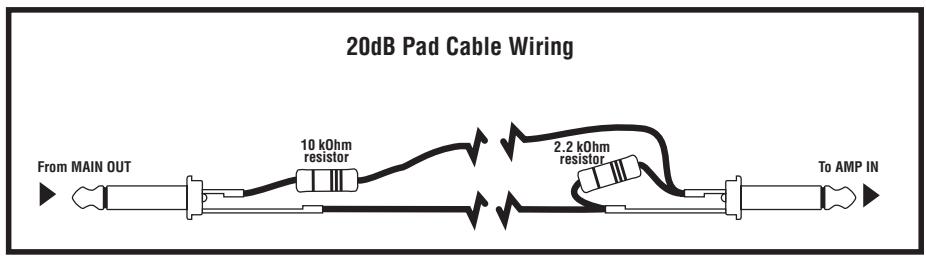
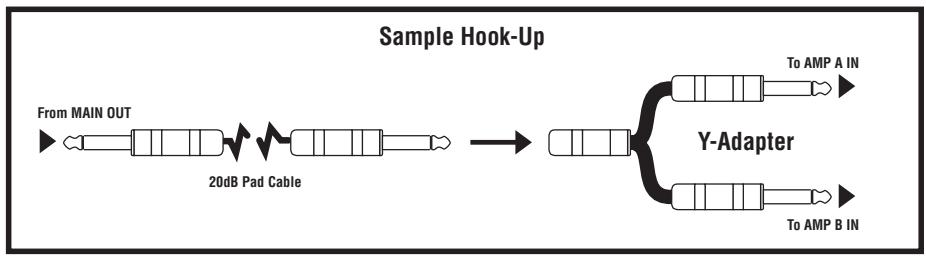
**To fashion the -20dB padded patch cables, start with two short, shielded patch cords. On each cord, solder a 10k Ohm resistor in series with the tip of the plug to be inserted in a LINE OUT jack, then solder a 2.2k Ohm resistor across the plug to be inserted in an AMP IN jack. It would then be advisable to identify either the LINE OUT or AMP IN plugs on both cords perhaps with tape or a dab of paint on the plug jacket.
0.8s Warm Small Room
0.8s Bright Small Room + 60ms Doubling Delay
1.0s Bright Small Room + 175ms Regen Delay
1.2s Warm Room + Medium Chorus
1.5s Bright Medium Room
1.5s Bright Medium Room + 80ms Slap Delay
2.5s Warm Large Room
B HALLS
1.5s Warm Medium Hall
2.0s Bright Medium Hall + 50ms Doubling Delay
2.5s Dark Medium Hall
3.0s Warm Hall + Slow Chorus
3.5s Bright Medium Hall
5.0s Dark Large Hall
8.0s Dark Huge Hall
C CHAMBERS·PLATES
0.5s Bright Plate
0.8s Bright Chamber + 125ms Regen Delay
0.8s Bright Plate + 200ms Regen Delay
1.2s Bright Chamber
1.2s Bright Plate
2.5s Warm Chamber
D DELAYS
60ms Slap Delay
100ms Slap Delay + Medium Chorus
150ms Medium Regen Delay
200ms Regen Delay + Slow Chorus
250ms Low Regen Delay
300ms Medium Regen Delay
350ms Regen Delay + Slow Chorus
E SPECIAL EFFECTS
1.2s Decay + 200ms Gate Reverb
1.0s Decay + 200ms Reverse Reverb
2.5s Dark Medium Hall
Dual Pitch Shift \~Major 3rd & 5th Up\~
Medium Flanger w/Medium Regen
500ms High Regen Delay

Two & Ten Year Warranty
Unlimited Warranty
Yorkville's two and ten-year unlimited warranty on this product is transferable and does not require registration with Yorkville Sound or your dealer. If this product should fail for any reason within two years of the original purchase date (ten years for the wooden enclosure), simply return it to your Yorkville dealer with original proof of purchase and it will be repaired free of charge. This includes all Yorkville products, except for the YSM Series studio monitors, Coliseum Mini Series and TX Series Loudspeakers.
Freight charges, consequential damages, weather damage, damage as a result of improper installation, damages due to exposure to extreme humidity, accident or natural disaster are excluded under the terms of this warranty. Warranty does not cover consumables such as vacuum tubes or par bulbs. See your Yorkville dealer for more details. Warranty valid only in Canada and the United States.
Garantie Illimitée
Voice: (716) 297-2920
Fax: (905) 837-8746
Fax: (716) 297-3689

Yorkville
Niagara Falls, New York
L1W-3Y8 CANADA
14305 USA

WEB: www.yorkville.com
Niagara Falls, New York
14305 USA
Voice: (716) 297-2920
Fax: (716) 297-3689

Quality and Innovation Since 1963
Printed in Canada
Manual-Owners-mp6d-00-4v1 • April 7, 2009