POWERMAX 1622 SERIES 2 - Audio Mixer YORKVILLE - Free user manual and instructions
Find the device manual for free POWERMAX 1622 SERIES 2 YORKVILLE in PDF.


User questions about POWERMAX 1622 SERIES 2 YORKVILLE
0 question about this device. Answer the ones you know or ask your own.
Ask a new question about this device
Download the instructions for your Audio Mixer in PDF format for free! Find your manual POWERMAX 1622 SERIES 2 - YORKVILLE and take your electronic device back in hand. On this page are published all the documents necessary for the use of your device. POWERMAX 1622 SERIES 2 by YORKVILLE.
USER MANUAL POWERMAX 1622 SERIES 2 YORKVILLE
IMPORTANT SAFETY INSTRUCTIONS

This lightning flash with arrowhead symbol, within an equilateral triangle, is intended to alert the user to the presence of uninsulated "dangerous voltage" within the product enclosure that may be of sufficiency
magnitude to constitute a risk of electric shock to persons.
The exclamation point within an equilateral triangle is intended to alert the user to the presence of important operating and maintenance (servicing) instructions in the literature accompanying the appliance.
Instructions pertaining to a risk of fire, electric shock, or injury to a person
CAUTION: TO REDUCE THE RISK OF ELECTRIC SHOCK, DO NOT REMOVE COVER (OR BACK).
NO USER SERVICEABLE PARTS INSIDE.
REFER SERVICING TO QUALIFIED SERVICE PERSONNEL.
Read Instructions: The Owner's Manual should be read and understood before operation of your unit. Please, save these instructions for future reference and heed all warnings.
Clean only with dry cloth.
Packaging: Keep the box and packaging materials, in case the unit needs to be returned for service.
Warning: To reduce the risk or fire or electric shock, do not expose this apparatus to rain or moisture. Do not use this apparatus near water!
Warning: When using electric products, basic precautions should always be followed, including the following:
Power Sources
Your unit should be connected to a power source only of the voltage specified in the owners manual or as marked on the unit. This unit has a polarized plug. Do not use with an extension cord or receptacle unless the plug can be fully inserted. Precautions should be taken so that the grounding scheme on the unit is not defeated. An apparatus with CLASS I construction shall be connected to a Mains socket outlet with a protective earthing ground. Where the MAINS plug or an appliance coupler is used as the disconnect device, the disconnect device shall remain readily operable.
Hazards
Do not place this product on an unstable cart, stand, tripod, bracket or table. The product may fall, causing serious personal injury and serious damage to the product. Use only with cart, stand, tripod, bracket, or table recommended by the manufacturer or sold with the product. Follow the manufacturer's instructions when installing the product and use mounting accessories recommended by the manufacturer. Only use attachments/accessories specified by the manufacturer
Note: Prolonged use of headphones at a high volume may cause health damage on your ears.
The apparatus should not be exposed to dripping or splashing water; no objects filled with liquids should be placed on the apparatus.
Terminals marked with the "lightning bolt" are hazardous live; the external wiring connected to these terminals require installation by an instructed person or the use of ready made leads or cords.
Ensure that proper ventilation is provided around the appliance. Do not install near any heat sources such as radiators, heat registers, stoves, or other apparatus (including amplifiers) that produce heat.
No naked flame sources, such as lighted candles, should be placed on the apparatus.
Power Cord
Do not defeat the safety purpose of the polarized or grounding-type plug. A polarized plug has two blades with one wider than the other. A grounding type plug has two blades and a third grounding prong. The wide blade or the third prong are provided for your safety. If the provided plug does not fit into your outlet, consult an electrician for replacement of the obsolete outlet. The AC supply cord should be routed so that it is unlikely that it will be damaged. Protect the power cord from being walked on or pinched particularly at plugs. If the AC supply cord is damaged DO NOT OPERATE THE UNIT. To completely disconnect this apparatus from the AC Mains, disconnect the power supply cord plug from the AC receptacle. The mains plug of the power supply cord shall remain readily operable.
Unplug this apparatus during lightning storms or when unused for long periods of time.
Service
The unit should be serviced only by qualified service personnel. Servicing is required when the apparatus has been damaged in any way, such as power-supply cord or plug is damaged, liquid has been spilled or objects have fallen into the apparatus, the apparatus has been exposed to rain or moisture, does not operate normally, or has been dropped.
SUVEZ TOUTES LES INSTRUCTIONS
Welcome to PowerMAX, possibly the most advanced, most powerful, mixer/amplifier in the world. Comprehensive audio mixing and advanced features including...
- Two onboard digital effects processors with 16 presets and parameter adjust on each)
- A speaker processor
- Four built-in power amplifiers with over 3200 Watts in total
- Three graphic EQ's, channel EQ with sweepable mids
- Channel input overload protection
- Solo and mute functions and much more...
This manual outlines the various functions and how they interact. Realizing that some PowerMAX users may be unfamiliar with certain features, we include user tips and additional information, which appears separately in the applicable sections.
For general information about mixing and other facets of sound-reinforcement check out our P.A. User Guide available on the internet... (http://www.yorkville.com).
Input Channel Features
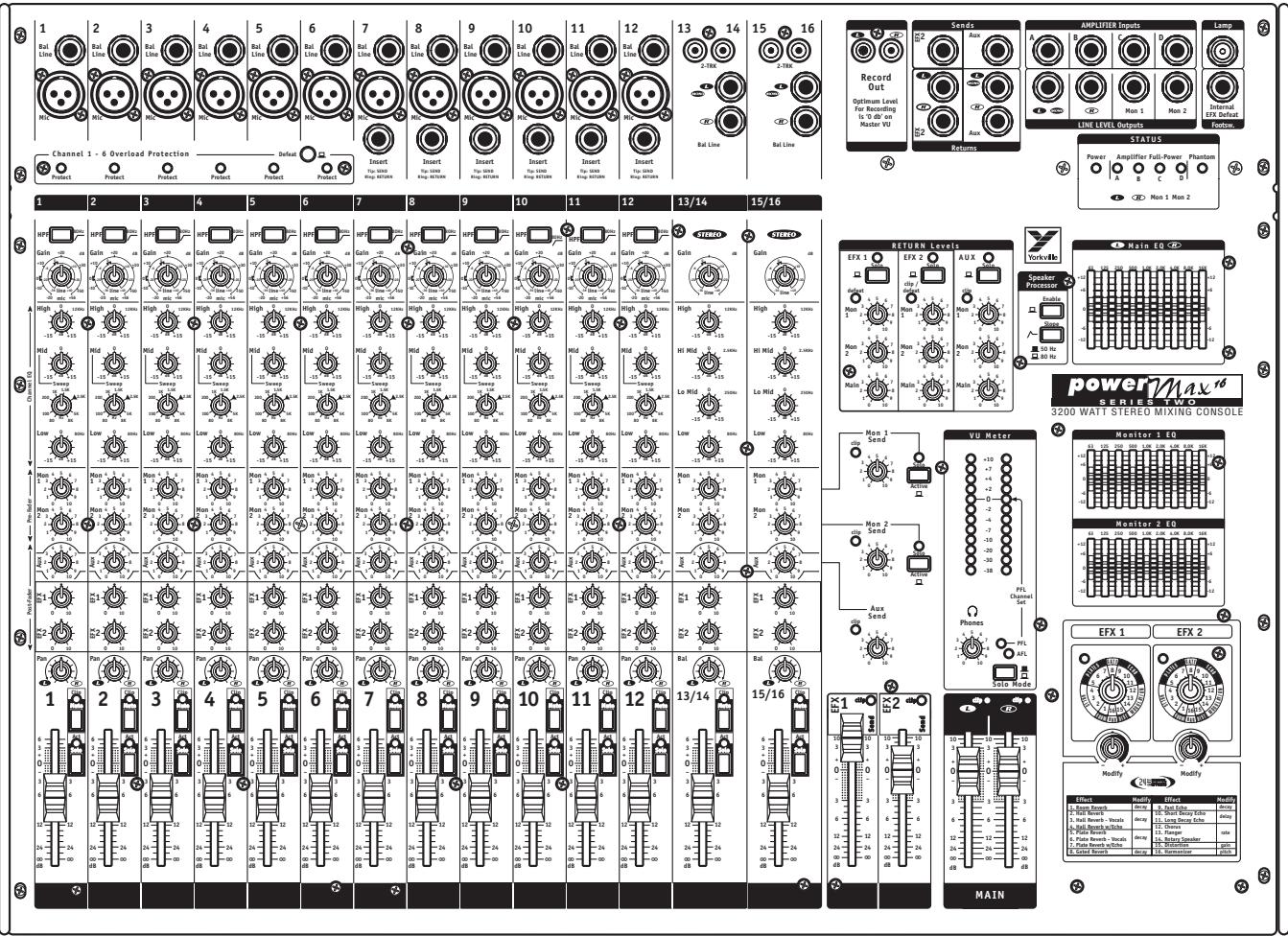
1. Channel Overload Protection
Mono input channels 1 to 6 in the PowerMAX 16 (1 to 12 in the PowerMAX 22) feature Channel Overload Protection - a sonically transparent limiting function suitable for percussive sources such as bass guitar (either direct, mic'd or a direct line from the amplifier), pop-prone and feedback prone microphones. (e.g. kickdrum, flat top guitar, and other troublesome sources)
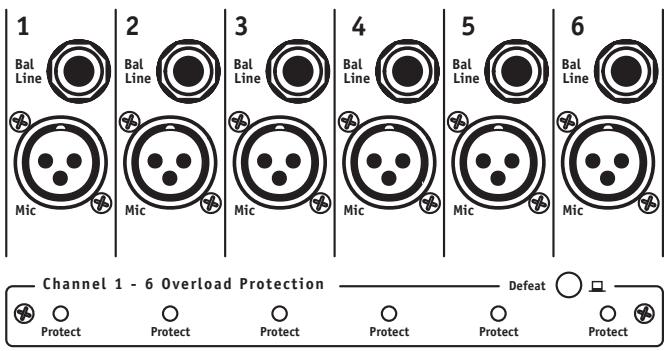
Each channel features a Protect LED to indicate when the overload protection is working. A single Defeat switch activates this feature on a group of six channels simultaneously.
2. Insert Jacks
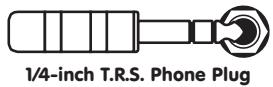
The mono channels without Channel Overload Protection feature Insert jacks. These are 1/4-inch Tip-Ring-Sleeve (TRS) connectors, which combine send and return functions for patching outboard signal processing directly into a channel. A suitable patch cable for this function (e.g. Yorkville model PC-6iSPH) would consist of a single
TRS (stereo) 1/4-inch plug and two lengths of shielded cable with a common ground branching to two regular (mono) 1/4-inch plugs. The TRS wiring is tip/send, ring/return and sleeve/ground. Since the PC-6iSPH comes with the leads marked Tip and Ring, connect the Tip plug to the input of the signal processor (EQ, compressor, echo, etc.); connect the Ring plug to the processor's output. The TRS plug would go into the Insert jack. The send function is post-Gain and post-HPF (high-pass-filter).
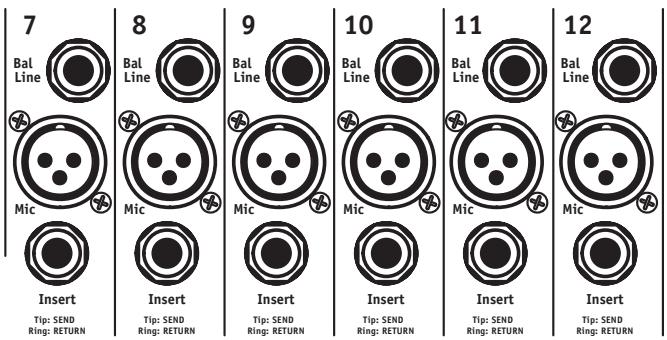


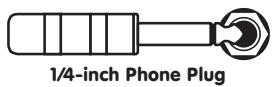
Alternatively, the Insert jack may be used to send an audio signal from that channel to a powered monitor (some people want to hear only themselves). Simply use an unbalanced shielded patch cable – in this one case, a balanced cable will not work. Be sure to Insert the plug only to the first "click" when using the Insert as a channel send, otherwise the signal will be interrupted and the channel will not work. If this happens, you have Inserted the plug too far. Simply pull the plug out gently to the first stop.
3. Mic Inputs
The PowerMAX active input circuitry will accept microphones with impedances ranging from 50 ohms through 10,000^* ohms. All low impedance microphones are compatible. Phantom power (covered in the section 4, Phantom Power Switch and LED, below) is available on all Mic inputs when activated. This feature is meant for condenser microphones but dynamic microphones may also be connected with no ill effects.
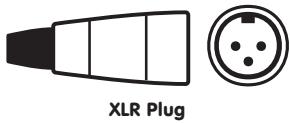
- Although it would be customary to plug high impedance microphones into the Bal Line jacks, most of them will also work in the Mic inputs, provided the microphone's built-in XLR connections are pin 1 and pin 2 and pin 3 is connected to pin 1.
4. Phantom Power Switch and LED
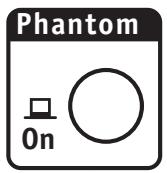
Phantom Power is available for condenser microphones. It may be applied to channels with regular dynamic microphones connected with no problems. When connecting microphones it is safest to turn off phantom power to avoid loud pops. The Phantom Power On/Off button is located on the front of the mixer, beside the Headphone jack and the Phantom Power LED is in the upper right area of the control panel.
48 Volt Phantom Power is available on channels 1 through 12 (1 through 18 on the PowerMAX-22).
5. Balanced Line Inputs
Mono line-level sources, such as amplifier line outputs and high-impedance microphones, can be connected to the mono or stereo channels through these jacks (use the L/Mono jacks on the stereo channels). Stereo audio sources such as digital audio players, CD-player, and tape decks may be connected to the Bal Line inputs on the stereo channels. RCA connectors are used to simplify this operation. It is possible to connect stereo sources to the mono channels, however you will need to plug the L&R signals into separate channels to avoid the risk of inter-modulation distortion (do not combines the signals using a "Y" connector into a single Bal Line jack).
The balanced connector references are:
Tip (or XLR pin 2) = hot, in phase;
Ring (or XLR pin 3) = hot, reverse phase;
Sleeve (or XLR pin 1) = ground
You can connect an unbalanced source to the Bal Line inputs with a standard unbalanced shielded patch cable without any adverse affects.
A slight modification to a balanced patch cable will help achieve noise cancellation when connecting PowerMAX to an unbalanced unit. Simply undo one end of a balanced patch cord and de-solder the wire from the ring tab, then resolder the wire to the shield tab making sure that it does not touch anything else. Now re-assemble the plug and mark it with some tape for future reference. This will be the end that you plug into the unbalanced unit (this will also work with an RCA connector).
The L&R Bal Line inputs on the Stereo channels are wired together internally so that a single (mono) signal connected to the L/Mono input will also be patched over to the R input (as long as nothing is plugged into the R jack). This simplifies connecting a mono source should the need arise (perhaps all the mono channels are taken).
In addition to being able to connect either a stereo or mono source to these jacks, you may alternately connect two different mono sources to them and use the Bal control to regulate their relative volumes. As an example, a guitar amp line-output and a keyboard amp line-output could be connected and mixed this way. However, now you must also convert the PowerMAX to mono operation, otherwise one instrument will only come out the left speakers and the other only through the right speakers. Mono conversion is accomplished simply by plugging a "Y" patch cable from the L/Mono (left Main) Line Level Output to the Amp A & B Amplifier Inputs. Now both main power amps will be receiving identical signals. See under Pan Control for another user tip regarding mono operation.
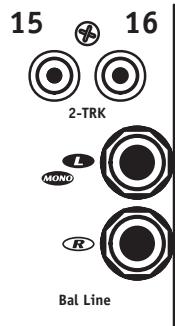
6. 2-Trk Inputs (Stereo Channels Only)
These RCA jacks are included for convenience since many audio sources such as digital audio players, CD-player, and tape decks have RCA outputs. Media players that use 1/8-inch (3 mm) jacks may be connected using an RCA to 1/8-inch (3 mm) TRS adapter cable. Because it is primarily a live audio mixer, PowerMAX does not feature RIAA phono input circuitry.
As a rule you would connect a tape deck or CD-player to either the 2-Trk inputs or the 1/4-inch Bal Line inputs, but not both. However, connecting sources to both sets – say, a media player to the 2-Trk inputs and a CD-player to the Bal Line inputs on the same channel – will work. Naturally there will not be any separate level control for one or the other, so the source with the stronger signal (or higher output impedance) will be louder. If you are not running both sources at once, this won't be a problem. In any case there will be no loading distortion or other ill effects.
| 1 | 2 |
| HPF 80Hz Gain +20 dB +10 1.5K -10 36 line +40 50 -20 mic +56 High 0 12KHz -15 dB +15 Mid 0 -15 dB +15 Sweep 1K 1.5K 200 1K 1.5K 100 1K 1.5K 80 1K 1.5K 5K 1K 1.5K Low 0 80Hz -15 dB +15 Mon 4 5 6 7 1 3 4 5 6 2 1 3 4 5 6 Mon 4 5 6 7 2 1 3 4 5 6 1 3 4 5 6 2 1 3 4 5 6 Aux 3 4 5 6 7 1 3 4 5 6 7 1 0 10 9 EPA 1 0 0 10 EPA 2 0 0 10 | HPF 80Hz Gain +20 dB +10 1.5K -10 36 line +40 50 -20 mic +56 High 0 12KHz -15 dB +15 Mid 0 -15 dB +15 Sweep 1K 1.5K 200 1K 1.5K 101 1K 1.5K 5K 1K 1.5K Low 0 80Hz -15 dB +15 Mon 4 5 6 7 1 3 4 5 6 2 1 3 4 5 6 Mon 4 5 6 7 2 1 3 4 5 6 1 3 4 5 6 7 1 0 10 9 EPA 1 0 0 10 EPA 2 0 0 10 |
| Pan 1 Clip Mints Act Solo 3 6 12 24 8 dB | Pan 1 Clip Mints Act Solo 3 6 12 24 8 dB |
7. HPF Button
Situated at the top of the mono channel strips, this switch activates a High-Pass Filter (a bass roll-off of 18 dB per octave below 80Hz ). The stereo channels do not have this feature, as they are normally used for pre-recorded material.
The HPF (High-Pass Filter) is useful for controlling unwanted low-frequency spillover picked up by microphones located too close to the bass drum, bass amp or the keyboard amp. It is also effective in regulating acoustic guitar pickups that are sounding too boomy (the lowest note on a concert-tuned guitar is 81.2Hz , so you aren't losing anything by rolling off the input response below 80Hz ). Additionally, the HPF works to reduce pops and thumps from vocal microphones. Any microphone, or pickup, which reflects a source that does not go below 80Hz should have the HPF activated. This includes most wind instruments, most male voices, nearly all female voices and all drum microphones except for the kick-drum.
Why roll off the bass on these channels? ...because you will obtain better clarity and improve the system's gain before feedback.
8. Gain Control
PowerMAX features active input circuitry with exceptionally high headroom. The Gain control regulates the channel gain level to match it with the input signal strength. There are two gradation circles, the outer one (-20 dB to +56 dB) for the Mic input, the inner one (-36 dB to +40 dB) for the Bal Line input. Since this control has a range of 70 dB, it presents the user with considerable variability given the slightest amount of movement.
A quick way to ensure that the Gain is adjusted correctly is to turn it up during a sound check until the Clip LED begins to flash (keep the channel fader at a safe, low setting during this process), then turn the Gain down slightly. PowerMAX's Clip LED drive circuits are preset to fire at 6 dB below the onset of actual clipping so you need not worry about seeing some activity on the lights. You will find that this or any system performs more cleanly and quietly with the Gain controls all set properly. Also, you may use PFL (Pre-Fade Listen) and the VU meter to set 0 dB.
9. Channel EQ
The mono channels feature 3-band Equalization with control of +/-15dB . Mids are swept from 80Hz to 8kHz (2.5 kHz highlighted in the graphics as (our) standard mid frequency). The High EQ is shelving at 12kHz and Low EQ shelves at 80Hz . The stereo channel EQ is 4-band (+/-15dB) with fixed mids at 250Hz and 2.5kHz . The Low EQ control (+/-15dB) are the same as the mono channels.
Setting the channel EQ, like setting the Gain, is best done during a sound check. In this case however, the less you vary things above or below "0," the better. +/-15dB represents considerable level change. If you need to turn down the High EQ on a channel, perhaps due to a persistent feedback problem with that microphone, you may need to readjust the level fader. In any case, big boosts are probably best avoided.
One cure for a bad feedback problem is to Insert (see Insert Jack) a graphic or parametric EQ into the problem channel and adjust it to attenuate only the feedback frequency. That way, fewer innocent frequencies will be affected. However, the channel EQ's Mid Sweep control can often be used quite effectively to perform a similar function. Simply set the Mid at about -6 dB then rotate the Sweep control until the feedback stops. Now turn the Mid up slightly to normalize the frequency response as much as possible without feedback.
10. Mon 1 and Mon 2 Sends
These are pre-fade, post-EQ sends. Internal routing is...
- to the Mon masters and Solo buttons
- to the Mon 1 and 2 EQs
- to the Mon 1 and 2 Line Level Outputs
- through the cutoff switches in the Amp C and D Amplifier Inputs
- to the built-in, 800-Watt amplifiers C&D and finally
- to the Mon 1 and 2 Power Amplifier Outputs.
15/16

Dual monitor systems permit setting up two zones of coverage. Certain channels may be isolated through one system or at least mixed louder through it. As an example, the vocalists might want to hear themselves predominantly through their monitors. The other system might carry a more generalized mix for the rest of the band's monitors. Remember that the channel Mon 1 and 2 send controls are affected by the channel EQ, but NOT the fader. When feedback sets in, it's often the monitors, not the mains, although it comes through both systems so it's hard to tell. When it happens, turn down the suspect channel's MON sends. You'll probably kill the feedback and that channel's level through the main P.A. can remain unchanged. Now you can adjust the Mon 1 or Mon 2 EQ then turn that channel's Mon send back up (carefully, you may still have some EQ-ing to do).
11. AUX Send
The channel Aux send is post-EQ and post-fader. Internal routing is
- to the Aux Send master and Clip LED, and
- to the Aux Send jack.
Since the Aux sends are post-fader, any changes to the channel fader levels will result in changes to the Aux send levels. Therefore the Aux sends are useful for adding external effects (there are also stereo Aux Returns), and for mono recording purposes such as speeches, a demo record rhythm track, etc.; which do not require effects or graphic-EQ (this is a pre-effects, pre-EO dry signal).
12. Efx 1 and 2 Sends
Like the Aux send, these are post-fader and post-EQ. The EFX1 send is internally routed...
- to the Efx 1 Send master fader,
- to the internal digital effects 1 system,
- to the Efx 1 Return masters.
The Efx 2 send is internally routed...
- to the Efx 2 Send master fader,
- to the internal digital effects to system, and (simultaneously) to the Efx 2 Send jack,
- to the Efx 2 Return masters.
The PowerMAX effects processors operate independently as two discreet stereo effects systems with sixteen presets and a parameter control each. You can, for example, have reverb on the Efx 1 system and a special effect on Efx 2. These would be mixed together on the main and monitor signals by the Efx Return to L&R and Mon 1 and 2 masters.
To get started, figure out which channels you want effects on (e.g. vocals, lead guitar, horns and keyboards - most likely not on the drums or the bass). During a sound check, turn up the Efx 1 send controls on those channels about halfway at first and push up the channel level faders also about halfway. Now dial in the desired effect using the Efx 1 Select and Parameter controls - the menu of preset with the parameter adjusted by the parameter pot appears below the dials. Next, turn up the Efx 1 L&R (main system) Return Levels master about halfway. Now push up the L&R main master faders to a moderate listening level, as well as the Efx 1 send master. Finally, re-adjust the channel Efx 1 send levels to add or subtract the effect's intensity in the main mix. Alternatively, you may preview the effects through headphones using the Solo buttons covered later on. To preview the effects on the monitor mixes, plug in headphones (jack located at front of mixer) depress the Mon 1 and/or Mon 2 Solo buttons, set the Solo Mode to PFL and turn up the Headphone master.
The channel Efx 1 send controls are exclusively for the internal effects system.
The channel Efx 2 send controls allow you to add external or internal effects. With no external effects units connected between the Efx 2 Send jack and L/R Return jacks, the internal Efx 2 system will be available to the mains and monitors. Simply set the Efx 2
Select and Parameter controls for the desired effect in the same manner as Efx 1, then adjust the Efx 2 Send and Return masters to blend in the effect with the dry signals. Use headphones and the Mon 1 and/or Mon 2 Solo buttons to listen to the effects mix in the monitor system. The Monitor Solo works the same with the AFL (After-Fader-Listen) and the PFL (Pre-Fader-Listen).
The Efx 2 send signal is available at the Efx 2 Send jack and is regulated by the Efx 2 Send master fader. You may connect external effects between the Send and Return jacks, or you may alternately use the Send jack to supply mono recording or broadcast signals not requiring effects (like the Aux signal, Efx 2 is dry and post-channel fader).
When using an external effects processor, connect the Efx Send jack to the input of the unit and the Efx Return jacks to its outputs. It is possible to use both an external effect unit and the internal unit if the external returns are connected to one stereo or two mono channels. If it's not a stereo effect, connect its output using a 'Y' cable to both the L&R Efx 2 Return jacks. The effect processor's output may be cued through headphones with the Efx 2 Solo button depressed and the Solo Mode button in PFL position. AFL gives you Efx 2 to Main Return level.
13. Pan Control (Mono Channels)
This controls the post-fader channel signal routing to the L&R main faders. Signal levels are compensated at the L&R rotation extremes so that panning during a performance will result in minimal SPL losses in the center-field audience areas.
In a stereo setup, the Pan controls would normally be set at, or near, center so audience members on both sides can hear everything properly. However if stereo is not an essential part of your P.A. sound, you might opt to convert PowerMAX to mono operation. To accomplish this, simply patch the L/Mono (left main/mono) Line Level Output into both the Amp A and Amp B Amplifier Inputs with a standard "Y" cable. Now, both main power amps are receiving a mono mix. This will enable you to use the Pan controls to set up two submaster groups – for example you could pan all the drum channels left and all the rest right. Now the L&R master faders become group masters. These master faders are placed close together, so it is easy to move them both at once when making main system level changes.
14. Balance Control (Stereo Channels)
This controls both the channel output routing to the L&R main faders and the comparative levels of the stereo signals within the channel. If you have patched for mono operation (see number 13. Pan control, above) it is possible to connect two different mono line-level sources to a stereo channel and use the Bal control to regulate their relative volumes. For more on this, see under Bal Line Inputs.
15. Clip/Mute LED
The Clip LED is triggered at 6 dB below the channel's actual clipping level. When the Mute button is depressed, the Clip light will illuminate at half-brightness and will still flicker to indicate clipping. With the Clip light threshold set below actual clipping level, it is possible to allow a certain amount of light activity without worrying about distortion. As a result, you may use the Clip light to help you adjust the Gain control. See under 8. Gain Control for more about this.
16. Mute Switch
The Mute switch shuts off the specific channel and all sends except PFL. Mute is a timesaving feature that enables you to put channels, which you have adjusted during the sound check, on hold until they're needed. It's important to do this since every open microphone connected to a mixer reduces the system's gain before feedback (by several decibels).
17. Solo Active LED
This LED flashes with channel activity and stays illuminated to indicate Solo activation. It will still pulse slightly with channel activity in Solo mode.
Just a reminder to take channels off Solo when you are through listening to them through the headphones and/or checking their audio level on the VU-Meter.

18. Solo Switch
The Solo switch is pre-Mute or post-Fader and introduces no attenuation. Routing is,
- to the AFL/PFL Solo Mode selector
- to the VU-Meter plus the Headphone level and amplifier.
The Solo feature allows you to isolate a channel or master buss through the headphones and on the VU-Meter. Because it is pre-Mute in the PFL mode, you can still Solo a channel on Mute - a convenience for digital audio players, CD-player, and tape decks on the stereo channels, or listening in on the mono channels for problems such as feedback or a distorted microphone. Also with the Solo Mode master button set for PFL, you can solo each channel during the sound check and adjust the channel Gain so that the VU-Meter averages around 0 dB.
The Clip LED is another way to help set the Gain control. The above method is more precise, but the Clip lights can all be seen with a quick look, hence they are better for making Gain adjustments later on. Look under 8. Gain control for more on this.
Soloing the effects busses lets you hear only effects through headphones, with no dry signal mixed in. This aids in selecting and adjusting the effects. Then, to preview the final main P.A. mix with dry and effects signals, switch off all the Solos. Only the main stereo mix will now be on the headphones.
During a sound check, use the Solo button/s to help you set Gain Level/s, one channel at a time as follows:
- Depress the Solo button on a channel you wish to adjust, making sure that all other channel and master Solos are off.
- Set the SOLO MODE button so that the PFL light flashes.
- Turn up the channel's Gain control until the VU-Meter peaks at "0".
- Adjust the level fader and EQ as desired.
- Re-adjust the GAIN if needed for OdB readings on the VU-Meter
19. Level Fader
All Level Fader gradations have 0 dB reference. This relates to 0 dB on VU-Meter when one channel is in operation on PFL Solo with continuous signal at the input and the channel Gain is adjusted for that reading. Switch to AFL with the channel and main faders at 0dB and the VU level reading should remain approximately 0 dB with one channel in operation (reduce main levels as you add channels to the mix to maintain 0dB readings in the AFL mode).
Level fader taper is expanded in the upper mid-slide area for precise adjustments and condensed at the extremes for fast off or max. Signal routing goes simultaneously to the Efx 1, the Efx 2 and Aux sends and Pan control.
Master Section
20. Record Outputs
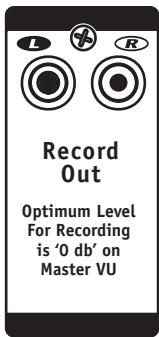
These unbalanced RCA outputs are pre-EQ, pre-Speaker Processor and post-faders (L&R), as well as post-effects.

The Record output signal consists of the L&R level (including effects) from the L&R masters. The signal is pre-graphic-EQ and speaker processor. This way, you can EQ the speaker system without those EQ adjustments being present on the Record output signals. As the panel artwork indicates, optimum level for recording is 0 dB (average) on the VU-Meters. For more information on setting gain levels for 0 dB, see under 18. Solo Switch.
21. Efx 2 and Aux Send Jacks
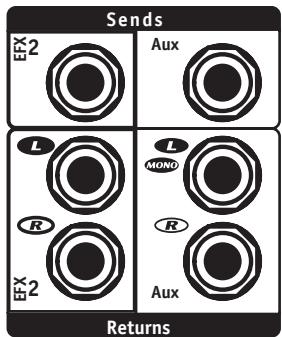
These jacks carry the dry, mono output of the Efx 2 and Aux summing stages and are controlled by their Send masters (and are TRS balanced).
You can connect either or both of these outputs to the inputs of an external effects processors. Alternately, either may be used as an audio output, perhaps to another P.A. system, recording (mono) or broadcast mixer. Just remember that the channel Efx 2 and Aux send controls are post-fader, in other words their send signal levels are affected by the channel faders.
The Efx 2 and Aux Send jack signals are dry; they are not affected by the L/R graphicEQ and have no internal effects. They are balanced connectors, but will work with either balanced or unbalanced cables. However, for optimum quiet performance, use balanced patch cords whenever possible.
22. Mon 1 and 2, Efx 1 and 2, Aux Send Masters, Solos and Clip LEDs
Each master regulates the output levels of its gain stage. Each stage also has a Clip LED and, with the exception of the Efx 1, Efx 2 and Aux busses, a Solo button and LED. Output signals are available at the applicable Send jacks except for Efx 1, which is internally routed to the input of built-in effects processor.
Adjust these sends for maximum level at the input of the connected (or internal) units without clipping. If clipping is indicated on a Send LED, reduce that master's level. The same action should be taken if clipping is indicated on the input of anything connected to the Send jacks or on the Efx 1 Return Levels channel.
The Solo features allow you to listen (to each Master Send) through headphones. The LED indicates that the signal is being summed into the solo (AFL and PFL busses). Remember to turn Solos off when you are done listening to them.
23. Efx 2 and Aux Return Jacks
These are the inputs to the Efx 2 and Aux Return master sections. The L/Mono Aux Return jacks are patched internally to the Right Return jacks which are switching jacks that interrupt the patch when a jack is Inserted. Both returns are TRS balanced.
The output/s of mono or stereo effects processors would be connected here. If an effects processor is mono, plug its output into the L/Mono Aux Return jack or use a 'Y' cable to the Efx 2 Return jacks. If it's stereo, use both jacks. Signals coming into the Efx 2 and/or Aux Return jacks are routed to the Efx 2 and Aux Return masters so that their mix levels to both Mon 1 and Mon 2 channels and the L/R main P.A. channel can be regulated precisely.
These jacks may alternately be used to connect another audio source, e.g. digital audio players, CD-player, tape decks, instrument amp line out, keyboard or even another mixer. The Efx 2 and Aux Return Masters regulate their mix levels to the main and monitor systems. The EFX2 and Aux Return jacks are balanced, but will work with either balanced or unbalanced cables. For optimum, quiet performance, use balanced patch cords whenever possible.
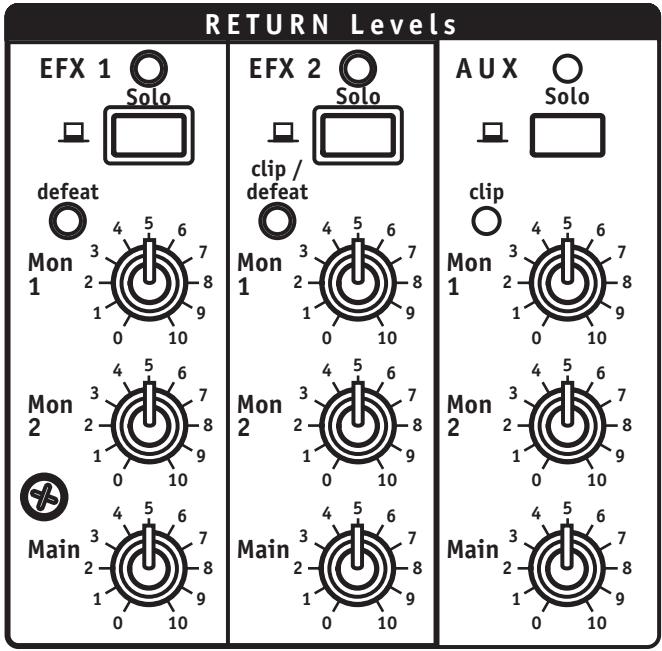
24. Return Levels Masters, Solos and Clip LEDs
Efx 1 is the internal effects processor bus. The Efx 1 Return masters are between its output and the internal inputs to the Mon 1, Mon 2 and L/R (main) busses. The Efx 2 and Aux Return masters are between their respective Return jacks and the internal inputs to the Mon 1, Mon 2 and L/R (main) busses. Solos can be PFL or AFL as per the Solo Mode button setting. In mono effects mode Efx 2 gets signal from internal-Efx 2. Efx 1 Return features a Defeat LED to indicate that the effect has been muted by the Internal Efx Defeat Footswitch.
These Masters permit mixing internal and/or external effects or other input signals to the Mon 1 and Mon 2 monitor channels and the L/R main channel. The Solo buttons let you preview through headphones whatever signals are coming into each Return Levels channel before turning up these masters (Solo Mode button set for PFL) or after they are turned up (Solo Mode at AFL). The Solo LED stays on to indicate that Solo is active. Remember to depress the button again when you are finished soloing.

Aux Clip and Efx 2 Clip/Defeat indicate excessive signal levels coming in via the Aux Return. This can mean that the Efx 2 Send fader or the Aux Master Send levels are set too high causing the effects units to put out too much signal. Turn them down. Trying to reduce clipping at this stage by turning down the Return Levels masters will not work.
Clipping is more likely to happen when a high-output audio source, possibly another mixer or an instrument amp's line output, has been connected to one or both of the Return jacks. In this case lower that mixer's (or whatever's) master level or other volume controls until the Clip LED goes out. Again, do not try to remedy the problem by turning down the Return levels. Efx 2 Clip/D defeat LED indicates that the effect has been muted by the Internal Efx Defeat Footswitch. This footswitch mutes only the internal effects. An external device should have its own footswitch.
Master Sends Section
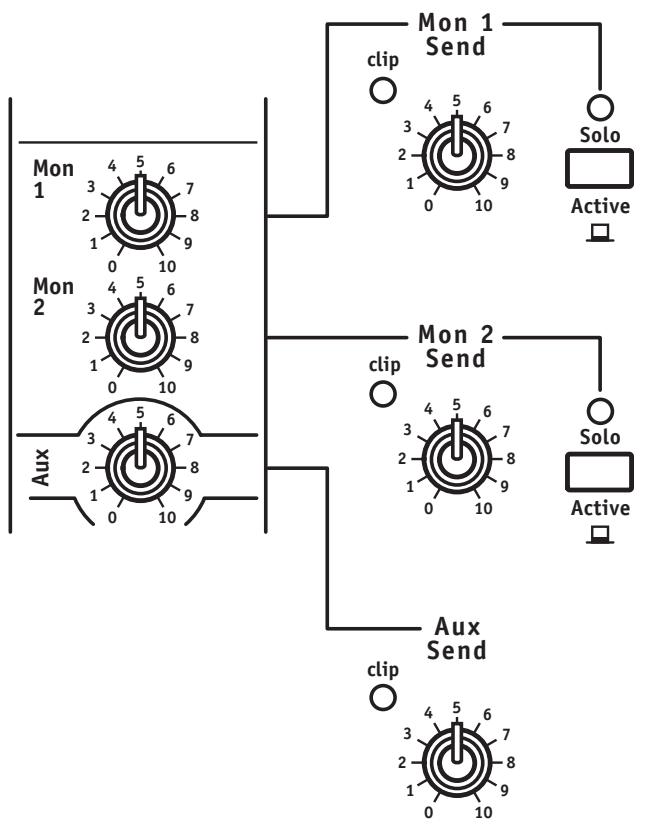
25. Mon 1 and 2 Send Masters, Clip LEDs and Solo Switches
Mon 1 and 2 Master Sends, Clip LEDs and Solo switches are between the summed channel send signals and its designated EQ and Send jack. The Solos and the Clip LEDs are post-master. Once again, the main L/R buss is on Solo when all the other solos are off.

The Clip LEDs indicate near-overload conditions. Reduce the appropriate master Mon Send setting or the channel Mon send settings to avoid distortion.
Because the monitor buss Solo is post-master, you hear the final mix through headphones with the Solo Mode in either AFL or PFL. Final monitor mix levels will therefore appear on the VU-Meter in either AFL or PFL.
26. Aux Send Master and Clip LED
The Aux Send master is an attenuator between the summed channel Aux sends and the Aux Send jack. The Clip LED is post-master.
If the Aux Clip LED becomes active, reduce the Aux Send master setting or the channel Aux send levels to reduce the risk of distortion. Otherwise, set the Aux master as required for the application - high enough to deliver ample signal strength but not too high for the connected unit's input headroom (check the unit's input clip indicator).
27. Efx 1 and 2 Send Masters and Clip LEDs
These faders are between the channel Efx sends and either the internal effects processor (Efx 1) or the Efx 2 Send jack (Efx 2). The Clip LEDs are post-fader.
See under Input Channel Features - Efx 1 and 2 Sends for tips about setting up effects.
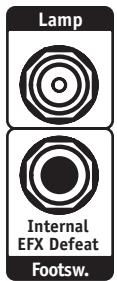
28. Internal Efx Defeat Footswitch Jack
This regulates internal Efx, Efx 1 and Efx 2. Connect a standard footswitch here (e.g. Yorkville model IFS-1A) to switch the internal effects on and off.
29. L&R (Main) Master Send Faders and Clip LEDs
The left and right main summing buss receives signals directly from the channel faders, as well as the three L&R Return Levels controls. Clip LEDs fire 6 dB lower than actual clipping so some activity is allowable. Signal routing goes from the master faders (to Stereo EQ)... and to the Speaker Processor. Then, to both the L&R Line Level Outputs and the normally closed switching lugs on the Amp A&B Input jacks – thereafter to amps A&B. (At the same time, the post-master signal goes directly to the Record outputs, bypassing the EQ, processor, etc.)
The Clip LEDs are unlikely to fire as this stage of the mixer has a large amount of headroom. However, if one, or both LEDs become very active (small amounts of activity are OK), check the Return Levels Clip LEDs and reduce the settings of any L&R Return Master/s in channels showing clipping.
The L&R Masters regulate the level of the main stereo mix available at the Record Outputs (no main EQ), and the L&R Line Level Outputs. They also regulate the amplifier A&B power output levels (unless another mixer has been patched into the Amp A&B Inputs in which case its masters will determine power output).
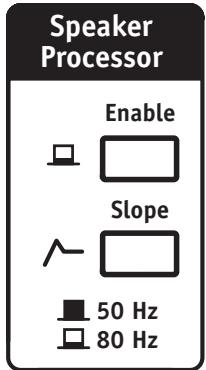
30. Speaker Processor Curve and Enable Buttons
The PowerMAX features a choice of two low-frequency boost curves centred at 50Hz and 80Hz and selectable via the Curve button. The 50Hz curve has a high Q-factor for subwoofoers while the 80Hz curve is slightly broader and better suited for full range cabinets. An Enable, On/Off switch is also provided.

It is advisable to use this feature judiciously. For example you would probably not want to boost the main L/R EQ's low frequencies while it is enabled. On the other hand, it can
add valuable depth to the speaker system. Experiment with it during a sound check. In case of low-frequency feedback, simply put the Enable button to the Off position.
31. L/R Main EQ
This is a stereo 9-band EQ on the output of the main bus. Range is +/-12 dB with centers at one-octave intervals from 63 Hz to 16 kHz.
The main EQ would most often be set during a sound check and used to carefully adjust main speaker response (no radical boosts). It is also useful for curbing feedback tendencies, but remember that monitors most often cause your feedback problems. Naturally, monitor feedback comes out the main P.A. too which, when you are out front at the mixer station, leads to the illusion that the main system needs EQing. See under Mon 1 and Mon 2 EQ's for more about this.
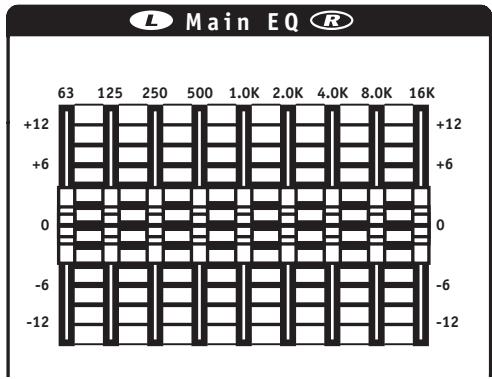
When setting the main EQ, do not automatically go to a smiling curve as with a home stereo - this will cost your system both headroom and gain before feedback. Initially, keep the EQ curve as close to flat (all sliders at center) as possible, then make necessary adjustments as required during the sound check to cut feedback frequencies.
32. Mon 1 and Mon 2 EQs
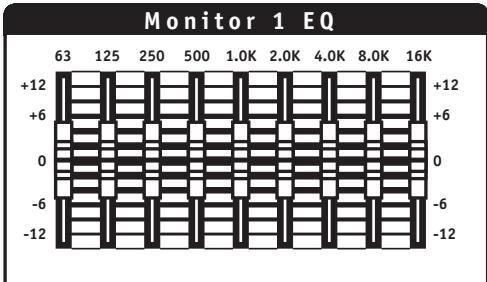
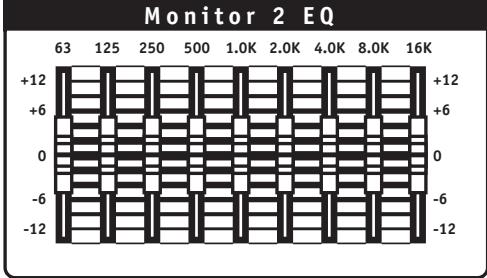
These are 9-band mono EQ's with +/-12 dB on the same centers as the L/R Main EQ. They are Inserted between the monitor busses and the # 3 & 4 power amps, also the Mon 1 and 2 Line Level Outputs.
These EQ's should be set flat (all sliders at center) then adjusted for minimal monitor feedback during a sound check. If feedback does set in during the job, you will be tempted to blame the mains because that's what you hear from the mixing station out front. Don't be misled. As a rule it's one or more of the monitors, but of course the noise comes out the mains too. Use your channel Mute buttons to mute each channel briefly and see if the noise stops. You may also use the Clip LEDs to hunt for feedback channels. If the channel Gains are set high enough per instructions, feedback channels will have increased Clip light activity. If only one or two channels are causing feedback, the best solution is to adjust the channel EQ or, better still, connect monitor-feedback-prone microphoness to the channels with Overload Protection. If, on the other hand, a larger percentage of the monitors are having feedback problems, use one or both of the Monitor EQs to cut monitor level at the feedback frequencies.
33. VU-Meter, Solo Mode Button, AFL and PFL LEDs
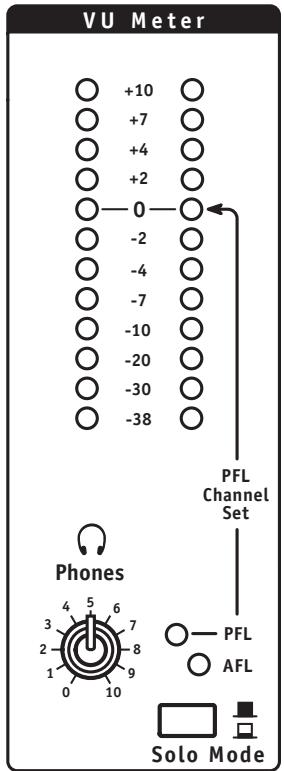
The VU-Meter reflects either the post-EQ, post-Speaker Processor main buss output levels, or the Solo buss levels. Flashing of the yellow LEDs at +2 and +4 should coincide with flashing of the Amp A and/or Amp B Amplifier Full-Power LEDs. The red +7 and +10 LEDs indicate that the main mixing buss is overloaded.
The Solo Mode button allows you to switch between AFL and PFL. AFL mode allows you to view post fader levels in the channels, effects to L&R in the Efx returns, and the Mon 1/ Mon 2 mix levels. PFL mode allows you to view pre-fader levels in the channels (even muted channels), effects input in the Efx returns, and the Mon 1/Mon 2 mix.
The AFL and PFL LEDs indicate which solo mode is currently in effect.

To view the main system levels, release all the Solo buttons so that neither the PFL nor the AFL LED flashes. To check Solo levels, press for PFL. Occasional peaks between +7 and +10 will not reflect actual clipping, however if such peaking becomes continuous, reduce either the channel fader levels if you are in AFL mode (or the input level of the Solo source if you are in PFL). - Look for the illuminated Solo LED and turn that master down.
Output Section
34. Headphones Level Control and Output Jack
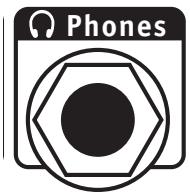
The level control regulates the output of the headphone amplifier. The headphone output jack is located on the front of the mixer beside the Phantom Power switch. The headphones program originates from the main L/R buss unless a solo is active in which case it originates from the Solo bus.
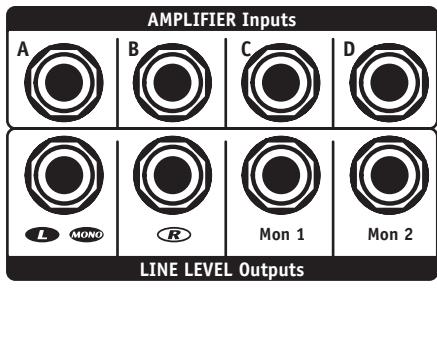
35. Amplifier AMP A, B, C and D Inputs
Each Amplifier Input uses a switching jack that cuts off internal signals routed to the power amp when a jack is Inserted.
The Amplifier Inputs have a few possible uses. For example, they enable you to access, and isolate the main power built-in amps so that they may be used in conjunction with an electronic crossover (used to bi-amp subwoofoers and full-range speakers.) In this case you would patch as follows,
i. PowerMAX L/Mono Line Level Output to the crossover's input (if it is a stereo crossover, pick one channel and use its input).
ii. From the crossover's low frequency, or subwoofer output to the PowerMAX Amp A Input.
iii. From the crossover's high frequency output to Amp B Input.
iv. Now, connect the subwoofoers to the Amp A Speaker output/s and the full-range cabinets to the Amp B Speaker output/s.
Two 8 ohm full-range speakers, and two 8 ohm subwoofoers can be powered this way. Actually, if you have a 3-way crossover or processor and only need one monitor power amp, you can tri-amp by using Amp A for subs, Amp B for woofers and Amp D for horns and/or tweeters.

Alternatively, the Amplifier Inputs can be used to slave one or more of the power amps – perhaps if the mixer is connected to a rack of amps and now the built-in amps are free to be used for other things. In another case, you might be using the PowerMAX L&R Line Level Outputs, also Mon 1 and 2, patched into four of another mixer's input channels. Now you may want to amplify the full mix coming out of that other board including whatever it's doing (possibly you're jamming with another group and you need extra channels). You would simply patch its main and monitor outputs into the appropriate Amplifier Inputs and now the two mixers are linked and the PowerMAX amps are ready to power up main and monitor speakers.

36. Amplifier Full Power LEDs
The Amplifier Full-Power LEDs are located in the upper right panel area just above the main EQ. They indicate that one or more power amp limiters (all non-defeatable) are working. Limiting begins 10 dB down from the onset of clipping and tends to be sonically transparent unless these LEDs are working constantly. If an LED is lit continuously, it indicates that you have run out of limiter room on that amplifier and are approaching the point where the mixer will begin to clip.
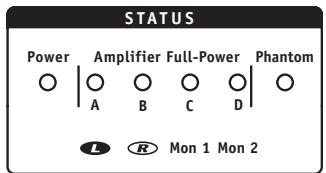
Given the amount of available power, it is unlikely that you will be pushing the system hard enough to run completely out of power amp headroom. If that does happen however, built-in limiting will ensure that no clipped signals endanger your speakers. If an Amplifier Full-Power LED is on continuously for any particular amp, reduce the master for that amp. Occasional flashing simply means that the limiter is reacting to peaks and requires no action on your part.

37. Speaker Connections
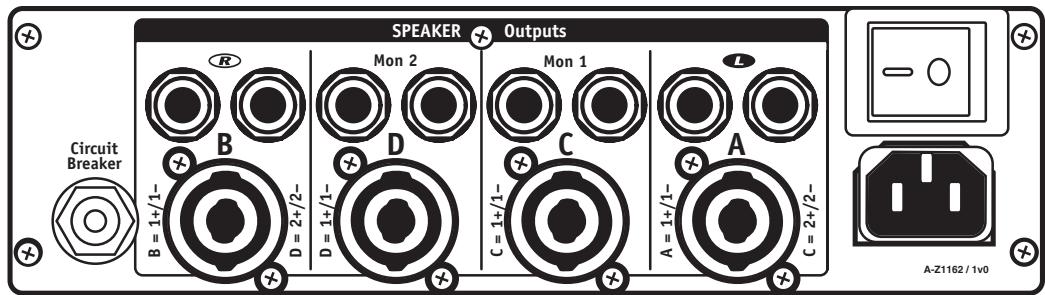
Speakon™ and 1/4-inch speaker outputs are located on the back panel and are identified as Left (A), Right (B), Mon 1 (C) and Mon 2 (D). All connectors, for a given amp, are wired in parallel. The minimum impedance of 4 ohms per amp is for full power. Loads below 4 ohms will be tolerated, but may cause reductions in output power.
38. Lamp Connector
Connects a 12 VDC gooseneck lamp with a BNC connector (e.g. Yorkville model GNL600). - max current 700mA
39. System Power LED
Located to the left of the Amplifier Full-Power LEDs, this is the AC pilot light.
40. Power Switch and Circuit Breaker
These are located on the back of the mixer by the Speaker connections. The breaker is rated 15 amps (8 amps for export models)
Basic Operating Instructions
Note A: For in-depth coverage of specific features, hookups, etc., look under the appropriate feature heading in the main body of the manual.
- Connect the power cord to a grounded AC outlet.
- Connect microphones and line-level sources to the mono channels, tape decks or CD players to the Stereo channels. Do not connect a phono turntable without using a phono preamp.
- Set all channel levels and masters at "0" (for now).
Note B: The following should all be done during a sound check
- With signals coming into the channels and faders off, press Solo and adjust the channel Gain controls for 0 dB on the VU-Meter (PFL).
- Connect any external effects to the Efx 2 Send and Return jacks and/or the Aux Send and Return jacks. Now set the desired Send and Return masters at halfway.
- Set channel EQs, main and monitor graphic EQs flat (at center). If unsure of Mid-Sweep, sat at 2.5 kHz.
- Turn up the desired channels' Efx 1 and/or Efx 2 and/or Aux sends halfway.
- Connect main and monitor speakers to their designated outputs on the back panel (2 x 8 ohms or 1 x 4 ohms per amp).
- Gradually bring up the channel fader levels to achieve the desired channel mix though the main P.A. Set the Masters for overall level.
- Bring the main L&R faders up to the "0" reference setting and turn the Mon 1 and/or 2 Master Sends up to 5. Set the Channel/s to "0."
- Adjust channel Efx sends and masters as required for the desired effects mix through the main system.
- Per instructions from the stage, adjust the Mon 1 and/or Mon 2 channel sends and the Mon 1 and/or Mon 2 Efx 1 or 2 Return Levels.
- Adjust the L&R, Mon 1 and 2 EQ's as needed. See under the feature headings for more details.
ADDENDUM
EQ Sweep Control
Although frequency sweep controls have graced the channel-EQs of recording mixers for many years, they are only found on the more upscale P.A. mixers. As a result many P.A. users, even veterans, are unfamiliar with their function. The Sweep control determines the range of frequencies that are affected by the Mid cut/boost. It moves or sweeps the Mid control's peak or notch in response up to several thousand Hertz or down to below 100 Hz. As a result it can have quite a noticeable effect on the sound, especially since the MID cut or boost will be interacting with whatever cuts or boosts you may have set with the Low or High EQ controls.
For example, if you have set a Low boost, a Mid boost swept all the way down to the lowest frequency setting will alter the sound of lows and increase their volume. Be careful this doesn't damage your woofers. And watch out for your tweeters/horns if you sweep the boost up to the higher settings while the High EQ is boosted.
Considering that the Sweep control can alter everything you are accustomed to an EQ doing, it would be worthwhile to spend some time becoming acquainted with how it works. As music plays through a channel on the mixer and speakers, adjust that channel's Mid, first for a boost then for a cut and Sweep them back and forth. (If there is no Mid cut or boost setting, i.e. if it is set at the centre position, the Sweep will have no effect at all). Now repeat the process with that channel's Low and High EQ controls at various settings (but with the volume at a safe level for the speakers).
Hint: The PowerMAX Sweep has a "home base" setting marked with a triangle at the 2.5kHz mark. This approximately corresponds to the setting of the fixed mid controls on our other mixers. Set channels not requiring Sweep equalization at 2.5kHz and the Mid cuts or boosts will have more standard results.
Together, Mid and Sweep controls can be used to accomplish a variety of tasks from combating feedback to improving the way things sound through the P.A. or on recording. Here are some of those tasks and settings:
Note: These are approximate settings only. Use them as a starting point and "tune around" them.
- Killing feedback? Set Mid at -6 dB and slowly rotate Sweep until the feedback stops. If needed cut the MID further.
- Bonky sounding snare drum? -6 dB @ 200 Hz (roll off Low EQ -6 dB)
- Boomy bass drum? -6 dB @ 300 Hz (Low EQ @ +6 dB and High EQ @ +3 dB)
- Fwashy sounding cymbals? -9 dB @ 300 Hz (roll off Low EQ -15 dB)
- Excessive hiss from guitar, bass or keyboard amp? +3 dB @ 5 kHz (High EQ rolled off -9 dB)
- Fading vocal range (notes too low for singer)? +3 dB @ 80 Hz (Low EQ rolled off -6 dB)
- Puffing on harmonica mic? -9 dB @ 80Hz (Low EQ rolled off -12 dB)
- Rack Toms? -3 dB @ 400 Hz
- Floor tom? -6 dB @ 200 Hz Generally speaking, you will probably end up with the Mid in cut mode for most problem solving uses of the Sweep control. In any case you will learn to use this feature judiciously. The best P.A. EQ setting is the one with the least adjustment, but when you need to solve a problem it's good to know how to use the tools.
Introduction

1/4-inch T.R.S. Phone Plug

XLR Plug
15 16

2-TRK


Bal Line
- Room Reverb – This is a simulation of a short decay reverb, similar in sound to a small room with hard surfaces. Use the Modify control to set the decay time.
- Hall Reverb - A long, smooth reverb simulating the sound of a large concert hall. High frequencies are progressively rolled off as the signal cycles through the reverberator. The Modify control sets the decay time.
- Hall Reverb (Vocals) - Same as the Hall Reverb but with an added ducking feature. When a signal is detected, the reverb level is reduced. When the signal stops, the reverb level is raised so you can hear the trailing reverberance.
- Hall Reverb With Echo - A hall reverb with an added 200 ms echo.
- Plate Reverb – Another long reverb, this one being a recreation of the reverb devices found in classic recording studios. Longer decay time than the hall reverb and with more emphasis on the top end. The Modify control sets the decay time.
- Plate Reverb (Vocals) – Same as the Plate Reverb but with an added ducking feature. When a signal is detected, the reverb level is reduced. When the signal stops, the reverb level is raised so you can hear the trailing reverberance.
- Plate Reverb With Echo - A plate reverb with an added 160 ms echo.
- Gated Reverb – The 80's are back! Commonly used on drums, this is a dense reverb that decays abruptly as the input signal disappears. Use the Modify knob to set the decay time.
- Fast Echo - This echo has a short 80 ms repeat time. The Modify knob is used to vary the decay time of the repeats.
- Short Decay Echo - Use the Modify knob to set the time between repeats. This echo will only give a couple repeats.
- Long Decay Echo - Use the Modify knob to set the time between repeats. This echo will only give several repeats.
- Chorus – Chorus is an electronic effect that multiplies your signal and staggers each copy in time and pitch, similar to what happens when a choir sings. The Modify knob is used to increase the amount by which the individual signals vary from one another.
- Flanger - Flanging is an effect created by comb filtering as a result of mixing a signal with a delayed version of itself. By rhythmically changing the delay time, you get the sound of a shifting comb filter. Use the Modify control to set this rate.
- Rotary Speaker – This is a recreation of an effect originally popular with organ players. The sound of a spinning speaker is akin to a tremolo with Doppler pitch shifting. The Modify control set the speed at which the speaker spins.
- Distortion - Similar to the style of distortion you get as you overdrive a tube prep. Turn the Modify knob to get more clipping and roll off the high frequencies. Try it on guitar and vocals.
- Harmonizer - This effect transposes the pitch of your signal to one of four fixed harmonies. Use the Modify control to choose from an octave down, a fifth down, a fifth up and an octave up.
Specifications
Number of Channels PM16: 16, PM22: 22
Channel Inserts PM16: ch. 7 to 12; PM22: ch. 13 to 18
Mono Channel EQ High, Mid, Mid Sweep, Low (PM16: ch. 1 to 12; PM22: ch. 1 to 18)
Stereo Channel EQ High, High Mid, Low Mid, Low (PM16: ch.13 to 16; PM22: ch 19 to 22)
Channel Effects All Channels
Monitors Effects Yes
Balance Controls PM16: ch. 13 to 16; PM22: ch. 19 to 22
Pan Controls PM16: ch. 1 to 12; PM22: ch. 1 to 18
Channel Overload Protection PM16: ch. 1 to 6; PM22: ch. 1 to 12
Inputs - XLR (bal) PM16: ch. 1 to 12; PM22: ch. 1 to 18
Inputs - 1/4-inch PM 16: ch. 1 to 16; PM22: ch. 1 to 22
Inputs - RCA (unbal) 2 Stereo Sets
Solo Switches All Channels, Mon1, Mon2, EFX Returns
Mute Switches All Channels
Hi Pass Switches PM16: ch. 1 to 12; PM22: ch. 1 to 18
Activity/SoloLED All Channels
Clip/Mute LED All Channels
Phantom Power 48 V + LED indicator
VU Meter 2 x 12 LEDs with Floating Peak
Headphone Monitor Features Level, AFL/PFL Switch, 1/4 inch Stereo
Internal Effects Two of 24 Bit, 16 Effects with Parameter Adjust
Auxiliary Sends 1 TRS
Effects Send 2 (1 Internal, 1 Internal/External)
Effects Return 2 stereo pairs on 1/4 inputs
Effects Return to Main Yes
Effects Return to Monitor Yes
Reverb / Effects Footswitch Yes
Record Outputs 1 Stereo RCA
Max Gain to Line Out-Mic Input (dB) 63
Max Gain to Line Out -Line Input (dB) 56
Master EQ-1 (type /Channels /Range - dB) Graphic / Stereo / 9 Band 63 Hz - 16,000 Hz
Monitor EQ -1 (type /Channels /Range - dB) Graphic / Mono / 9 Band 63 Hz - 16,000 Hz
Monitor EQ-2 (type /Channels /Range - dB) Graphic / Mono / 9 Band 63 Hz - 16,000 Hz
Main Outputs (Line Level) Main L(Mono)/R (1/4 inch TRS)
Main Amp Inputs (Line Level) Amp A/B (1/4 inch TRS)
Monitor Outputs (Line Level) Mon 1/2 (1/4 inch TRS)
Monitor Amp Inputs (Line Level) Amp C/D (1/4 inch TRS)
Outputs - Amp A - 1/4-inch Jacks 2
Outputs - Amp A - Speakon 4-pin 1 - Carries A & C
Outputs - Amp B - 1/4-inch Jacks 2
Outputs - Amp B - Speakon 4-pin 1 - Carries B & D
Outputs - Amp C - 1/4-inch Jacks 2
Outputs - Amp C - Speakon 4-pin 1
Outputs - Amp D - 1/4-inch Jacks 2
Outputs - Amp D - Speakon 4-pin 1
Mixer - Signal to Noise Ratio (dB) greater than 100
Response (Tone and EQ Flat, +/-2dB) 20 Hz - 20,000 Hz
Mixer - Input Referred Noise to line out, @ 150 ohms (dBv) -117
Mixer THD (Main out w/ -10dB input) less than 0.03%
Amp A - Power Output @ 8 ohms (0%1"THD, 1kHz) 600
Amp A - Power Output @ 4 ohms 800 (900 with 1Ch driven)
Amp B - Power Output @ 8 ohms (0%1"THD, 1kHz) 600
Amp B - Power Output @ 4 ohms 800 (900 with 1Ch driven)
Amp C - Power Output @ 8 Ohms (0%1"THD, 1kHz) 600
Amp C - Power Output @ 4 ohms 800 (900 with 1Ch driven)
Amp C - Power Output - other 600
Amp D - Power Output @ 8 Ohms (0%1"THD, 1kHz) 600
Amp D - Power Output @ 4 ohms 800 (900 with 1Ch driven)
Amp D - Power Output -other 600
THD - 1kHz (dB) less than 0.1%
THD - 20Hz-20kHz (dB) less than 0.5%
Hum and Noise (un / Aweight -dB) -103
Typical crosstalk -1 kHz (dB) less than -60
Input Impedance - Bal/Unbal (ohms) 22,000 / 12,000
Input Sensitivity (Vrms Sine) 1.4 V
CMRR @ 60Hz (min/typ) 54 dB / 66 dB
Max Voltage Gain (dB) 32/27**
Power Consumption (typ/max) 660 VA / 1800 VA
Protection Thermal / Load / DC
Cooling 4x Variable Speed DC Fan
Type Toroidal
Finish Scratch Resistant Vinyl-Coated Aluminum
(BNC) Yes
Other Features ** Main Amp / Mon Amp
Dimensions (DWH, inches) PM16: 20 × 28.2 × 5.2 ; PM22: 20 × 31.3 × 5.2
Dimensions (DWH, cm) PM16: 51 x 72 x 13.2; PM22: 51x79.5x13.2
Weight (Ibs/kg) PM16:45.5/20.7;PM22:54.5/24.8
- Specifications subject to change without notice
PowerMAX Digital Effects
Commandes Balance PM16:c.13a16PM22:c.19a22
andes Panoramiques PM16:c.1a12PM22:c.1a18
EQ Principal -1 (type /Canaux/Plage - dB)
EQ Moniteur -1 (type /Canaux/Plage - dB) Graphique / Mono / 9 Bandes 63 Hz - 16,000 Hz
EQ Moniteur -2 (type /Canaux/Plage - dB) Graphique / Mono / 9 Bandes 63 Hz - 16,000 Hz
Sorties Principales (Niveau Ligne) Principal G(Mono)/D (1/4 pouce PBM)
Isole 12V CC (BNC) Ou#
Yorkville's two and ten-year unlimited warranty on this product is transferable and does not require registration with Yorkville Sound or your dealer. If this product should fail for any reason within two years of the original purchase date (ten years for the wooden enclosure), simply return it to your Yorkville dealer with original proof of purchase and it will be repaired free of charge. This includes all Yorkville products, except for the YSM Series studio monitors, Coliseum Mini Series and TX Series Loudspeakers.
Freight charges, consequential damages, weather damage, damage as a result of improper installation, damages due to exposure to extreme humidity, accident or natural disaster are excluded under the terms of this warranty. Warranty does not cover consumables such as vacuum tubes or par bulbs. See your Yorkville dealer for more details. Warranty valid only in Canada and the United States.
Garantie Illimitée
Voice: (716) 297-2920
Fax: (716) 297-3689

Niagara Falls, New York
14305 USA

WEB: www.yorkville.com
Niagara Falls, New York
14305 USA
Voice: (716) 297-2920
Fax: (716) 297-3689