
M810 - Powered speaker YORKVILLE - Free user manual and instructions
Find the device manual for free M810 YORKVILLE in PDF.


| Product Type | Powered mixer (amplified mixer) |
| Brand | YORKVILLE |
| Model | M810 |
| Number of Input Channels | 10 (6 mono + 2 stereo) |
| Microphone Inputs (XLR) | 8, with switchable 48V phantom power |
| Line Inputs (1/4") | 10 (balanced and unbalanced) |
| Stereo Inputs (RCA) | 1 pair (Tape/CD) |
| Main Equalizer | 9-band graphic (160 Hz – 6.3 kHz) + 2 shelving bands |
| Monitor Equalizer | 9-band graphic + 2 shelving bands |
| Effects Processor | 16-bit digital, 255 effects (reverbs, delays, etc.) |
| Output Power (Stereo Amp) | 2 x 400 W at 4 ohms; 2 x 250 W at 8 ohms |
| Frequency Response | 20 Hz – 20 kHz (±2 dB, EQ flat) |
| Signal-to-Noise Ratio | 105 dB |
| Power Supply | 120 V AC (standard version); adaptable 220-240 V depending on version |
| Dimensions (W x D x H) | 28 x 47 x 28 cm (11.1 x 18.6 x 11 inches) |
| Weight | 12 kg (27 lb) |
| Chassis | Steel and aluminum, gray and black finish |
| Rack Mounting | Yes (optional kit) |
| Cooling | 2 x 80 mm fans |
| Protection | Thermal, short circuit, impedance overload |
| Maintenance | Clean exterior with a dry cloth; do not use liquids or abrasive products |
| Spare Parts and Repairability | Contact an authorized YORKVILLE dealer for any repairs or parts |
Frequently Asked Questions - M810 YORKVILLE
User questions about M810 YORKVILLE
0 question about this device. Answer the ones you know or ask your own.
Ask a new question about this device
Download the instructions for your Powered speaker in PDF format for free! Find your manual M810 - YORKVILLE and take your electronic device back in hand. On this page are published all the documents necessary for the use of your device. M810 by YORKVILLE.
USER MANUAL M810 YORKVILLE
IMPORTANT SAFETY INSTRUCTIONS
CAUTION AVIS
RISK OF ELECTRIC SHOCK DO NOT OPEN
FISQ DE GHCC ECECTTIGUE NE PAS DUIN
INSTRUCTIONS PERTAINING TO A RISK OF FIRE, ELECTRIC SHOCK, OR INJURY TO PERSONS.
CAUTION:
TO REDUCE THE RISK OF ELECTRIC SHOCK, DO NOT REMOVE COVER (OR BACK). NO USER SERVICEABLE PARTS INSIDE.
REFER SERVICING TO QUALIFIED SERVICE PERSONNEL.
Read Instructions:
The Owner's Manual should be read and understood before operation of your unit. Please, save these instructions for future reference.
Packaging:
Keep the box and packaging materials, in case the unit needs to be returned for service.
Warning:
When using electric products, basic precautions should always be followed, including the following:
Power Sources:
Your unit should be connected to a power source only of the voltage specified in the owners manual or as marked on the unit. This unit has a polarized plug. Do not use with an extension cord or receptacle unless the plug can be fully inserted. Precautions should be taken so that the grounding scheme on the unit is not defeated.
Hazards:
Do not place this product on an unstable cart, stand, tripod, bracket or table. The product may fall, causing serious personal injury and serious damage to the product. Use only with cart, stand, tripod, bracket, or table recommended by the manufacturer or sold with the product. Follow the manufacturer's instructions when installing the product and use mounting accessories recommended by the manufacturer.
The apparatus should not be exposed to dripping or splashing water; no objects filled with liquids should be placed on the apparatus.
Terminals marked with the "lightning bolt" are hazardous live; the external wiring connected to these terminals require installation by an instructed person or the use of ready made leads or cords.
No naked flame sources, such as lighted candles, should be placed on the apparatus.
Power Cord:
The AC supply cord should be routed so that it is unlikely that it will be damaged. If the AC supply cord is damaged DO NOT OPERATE THE UNIT.
Service:
The unit should be serviced only by qualified service personnel.
INSTRUCTIONS RELATIVES AU RISQUE DE FEU, CHOC ÉLECTRIQUE, OU BLESSURES AUX PERSONNES.
AVIS:
AFIN DE REDUIRE LES RISQUE DE CHOC ELECTRIQUE, N'ENLEVEZ PAS LE COUVERT (OU LE PANNEAU ARRIERE). NE CONTIENT AUCUNE PIECE REPARABLE PAR L'UTILISATEUR.
CONSULTEZ UN TECHNICIEN QUALIFIE POUR L'ENTRETIENT.

1/4-inch T.R.S. Phone Plug

XLR Plug

Introduction
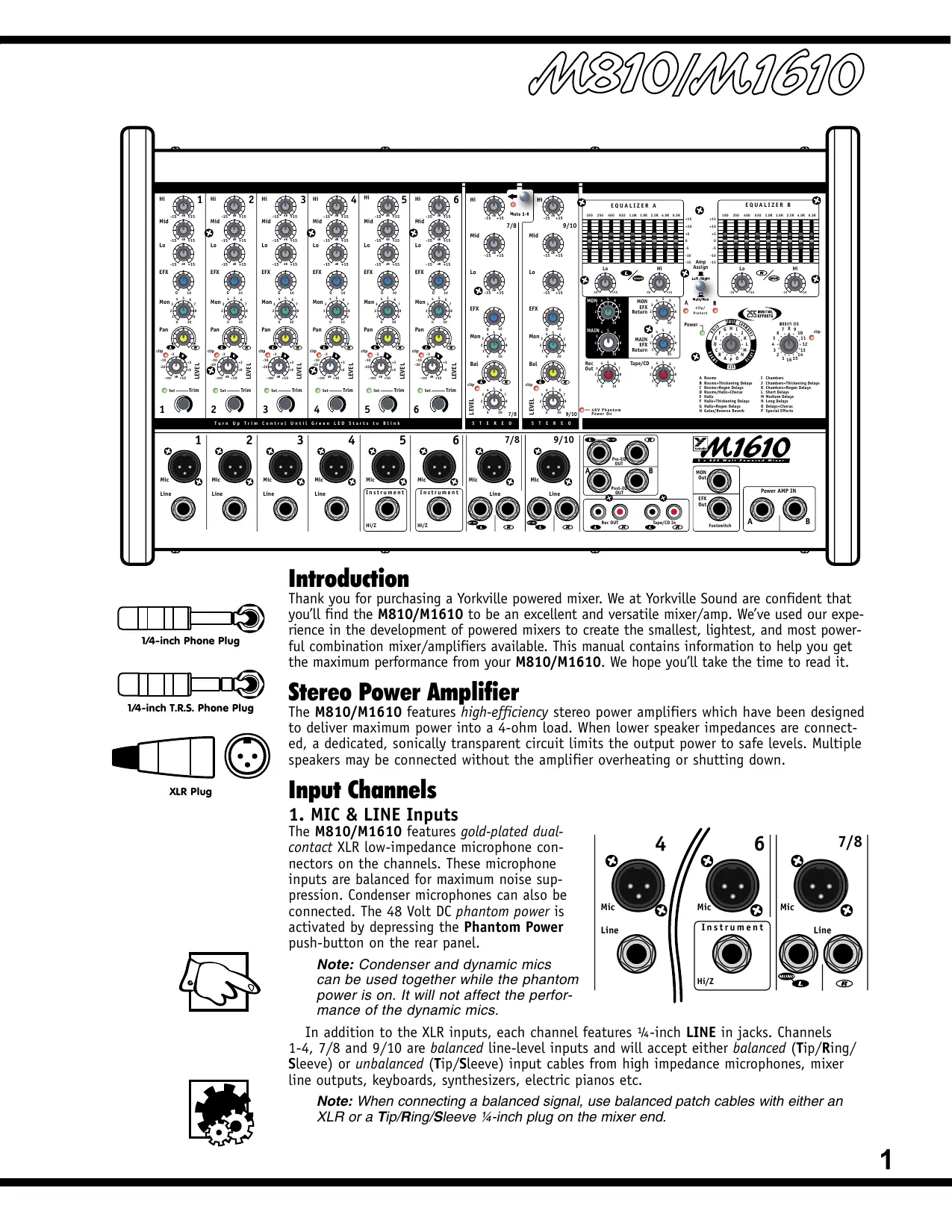
Thank you for purchasing a Yorkville powered mixer. We at Yorkville Sound are confident that you'll find the M810/M1610 to be an excellent and versatile mixer/amp. We've used our experience in the development of powered mixers to create the smallest, lightest, and most powerful combination mixer/amplifiers available. This manual contains information to help you get the maximum performance from your M810/M1610. We hope you'll take the time to read it.
Stereo Power Amplifier
The M810/M1610 features high-efficiency stereo power amplifiers which have been designed to deliver maximum power into a 4-ohm load. When lower speaker impedances are connected, a dedicated, sonically transparent circuit limits the output power to safe levels. Multiple speakers may be connected without the amplifier overheating or shutting down.
Input Channels
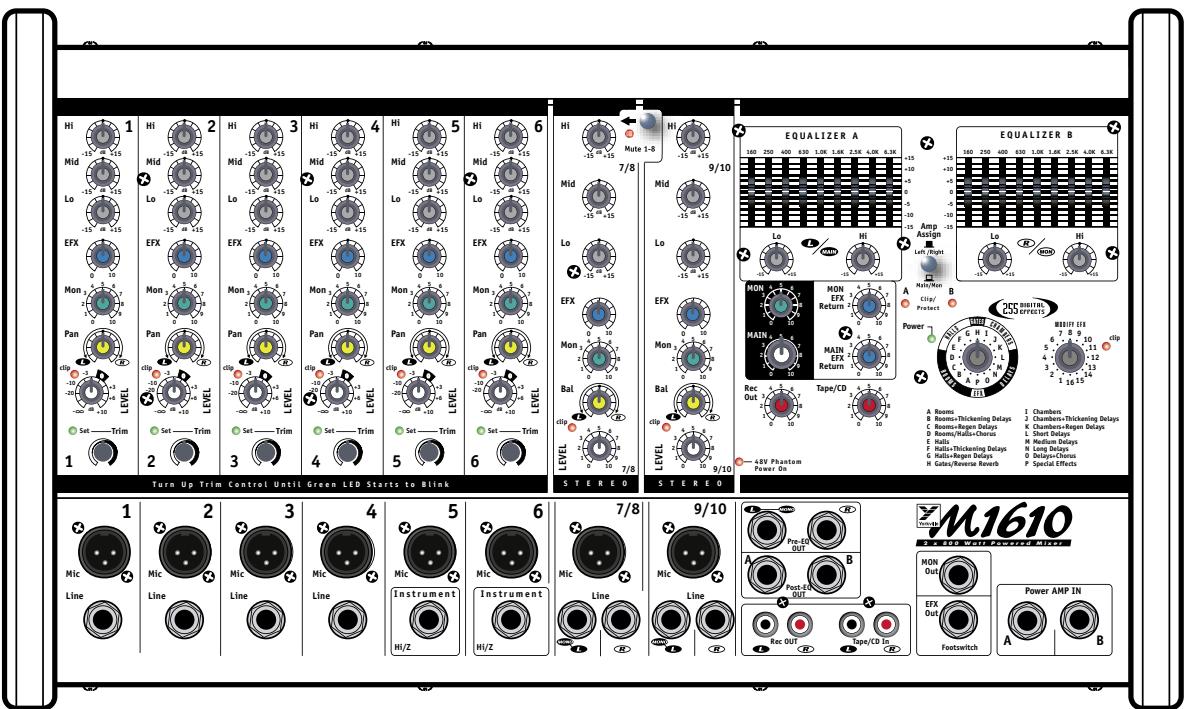
1. MIC & LINE Inputs
The M810/M1610 features gold-plated dual-contact XLR low-impedance microphone connectors on the channels. These microphone inputs are balanced for maximum noise suppression. Condenser microphones can also be connected. The 48 Volt DC phantom power is activated by depressing the Phantom Power push-button on the rear panel.
Note: Condenser and dynamic mics can be used together while the phantom power is on. It will not affect the performance of the dynamic mics.
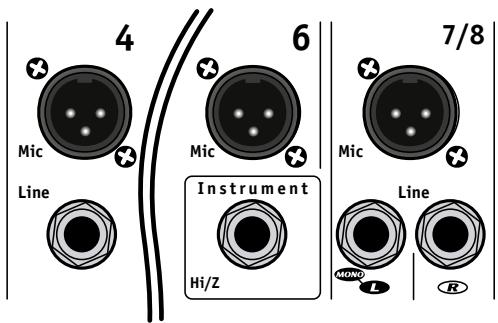
In addition to the XLR inputs, each channel features 1/4 -inch LINE in jackets. Channels 1-4, 7/8 and 9/10 are balanced line-level inputs and will accept either balanced (Tip/Ring/Sleeve) or unbalanced (Tip/Sleeve) input cables from high impedance microphones, mixer line outputs, keyboards, synthesizers, electric pianos etc.
Note: When connecting a balanced signal, use balanced patch cables with either an XLR or a Tip/Ring/Sleeve 1/4 -inch plug on the mixer end.
Channels 5 and 6 have very high impedance, unbalanced 1/4 -inch inputs which are optimized for instruments such as electric basses, acoustic electric guitars etc. Stereo channels 7/8 and 9/10 have left and right 1/4 -inch balanced LINE in jacks as well as mono gold-plated XLR low impedance microphone inputs. The 1/4 -inch inputs may be used to connect a stereo CD player, tape deck or an additional mixer etc. A phono pre-amplifier must be connected to the M810/M1610 inputs for optimum turntable performance.
Connecting signals to both types of inputs on any one channel (MIC and LINE in) is not recommended. To do so may change the gain of the input circuit.
Note: You may connect a stereo source to channels 1 through 6 but you must use two channels, one for left and one for right and Pan appropriately or sum to mono using a 'Y' cable.
2. Channel 1-6 TRIM Controls & SET LEDs
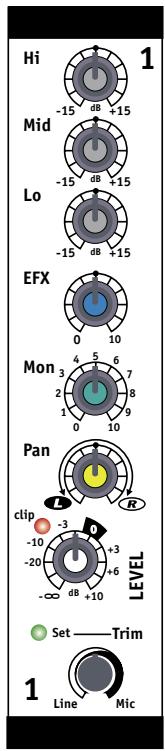
The first 6 mono channels of the M810/M1610 have been equipped with an input TRIM control and are also protected by an overload protection circuit. The TRIM controls are used to make sure that an ideal signal level is flowing through the channel, no matter what the input source. Each channel has a green LED that will flash when the proper signal level has been reached. The channel overload protection circuit will provide additional protection from clipping on peaks of up to 16 dB above normal operating levels.
To set the TRIM
i. Turn down the channel LEVEL control,
ii. With a normal signal present at the input, turn up the TRIM control until the green LED just starts to flash (when the signal peaks).
iii. You can then use the LEVEL control to set the channel volume level. Increasing the TRIM beyond this point will compress the signal on that channel.
3. Channel LEVEL Controls & CLIP LEDs
This adjustment determines the signal level sent to the MAIN mixing bus. The CLIP LED will illuminate when the channel's overall signal level is 3 dB below the onset of actual clipping. As a result, small amounts of clip LED activity are acceptable, however frequent or continuous activity indicates the need to turn down the LEVEL control.
In audio terminology, a bus is a mix-down channel where all the signals from the input channels are blended into one signal. The M810/M1610 has 5 busses: MAIN (left and right), MONITOR, EFFECTS and RECORD OUT.
4. Channel Lo, Mid, & Hi Equalization
The M810/M1610 tone controls adjust the bass, middle and treble frequencies for each channel independently. Center frequencies have been carefully selected to help achieve the best quality of sound. Bass is centered on 80 Hz, Mid at 2.5 kHz and the Hi is at 12 kHz. The adjustment range for each control is +/- 15 dB. These parameters provide versatile equalization consistent with the clean simplicity of the M810/M1610's design. As with equalizers, boosting one or more frequencies increase the channel's level. If the channel is already at a high level, clipping may occur, in which case the clip LED will illuminate. Reduce the LEVEL setting and/or the Equalizer if clip activity is excessive.
Note: The center position reflects a neutral or flat EQ control setting; however, turning down EQ settings can be used effectively to reduce feedback and/or distortion).

5. Channel MON Controls
The MON control (monitor send) on each channel varies the amount of signal being sent to the monitor bus in the M810/M1610. In the mono channels the MON signal is pre-LEVEL control, post-EQ and post-TRIM. It is taken before the LEVEL control so the monitor signal can be mixed independently of the MAIN mix. As a result, channel EQ and TRIM settings do affect the sound of the monitor signals, while the channel LEVEL controls do not affect the MON signal. The MON signal in the stereo channels is pre-LEVEL and pre-EQ.
Note: With an independent monitor mix, it may be beneficial to connect a graphic equalizer between the MON output and the monitor amplifier (Power AMP IN B, external amplifier or powered speakers, depending on how you have it set up) to help control feedback.
6. Channel EFX Controls
The EFX control (effects send) for each channel adjusts the level of the channel signal being sent to the M810/M1610 effects bus. This signal is post-LEVEL control and post-EQ, the sound is affected by both the channel EQ controls and the channel LEVEL control. The signal from the effects bus is internally routed to the Digital Effects Processor. The channel EFX control
regulates the intensity of the built-in digital effects for the channel's output. When using the built-in digital effects, you can connect a standard on/off footswitch (e.g. Yorkville model IFS-1A) to the EFX Out/Footswitch jack to turn the internal effects on or off. For more information see the section EFX Out/Footswitch in this manual.
Tip: Alternatively, this signal at this jack can be connected to the input of an external stereo effects unit and returned via channel 7/8 or 9/10. However, if you do not require any effects at all, the effects bus output signal can be connected to the input of an additional monitor system or another amp/speaker system via the EFX Out/ Footswitch jack using a standard balanced patch cord. In this case, the EFX controls would act as send controls to achieve a semi-separate mix. Remember that the channel LEVEL controls also affect this signal.
7. Channel Pan & Bal Controls
The signal balance of each channel going to the left and right main PA channels can be adjusted by the Pan control in channels 1 to 6, and by the Bal control in channels 7/8 and 9/10. Turning this control counterclockwise towards the L will increase the signal level in the left channel to a maximum of 3 dB while also reducing the level in the right channel to zero. Turning the control clockwise towards the R will increase the signal level in the right channel while also reducing the signal level in the left channel.

Master Section
1. MAIN Master Control
The MAIN master control adjusts the overall level of the main mix, the PA volume.
Note: To ensure maximum signal headroom and clarity, set the channel TRIM and LEVEL controls first for a good signal without clipping, then set the master for the overall volume desired.
2. MON Master Control
The overall level of the monitor mix is adjusted with the MON master control.
Note: As with the MAIN master, set the MON master to deliver the desired volume after setting the channel sends.
3. MAIN EFFECTS Return Control
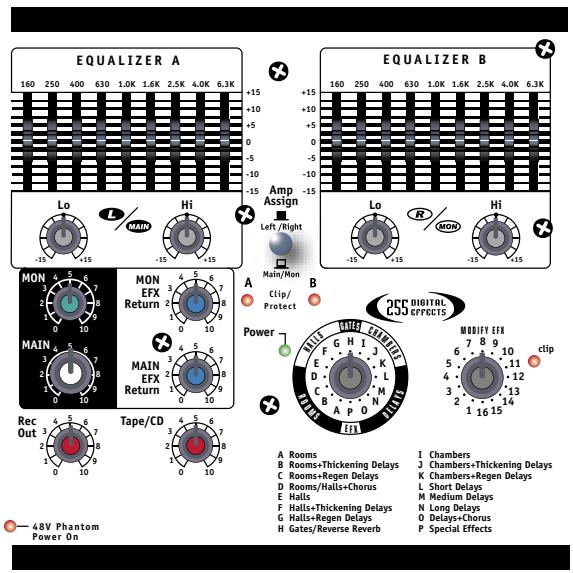
The MAIN EFX control regulates the amount of signal going from the output of the internal Digital Effects Processor to the MAIN mixing bus where it is mixed with the dry signals directly. It controls the intensity of the effects on the left and right MAIN output signals.
4. MON EFFECTS Return Control
The MON EFX control regulates the amount of signal going from the output of the internal Digital Effects Processor to the MON mixing bus where it is mixed with the dry signals directly from the channel MON send controls. It controls the overall effects intensity for the MON Out signal.
5. Pre-EQ OUT, Post-EQ OUT
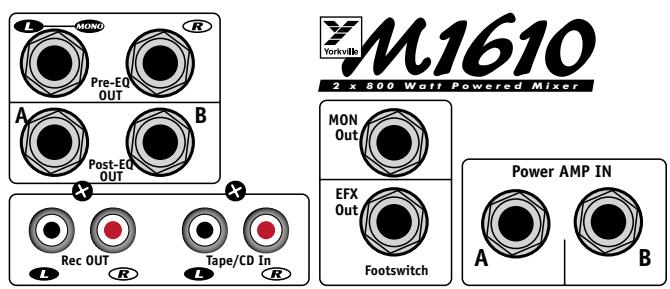
These jacks offer a variety of patching and routing options. They are positioned in the signal path before and after the M810/M1610 main graphic equalizers.
These bus signals are at line level, not speaker level (use the SPEAKER outputs on the rear panel to drive speakers). Using signals from these jacks has no effect on the operation of the M810/ M1610 built-in power amplifier. This makes it possible to feed an external power amplifier, or even multiple inter-connected power amps, while the internal power amplifier is functioning.

Note: It is not necessary to have speakers connected if you'd like to use the unit strictly as a mixer. If a mono signal is required, possibly to feed a mono-house PA or another amp/ speaker system, use the L/Mono Pre-EQ jack. Mono operation of this jack is switched to left channel only as soon as a jack is inserted in the R Pre-EQ jack. The Post-EQ OUT jacks are not linked in this manner. They follow the operation of the Main/Mon switch described below.
6. Power AMP IN Jacks
The Power AMP A IN and Power AMP B IN jacks are direct inputs to the built-in power amplifiers. They are referred to as A and B rather than left and right simply because it is possible to power both main PA speakers with one amplifier channel and monitors with the other. This can be accomplished by selecting the Main/Mon position on the selector switch located between the graphic equalizers. In the Left/Right position, Power AMP A receives the left signal while Power AMP B receives the right signal. In the Main/Mon position, Power AMP A receives a mono sum of left and right signals while Power AMP B receives the monitor signal. An alternative use for the Power AMP A IN and Power AMP B IN jacks would be as patching inputs. Since they're switching jacks if you plug into one (or both) the internal signal flow will be interrupted. This interrupts the signal from the M810/M1610 mixer to the built-in power amplifiers allowing you to insert signal control devices such as an elite processor, an additional equalizer, or a compressor/limiter into the main stereo signal path. Connect cables from the L and R Post-EQ OUT (or Pre-EQ OUT) to the device's input jacks and then from the device's output jacks to the M810/M1610 Power AMP A IN and Power AMP B IN jacks.
You can connect another mixer to the M810/M1610 power amplifier through the Power AMP A IN and Power AMP B IN jacks. This slaves the amplifier to the other mixer's signals; it no longer receives the built-in mixer's signals which means that you could use the built-in mixer to do a totally separate mixing job. For example, you could patch the M810/M1610 L and R Pre-EQ OUT (or Post-EQ OUT) to inputs on another mixer connected to other amplifiers driving a PA speaker system while using the M810/M1610's A and B amps to power control room speakers.
7. Rec OUT Jacks
These phono connectors send the L and R pre-EQ, pre-EFFECTS (not affected by the MAIN EQ) main mix signals. The Rec OUT control, located just below the MAIN control, adjusts the signal level for these jacks. Using phono patch cords, connect directly to the Auxiliary (line-level) inputs on a tape deck or other recording device.
8. MON Out Jack
The monitor bus output signal from the Mon OUT jack is line level and would normally be patched to the input of a mono power amplifier (or a single channel of a stereo amp) driving stage monitor speakers. Keep in mind that in the Left/Right position of the Amp Assign switch there is no internal equalization for the monitor mix (you might want to patch a graphic equalizer between the Mon OUT jack and the input of your monitor power amplifier, this can help regulate the feed). As mentioned under #5. Pre-EQ OUT, Post-EQ OUT section (above), the monitor mix signal can also be patched to one channel of the internal amplifier using the Amp Assign switch.
9. EFX Out / Footswitch Jack
Using this jack you can connect a standard on/off footswitch to control the activation of the internal Digital Effects Processor or it can be used as an effects send jack for use with an external effects processor.
Note: Both devices would be sent a signal, so you could connect the external unit's left and right outputs to the L and R inputs on channel 7/8 (channel 9/10 or any of the other channels). Use the LEVEL of that channel to adjust the amount of wet signal added to the main mix and the MON control to adjust the amount of wet signal added to the monitor mix. Make sure that its EFX control on the channels are turned off. An alternative could be to use the EFX Out / Footswitch jack to deliver line level signal to the input of an auxiliary amplifier or even a recording device. Here, the channel EFX controls would act as secondary level controls.
10. Power LED & Switch
The Power LED lets you know that the M810/M1610 is plugged in, turned on and all systems are normal. The Clip/Protect LEDs normally indicate clipping in the amplifiers. They will remain illuminated and the power LED will turn off in the unlikely event that the amplifiers overheat or if DC voltage is detected on the output. The AC power on/off switch is on the rear panel of the M810/M1610.
11. Phantom Power
The Phantom Power LED indicates that 48 volts of DC phantom power is present on the XLR microphone inputs for powering condenser microphones. Regular dynamic mics may also be used while the Phantom Power is on. Connecting a microphone of either type with phantom power on and the channel LEVEL up will create a large transient, resulting in a loud, potentially damaging pop. When setting up, either turn off the AC power, the phantom power, or set all channel levels to zero. The Phantom Power push-button is located on the rear panel between the speaker output jacks.
12. Tape/CD Input
Left and right RCA inputs are provided to connect a CD player, cassette player or other stereo source to the mixer. These inputs are routed directly to the main bus, the Tape/CD control adjusts the amount of signal.
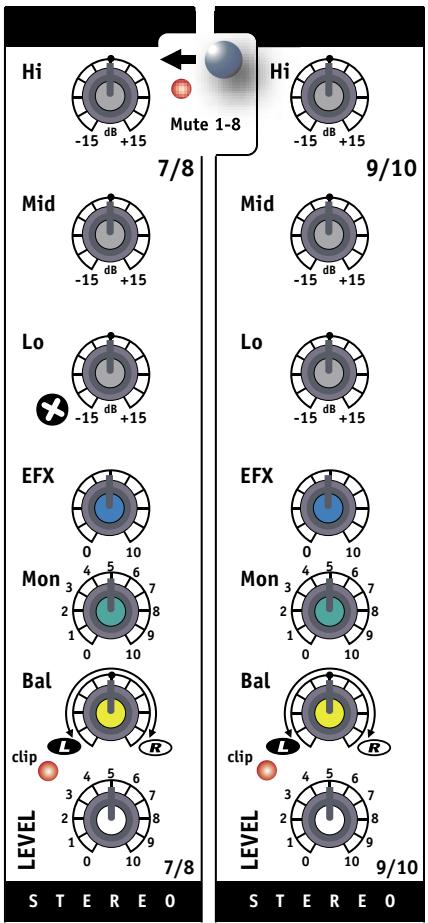
13. Mute 1-8 Switch
The M810/M1610 includes a feature that enables users to instantly mute channels 1-8. Depressing the Mute 1-8 switch will mute channels 1-8 signals being sent to the Left, Right, Mon and EFX busses (the signals from these channels will still be sent to the record bus and will not be muted. Channel 9/10 will remain active, leaving this channel open for allowing a microphone or CD player, cassette player or other stereo source to be heard over the Left, Right, Mon and EFX busses. This feature lets you mute the mics and instruments on stage and still allows you to make announcements or play music during breaks. When the band returns to perform, simply deactivate.
Note: The Tape/CD input in the master section also remains active. While muted, the Mute LED flashes at a slow rate (long on/short off) and the clip LEDs of all the muted channels alternate long off/short on.
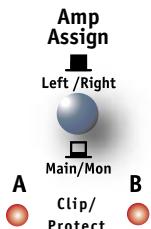
14. Amp Assign Switch
The MAIN controls determine the level of the signal routed through the Amp Assign switch:
i. In the Left/Right position, the Amp Assign switch directs the left and right MAIN master signals through Equalizer A and Equalizer B. The signal goes to the left and right inputs of the built-in power amplifier (Amp A and Amp B) and to the left and right post-EQ OUT jacks.
ii. In the Main/Mon position, the Amp Assign switch sums the left and right MAIN signals into a single, mono signal while directing it to the input of Equalizer A, the output of which goes to both the Amp A power amp channel and to the Post-EQ
MAIN OUT jack. Additionally, the signal from the MON master's output is routed through Equalizer B and then to both the Amp B power amp channel and to the MON Out jack.

Digital Effects Processor
1. Select & MODIFY EFX Controls
The Select control selects from 16 banks of digital reversals, delays and other effects. Simply rotate the Select control to the basic type of effect you prefer. This control rotates continuously so you can rotate in either clockwise or counter-clockwise to select the desired effect. Lists of effects banks appear later in this manual and on the front panel of the M810/M1610. (The variations for the specific effects banks are listed later in this manual.)
Each bank of effects contains 16 effect variations. The MODIFY EFX control selects one of these variations. For example, if bank M (Medium Delays) has been selected, position 1 on the MODIFY EFX control will give you 200 milliseconds of delay, and positions 2 through 16 will give you progressively longer delays up to 375 milliseconds. Bank P is the exception to this rule. It consists of sixteen different special effects such as pitch shift up or down, detune, flanger etc.
Note: The signal sent from the internal Digital Effects Processor to the MON mix is independent from the MON send controls on the channel strips. When a channel's
EFX control is sending signal to the internal Effects processor and the MON control, for that channel, is turned off, that channel's wet effects will be heard in the MON bus if the EFX to Monitor return is turned up.
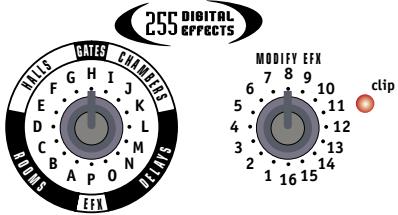
2. Effects CLIP LED
Situated to the right of the MODIFY EFX control, the CLIP LED indicates that the digital processor is receiving an input signal that's too strong, resulting in distortion. For optimum performance, the CLIP LED should never flash. If there is clipping activity, turn down the channel EFX controls appropriately.
A Rooms
B Rooms+Thickening Delays
C Rooms+Regen Delays
D Rooms/Halls+Chorus
E Halls
F Halls+Thickening Delays
G Halls+Regen Delays
H Gates/Reverse Reverb
I Chambers
J Chambers+Thickening Delays
K Chambers+Regen Delays
L Short Delays
M Medium Delays
N Long Delays
0 Delays+Chorus
P Special Effects
3. EFFECTS TABLES
See rear inside cover for effects tables.
Built in 9-Band Graphic Equalizer & Shelving EQs
General
Each EQ consists of a set of +/-15dB range type controls. In the M810/M1610 there are nine sliders for each channel, each one operating over a 2/3-octave portion of the midrange band of sound frequencies, as well as rotary shelving Bass and Treble controls.
Note: Equalizers have an effect on the gain of the main system as well as its frequency response. Once adjusted, you may need to adjust the MAIN master level if the clip LEDs become too active.
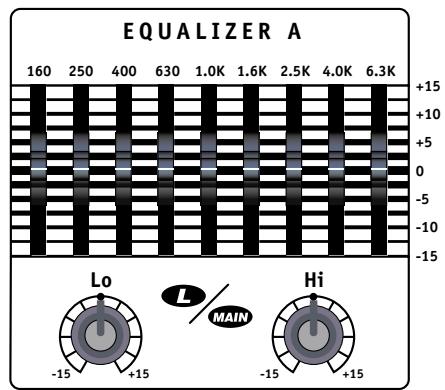
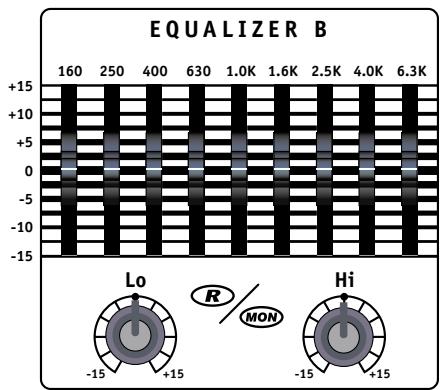
There Are 3 Main Functions for the Graphic EQ & Shelving Equalizers
i. To adjust the system to help reduce feedback, a normal technique is to turn the main system up to the point of feedback and then adjust the EQ sliders individually to determine which frequency band will reduce the potential of feedback. When the specific frequency band is isolated, set it to about -3 to -5 dB. Usually only 2 or 3 bands can be reduced before the feedback reduction process begins to affect the sound quality.
ii. To adjust for deficiencies in the speaker system's high frequency and bass response, the M810/M1610 also has a 2-band rotary shelving equalizer. These work in conjunction with the 9-band graphic. Yorkville engineers have developed this technique to provide you with greater tone shaping capability. This allows the graphic equalizer bands frequencies to be spaced at closer intervals, which mean better selectivity for feedback reduction and sound shaping. You may want to turn up the Lo and Hi controls to give the system a more HiFi sound when you're playing at lower volumes. At higher volume levels, you may need to turn these controls down, this will help maximize the volume and tighten up the sound.
iii. The third use of the graphic equalizer is to adjust the sound character for artistic reasons. The frequencies are adjusted until the sound feels best to the musicians.
M810/M1610 Rear Panel
1. Power Amplifiers
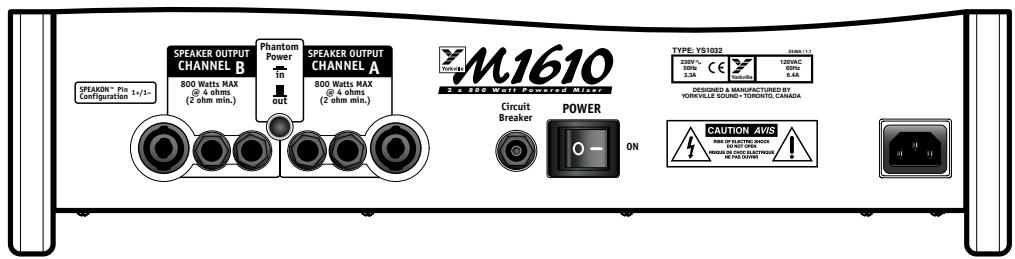
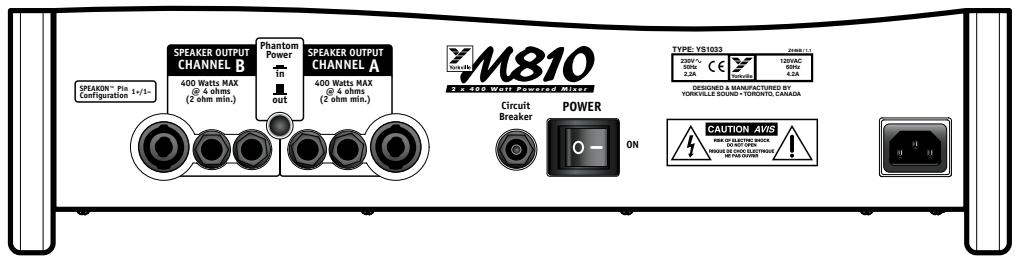
Each of the M810/M1610 dual power amplifiers has two 1/4 -inch jacks and 1 Speakon jack for speaker connections. The power amplifiers are designed to provide full power into a 4-ohm load. Connecting two 4-ohm speakers (2-ohm load) to either AMP A or AMP B will not harm the M810/M1610 but the maximum power output may be reduced.
WARNING: Do not obstruct the flow of air around the vents on the rear of the M810/ M1610, this may cause the power amplifier to overheat. The amplifier will start to reduce its power output in order to keep running. In extreme cases it may be forced to shut down. If the clip LEDs are illuminated continuously and the Power LED is off, this will indicate shutdown. After the M810/M1610 cools down, operation will be restored automatically. This condition should not occur if adequate ventilation is provided at the back of the unit.
2. Power Switch and Breaker
The Power switch and circuit breaker are located on the rear panel. If the circuit breaker trips during use, wait a few minutes (to cool), then push in to reset. The circuit breaker can trip if the amplifier is too heavily loaded with long periods of continuous tones (such as feedback). If the circuit breaker trips immediately after being reset, take the unit to your Yorkville dealer for service.
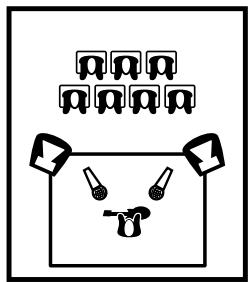
Keep the Main Speakers between mics and audience to minimize feedback
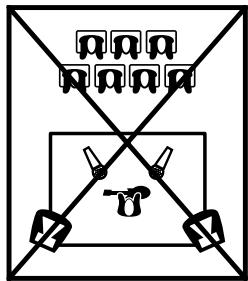
DO NOT place Main Speakers in back of the stage!!
Input Wiring tips: 1. For all input connectivity use shielded wire only Cables with a foil shield high-density braid are be
2. When changing input connections, turn down the level controls on the mixer to eliminate pops and thumps out of the loudspeakers as the cable contacts the mixer.
3. Keep input connection cables as short as possible to minimize noise and hum.
General Operating Instructions
- Connect the AC power cord to a 120 Volt AC grounded power outlet (220 to 240 Volts in export units).
- Turn the MAIN and MON master controls to 0 initially, then switch on the Power.
- You can connect low-impedance microphones to the 3-pin XLR type MIC inputs.
- Connect high-impedance mics or mono line-level signal sources (mixer line outputs, keyboards etc.), to the 1/4 -inch balanced LINE IN jacks on channels 1-4, 7/8 and 9/10. Connecting more than one signal source to both XLR and 1/4 -inch inputs is not recommended; this includes stereo sources (if you try to connect a stereo source to a mono channel using a Y-adapter, you may get distortion). The 1/4 -inch channels 5 and 6 are optimized for musical instruments and are not balanced.
- Connect stereo sources (CD players, tape decks, stereo keyboards etc.) to channels 7/8 or 9/10 via the stereo 1 / 4 -inch balanced LINE IN type inputs. Once again, connect only one signal source per channel, and use shielded patch cords for all pre-amp connections. If a monitor send or EFX send is not required use the Tape/CD input for your stereo source.
6a. Use 18-gauge (or heavier) speaker cables, using shielded patch cords to connect speakers will waste power by heating up. Connect one or two 8-ohm PA speakers to the SPEAKER outputs on the rear panel.
Note: To deliver maximum power to a pair of 4-ohm PA speakers, connect only one speaker to each amplifier.
6b. If you are using a separate power amplifier for the stage monitor speakers, connect the main speakers (as in #6, above) and run a shielded patch cord from the Pre-EQ or Post-EQ Out jack to the input of the monitor power amp. If you are using a separate graphic equalizer for the monitors run a shielded patch cord from the Pre-EQ or Post-EQ Out
OUT jack to the input of the EQ. Then, another one from the EQ's output to the input of the monitor power amp.
7. Position your main PA speakers at the front of the stage, pointing directly at the audience. Position your monitor speakers on the stage floor; preferably to one side of the mic stands, pointing up at the performer. Try to use cardioid or uni-directional mics to help reduce the threat of feedback through the monitors (avoid having the back of the mic pointing directly at the speakers).
8. During a sound check and with the band playing, make the following control adjustments:
i. On mono channels, you need to set the TRIM appropriately. To set the TRIM, first turn the channel LEVEL control down, with a normal signal (present at the input) adjust the TRIM control until the green LED flashes only during the peaks in signal. Now you can use the LEVEL control to set the channel volume level.
ii. Set the channel Lo, Mid, and Hi EQ controls at center. Set the channel LEVEL, MON, and EFX controls to seven. The Graphic EQ sliders and rotary shelving controls should be set at the center position at this point as well.
iii. Turn the MAIN and MON Master controls up to give the desired volume, the MAIN EFX return to around 7. Effects in the monitors tend to increase the possibility of feedback so if the band insists, set the MON EFX return to 5.
iv. Adjust the channel MON control/s to give each performer the desired volume levels. Use the MON master control to adjust the overall monitor level.
v. Use the channel LEVEL control/s to balance each channel's volume level through the main PA speakers.
vi. Turn up the EFX controls on those channels requiring the selected Digital Effect. Typically, the lead and harmony vocal channels would be good candidates for effects. Reverb can be used on other channels or on recorded music, but should be used sparingly.
- Feedback during a performance is usually caused by one of the stage monitors. The main PA is less likely to feedback because the mics are usually a good distance from the main PA speakers. Therefore, if you're using monitors, and feedback occurs, try the following procedures:
i. Turn the MON Master down until the feedback stops.
ii. If a graphic equalizer is patched between the MON output and your monitor power amp, adjust the EQ sliders individually to determine which frequency band will reduce the potential of feedback.
iii. Now turn the MON Master back up. If the feedback returns, reset the sliders to their original positions and retry using different sliders.
iv. In the rare case of main system feedback, follow the above type of procedure, but use the MAIN Master and the built in Graphic EQ.
M810/M1610

1/4-inch Phone Plug

1/4-inch T.R.S. Phone Plug

XLR Plug



Introduction
B Rooms+Thickening Delays
C Rooms+Regen Delays
D Rooms/Halls+chorus
E Halls
F Halls+Thickening Delays
6 Halls+Regen Delays
H Gates/Reverse Reverb
I Chambers
J Chambers+Thickening Delays
K Chambers+Regen Delays
L Short Delays
M Medium Delays
N Long Delays
0 Delays+Chorus
P Special Effects
Number of Channels 10
Mono Channel EQ Low, Mid, High
Stereo Channel EQ Low, Mid, High
Channel Effects All Channels
Monitors Effects Yes
Balance Controls Ch. 7-10
Pan Controls Ch.1-6
Channel Overload Protection Ch. 1-6
Inputs - XLR (bal) 8
Inputs - 1/4" 10
Inputs - RCA (unbal) 1 Pair
Mute Switches Global 1 - 8
Activity/SoloLED Trim Set Ch.1-6
Clip/Mute LED All Channels
Phantom Power 48V + LED Indicator
Internal Effects Digital 16 Bit; 255 Effects
Auxiliary Sends Effect - Monitor
Effects Send Yes
Effects Return Internal
Effects Return to Main Yes
Effects Return to Monitor Yes
Reverb / Effects Footswitch Yes
Record Outputs Stereo RCA Pair
Max Gain to Line Out -Mic Input (dB) 84
Max Gain to Line Out -Line Input (dB) 82
Master EQ -1 (type /Channels /Range - dB) Graphic 9 band (160hz-6.3khz) +2 band Shelving
Monitor EQ -1 (type /Channels /Range - dB) Graphic 9 band (160hz-6.3khz) +2 band Shelving
Main Outputs (Line Level) 2 x 1/4-inch TRS
Main Amp Inputs (Line Level) 2 × 1/4 -inch TRS
Monitor Outputs (Line Level) 1 × 1/4 -inch TRS
Outputs - Amp A - 1/4" Jacks 2
Outputs - Amp A - Speakon 4-pin 1
Outputs - Amp B - 1/4" Jacks 2
Outputs - Amp B - Speakon 4-pin 1
Mixer - Signal to Noise Ratio (dB) 105
Mixer - Frequency Response (Tone and EQ Flat, +/-2dB) 20 - 20,000
Mixer - Input Referred Noise to line out, @ 150 Ohms (dBv) -119
Mixer THD (Main out w/ -10dB input) 0.01%
Amp A - Power Output @ 8 Ohms (0%1"THD, 1kHz) 250
Amp A - Power Output @ 4 Ohms 400
Amp A - Power Output -other 400 @ 2 ohms
Amp B - Power Output @ 8 Ohms (0%1"THD, 1kHz) 250
Amp B - Power Output @ 4 Ohms 400
Amp B - Power Output -other 400 @ 2 ohms
THD-1kHz(dB) 0.1%
THD-20Hz-20kHz(dB) 0.5%
Hum and Noise (un / Aweight -dB) -101 / -107
Typical crosstalk -1 kHz (dB) better than -60 db
Input Impedance - Bal/Unbal (Ohms) 20k
Input Sensitivity (Vrms Sine) 1.4
CMRR @ 60Hz (min/typ) -37db / -60db
Max Votage Gain (dB) 29
Power Consumption 4.2A @ 60Hz / 2.2A @ 50Hz
Protection Thermal, Short Circuit, Impedance Overload
Cooling 2 × 80 mm Fans
Transformer Type Toroidal
Finish Grey and Black Powder Coat
Chassis Construction Steel and Aluminum
Rackmount Yes (Kit Available)
Other Features Tiltback or Upright Wedge Angles
Dimensions (DWH, inches) 11.1 x 18.6 x 11
Dimensions (DWH, cm) 28 × 47 × 28
Weight (lbs/kg) 27 / 12
M1610 SPECIFICATIONS
Number of Channels
Mono Channel EQ
Stereo Channel EQ
Channel Effects
Monitors Effects
Balance Controls
Pan Controls
Channel Overload Protection
Inputs - XLR (bal)
Inputs - 1/4"
Inputs - RCA (unbal)
Mute Switches
Activity / Solo LED
Clip /Mute LED
Phantom Power
Internal Effects
Auxiliary Sends
Effects Send
Effects Return
Effects Return to Main
Effects Return to Monitor
Reverb / Effects Footswitch
Record Outputs
Max Gain to Line Out -Mic Input (dB)
Max Gain to Line Out -Line Input (dB)
Master EQ-1 (type /Channels /Range - dB)
Monitor EQ -1 (type /Channels /Range - dB)
Main Outputs (Line Level)
Main Amp Inputs (Line Level)
Monitor Outputs (Line Level)
Outputs - Amp A - 1/4" Jacks 2
Outputs - Amp A - Speakon 4-pin
Outputs - Amp B - 1/4" Jacks
Outputs - Amp B - Speakon 4-pin
Mixer - Signal to Noise Ratio (dB)
Mixer - Frequency Response (Tone and EQ Flat, +/-2dB)
Mixer - Input Referred Noise to line out, @ 150 Ohms (dBv)
Mixer THD (Main out w/ -10dB input)
Amp A - Power Output @ 8 Ohms (0%1"THD, 1kHz)
Amp A - Power Output @ 4 Ohms
Amp A - Power Output -other
Amp B - Power Output @ 8 Ohms (0%1"THD, 1kHz)
Amp B - Power Output @ 4 Ohms
Amp B - Power Output -other
THD - 1kHz (dB)
THD - 20Hz-20kHz (dB)
Hum and Noise (un / Aweight -dB)
Typical crosstalk -1 kHz (dB)
Input Impedance - Bal/Unbal (Ohms)
Input Sensitivity (Vrms Sine)
CMRR @ 60Hz (min/typ)
Max Votage Gain (dB)
Power Consumption
Protection
Cooling
Transformer Type
Finish
Chassis Construction
Rackmount
Other Features
Dimensions (DWH, inches)
Dimensions (DWH, cm)
Weight (lbs/kg)
10
Low, Mid, High
Low, Mid, High
All Channels
Yes
Ch. 7 - 10
Ch. 1-6
Ch. 1 - 6
8
10
1 Pair
Global 1-8
Trim Set Ch. 1 - 6
All Channels
48V + LED Indicator
Digital 16 Bit; 255 Effects
Effect - Monitor
Yes
Internal
Yes
Yes
Yes
Stereo RCA Pair
84
82
Graphic 9 band (160hz-6.3kHz) +2 band Shelving
Graphic 9 band (160hz-6.3khz) +2 band Shelving
2x1/4inch TRS
2x1/4inch TRS
1x1/4inch TRS
2
1
2
1
101
20-20,000
-119
0.01%
600
800
600 @ 2 ohms
600
800
600 @ 2 ohms
0.10%
0.50%
-101
better than -60db
20k / 10k ohms
1.4
-37db / -60db
32
6.4A @ 60Hz / 3.3A @ 50Hz
Thermal, Short Circuit, Impedance Overload
2×80mm Fans
Toroidal
Grey and Black Powder Coat
Steel and Aluminum
Yes (Kit Available)
Tiltback or Upright Wedge Angles
11.1 x 18.6 x 11
28 × 47 × 28
29/13
M810 SPECIFICATIONS
Nombre de canal 10
- Mic & Line Inputs 1
- Channel 1-6 Trim Controls & Set LEDs .........2
- Channel LEVEL Controls & CLIP LEDs .........2
- Channel Lo, Mid & Hi Equalization............2
- Channel MON Controls 2
- Channel EFX Controls 2
- Channel Pan & Bal Controls.. 3
Master Section
- MAIN Master Control 3
- MON Master Control 3
- MAIN EFFECTS Return Control
- MON EFFECTS Return Control 3
- Pre-EQ OUT, Post-EQ OUT 3
- Power AMP IN Jacks 4
- Rec OUT Jacks 4
- MON Out Jack 4
- EFX Out / Footswitch Jack 4
- Power LED & Switch 5
- Phantom Power 5
- Tape/CD Input 5
- Mute 1-8 Switch
- Amp Assign Switch 5
Digital Effects Processor
- Select & MODIFY EFX Controls 6
- Effect CLIP LED 6
Built In 9-Band Graphic Equalizer & Shelving EQs
- General 6
- Main Functions 6
M810/M1610 Rear Panel
- Power Amplifiers 7
- Power Switch & Breaker 7
General Operating Instructions 8
Specifications
Block Diagram 17
1.M810. 18
2. M1610 19
Effects Table 23
Introduction 9
Amplicature de Puissance Stereo 9
Input Channels
Built In 9-Band Graphic Equalizer & Shelving EQs
1 0.5s Bright Small Room
2 0.5s Warm Small Room
3 0.5s Dark Small Room
4 0.8s Bright Small Room
5 0.8s Warm Small Room
6 1.0s Bright Small Room
7 1.0s Warm Small Room
8 1.2s Bright Medium Room
9 1.2s Warm Medium Room
10 1.5s Bright Medium Room
11 1.5s Warm Medium Room
12 1.5s Dark Medium Room
13 2.0s Bright Large Room
14 2.0s Warm Large Room
15 2.5s Bright Large Room
16 2.5s Warm Large Room
B ROOMS & THICKENING DELAYS
1 0.5s Bright Small Room + 50ms doubling delay
2 0.5s Warm Small Room + 40ms doubling delay
3 0.5s Dark Small Room + 40ms doubling delay
4 0.8s Bright Small Room + 60ms doubling delay
5 0.8s Warm Small Room + 50ms doubling delay
6 1.0s Bright Small Room + 70ms slap delay
7 1.0s Warm Small Room + 50ms doubling delay
8 1.2s Bright Medium Room + 50ms doubling delay
9 1.2s Warm Medium Room + 50ms doubling delay
10 1.5s Bright Medium Room + 80ms slap delay
11 1.5s Warm Medium Room + 60ms doubling delay
12 1.5s Dark Medium Room + 70ms slap delay
13 2.0s Bright Large Room + 80ms slap delay
14 2.0s Warm Large Room + 60ms doubling delay
15 2.5s Bright Large Room + 100ms slap delay
16 2.5s Warm Large Room + 80ms slap delay
C ROOMS & REGeneration DELAYS
1 0.5s Bright Small Room + 200ms regen delay
2 0.5s Warm Small Room + 175ms regen delay
3 0.5s Dark Small Room + 150ms regen delay
4 0.8s Bright Small Room + 200ms regen delay
5 0.8s Warm Small Room + 150ms regen delay
6 1.0s Bright Small Room + 175ms regen delay
7 1.0s Warm Small Room + 125ms regen delay
8 1.2s Bright Medium Room + 150ms regen delay
9 1.2s Warm Medium Room + 200ms regen delay
10 1.5s Bright Medium Room + 200ms regen delay
11 1.5s Warm Medium Room + 175ms regen delay
12 1.5s Dark Medium Room + 150ms regen delay
13 2.0s Bright Large Room + 200ms regen delay
14 2.0s Warm Large Room + 125ms regen delay
15 2.5s Bright Large Room + 150ms regen delay
16 2.5s Bright Large Room + 200ms regen delay
ROOMS/HALLS &CHORUS
1 0.5s Bright Room + slow chorus
2 0.8s Warm Room + medium chorus
3 1.0s Bright Room + slow chorus
4 1.2s Warm Room + medium chorus
5 1.5s Bright Room + slow chorus
6 1.8s Warm Room + slow chorus
7 2.5s Bright Room + medium chorus
8 3.0s Warm Room + slow chorus
9 2.0s Bright Hall + slow chorus
10 2.5s Warm Hall + medium chorus
11 2.5s Bright Hall + slow chorus
12 3.0s Warm Hall + slow chorus
13 3.5s Warm Hall + slow chorus
14 3.5s Bright Hall + medium chorus
15 5.0s Warm Hall + slow chorus
16 8.0s Warm Hall + slow chorus
CHAMBERS/PLATES
1 0.8s Warm Chamber
2 0.8s Bright Chamber
3 1.2s Warm Chamber
4 1.2s Bright Chamber
5 1.5s Warm Chamber
6 1.5s Bright Chamber
7 2.5s Warm Chamber
8 2.5s Bright Chamber
9 3.5s Warm Chamber
10 3.5s Bright Chamber
11 0.3s Bright Plate
12 0.5s Bright Plate
13 0.8s Bright Plate
14 1.2s Bright Plate
15 1.5s Bright Plate
16 2.0s Bright Plate
CHAMBERS/PLATES +THICKENING DELAY
1 0.8s Warm Chamber + 50ms doubling delay
2 0.8s Bright Chamber + 50ms doubling delay
3 1.2s Warm Chamber + 60ms doubling delay
4 1.2s Bright Chamber + 70ms slap delay
5 1.5s Warm Chamber + 70ms slap delay
6 1.5s Bright Chamber + 80ms slap delay
7 2.5s Warm Chamber + 80ms slap delay
8 2.5s Bright Chamber + 100ms slap delay
9 3.5s Warm Chamber + 90ms slap delay
10 3.5s Bright Chamber + 100ms slap delay
11 0.3s Bright Plate + 40ms doubling delay
12 0.5s Bright Plate + 50ms doubling delay
13 0.8s Bright Plate + 50ms doubling delay
14 1.2s Bright Plate + 80ms slap delay
15 1.5s Bright Plate + 80ms slap delay
16 2.0s Bright Plate + 100ms slap delay
K CHAMBERS/PLATES + REGEN DELAYS
1 0.8s Warm Chamber + 150ms regen delay
2 0.8s Bright Chamber + 125ms regen delay
3 1.2s Warm Chamber + 175ms regen delay
4 1.2s Bright Chamber + 200ms regen delay
5 1.5s Warm Chamber + 150ms regen delay
6 1.5s Bright Chamber + 200ms regen delay
7 2.5s Warm Chamber + 175ms regen delay
8 2.5s Bright Chamber + 125ms regen delay
9 3.5s Warm Chamber + 200ms regen delay
10 3.5s Bright Chamber + 150ms regen delay
11 0.3s Bright Plate + 125ms regen delay
12 0.5s Bright Plate + 150ms regen delay
13 0.8s Bright Plate + 200ms regen delay
14 1.2s Bright Plate + 175ms regen delay
15 1.5s Bright Plate + 150ms regen delay
16 2.0s Bright Plate + 200ms regen delay
L SHORT DELAYS
1 30ms slap delay
2 35ms slap delay
3 40ms slap delay
4 50ms slap delay
5 60ms slap delay
6 70ms slap delay
7 80ms slap delay
8 90ms slap delay
9 100ms slap delay
10 100ms regen delay
11 125ms low regen
12 125ms medium r
13 150ms low regen
14 150ms medium r
15 175ms low regen
16 175ms medium r
E HALLS
1 1.5s Dark Medium Hall
2 1.5s Warm Medium Hall
3 1.5s Bright Medium Hall
4 2.0s Dark Medium Hall
5 2.0s Warm Medium Hall
6 2.0s Bright Medium Hall
7 2.5s Dark Medium Hall
8 2.5s Warm Medium Hall
9 2.5s Bright Medium Hall
10 3.5s Dark Medium Hall
11 3.5s Warm Medium Hall
12 3.5s Bright Medium Hall
13 5.0s Dark Large Hall
14 5.0s Warm Large Hall
15 8.0s Dark Huge Hall
16 8.0s Warm Huge Hall
HALLS & THICKEN
1 1.5s Dark Medium Hall + 50ms doubling delay
2 1.5s Warm Medium Hall + 70ms slap delay
3 1.5s Bright Medium Hall + 90ms slap delay
4 2.0s Dark Medium Hall + 90ms slap delay
5 2.0s Warm Medium Hall + 70ms slap delay
6 2.0s Bright Medium Hall + 50ms doubling delay
7 2.5s Dark Medium Hall + 70ms slap delay
8 2.5s Warm Medium Hall + 80ms slap delay
9 2.5s Bright Medium Hall + 100ms slap delay
10 3.5s Dark Medium Hall + 80ms slap delay
11 3.5s Warm Medium Hall + 90ms slap delay
12 3.5s Bright Medium Hall + 100ms slap delay
13 5.0s Dark Large Hall + 80ms slap delay
14 5.0s Bright Large Hall + 100ms slap delay
15 8.0s Dark Huge Hall + 100ms slap delay
16 8.0s Warm Huge Hall + 100ms slap delay
G HALLS & REGeneration DELAYS
1 1.5s Dark Medium Hall + 150ms regen delay
2 1.5s Warm Medium Hall + 175ms regen delay
3 1.5s Bright Medium Hall + 200ms regen delay
4 2.0s Dark Medium Hall + 200ms regen delay
5 2.0s Warm Medium Hall + 150ms regen delay
6 2.0s Bright Medium Hall + 175ms regen delay
7 2.5s Dark Medium Hall + 200ms regen delay
8 2.5s Warm Medium Hall + 150ms regen delay
9 2.5s Bright Medium Hall + 175ms regen delay
10 3.5s Dark Medium Hall + 125ms regen delay
11 3.5s Dark Medium Hall + 150ms regen delay
12 3.5s Bright Medium Hall + 200ms regen delay
13 5.0s Dark Large Hall + 175ms regen delay
14 5.0s Bright Large Hall + 200ms regen delay
15 8.0s Dark Large Hall + 150ms regen delay
16 8.0s Bright Large Hall + 200ms regen delay
H GATED/REVERSE REVERB
1 0.8s decay 100ms Gate
2 0.8s decay 200ms Gate
3 1.2s decay 100ms Gate
4 1.2s decay 200ms Gate
5 1.8s decay 150ms Gate
6 1.8s decay 200ms Gate
7 2.0s decay 300ms Gate
8 2.0s decay 300ms Gate
9 2.5s decay 250ms Gate
10 2.5s decay 400ms Gate
11 0.5s decay 100ms Rever
12 0.5s decay 200ms Rever
13 1.0s decay 100ms Rever
14 1.0s decay 200ms Rever
15 2.5s decay 250ms Rever
16 4.0s decay 300ms Rever
M MEDIUM DELAYS
1 200ms low regen delay
2 200ms medium regen delay
3 225ms low regen delay
4 225ms medium regen delay
5 250ms low regen delay
6 250ms medium regen delay
7 275ms low regen delay
8 275ms medium regen delay
9 300ms low regen delay
10 300ms medium regen delay
11 325ms low regen delay
12 325ms medium regen delay
13 350ms low regen delay
14 350ms medium regen delay
15 375ms low regen delay
16 375ms medium regen delay
N LONG DELAYS
1 390ms low regen delay
2 390ms medium regen delay
3 400ms low regen delay
4 400ms medium regen delay
5 410ms low regen delay
6 410ms medium regen delay
7 420ms low regen delay
8 420ms medium regen delay
9 430ms low regen delay
10 430ms medium regen delay
11 450ms low regen delay
12 450ms medium regen delay
13 475ms low regen delay
14 475ms medium regen delay
15 500ms low regen delay
16 500ms medium regen delay
O DELAYS & CHORUS
1 50ms doubling delay + slow chorus
2 80ms slap delay + medium chorus
3 100ms slap delay + medium chorus
4 150ms regen delay + slow chorus
5 175ms regen delay + medium chorus
6 200ms regen delay + slow chorus
7 225ms regen delay + medium chorus
8 250ms regen delay + slow chorus
9 275ms regen delay + medium chorus
10 300ms regen delay + slow chorus
11 325ms regen delay + medium chorus
12 350ms regen delay + slow chorus
13 370ms regen delay + medium chorus
14 380ms regen delay + slow chorus
15 390ms regen delay + medium chorus
16 400ms regen delay + slow chorus
P SPECIALEFFECTS
1 Pitch Shift octave down
2 Pitch Shift octave up
3 Pitch Shift major 3rd up
4 Pitch Shift major 5th down
5 Dual Pitch Shift major 3rd
6 Dual Pitch Shift octave up
7 Detune Flanger
8 Slow Flanger w/ medium
9 Slow Flanger w/ high reg.
10 Medium Flanger w/ med
11 Medium Flanger w/ high
12 250ms high regen delay
13 500ms medium regen de
14 500ms high regen delay
15 Slow Flanger + Pitch Shift
16 Slow Flanger + Pitch Shift
A ROOMS E HALLS I CHAMBERS/PLATES MEDIUM DELAYS 1 0.8s Warm Chamber 2 200ms low regen delay 1 0.8s Light medium delay 2 200ms medium delay 3 225ms low regen delay 4 225ms medium delay 5 250ms low regen delay 6 250ms medium delay 7 275ms low regen delay 8 275ms medium delay 9 300ms low regen delay 10 300ms medium delay 11 325ms low regen delay 12 325ms medium delay 13 350ms low regen delay 14 350ms medium delay 15 375ms low regen delay 16 375ms medium delay
B ROOMS & THICKENING DELAYS F HALLS & THICKENING DELAYS J CHAMBERS/PLATES + THICKENING DELAYS N LONG DELAYS 1 0.8s Warm Chamber + 50ms doubling delay 2 0.8s Bright Chamber + 50ms doubling delay 3 400ms low regen delay 4 400ms medium delay 5 410ms low regen delay 6 410ms medium delay 7 420ms low regen delay 8 420ms medium delay 9 430ms low regen delay 10 430ms medium delay 11 450ms low regen delay 12 450ms medium delay 13 475ms low regen delay 14 475ms medium delay 15 500ms low regen delay 16 500ms medium delay
C ROOMS & REGENERATION DELAYS G HALLS & REGENERATION DELAYS K CHAMBERS/PLATES + REGEN DELAYS O DELAYS & CHORUS
1 0.8s Bright Chamber + 150ms regen delay 1.5s Dark Medium Hall + 150ms regen delay
2.0.8s Bright Medium Hall + 150ms regen delay
3.0.8s Dark Medium Hall + 150ms regen delay
4.0.8s Bright Medium Hall + 150ms regen delay
5.0.8s Bright Medium Hall + 150ms regen delay
6.0.8s Bright Medium Hall + 150ms regen delay
7.0.8s Bright Medium Hall + 150ms regen delay
8.0.8s Bright Medium Hall + 150ms regen delay
9.0.8s Bright Medium Hall + 150ms regen delay
10.0.8s Bright Medium Hall + 150ms regen delay
11.0.8s Bright Medium Hall + 150ms regen delay
12.0.8s Bright Medium Hall + 150ms regen delay
13.0.8s Bright Medium Hall + 150ms regen delay
14.0.8s Bright Medium Hall + 150ms regen delay
15.0.8s Bright Medium Hall + 150ms regen delay
16.0.8s Bright Medium Hall + 150ms regen delay
D ROOMS/HALLS H GATED /REVERSE L SHORT DELAYS P SPECIAL EFFECTS
& CHORUS H GATED /REVERSE L SHORT DELAYS P SPECIAL EFFECTS
& CHORUS H GATED /REVERSE L SHORT DELAYS P SPECIAL EFFECTS

WEB: www.yorkville.com
Niagara Falls, New York
14305 USA
Voice: (716) 297-2920
Fax: (716) 297-3689

- IMPORTANT SAFETY INSTRUCTIONS
- CAUTION AVIS
- CAUTION
- READ INSTRUCTIONS
- PACKAGING
- WARNING
- POWER SOURCES
- HAZARDS
- POWER CORD
- SERVICE
- AVIS
- INTRODUCTION
- STEREO POWER AMPLIFIER
- INPUT CHANNELS
- MIC & LINE INPUTS
- CHANNEL 1-6 TRIM CONTROLS & SET LEDS
- TO SET THE TRIM
- CHANNEL LEVEL CONTROLS & CLIP LEDS
- CHANNEL LO, MID, & HI EQUALIZATION
- CHANNEL MON CONTROLS
- CHANNEL EFX CONTROLS
- CHANNEL PAN & BAL CONTROLS
- MASTER SECTION
- MAIN MASTER CONTROL
- MON MASTER CONTROL
- MAIN EFFECTS RETURN CONTROL
- MON EFFECTS RETURN CONTROL
- PRE-EQ OUT, POST-EQ OUT
- POWER AMP IN JACKS
- REC OUT JACKS
- MON OUT JACK
- EFX OUT / FOOTSWITCH JACK
- POWER LED & SWITCH
- PHANTOM POWER
- TAPE/CD INPUT
- MUTE 1-8 SWITCH
- AMP ASSIGN SWITCH
- DIGITAL EFFECTS PROCESSOR
- SELECT & MODIFY EFX CONTROLS
- EFFECTS CLIP LED
- EFFECTS TABLES
- BUILT IN 9-BAND GRAPHIC EQUALIZER & SHELVING EQS
- GENERAL
- THERE ARE 3 MAIN FUNCTIONS FOR THE GRAPHIC EQ & SHELVING EQUALIZERS
- M810/M1610 REAR PANEL
- POWER AMPLIFIERS
- POWER SWITCH AND BREAKER
- GENERAL OPERATING INSTRUCTIONS
- M810/M1610
- M1610 SPECIFICATIONS
- M810 SPECIFICATIONS
- GENERAL OPERATING INSTRUCTIONS 8
- SPECIFICATIONS
- B ROOMS & THICKENING DELAYS
- C ROOMS & REGENERATION DELAYS
- ROOMS/HALLS &CHORUS
- CHAMBERS/PLATES
- CHAMBERS/PLATES +THICKENING DELAY
- K CHAMBERS/PLATES + REGEN DELAYS
- L SHORT DELAYS
- E HALLS
- HALLS & THICKEN
- G HALLS & REGENERATION DELAYS
- H GATED/REVERSE REVERB
- M MEDIUM DELAYS
- N LONG DELAYS
- O DELAYS & CHORUS
- P SPECIALEFFECTS
Brand : YORKVILLE
Model : M810
Category : Powered speaker