BASS MASTER 400 - Bass Amplifier YORKVILLE - Free user manual and instructions
Find the device manual for free BASS MASTER 400 YORKVILLE in PDF.


User questions about BASS MASTER 400 YORKVILLE
0 question about this device. Answer the ones you know or ask your own.
Ask a new question about this device
Download the instructions for your Bass Amplifier in PDF format for free! Find your manual BASS MASTER 400 - YORKVILLE and take your electronic device back in hand. On this page are published all the documents necessary for the use of your device. BASS MASTER 400 by YORKVILLE.
USER MANUAL BASS MASTER 400 YORKVILLE
IMPORTANT SAFETY INSTRUCTIONS
CAUTION AVIS
RISK OF ELECTRIC SHOCK DO NOT OPEN
RISQUE DE CHOC ELECTRIQUE NE PAS OUVIRI

INSTRUCTIONS PERTAINING TO A RISK OF FIRE, ELECTRIC SHOCK, OR INJURY TO PERSONS.
CAUTION:
TO REDUCE THE RISK OF ELECTRIC SHOCK, DO NOT REMOVE COVER (OR BACK). NO USER SERVICEABLE PARTS INSIDE.
REFER SERVICING TO QUALIFIED SERVICE PERSONNEL.
Read Instructions:
The Owner's Manual should be read and understood before operation of your unit. Please, save these instructions for future reference.
Packaging:
Keep the box and packaging materials, in case the unit needs to be returned for service.
Warning:
When using electric products, basic precautions should always be followed, including the following:
Power Sources:
Your unit should be connected to a power source only of the voltage specified in the owners manual or as marked on the unit. This unit has a polarized plug. Do not use with an extension cord or receptacle unless the plug can be fully inserted. Precautions should be taken so that the grounding scheme on the unit is not defeated.
Hazards:
Do not place this product on an unstable cart, stand, tripod, bracket or table. The product may fall, causing serious personal injury and serious damage to the product. Use only with cart, stand, tripod, bracket, or table recommended by the manufacturer or sold with the product. Follow the manufacturer's instructions when installing the product and use mounting accessories recommended by the manufacturer.
The apparatus should not be exposed to dripping or splashing water; no objects filled with liquids should be placed on the apparatus.
Terminals marked with the "lightning bolt" are hazardous live; the external wiring connected to these terminals require installation by an instructed person or the use of ready made leads or cords.
No naked flame sources, such as lighted candles, should be placed on the apparatus.
Power Cord:
The AC supply cord should be routed so that it is unlikely that it will be damaged. If the AC supply cord is damaged DO NOT OPERATE THE UNIT.
Service:
The unit should be serviced only by qualified service personnel.
INSTRUCTIONS RELATIVES AU RISQUE DE FEU, CHOC ÉLECTRIQUE, OU BLESSURES AUX PERSONNES.
AVIS:
AFIN DE REDUIRE LES RISQUE DE CHOC ELECTRIQUE, N'ENLEVEZ PAS LE COUVERT (OU LE PANNEAU ARRIERE). NE CONTIENT AUCUNE PIECE REPARABLE PAR L'UTILISATEUR.
CONSULTEZ UN TECHNICIEN QUALIFIE POUR L'ENTRETIENT.
The YORKVILLE BASS MASTER 400 was designed with the needs of professional bass guitar players in mind. This bass amplifier's high dynamic headroom handles the most demanding playing styles. It also features a passively cooled high efficiency amplifier. This two rack-space amplifier can be mounted in a standard 19" rack. We believe you will find your YORKVILLE BASS MASTER 400 to be dependable and versatile for years to come.
Volume / Gain
Use the 0dB INPUT for passive bass guitars, the -6dB INPUT for bass guitars with active electronics.
To obtain the maximum signal to noise ratio, follow the procedure described below:
i. Set the amplifier VOLUME control to 2.
ii. Set your bass guitar controls to FULL.
iii. Set the amplifier GAIN control to 5, then play the bass guitar as hard as you would expect to. (If pre-amplifier distortion is heard, the GAIN should be reduced until it disappears. If distortion is not heard, turn up the GAIN control until it occurs, then reduce the GAIN until it disappears).
iv. Set the VOLUME control for the level of sound desired. Use the VOLUME control for additional sound level changes.
Graphic EQ
The ten graphic equalizer controls are optimized for bass guitar signals. The center detente on the EQ sliders allow rapid resetting to a flat response. Do Not boost at 40Hz unless your speakers can handle the low frequencies. Most speaker systems are not designed to handle a lot of low frequency signals and damage may result. To obtain the best results from the equalizer, keep the EQ sliders balanced around 0 and away from the extremes. The EQ switch enables the equalizer (the green LED lights when the equalizer is active).
The EQ LEVEL controls the overall level of the equalized signal. This control is used to balance the equalized and flat sound levels. Moving the slider up (+) increases the equalized sound level, moving the slider down (-) decreases the equalized sound level. The EQ LEVEL control can be used as a "solo" or an additional channel Volume control.
There are a few examples of GRAPHIC EQ settings at the end of the manual.
Limiter
The LIMITER prevents audible power-amplifier clipping. Just before clipping occurs the signal is reduced to prevent audible clipping. The LIMITER allows clear playing at higher output levels.
Contour
The CONTOUR control produces an unique sound alternative. The CONTOUR attenuates the midrange and boosts a band of high frequencies. The yellow front panel LED lights when the CONTOUR is active. The CONTOUR control may be used in conjunction with the GRAPHIC EQ control (in this case the GAIN control may need readjustment).
Line Out
The LINE OUT phone plugs are balanced with the Tip in phase (0^) , the Ring out of phase (180^) , and the Sleeve is ground (GND). A standard two conductor phone plug can be used if desired (however, the other LINE OUT will be unbalanced. The LINE OUT signal is post-effects and it's level is not changed by the VOLUME control.
Footswitch
The CONTOUR and GRAPHIC EQ can be activated remotely via a footswitch. When a footswitch is connected, the front panel switches are deactivated. When the YORKVILLE BASS MASTER 400 is used with a YORKVILLE dual-footswitch, (LEDs in parallel with switches,) the red LED (yellow front panel LED) lights when the CONTOUR is on, the green LED lights when the GRAPHIC EQ is on.
EFX Send / Return
FRONT
The signal at the EFX SEND jack is used to feed an external effects device. The EFX RTN jack, when used, disconnects the original signal going to the power amplifier as well as the Line Output, the signal is replaced with the signal from the EFX RTN jack. Together, both jacks form the effects loop. The effects loop Level is 1Vrms.
REAR PANEL
The rear panel effects-loop is post front panel effects
Power
The red LED above the power switch will light when the BASS MASTER 400 is ON.
Output Jacks
Two parallel power amplifier output jacks are located on the back panel. The minimum impedance of the external speaker load is 4 Ohms. The power amplifier is electronically and thermally protected against unsafe loads. If the thermal protection activates, reset will occur when the heatsink has slightly cooled.
loop. The phone plug ring is EFX SEND and the tip is EFX RTN, the sleeve is ground.

Specifications
Power
725W, 4 Ohm load
1kHz, 2 cycle burst 750W typical
400W, 4 Ohm load
1kHz, continuous at 5%THD 440W typical
300W, 8 Ohm load
1kHz, continuous at 5%THD 315W typical
* Measurements made with regulated 120V supply.
Input 0dB Effects Return
DC Offset
Hum and Noise
Sensitivity
< 25mVrms
<1Vrms
750mVrms typical
< 60mV
15mV typical
-90dB below max output voltage, unweighted
-94dB typical
* Measurements made with GAIN and VOLUME at 5, CONTOUR and EQ off.
GRAPHIC EQUALIZER SETTINGS
Use the following EQ settings as a general guide. Adjust the controls to suit your bass guitar and tonal preference.
Use the 40Hz, 80Hz sliders for Bottom-End.
Use the 1.3kHz slider for Attack.
Use the 2.5kHz slider for String & Fret Noise.
Use the 10kHz slider for Hiss.
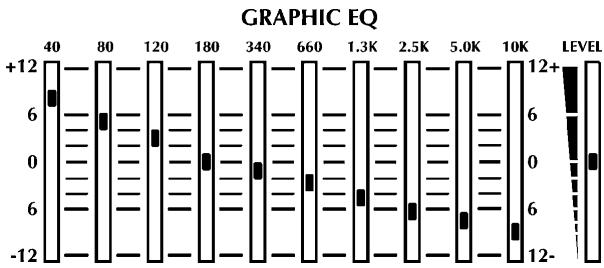
Reggae
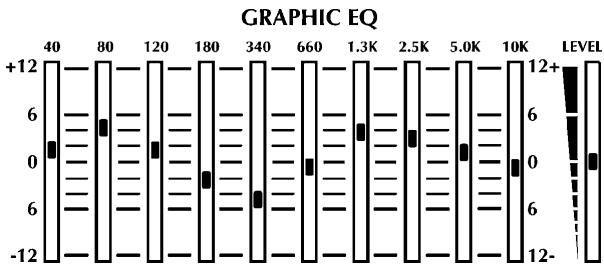
Bright Rock
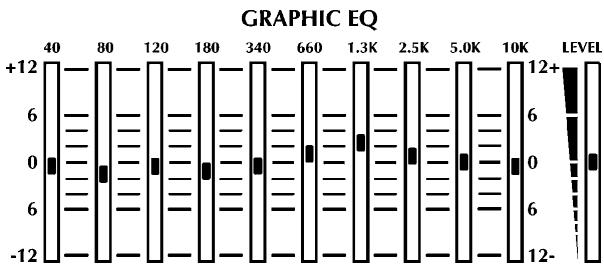
R&B / Funk
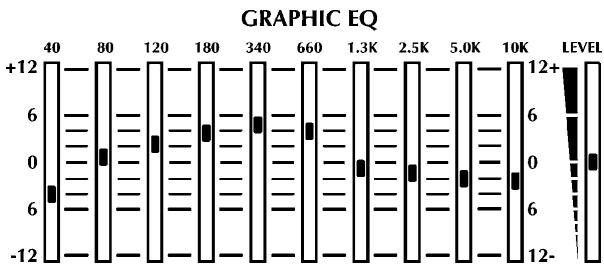
Latin
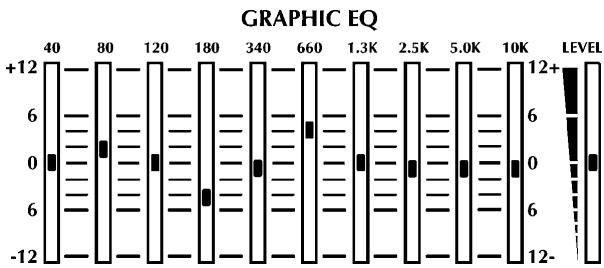
Fusion / Jazz
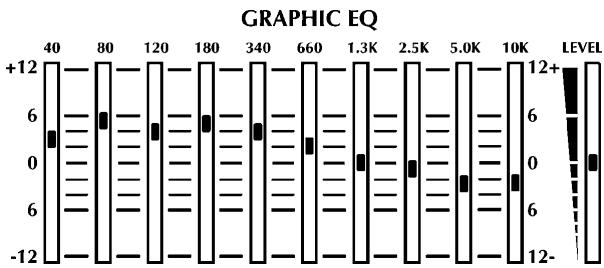
Country / Blues

BASS MASTER 400
Niagara Falls, New York
14305 USA
Voice: (716) 297-2920
Fax: (716) 297-3689