
IMARA HRM - Sports Watch NIKE - Free user manual and instructions
Find the device manual for free IMARA HRM NIKE in PDF.


| Product type | Sports watch with heart rate monitor |
| Brand | Nike |
| Model | IMARA HRM |
| Water resistance (watch) | 50 meters (5 ATM) |
| Water resistance (HR transmitter) | 30 meters (3 ATM) |
| Power supply (watch) | CR2032 3V Lithium battery |
| Battery life (watch) | Approximately 1.5 years depending on use |
| Power supply (HR transmitter) | CR2032 3V Lithium battery |
| Battery life (HR transmitter) | Approximately 1 year for 1 hour of use per day |
| Glass material | Mineral glass |
| Strap material | Polyurethane |
| Case material | Polycarbonate |
| Button material | Polycarbonate |
| Buckle material | Stainless steel |
| Bezel material | Stainless steel |
| Operating temperature | 0°C to 40°C |
| Main functions | ECG heart rate monitor, simplified chronograph, real-time calorie counter, programmable training zones, 2 interval timers, alarm, time/date/day display |
| Cleaning and maintenance | Wipe the HR transmitter after use. Do not store on a conductive material. Avoid pressing buttons under water. |
| Safety | Consult a doctor before use for pacemaker wearers. Keep batteries out of reach of children. |
| Repairability | User-replaceable batteries. For the watch, turn the battery cover a quarter turn with a coin. For the transmitter, unscrew the cover. |
| Reset | Press all four buttons simultaneously to reset and clear data. |
Frequently Asked Questions - IMARA HRM NIKE
User questions about IMARA HRM NIKE
0 question about this device. Answer the ones you know or ask your own.
Ask a new question about this device
Download the instructions for your Sports Watch in PDF format for free! Find your manual IMARA HRM - NIKE and take your electronic device back in hand. On this page are published all the documents necessary for the use of your device. IMARA HRM by NIKE.
USER MANUAL IMARA HRM NIKE
Information is Power
By measuring intensity (heart rate) and duration (time) you can avoid over training, help prevent injury, and maximize your chances of achieving your goals.
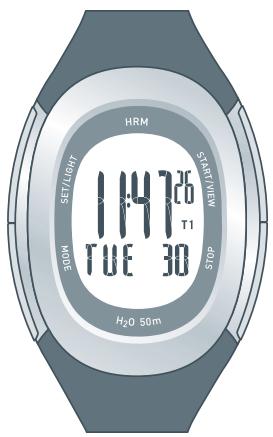
Imara HRM features
- ECG accurate heart rate data
- Simplified stopwatch
Real time calorie counter - Programmable HR training zones
- 2 countdown interval timers
- Data: total workout time, calories burned, average heart rate and time in zones.
- Time/Day/Date/Alarm
HR transmitter
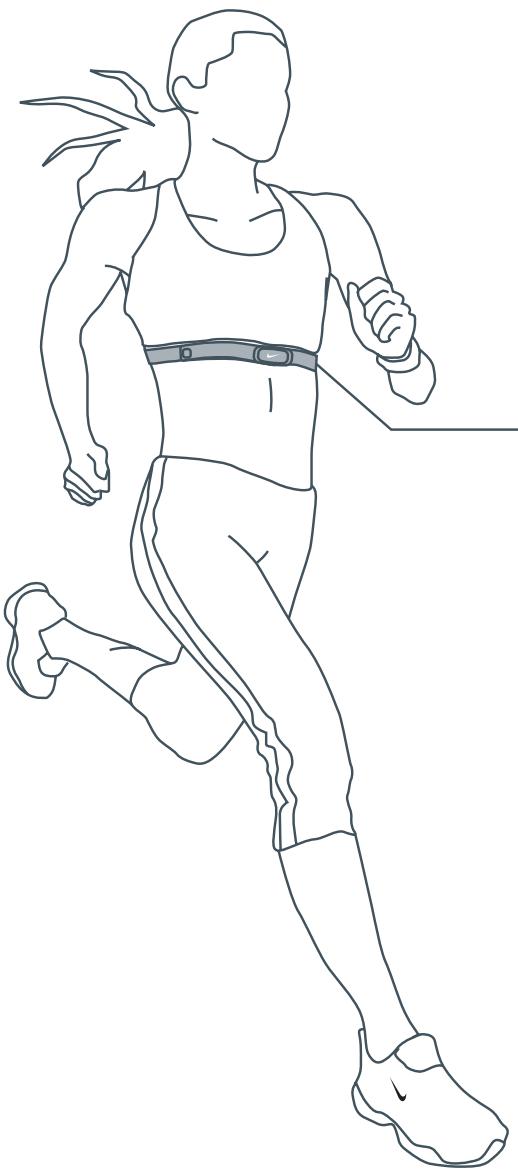
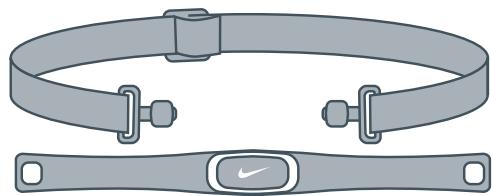
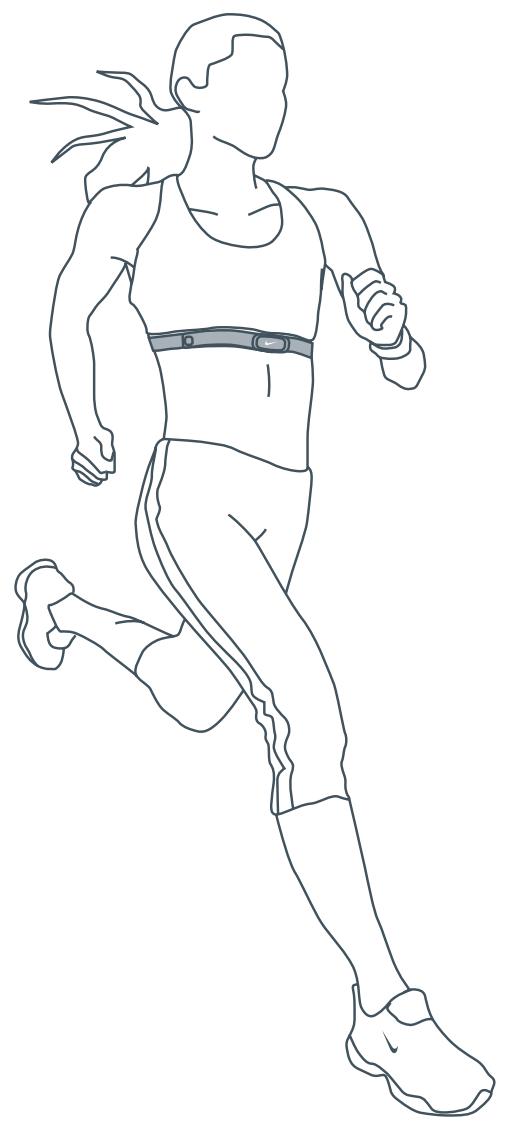
The Heart-Rate transmitter reads heart-rate information when worn directly against the skin and within a few meters of the watch.
The HR transmitter is ergonomically designed to fit comfortably during all types of exercise.
ATTENTION: Anyone beginning an exercise regimen for the first time (especially users of pacemakers or other implanted devices) should consult a physician or health professional before using the heart-rate transmitter.
Contents
Quick Start 3
TIME mode
Set Time 5
CHRONOGRAPH mode
Setting Heart Rate Zones 6
Setting Calorie Information 7
Using the Chronograph 8
INTERVAL mode
Setting Training Intervals 9
DATA mode
Review Workout Data 10
ALARM mode
Set Alarm 11
Heart Rate Intensity Chart 12
Troubleshooting 13
Specifications 13
Battery 14
This document with updates is available online at www.niketiming.com
Printed on Wood Free Paper
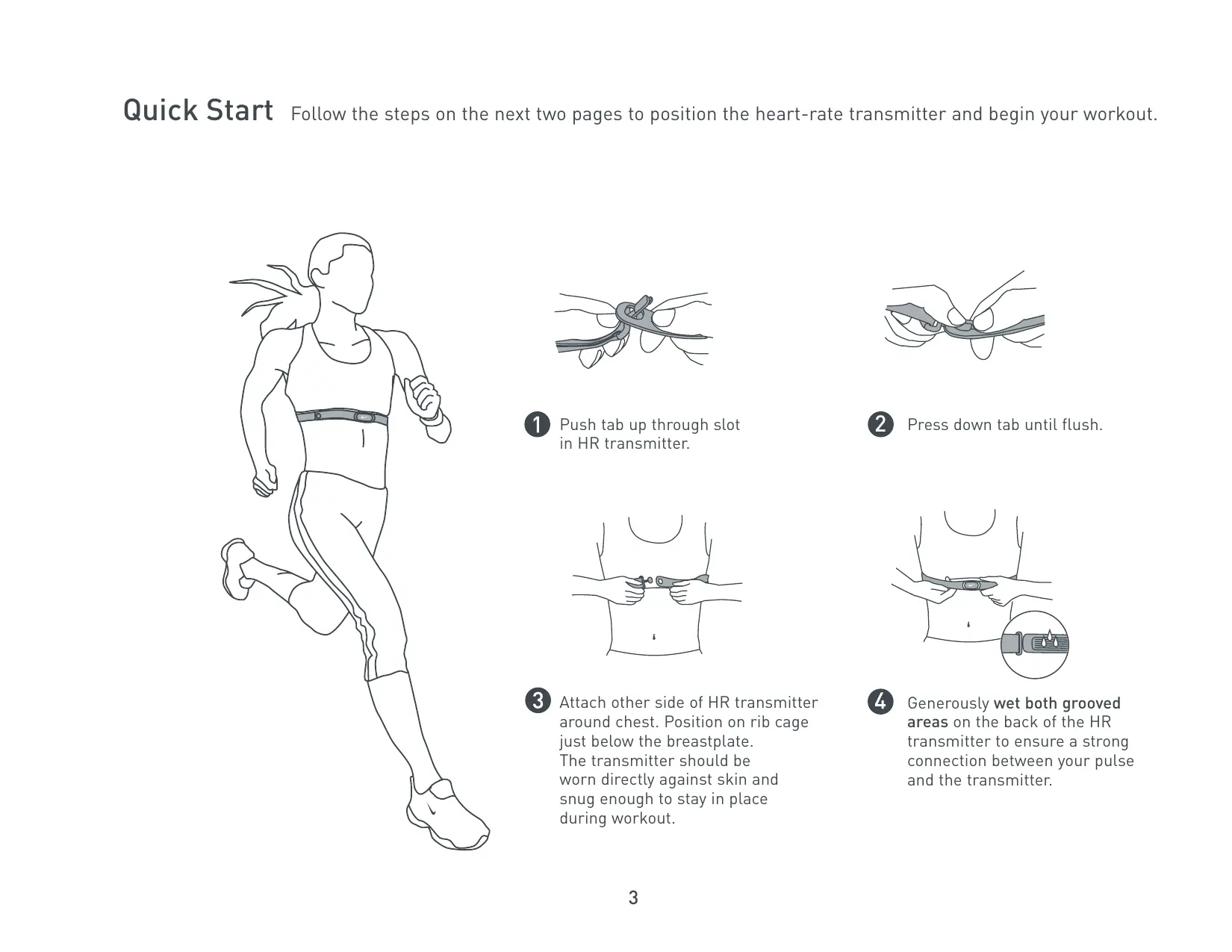
Quick Start Follow the steps on the next two pages to position the heart-rate transmitter and begin your workout.
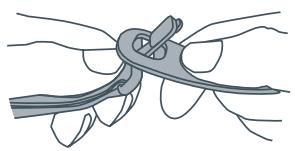
Push tab up through slot in HR transmitter.
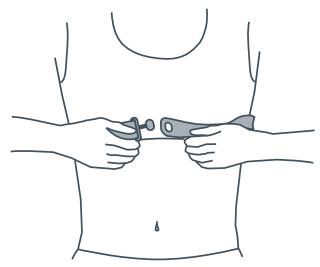
3 Attach other side of HR transmitter around chest. Position on rib cage just below the breastplate. The transmitter should be worn directly against skin and snug enough to stay in place during workout.
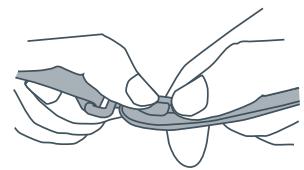
Press down tab until flush.
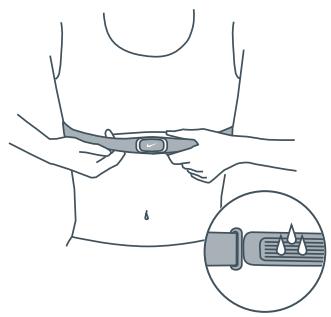
4 Generously wet both grooved areas on the back of the HR transmitter to ensure a strong connection between your pulse and the transmitter.
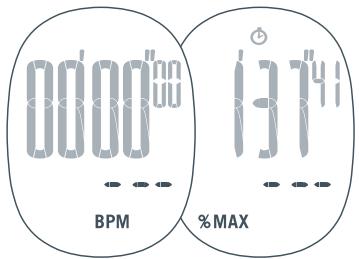
No Heart Rate Displayed
If you see three blinking lines in the display, the watch is not receiving transmission from the HR transmitter.
Run through the Quick Start again or see the Troubleshooting guide.
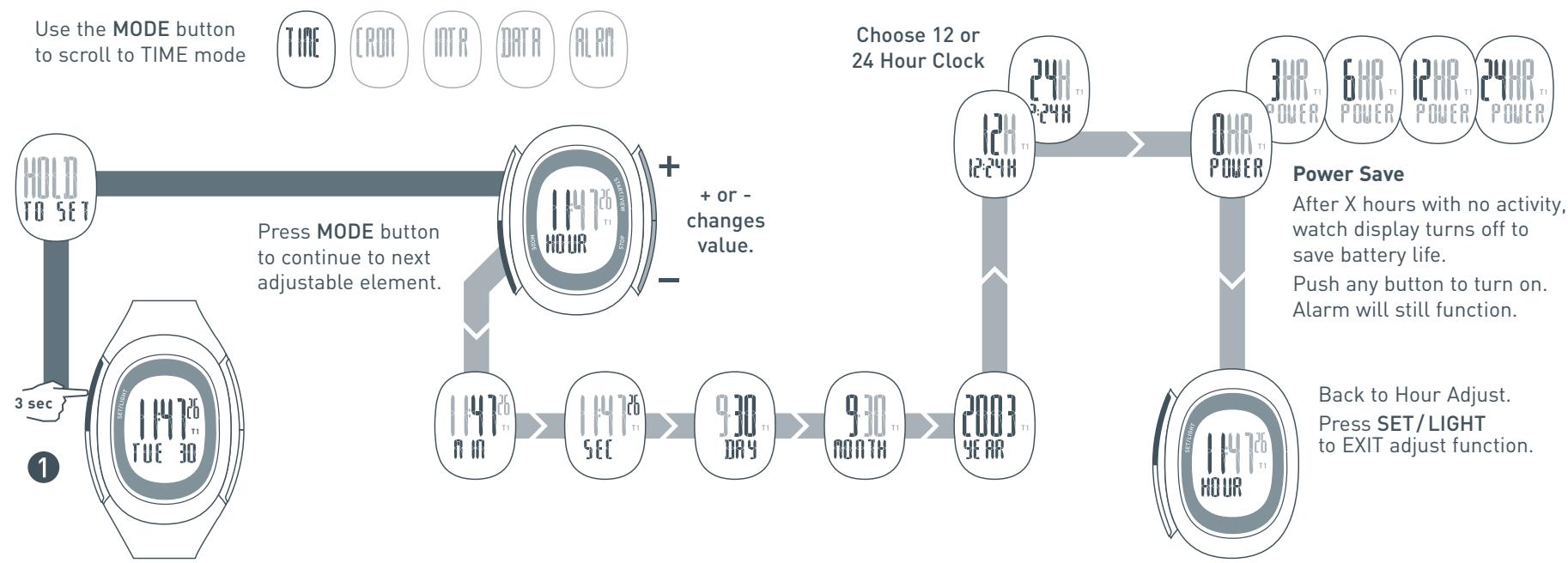
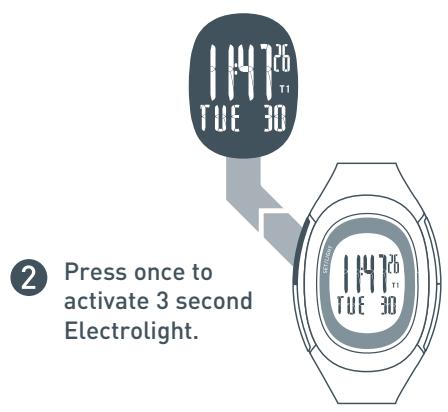
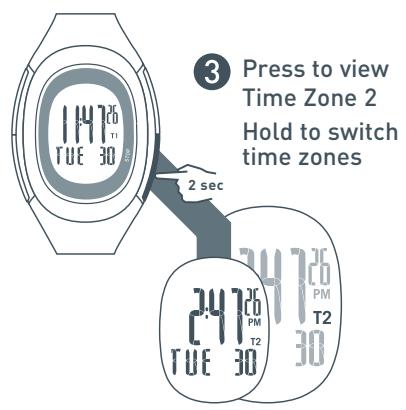
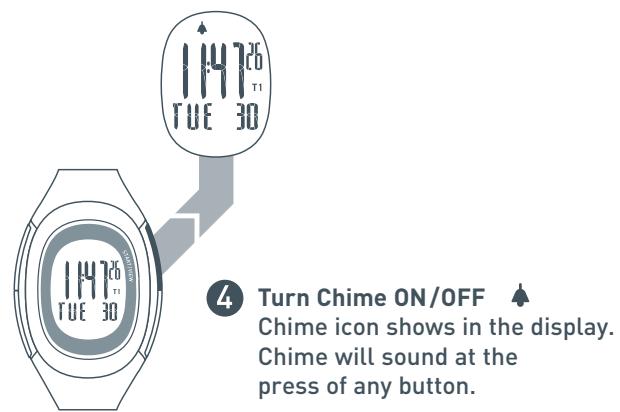
In TIME mode you can set the time, date and power save option. TIME mode is the only mode in which you can turn the button chime ON and OFF. Follow the chart below to adjust the time and date settings.
Setting Heart Rate Zone
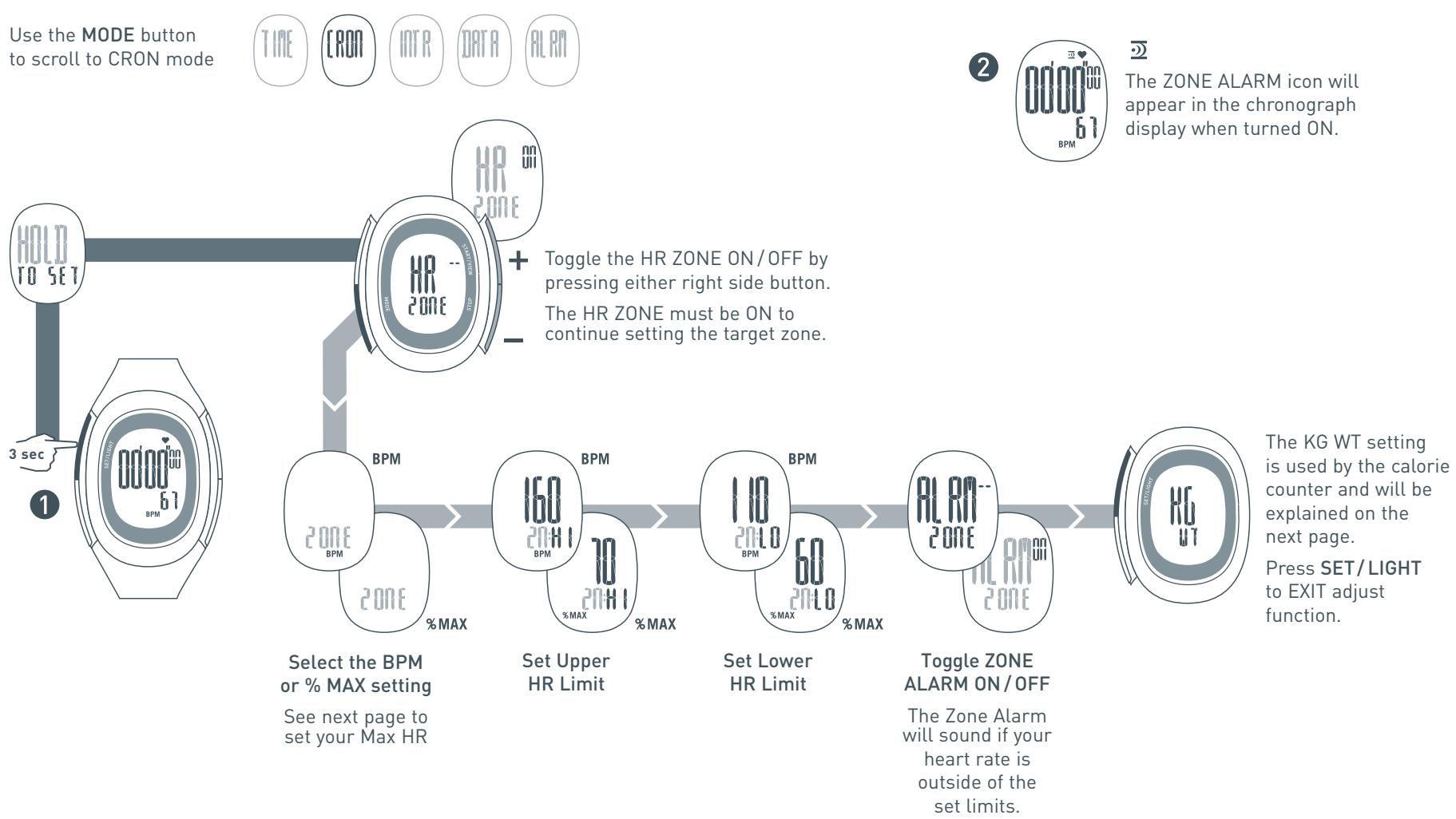
Your heart rate is measured in beats per minute (BPM). Setting a heart rate zone allows you to exercise within an upper and lower heart rate limit. The watch will report your heart rate in either BPM or a percentage of your maximum heart rate. Follow the chart below to set a target heart rate zone.
Setting Calorie Information
The calorie counter will automatically determine the amount of calories you have burned during a workout. Follow the chart below to enter the information used to calculate calories burned.
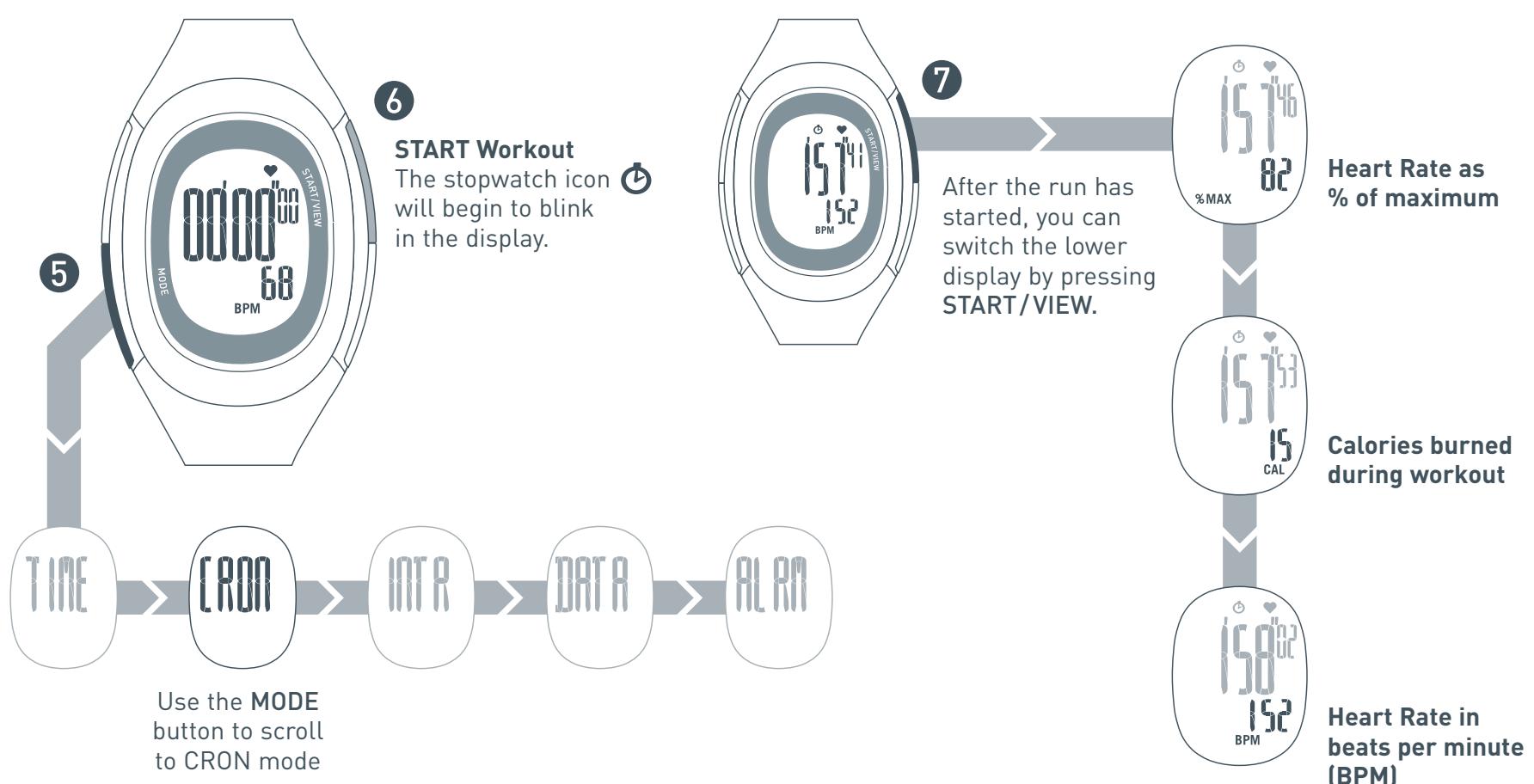
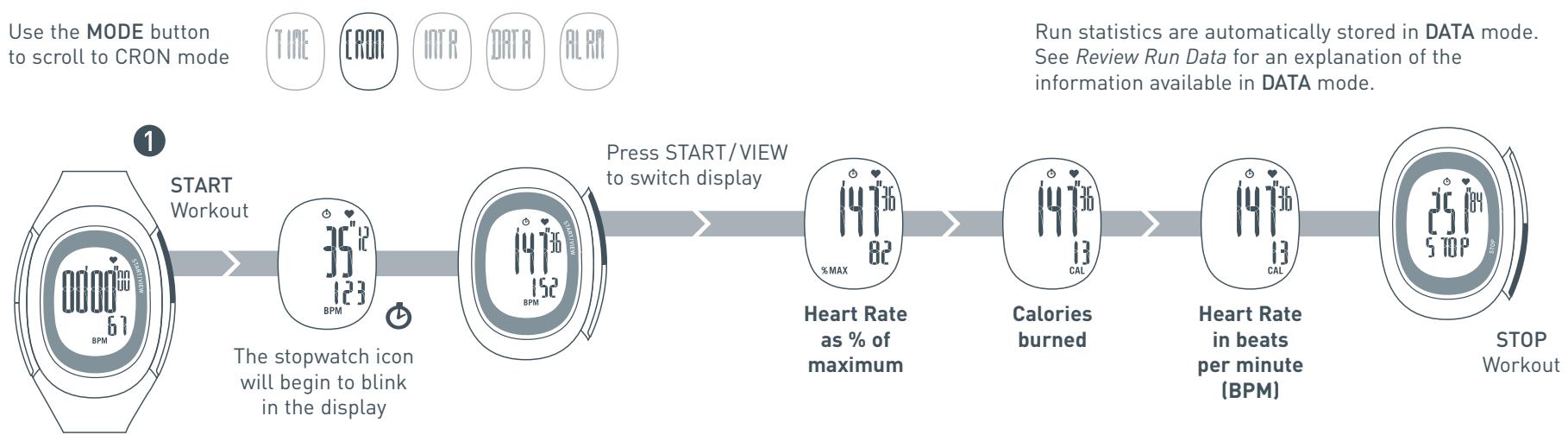
Use the MODE button to scroll to CRON mode


This chart assumes the HR ZONE is turned OFF. If the HR ZONE is ON you will have to press the MODE button until KG WT or LBS WT appears on the display.
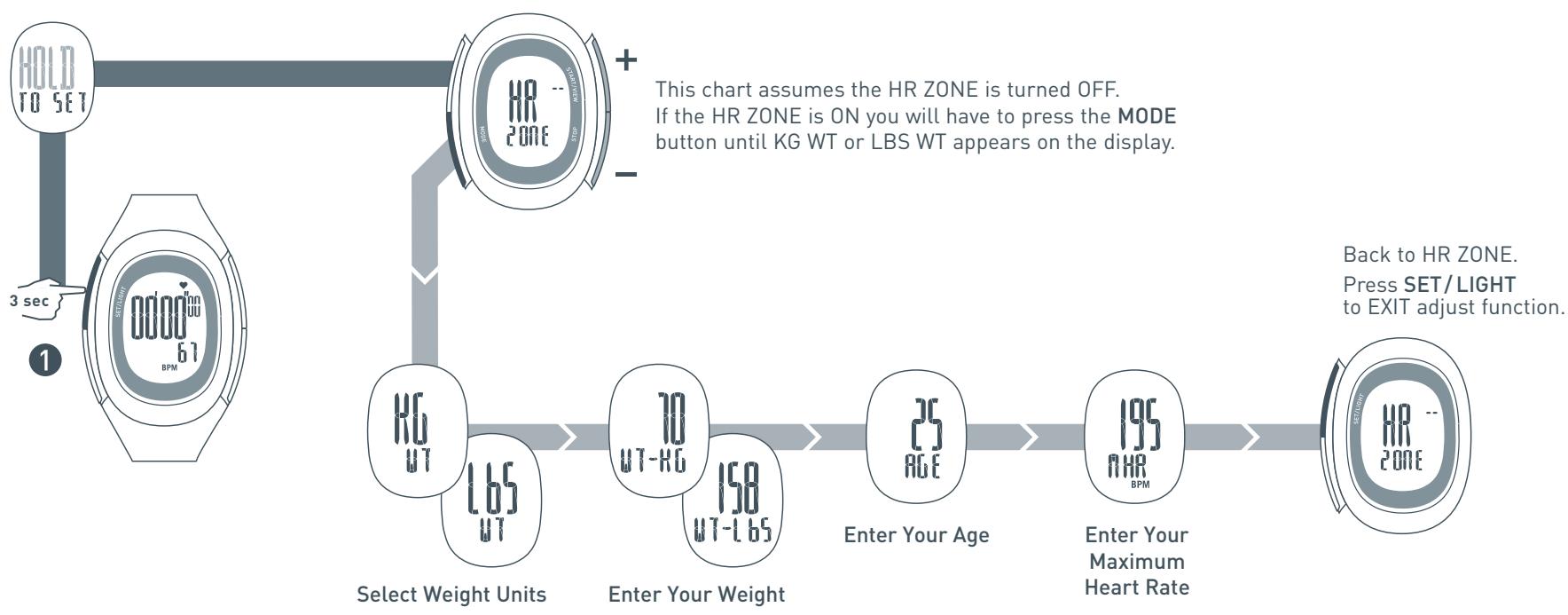
NOTE: Your Max. HR can be determined using the Heart Rate Chart near the back of this manual. The chart has a basic calculation and may not work for everyone. For best results, consult your physician for a Max. HR that is correct for you.
Using the Chronograph
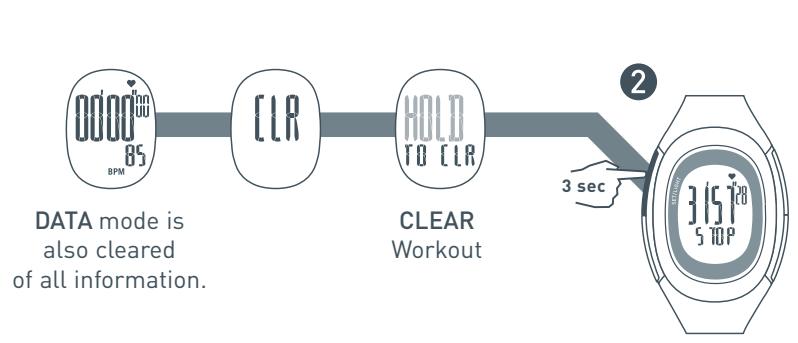
The chronograph is as easy as start and stop with the ability to switch the view to display either BPM, a percentage of your maximum heart rate or the calories burned during a workout. If the HR Zone and the Zone Alarm are turned ON, the chronograph will alert the user if they are outside of the set HR Zone (see Setting Heart Rate Zone to turn the HR Zone ON). Follow the chart below to operate the chronograph.
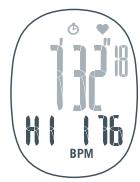
Out-of-Zone Indicators
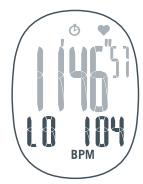
If the HR Zone is turned ON and your heart rate is outside of the target zone, the Out-of-Zone Indicators will flash in the chronograph display. HI indicates your heart rate is above the zone. LO indicates a heart rate below the zone. If the Zone Alarm is turned ON, a beep will sound with either indicator. (See Setting Heart Rate Zone to turn the HR Zone and Zone Alarm ON/OFF)
Setting Training Intervals
INTERVAL mode features a two segment countdown timer. You can use this as an interval training tool by exercising at a hard intensity for a certain period of time, followed by a recovery interval at a easier intensity level. For example, you could set segment one as a running interval and segment two as a walking interval. As each segment is completed, the next begins. All segments will continue to repeat until the timer is stopped or you complete 50 loops of both segments. Follow the chart below to set your training intervals.
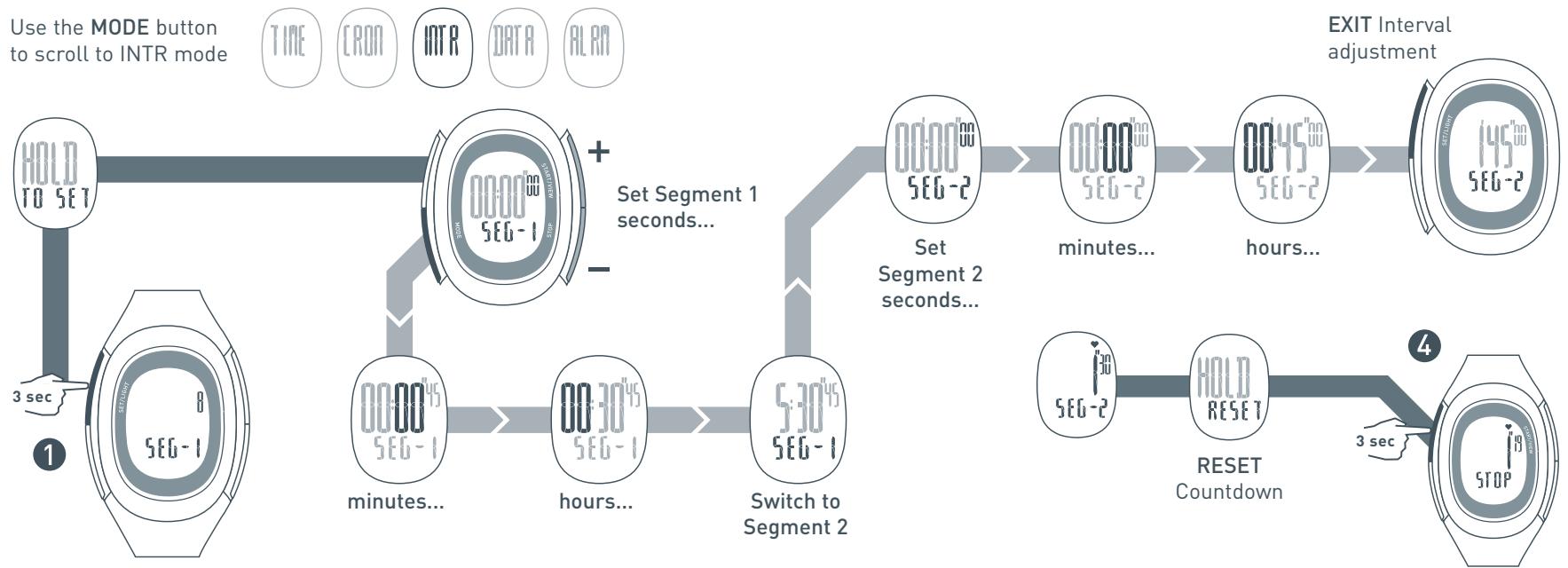

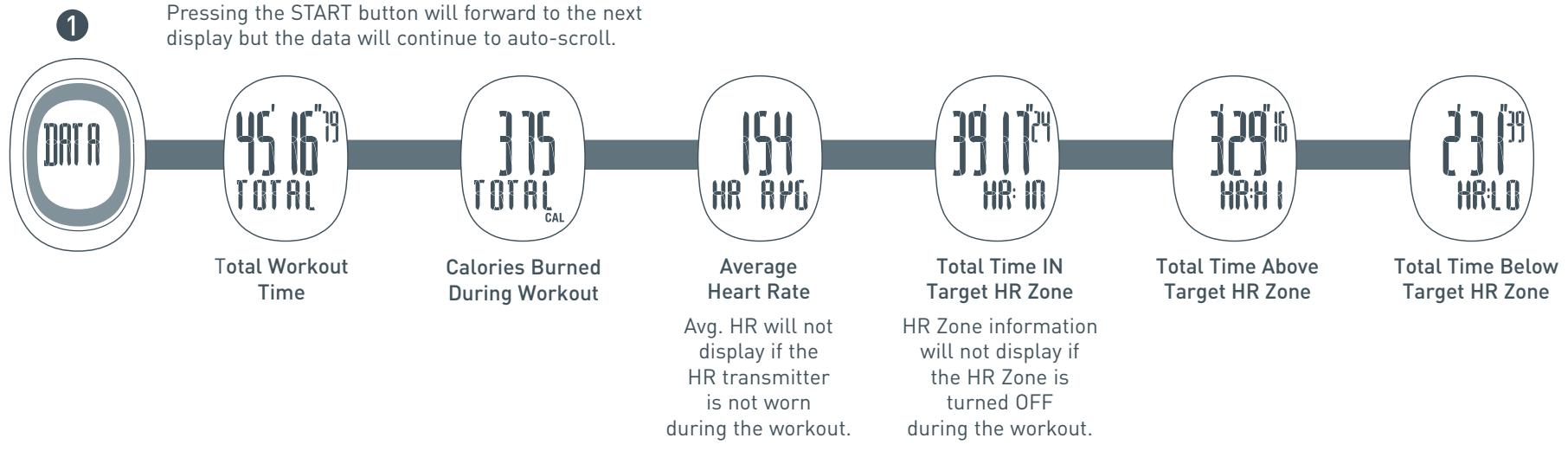
In DATA mode you can review detailed information for each workout. DATA mode will display total workout time, the calories burned during each workout and average heart rate. If the HR Zone is turned ON, DATA mode will also return total time in, above and below the target heart rate zone. Follow the chart below to review the data for each workout.
Use the MODE button to scroll to DATA mode
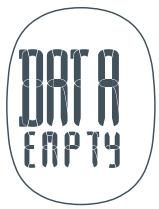
DATA EMPTY
If the display reads DATA EMPTY, the chronograph has been cleared and there is no information currently in DATA mode. You can only clear workout information within CRON mode.
Within ALRM mode you can set one daily alarm. The alarm will sound for 20 seconds.
Follow the chart below to set the daily alarm.
Use the MODE button
to scroll to ALRM mode


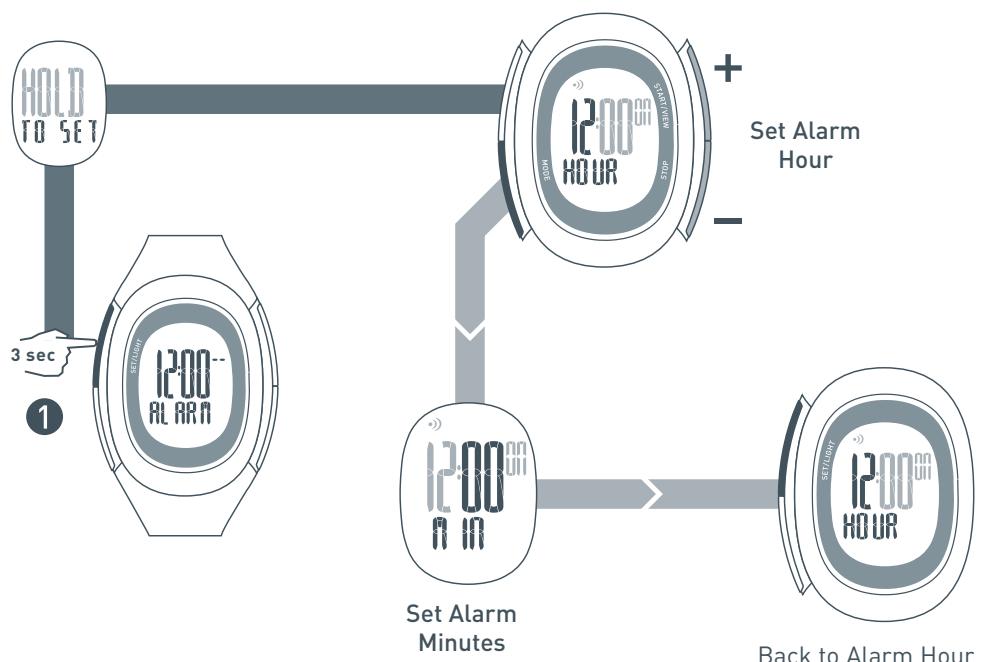
Back to Alarm Hour
Press SET/LIGHT
to EXIT adjust function.
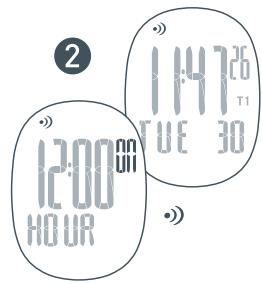
NOTE: The Alarm will automatically turn ON when you enter the adjust function.
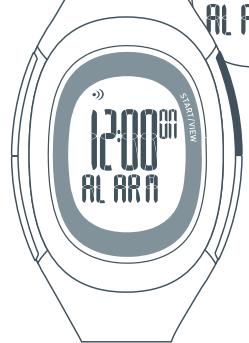
When the Alarm is ON, the Alarm Icon
will show in ALRM mode and TIME mode.
3
1200
ALARR
Alarm ON/OFF
After the alarm is set,
press either right side
button to toggle alarm ON/OFF
Heart Rate Intensity Chart
This is another way to gauge your approximate heart rate zones based on your age. Starting with your Max. Heart Rate, use the chart to help calculate your zones depending on the intensity of your workout. This formula is very basic and may not work for everyone. For best results, consult your physician for a Max. HR that is correct for you.
| Find your Max Heart Rate | Determine your Target Heart Rate Zones (Intensities) | |||
| 210 - (0.7 x age) | Light Intensity (60-70% of Max HR) | Moderate Intensity (70-80% of Max HR) | Heavy Intensity (80-90% of Max HR) | Maximum Intensity (90-100% of Max HR) |
| Exercise in this range at the start of a workout or to recover from a tough workout or race. You should be able to easily maintain a conversation while exercising at this intensity. | Exercise in this range to develop endurance and prepare your muscles to make the transition from aerobic to anaerobic. You should be able to maintain this for a while. You should not be completely breathless and this should not hurt. | Exercise in this range to increase muscle strength and improve your anaerobic threshold. This is uncomfortable. You should be breathing very heavily. You should only be able to sustain this for a brief time. | Exercise in this range to increase mental toughness, Max V02 and tolerance to lactic acid. This is very uncomfortable. You can barely sustain it. You should be completely breathless. Do not exercise at this intensity except on the advice of a trained medical professional. | |
| Max Heart Rate | ||||
| 205 bpm | 123 - 143 bpm | 144 - 163 bpm | 164 - 184 bpm | 184 - 205 bpm |
| 200 | 120 - 139 | 140 - 159 | 160 - 179 | 180 - 200 |
| 195 | 117 - 136 | 137 - 155 | 156 - 175 | 176 - 195 |
| 190 | 114 - 132 | 133 - 151 | 152 - 170 | 171 - 190 |
| 185 | 111 - 129 | 130 - 147 | 148 - 166 | 167 - 185 |
| 180 | 108 - 125 | 126 - 143 | 144 - 161 | 162 - 180 |
| 175 | 105 - 122 | 123 - 139 | 140 - 157 | 158 - 175 |
| 170 | 102 - 118 | 119 - 135 | 136 - 152 | 153 - 170 |
| 165 | 99 - 115 | 116 - 131 | 132 - 148 | 149 - 165 |
| 160 | 96 - 111 | 112 - 127 | 128 - 143 | 144 - 160 |
| 155 | 93 - 108 | 109 - 123 | 124 - 139 | 125 - 155 |
| 150 | 90 - 104 | 105 - 119 | 120 - 134 | 121 - 150 |
Troubleshooting
No heart rate displayed on watch:
The grooved sensors may not be wet enough.
Wet and try again. It is recommended that you wear the Heart Rate Transmitter directly against your skin. If you are wearing the HR Transmitter over clothing, try getting the clothing wet also.
The HR Transmitter may not be positioned correctly.
Make sure the grooved sensors are flat against the skin.
Heart rate reading on watch is erratic or stops:
You may need to replace the battery in the HR Transmitter.
Sources of electromagnetic fields like appliances, computers and power lines can cause interference. Change your location.
This product complies with EN60601-1-2
Watch display is frozen:
The display of your watch may "freeze" due to static electricity or recent battery replacement. If this occurs, press and hold all four buttons at the same time. This will erase the data in the memory and allow you to reset the watch to the factory settings.
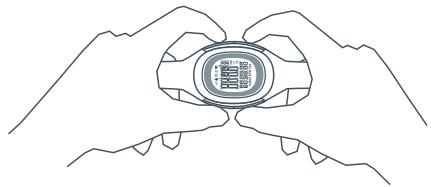
Press and hold all four buttons at the same time to reset the watch to the factory settings.
Watch beeps continuously:
If you have the zone alarm on and your heart rate does not fall within any of your zones, the watch will beep to indicate you are out of your zones. See Setting Heart Rate Zone for instructions on how to turn off the zone alarm.
Specifications
Watch
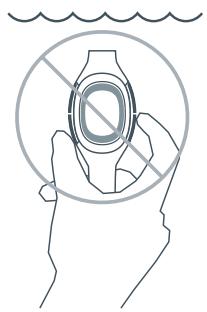
Water Resistant up to 50 Meters:
Designed for underwater performance to a depth of 165 feet (50 m).
ATTENTION: Water damage will occur if watch buttons are pressed while underwater!
Operating Temperature: 0 to 40° Celsius
Material Specifications:
Crystal: Mineral Glass
Strap: Polyurethane
Case: Polycarbonate
Buttons: Polycarbonate
Buckle: Stainless Steel
Bezel: Stainless Steel
Battery Hatch: Stainless Steel
Mode Limits:
Chronograph: 23:59'59"
Heart Rate: 30 - 240 bpm
Timer: 23:59'59"
HR Transmitter
Water Resistant up to 30 Meters:
Wipe dry after use. Do not store among conductive material.
Operating Temperature: 0 to 40° Celsius
Accuracy: ± 1% or ± 1% bpm, whichever larger (steady state)
Material Specifications:
Case: Polycarbonate
Strap: Urethane
Band: Elastic
Battery
WARNING! Keep watch batteries away from children. If swallowed, contact a doctor immediately.
WARNING! Batteries contain chemical substances. They should be disposed of properly according to local regulations.
Watch
Battery Type: CR2032 3V Lithium
Battery Life:
The battery is estimated to last 1.5 years depending on frequency and use of certain features. Activating the Electrolite feature will contribute to battery drain. Utilizing the Power Save function will help conserve battery life.
Battery Replacement:
Follow steps below to replace your watch battery. For best results, you can have Nike's authorized service center change the watch battery.
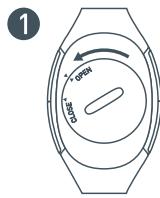
Using a coin, turn the battery hatch one-quarter turn counter-clockwise.
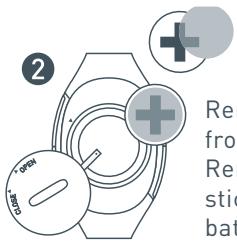
Remove battery from compartment. Remove insulator sticker from old battery and place it on new CR2032 3V Lithium battery.
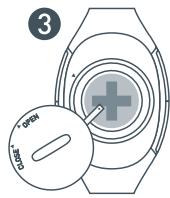
Place the new battery into the compartment under the metal tab.
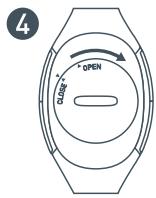
Make sure the O-ring is in proper placement. Replace the battery hatch.
HR Transmitter
Battery Type: CR2032 3V Lithium
Battery Life:
The battery is estimated to last 1 year if HR Transmitter is used one hour per day.



Using a coin, unscrew the battery hatch by turning it counter-clockwise.
Insert a CR2032 3V lithium battery with the writing facing you. Do not touch the 2 contacts.
Replace the battery lid.
- INFORMATION IS POWER
- IMARA HRM FEATURES
- HR TRANSMITTER
- CONTENTS
- TIME MODE
- CHRONOGRAPH MODE
- INTERVAL MODE
- DATA MODE
- ALARM MODE
- QUICK START FOLLOW THE STEPS ON THE NEXT TWO PAGES TO POSITION THE HEART-RATE TRANSMITTER AND BEGIN YOUR WORKOUT
- NO HEART RATE DISPLAYED
- SETTING HEART RATE ZONE
- SETTING CALORIE INFORMATION
- USING THE CHRONOGRAPH
- OUT-OF-ZONE INDICATORS
- SETTING TRAINING INTERVALS
- DATA EMPTY
- HEART RATE INTENSITY CHART
- TROUBLESHOOTING
- NO HEART RATE DISPLAYED ON WATCH
- HEART RATE READING ON WATCH IS ERRATIC OR STOPS
- WATCH DISPLAY IS FROZEN
- WATCH BEEPS CONTINUOUSLY
- SPECIFICATIONS
- WATCH
- WATER RESISTANT UP TO 50 METERS
- MATERIAL SPECIFICATIONS
- MODE LIMITS
- WATER RESISTANT UP TO 30 METERS
- BATTERY
- BATTERY LIFE
- BATTERY REPLACEMENT
Brand : NIKE
Model : IMARA HRM
Category : Sports Watch