
XF6800EL - Washing machine NEW POL - Free user manual and instructions
Find the device manual for free XF6800EL NEW POL in PDF.


| Product type | Washing machine |
| Brand | NEW POL |
| Model | XF6800EL |
| Width | 59.5 cm |
| Height | 85.0 cm |
| Depth | 55.0 cm |
| Maximum washing capacity (cotton) | 6.0 kg |
| Maximum spin speed | 800 rpm |
| Water pressure | 0.05 - 1 MPa |
| Washing programs | Cotton, Synthetics, Delicate, Wool, Quick wash, Rinses, Drain and spin |
| Optional functions | Prewash, Extra rinse |
| Balance control | Yes (anti-unbalance) |
| Load recognition system | Yes (only for cotton programs) |
| Loading type | Front loading (porthole) |
| Spin speed adjustment | Yes, variable |
| Washing temperatures | Cold, 30°C, 40°C, 50°C, 60°C, 75°C, 90°C |
| Washing phase indicator | LED (Prewash, Wash, Rinses, Spin, End) |
Frequently Asked Questions - XF6800EL NEW POL
User questions about XF6800EL NEW POL
0 question about this device. Answer the ones you know or ask your own.
Ask a new question about this device
Download the instructions for your Washing machine in PDF format for free! Find your manual XF6800EL - NEW POL and take your electronic device back in hand. On this page are published all the documents necessary for the use of your device. XF6800EL by NEW POL.
USER MANUAL XF6800EL NEW POL
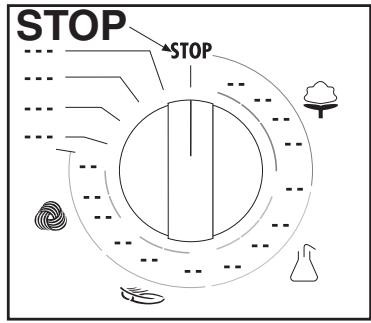
"STOP" SUL PROGRAMMATORE
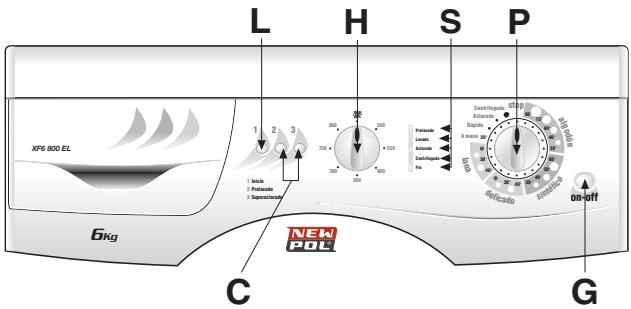
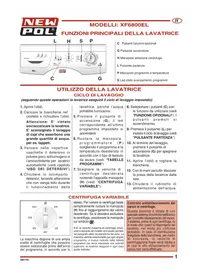
MAIN FUNCTIONS OF THE WASHING MACHINE
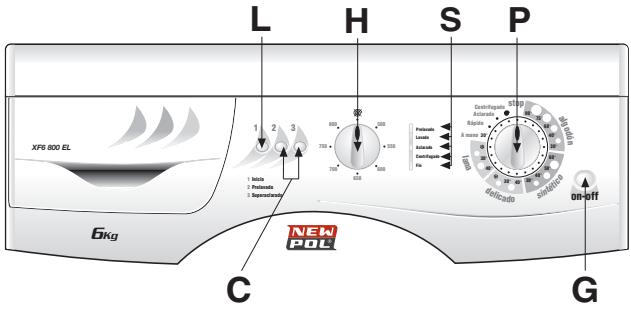
C Optional function buttons
G On/Off button
H Spin selector knob
L Start button
P Programme and temperature knob
S Programme status led
USING THE WASHING MACHINE
WASH CYCLE
(follow these instructions and the washing machine will run the selected wash cycle)
- Open the door
- Load the washing in the drum and close the door.
Warning: Do not overload the machine. It is not advisable to wash items that absorb large quantities of water such as carpets.
- Add a low-suds detergent and softener designed for automatic washing machines in the respective compartments of the detergent drawer (see chapter "USE OF DETERGENTS").
-
Close the detergent drawer. Do not open the drawer while the machine is working as this may cause water to spill out.
-
Press the on button (G); the led corresponding to the last program selected will light up.
- Rotate the programmer knob (P) to select the required programme and temperature according to the type of fabric to wash (see: "PROGRAMME TABLES")
- Select the required spin speed by rotating the relative knob (H) (see "VARIABLE SPIN").
- Select the (C) buttons with the functions required (see "OPTIONAL FUNCTIONS"). The pressed buttons will light up
-
Press button (L) to start the wash cycle (see "START BUTTON")
-
At the end of the wash, press the On/Off button (G) to switch off the washing machine.
- Open the door and remove the washing.
- With dry hands, unplug the washing machine from the mains supply.
- Close the water feed valve.
VARIABLE SPIN
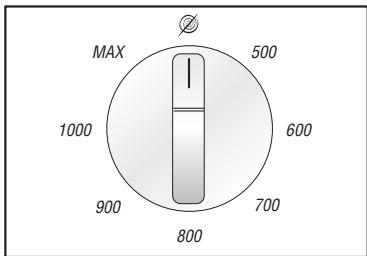
The washing machine has a wide selection of spin speeds that can be selected before starting the wash programme. To change the speed,
simply rotate knob (H) to the value required. To select the no-spin function, rotate the knob to position
NB. The maximum spin speed (MAX) will vary according to the machine model and that reported in the technical characteristics table. The maximum selectable speed for each programme is indicated in the programme table (if a higher spin speed is selected, the machine will only effect a spin at the value indicated in the table).
Spin load imbalance control:
This washing machine is equipped with a special electronic control system for correctly balancing the wash load. Prior to each spin, the system ensures that the washing is evenly distributed in the drum.
If the washing is not evenly distributed, the final spin speed is reduced, and if the load is very unbalanced, the spin is not effected.
USING THE WASHING MACHINE
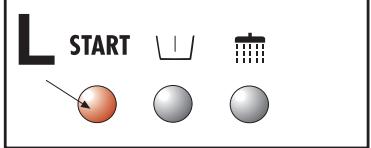
START BUTTON
After selecting the required programme, press this button to start the wash cycle Button (L) will light up to indicate the wash cycle
has started.
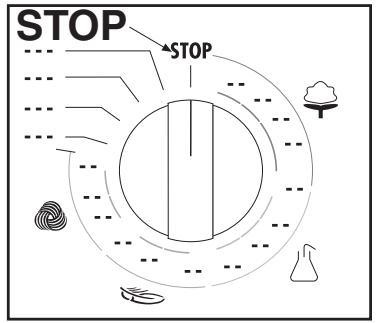
PROGRAMMER KNOB "STOP"
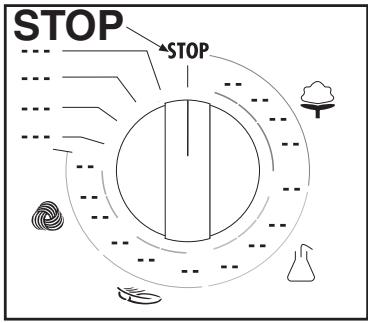
The stop function resets the washing machine. If, for any
reason, you want to change the wash programme or add more washing to the load during the wash cycle, simply place the programmer knob in position "STOP" (the button will start to flash). Then re-position the knob on the new programme and press the "START" button.
Warning!! only use this function if strictly necessary and then only if the programme to reset has been running for a few minutes. Before opening the door after a reset, wait 2 minutes for the locking mechanism to release.
OPTIONAL FUNCTIONS
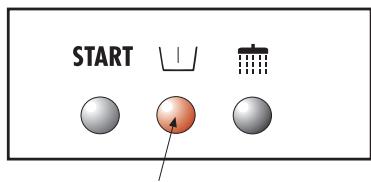
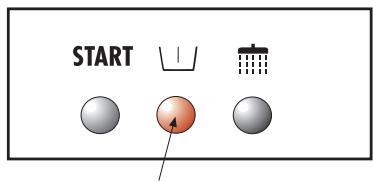
PREWASH
Press this button and the machine will perform a prewash at the maximum temperature of 40^ . This function can only be used on the "COTTON" and "SYNTHETICS" programmes.
N.B. When this option is used, the detergent must also be added to the appropriate prewash compartment.
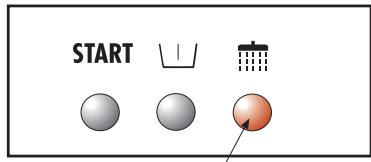
EXTRA RINSE
The washing machine has been designed to reduce water
consumption to a minimum. In very soft water areas, or in the case where detergent residues are noticed at the end of the wash cycle, pressing this button will add one more rinse to the programme.
NB. The use of this function depends on the type of programme selected. Consequently, if the wash programme does not include this function, the button cannot be enabled (see PROGRAMME TABLE").
MONITORING THE WASH
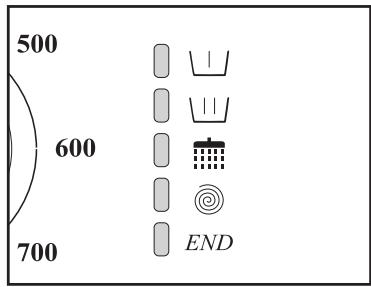
The figure alongside shows the 5 main functions of a PREWASH, WASH, RINSE, SPIN, END wash cycle:
Each of these functions will be highlighted during the wash by a led.
In this way, the user is constantly aware of the progress of the wash.
After the spin phase, the
corresponding led will stay lit for approximately 2 minutes. This is the time lapse necessary for the door release mechanism to work, after which the END led will light up.
At this point, press the On/Off button, open the door and remove the washing.
PROGRAMMETABLES
| PROGRAMMER KNOB | WASH TEMPERATURE | SYMBOL | FABRIC TYPE | DISPENSER COMPARTMENTS | SPINN SPEED | BUTTONS ENABLED | |
| 1 | |||||||
| COTTON | 90° | 90° | Heavily soiled white cotton fabrics with organic stains. | 123 | Max (or lower) | ● | ● |
| COTTON | 75° | 75° | Sheets, shirts, tablecloths, towels that are resistant and heavily soiled | 123 | Max (or lower) | ● | ● |
| COTTON* | 60° | 60° | For shirts, tablecloths, towels that are resistant and normally soiled | 123 | Max (or lower) | ● | ● |
| COTTON | 40° | 40° | White and coloured fabrics that are resistant and heavily soiled | 123 | Max (or lower) | ● | ● |
| COTTON | 30° | 30° | Delicate coloured fabrics that are lightly soiled | 123 | Max (or lower) | ● | ● |
| SYNTHETICS | 60° | 60° | Colourfast synthetic fabrics that are heavily soiled | 123 | 800 (or lower) | ● | ● |
| SYNTHETICS | 50° | 50° | Colourfast synthetic fabrics that are normally soiled | 123 | 800 (or lower) | ● | ● |
| SYNTHETICS | 40° | 40° | Delicate coloured synthetic fabrics that are lightly soiled | 123 | 800 (or lower) | ● | ● |
| SYNTHETICS | 30° | 30° | Delicate coloured synthetic fabrics that are lightly soiled | 123 | 800 (or lower) | ● | ● |
| DELICATES | 40° | 40° | Delicate cotton, viscous and mixed delicate fabrics | 123 | 500 (or lower) | ○ | ○ |
| DELICATES | 30° | 30° | Delicate cotton, viscous and mixed delicate fabrics | 123 | 500 (or lower) | ○ | ○ |
| DELICATES | COLD | — | Fabrics in silk and mixed delicates | 123 | 500 (or lower) | ○ | ○ |
| WOOL **** | 40° | Machine washable wool | 123 | 800 (or lower) | ○ | ○ | |
| WOOL | 30° | 30° | Machine washable wool | 123 | 800 (or lower) | ○ | ○ |
| WOOL | COLD | — | Machine washable wool | 123 | 800 (or lower) | ○ | ○ |
| HAND WASH | 30° | Hand washable fabrics | 123 | 800 (or lower) | ○ | ○ | |

OPTIONAL WITH PREWASH BUTTON PRESSED
FUNCTION ENABLED
FUNCTION DISABLED
- Reference programme for energy classification purposes according to standard EN 60456
*** Reference program for pure new wool.
PROGRAMMETABLES
| PROGRAMMER KNOB | WASH TEMPERATURE | SYMBOL | FABRIC TYPE | dispensers COMPARTMENTS | SPINN SPEED | BUTTONS ENABLED | |
| QUICK WASH | 40° | —— | This programme will wash dirty washing in 35 minutes at a maximum temperature of 40°. | 123 | 800 (or lower) | ○ | ○ |
| RINSES | —— | —— | To rinse and refresh the washing | 123 | Max | ○ | ● |
| DRAIN AND SPIN | —— | —— | Drain and final spin | 123 | Max | ○ | ○ |
FUNCTION ENABLED FUNCTION DISABLED
INTELLIGENT LOAD RECOGNITION SYSTEM
The electronic washing machine is equipped with a special system that automatically recognises the amount of washing loaded in the drum. The machine can thus regulate the amount of water to use for the wash and proportion the wash time accordingly, thus saving water, time and energy.
In the case where the amount of washing is less than the maximum recommended load (see technical characteristics table), the quantity of water used for the wash will be reduced by 2 litres for each kg less of washing.
In the case of a half-load or less, the machine will automatically carry out one rinse less than programmed.
N.B. This function is only activated for cotton programmes.
TECHNICAL CHARACTERISTICS
| MODEL → | XF6800EL | |
| Dimensions: | Width cm.: | 59.5 |
| Height cm.: | 85.0 | |
| Depth cm.: | 55.0 | |
| Maximum recommended load*: | 6,0 Kg | |
| 3,0 Kg | ||
| 1,5 Kg | ||
| Spin max: (rpm) | 800 | |
| Water pressure: | min. 0,05 MPa - max. 1 MPa | |
| Max. absorbed power/Electrical connection | see plate with technical feature | |
*To ensure that the wash load is evenly balanced in the machine and to avoid excessive vibration during spinning, the amount of washing must not be less than 1kg .

"STOP" EN EL PROGRAMADOR
FONCTIONS OPTIONNELLES
PRELAVAGE
- "STOP" SUL PROGRAMMATORE
- MAIN FUNCTIONS OF THE WASHING MACHINE
- USING THE WASHING MACHINE
- WASH CYCLE
- VARIABLE SPIN
- Spin load imbalance control:
- START BUTTON
- PROGRAMMER KNOB "STOP"
- OPTIONAL FUNCTIONS
- PREWASH
- EXTRA RINSE
- MONITORING THE WASH
- FUNCTION ENABLED FUNCTION DISABLED
- INTELLIGENT LOAD RECOGNITION SYSTEM
- "STOP" EN EL PROGRAMADOR
- FONCTIONS OPTIONNELLES
- PRELAVAGE
Brand : NEW POL
Model : XF6800EL
Category : Washing machine