ManualGo.com
 MIDLAND 445 BT - Talkie Walkie ALAN - Free user manual and instructions
Find the device manual for free MIDLAND 445 BT ALAN in PDF.



Download the instructions for your Talkie Walkie in PDF format for free! Find your manual MIDLAND 445 BT - ALAN and take your electronic device back in hand. On this page are published all the documents necessary for the use of your device. MIDLAND 445 BT by ALAN.
USER MANUAL MIDLAND 445 BT ALAN
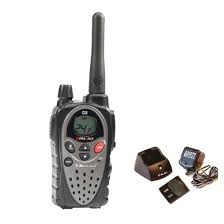
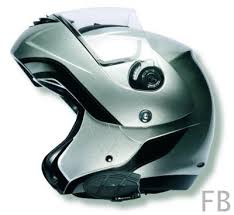
MIDLAND 445 BT has following main features: + ALAN 445 BTis the first PMR 446 radio with integrated Bluetooth circuits. + lt is designed to be operated without any charges and individiual license in all EU member states + non EU countries, which apply the R&TTE directive (Iceland, Norway, San Marino, Switzerland and Liechtenstein). Please find the complete country list in our Declaration of Conformity or on our service web site http://www.hobbvradio.de. + __ While the Bluetooth headset and the radio do not require any cable connection, it is now possible to mount the radio and external PTT key on the motor bike - this ensures a better communication range, since the radio is no more operated from a pocket in your jacket. A free radiating antenna can extend the communication range under optimized conditions up to 4-6 km. + The automatic voice switching (VOX-function) of the radio can also be used in Bluetooth mode (if the headset ensures sufficient noise canceling). Some high-end motor bike helmets may allow VOX operation at moderate speed. However, we recommend to use manual PTT switching for 2-way motor bike radio communication. Only PTT operation allows clear and undisturbed communication at high speed situations. À waterproof PTT key is supplied with the radio! + The Bluetooth Module of 445 BT contains the chipset of our BPA 100 Bluetooth adaptor and can be connected to almost all standard BT-headsets, which are sold for use with cellular phones. + __ The additional charging socket allows recharging of the batteries even during operation of the radio. + The radio can also be used by security staff. While wearing a standard BT headset, the radio can be hidden in the pocket, and the PTT key of the radio can be used as well as the hidden external PTT button. + Monitoring via loudspeaker: The speaker of the radio can monitor the radio reception independent of the Bluetooth Headset. The volume setting of the speaker (volume knob) has no influence on the volume at the BT headset. For BT mode only, the speaker volume can be adjusted to low. + A dual colour red/green LED shows all BT functions.
Pairing-Procedure If there is any paired Bluetooth Headset nearby (range up to some meters), it can be connected with the radio. Before first connection, both units (radio and headset) must be paired toghether, because both must know that they ,belong“ to each other. This is important, because you certainly do not wish that your neighbor can use your radio without your agreement! How to perform the Pairing Process:
à Bluetooth Please study the user instructions for your headset. Although the procedure is similar among many Bluetooth sets, we cannot describe all these procedures here. Please study the chapter about pairing with a mobile phone, the procedure to pair it with the 445 BT is the same! Nearly all headsets indicate the pairing process by rapid flashing of the LED's (green-red or blue red, depending on the model) Before pairing, start with switched off Bluetooth functions of both units. To make sure that the BT function of the 445 BT is really switched off, switch the radio on and press the Bluetooth button at least for 4 seconds, until the LED will flash 4 x red. Now the Bluetooth function is off. Now switch the Bluetooth function on again: Press the Bluetooth button and keep it continuously pressed. After the first 4 seconds, You will see the BT function switch on again ( 4 x green flashing). This shows that BT is now on. 4sec 4x green + __ Do not release the button now- keep it further pressed. After some more seconds, the LED starts flashing red and green rapidly. This shows, that Your radio is now ready for pairing, it is waiting for a Bluetooth headset in the range
nearby. 4 sec 4sec alternative flashing ca. 1 minute You will have about 1 minute time to start the same procedure with Your headset. If both units are pairing, they will exchange their individual serial numbers and some codes, which later lets them detect each other as paired. In future, both units will detect each other immediately after switching them on. + The LED's will stop flashing after pairing has been completed. Now, the LED will only flash green from time to time. This shows that both units are paired, but they are in StandBy mode. Info: Automatic PIN Code transfer If You should have already paired a BT device with a mobile phone, You will have learned to enter the 4 digit PIN code for the headset into the mobile phone. Since the 445 BT has no keyboard, the Bluetooth chipset in Your radio will automatically transfer the PIN code to your headset, provided that the headset will use one of the usual PIN codes: + 0000 (e.g. for our MIDLAND BT Intercom, Albrecht Rider, BMW und Vemar helmets) + 1234 (e.g. for many other Standard Bluetooth Headsets), or + __ 1111, whichis also used often. Other PIN codes cannot be paired with 445 BT. (We have no information about any suitable headset type, which should use different PIN codes as the above mentioned 3 codes. + To be on the safe side, You should ask Your Headset supplier for the PIN code information before You buy the Bluetooth Headset or — helmet).
Talk connection onJoff There are two possible methods to start the Bluetooth communication link. The method depends on which “protocol” will be used in the headset software. Press Bluetooth button at 445 BT shortly (= less than 1 second). After appr. 1 second, the communication link is established and the LED will change to green continuously. You can now listen and / or talk. Press the Talk / Start button at the Bluetooth headset. The LED at the 445 BT will light green as well. Which of both possibilities will work, depends on the headset and the kind of Bluetooth protocol applied by the headset software. The so called Headset Protocol will allow both methods, while the Handsfree Protocol allows in some cases only the Bluetooth button at the 445 BT side to start and stop the communication link. For example the BMW Bluetooth helmet system is using the Handsfree Protocol, so only the button at the 445 BT should be used. Bluetooth connections to 2-way radios are different from cellular phone connections. In cellular phone systems the Bluetooth system + headset will fall back into standby mode after a phone call has been terminated. This will save power consumption. In 2 way radio communications, where we do not have ringing or dialing situations, the headset + Bluetooth link must be always fully active. Otherwise You would not hear short conversations on the selected channel! This is the technical reason why the operating time of a BT headset is shorter in 2-way communication compared to the long standby periods of GSM connections. In 2 way radio systems the headset remains permanently connected with the radio and cannot be connected with any other Bluetooth audio source at the same time. However, our MIDLAND BT Intercom system is able to keep a radio connection between driver and 455 BT and to the passenger at the same time, because the BT Intercom is using separate chipsets systems for the Bluetooth and the passenger communication paths. Automatic switching between Standard Microphone / Headsets and Bluetooth® Normally the radio works with internal or external wired headset, as described in the standard user manual. The BT module is off or in StandBy (LED is flashing green from time to time). lf BT connection is activated (,Talk“ position) the LED will be continuously green. Now the internal microphone is switched off and the radio uses only the BT headset. The internal PTT button or an external button, connected to the mic socket, works now for the Bluetooth connection.
Activating and Deactivating of the Bluetooth Link You can activate or deactivate the communication link any time by short pressing the start / Stop key at the headset or the Bluetooth key at the 445BT radio. Activated: Green LED on, Deactivated: LED off, only flashing green from time to time shows that the system is in standby mode. If You do not use Bluetooth for longer time, you should switch it off completely (4 seconds pressing until 4 x red will flash) Vox or manual PTT Operation? You can generally select between VOX or manual PTT operation in Bluetooth mode as well as in wired microphone mode. Since we do not recommend to use VOX operation on the motor bike, especially not in high speed situations, you should use the supplied manual PTT button. The PTT button is waterproof and can be mounted with velcro tape at the steering bar. Security guards can use the PTT key in the 445 BT radio as well as the external PTT button. The internal mirophone will be switched off as soon as the Bluetooth link will be on. Volume Setting Please adjust the receiving volume only at the Bluetooth headset. All headsets have up/ down volume buttons. The volume knob at the radio is only for monitoring via loudspeaker and has no influence on the Bluetooth volume.
Trouble Shooting: Bluetooth Connection interrupted or not possible It may be a matter of some exercise to perform the pairing of both units at the same time gap. If you should not succeed at the first trial, just try it once more! Important is to start always with switched off Bluetooth functions, otherwise you will not reach the pairing mode. As long as two Bluetooth devices are paired, they should find each other automatically after any off and on switching. If the communication link is interrupted or not possible, please try first to switch both units off, wait some seconds and then switch on again. Press the talk / Bluetooth button(s) and check whether or not the link is re-established. If this procedure does not help, please repeat the pairing procedure. However, it can happen that 2 devices may loose their pairing, maybe through EMC or radio interference effects. Service Address (for radios sold in Germany) © Alan Electronics GmbH 2006 - Daimlerstr. 1k- D 63301 Dreieich - www.alan-electronics.de Service Download: http://www.hobbyradio.de Repairing inquiries: (+49) 6103 9481 22 Fax: (+49) 6103 9481 60 e-mail: service@alan-electronics.de In other countries please contact your distributor or have a look to our international homepage http.//www.alangroup.eu There You will find the addresses of our European distributor's network.