ManualGo.com
 ALBRECHT AE 600 - Motorcycle intercom ALAN - Free user manual and instructions
Find the device manual for free ALBRECHT AE 600 ALAN in PDF.



Download the instructions for your Motorcycle intercom in PDF format for free! Find your manual ALBRECHT AE 600 - ALAN and take your electronic device back in hand. On this page are published all the documents necessary for the use of your device. ALBRECHT AE 600 by ALAN.
USER MANUAL ALBRECHT AE 600 ALAN
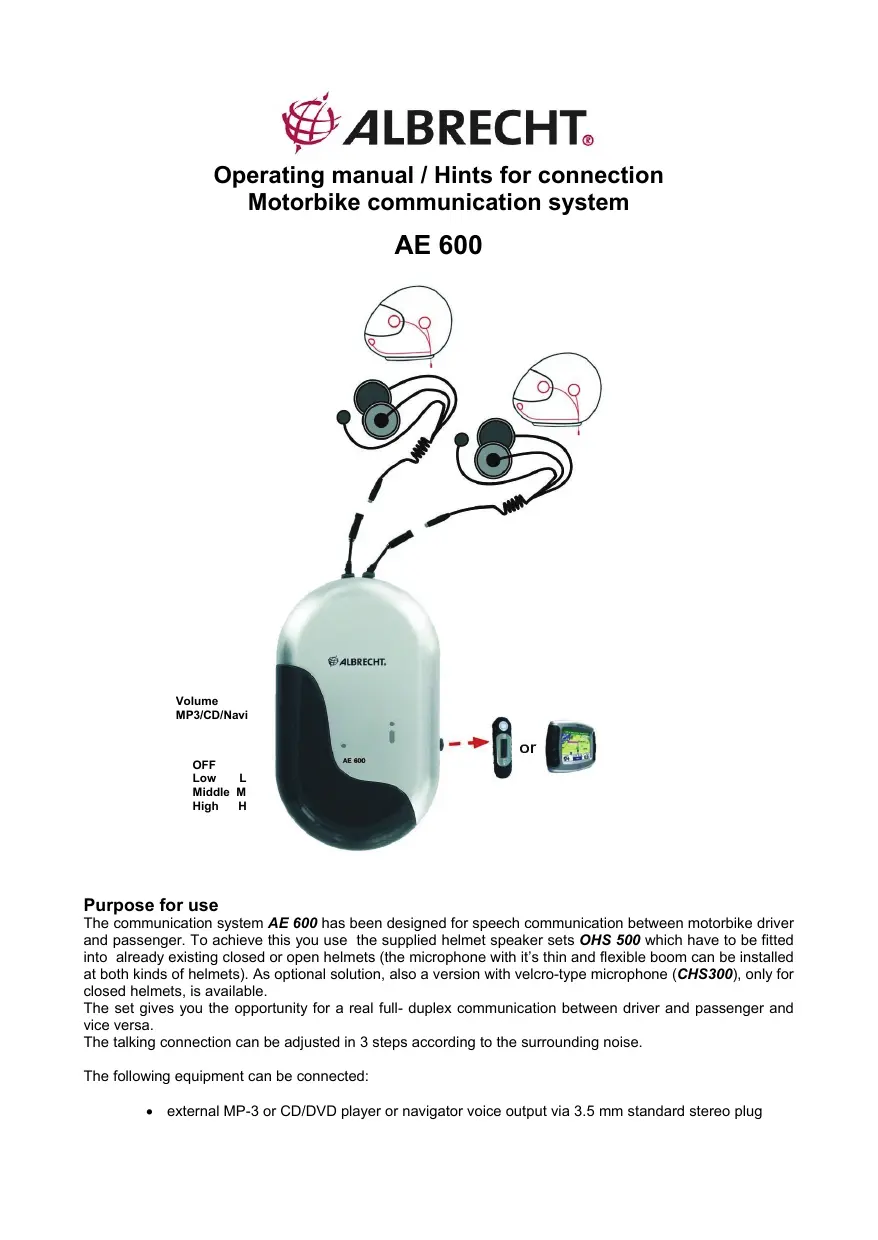
Purpose for use The communication system AE 600 has been designed for speech communication between motorbike driver and passenger. To achieve this you use the supplied helmet speaker sets OHS 500 which have to be fitted into already existing closed or open helmets (the microphone with it’s thin and flexible boom can be installed at both kinds of helmets). As optional solution, also a version with velcro-type microphone (CHS300), only for closed helmets, is available. The set gives you the opportunity for a real full- duplex communication between driver and passenger and vice versa. The talking connection can be adjusted in 3 steps according to the surrounding noise. The following equipment can be connected:
- external MP-3 or CD/DVD player or navigator voice output via 3.5 mm standard stereo plug The set is being operated with 3 x AAA size Alkaline or rechargeable NiCd/ NiMH batteries independent from vehicle power supply (not supplied with the intercom). Declaration of Conformity: The motorbike communication system fits in conformity with the European EMC directive 2004/108/EG, European EMC standards EN 50 022:2006, EN 55024:1998 with A1 and A2 (2003), EN 60065: 2002 + A1 (2006) (electrical safety) and WEEE / RoHS, and it carries the CE- mark. The actual EC declaration of conformity can be downloaded from www.hobbyradio.de Conditions for accessory connection MP-3/Music CD or Navigator voice announcements:
3.5 mm stereo plug (3). To enjoy music in stereo is not possible, the ear-phones get the same signal (mono).
The volume is adjustable by the volume control (4). Hints for installation and connection Fitting of helmet sets: The two helmet sets consist of two flat padded ear sets to be inserted in the helmet, a microphone with a flexible thin boom to be installed close to your mouth and a waterproof transmit talk button which can be fixed within reach of the handle-bar or at your glove. Supplied are two self-adhesive pads for fitting the earphones in the helmet and a velcro tape adjustable in length to install the talk button. These adhesive pads do have an adhesive surface on one side (remove protective foil), on the other side there is a velcro clasp so that ear sets can be easily installed or removed for adjustment or cleaning. Bikers with only limited space to install the talk button i. e. on a metal plate at the handle bars may remove the velcro tape and stick the talk button with adhesive pads directly to the desired location. Please fix the ear sets with still a small gap between the ears and the helmet. Your ears should not be completely covered by the ear set because then you might not be able to listen to the surrounding noise of traffic (due to Road Traffic Act you may not use headsets that completely cover your ears because you might overhear honking or other signals). Please do not carry out any technical modifications at the helmet before installing the headset. The ECE standard for motorbike helmets does not permit to flatten the material inside the helmet i. e. to make space for the ear set. Fix the microphone so, that it is always close to your mouth with the supplied adhesive pad. Before fixing the adhesive pads thoroughly clean the desired location (i.e. with alcohol, but do not use any solvent). Press tightly and remember that it takes several hours until the final strength has been achieved. The basic installation is very simple- just plug in the 2 headphones (2), and that’s it! Where to locate the central unit The best place for location of the central unit is inside or close to the tank knap sack or in the outside-pocket of your biker-suit. Power supply / Inserting of batteries Open the battery lid at the bottom of the central unit. Insert 3 batteries or rechargeable batteries size AAA (Micro). Pay attention to the correct position of the battery poles.
Never use batteries and rechargeable batteries mixed in the battery compartment. Only use batteries or rechargeable batteries of the same kind, and never mix full and empty batteries. Dispose of used batteries only at the authorized collecting points at special dealers. Pay attention to the different containers for batteries and rechargeable batteries. Batteries and rechargeable batteries are special waste, they may not be disposed of with household garbage. Never throw batteries or rechargeable batteries into any fire, never short-circuit the poles of batteries or rechargeable batteries: Danger of fire, explosion or injury may occur! Operation Intercom: The intercom communication quality between driver and pillion depends on the environmental noise and the correct sensitivity adjustment. The AE 600 has a special noise reduction electronic filter that improve the sound quality. AE 600 has a 4 position slide switch (1). The intercom enables a full duplex conversation: from driver's mic to pillion's headphones and vice versa. You may select 3 different settings:
Position L (Low): For high speed motorbike driving. The mic sensitivity is rather low to avoid excessive noise pick-up. The setting is adjusted to normal biker's talking behaviour: You speak automatically louder if you are in a noisy, high speed environment.