
WIRELESS DOCK - Wireless audio dock SONOS - Free user manual and instructions
Find the device manual for free WIRELESS DOCK SONOS in PDF.

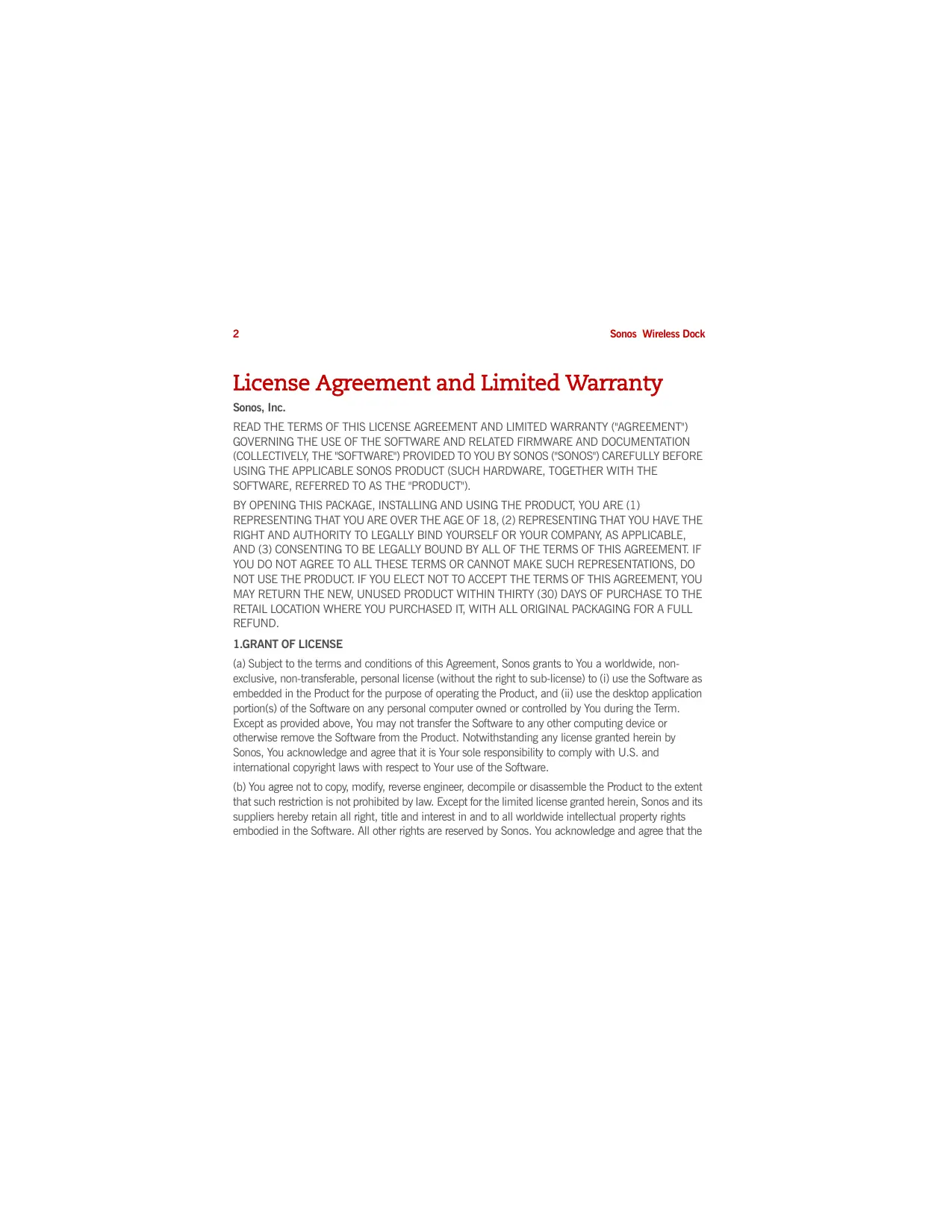


| Product Type | Wireless Audio Dock |
| Brand | SONOS |
| Model | WIRELESS DOCK |
| Dimensions (approx.) | 10 x 10 x 5 cm |
| Weight (approx.) | 200 g |
| Power Supply | Power adapter included (country dependent) |
| Compatibility | iPod touch (1st-3rd gen), iPod classic, iPod nano (3rd-5th gen), iPhone 4, 3GS, 3G, iPhone |
| Main Features | Wireless audio streaming to Sonos system, device charging (1 A), auto-play mode, accessory mode |
| Sonos Network Connection | Via rear connect button, green/white LEDs |
| Status Indicators | Solid white (normal), flashing white (startup), green/white (connecting), red (incompatibility) |
| Volume Control | Side buttons (+) and (-) |
| Cleaning | Dry, soft cloth, no solvents or household cleaners |
| Safety | Do not expose to water, unplug during storms, refer servicing to qualified personnel |
| Compliance | CE (EMC 2004/108/EC, LVD 2006/95/EC, R&TTE 1999/5/EC), FCC Class B, ICES-003, RSS-210 |
| Limited Warranty | 1 year from date of purchase |
| Spare Parts | Power adapter, power cord (available via Sonos support) |
| Repairability | Repair by Sonos authorized technician only |
| General Information | Requires at least one configured Sonos ZonePlayer, software update recommended |
Frequently Asked Questions - WIRELESS DOCK SONOS
User questions about WIRELESS DOCK SONOS
0 question about this device. Answer the ones you know or ask your own.
Ask a new question about this device
Download the instructions for your Wireless audio dock in PDF format for free! Find your manual WIRELESS DOCK - SONOS and take your electronic device back in hand. On this page are published all the documents necessary for the use of your device. WIRELESS DOCK by SONOS.
USER MANUAL WIRELESS DOCK SONOS
Sonos® Wireless Dock Guide. For use with the Sonos Multi-Room Music System.
THIS DOCUMENT CONTAINS INFORMATION THAT IS SUBJECT TO CHANGE WITHOUT NOTICE.
No part of this publication may be reproduced or transmitted in any form or by any means, electronic or mechanical, including but not limited to photocopying, recording, information retrieval systems, or computer network without the written permission of Sonos, Inc.
Sonos is a registered trademark of Sonos, Inc. in the United States, Canada, United Kingdom, Benelux (Belgium, Luxembourg and the Netherlands), Japan, Finland, France, Mexico, Germany, Russia and Australia, and a trademark of Sonos, Inc. in other countries. SonosNet, ZonePlayer, ZoneBridge and all Sonos logos are trademarks of Sonos Inc. in the United States and other countries.
Macintosh, Mac OS, iPod, iPod touch, and iPhone are trademarks of Apple, Inc., registered in the U.S. and other countries. iPad is a trademark of Apple Inc.
Windows Vista and Windows XP are either registered trademarks or trademarks of Microsoft Corporation in the United States and/or other countries.
This product includes technology owned by Microsoft Corporation and under a license from Microsoft Licensing, GP. Use or distribution of such technology outside of this product is prohibited without a license from Microsoft Corporation and/or Microsoft Licensing, GP as applicable.
MPEG Layer-3 audio decoding technology licensed from Fraunhofer IIS and Thomson.
Sonos uses MSNTP software, which was developed by N.M. Maclaren at the University of Cambridge.
© Copyright, N.M. Maclaren, 1996, 1997, 2000; © Copyright, University of Cambridge, 1996, 1997, 2000.
All other products and services mentioned may be trademarks or service marks of their respective owners.
© 2004-2010 by Sonos, Inc. All rights reserved.

For the latest product documentation, including the Sonos Multi-Room Music System User Guide, go to www.sonos.com/support and click Documentation.
To help you get the most enjoyment from your Sonos system, we have a Support team ready to answer any question—big or small.
Web site: www.sonos.com/support
- Email: support@sonos.com
Text-Chat and Phone: www.sonos.com/support/contact
Wireless Dock Product Guide
Version: 101001
Sonos Wireless Dock Contents
Sonos Wireless Dock (English) 1
Sonos Wireless Dock (Deutsch) 19
Sonos Wireless Dock (Nederlands) 49
Sonos Wireless Dock (Svenska) 79
Sonos Wireless Dock (Français) 107
Sonos Wireless Dock (Espanol) 135
Sonos Wireless Dock (Italiano) 163
License Agreement and Limited Warranty
Sonos, Inc.
READ THE TERMS OF THIS LICENSE AGREEMENT AND LIMITED WARRANTY ("AGREEMENT") GOVERNING THE USE OF THE SOFTWARE AND RELATED FIRMWARE AND DOCUMENTATION (COLLECTIVELY, THE "SOFTWARE") PROVIDED TO YOU BY SONOS ("SONOS") CAREFULLY BEFORE USING THE APPLICABLE SONOS PRODUCT (SUCH HARDWARE, TOGETHER WITH THE SOFTWARE, REFERRED TO AS THE "PRODUCT").
BY OPENING THIS PACKAGE, INSTALLING AND USING THE PRODUCT, YOU ARE (1) REPRESENTING THAT YOU ARE OVER THE AGE OF 18, (2) REPRESENTING THAT YOU HAVE THE RIGHT AND AUTHORITY TO LEGALLY BIND YOURSELF OR YOUR COMPANY, AS APPLICABLE, AND (3) CONSENTING TO BE LEGALLY BOUND BY ALL OF THE TERMS OF THIS AGREEMENT. IF YOU DO NOT AGREE TO ALL THESE TERMS OR CANNOT MAKE SUCH REPRESENTATIONS, DO NOT USE THE PRODUCT. IF YOU ELECT NOT TO ACCEPT THE TERMS OF THIS AGREEMENT, YOU MAY RETURN THE NEW, UNUSED PRODUCT WITHIN THIRTY (30) DAYS OF PURCHASE TO THE RETAIL LOCATION WHERE YOU PURCHASED IT, WITH ALL ORIGINAL PACKAGING FOR A FULL REFUND.
1.GRANT OF LICENSE
(a) Subject to the terms and conditions of this Agreement, Sonos grants to You a worldwide, non-exclusive, non-transferable, personal license (without the right to sub-license) to (i) use the Software as embedded in the Product for the purpose of operating the Product, and (ii) use the desktop application portion(s) of the Software on any personal computer owned or controlled by You during the Term. Except as provided above, You may not transfer the Software to any other computing device or otherwise remove the Software from the Product. Notwithstanding any license granted herein by Sonos, You acknowledge and agree that it is Your sole responsibility to comply with U.S. and international copyright laws with respect to Your use of the Software.
(b) You agree not to copy, modify, reverse engineer, decompile or disassemble the Product to the extent that such restriction is not prohibited by law. Except for the limited license granted herein, Sonos and its suppliers hereby retain all right, title and interest in and to all worldwide intellectual property rights embodied in the Software. All other rights are reserved by Sonos. You acknowledge and agree that the
technology embedded in and used to create the Product constitute the valuable trade secrets and know-how of Sonos, and to the extent you discover any such trade secrets, You will not disclose them to any third party.
(c) Sonos shall have no obligation to provide any updates or upgrades to the Product, but in the event that it does, such updates, upgrades and any documentation shall be deemed the "Product", and shall be subject to the terms and conditions of this Agreement.
2. TERM OF AGREEMENT
(a) You may terminate this Agreement at any time by notifying Sonos, discontinuing use of the Product and purging the Software from Your computing device.
(b) This Agreement will automatically terminate if You violate any of its terms.
(c) Sections 1(b), 3, 4, 6(c), 7 and 9 shall survive termination or expiration for any reason.
3.COMPLIANCE WITH COPYRIGHT LAWS
Sonos complies with U.S. and international copyright laws and in consideration of the licenses granted herein, You agree to do the same. You acknowledge that unauthorized copying or distribution of music or other content accessed using the Product ("Content") is prohibited by such copyright laws, and You agree that You will not, directly or indirectly, copy or distribute any Content without the express written authorization of the copyright holder. You agree to indemnify and hold harmless Sonos and its licensors from and against any and all claims, suits, losses, damages, liabilities, costs and expenses incurred by Sonos or its licensors arising out of or related to Your failure to comply with the terms of this Section 3.
4.SONOS PRIVACY POLICY
Use of Sonos Products is subject to the Sonos Privacy Policy, which can be found at www.sonos.com/legal/privacy_policy.htm and by reference is made a part of this Agreement. The Sonos Privacy Policy outlines the type of information that may be collected from you by Sonos and how such information may be used by Sonos. It is important that you read and understand the terms of the Privacy Policy.
5. THIRD PARTY CONTENT AND TECHNOLOGIES SUPPORT
From time to time, Sonos may provide access to third party content providers via the Product. In addition, Sonos may support certain third party technologies, such as specific file formats or CODECs. Sonos reserves the right to discontinue access to and/or support for such third party content or technologies at any time, and for any reason. Sonos makes no representations or warranties whatsoever regarding the selection of, or continuing support for, any such third party content or technologies.
6.WARRANTY AND DISCLAIMER
(a) Limited Warranty. Sonos warrants to You that for a period of one (1) year after the date of original purchase of the Product, the Product will be free from defects in materials and workmanship. SONOS DOES NOT WARRANTY THAT THE PRODUCT WILL OPERATE WITHOUT INTERRUPTION OR WILL BE ERROR-FREE, OR THAT ALL ERRORS MAY BE CORRECTED. EXCEPT AS SET FORTH IN SECTION 6(C), SONOS' SOLE LIABILITY, AND YOUR SOLE REMEDY, FOR BREACH OF THE FOREGOING WARRANTY WILL BE, AT SONOS' SOLE DISCRETION, REPAIR OR REPLACEMENT OF THE PRODUCT, OR, IF NEITHER OF THE FOREGOING ARE REASONABLY AVAILABLE, A REFUND OF THE AMOUNT YOU PAID, LESS AMOUNTS ATTRIBUTABLE TO YOUR PRIOR USE.
(b) Limitations. The foregoing warranty does not extend to problems in the Product that result from: (i) Your failure to implement all bug fixes or error corrections to the Product which are made available by Sonos; (ii) any use of the Product in a manner for which it was not designed or as not authorized under this Agreement; or (iii) any use of the Product with other products, hardware or products not supplied by, and inconsistent with the documentation provided by, Sonos.
(c) Disclaimer. EXCEPT AS EXPRESSLY SET FORTH ABOVE, SONOS MAKES NO WARRANTYES, WHETHER EXPRESS, IMPLIED, STATUTORY OR OTHERWISE, WITH RESPECT TO THE PRODUCT. SONOS AND ITS SUPPLIERS HEREBY SPECIFICALLY DISCLAIM ALL OTHER EXPRESS, STATUTORY AND IMPLIED WARRANTYES AND CONDITIONS, INCLUDING THE IMPLIED WARRANTYES OF MERCHANTABILITY, FITNESS FOR A PARTICULAR PURPOSE, NON-INFRINGEMENT AND THE IMPLIED CONDITION OF SATISFACTORY QUALITY. EXCEPT AS EXPRESSLY STATED IN SECTION 6(A), THE PRODUCT IS SUPPLIED ON AN "AS IS" BASIS WITHOUT WARRANTY. YOU ASSUME ALL RESPONSIBILITIES FOR SELECTION OF THE PRODUCT TO ACHIEVE YOUR INTENDED RESULTS, AND FOR THE INSTALLATION AND USE OF THE
PRODUCT. Some jurisdictions do not allow a limitation on implied warranties, and so the foregoing disclaimer may not apply to You. In any event, any implied warranties that may exist under the laws of Your jurisdiction are limited to the one (1) year period set forth in the limited warranty given under subsection (a) above.
7.LIMITATION OF LIABILITY
(a) TO THE MAXIMUM EXTENT ALLOWED UNDER LAW, IN NO EVENT WILL SONOS OR ITS SUPPLIERS BE LIABLE FOR ANY DAMAGES, INCLUDING BUT NOT LIMITED TO, INCIDENTAL, SPECIAL, CONSEQUENTIAL, EXEMPLARY, OR INDIRECT DAMAGES, AND INCLUDING BUT NOT LIMITED TO, COST OF COVER, LOSS OF DATA, LOSS OF PROFITS, BUSINESS INTERRUPTION, LOSS OF BUSINESS INFORMATION, OR OTHER PECUNIARY LOSS ASING FROM THE USE OF (OR INABILITY TO USE) THE PRODUCT, NO MATTER HOW CAUSED AND ON ANY THEORY OF LIABILITY. BECAUSE SOME STATES/JURISDICTIONS DO NOT ALLOW THE EXCLUSION OR LIMITATION OF LIABILITY FOR CONSEQUENTIAL OR INCIDENTAL DAMAGES, SOME OF THE ABOVE LIMITATIONS MAY NOT APPLY TO YOU, BUT THEY SHALL APPLY TO THE MAXIMUM EXTENT PERMITTED BY LAW.
(b) IN NO EVENT SHALL SONOS' TOTAL LIABILITY TO YOU FOR ALL DAMAGES IN ANY ONE OR MORE CAUSES OF ACTION EXCEED THE AMOUNT PAID BY YOU FOR THE PRODUCT.
(c) The limitations in Section 7 will apply even if Sonos, its suppliers or dealers have been advised of the possibility of such damage or of any type of use intended by You. These limitations shall apply notwithstanding the failure of essential purpose of any limited remedy. You acknowledge that these limitations reflect a reasonable allocation of risk.
8.INFRINGEMENT INDEMNITY
(a) Indemnity. Sonos shall defend or settle any claim, demand, suit, proceeding or action ("Claim") against You to the extent that such Claim is based on an allegation that any portion of the Product, as furnished to You under this Agreement and used as authorized in this Agreement, infringes any third party's U.S. copyright or misappropriates such third party's trade secrets, provided that You: (i) give prompt written notice of the Claim to Sonos; (ii) give Sonos the exclusive authority to control and direct the defense or settlement of such Claim; and (iii) give Sonos, at Sonos' expense (except for the value of Your time), all necessary information and assistance with respect to the Claim. Sonos shall pay all settlement amounts, damages and costs finally awarded to the extent attributable to such Claim. You
may participate in the defense of Claim at Your expense. Sonos will not be liable for any costs or expenses incurred without its prior written authorization.
(b) Limit on Indemnity. The foregoing notwithstanding, Sonos shall have no liability for a Claim to the extent based on: (i) the use by You of any Product more than thirty (30) days after Sonos notifies You in writing that continued use of the Product may give rise to such Action; (ii) the combination of the Product, or any part thereof, with other hardware or products not provided by Sonos, which Claim would have been avoided if the Products had not been so combined; or (iii) use of the Products other than as authorized under this Agreement.
(c) Entire Liability. THE FOREGOING PROVISIONS OF THIS SECTION 8 STATE THE ENTIRE LIABILITY AND OBLIGATIONS OF SONOS, AND YOUR EXCLUSIVE REMEDY, WITH RESPECT TO ANY ACTUAL OR ALLEGED INFRINGEMENT OF OR MISAPPROPRIATION OF ANY INTELLECTUAL PROPERTY RIGHT BY THE PRODUCT.
9.MISCELLANEOUS
You acknowledge that the Product is subject to the export control law and regulations of the United States, and any amendments thereto. You warrant that You will comply in all respects with United States exports laws and regulations. This Agreement shall be governed by the laws of the State of California, without reference to its conflict of law principles. You consent to the jurisdiction of the federal and state courts sitting in the State of California. This Agreement constitutes the entire agreement between You and Sonos with respect to the subject matter hereof, and supersedes all prior oral or written understandings, communications or agreements not specifically incorporated herein. If any provision of this Agreement is found to be invalid or unenforceable pursuant to judicial decree or decision, the remainder of this Agreement shall remain valid and enforceable according to its terms. You may not assign this Agreement, or any of its rights or obligations hereunder, whether by operation of law or otherwise, without the prior written consent of Sonos. Any attempted assignment by You without prior written consent shall be void.
For inquiries or questions regarding this Agreement, please send an e-mail to support@sonos.com or call (800) 680-2345.
Sonos® Wireless Dock (English)
The Sonos Wireless Dock...
Allows you to play your favorite music from an iPod® or iPhone® on a Sonos system — all throughout your home. The dock is compatible with:
- iPod touch (1st, 2nd and 3rd generation)
- iPod classic
-
iPod nano (3rd, 4th and 5th generation)
iPhone 4, iPhone 3GS, iPhone 3G, iPhone -
Charges while it's seated in the dock. The Wireless Dock supports 1 Amp charging, the latest specification from Apple®.
- Is great for parties — simply have your friends dock their iPod or iPhone for play back on your Sonos system.
Technical Support
To help you get the most enjoyment from your Sonos system, we have a Support team ready to answer any question—big or small.
Web site: www.sonos.com/support
- For help with troubleshooting and support issues, visit our Web site where you can visit the Forums, browse our Frequently Asked Questions (FAQ) pages, or request assistance.
Email: Support@sonos.com
Text-Chat and Telephone: www.sonos.com/support/contact
- Please visit the Text-Chat and Telephone link to find the correct telephone number for your country.
Before You Begin
- At least one ZonePlayer must be set up before adding the Wireless Dock to your Sonos Multi-Room Music System. For help with this step, refer to the instructions packaged with your ZonePlayer(s).
- If a software update is available, be sure to update your Sonos Multi-Room Music System before adding the Wireless Dock.
Adding a Wireless Dock
The Sonos Wireless Dock allows you to play music stored on your docked iPod or iPhone in any or every room of your home, all perfectly synchronized.
- Attach the power adapter and plug in the Wireless Dock.
-
Choose one of the following options:
-
Using any handheld Sonos Controller, select Settings>Add a Sonos Component from the Music Menu.
- Using the Sonos Controller for Mac or PC, select Add a Sonos Component from the Zones menu.
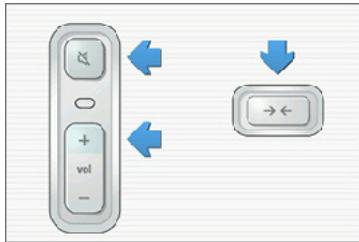
During the setup process, you will be prompted to press and release the Connect button on the back of the dock. The indicator lights will flash green and white while the ZoneBridge is connecting.
You may be prompted to update the wireless dock after you add it to your Sonos system.
- If the indicator lights begin to flash green and red alternately, it means your Wireless Dock and one or more ZonePlayers are not on the same Sonos software version. Please check for software updates by selecting Settings> Online Updates.
- If the status indicator LED begins to flash red when you dock your iPod, it means this device is not a supported model. (Please see page 2 for compatible devices.)

Note: For additional status indicator explanations, please see "LED Explanations" on page 12.
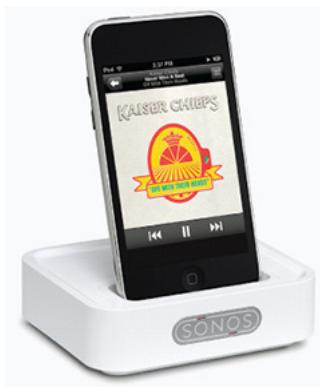
Autplay mode
Autplay mode provides a seamless transition between your portable and home audio experience. You can walk in the door, place your device in the dock, and the music that's playing on your iPod or iPhone automatically starts playing over Sonos. You will be prompted to select an Autplay zone during setup. You can change the autplay zone anytime (see "Changing Dock Settings" on page 7.)
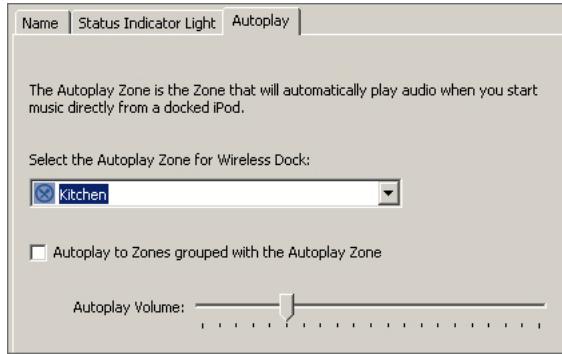
Sonos Controller for Mac or PC
Sonos Controller for iPhone
Assign your Autplay Zone
Choose the zone below that will automatically play music started directly from your docked iPod. You can change this setting later.
Then press the Next button to continue.
While your device is seated in the dock in autplay mode, you can select music directly from the device. You can switch to accessory mode at any time to make music selections and control playback using a Sonos Controller.
-
To switch to accessory mode, simply start browsing the music on your iPhone or iPod using any Sonos Controller — playback control automatically shifts to your Sonos system.
-
To return to autplay mode, simply undock and redock your device.

Note: When your iPhone is seated in the dock in Autoplay mode, the ringtone for incoming calls will play through your Sonos system. If you do not want to hear ringtones or other system sounds associated with your device, simply set the iPhone ringer switch (located on the left side of your phone) to silent.
Changing Dock Settings
You can change your wireless dock settings anytime.
Using a handheld Sonos Controller
- Using a handheld Sonos Controller, select Settings>Dock Settings from the Music Menu.
- Select the wireless dock you want to make changes for.
-
Choose one of the following options:
-
Select Dock Name to type a new name for the dock (the default name is Wireless Dock)
- Select Autplay Zone to select the zone that will automatically play audio when you start music directly from an iPod or iPod touch and then place it in the wireless dock.
-
Select Include Grouped Zones to include (yes) or exclude (no) currently grouped zones from Autplay mode.
-
Select Autoplay Volume to adjust the volume level for the Autoplay zone.
- Select White Status Indicator Light to turn the white status indicator on or off when the dock is in normal operation.
Using a Sonos Controller for Mac or PC
- Using the Sonos Controller for Mac or PC, select Dock Settings from the Zones menu.
- Choose the wireless dock you want to make changes for, and select Settings.
-
Choose one of the following options:
-
Select Dock Name to type a new name for the dock (the default name is Wireless Dock.)
- Select White Status Indicator Light to turn the white status indicator on or off when the dock is in normal operation.
-
Select Autplay Zone to select the zone that will automatically play audio when you start music directly from an iPod or iPod touch and then place it in the wireless dock.
-
Click Apply, and then click OK when you are finished making changes.
Selecting Music
You can select music directly from your device when it is seated in the dock (play mode), or you can use any Sonos Controller to make music selections and control playback (accessory mode).
Using a handheld Sonos Controller
- Place a compatible device in the dock (see page 2 for a complete list.)
- Select Docked iPods from the Music Menu.
- Select the device you want to play back.
-
Choose one of the following options:
-
Select Play Now to begin playback.
- Select Browse to search for music selections.
Using the Sonos Controller for Mac or PC
- Place a compatible device in the dock (see page 2 for a complete list.)
- Select the Docked iPods tab from the Music Library pane.
- Select the device you want to play back.
-
Choose one of the following options:
-
Select Play from the iPod, and click Play Now.
- Select Browse to look for a music selection, and then click Play Now.
Wireless Dock Front
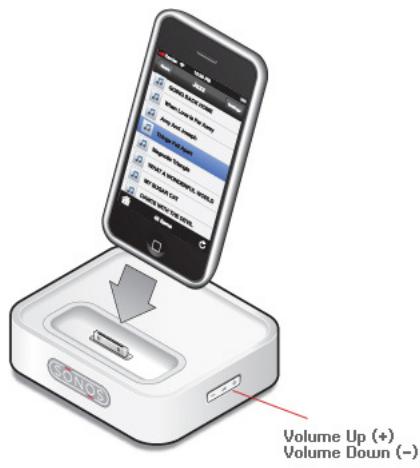
Volume Up (+) Volume Down (-)
Press the buttons on the side of the dock to adjust the volume up and down.
Dock Rear Panel Connectors
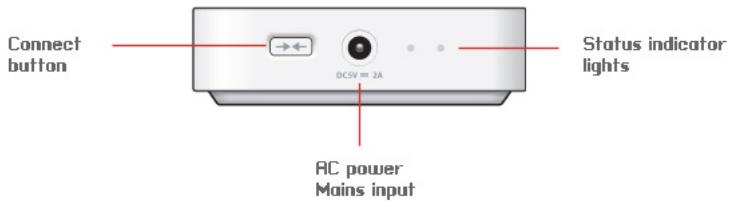
Connect button
Press the Connect button to join the Wireless Dock to your Sonos Multi-Room Music System.
Wireless dock status indicator
- LED Flashes white when powering up; flashes green and white when connecting to your Sonos Multi-Room Music System.
- LED Solid white when powered up and connected to your Sonos Multi-Room Music System (normal operation).
- LED Flashes red if the device in the dock is not a supported model. (For a complete list, see page 12.)
AC power (mains) input
Use the supplied power adapter to connect to power outlet. Be sure to use the proper power adapter for your country.
LED Explanations
| Dock Status Indicator | Mute Button Indicator | State | Additional Information |
| Solid white | Off | Powered up, connected to the network | You can turn the white light off so it does not display when you dock is in normal operation. |
| Solid white | Solid green | Muted | |
| Flashing white | Off | Powering up (booting) | |
| Flashing white | Flashinggreen | Powered up, not connected to a Sonos system | Flashing in unison. |
| Flashing white | Flashing green | Looking for a Sonos Multi-Room Music System. | Flashing alternately. |
| Flashing red | Off | iPod incompatibility | The device in the dock is not compatible. See page 2 for a list of compatible devices. |
Flashing red
Flashing green
Dock is connected to a ZonePlayer, but there is a software version mismatch between the Sonos components.
Choose one of the following to check for updates:
Using a handheld Controller, select Settings Online Updates.
Using a Sonos Controller for Mac or PC, select Help>Check for Updates.
Flashing red, followed by a repeating pattern of: White or Amber flashing alone, then Green and Amber flashing in unison
Diagnostics mode
You may be instructed to enter Diagnostics mode by a technician when you call Customer Support to report a problem.
If you accidentally enter diagnostics mode, press the Connect button to exit.
Regulation Information
Europe
Sonos declares that this product herewith complies with the requirements of the EMC Directive 2004/108/EC, the Low Voltage Directive 2006/95/EC and the R&TTE Directive 1999/5/EC when installed and used in accordance with the manufacturer's instructions. A copy of the full Declaration of Conformance may be obtained at www.sonos.com/support/policies.
Europa
Attention In France, operation is limited to indoor use within the band 2.454- c① 2.4835 GHz.
This equipment has been tested and found to comply with the limits for a Class B digital device, pursuant to part 15 of the FCC Rules. These limits are designed to provide reasonable protection against harmful interference in a residential installation. This equipment generates, uses and can radiate radio frequency energy and, if not installed and used in accordance with the instructions, may cause harmful interference to radio communications. However, there is no guarantee that interference will not occur in a particular installation. If this equipment does cause harmful interference to radio or television reception, which can be determined by turning the equipment off and on, the user is encouraged to try to correct the interference by one or more of the following measures:
- All Sonos devices have in-products antennas. Users cannot reorient or relocate the receiving antenna without modifying the product
- Increase the separation between the equipment and receiver.
- Connect the equipment into an outlet on a circuit different from that to which the receiver is connected.
Caution: Modifications not expressly approved by the manufacturer may void the user's authority to operate the equipment under FCC rules.
Canada
This Class B digital apparatus complies with Canadian ICES-003 and RSS-210. Operation is subject to the following two conditions: (1) this device may not cause interference, and (2) this device must accept any interference, including interference that may cause undesired operation of the device.
Canada
The installer of this radio equipment must ensure that the product is located such that it does not emit RF field in excess of Health Canada limits for the general population; consult Safety Code 6, obtainable from Health Canada's Web site www.hc-sc.gc.ca/rpb. As mentioned before, the installer cannot control the antenna orientation.
However, they could place the complete product in a way that causes the problem mentioned above.
Industrie Canada
RF Exposure Requirements
To comply with FCC and Industry Canada exposure essential requirements, a minimum separation distance of 20cm (8 inches) is required between the equipment and the body of the user or nearby persons.
Recycling Information

This symbol on the product or on its packaging indicates that this product shall not be treated as household waste. Instead please deliver it to the applicable collection point for the recycling of electrical and electronic equipment. By recycling this product correctly, you will help conserve natural resources and prevent potential negative environmental consequences. For more detailed information about recycling of this product, please contact your local city office, your household waste disposal service or the shop where you purchased the product.
Important Safety Information
- Read these instructions.
- Keep these instructions.
- Heed all warnings.
- Follow all instructions.
- Do not use this apparatus near water.
-
Clean only with dry soft cloth. Household cleaners or solvents can damage the finish on your Sonos components.
-
Do not install near any heat sources such as radiators, heat registers, stoves, or other apparatus that produce heat.
- Protect the power cable from being walked on or pinched, particularly at plugs, convenience receptacles, and the point where they exit from the apparatus.
- Only use attachments/accessories specified by the manufacturer.
- Unplug this apparatus during lightning storms or when unused for long periods of time.
- Refer all servicing to Sonos qualified service personnel. Servicing is required when the apparatus has been damaged in any way, such as power-supply cable or plug is damaged, liquid has been spilled or objects have fallen into the apparatus, the apparatus has been exposed to rain or moisture, does not operate normally, or has been dropped.
- The Mains plug should be readily available to disconnect the equipment.

-
Warning: To reduce the risk of fire or electric shock, do not expose this apparatus to rain or moisture.
-
Do not expose apparatus to dripping or splashing and do not place objects filled with liquids, such as vases, on the apparatus.
Website: www.sonos.com/support
Sonos declares that this product herewith complies with the requirements of the EMC Directive 2004/108/EC, the Low Voltage Directive 2006/95/EC and the R&TTE Directive 1999/5/EC when installed and used in accordance with the manufacturer's instructions. A copy of the full Declaration of Conformance may be obtained at www.sonos.com/support/policies.
Europa
This Class B digital apparatus complies with Canadian ICES-003 and RSS-210. Operation is subject to the following two conditions: (1) this device may not cause
interference, and (2) this device must accept any interference, including interference that may cause undesired operation of the device.
Canada
The installer of this radio equipment must ensure that the product is located such that it does not emit RF field in excess of Health Canada limits for the general population; consult Safety Code 6, obtainable from Health Canada's Web site www.hc-sc.gc.ca/ rpb. As mentioned before, the installer cannot control the antenna orientation. However, they could place the complete product in a way that causes the problem mentioned above.
Industrie Canada
Sonos® Wireless Dock (Nederlands)
Website: www.sonos.com/support
Sonos Wireless Dock...
E-post: Support@sonos.com
4.SONOS SEKRETESSPOLICY
Site Web: www.sonos.com/support
Sonos declares that this product herewith complies with the requirements of the EMC Directive 2004/108/EC, the Low Voltage Directive 2006/95/EC and the R&TTE Directive 1999/5/EC when installed and used in accordance with the manufacturer's instructions. A copy of the full Declaration of Conformance may be obtained at www.sonos.com/support/policies.
Europa
Attention. In France, operation is limited to indoor use within the band 2.454-2.4835 GHz.
This Class B digital apparatus complies with Canadian ICES-003 and RSS-210. Operation is subject to the following two conditions: (1) this device may not cause interference, and (2) this device must accept any interference, including interference that may cause undesired operation of the device.
Canada
The installer of this radio equipment must ensure that the product is located such that it does not emit RF field in excess of Health Canada limits for the general population; consult Safety Code 6, obtainable from Health Canada's Web site www.hc-sc.gc.ca/rpb. As mentioned before, the installer cannot control the antenna orientation. However, they could place the complete product in a way that causes the problem mentioned above.
Industrie Canada
www.sonos.com/support/policies.
Europa
Sonos Wireless Dock...
- THIS DOCUMENT CONTAINS INFORMATION THAT IS SUBJECT TO CHANGE WITHOUT NOTICE.
- For the latest product documentation, including the Sonos Multi-Room Music System User Guide, go to www.sonos.com/support and click Documentation.
- Sonos Wireless Dock Contents
- License Agreement and Limited Warranty
- 1.GRANT OF LICENSE
- TERM OF AGREEMENT
- 3.COMPLIANCE WITH COPYRIGHT LAWS
- 4.SONOS PRIVACY POLICY
- THIRD PARTY CONTENT AND TECHNOLOGIES SUPPORT
- 6.WARRANTY AND DISCLAIMER
- 7.LIMITATION OF LIABILITY
- 8.INFRINGEMENT INDEMNITY
- 9.MISCELLANEOUS
- Sonos® Wireless Dock (English)
- The Sonos Wireless Dock...
- Technical Support
- Web site: www.sonos.com/support
- Before You Begin
- Adding a Wireless Dock
- Autplay mode
- Changing Dock Settings
- Using a handheld Sonos Controller
- Using a Sonos Controller for Mac or PC
- Selecting Music
- Using the Sonos Controller for Mac or PC
- Wireless Dock Front
- Dock Rear Panel Connectors
- Connect button
- Wireless dock status indicator
- AC power (mains) input
- LED Explanations
- Regulation Information
- Canada
- Industrie Canada
- RF Exposure Requirements
- Recycling Information
- Important Safety Information
- Website: www.sonos.com/support
- Sonos® Wireless Dock (Nederlands)
- Sonos Wireless Dock...
- 4.SONOS SEKRETESSPOLICY
Brand : SONOS
Model : WIRELESS DOCK
Category : Wireless audio dock