
RCC-1055 - Power amplifier ROTEL - Free user manual and instructions
Find the device manual for free RCC-1055 ROTEL in PDF.


| Product Type | CD Multi-Disc Changer (5 discs) |
| Model | RCC-1055 |
| Brand | Rotel |
| Dimensions (W x H x D) | 432 x 121 x 410 mm |
| Front panel height | 109 mm |
| Weight | 7.8 kg |
| Power supply | 120 V / 230 V, 50/60 Hz, 15 W |
| Frequency response | 20 - 20,000 Hz |
| Signal-to-noise ratio | > 100 dB |
| Total harmonic distortion + noise | 0.0045% @ 1 kHz |
| Intermodulation distortion | 0.0045% @ 1 kHz |
| Dynamic range | > 96 dB |
| Channel separation | 98 dB @ 1 kHz |
| Maximum output level (line) / Impedance | 2 V / 100 ohms |
| Digital output (coaxial) / Impedance | 0.5 V peak-to-peak / 75 ohms |
| D/A converter | 18-bit equivalent, Delta-Sigma, 8× oversampling, HDCD |
| Readable formats | Audio CD, MP3, HDCD |
| Main functions | Programmed playback (32 tracks), repeat (1 track, 1 disc, all), random playback, intro scan, disc change during playback |
| Remote control | RR-D92 (infrared, extended functions) |
| 12 V trigger input | Yes (3–30 V, AC/DC) |
| Computer I/O jack | RJ-45 for external control |
| Maintenance and cleaning | Dry cloth or vacuum cleaner; do not use chemical products |
| Safety | Class 1 laser, double insulation, do not open the casing, disconnect during storms or prolonged non-use |
| Spare parts and repairability | Internal fuse; refer all repairs to an authorized Rotel dealer |
| General information | FCC Class B certified, complies with Canadian standard NMB-003, RoHS/WEEE |
Frequently Asked Questions - RCC-1055 ROTEL
User questions about RCC-1055 ROTEL
0 question about this device. Answer the ones you know or ask your own.
Ask a new question about this device
Download the instructions for your Power amplifier in PDF format for free! Find your manual RCC-1055 - ROTEL and take your electronic device back in hand. On this page are published all the documents necessary for the use of your device. RCC-1055 by ROTEL.
USER MANUAL RCC-1055 ROTEL
CD Multi-Disc Changer
OT REMOVE COVER. NO USER-SERVICEABLE PARTS INSIDE REFER SERVICING TO QUALIFIED SERVICE PERSONNEL.
APPLICABLE FOR USA, CANADA OR WHERE APPROVED FOR THE USAGE
CAUTION: TO PREVENT ELECTRIC SHOCK, MATCH WIDE BLADE OF PLUG TO WIDE SLOT. INSERT ONLY.
ATTENTION: POUR EVITER LES CHOCS ELECTRIQUES,
INTRODUIRE LA LAME LA PLUS LARGE DE LA FICHE DANS LA BORNE CORRESPONDANTE DE LA PRISSE ET
BANS ER DONNE COTIENT POUSSER JUSQU AU FOND.

This symbol is to alert the user to the presence of uninsulated dangerous
voltages inside the product's enclosure that may constitute a risk of electric shock

This symbol is to alert the user to important
operating and maintenance (service)
instructions in this manual and literature
accompanying the product.
This Class B digital apparatus complies with
Canadian ICES-003.
- CLASS 1 LASER PRODUCT
- DANGER: Visible laser radiation when open and interlock failed or bypassed. Avoid direct exposure to beam.
- CAUTION: Do not open the top cover. There are no user serviceable parts inside the player; leave all servicing to qualified service personnel.
WARNING!
To reduce the risk of electrical shock, fires, etc.:
- Do not remove screws, covers or cabinet.
- Do not expose the unit to rain or moisture.
- Do not touch the power cord or plug with wet hands.
This symbol means that this unit
is double insulated. An earth
connection is not required.


Important Safety Information
WARNING: There are no user serviceable parts inside. Refer all servicing to qualified service personnel.
WARNING: To reduce the risk of fire or electric shock, do not expose the unit to moisture or water. Do not allow foreign objects to get into the enclosure. If the unit is exposed to moisture, or a foreign object gets into the enclosure, immediately disconnect the power cord from the wall. Take the unit to a qualified service person for inspection and necessary repairs.
Read all the instructions before connecting or operating the component. Keep this manual so you can refer to these safety instructions.
Heed all warnings and safety information in these instructions and on the product itself. Follow all operating instructions.
Clean the enclosure only with a dry cloth or a vacuum cleaner.
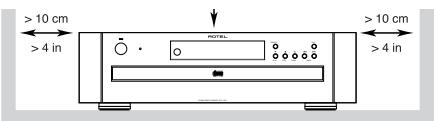
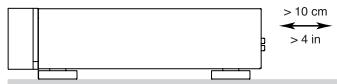
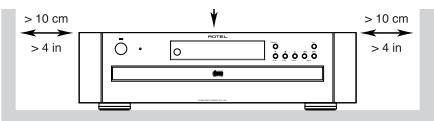
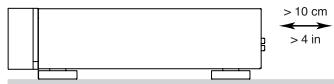
You must allow 10 cm or 4 inches of unobstructed clearance around the unit. Do not place the unit on a bed, sofa, rug, or similar surface that could block the ventilation slots. If the component is placed in a bookcase or cabinet, there must be ventilation of the cabinet to allow proper cooling.
Keep the component away from radiators, heat registers, stoves, or any other appliance that produces heat.
The unit must be connected to a power supply only of the type and voltage specified on the rear panel of the unit.
Connect the component to the power outlet only with the supplied power supply cable or an exact equivalent. Do not modify the supplied cable in any way. Do not attempt to defeat grounding and/or polarization provisions. Do not use extension cords.
Do not route the power cord where it will be crushed, pinched, bent at severe angles, exposed to heat, or damaged in any way. Pay particular attention to the power cord at the plug and where it exits the back of the unit.
Main plug is used as the mains disconnect device and shall remain ready accessible.
The power cord should be unplugged from the wall outlet if the unit is to be left unused for a long period of time.
Immediately stop using the component and have it inspected and/or serviced by a qualified service agency if:
- The power supply cord or plug has been damaged.
- Objects have fallen or liquid has been spilled into the unit.
The unit has been exposed to rain. - The unit shows signs of improper operation
- The unit has been dropped or damaged in any way
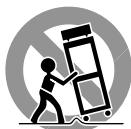
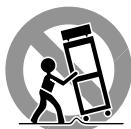
Place the unit on a fixed, level surface strong enough to support its weight. Do not place it on a moveable cart that could tip over.
Notice
The COMPUTER I/O connection should be handled by authorized person only.
FCC Information
This equipment has been tested and found to comply with the limits for a Class B digital device, pursuant to Part 15 of the FCC Rules. These limits are designed to provide reasonable protection against harmful interference in a residential installation. This equipment generates, uses and can radiate radio frequency energy and, if not installed and used in accordance with the instruction, may cause harmful interference to radio communications.
However, there is no guarantee that interference will not occur in a particular installation. If this equipment does cause harmful interference to radio or television reception, which can be determined by turning the equipment off and on, the user is encouraged to try to correct the interference by one or more of the following measures:
Reorient or relocate the receiving antenna.(TV, radio, etc.)
- Increase the separation between the equipment and receiver
- Connect the equipment to an outlet on circuit different from that to which the receiver is connected.
- Consult the dealer or an experienced radio/TV technician for additional help.
Caution
This device complies with part 15 of the FCC Rules operation is subject to the following to conditions: (1) This device may not cause harmful interference, and (2) this device must accept any interference received, including interference that may cause undesired operation.
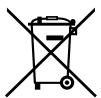
Rotel products are designed to comply with international directives on the Restriction of Hazardous Substances (RoHS) in electrical and electronic equipment and the disposal of Waste Electrical and Electronic Equipment (WEEE). The crossed wheelie bin symbol indicates compliance and that the products must be appropriately recycled or processed in accordance with these directives.
1: Controls and Connections
3: RR-D92 Remote Control
Telekomande RR-D92
4: Analog Signal Connection
Branchement signal analogue
IopcoeHHeHne KaHaJorOBbIM BbIXOaM
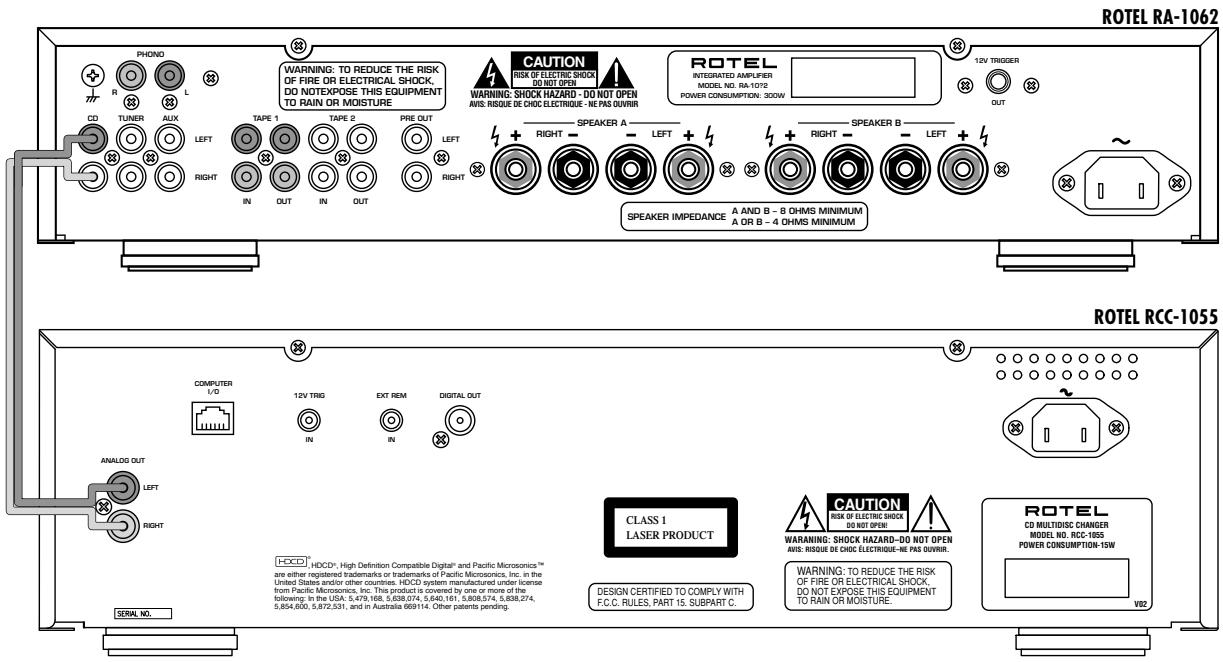
5: Digital Signal Connection
IopcoeHHeHKe KcnpoBbIM BbIXOaM
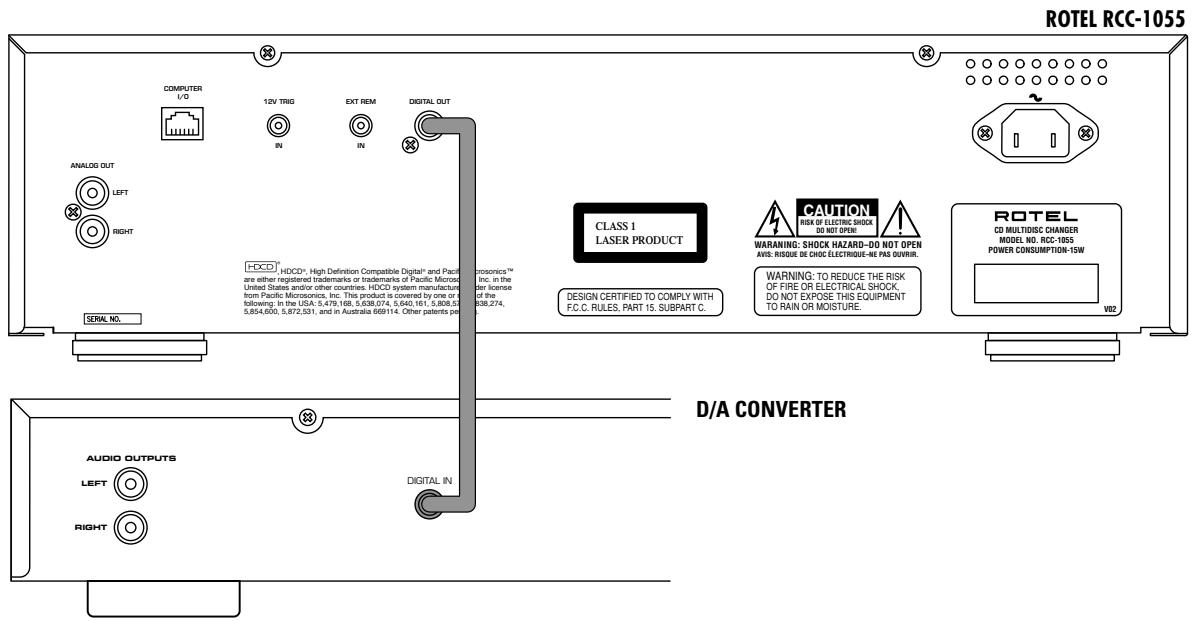
Important Notes
When making connections be sure to:
Turn off all the components in the system before hooking up any components, including loudspeakers.
Turn off all components in the system before changing any of the connections to the system.
It is also recommended that you:
Turn the volume control of the amplifier all the way down before the amplifier is turned on or off.
Remarques importantes
1: Controls and Connections 3
2: Display Panel 3
3:RR-D92 Remote Control 3
4: Analog Signal Connection 4
5: Digital Signal Connection 4
Important Notes 5
About Rotel. 6
Getting Started. 7
A Few Precautions 7
Placement 7
Cables 7
Handling Compact Discs 8
AC Power and Control 8
AC Power Input 8
Power Switch 1 and Power Indicator Z 8
Output Connections 8
Analog Outputs 13 8
Digital Output 17 8
Remote Control. 8
Remote Sensor 4 8
External Remote Input 15 9
Remote Control Batteries 9
12 Volt Trigger Input 15 9
Computer I/O Connector 14 9
Loading Discs 9
Disc Tray 8 and Open/Close Buttons 6 and 19 9
Disc Skip Buttons 7 and 24 9
Selecting a Disc to Play 9
Disc 1-5 Buttons 27 9
Playing Discs 10
Play Buttons 9 and 21 10
Pause Button 1122 10
Stop Button 10 26 10
Track Skip Buttons 12 20 10
Track Selection Buttons 28 10
Search Buttons 10
About HDCD 10
Display Panel 5 10
Time Display Button 25 11
Each/Remain Mode 11
Total/Remain Mode 11
Repeat Play Button 29 11
Repeat 1 Track 11
Repeat 1 Disc 11
Repeat All Discs 11
Random Play Button 30 12
Intro Scan Button 31 12
Programmed Disc Play 12
Program Button 12
Track Programming 12
Adding Tracks to a Program 13
Review Button 33 13
Playing Programmed Tracks 13
Troubleshooting. 14
Display Is Not Lit 14
Fuse Replacement 14
Disc Does Not Play 14
No Sound 14
Sound Skips 14
Hum 14
Specifications 14
About Rotel
A family whose passionate interest in music led them to manufacture high fidelity components of uncompromising quality founded Rotel over 45 years ago. Through the years that passion has remained undiminished and the family goal of providing exceptional value for audiophiles and music lovers regardless of their budget, is shared by all Rotel employees.
The engineers work as a close team, listening to, and fine tuning each new product until it reaches their exacting musical standards. They are free to choose components from around the world in order to make that product the best they can. You are likely to find capacitors from the United Kingdom and Germany, semi conductors from Japan or the United States, while toroidal power transformers are manufactured in Rotel's own factory.
Rotel's reputation for excellence has been earned through hundreds of good reviews and awards from the most respected reviewers in the industry, who listen to music every day. Their comments keep the company true to its goal - the pursuit of equipment that is musical, reliable and affordable.
All of us at Rotel, thank you for buying this product and hope it will bring you many hours of enjoyment.
HDCD, HDCD, High Definition Compatible Digital and Pacific MicrosonicsTM are either registered trademarks or trademarks of Pacific Microsonics, Inc. in the United States and/or other countries. HDCD system manufactured under license from Pacific Microsonics, Inc. This product is covered by one or more of the following: In the USA: 5,479,168, 5,638,074, 5,640,161, 5,808,574, 5,838,274, 5,854,600, 5,864,311, 5,872,531 and in Australia: 669114. Other patents pending.
Getting Started
Thank you for purchasing the Rotel RCC-1055 CD Multi-Disc Changer. When used in a high-quality music audio system, it will provide years of musical enjoyment.
The RCC-1055 is a full featured, high performance component. It is the ideal choice for those who want the convenience of a CD changer, but who will not accept compromised sound quality. The RCC-1055 features high precision 8-times oversampling digital filters. In addition, it can play MP3 encoded discs and incorporates HDCD circuitry.
Ease of operation has not been forgotten. While one disc is playing you can change any of the other four. Full remote control, 32 track programming, and track scanning are provided.
The highest quality components, such as metal film resistors and polystyrene or polypropylene capacitors are used in important signal paths. All aspects of this design have been examined with the final goal being faithful reproduction of music.
The RCC-1055 is easy to install and use. If you have experience with other stereo systems, you shouldn't find anything perplexing. Simply connect it to the associated components and enjoy.
A Few Precautions
Please read this manual carefully. It provides information on how to incorporate the RCC-1055 into your system as well as information that will help you get optimum sound performance. Please contact your authorized Rotel dealer for answers to any questions you might have. In addition, all of us at Rotel welcome your questions and comments.
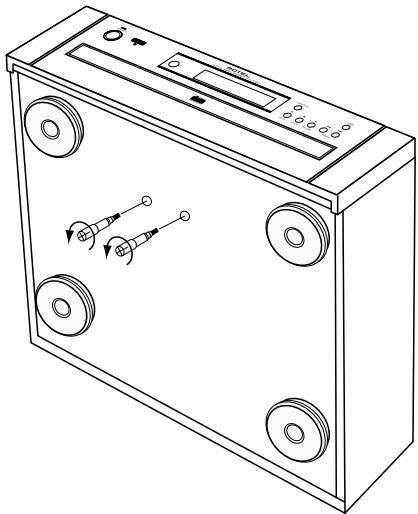
NOTE: There are 2 screws that hold the disc drawer securely in place during shipment. The screws have red plastic handles that make them easy to identify and remove. Gently turn the RCC-1055 on its side and turn the screws counterclockwise to remove them. If the screws are not removed the disc drawer will not open.
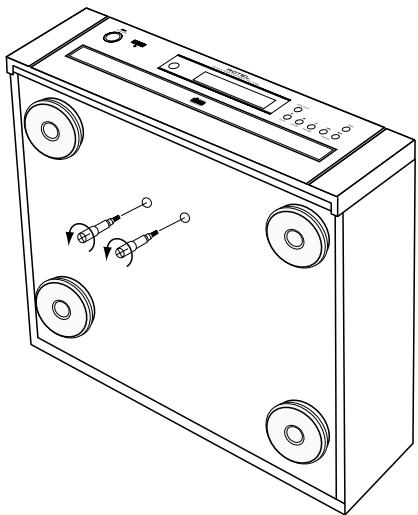
If you neglected to remove the screws before attempting to use the RCC-1055, turn the unit off and unplug it from the wall outlet. Then remove the screws as described above.
Keep the screws in a safe place because they must be replaced when the RCC-1055 is moved. Before the RCC-1055 is moved, remove all the CDs from the disc tray and close the disc drawer. Wait until the display shows "0 00 00:0" then turn off the power switch and unplug the power cord from the wall outlet. Turn the unit on its side and reinstall the screws.
Save the RCC-1055 shipping carton and all enclosed packing material for future use. Shipping or moving the RCC-1055 in anything other than the original packing material may result in severe damage to your amplifier.
The RCC-1055 is designed to play compact
discs bearing the identification logo shown here. Other types of disc must not be used.

Before moving the RCC-1055, remove all discs from the unit. This will prevent possible damage should the discs shift out of their normal positions inside the unit.
Keep the disc tray closed except when loading or unloading discs. This helps keep dust away from the sensitive laser pick up.
Fill out and send in the owner's registration card packed with the RCC-1055. Also be sure to keep the original sales receipt. It is your best record of the date of purchase, which you will need in the event warranty service is ever required.
Placement
Like all audio components that handle low-level signals, the RCC-1055 can be affected by its environment. To minimize the chance the RCC-1055 will pick up hum or interference, do not place it on top of an amplifier or any other device that has a large power transformer. Keep the RCC-1055 away from devices that have motors for the same reason. Do not place the RCC-1055 where it will be exposed to direct sunlight. Finally do not use the RCC-1055 where the temperature will be above 95^ / 35^ or below 41^ / 5^ . If the RCC-1055 is moved from a cold environment to a warm one, condensation can form on the optical components, which will prevent proper operation. Do not use the RCC-1055 for at least 30 minutes after it is moved from a cold environment.
We recommend installing the RCC-1055 in furniture designed to house audio components. Such furniture is designed to reduce or suppress vibration which can adversely affect sound quality. Ask your authorized Rotel dealer for advice about component furniture and proper installation of audio components.
Cables
Be sure to keep the power cords, digital signal cables and regular audio signal cables in your installation away from each other. This will minimize the chance of the regular audio signal cables picking up noise or interference from the power cords or digital cables. Using only high quality, shielded cables will also help to prevent noise or interference from degrading the sound quality of your system. If you have any questions see your authorized Rotel dealer for advice about the best cable to use with your system.
Handling Compact Discs
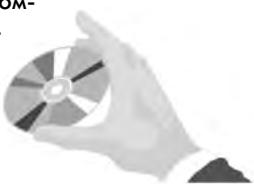
Handle CDs carefully. Hold them by their edges, as shown here, and avoid touching the playing surface.
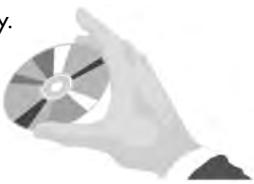
Fingerprints and dust should be carefully wiped off the disc's signal surface (glossy surface) with a soft cloth. Wipe in a straight motion from the inside to the outside of the disc.
Never use chemicals, such as record cleaning sprays, anti-static sprays or fluids, benzine or thinner to clean compact discs. These chemicals will damage the disc's plastic surface.
Keep discs in their storage cases when not in use to protect them from dust and scratches. Do not expose compact discs to direct sunlight, high humidity or high temperatures for extended periods of time.
AC Power and Control
AC Power Input 18
Your RCC-1055 is configured at the factory for the proper AC voltage in the country where you purchased it (either 120 volts or 230 volts. The AC line configuration is noted on a decal on the back panel.
NOTE: Should you move your CD player to another country, it may be possible to reconfigure it for use on a different line voltage. Do not attempt to perform this conversion yourself. Opening the enclosure of the RCC-1055 exposes you to dangerous voltages. Consult a qualified service person or the Rotel factory service department for information.
The RCC-1055 should be plugged directly into a 2-pin polarized wall outlet or into the switched outlet on another component in your audio system. Do not use an extension cord.
Be sure the power switch on the front panel of the RCC-1055 is turned off (in the "out" position). Then plug the power cord into an AC power outlet.
If you are going to be away from home for an extended period of time such as a month-long vacation, it is a sensible precaution to unplug your CD player (as well as other audio and video components) while you are away.
Power Switch 1 and Power Indicator 2
The Power Switch is located on the left side of the front panel. Push the switch button in to turn on the RCC-1055. To turn the RCC-1055 off, push the button again to return it to the "out" position.
NOTE: If you are using a switched outlet to turn on and off your CD player, you should leave the power switch in the "on" position. When AC power is applied to the unit, it will power up in fully active mode.
When the Power Switch is turned on the disc in position 1 in the tray is selected. The Disc and Track Displays illuminate and show Disc 1/Track 1. The Time Indicator also illuminates.
Output Connections
The RCC-1055 gives you a choice of analog or digital output signals. The analog output signal from the built-in Digital to Analog converter is used with conventional analog audio components. The digital output, which provides an unprocessed digital data signal, is used with outboard D/A converters or digital processors.
NOTE: To prevent loud noises that neither you nor your speakers will appreciate, make sure all the system components are turned off when you make any signal connections.
Analog Outputs 13
[See Figure 4 for wiring illustration]
A pair of standard RCA jacks supplies a conventional unbalanced analog output signal from the RCC-1055 to the source inputs of an audio preamplifier, integrated amplifier, or receiver. RCA connections are found on virtually all components. Select high quality audio interconnect cables. Connect the left channel output of the RCC-1055 to the left channel source input on the preamplifier or other component. Connect the right output of the RCC-1055 to the right channel source input on the preamplifier or other component.
Digital Output 7
[See Figure 5 for connection illustration]
If you are using the RCC-1055 as a disc transport with an outboard D/A converter or other digital processor, you need an unprocessed digital data stream from the RCC-1055, taken before the built-in D/A converter. This signal is supplied by the back-panel coaxial digital output jack. Using a standard 75 ohm coax cable, connect the digital output jack to the digital input connector on the outboard D/A converter.
Remote Control
The RCC-1055 is supplied with an RR-D92 remote control. When using the RR-D92 the emitter on the front of the control must be pointed at the RCC-1055 front panel. The basic disc play functions are controlled by the button located near the front of the RR-D92. There is a cover over the lower portion of the RR-D92 that slides down to reveal buttons that control secondary functions, such as programming, disc scanning and direct disc selection.
The RR-D92 duplicates the basic disc play control functions of the front panel control buttons. When a disc play control is on both the front panel and the remote control, both control identifiers are shown in the related instruction text. For example, to play a disc you can press either 9 on the front panel or 21 on the remote control. There are some functions, such as programmed track play functions, that are operated exclusively by the RR-D92.
Remote Sensor 4
The Remote Sensor picks up the infrared signals from the remote control. Do not cover or block the sensor. It must be unobstructed or the remote control will not work properly. The operation of the Remote Sensor can also be affected if it is exposed to bright light, particularly sunlight. Certain types of lighting, such as halogen lights, that emit a fair amount of infrared light, can also interfere with proper operation. In addition remote control functions may not work reliably if the batteries in the RR-D92 are weak.
External Remote Input 16
This connector is designed to be used in conjunction with XantechTM brand Video LinkTM IR signal pick ups (sold separately by custom system installers). This feature enables you to operate the RCC-1055 with the hand held remote control even when it is installed where it is not visible from your listening location. Contact your authorized Rotel dealer for more information.
Video Link and Xantech are Trademarks of Xantech Corporation.
Remote Control Batteries
The supplied batteries must be installed before the remote control can be used. Slide the secondary control cover down until it stops. Then gently press the small triangular symbol on the cover and slide the cover down to expose the battery well. Install the batteries with the terminals as shown in the illustration in the battery well. Test the control for proper operation, then slide the cover back into place. When the batteries become weak the remote control won't operate the RCC-1055 consistently. Installing fresh batteries should eliminate the problem.
NOTE: Remove the batteries from the remote control if it will not be used for a long period of time. Do not leave run down batteries in the remote control. Exhausted batteries can leak corrosive chemicals which will damage the unit.
12 Volt Trigger Input
The RCC-1055 can be activated by a 12 volt trigger signal. The trigger input accepts any control signal (AC or DC) ranging from 3 volts to 30 volts. When a cable is connected to the 12V input and a trigger signal is present, the RCC-1055 is activated. When the trigger signal is turned off, the unit goes into standby mode. The front panel power indicator remains lit, but the display goes dark and the unit will not operate.
NOTE: When using the 12V Trigger feature, leave the POWER button in the ON position.
Computer I/O Connector 14
The RCC-1055 can be operated from a personal computer running audio system control software from third-party developers. This control is accomplished by sending the operating codes normally sent by the RR-D92 remote control over a hard-wired network connection from the computer.
The COMPUTER I/O input provides the necessary connection on the back panel. It accepts standard RJ-45 8-pin modular plugs, such as those commonly used in 10-BaseT UTP Ethernet cabling.
For additional information on the connections, software, and operating codes for computer control of the RCC-1055, contact your authorized Rotel dealer.
Loading Discs
Disc Tray 8 and Open/Close Buttons 6 and 19
Press the Open/Close button on either the front panel or the remote control to open the Disc Tray. Place discs in the numbered recesses in the Disc Carousel with the label sides up. Be sure the discs are centered in the recesses in the Disc Carousel. Both standard 12cm discs and 8cm discs may be loaded. There is a separate recessed area in the carousel for 8cm discs. When the Disc Tray is open discs can be loaded into the three disc positions at the front of the tray. To load discs into the remaining positions press the Disc Skip button 7 24 to rotate the carousel. Press the Open/Close button again to close the Disc Tray when you are done loading discs.
NOTE: Do not push the Disc Tray in manually. Doing so could cause damage. Use the Open/Close buttons. Do not touch the Disc Carousel while it is turning or attempt to turn it by hand, as this also could cause damage. Use the Disc Skip buttons and let the Disc carousel come to a stop before loading or removing discs.
You can also load discs into the RCC-1055 while a disc is playing. Press the Open/Close button to open the Disc Tray. Three of the four disc positions will be available for disc loading. To access the remaining position press the Disc Skip button. The disc tray will turn to allow access to the remaining disc position. Press the Open/Close button again to close the Disc Tray when you are done loading discs.
Disc Skip Buttons 7 and 24
The Disc Skip buttons have two functions. One is to turn the Disc Carousel when you are loading discs, as described in the previous section.
NOTE: Do not turn the carousel by hand; use the Disc Skip button. Do not touch the carousel while it is turning.
The other function of the Disc Skip button is to select a disc to be played. The next higher numbered disc is selected each time the Disc Skip button is pressed. If disc 5 is selected, pressing the Disc Skip button selects disc 1.
Pressing the Disc Skip button when a disc is not playing selects the next disc. If the Disc Skip button is pressed when a disc is playing, the RCC-1055 stops playing the current disc, selects the next disc, and begins playing track 1 of that disc.
Selecting a Disc to Play
In addition to the Disc buttons described above, the remote control may also be used to select discs.
Disc 1-5 Buttons 27
(remotonly)
Press the button that corresponds to the disc you want to select. Pressing one of the Disc 1-5 buttons when a disc is not playing simply selects the corresponding disc. If one of the Disc 1-5 buttons is pressed when a disc is playing, the RCC-1055 stops playing the current disc, selects the corresponding disc, and begins playing track 1 of the disc.
Playing Discs
Play Buttons 9 and 21
Press the Play Button to play the disc indicated in the Disc Display. The disc will begin playing with Track 1, unless another track has been selected before the Play button is pressed.
Unless one of the Repeat Play functions has been selected:
After the last track on discs 1 through 4 is played, the next disc is selected and play continues with track 1 of the disc.
- At the end of disc 5 disc play stops.
See the Repeat Play section for more information.
Notes About MP3 Discs
The RCC-1055 can play discs recorded with the MP3 (Mpeg1, Layer3) format. Either CD-R or CD-RW discs may be used. The maximum allowable number of folders on the disc is 255. The maximum allowable number of files on the disc is 999, with a maximum of 255 in any folder. The bit rate for the disc must be between 32Kbps and 320Kbps. It is also possible to play discs recorded with the Mpeg2, Layer3 and Mpeg2.5, Layer3 format.
Pause Button 1122
Press the Pause Button to temporarily stop playing the disc. Press the Pause Button again, or the Play Button, to resume playing the disc at the same track and time.
Stop Button 10 26
Press the Stop Button to stop playing the disc. The disc will remain selected but the track selection will go back to track 1.
Track Skip Buttons 12 20
When a disc is not playing:
- Press the button to select the next track on the disc. Press and hold the button to advance more than one track on the disc.
- Press the button to select the previous track on the disc. Press and hold the button to go back more than one track on the disc.
When a disc is playing:
- Press the button to skip the rest of track being played and begin playing at the beginning of the next track on the disc. Press and hold the button to advance more than one track on the disc.
- Press the button to return to the beginning of the track being played. Press and hold the button to go back more than one track on the disc.
Track Selection Buttons 29
(remotonly)
To select a specific track on a disc, press the corresponding Track Selection buttons. The selected track immediately begins playing. To select tracks higher than number 9 simply press the appropriate buttons in quick succession. For example, to select track 17, press the "1" button then the "7" button.
NOTE: When the RCC-1055 is in Programmed Play mode, the Track Selection buttons are used to select tracks to be added to the program. See the Programmed Disc Play section.
Search Buttons
(remotonly)
Press and hold the or buttons to quickly search a disc in the forward or reverse direction. For the first five seconds the search speed will be approximately four times normal playing speed. After three seconds the search speed will increase to approximately 20 times normal playing speed. The sound volume is reduced while the search function is being used. The search function may be used when disc play has been temporarily stopped with the Pause function, however no sound is heard. The Search function will not go past the beginning or end of the selected disc.
About HDCD® E
HDCD discs are encoded with a high density data stream. During playback this high density data stream is decoded to a conventional digital signal. This HDCD encode/decode system greatly reduces the errors that are normally generated during the analog-to-digital, and then digital-to-analog, conversions. The HDCD system is automatically activated, and the HDCD Indicator lights, whenever an HDCD disc is played.
Display Panel 5
The Disc Indicators A shows the positions in the Disc Tray that have discs in them.
The Play Indicator B is lit whenever a disc is playing.
The Pause Indicator is lit when disc play has been temporarily stopped with the Pause button.
The Disc Selection Indicator typically shows the number of the disc currently selected. If the Remaining Disc Playing Time display option has been selected the Disc Selection Indicator changes to a “-”. See the Time Display section.
The Track Indicator 1 shows either the track that is selected, the total number of tracks on the disc, or the number of tracks that remain on the disc. See the Time Button section.
One of the Repeat Play Mode Indicators F will light if one of the repeat play options has been selected. See the Repeat Play Button section for more information.
The Random Play Indicator E is lit when one of the random play options is being used. See the Random Play section.
The Program Play Indicator lights whenever the track programming function is activated. See the Programed Play Section.
The Intro Scan Indicator is lit when the Intro Scan feature is activated. See the Intro Scan section.
One of the Total/Each/Remain Time Indicators will light indicating what is shown in the Time Display. See the Time Display Section.
The Time Display shows either the total playing time of the disc that is selected, the amount of time the current track has been playing, the remaining playing time of the current track, or the remaining time of the disc that is playing. See the Time Button section.
Track Calendar Display shows the total number of tracks on the disc that is playing and the track that is currently playing.
When a disc is selected, the Track Calendar Display shows the total number of tracks on the disc. The number of the track that is playing flashes. After a track is played the number for that track is turned off.
If there are more than 20 tracks on the disc after track 20 there is no track indication in the calendar display. The Track Indicator shows the number of the track being played, or the number of tracks remaining, depending on the Time Display mode selected.
When programmed tracks are played, only the number(s) of the programmed track(s) are illuminated. The number of the track that is playing flashes, and is turned off after the track is played. See the Programmed Play section.
Time Display Button 25
(remotonly)
When a disc is selected, but not playing, the Time Display shows the total playing time of the disc and the number of tracks on the disc. When a disc is playing, the Time Display shows the track number and the amount of time the track has been playing. Press the Time Display button to change the Time/Track Display mode.
Each/Remain Mode
Press the Time button once to select the Each/ Remain mode. The Remaining Time Indicator lights. The Track Indicator shows the track being played. The Time Display shows the amount of time remaining on the track that is playing.
Total/Remain Mode
Press the Time button again to select the Total/ Remain mode. The Remaining Time Indicator remains lit. The Track Indicator shows the number of tracks remaining to be played. The Disc Display changes from the number of the disc that is playing to a "--". The Time Display shows the amount of time remaining on the disc.
Pressing the Time button when the Total/Remain mode is selected changes the Time/Track Display back to the Normal Display mode. The Time/Track Display also reverts to the normal display mode when disc play is stopped and started again.
Repeat Play Button 29
(remotonly)
Normally discs 1 through 5 play in sequence and play stops at the end of disc 5. Press the Repeat Play button to select the Repeat 1 Track mode. Press it again to select the Repeat 1 Disc mode. Press it again to select the Repeat All Disc mode. Press it once more to return to normal disc play mode. Repeat Play functions may be turned on or off at any time, even when a disc is playing.
Repeat 1 Track
When the Repeat 1 Track function is selected the "Repeat" and "1" indicators in the display light. If the Repeat 1 Track option is selected when a disc is not playing, the track that is selected when the play button is pressed is repeated. If the Repeat 1 Track option is selected while a track is playing, that track continues to play and is then repeated.
The Track Skip buttons function normally when the Repeat 1 Track option is selected. If a new track is selected with the Track Skip buttons, it is repeated until the Repeat Playing option is turned off. The Search buttons function normally when the Repeat 1 Track option is selected. You can search forward to the next track, and backward to the previous track. The new track is then repeated.
If the Programed Play feature is being used the Repeat 1 Track feature cannot be selected.
Repeat 1 Disc
When the Repeat 1 Disc function is selected the "Repeat", "1" and "Disc" indicators in the display light. If the Repeat 1 Disc option is selected when a disc is not playing, the disc that is selected when the play button is pressed begins playing track 1. After the last track on the disc, play continues, starting with track 1 of the disc. If the Repeat 1 Disc option is selected while a track is playing, that track continues to play. After the last track on the disc, play continues, starting with track 1 of the disc.
The Track Skip buttons function normally when the Repeat 1 Disc option is selected.
Repeat All Discs
When the Repeat All Discs option is selected the "Repeat Disc" indicators in the display are lit. All the tracks on all the discs are played in sequence, beginning with the track that is selected or playing. After the last track on disc 5 is played, track 1 of disc 1 is played. All the discs continue to play in sequence until the Repeat All Discs function is turned off.
The Disc Skip and Disc Search feature work normally when the Repeat All Discs function is turned on.
If the Programmed Play feature is being used, the programmed tracks are played in sequence. When the last programmed track is played, play continues with the first programmed track. See the Programmed Play section for more information.
The Track Skip and Search functions work normally when the Repeat All Discs feature is being used.
Random Play Button 30
(remotonly)
The Random Play feature randomly selects tracks to be played. Press the Random button to turn the feature on. Press it again to turn Random Play off. When the Random Play is active the Random Indicator in the display is illuminated.
If Random Play is turned on when a disc is not playing, a track is randomly selected when the play button is pushed. If a disc is playing when Random Play is turned on, another track is randomly selected immediately and begins playing.
The Random Play feature can be set to select only tracks from a single disc or from all discs. While a disc is not playing, press the Random Play button once to play tracks from only the current disc. Press the Random Play button twice to play tracks from all the discs. The display will show "Random 1 Disc" or "Random Disc" to indicate the mode selected. When you press the Play button random tracks are played from the selected disc or from all discs.
If the Track Skip Forward button is pressed when a disc is playing and Random Play is turned on, another track is immediately randomly selected. The Track Skip Back button does not work when Random Play is turned on.
The Search Forward button functions normally when Random Play is turned on. If you search forward to the end of a track another track is randomly selected. The Search Reverse button will allow you to search back to the beginning of the track that is playing.
Random Play can be used in conjunction with Programmed Play. If Random Play is turned on after a set of tracks has been programmed, the programmed tracks are played in random order.
NOTE: In order to use these two together the Random Play must be turned on after tracks have been programmed. If Random Play is turned on the Programmed Play feature cannot be selected.
If the Repeat 1 Track or Repeat 1 Disc feature is on, it is deactivated when Random Play is turned on. The Random Play and Repeat All Discs features may be used together.
Intro Scan Button 31
(remotonly)
The Intro Scan feature lets you listen to a short section of the beginning of musical tracks. Press the Scan button to turn on the Intro Scan feature. Press the Scan button again, or the Stop button, to turn Intro Scan off. When the Intro Scan feature is active the Intro indicator in the display is lit.
If Programmed Play is not being used, the first 10 seconds of each track on each loaded disc is played in sequence, beginning with the currently selected track. After the first 10 seconds of the last track on disc 5 is played, Intro Scan playing stops. If Programmed Play is being used, the first 10 seconds of each programmed track is played, beginning with the currently selected programmed track. After the first 10 seconds of the last programmed track is played, Intro Scan playing stops.
If Intro Scan is turned on when a disc is not playing, scanning begins with the track that is selected. If a disc is playing when Intro Scan is turned on, the RCC-1055 skips to the next track, plays the first 10 seconds of that track, and each of the following tracks. There is one exception - if Intro Scan is turned on while the first 10 seconds of a track is playing. In that instance the remainder of the first 10 seconds of that track is played. The RCC-1055 then skips to the beginning of the next track and continues scanning.
The Intro Scan feature is interactive with Random Play, Programmed Play and Repeat Play. Such combined functions will rarely be used. For example, if both Intro Scan and Repeat Play/All are turned on, the first ten seconds of each disc is played continually in sequence. If both Intro Scan and Random Play are turned on, the first ten seconds of randomly selected tracks are played. If Intro Scan and Programmed Play are active, the first ten seconds of each programmed track are played in sequence. If Repeat Playing/All is also active the first ten seconds of each programmed track are played in sequence continually. Other combinations of functions are possible, but again are unlikely to be used.
Programmed Disc Play
Up to 32 tracks, on any of the loaded discs, can be in selected for playback. After a group of tracks have been programmed, they are played back in the programmed order. All programming and programmed play functions are done with the remote control.
Program Button 32
(remotonly)
The Program Button is used to turn the Programmed Play feature on and off. When Programmed Play is turned on the Program Play Indicator D in the display is lit.
Once a group of tracks have been programmed, only those tracks may be played until the Programmed Play feature is turned off. Press the Program Button to temporarily turn off Programmed Play, clear the programmed tracks and return to normal play mode. Programmed tracks are also cleared when the Disc Tray is opened, when the Stop button is pressed for 3 seconds and when the power is turned off.
Track Programming
While a disc is not playing press the Program Play button 32 , the Program Indicator 0 in the display will light. If the track you want to select first is on the disc that is already selected simply press the Track Selection button(s) 23 to select the first track. The Time display will briefly change to display "P-01" indicating the track is now programmed selection 1. If the track you want to program first is on a different disc from one selected use the Disc Selection buttons 27 to select a different disc, then select the track with the Track Selections buttons. If the second track you want to add to the program list is on the same disc simply use the Track Selection buttons to select the next track. If the second track you want to add to the program list is on a different disc use the Disc Selection buttons to select the next disc. The Track and Time displays will change to indicate another selection is being made. The Time display will briefly change to display "P-02" indicating the track is now programmed selection 2. Continue selecting new discs (if necessary) and tracks until you have programmed all the tracks you want.
See the following page for a programming example.
Programming Example
While disc 3 is selected but not playing . . .
Pressing Button(s)
Results In
Program Button
Program Mode is activated
Track Button 3
Disc 3 / Track 3 becomes selection 1
Track Button 7
Disc 3 / Track 7 becomes selection 2
Disc Button 4, then Track Buttons 1 then 4
Disc 4 / Track 14 becomes selection 3
Disc Button 5, then Track Button 9
Disc 5 / Track 9 becomes selection 4
Track buttons 1 then 2
Disc 5 / Track 12 becomes selection 5
Disc Button 1, then Track Button 8
Disc 1/Track 8 becomes selection 6
Disc Button 2, then Track Button 4
Disc 2 / Track 4 becomes selection 7
Track Button 1
Disc 2 / Track 1 becomes selection 8
Adding Tracks to a Program
You can add track selections to the programmed list when disc played is stopped. If the track you want to add is on the disc that is selected, just select the new track with the Track Selection buttons. Or use the Disc Selection buttons and the Track Selection buttons to add new tracks from another disc to the program.
Review Button
Remote Only
Press the Review button to review the programmed tracks. Each time the button is pressed the next disc/track selection, and the program position number, is displayed. This function can be used at any time - when programming, while playing programmed tracks or while programmed tracks are not playing. If you review the programmed tracks while programming or playing programmed tracks, the display temporarily changes to show the programmed selections and then returns to normal mode.
To remove a programmed track press the Review button until the track you want to delete is displayed. Then press Stop to remove the track from the program.
Playing Programmed Tracks
Once a group of tracks has been programmed press the Play button to begin playing the tracks, starting with programmed selection 1. The selected tracks will play in sequence until the last selected track is over. Then disc play stops.
When programmed tracks are playing, the Track Calendar in the display shows only the numbers of the programmed tracks. The number of the track that is playing flashes.
The Pause button functions normally when playing programmed tracks. If you press the stop button while playing programmed tracks, play resumes with programmed selection 1 when the play button is pressed again.
The Track Skip buttons function normally when playing programmed tracks. Press the button to skip to the next programmed track. Press the button to return to the beginning of the track that is playing. Press the again to go back to the previous programmed track. The track skip function will not go past the first or last programmed track unless the Repeat play function is turned on.
The Search Buttons also function when playing programmed tracks. Pressing the button searches forward. If you search to the end of the track the next programmed track is played. If you search to the end of the last programmed track play stops unless the Repeat function is turned on. Pressing the button searches backwards, but the search will not go beyond the beginning of the track that is playing.
The Repeat All Disc function works when programmed tracks are playing. The other Repeat functions cannot be selected. When the Repeat function is turned on the first programmed track begins playing after the last programmed track has been played. Similarly, the first programmed track begins playing if you press the when the last programmed track is playing or if you press the until you reach the end of the last programmed track.
Troubleshooting
Most difficulties in audio systems are the result of incorrect connections, or improper control settings. If you encounter problems, isolate the area of the difficulty, check the control settings, determine the cause of the fault and make the necessary changes. If you experience problems with the RCC-1055, refer to the suggestions for the following conditions:
Display Is Not Lit
The Disc, Track and Time indicators in the display should be lit whenever the power switch of the RCC-1055 is pushed in. If the display does not light, test the power outlet with another electrical device, such as a lamp. Be sure the power outlet being used is not controlled by a switch that has been turned off.
Fuse Replacement
If another electrical device works when plugged into the power outlet, but the RCC-1055 display will not light when the power switch is pushed in, it indicates that the internal power fuse may have blown. If you believe this has happened, contact your authorized Rotel dealer to get the fuse replaced.
Disc Does Not Play
If a disc does not begin playing when the Play button is pressed, open the disc tray and be sure the disc is loaded with the label side up. If a disc is properly loaded, inspect the playing side of the disc for contamination or damage. If the disc is dirty, clean it as described in the Handling Compact Discs section. If a disc is damaged it should be replaced.
No Sound
Check the input selector on the amplifier to be sure it is properly set. Check the tape monitor switches to be sure they are properly set. Check other signal sources to be sure the amplifier is operating properly. Finally check the audio cables between the RCC-1055 and the amplifier to be sure they are properly connected.
Sound Skips
If the sound from the RCC-1055 skips or jumps around, the disc may be defective or dirty. If the disc is clean, try another disc. If a problem persists it could be caused by vibrations reaching the RCC-1055. Sound vibrations, especially from a subwoofer, can interfere with the laser reading a disc surface. Move the RCC-1055 to a more stable surface, or to a location farther away from the speakers.
Hum
Hum is caused by electrical interference from other devices. It is most often picked up by the audio signal cables. Use high-quality cables. Low quality cables often have inadequate shielding. Check to be sure the cables are solidly connected to both the RCC-1055 and the amplifier. Try moving the cables to a position farther away from other electrical components, especially power amplifiers which have large power transformers. Other devices that commonly cause interference are fluorescent lights and light dimmer controls.
Specifications
Frequency Response (± 0.5dB)
Signal to Noise Ratio
Total Harmonic Distortion + Noise
Intermodulation Distortion
Dynamic Range
Channel Separation
Channel Balance
Phase Linearity
Speed Accuracy, Wow & Flutter
Digital to Analog Converters
Maximum Audio Line Output/Impedance
Digital Output Level (coax)/Impedance
Power Requirements
USA Version
European Version
Power Consumption
Dimensions (W× H× D)
Panel Height
Weight (net)
20-20,000 Hz
100 dB
0.0045% @ 1kHz
0.0045% @ 1kHz
96 dB
98 dB @ 1kHz
± 0.5 dB
± 0.5 degree
Quartz Crystal Precision
18 bit equivalent, multi-level Delta-Sigma DAC with
8x oversampling digital filter and HDCD
2 Volts/100 Ohms
0.5 Volt, Peak to Peak/75 Ohms
120 Volts, 60 Hz;
230 Volts, 50 Hz
15 Watts
432× 121× 410mm
17 × 4^3 /4 × 16^1 /8 inches
109 mm / 4% / 32 inches
7.8kg 17.2 lb.

ATTENTION :
RISQUE D' ELECTROCUTION. NE PAS OUVRIR

ATTENTION: POUR REDUIRE LE RISOUE D'ÉLECTROCUCTION, NE PAS RETIRER LE CAPOT. IL N.Y A à L'INTERIEUR AUCHE PIECE SUSCEPTIBLE D'ETRE MODIFIED PAR L'UTILISATEUR, EN CAS DE PROBLEMÉ, ADRESSE-VOUS UN AR REPARATEUR AGREE.
APPLICABLE FOR USA, CANADA OR WHERE APPROVED FOR THE USAGE
CAUTION: TO PREVENT ELECTRIC SHOCK, MATCH WIDE BLADE OF PLUG TO WIDE SLOT. INSERT ONLY.
ATTENTION: POUR EVITER LES CHOCES ELECTRIQUES, INTRODUIRE LA LAME LA PLUS LARGE DE LA FICHE DANS LA BORNE CORRESPONDANTE DE LA PRISE ET POUSSER JUSQU AU FOND.

This Class B digital apparatus complies with Canadian ICES-003.
CLASS 1
LASER PRODUCT
IMPORTANT AU SUJET DES APPAREILS À TÉTE DE LECTURE LASER
This Class B digital apparatus complies with Canadian ICES-003.
CLASS 1 LASER PRODUCT
This Class B digital apparatus complies with
Canadian ICES-003.
Conector Computer I/O 14
This Class B digital apparatus complies with Canadian ICES-003.
CLASS 1
LASER PRODUCT
BELANGRIJK VOOR LASERPRODUCTEN
De "STOP" toets 10 of 26
This Class B digital apparatus complies with Canadian ICES-003.
CLASS 1
LASER PRODUCT
IMPORTANT PER PRODOTI LASER
Connectore Computer I/O
14
Tasti Track Skip 12 20
Tasti Track Selection 20
(solo telecomando)
The Pause Indicator is lit when disc play has been temporarily stopped with the Pause button.
This Class B digital apparatus complies with Canadian ICES-003.
CLASS 1
LASER PRODUCT
VIKTIGFOR LASERPRODUKTER
EACH/REMAIN 71
TOTAL/REMAIN 71
REPEAT-knappen 29 71
Upprepa 1 lat 71
Upprepa 1 skiva 72
Upprepaaalla skivor 72
RANDOM-knappen 30 72
SCAN-knappen 31 72
Programmering 72
PROG-knappen 72
Programmera latar 73
Lagga till en lat i spellistan 73
REVIEW-knappen 33 72
Precision ("Wow and flutter")
D/A-omvandlare
Maximal analog utsignal/impedans
Digital utsignal/impedans
Strömförsörning
Europa
USA
Strömforbrukning
Matt(BxHxD)
Fronthöjd
Vikt (netto)
20-20 000 Hz
100dB
0,0045% vid 1 kHz
0,0045% vid 1 kHz
96dB
98 dB vid 1 kHz
±0,5dB
± 0,5 grader
Quartz Crystal-precision
18-bitars multi-level Delta-Sigma med
This Class B digital apparatus complies with Canadian ICES-003.
CLASS 1
LASER PRODUCT
BAXH0 IJIY YCTPOIcTB, COIDEPXAUNX BHYTPN JIA3EP
U. TcpoJICTBO COOTBETCTBYET KJIACCY 1 no KIACCINKIAUNI n3aepBNHxN3dEINJ.
2.Пи ChATIN KpbIshK IN HeHcnpaBHOCTN INI 6nOKnPOBKe 3uINbTI CyueSTByET OAnCHOCTb BO3dEeTBN BnDIMIMO N HBeIMIMO rNJIyUeHn IA3epa.He 3rAJIbIBaIte B Ia3epHoe YCTPOJCTBO.
3.He ChmHaTe BepxHNO KpbIbKy.BHyTn HET qCTeN,IOCTyINbIXIa IIO6cIyXKBaHINbIOJIbOBeTaNIOBepSte 06cIyXbHNbHeKBAINΦINuPBOAHMO Mactpey.
IPEDOCTEPEXKEHENIE!
ДлгУменипска удага NazEVCKM TOKOM, noхар n.T.I.
- He otBopauHbAaTe 6oIbI, He cHIMaIte KpbIuKy n He BCKpbIAaTe Kopnyc.
- He noDBepraTe yCTpOHTBO BO3dEChTBHIO BnArnn IIN IOxJIA.
3.He npKacaiTecb K ceteBomy Ka6eJIO MOKpbIMn pykAMn.
He nepeIbIbIaIe BxOJIaIaII B KOMNIeK T UHP nITAHn. He NcJIy3TecB yJINHHTePAM.
He npoklaibbaite shyp nntaHn B mectax, rde OH moKet 6bIb nobpejden nn neperpet. Obaaatae ocobo BHMaHmHe Ha cetebyu BNky n MeTo BOxOda shupa Hs annpapata.
Ecn npenonaraeTc doctatoHNO donro He nncnbsObaTb annapat, BbHbTe Bnky shupa nTuHaHn m3poETKn.
Hemdienho npekpatne noJIb3ObaTbca annapatomn 6oBpntecb K KBaINΦmUPOBAHOMy MaCTepy,ecN:
- NobpekdeHbI shyP nHTAHn nn Bnka.
BHytpb annapata nonan noctopohnne npedmetbl nn KIOKCTb.
- Annapat nonan noD doxkb.
AnnapatHepyHKUHOHpyeT HbIM 6pa3OM.
Annapat yponnIN nIN OH NOBpeK-EN dpymC nOco6OM.
IcnoB3yIte ka6eIcn 3aunToi Class
2 npnndocoeHHENH K KOHOH K KNEHMAM YCNNTTEA JIbO6eNeHEn HaeKHOH 3OJIaUNu MNHNM3aUNu PNCsKa yapa 3eNkTPrueCTBOM.
Pa3MeaJte annapat Ha yToHbO, nIOckoN NOBepxHOCTn, NOCTaTOHNO pOuHoi, YTO6bI BbIePxAtB eRO BEc. He CTabBe Tne annapat Ha TeLeKkY, KOtopa MoKet ONpOKHytCb.
3ameuHna
NIOcoeMHHeHKe KOMNbIbTePHOMy HHTepdEmy
COMPUTER I/O DOJKNHO BbINIOHnTbC TOnbKO
ABTOPTMOBHNbIM NEPcOHAnOM.
HcOpmaunFCC
DaHHeo 6obpyOboAHne 6bINo MCbIbTaHO n np3HaHO COOTBCTCTYIOUIM ORPAHCHENM JIA uOpOBORO np6bopa KnaCa B, cornacho Yactm 15 noLoXeHH OeepaBhoKOMcCnno No CB3N (FCC).
3tn orpaHnueHHa pa3pa6oTahbl nla oBcepeHHa Heo6XoIMMOI 3auITbTo tBpeHNO INTEppeHcNBI M ceTax pa3meueHHa oObyDobAHn NIOb3OBaTeHem. 3to oObyDobAHne Rheepnyet, HcNoJIb3yET mOKeT uN3nyatb 3HeprHIO Ha paIIOvAcTote H,ecIN OHO yCTaHOJIeHO I NCNoJIb3yETcH e B COOTBcTCTBN C hHTpyKUHNMI, MOKeT Co3dABaTB BpeHbIe NOMEXI dA pAnIOCb3N.
OdaHako HETRAPaHTM, YTO DaHnA INTEppepeuHn He npoBbTcB KAXDOM KOHKPeTHOM Cnyae.
Ecnn daHnne OobopyoabHnne BCE-takn obycnoBnBaet BpeHyIOHTeppepEnuO caPNOOC83bU INI pnpEOM TeneBnO3HOHNbI npOrpAmA, KOTpor MOket 6bTbOnpeJeHa NytEm BKIOHeM N bblKIOHeHn DaHnHO OOBpyoBAnH, NoJIbOBeaNb MOket NObnITaqCbNcpanbTb DAHHy IOHTeppepEnu pnp NMOUOn OHIN NIn HeckONbKHX MEP, ONCNAHbIX HNXe:
- IpeopneHTnOBaTb nH yCTaHOBNTb B npyroe Mecto npmHyIO aHTehHy.
- YBeHnHTb paCCToHnHe MeKJy DaHHbIM o6OpyOBAHNEM n PnEHMnKOM.
- Плдклочь данhoe obopydobahne К друю сетево розтke.
- 06paTbC3a nOMOuBIO K dIJIepy IIN ONbITHOMy paIIO/TeJIeBN3OHNOHOMY texHnky
PpeoctepexkeHne
3To yctpoiCTBO COOTBETCTBYeT Yactn 15 PpaBnI FepeapbHOB KOOMCCHN NO CBA3N (FCC) IN OJNOXHO yOBDNETBOPATb CNeDyUOUMN YcIOBNAM: (1) 3To yctpoiCTBO He OJNOXHO NOPOXDAbTB BPeDhble NOMEx, n2 (2) 3To yctpoiCTBO DOJNOX HO BiJeDEPKXBtB Bo3dEChTBHe npINHMaEBHX NOMEX, BKIOHYA Te NOMEX, KOTOpbe MORYt Bl3BATb HHexeJIATEbHBe 3oekTebl.

IpojkyTBolet cnpoeKtnpOboHbI TAK, To6bl COOTBETCBOBAt Tpe6oBAHNm MEXyHApOBDhX INePekTNB NO ORaPAnHeHIO pImeHEnH BpeDnBx BeueCTB B3NeKtpOTexHNueCKOM N 3NeKtpOnHOM OOBpyOBOAHMn (Restriction of Hazardous Substances -RoHS), TAKKe no 06paueHHo COTcLyHbWIM CBOB CPOK 3NeKtpOTexHNueCKHM N 3NeKtpOnHbIM OOBpyOBOAHmE (Waste Electrical and Electronic Equipment - WEEE).N3o6paXeHne nepeUepKHytoro MYCOPHR06aKaHa KAJecax O3Haayet TAKKe TO, YTO 3TN IpojkyTb DJIKNHb6bTB BTOPNHO HcNOB3OBAHbI (peuKmIPoBAHbI) INn Xe O6pa6OtaHbI B COOTBETCBNc C yNOMAHTbIMn Bblie INePekTbAMn.
Copepkanhe
1:OprahbIyynpaBHeHnnaPazbeMbI 3
2:Диспел 3
3.ПульгДУRR-D92 3
4:ПодcoeннснеКанлоговьм Вьхдам
5:Плдсоевненецкфровьм Вьхдм 4
Baxhble 3ameyannn 5
BaxkhbIe HnctpyKmH no 6e3oNaChocTm.75
3ameyannn 75
HcOpmaaFCC 75
Ipeoctepeken 75
OKOMIaHHROTEL. 76
NepBble warn. 77
Mepb npoeocpOxHcTn 77
YCTAHOBKa 77
Kabenn 77
06paueHne cKoMnAkrT-DnCKaAMn. 78
IITaHHe YeHHxepa N opraHbI ynpabJIemHa....78
PazbemdIa cTeBoro shypa 18 78
BbKJIyOuTeIb NITAHN 1 HnDnKaTOp
NHTAHNA 78
IopcoeHHHeMe BbIXOaHbIX CMrHaIOB 78
AHOJIOROBbIe BbIXOdbI 13 78
Ludpobov BbIXoD 17 78
Iy..79
IaTcHK NK CnHAnOB 4 79
BxOu BHeuHero WcMnHaJlA External Remote 16 79
YcTaHOBka 6aTaapeB pyIbT Dy 79
12-B Tprnrrpehny Bxod 15 79
Pa3bem Computer I/O 14 .79
3aRpy3ka dmKOB 79
Лоток Ддяпсков B И КНКИ Open/Close
6 19 79
KhoNk npOnycka dmcka DISC SKIP 7 n 24 80
Bb6op nckOB dIa Bocnpn3BeJeHm. 80
KHOJIKNIINCKOB1-5 27 80
Bocnpon3BeJeHne IMCKOB 80
KhoIKNPLAY 9 m 21 80
KhoNka PAUSE 1122 80
KhoNka STOP 1026 80
KhoTKn TRACK SKIP 12 20 80
Khoonkm TRACK SELECTION 28 80
KhoNkM SEARCH 23 80
OΦopmatéHDCD 81
Iucnnei 5 81
KhONKa HnDnKauuB BpeMeHn 25 81
Pekmm Each/Remain 81
Pekmm Total/Remain 81
Khonka nobtopa REPEAT PLAY 29 81
Функця NOBtopa Ondoro Tpeka -Repeat 1 Track 81
Функця NOBtopa OndorOuKcA -Repeat 1 Disc 82
Повтор BCexДиСКOB -Repeat All Discs 82
KhONka clyaHoro Bocnpn3BeDeHHA
RANDOM PLAY 30 82
KhONKa cKaHnpOBaHHa TpekoB
INTRO SCAN 31 82
Bocnpn3BeHne no nporpamme 83
KhoIIa nporpammpoBAnHOro BocnpOn3BeDHeN
PROGRAM PLAY 83
IporpammmpoBaHne tpeKOB-Track Programming 83
IobablenHe TpeKOB B nporpaMMy 83
Khoika REVIEW 33 84
Bocnpon3BeDenHe 3anporpaMMNpOBaHHbIX
TpeKOB 84
06hApyKeHne MyctpaHHe HEmCnpabHObTei ...84
He cBeTntca nnncnle 84
3aMeHa npedoxpahnte 84
IIuCKn He BOCpON3BOJATc8 84
Her3byka 84
3Byk npepbBaetc 84
ΦOH NIM WYM 85
TexHHueckHe xapaKtepncTHKn 85
OKompanHnROTEL
KOMnAHnRA ROTEL oCHOBAH6Oone 45 let Ha3aAD cEmbei, KOTOPaI n3-3a CTpACTHOI IIO6Bn K My3bIke 3aHJNACb npOn3BOIDCTBOM hi-fi KOMnHOHeTOB.C rOdAmN 3Ta CTpactb He yTHxla, N CERODHc TpeMJIeHne cEMbN K OBeCneueHnO ayDnOΦnIOB M MeLOMAHOB, HE3ABNCMO OTNXΦMHANCOBOr NOLOXKeHnA, annapatypoB BbICoayuWero KaueCTBa, pa3JeJhot BCE cotpydnHKn Rotel.
Дужнaja komaHaHa nHxhepeOB npocLyuWnBaet n HactpanBaet KaJdoe HoBOe m3dJIne, nOKa OHO He 6ydet COOTBETCTBOBATb CAMbIM BbICOKm CTahdaptam. Nm npedoctabNeHa CBo6Oda BbI6opa KOMnNekTyUoXn NO BCemy Mny, yTo6bl cEnatb annapat kak MoxHo lywe. BepoTHo, Bbl CMOxete HaTn OTbOpHbIe KOHeHCATOpbI n3 BeNko6pTuTAHn N rEpMaHH, noynpoBoDnHKn n3 JnoHNn n CUSA, a taKxe TopoHaIaNbHbIe CNIOBbIe TpaHcΦopMAtOpbI, n3rOToBLeHHbIe Ha co6CTBeHHOM 3aboDE ROTEL.
Penytaun KOMnAHnROTELKpON3BODHTeI npEBOxCoJHOH TeHNKn NOITBepXDeHa COTHMN NIOXHTeNbHbIX OT3bIBOB INHarpaOt OHAnBoJe YBaXaEmbIX KcCneptOB.IX KOMMeHTapuN NOMOrAoiT KOMnAHnTOUHO DEPKaTbCkypca Ha NPOUN3BODCTBOKaueCTBeHHoro, HAnExHoro n DOCTyINHoro O6OpyDoBaHn.
Mbl, cotpydHnKoKOMpaHmROTEL, 6naorDapnBac3a NOKyKy 3TOrO n3eJInra, Hanaeemc, yTO OHO IOCTaBNT BAM MHORO yDOBOJIbCTBnR.
HDCD, HDCD, High Definition Compatible Digital® n Pacific Microsonics™ - 3to n6o 3apernctpnpobAHbIe ToproBbIe MapKn, n6o ToproBbIe MapKn Kopnpaunn Pacific Microsonics, Inc. B CLUA n/nn npyrnx cTpaHax. CnCTema HDCD n3rotOBJIeHa no nueHn Pacific Microsonics, Inc. Ha 3OT npOyKT paccnpocpnaerTc DeiCTBne Ondoro nn 60one n3 cneDuOnx naTeHTOB: B CLJA: 5,479,168, 5,638,074, 5,640,161, 5,808,574, 5,838,274, 5,854,600, 5,864,311, 5,872,531 n B AbCTpAunn: 669114. Dpyrne nateHTbI taKxe deiCTByIOT.
Первileшаги
Blaorapm Bac 3a nokyeHnJkepa CD Rotel RCC-1055.BcoCTabe BlicOKokaueCTBeHHoayinocTeMbIyeHnJKepe RCC10556ydtCnykntb Bam MHOrne robl.
CD yeHJxep Rotel RCC-1055-3to noIHO- yHKUHOHaJIbHbIKOMIOHEr BbICOKO rKlaCCa. OH npEcdTABJeT nDeaJIbHbIKBb6Op IaI Tex, KTO xOuyET Bce yO6CTBa CD yeHJxepa, He nJa a KOMIpomncc B KaueCTBe 3ByaHnR.CC-1055 oChauehen BBcOKOTOHbIMn UcPpOBbIMn FmIbTpamn C8-KpaTHoNpeEduckPeTn3aUnnei.Kpome TOrO, OH MOXeT BOCpON3BOIDnT bINCKn, KOIpOBaHHbIE B cXaTOM fOpMaTe MP3, INMeet cxemy DeKoIpOBaHHa HDCD fOpMaTa.
He 3a6bita n npocToTa B o6paueHn C yeHdxKepom DnCKOB. B To Bpem, Noka irpaet OIN DNCK, Bbl MoXeTe 3aMeHnTb JIO6oN I3OCTABuNXcra YETbipex. YnpabNeHne BCEMNdyHKUAMn C nyIbTa, nporpaMMnpOBAHne Do 32 TpeKOB nix cKaHnPobAHne (6bICTpbInpocMOrTp) TAKKe o6ecneUeHo.
KOMnoHeHtbl BbICoayIwero KaueCTBa, TAKNE KAK MetaJIIOJIeHOuHbIe pe3NCTOpbl I NOJIcTHIpOJIOBble HIN NOJIIpONJIeHOBBle KOHNecHcatOpBip ICNoJIb3yOTcBO BCex BAxKHeuXn CnHaJIbHbIX nyTcx. Bce Detanl KOHCTpyKcun TzAteJIbHO npOBepenbl Ha ppeMet npeJeIbHo BEphoro BOCpON3BeDEHMy3bIKN.
RCC-1055 JERKO UCTAHOBITb HNCIOJIb3OBAITb. Ecnn y BAC eCTb ONBt OBpaUeHnC dpyrIMN CTpeo CNTeMAMB, Bbl He BCTpeTITE HNKAKNX TpydHocTe.IPocTo NpOcEOHNITE erO K OCTaJIbHbIM KOMNOHEHTAM HACJAAJaTECb My3blKoI.
Mepbl npedoctopoXhOCTn
BHNMaTeJIbHO npOuHTaIte 3To pyKOBoDCTBO. NOMMn OCHOBHbIX INHcTpyKcNn PO yCTaHOBKe n3KnJyatauNN RCC-1055,B HEM coDEpxATcpeKoMeHdaUu, KOtOpBie NOMOTy Bam MaKcImaJIbHo NcNoJIb3OBaTb BCE BO3MOxHocTN BaSeu CnCTeMbI. NIO BcEM mHTepecyHouuMn Bac Bonpocam o6paauaTecb K yOnlHOMOeHHOMy DInIepy Rotel.BceMbI, cotpydHnKn Rotel, Bcerda rotobbl OTBeTNTb Ha Baun Bonpocbl n pinnrTaB aWu 3ameuHa.
INPMEAHHE: IMeTcRA BVA BNHTa, KOTOpbIe HaJExKHO fNCKCpYOT ILOTOK dJIa DNCKOB B npoEcce DoCTABKn. Y HnX KpaCHbIe PIIactIKOBbIe rOJOBKn dJIa TORo. 7tO6bl Nx MoKHO bIIO JERKO HAHTN bBBiHNHTb. OctopoxHNOJIOXHnTe RCC-1055 Ha6OK N BBIEbpHnTe 3TN BnHTbI npOTNB qacOBn CTpeJIkn. Ecnnnx He ydaJIHTb, To IOTOK dJIa DNCKOB He OTKPOETcR.
EcIn Bbl 3a6bln ydaHntb KpeEnKhble BnHTbl neped Tem, KAK NOnbItatcbc BkJIIOHTb RCC-1055,BbIKIIOHTe ero n BblbTe BnIKy u3 po3eTK. YdaJIInTe BnHTbl KAK YKa3aHO Bblwe.
XpaHnTe 3TN BnHTbI B HADeJxHOM MeCTe, T.K. IN NOTpe6yETcYCTAHOBnTB CHOBA npTpAnCnpTIpOBKe RCC-1055. IpexJe, Yem IpeBcO3ntb RCC-1055, BbInbTe BCE CD DnCKN n3 NotKa n 3aKpOte erO. NdoXnTe, Noka DnCnNei NOKaKet "0 00 00:0", a 3aTeM BbIKLIOHTne NHTaHne n BbInbTe BNkY n3 Po3eTKn. NObepHnTe YeHnDxep Ha6ok n 3aBePnTe HA MeCTO BCe BnHTbl.
CoxpaHnte Kopo6ky IJRA TpAHcNoptnOpBKN IN BCE OCTaJIbHbIe YNAKOBOUHbIe MATEpnaJIbI, 4TO6bIBdJIbHeIWeMIMETb BO3MOXHOCTb BOCNoJIb3OBAtbcr MM. IpeMeSeHne mNt TpAHcNoptnOpBbKaYeHNJxepa RCC-1055 B dpyroR yNAKOBe MoKET bI3BaTb Cepbe3HbIe NOBpeXJeHnY UcToPoiCTBa, He NOKpbIbAeMbIe rapaHTnei.
RCC-1055 npedna3nueH nla Bocnpo
n3BedeHnKOMnAKT- dNCKOB C JIOTINOM, yKa3aHHbIM 3JeCb. IpOChne Tnbl DnCKOB nCNOJb3OBATb HeJb3J.

Ipejde, yem nepebo3ntb RCC-1055, BbHbTe BCE CD nckn n3 loTKa. 3To npedOTbpatNT BO3MOXhble NOBpeJdHnue Hxepa BCnyae, ecnn dNCKn cDbuHyTc co CBOHX o6bUHbIX Mec BTyTpN Kopnyca.
ДерхиTe JIoTOK ДЯ ДИСКOB 3aKpbIbIM, KpOME MOMeHTOB, KOrJa Bbl 3aRpyXkaete NIN BblHmaeTe DnCKN. 3TO npeDoxpaHInTB yBCTBNTeJIbHyIO Ja3epHyIO rONOBky OT nbIN.
O63aTeIbHo coXpaHnte yeK n rapaHTnHbI TaIOn Ha RCC-1055. 3To rIaNBhIe DOKyMeHTbl, yIOCTOBepraHOUne DaTy NOKyKN, B Cnyuae O6paueHn 3a rapaHTnHbIM o6cIyXuBaHnEM.
YCTAHOBKA
Kak n BCE aydno KOMNOHEThb, 6oPabStBaIOUne CnAbBe 3eKtpnueckne CnHnbl, RCC-1055 noDBepxhen BnHnHO OkpyXaOuSei CpeBn i DpyrOro 6OpuyOBAnHn. IJIa CNHXeHNBApoTNoCTn HABODKn NOMex, CTapaiTeCb He CTABNTB RCC-1055 Ha ycHInTEnn Nn DpyrNe KOMNOHEThb C6OJIbShIMn CnIOBbIMn TpaHcCpOpMaTOPAMn. IToJKe npUHe DEpxHTe RCC-1055 NoAJIbWe ot YcTPOiCTB, BHyTpN KOTopbIX NMeOT 3eKTPoDnBirATEnn. He CTABtE RCC-1055 B TaKoe MeCTo, rHe Ha Hero 6yDet NaATb PpAmO CoJHeuHb CBet. HakoHeu, He NcOnb3yIte RCC-1055 Tam, rDe TeMnepatypa MoXet 6bITb Bblwe 35^ nIN Hxke 5^. EcnBbl NpeHecn RCC-1055 n3 XoJIoHoro NomeuHn B TeIIloe, Ha ONTKe MoXet 6pbzOBaTbc KaHdEcHcat, MewaIOuN npabNlbHoH pa6ote. NdoXdnte, no KpaHne Mepe, 30 MHyT, NOKa RCC-1055 He corpeertca.
PekomeHdyem HcnoIb3ObaTb Ira RCC-1055 cneuaJIIN3NpOBaHNyO Me6JIb Ira aydNO KOMnOHeHToB. TaKa JMe6JIb paccuHa HA NIOabIeHne Bn6paun, OtpuataTeJbHO BnIHOSeH Ha KaueCTBO 3ByKoBocnpOn3BeDEnH. O6paTntecb K BaWemy ABTO3OBAHOMy DInepy Rotel 3a COBETAMn IO Bb6OpY NOxOJaEe aydNo Me6JIn n UCTAHOBKn KOMnOHeHToB Ha Hee.
Ka6eJn
山HpybI nHTaHnA, uHpOBoBie n aHaJorOBBie ayDIO Ka6eJI NdoJXHbI HaxoJntbcKaK moXHO daJIbWe dpyr ot dpyra. B 3tOM cNyae Mehbe WeaHCoB, qTO aHaJorOBBI cnHAn 6yDet 3aRpa3Hen UYMOM n NOMexAmn OT CInOBoBix nUcHpOBoBix Ka6eJe. C ToJ xe CEJbIO nCNoJb3yNte ToJbKO bblCOKOKaueCTBeHHbIe kKpaHnpOBaHbIe Ka6eJI. O6paTntEcB K BaWemy ABTopn3O-
BaanHomy dInepy Rotel 3a coBeTAmn no Bb6opy cambix nyuwxk a6enei nIINcNoB3OBAHNBAaew aydno cnCTeme.
06paueHne cKOMnakT- nnCKAMN
O6paaItecb c KOM-NAKT-DNCKAMN OCTO
poXHo HnKOrda He npKacaiTecb K CTOpOHe nCKa C 3aNNcbHO, BcERda DePxNte NCKa 3a Kpa, KaK noI pncyHke.
OTneatkn nalbueB n bIb DOJIKNb6bly ydaJIeHbY uCTOJ MArKO JcAeTKoB. BItnpaTe DnCK OT cHTpa K KpaM, KaN oKa3aHO Ha pncynke.
HnkOrda He nCnoJb3yIte yIcTaeupe pactBopbl Ha OCHOBE pactBopnteJe, TAKne KAK oprAHueckn pactBopnteB uIN 6EH3IN, XO3aICTBeHHbIe OUHCTNTeIN uIN aHTNCTATNUeCKNe a3PO30In, npedHA3HaueHHbIe IJI BUNHIObIX rpaMIIaCTNHOK, NockoJIbKBy OHN MOrYT NOBpeHtB DnCK.
Bcerda xpaHnte nckn Bnx Kopo6kax, kOrda He nCnoIb3yeTe,B BepTKaIbHOM noLoXeHNn IJy 3auNTbI OT nbInu, capanHH nn DpyrNx NobpeKdEHN. H xpaHnte nCKn B MeCTax, NOBepXeHHbIX npMOMy COJIHeHOMy CBETy, C BbICOKO BLnXHOCTbIO nn B6n3n NcToUHKnOB TeIIa.
Bxod Bheeshero NK cnrgaJa External Remote 16
Ha3to 3,5 MMrHe3do, nomuehenhoe EXT REM IN, moxho nOaTb CnHAn OT BbIHeceHHoro ceHCopa dNCTaHcNoHHoro ynpabLeHnra (hanpnmep, Video Link Mapkn Xantech), npoabaemoro OTdJIbHO CTOpOHmnn npOn3BODnteMa. 3To noJe3HO, KOrda ueHNJKeP HaxoNTcRe H Be rIaBHO KomHate npocLyuNbAHn, a NOMEuen B CkpbTyIO CTOnky BMeCTe C DpymN KOMnoHENTAMN
DOMaHHeN aBTOMATnK; JIN6o YeHHJxep HAXOHTCBA KOMHATE nPoCnyuHBAHn, HO B WkaQy IJIa aIppaTpybI C TEMHbIMn CTeklAmn -CIOBOM, eCNi CNrHaN C NylbTa He MoXeT Nonactb PpA Mo HA BCTpoEHHbI cEHcop YeHdJepa. O BbIHOCbIX CeHCopax IN XN IONDcEHNHEHm pOKOHcyblTpuyTeCb y ABTopn3OBaHHoro dInepa Rotel.
Video Link Xantech - 3TO TOPROBIE MAPKU Xantech Corporation
YctahOBka 6atapeB nyIbT DY
Ipexde, yem noIb3oBaTbcnyIbTom,
3arpy3nte B hero 6atapeKn, noCTabJIaEMbIe
B KOMPNeKe. CdbHbTe KpbIuKy npIbTa
BHN3. Noka OHa He octAHOBNTc. 3aTeM
OCTOPOXHO HAXMITE HA MAJIbTIpeTyROJIbHbIi
CmBOJ HA KpbIuKe n CdbHbTe ee eue
Hnxke, YTO6bl NOKa3aONcOTcK dJa 6atapeN.
YCTAHOBtE 3JeMeHTb NITAHN, Co6IHOda
yKa3aHHyO BHTpn OTcKa NOnpHOCTb (+山 -) . PpOBepbTe npABINbHOCTb pa6Otbl
nyIbTa, 3aTeM BepHnte KpbIuKy Ha MeTo.
EcIn 6atapen pa3prJxHebl, NyIbThe 6yDet
yBepeHNo pa6OtaB. YCTAHOBKa CBExNX
6atapeek pewaet 3Ty np6JIeMy.
INPMEAHHE: EcnBbI He HamepeHbI NCNoB3OBaT bY dNtTeHbI nepnoB BpemeHb, BbIHbTe 6atapeu, YTo6bl npedOTbpaNTb NOBpexdHeNe ot yteKn nKn Kopp0nn. Cebwne 6atapen cneJyET ydaNtB kAK MoXHO 6bICTpee, YTo6bl npedOTbpaNTb NOBpexdHeNe ot yteKn nKn Kopp0nn.
12-B trprrrepnbBxOa 15
RCC-1055 MoXHO BKNIOHATb TpIrrrepHbIM CnIRHaONm UPOBn 12 B OT npEDynNTenr RoTe. TpIRrepHbN BXo nprINHMaET IIO6Oi CNrHAn ynpabNeHHn (nepeMeHHoro nn NoCToAHORo TOKa) HnpanxKeHNem O3 Do 30 BoJbT. Noka noDcoeHNHeh Ka6eJIb n CNrHAn 12 B npCytCTByeT Ha 3tOM BXoDe, RCC-1055 BKnIOueH. Korda CnIRHaN npOnaAet, yeHnHexep nepexOaHT B pexHm roTOBHOCTn. B 3tOM pexKmE uHdNKatOp cEtNa nepeDneH naHEnn CBETNTcR, Ho DnCnJIe noraWeH n annapat HaxOaNTcB Hepa6Oohcm CoCToHN.
PIMMEAHNE: Ecni Bbl BKIOuaeTe N BbIKIHOaTe YeHJxep TprrRepHbIM CnHAnOM, OCTABBe KHOKNy NHTAHN POWER BO BKIOUeHHOM NOLOXeHN.
PaaS Computer I/O 14
Pa6otoR RCC-1055 MoKet ynpabTb nepcoHaIbHbI KOMpbIoTeP, NcNoIb3yUoIIN npOrpamMy ynpabIeHn aynocNCTeMOI ot cToPOHHx pa3pa6OTuNKOB. KoIbI ynpabIeHn, 06bIuHO nocblaemBie C nyIbTa, OT KOMpbIoTepa nepeaIoTc noCpeDCTBOM noCneDoBaTeNbHoro INHepeCa RS-232.
BxoD COMPUTER I/O Ha 3aHHe nAheHn o6ecneuBaet noCoeHNHeHne K cTeN C nOMoIbIO cTaNapTHOrO 8-KoHTaKTHOrO pa3bEma RJ-45, TINuHOrO dJa Ka6eJIbHbIX JOKaJIbHbIX cTeE 10-BaseT UTP Ethernet.
3a DOnoJIHnTeIbHOINHOpMaIeN O coeHNHeHX, npOrpaMMHom o6ecneueHnn KoJax ynpabLeHn IJa RCC-1055 6paauTecb KaBTOPAHOMy dInpey Rotel.
3a rgy3ka nckOB
JIoTOKДЛЯДИСКOB 8 N KHONKU Open/Close 6 n 19
Haxmte Ha KhoNky Open/Close Ha nepedne Hanein nHa npIbTe dTOrTO, 406bl OTKpbItb IOTOK (kapycen) dNAnCKOB. NomeCTNE INCK B INPOHymepoBAHHoe yRy6leHne HA JOTKe MapKnpoBAAHO CTOPOHBO BBepx.Y6eINTEcB, 70 TINCK NOnaI TOHNO B ueHTp yRny6leHn. MoXHO BCTABnTB DnCKn DNAMETPOM 12 CM n8 CM. INMaMbIX DnCKOB 8 CM IMeETCg OTJeBhble yRy6leHn. Korda 3TA KapcyeB OTKpbTa, MOXHO BCTABnTB DnCKB Tpr No3uNN CpeDNI. INr 3arpy3kn DnCKOB B OCTaNbHbe No3uNN Haxmte KhoNky Disc Skip 7 24, YTO6bl NOBepHytB kapycen. Haxmte Ha KhoNky Open/Close eue pa3YTO6bl 3aKpbItb IOTOK, nocNe toro, KAK 3arpy3nE BCE DnCKn.
INPMEAHHE:He HaxnmaTe pykami Ha Notok.TaK BbMoXeTe ero Nobpeintb. NcnoIb3yIte TOnko KNOpKn Open/Close. He npKacaiTecb K KapceH, Korda OHa bPaauaetc, n He nbItaiTecb NOBepHytbe e Bpyuhy, TaK Bbl MoXeTe ee Nobpeintb. NcnoIb3yIte ToIbKO KNOpKn Disc Skip n daIte Notky (kapceH) octahOBntbc, npexJe Yem BCTABJIrTaB IIIn BbIHMaTb DnCKn.
Bbl Moxete TaKke 3arpyKaTb DNCKn B RCC-1055, nOKaOoHnDnCK BoCnPOn3BODnTC. HaxMITE Ha KhoNkY Open/Close nla OTkpblBAHNn Kapycenl. Tpn n3 Yetbipex No3uyn 6dyt doctynbl IJra 3arpy3Kn DnCKOB. IJra toro, yTo6bl Do6paTbcI DO OCTabwecnr No3uyn, HaxMITE KhoNkY Disc Skip. Jnotok NOBepHeTc NMOxHO 6yDet 3aMeHnTb eue Odnn DnCK. HaxMITE Ha KhoNkY Open/ Close eue pa3 dJa 3akpbTiN rNotka, kOrda Bbl 3arpy3nN BCE DNCKn.
Khonkn nponycka dncka DISC SKIP 7 n 24
KhoNka DISC SKIP BbINOJIHReT DBe cyHKun. OHa n3 HnX - NobOpOT Kapycen npn 3aRpy3Ke oOepeHOro nCKa, KaK 6blNo onncAo B npEdIyUeM pa3dene.
PIMMEAHNE: He nbItaTReTcB NOBepHyTB KapyceIb BpyuHyo, uCNoIb3yIte ToJbKO KhoNkn Disc Skip. He npKacaiTeC b K KapyceIi, Korda OHa BpaUaetcra.
Bb6op NnCKOB JIy BocnpOn3VeJeHn
Kpome KhoNOK Disc onncaHbix BbiIe, MoXHO TAKKe IcNoIb3OBAt b KhoIKN Ha npJIbTe IJr Bb6Opa DnCKOB.
KhoNkDnCKOB 1-527
(Tonbko Ha nynbte)
Haxmte KhONky c Homepom DnCKa, KOtOpbBb XOTNE Bbl6paTb. HxKATne OHOH n3 KhoNOK Disc 1-5, KOrda dNcK He BocnpOn3BOJNTc, O3Naayet npocTo Bbl6op COoTBETCTByUOe RoDnCKa. Ecn OHa n3 KhoNOK Disc 1-5 HxKaTa, KOrda dNcK Irpaet, RCC-1055 octaHabInBaet BocnpOn3BeDeHne TeKyUero DnCKa, Bbl6npaET HyXhBd NnCK n HaunHaer BocnpOn3BeDeHne C TpeKa 1.
Bocnpon3BeJeHne IncKOB
KhoNKn PLAY 9 n 21
Haxmte KhoNky PLAY JIBAOcnpon3BedeHn DaNcKa, yka3aHHoro Ha dncnlee. 3Toi KhoNko 3aynyckaetc Bocnpon3BedeHne Dncka. Bocnpon3BedeHne Hauhnaetc C nepBoDopoxKKn, ecn Do Haxatra KhoNkn PLAY BbI He Bb6pann dpuyio dopoxkny.
Ecn He 6bila Bbi6pana Onda n3 cyHKcni NOBtOPHOro Bocnpoun3BeDeHnre Repeat Play:
- Pocne Bocnpoun3Beelen noCleJeHero Tpeka Ha dinckax ot 1 do 4, Bbl6npaetc CneIyUoIu nnck n Bocnpoun3Beelen HauHHaETc c Tpeka 1 Ha 3TOM dincke
- Послесдостижени Концдисka 5 Вoc-npon3bveHne OCTaHabInBaetc
Cm. Pa3dien nobtophoro Bocnpoun3BedeHnre Repeat Play.
3aMeaHnO dNcKax MP3
RCC-1055 MoKTe BOCnpoN3BOoNtB DnCKn, 3aHncaHHbIe BΦopMaTe MP3 (Mpeg1, Layer3). MoXHo NcNoJIb3OBoAtb KaC CD-R, TaK n CD-RW DnCKn. MaKcMaJIbHoe DoNyCTmOe YncIIO NaIOK Ha DnCKe -255. MaKcMaJIbHoe DoNyCTmOe YncIIO φaIIOB Ha DnCKe -999, C MaKcMymOM 255 B IHO6Oi NanKe. BntPeIT (CKOpocTb NOtOKa DAHbIX) DnDnCKa DOJxHa 6bITb MExdY 32Kbps n 320Kbps. Bo3MoXHo TaKxe BOCnpoN3BeDeHne DnCKOB, 3aHncaHHbIX BΦopMaTax Mpeg2, Layer3 n Mpeg2.5, Layer3.
Khonka PAUSE 1122
Haxmnte KhoNky PAUSE IJIa BpeMeHHoro octaHOBa BocnpoIN3BeDeHnna Dncka. Ha IucnIee CBetntc HnDnKATop PAUSE. YTo6bI Bo3O6HOBnTB BocnpoIN3BeDeHne c TORO Xe TpeKa IN BpeMeHN, Haxmnte PAUSE nPLy.
Khonka STOP 10 26
Haxmnte KhoNky STOP nla octaHOBKn Bocpon3BeHn Da. Bb6paHHbI dNCK octaetc, Ho npOxCoOnIT Bo3Bpat K nepBoi dopoxke.
KhoNkn TRACKSKIP 12 20
Korda nck He Bocnpon3BODNTc:
Haxatne npabOu KhoNKn BbI3bIBaet nepexoK hauany cJeDyOuSei DOpoxKn. Haxatne u yepxKaHne npabOu KhoNKn Bbl3bIAeT nepexoHa 60Jee, Yem Odn TpeK.
Haxatne leBOI KhoNk Bb3bBaet nepexoK NaHaayI npdeBlyuero TpeKa Ha Dncke. Haxatne uYepXaHne leBOI KhoNk BB3bBaet nepexoN Ha 60nee, yem OOnn TpeK Ha3aD Ha 3TOM Dncke.
Korda nck Bocnpon3BODNTc:
Haxatne npabOHNKbIb3bIBaET nponyck octatka Tekyuero TpeKa n nepexoK hauany cJeDyHOsei DOpoxKn. Haxatne uYepXaHne npabOHNK bIb3bIAeT nepexoHa 6OJee, yem OdnH TpeK.
Haxatne leBOI KhoNk Bb3bBaET nepexoK Hauany Tekyuero TpeKa Ha dncke. Haxatne u yepxahne leBOI KhoNk BB3bBaet nepexoHa 60nee, cem Odn TpeK Ha3aD Ha 3TOM dncke.
Khoikn TRACK SELECTION 26
(TOJIbko Hc npJIbTe)
Дя Bыбopa KOKpeTHOДОPOXKnHa ДиСКЕ HAXMITE COOTBETCTBYUOуH KONKY TRACK SELECTION. Bby6paHHb TpeK HemeJleHNO HauHET BOCIpOu3BOuNTbC. Дя Bыбopa TpeKOB C HOMePam6OJIe 9 npocTo HaxmAJte COOTBETCTBYUOuNe KHONKn DoCTaTOUHO 6bICTpo. HanpImep, Дя Bыбopa TpeKa 17, HAXMITE KONKY "1", a 3aTeM cpa3y "7".
ПРМЕЧАНЕ: Korда RCC-1055
HaxoDntcB pexnme nporpaMMHoro Bocpoun3BeDenna Programmed Play, KhoNk Tracck Selection nCnoNb3yIOTcA IJIy Bbl6oparpeKOB,do6aBnEeMbIX B nporpaMMy.Cm.Pa3deJ
IporpammmpoBaHnoe Bocnpon3BedeHne.
KhoIkn SEARCH 23
(Tonbko Ha nynbe)
Hakmtte uyepeKbAte KhoNk nIIN
Iyckopenhoro Bocpnun3BedeHnBnepei
IIHa3ad.B TeueHne nepBbIX PAn TckyHd
ckopoctb noncka 6ydet np6bn3ntelbHO
4 pa3a Bbiwe HopmaIbHo. 3atem
pee3 Tpr cekynbl OHa BO3pactet Do
20-kpatHO. rPOMKoCTb 3ByKa noHNkaetc
piu yckopehHom Bocpnun3BeHenn.
fHKUIO noncKa moKHO nCNOJIb3OBaTH b
npBpeMeHHO octAHOBKe Bocpnun3BeHnE
c NOMOJIbKO HONKn PAUSE, oHaKo 3Byk pni
3Tom He 6ydet CblIeH. FyHKUra noncKa
He BixOan3 a pamKn Bbl6paHHoro DnCKa
(hauano I KOHe).
OΦopMaTe HDCD
HDCD 3aKoOpOBaHb C 60nee BbICOKO NIOTHOCBIO 3ByKOBOr NOtOKa. B npouecce BocnpOn3BeDeHnna 3TOT NOTOK BcICOKO NIOTHOCN DEKOINpyETC B O6bUHbI cΦpOBoC nHnA. TaKoe HDCD KOnpOBaHne/DEKOINpOBaHne cyueCTBeHNO cokpaauet uCNo OUn6OK, KOtOpbl EobuHO NopoXdaHOTc npn aHaIoro-uaΦpOBOM, a 3atem uΦpOaHAnorOBOM ppeo6pa3OBAHn. Cntema HDCD 3anyckaTeC abTomatnueckn, n npn 3ToM 3aropaTe nHnKaTOp HDCD 3 npn BocnpOn3BeDeHn nnCKa HDCD.
Диспелу 5
HnKATop DISC noka3bIbAeT no3nuiu INCKOB Ha Kapycelen.
Hndkatop Bocnpoun3BeDenHy PLAY 3aropaetc, KOrda nck nrpaet.
INHdkaTop npay3bl PAUSE 3aropaeTc, KOrda Bocpon3BedeHne Dncka BpeMeHHO octahOBHeo KHonKoI PAUSE.
Hndkatop Bb6opa Dnckob DISC SELECTION O6bIuHO noka3bIbaet Homep BbI6paHHoro dNcKa. EcnBbI6paH BapnAHT Noka3a octauoeroa BpeMeHN Bocnpon3BeDeHna dncka, To Noka3aHn Hndkatopa DISC SELECTION MeHrOToHa «- «. CM. Pa3dien «Ot6paXeHne BpeMeHN
HndkatopdoopkKnTRACKOto6paxaet nIbO Hmep Tekyuee dopokkn, IbO 06ee uCNo doopkeHa Tekyuem DnCke, IbO octaUoeeecyaCNo doopkeHa Tekyuem DnCke.Cm.Pa3dEe «Oto6paxeHne BpeMeHH.
OdnH n3 nHnKATOPOB pekmOB noBtopa REPEAT PLAY 3aropaeTc,ecnBb6pan OdnH n3 BapnaHTOB noBtopHOBOcnpoN3BeDHeN. Cm.Pa3dEe «Khonka NOBTOPHbIX pekmmOB»
Hndkatop Bocnpo3BedeHb CnyauHOM npaRKe RANDOM 3aropaetc,ecn bIbpaH oIN H3 BapnaHTOB CnyauHoro Bocnpo3BeHHe. Cm.Pa3dE «Bocnpo3-BeHHe B CnyauHOM npaRKe»
Индikatop Bocpon3BedeHЯ NO nporpamme PROGRAM PLAY 3aropaetc, ecn Bb6pan OdIN H3 BapnaHTOB CnyaHoro Bocpon3BedeHЯ. CM. Pa3dIe «Bocpon3BedeHne no nporpamme».
Hndkatop npocmotpa tpekoB INTRO SCAN 3aropaetc,ecn BbI6pHaΦyHKunckaHnpobAHIOdoPoxek.Cm.Pa3dEe「PocMOTp tpekoB
Odnn nHnDnKatopOB peKmOB OTo6paXeHn BpeMeHN TOTAL/ EACH/ REMAIN TIME 3aropaetc, noDcKa3bBa, yTo bBIOuTcHa dnCnne. Cm. Pa3dEe «Oto6paXeHne BpeMeHN
Hdkatop 06paXeHn BpeMeH NIME DISPLAY K noka3bIaET IIn6o 06ee BpeM Bocpnoun3BeHnBbl6paHoro Dncka, IIn6o nCTekUee BpeM Bocpnoun3BeHnTekyuero TpeKa, IIn6o octaoUeeC BpeM Bocpnoun3BeHnTekyuero Dncka. Cm. Pa3dEeK KhoNka peKIMOB OTO6paXeHn BpeMeHN
Инданатор «Календаря» (otobpaxeону tpekoB) TRACK CALENDER DISPLAY 1 noka3blyaet o6uee uncno tpekoB HaДиСke, a TAKKHe BbIeJЯET TpeK, KOTOpbI BOCPON3BOdITcR B HAcTOnuSce BpeM.
Korda nck Bb6paH, HndkaTop Track Calendar Display noka3bIbaet 06ee Ynclo tpekOB Ha dncke. Homep tpeka, KOTOpB BOCPON3BOIDTCB Hactouee Bpem, Mraet. Nocne toro, KaOH 6ydet npocnyanHomep nepecTaet MraTb.
Ecn Ha DnCke 6oJee 20 TpeKOB,To TpeKc 6OJIbHIMN HOpemam He OTO6paXaOTcHa «KaIeHdape》.HdNKatop Track noka3bIbAet HOpem TpeKa, KOTOpBb BocnpOn3BOaNTcR, HnN YncNo OCTaUxnxCdoPoxek,B 3ABUCMOCtN OT Bb6paHHoro pexIma OTO6paXeHnBpemeH Time Display.
Korda ndet Bocnpo3BeHne no nporpamme, BbICBEuBaIOTc TOnbKO Homepa 3anporpammpoBaHHbI TpeKOB. Homep TpeKa, KOTOpBn BOCnpo3BOJNTc, Mraet, a nocTe TORO, KaOH 6yJeT npocnyaH, Homep nepectaet mRaTb. Cm. Pa3deI «Bocnpo3BeHne no nporpamme».
KhoNka HndnKaucn
BpeMeHn

(TOJIbko Ha npIbTe)
Korda nck Bb6pan, Ho He Bocnpo3BODntc, HndkaTop Time Display noka3b1Baet o6ee Bpem Bocnpo3BedeHn daCKa n uCNO TpeKOB Ha dncke. Korda nck Bocnpo3BOIDTC, HndkaTop Time Display
noka3b1Baet Homep Tpeka N nctekwee Bpemaero Bocnpon3BeDhen. Haxmnte Ha KhoNky Time Display dIra CMeHbI pexMmOB Time/Track Display.
Pekm Each/Remain
Haxmnte Ha KhoNky Time oINn pa3 IJIy Bb6opa pexima Each/Remain. 3aropntc Hndnkatop octaIOUeroCBApeMeHN Remaining Time. Hndnkatop Track nokaxet Homep Bocnpo3BODnMOrO TpeKa. Hndnkatop Time Display nokaxet octaIOUeEcBpeMa Bocnpo3BODnMOrO TpeKa.
PekmTotal/Remain
Haxmte Ha KhoKy Time eue pa3 nIb b6opa pexnma Total/Remain mode. OctaHetc ropeB HndkaTOp octaooeroBpemH Remaining Time. HndkaTOp Track noKaTe Ynclo TpeKOB, octabweecHa dNcKe. HndkaTOp DisC Display cMeHtnoKa3AHn C HOMepa NCKA, KOtbpH irpaet, Ha "--". HndkaTOp Time Display noKaXeT OctaooeeCBApeMa BocnpOn3BODnMOrO DnCKa.
Haxatne Ha Khonky Time, KOrda Bbl6pah pexm Total/Remain, n3MeHre HnDnKaunHO Time/Track o6patHO Ha HopMaJIbHoe OTO6paXeHne Normal Display. HnDnKaunr Time/ Track Bo3BpaUaTaetc TaKKe K HopMaJIbHomy OTO6paXeHnO, KOrda Nsck OctahOBJen H nnotom 3anyuien CHOBA.
Khoika noBtopa REPEAT PLAY 29
(Tonbko Hn npnbte)
O6bHNO DnCKn 1-5 BOCnpOn3BOJATcnoCneIOBATEbHo, IN BOCnpOn3BeDeHne npEkapaaetcB KOHe DCa 5. HaxMnte Ha KhoNky Repeat Play nra BbI6opa pexIma Repeat 1 Track. HaxMnte ee eue pa3 nra BbI6opa pexIma Repeat 1 Disc. HaxMnte ee eue pa3 nra BbI6opa pexIma Repeat All Disc. HaxMnte ee eue pa3 nra Bo3BpataK HopMaJIbHOMy pexIMy BOCnpOn3BeDEHnA DnCKOB.ФункциN Repeat Play moXHO BKJIIOUaTb N BYKJIIOUaTb B IIO6o MOMENT,Даже KOrDa DnCK BOCnpOn3BOJNTcR.
Функця повтора оndorotpeka - Repeat 1 Track
Korda Bb6panaФyHKnra Repeat 1 Track, Hndnkatopby "Repeat" n "1" 3aropaOTca Ha dncJIe. EcnB b6paH BapnAHT Repeat 1 Track, KOrda Ncck He Bocnpon3BOaNTcT, To npH haxATm KNOpKn PLAY Bb6paHHbI Tpek 6ydet NobTopeH. EcnB b6paH BapnAHT
Repeat 1 Track B TO Bpem, KOrda Tpek BocnpOn3BODNTc, To 3OT Tpek npOJkaet nRpaTb, a 3aTeM NOBTOPReTc eue pa3.
KhoNKn Track Skip cyhkuohnpyot HopMaIbHo, KOrda Bb6paH BapnAHT Repeat 1 Track. EcnB b6patb HObI TpeK c NOMOuBHO KhoNKn Track Skip, To OH NOBTopraetcdoTexnopoka pexnIMRepeat Playing He OTKluOHCTc. KhoNKn Search TaKKe cyhkuohnpyOT HOpMaIbHo, eCIn Bb6paH BapnAHT Repeat 1 Track. Bb MoXeTe 3anyctntb yckopenhoe Bocnpou3BeDeHne BnpeE -DcNeDuOJero TpeKa, INJ Xe Ha3aI -DIO npdebluyero.HobI TpeK 3aTEM 6ydet nobTopeH.
Ecn nCnoNb3yeTc yHKnzna Programmed Play, to nobTop b pexnme Repeat 1 Track HeBO3MOxhen.
Функшия NOВTOPа OДHorO Дискa - Repeat 1 Disc
Korda BbI6paHa cyHKunna NOBtopa OndHoro dNcKa Repeat 1 Disc, Ha dncnlee 3aropauOTc HndNKATOpby "Repeat", "1" n "Disc". EcnB BapnAHT Repeat 1 Disc BbI6pan, KOrda dNcK He BOCnpOn3BOoNTcTc, To npn Haxattn KhoNk PLAY bI6paHHbI dNcK hauhet BocnpOn3BOoNTc c Tpeka 1. PocTe toro, KaK 6yDet npOnrpan NocJeHn I TpeK DaHORO dNcKa, BOCnpOn3BeDeHne BO306HOBNTc, HauHnA C Tpeka 1 3Toro Xe dNcKa. EcnB BapnAHT Repeat 1 Disc BbI6pan, Korda TpeK BOCnpOn3BOoNTcTc, To ero BOCnpOn3BeDeHne npOdoJXntc. PocLe OKOHAnHna NoCleHero TpeKa 3Toro dNcKa, BOCnpOn3BeDeHne npOdoJXntc, HauHnA c DopoJxN 1 dNcKa.
Korda BbI6paH BapnAHT Repeat 1 Disc, KhoNKn Track Skip cyHKcNoHpyIOT HopMaJIbHO.
Повтор BCex ДиСКOB - Repeat All Discs
Korda Bb6paH BapnAHT NOBtopa BceX
DnCKOB Repeat All Discs,Ha DnCnnee
3aRopaetc HnIkaTOp "RepeatDisc".Bce
TpeKn Ha BCex DnCKax BocnpOn3BOJATc
NocJeIOBaTeJIbHo, NaHnHa C TpeKa,
KOTOpBb Bb6paH IIN BOCnpOn3BOJNTc.
PiOcNe NocJeIeHrO TpeKa C DnCKa 5,6yDet
BOcnpOn3BeDeH TpeK 1 C DnCKa 1.Bce DnCKn
6yDyT BOCnpOn3BOJITbcNocJeIOBaTeJIbHo
doTexnop,poKa yHKnraRepeatAllDiscs
He 6yDet OTKJIouCeHa.
Koranda yHkua Repeat All Discs BKJIOueHa, pexmmb Disc Skip n Disc Search pa6oTaIOT HOpMaJIbHO.
Ecn nCnoB3yeTc nporpamMHOe BocnpoN3BeDeHne - Programmed Play, to 3anporpammmopobAHbIe TpeKn BocnpoN3BoaTcnaocJeDoBaTeInbHo. KOrda noCleHn 3anporpammmopobAHbIy TpeK BOCpOuN3BeDn, BOCpOuN3BeDHe NBE036HOBJAEc C nepBoi 3anporpammmopBOHHo dopoxKn.Cm Pa3dEn «PorpammmopobAHHoe BocnpoN3BeDeHne» - Programed Play.
Korda nCnoIb3yETcpeXm noBtopa Repeat All Discs, yHKunn Track Skip n Search pa6oTaIOT HopMaJIbHo.
Khonka clyuaHoro BocnpOn3VeJeHnRA.Random PLAY
(Tonbko Hα nylbte)
Функцу Random Play Bыбирает TpeknДЯ ВOCpnON3BedeHnСучaнБIM O6pa3OM.HaxmITE Ha KhoNkY Random ДЯ eeВКLOUeHn.HaxmITE ee eue pa3 ДЯOTKLOUeHn.Random Play.Korda RandomPlayakTUBHa,INDnKATopRandomEcnnФункцу Random Play BkLIOucaETc,KOrdaДИСн He BOCpnON3BOOHTc,TpeK 6ydetBbI6pAH CnyauHbIM O6pa3OM KOrda BbI HAXMeteHa KHOKNy PLAY.Ecnв BKLOUHTbФункцuio Random Play,KordaДИСNуkeBOCpnON3BOOHTc,TO HemeJIENHO 6ydetBbI6pAH CnyauHbIM O6pa3OM DpyroI TpeKИ HauHETceroBOCpnON3BedeHne.
Функця Random Play moKet 6bIb HactpoeHa Ha BbI6op TpeKOB ToIbKO C OdHOrO DnCKa NIN JxE CO BCEx DnCKOB. Ioka nck He BOCpON3BODnTcR, HaxMnte Odn pa3 Ha KhoNkY Random Play 0 dJa BOCpON3BeDEHn TpeKOB ToIbKO c TeKyUero DnCKa. HaxMnte Ha KhoNkY Random Play DBaXdbI dJa BOCpON3BeDEHn TpeKOB Co BCex DnCKOB. Ha DnCnnee NoBnTcR "Random 1 Disc" nn "Random Disc" dJa INduKaunn Bbl6paHHoro pexmHa. Korda Bbl HaxMeTe Ha KhoNkY Play TO cnuyaHbIe TpeKn 6ydt BOCpON3BODnTbcr C Bbl6paHHoro DnCKa NIN JxE CO BCEx DnCKOB.
Ecnna HaxaTb Ha KhoNkY Track Skip Forward KOrda DnCK BocnpOn3BODntc npeXm Random Play BkIIOueH, 6yJeT HeMeJleHNO Bbl6paH CnyaHbIM O6pa3OM npyroTpeK. KhoNka Track Skip Back He pa6oTaet npn BkIoueHHO fynKcnn Random Play.
Khonka Search Forward cyHKunOHpyet HopMaIbHo, KOrDa Random Play BkIouyeH. EcIn BBcIeJaan NOnck BnpeE dO KOuca TpeKa, npyroTpeK 6yET cpa3y Je Bbl6paN CnyaHbIM o6pa3oM. Khonka Search Reverse n03BOINT BAM yCKopeHNO pocmOTpeT b TpeK, KOTOpBb BOCpON3BOIDTCsA, H3aDdo CAMoro HauJla.
Функцию Random Play moxho nCIOJb3OBAtbo cobmectho c Programmed Play. Ecnn Random Play BkIountb nocne toro, KaK HeckoiBko TpekoB yke 3anporpamMnPOBaHbI, OHN 6ydyT BOCPON3BOOnTbC B CnyaHOM nopAKe.
INPMEAHHE:ДЯТOrO,чTO6bl MCNoJIb3OBaTbДВapeXIMaCoBMeCTHO, Random PlayHxKHO BKNIOuATbToJbKO nocJeToRr,KAKXOTaHECKoJIbKO TpeKOB 6yIyT 3anporpamMnPOBaHbI.ΕcNl Random PlayBKnIOueH,ToФyHKmIO Pro- grammed Play HeNb3a 6yIeT BbI6paTb.
EcnB BKJHoueHbI cyHKuIN NOBtopa Repeat 1 Track Hn Repeat 1 Disc, OHN OTKJIIOaHOTcnoCne BkJIOueHInra Random Play. CyHKUIN Random Play n Repeat All Discs moXHoNCNOJB3OBATb COBMeCTHO.
KhoNka cKaHnpOBaHnTpekoB INTRO SCAN 31
(TOJIbKO Hc NJIbTe)
KhONka cKaHnPOBaHnra TpeKOB - Intro Scan NO3BOJRAET BAM npocIyWATb KOpOTKne OTPbIKn Hauana KaXdORo N3 My3bIKaJIbHbIX TpeKOB. HaxMnte Ha KhONky Scan dJa BKJIIOUeHnpeXmHa Intro Scan. HaxMnte Ha KhONky Scan eue pa3, nIN Ha Stop, dJa OTKJIIOUeHnro Intro Scan. Korda fynKcua Intro Scan AKTINBA, 3aropaetcNnDnKatop 6Ha dnCnJIee.
Ecn nporpamMHOe Bocnpo3BedeHne Pro grammed Play he ncoNt3yetc, nepBbie 10 cekynk kaxdoT peka Ha kaxdom 3aarpjxehHom dncke Bocnpo3BOJATcN nocJeobateIbHo, hauHna C tekyuero tpeka. Nocne Bocnpo3BedeHn 10 cekynd nocJeHero Tpeka Ha dncke 5, Intro Scan octahabnBaETc. Ecn nCOnb3yETc Programmed Play, to 6dyT Bocnpo3BedeHb nepBbie 10 cekynd kaxdoT zanporpammPOBaHHoro Tpeka, hauHna C tekyuero bbl6paHHoro Tpeka n3 nporpaMMbl. Nocne Bocnpo3BedeHn 10 cekynd nocJeHero 3anporpammmPoBaHHoro Tpeka, Intro Scan octahabnBAeTc.
EcIn Intro Scan BKJIOHTb KOrda NsCK He BOCPON3BOOHTc, cKaHnPOBaHne HaChETc C TpeKa, KOtOpBb Bb Bb6epete. Ecn Jxke, KOrda Bbl BKJIoUaTe Intro Scan, nckyXe BOCPON3BOOHTc, To RCC-1055 nepexoAnT K cNeIyUoMeMy TpeKy, BOCPON3BOOHT nepBbIe 10 cekyHd 3toro TpeKa I BCEx NocJeIyUoUnx. CyueCTByet OJHO NCKLIooHeHne - ecn Intro Scan BKJIOHTb BO BpEm BOCPON3BeDeHnepBbIX 10 cekyHd TpeKa. B 3ToM cnyae 6ydt BVocPON3BeDeHb OCTAtKN OT nepBbIX 10 cekyHd 3toro TpeKa. 3aTeM RCC-1055 nepexoNT K Hauany cNeIyUoJero TpeKa n npdoJOnkaet cKaHnpOBaHne.
Функця Intro Scan B3aHMOeIcTByET c Функця Random Play, Programmed Play n Repeat Play. Odnako takne Комбианции ИсплььзуOTс рedingо. Hаример, ecnOДнOBpeMeHNO BKЛIOчNTb Intro Scan n Repeat Play/All, to nepBbIe 10 cekyHd tspKOB c kaxdORo dNcKa 6ydyT Bocnpoun3BeDEHb IОspedobATENBHO n HeppepbIBHO. EcIn OdnOBpeMeHNO BKlIOchTb Intro Scan n Random Play, to 6ydyT BOCpoun3BOIDtbcr nepBbIe 10 cekyHd ClyayHBObl6paHHbIX tspKOB. EcIn Intro Scan n Programmed Play OdnOBpeMeHNO AKTNHBi, to NocpeDobateNBHO 6ydyT Bocnpoun3BOIDtbcr nepBbIe 10 cekyHd kaxdORo 3anporpamMPOBaHHO tspKa. EcIn BKJIIOCHt b ese n Repeat Playing/ All, to 6ydyT NocpeDobateNBHO BOCpO- 3BOIDtbcr nepBbIe 10 cekyHd kaxd ILOTO 3anporpamMPOBaHHO tspKa, Pnpuem 6eckoheHo. Bo3moXhbI n Dpyrme KOMbUHauZnФyHKuI, Odnako HABPd liN OnH 6ydy T NcNoB3OBAHbI.
Bocnpo3BedeHne npnporpaMme
1032 TpekoB, CIO6Oro n3 3aRpyXeHHbIX DnCKOB, MOryT 6bITb BbIbpaHbI dNRA BOCnpo-n3BeDeHn. Iocne toro kak rpynnA Tpe- KO 3aNporpamMnPOBaHa, OHN BOCnpo-n3BOJATcB Tpe6yeom NopdKe. Bce Warr nporpammmpoBAHn N cyHKuIN nporpamMHoro BOCpOn3BeDeHne OcyUeCTBJIrIOTcCnylbTa DY.
KhoNka nporpaMMnpoBaHHoro Bocnpo3BVeJeHnA PROGRAM PLAY
(Tonbko Ha nylbte)
KhoKa Program nCnoIb3yeTc dIa BKnIO-ueHn I BbIKIOueHn cyHKcIM npOrpaMmpoBaHHoro BocpOIN3BeEHN Progrommed
Poka BbI6paH nnck 3, Ho eue He BoCnpo-n3BOOHTc. ..
Haxatne KhoNk (KHONoK)
Pe3ynbTat
Khonka Program
3anyck peknma nporpaMMnpobHna Program Mode
Khonka Track 3
Disc 3/Track 3-BbI6paH TpeK 3 c ncka 3, noi Homepom 1
Khonka Track 7
Disc 3/Track7-BbI6paH TpeK 7 cDnCKa 3, noHomepom 2
KhONka Disc 4,3aTEM KhONka Track 1,3aTEM 4 Disc 4/Track 14-BbI6paH Tpek 14c DnCKA4,POJ HOMePOM3
KhONka Disc 5, 3aTeM KhONka Track 9 Disc 5 / Track 9 - BbI6paH TpeK 9 c DnCKa 5, nOJ HOMePOM 4
KhoNka Track 1,3aTeM KhoNka 2 Disc5/Track12-BbI6paH TpeK 12c DnCKa5,poNHOmePOM5
KhONka Disc 1, 3aTeM KhONka Track 8 Disc 1 / Track 8 - Bbl6paH Tpek 8 c DnCKa 1, nOJ HomepOM 6
Khoika Disc 2, 3aTeM KhoIka Track 4 Disc 2 / Track 4 - BbI6paH Tpek 4 c DnCKa 2, noI Homepom 7
Khonka Track 1
Disc 2/Track1-BbI6paH TpeK 1 c DnCKa 2,poJ HomepOM8
Ió6aBJIeHne TpeKOB B npoRpaMMy
Bb MoKTe Do6aBnTb BbIbpaHnHb Tpek B Cnncok nporpammbl, KOrJa BOCnPON3BeJeHne Dncka ocTahOBJIeHO. Ecn Tpek, KOTopbl Bbl XOTnTE Do6aBnTb, HaxoJntcHa BblbpaHnom DnCKe, IpocTo Bbl6epnTe HObbl Nck KhONKaMn Track Selection. Nn Jx McNoIb3yte KhONKn Disc Selection n KhONKn Track Selection dIra Do6aBJIeHn HOBbIX TpeKOB cDpyrOro DnCKa B nporpammy.
Khonka REVIEW 33
(Tonbko Ha nynbTe)
Haxmte Ha KhoNky Review IJn 063opa 3anporpammmpoBaanbIX TpekoB. Pn KaKdoM HaxkATNI KHOKN BbIBOaNTcHa HaIcnPne CNeDyUoAa NOnuAa Dnck/tpek, a Takke ee Homep B nporpamme. 3Ta cyHKua MoKeT 6bITb NcNoJIb3OBaHa B IIO6oe BpeMa-B XoJe nporpaMMnpoBAnHa, BOCpON3BeDeHn3 AnporpaMMnpoBAnHbIX TpekoB IIIN KOrda OHn HE BOCpON3BOaTcE. EcIn Bbl npocmatpnaete CncoK B XoJe nporpaMMnpoBAnHa IIIN Ke BO BpeMa BOCpON3BeDeHn3 AnporpaMMnpoBAnHbIX TpekoB, IcCnne Ha BpeMa nepeKlIOuAetcHa NOKa3 CnNcKa, a 3aTeM Bo3BpaAaetcB HopMaNbHbI peKIm.
Дя удаленя 3anporpaMMPOBAHHbIX tpekOB haxMnte Ha KhoNky Review noka tpek, KOtOpBb Bbl XOTnTE ydaJIITb BIneH ha Dncnnee. 3aTeM haxMnte Stop Iraero ydalenry n3 nporpaMMbl.
Bocnpon3BveJeHne 3anporpamMnpoBaHHbIX TpeKOB
Kak ToIbko rpynna Tpeko 3anporpamnpoBaHa, HaxMnte Ha KhoNky Play nna Hauana Bocnpo3BeDeHn, HauHnA cHomepa 1. Bbl6paHHble Bamn TpeKn 6yDyT Bocnpo3BeHeBIOncJeOBaTeNbHO, NOKa He KOHHTcNoCneHn. Nocne 3toro BOCnpo3BeHeHne DnCKa OCTahOBHTc.
Korda 3anporpammmnoBaHnble Tpekn Bocnpon3BodTcR,《KaIeHapb》Track Calendar Ha nucnnee noka3bIbaet ToIbko nx homepa.Homep toro tpeka, KOTOpBni npOnrpbIbAETCBA DAHHBI MOMEHT, Mtraet.
KhONKa Pause yHKcUOnHnpyET HopMaIbHo, KOrDa BOCpOu3BODaTcra3aNporpAmMnPOBaHbIe TpeKn. EcnBbI HaxMeTeHa KhONKy STOP B XoJe BOCpOu3BeDeHna 3aNporpAmMnPOBaHbIX TpeKOB, To npiNoBTOPHom HaxKatmN KHONk PLAY BOCpOu3BeHeHne BO3o6HOBHTc c HOMepa 1.
KhONKn Track Skip yHKnOuHpyoHOpMaIbHo, KOrda BocnpOn3BodAITcra 3a nporpammmopobAHbIe TpeKn. HaxMnte Ha KhONky IJnI nepexoJa K 3anporpaAMmnpOBaHHOMy TpeKy. HaxMnte Ha KhONky IJnI Bo3Bpata K Hauany TpeKa, KOtOpbl BocnpOn3BODITcra. HaxMnte
Ha KhoNky eue pa3 IJRA BO3Bpata K npedIyUeMy 3aPporpaMMnPOBaHOMy TpeKy.ФuHKUra Tpek skip He BbIXoINr 3a pamKn nepBoro n oocJeHero 3aPporpaMMnPOBaHHbIX TpeKOB, NOKA HE BKJIIOyeHa cyHKcua NOBtopa Repeat.
KhONKnSearchTakKeΦyHKnUHmpyIOT,KoRda BOCnpOn3BODATc3anpOrpaMMnPOBAHHbte TpeKn.Пи Haxatnn Ha KhoNky PnpCXoDIT nonck Bnepei.Ecn Bi doJdeTe Do KOHua TpeKa,6yJeT BOCnpOn3BeDeH CneNyOuun 3anporpaMMnPOBAHHbI TpeK.Ecn Bi doJdeTe Do KOHua NocNeJHero 3anporpaMMnPOBAHHORo TpeKa,BOCnpOn3BeDEHne OCTaHOBNTc, ecn He BKIOUeHaФyHKuIN NOBtopa Repeat.Haxatne Ha KhoNky PnpBODNT K yCKOpEHOMy npOCMToPy Ha3aI,HO nOncK He BbIXoDHTa HauANO TpeKa,KOTopbI BOCnpOn3BODITcI.
Функця NOBtopa Bcex DnCKOB Repeat All Disc taKxe pa6oTaet npu Bocnpon3-BeDeHHN 3anporpammpoBAHbIX TpeKOB. Ondako npOye fynkCNI NOBtopa Repeat He Moryt 6bIb BKIOUeHb. KOrda fynkCNI Repeat BKIOUeHa, nepBbI 3anporpammpoBAHbI TpeK HauHnaET BOCNPON3BOIDITc NocTe TORO, KaK 3aOKOHITc NocJeHn. AnAIONHO, nepBbI 3anporpammpoBAHbI TpeK HauHnaET BOCNPON3BOIDITc EcINn Bbl HaxMeTe HA KONKy BxOe BOCNPON3BeDEHn NocJeHero 3anporpammpoBAHORo TpeKa IInn Xe ecINn Bbl HaxMeTe Ha KONky NocTe TORO, KAK DoCTURHeTc KOHcI NaCneHero 3anporpammpoBAHORo TpeKa.
06napyxkeHne n yctpaHene HencnpaBHOCTeI
BoIbIINHCTBO HeNoJALOK B ayDnOncTeMax npOnCXoJNT n3-3a HEnpabInbHbIX COeINHeH Nnn HEnpabInbHbIX yCTaHOBOK oprAOHB ynpabJIeHn. B cIyae BO3NkHOBeHn npo6JIeMb, onpeJeIte ee MeTo, npOBepbTe BCE HAcTPOIKu yCTaHOBKn, BbIbIte npuHy OTKa3a u CdeJaIte Heo6XoJMbIe N3MeHENH. EcNI, HecMOTpy Ha TtateJIbHyO npOBepKy CoeINHeHn u YCTaHOBOK, Bbl He MoXeTe Do6Ntbcra 3Byka OT RCC-1055, npocMOTPte npedCTabJIeHHbIh HNXe CnICOK.
He cBeTcTaDncJIeJ
HdkatopbDisc,TrackHa dnCnnee DOnxhbl 63ateIbHO 3arOpetbc npB KJIoueHN nHTAHN KHONKO POWER Ha RCC-1055.EcnDnCneH He CBeNTc, npOBepbTe HAnuHne HApJKeHn B CeteBOI po3ETKe dpyrHm 3NeKtpoPnp6Opom, HAnpMep, lamnoi. Y6eINTecb, yTO po3ETKa HE KOHTpOInpuyETc KaKm-NIO BO BbIKHOATeMe,KOTOpbI B DAHHbIMOMENT BbIKIOHe.
3aMeHa npedoxpahnteJra
Ecn npyro 3neKtpnp6op, noKnHouHHbIK TOn Jxpeo3eKe, pa6otaet, a dncnnei RCC-1055 He cbetntc npn Haxatnn KhoNkC eTeBoro BblKnHoyateJIa, BO3MOXHO, npeeroepn BHyTpeHHn PnabKn npedoxpAHNTelb YeyHdxepa. B 3tOM cnyae 6bpATnteCB ABTOPn3OBAHHyO cepBnCHyO cnjx6y Rotel Ira ero 3ameHbl.
pa3pIHOCTbO, 3KBNBaJIeHTHOI 18 6nt, 8-KpAthoH
nepednckpertnauein dekoepom HDCD
2B/100OM
pa3max 0,5 B/75 OM
230B,50Γu
15 Bt
432× 121× 410mm
109mm
7,8Kr
ROTEL
The Rotel Co. Ltd.
10-10 Shinsen-Cho
Shibuya-Ku
Tokyo 150-0045
Japan
Phone: +81 3-5458-5325
Fax: +81 3-5458-5310
Rotel of America
54 Concord Street
North Reading, MA 01864-2699
USA
Phone: +1 978-664-3820
Fax: +1 978-664-4109
Rotel Europe
Dale Road
Worthing, West Sussex BN11 2BH
England
Phone: +44 (0)1903 221 600
Fax: +44 (0)1903 221 525
Rotel Deutschland
Kleine Heide 12
- APPLICABLE FOR USA, CANADA OR WHERE APPROVED FOR THE USAGE
- This Class B digital apparatus complies with
- Canadian ICES-003.
- WARNING!
- Important Safety Information
- Notice
- The COMPUTER I/O connection should be handled by authorized person only.
- FCC Information
- Caution
- 4: Analog Signal Connection
- 5: Digital Signal Connection
- Important Notes
- When making connections be sure to:
- It is also recommended that you:
- Remarques importantes
- About Rotel
- Getting Started
- A Few Precautions
- Placement
- Cables
- Handling Compact Discs
- AC Power and Control
- AC Power Input 18
- Power Switch 1 and Power Indicator 2
- Output Connections
- Analog Outputs 13
- [See Figure 4 for wiring illustration]
- Digital Output 7
- [See Figure 5 for connection illustration]
- Remote Control
- Remote Sensor 4
- External Remote Input 16
- Remote Control Batteries
- Volt Trigger Input
- Computer I/O Connector 14
- Loading Discs
- Disc Tray 8 and Open/Close Buttons 6 and 19
- Disc Skip Buttons 7 and 24
- Selecting a Disc to Play
- Disc 1-5 Buttons 27
- (remotonly)
- Playing Discs
- Play Buttons 9 and 21
- Notes About MP3 Discs
- Pause Button 1122
- Stop Button 10 26
- Track Skip Buttons 12 20
- Track Selection Buttons 29
- Search Buttons
- About HDCD® E
- Display Panel 5
- Time Display Button 25
- Each/Remain Mode
- Total/Remain Mode
- Repeat Play Button 29
- Repeat 1 Track
- Repeat 1 Disc
- Repeat All Discs
- Random Play Button 30
- Intro Scan Button 31
- Programmed Disc Play
- Program Button 32
- Track Programming
- Programming Example
- Adding Tracks to a Program
- Review Button
- Remote Only
- Playing Programmed Tracks
- Troubleshooting
- Display Is Not Lit
- Fuse Replacement
- Disc Does Not Play
- No Sound
- Sound Skips
- Hum
- Specifications
- ATTENTION :
- This Class B digital apparatus complies with Canadian ICES-003.
- IMPORTANT AU SUJET DES APPAREILS À TÉTE DE LECTURE LASER
- Conector Computer I/O 14
- BELANGRIJK VOOR LASERPRODUCTEN
- De "STOP" toets 10 of 26
- IMPORTANT PER PRODOTI LASER
- Connectore Computer I/O
- 14
- Tasti Track Skip 12 20
- Tasti Track Selection 20
- (solo telecomando)
- VIKTIGFOR LASERPRODUKTER
- BAXH0 IJIY YCTPOIcTB, COIDEPXAUNX BHYTPN JIA3EP
- IPEDOCTEPEXKEHENIE!
- 3ameuHna
- HcOpmaunFCC
- PpeoctepexkeHne
- Copepkanhe
- OKompanHnROTEL
- Первileшаги
- Mepbl npedoctopoXhOCTn
- YCTAHOBKA
- Ka6eJn
- 06paueHne cKOMnakT- nnCKAMN
- Bxod Bheeshero NK cnrgaJa External Remote 16
- 12-B trprrrepnbBxOa 15
- PaaS Computer I/O 14
- 3a rgy3ka nckOB
- Khonkn nponycka dncka DISC SKIP 7 n 24
- Bb6op NnCKOB JIy BocnpOn3VeJeHn
- KhoNkDnCKOB 1-527
- (Tonbko Ha nynbte)
- Bocnpon3BeJeHne IncKOB
- KhoNKn PLAY 9 n 21
- 3aMeaHnO dNcKax MP3
- Khonka PAUSE 1122
- Khonka STOP 10 26
- KhoNkn TRACKSKIP 12 20
- Korda nck Bocnpon3BODNTc:
- Khoikn TRACK SELECTION 26
- (TOJIbko Hc npJIbTe)
- KhoIkn SEARCH 23
- (Tonbko Ha nynbe)
- OΦopMaTe HDCD
- Диспелу 5
- KhoNka HndnKaucn
- BpeMeHn
- (TOJIbko Ha npIbTe)
- Pekm Each/Remain
- PekmTotal/Remain
- Khoika noBtopa REPEAT PLAY 29
- (Tonbko Hn npnbte)
- Функця повтора оndorotpeka - Repeat 1 Track
- Функшия NOВTOPа OДHorO Дискa - Repeat 1 Disc
- Повтор BCex ДиСКOB - Repeat All Discs
- Khonka clyuaHoro BocnpOn3VeJeHnRA.Random PLAY
- (Tonbko Hα nylbte)
- KhoNka cKaHnpOBaHnTpekoB INTRO SCAN 31
- (TOJIbKO Hc NJIbTe)
- Bocnpo3BedeHne npnporpaMme
- KhoNka nporpaMMnpoBaHHoro Bocnpo3BVeJeHnA PROGRAM PLAY
- (Tonbko Ha nylbte)
- Ió6aBJIeHne TpeKOB B npoRpaMMy
- Khonka REVIEW 33
- Bocnpon3BveJeHne 3anporpamMnpoBaHHbIX TpeKOB
- 06napyxkeHne n yctpaHene HencnpaBHOCTeI
- He cBeTcTaDncJIeJ
- 3aMeHa npedoxpahnteJra
- ROTEL
Brand : ROTEL
Model : RCC-1055
Category : Power amplifier