
WMS 40 PRO DUAL - Wireless Microphone System AKG - Free user manual and instructions
Find the device manual for free WMS 40 PRO DUAL AKG in PDF.


| Brand | AKG |
| Model | WMS 40 PRO DUAL |
| Category | Dual channel wireless microphone system (DUAL) |
| Carrier frequency | 660 - 865 MHz (UHF) |
| Modulation | FM |
| Audio bandwidth (receiver) | 40 - 20,000 Hz |
| Signal-to-noise ratio | typ. 110 dB(A) |
| RF output power (transmitters) | 10 mW |
| Power supply receiver SR 40 DUAL | 120/230 V AC, 50/60 Hz via mains adapter |
| Power supply transmitters HT 40 PRO and PT 40 PRO | 1 x 1.5 V AA battery (LR6) |
| Battery life (transmitters) | approx. 30 h (2200 mAh battery) |
| Dimensions receiver SR 40 DUAL | 200 x 190 x 44 mm |
| Dimensions handheld transmitter HT 40 PRO | 229 x 53 x 53 mm |
| Dimensions bodypack transmitter PT 40 PRO | 60 x 74 x 30 mm |
| Weight receiver SR 40 DUAL | 620 g |
| Weight handheld transmitter HT 40 PRO | 160 g |
| Weight bodypack transmitter PT 40 PRO | 60 g |
| Main features | Automatic squelch, compander, volume control, LED indicators (RF OK, AF CLIP), color coding for frequency, automatic background noise attenuation |
| Maintenance and cleaning | Clean surfaces with a soft damp cloth; wash the foam windscreen with soapy water |
| Safety | Do not open, do not expose to moisture; disconnect the mains adapter if not in use for a long time; use only the supplied adapter |
| Included accessories (example Vocal Set DUAL) | 2 HT 40 PRO handheld transmitters, 2 microphone stand adapters, 2 AA batteries, 2 spare clips, 1 SR 40 DUAL receiver, 1 power supply, 1 appendix |
Frequently Asked Questions - WMS 40 PRO DUAL AKG
User questions about WMS 40 PRO DUAL AKG
0 question about this device. Answer the ones you know or ask your own.
Ask a new question about this device
Download the instructions for your Wireless Microphone System in PDF format for free! Find your manual WMS 40 PRO DUAL - AKG and take your electronic device back in hand. On this page are published all the documents necessary for the use of your device. WMS 40 PRO DUAL by AKG.
USER MANUAL WMS 40 PRO DUAL AKG
WMS 40 SINGLE WMS 40 DUAL
Please read the manual before using the equipment!
MODE D'EMPLOI p.23
Figs. 3, 4, 8, 9 2
Figs. 5, 6, 7, 10 3
Figs. 11 through 16 4
FCC Statement 14
1 Safety and Environment 15
1.1 Safety. 15
1.2 Environment 15
2 Description 15
2.1 Introduction. 15
2.2 Packing Lists. 15
2.3 Optional Accessories 16
2.4 SR 40 SINGLE/DUAL Receivers. 16
2.4.1 Front Panel 16
2.4.2 Rear Panel 17
2.4.3 Automatic Squelch 17
2.5 HT 40 PRO Handheld Transmitter 17
2.5.1 Controls. 17
2.6 PT 40 PRO Bodypack Transmitter 17
2.6.1 Controls 17
2.6.2 Microphones, Guitar Cable 18
3 Setting Up 18
3.1 Positioning the Receiver 18
3.2 Connecting the Receiver to a Balanced Input 18
3.3 Connecting the Receiver to an Unbalanced Input 18
3.4 Connecting the Receiver to Power 18
3.5 Inserting and Testing Batteries in the Handheld/Bodypack Transmitters 18
3.6 Setting Up the Handheld Transmitter 19
3.6.1 Replacing the Color Code Clip 19
3.7 Setting Up the Bodypack Transmitter 19
3.7.1 Connecting a Microphone 19
3.7.2 Connecting an Instrument 19
3.7.3 Inserting a Label 19
3.8 Before the Soundcheck 19
4 Microphone Technique 20
4.1 HT 40 PRO Handheld Transmitter 20
4.1.1 Working Distance and Proximity Effect 20
4.1.2 Angle of Incidence 20
4.1.3 Feedback 20
4.1.4 Backing Vocals 20
4.2 CK 55 L Lavalier Microphone 20
4.3 C 555 L Head-worn Microphone. 20
4.3.1 Putting On the Microphone 20
4.3.2 Windscreen 20
4.3.3 Moisture Shield 20
5 Cleaning 21
5.1 Surfaces 21
5.2 Handheld Transmitter Internal Windscreen 21
6 Troubleshooting 21
7 Specifications 22
7.1 WMS 40 SINGLE/DUAL 22
7.2 CK 55 L, C 555 L 22
7.3 S0 40. 22
FCC Statement
This equipment has been tested and found to comply with the limits for a Class B digital device, pursuant to Parts 74 and 15 of the FCC Rules. These limits are designed to provide reasonable protection against harmful interference in a residential installation. This equipment generates, uses, and can radiate radio frequency energy and, if not installed and used in accordance with the instructions, may cause harmful interference to radio communications. However, there is no guarantee that interference will not occur in a particular installation. If this equipment does cause harmful interference to radio or television reception, which can be determined by turning the equipment off and on, the user is encouraged to try to correct the interference by one or more of the following measures:
Reorient or relocate the receiving antenna.
increase the separation between the equipment and the receiver.
Connect the equipment into an outlet on a circuit different from that to which the receiver is connected.
Consult the dealer or an experienced radio/TV technician for help.
Shielded cables and I/O cords must be used for this equipment to comply with the relevant FCC regulations.
Changes or modifications not expressly approved in writing by AKG Acoustics may void the user's authority to operate this equipment.
This device complies with Part 15 of the FCC Rules. Operation is subject to the following two conditions: (1) this device may not cause harmful interference, and (2) this device must accept any interference received, including interference that may cause undesired operation.
1 Safety and Environment
- Do not spill any liquids on the equipment and do not drop any objects through the ventilation slots in the equipment.
- The equipment may be used in dry rooms only.
- The equipment may be opened, serviced, and repaired by authorized personnel only. The equipment contains no user-serviceable parts.
- Before connecting the equipment to power, check that the AC mains voltage stated on the supplied AC adapter is identical to the AC mains voltage available where you will use the equipment.
- Operate the equipment with the supplied AC adapter with a 12-VDC output. Using adapters with a different output voltage or current type may cause serious damage to the unit.
- If any solid object or liquid penetrates into the equipment, shut down the sound system immediately. Disconnect the AC adapter from the power outlet immediately and have the equipment checked by AKG service personnel.
- If you will not use the equipment for a long period of time, disconnect the AC adapter from the power outlet. Please note that the equipment will not be fully isolated from power when you set the power switch to OFF.
- Do not place the equipment near heat sources such as radiators, heating ducts, or amplifiers, etc. and do not expose it to direct sunlight, excessive dust, moisture, rain, mechanical vibrations, or shock.
- To avoid hum or interference, route all audio lines, particularly those connected to the microphone inputs, away from power lines of any type. If you use cable ducts, be sure to use separate ducts for the audio lines.
- Clean the equipment with a moistened (not wet) cloth only. Be sure to disconnect the AC adapter from the power outlet before cleaning the equipment! Never use caustic or scouring cleaners or cleaning agents containing alcohol or solvents since these may damage the enamel and plastic parts.
-
Use the equipment for the applications described in this manual only. AKG cannot accept any liability for damages resulting from improper handling or misuse.
-
The AC adapter will draw a small amount of current even when the equipment is switched off. To save energy, disconnect the AC adapter from the power outlet if you will leave the equipment unused for a long period of time.
- When scrapping the equipment, separate the case, circuit boards, and cables, and dispose of all components in accordance with local waste disposal rules.
- The packaging of the equipment is recyclable. Dispase of the packaging in an appropriate container provided by the local waste collection/recycling entity and observe all local legislation relating to waste disposal and recycling.

1.1 Safety
1.2 Environment


2.1 Introduction
2.2 Packing Lists
Kits with SR 40 SINGLE receiver
Thank you for purchasing an AKG product. This Manual contains important instructions for setting up and operating your equipment. Please take a few minutes to read the instructions below carefully before operating the equipment. Please keep the Manual for future reference. Have fun and impress your audience!
The WMS 40 SINGEL/DUAL is available in four kits with an SR 40 SINGLE single-channel receiver and four kits with an SR 40 DUAL dual-channel receiver:
INSTRUMENTAL SET SINGLE
1 PT 40 PRO bodypack transmitter
1 AA size battery
1 set of lettering labels
1 MKG L guitar cable
1 SR 40 SINGLE receiver
1 AC adapter (see sticker on packaging)
1 Manual Supplement sheet
PRESENTER SET SINGLE
1 PT 40 PRO bodypack transmitter
1 AA size battery
1 set of lettering labels
1 CK 55 Lavalier microphone with attachment clip
1 W55 windscreen
1 SR 40 SINGLE receiver
1 AC adapter (see sticker on packaging)
1 Manual Supplement sheet
SPORTS SET SINGLE
1 PT 40 PRO bodypack transmitter
1 AA size battery
1 set of lettering labels
1 C 555 L head-worn microphone
moisture shields
1 W 444 windscreen
1 SR 40 SINGLE receiver
1 AC adapter (see sticker on packaging)
1 Manual Supplement sheet
VOCAL SET SINGLE
1 HT 40 PRO handheld transmitter
1 stand adapter
1 AA size battery
1 semitransparent replacement clip
1 SR 40 SINGLE receiver
1 AC adapter (see sticker on packaging)
1 Manual Supplement sheet
TRANSFORMER SET SINGLE
1 S0 40 plug-on transmitter with user manual
1 black battery cover
1 AAA size battery
1 set of lettering labels
1 SR 40 SINGLE receiver
1 AC adapter (see sticker on packaging)
1 Manual Supplement sheet
2 Description
Kits with SR 40 DUAL receiver
GUITAR/VOCAL SET DUAL
1 PT 40 PRO bodypack transmitter
1 AA size battery
1 set of lettering labels
1 C 555 L head-worn microphone
2 moisture shields
1 W 444 windscreen
1 GB 40 Guitarbug with user manual
1 AAA size battery
1 adapter plug
1 SR 40 DUAL receiver
1 AC adapter (see sticker on packaging)
1 Manual Supplement sheet
INSTRUMENTAL SET DUAL
2 PT 40 bodypack transmitters
2 AA size batteries
1 set of lettering labels
2 MKG L guitar cables
1 SR 40 DUAL receiver
1 AC adapter (see sticker on packaging)
1 Manual Supplement sheet
PRESENTER SET DUAL
1 HT 40 handheld transmitter
1 stand adapter
1 semitransparent replacement clip
1 PT 40 PRO bodypack transmitter
2 AA size batteries
1 set of lettering labels
1 C 555 L head-worn microphone
2 moisture shields
1 W 444 windscreen
1 SR 40 DUAL receiver
1 AC adapter (see sticker on packaging)
1 Manual Supplement sheet
VOCAL SET DUAL
2 HT 40 handheld transmitters
2 stand adapters
2 AA size batteries
2 semitransparent replacement clips
1 SR 40 DUAL receiver
1 AC adapter (see sticker on packaging)
1 Manual Supplement sheet
2.3 Optional Accessories
- Check that the packaging contains all of the items listed for your system. Should any item be missing, please contact your AKG dealer.
- For optional accessories, refer to the current AKG catalog or folder, or visit www.akg.com. Your dealer will be glad to help.
2.4 SR 40 SINGLE/DUAL Receivers
The SR 40 SINGLE/DUAL series includes two stationary receivers for use with all WMS 40 and Microtools Series transmitters. They feature a half-rack case for mounting in a 19" rack.
The SR 40 SINGLE provides a single reception channel and operates on one fixed, quartz stabilized frequency in the 660 MHz to 865 MHz UHF carrier frequency range.
The SR 40 DUAL combines two SR 40 SINGLE receiver channels in one half-rack case. Each channel operates on a separate frequency.
2.4.1 Front Panel

Fig. 1: Front panel controls on SR 40 DUAL receiver.
1 ON/OFF: On/off pushbutton switch with status LED.
2 Antenna (1 per channel): Fixed-length UHF antenna permanently mounted on the front panel.
3 VOLUME (1 per channel): This rotary control adjusts the receiver's output level from microphone to line level for matching to the input sensitivity of your mixer or amplifier.
4 RF OK (1 per channel): This LED illuminates to indicate that signal is being received. If no signal is received or the automatic squelch is on, the RF OK LED goes out and the audio output is muted.
5 AF CLIP (1 per channel): This LED illuminates to indicate the audio level of the received signal is overloading the receiver's audio section.
6 Color code lines: The color indicates the carrier frequency of the respective receiver channel. Both the SR 40 SINGLE and the SR 40 DUAL have two color code lines. On the SR 40 SINGLE, both color code lines are of the same color. Transmitters tuned to the same frequency are marked with the same color. Refer to the Manual Supplement sheet for a color code table.
2 Description

2.4.2 Rear Panel
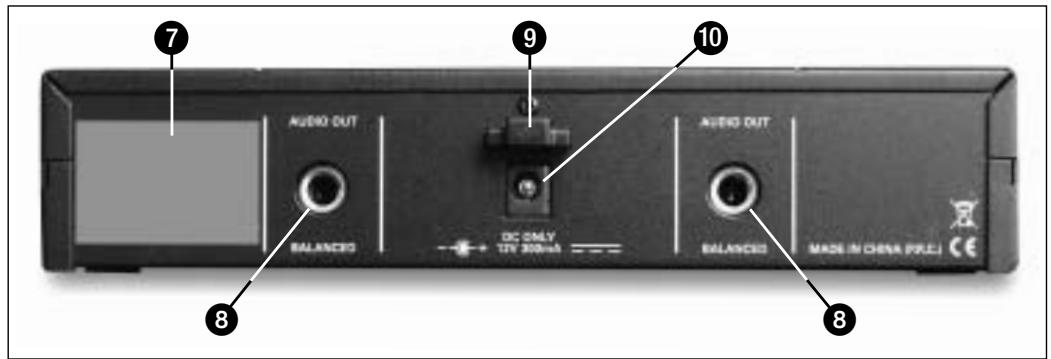
7 Carrier frequency label: A label indicating the carrier frequency (frequencies) and approval marks of your receiver is affixed to the rear panel of the receiver.
8 AUDIO OUT (1 per channel): Balanced TRS 1/4" jack, adjustable from mic to line level. You can connect the output either to an XLR microphone input or to an unbalanced line input on a mixer or amplifier.
9 Strain relief for the feeder cable of the supplied AC adapter.
10 DC ONLY: Input connector for the supplied AC adapter.
The automatic squelch circuit switches the receiver off if the received signal is too weak, in order to suppress the related noise or the residual noise of the receiver while the transmitter is off.
The HT 40 PRO handheld transmitter operates on a single fixed, quartz stabilized frequency in the 660 MHz to 865 MHz UHF carrier frequency range and uses an antenna integrated in the body.
The microphone element permanently mounted on the transmitter uses a high quality cardioid transducer from AKG. It provides low handling noise sensitivity, high gain before feedback, and brilliant sound quality, as well as a built-in wind and pop filter to reduce wind and breath noise.
11 On/off switch: This slide switch provides three positions indicated in the display window:
ON: Power to the transmitter is on.
MUTE: The signal delivered by the microphone element is muted while power and the RF carrier frequency remain on.
OFF: Power to the transmitter is off.
12 Status LED: Indicates the transmitter's operating status.
LED lit green: Battery is OK.
LED lit red: From the moment the LED changes to red, the battery capacity will provide a maximum of two operating hours. We recommend replacing the battery with a new one as soon as possible.
- If you use a rechargeable battery, the LED will change to red 15 minutes before the battery will be dead!
13 Color code clip: The color of this plastic clip indicates the carrier frequency of your transmitter. Receiver channels tuned to the same frequency are marked with the same color. Refer to the Manual Supplement sheet for a color code table.
You can remove the color code clip on the HT 40 PRO and replace it with the supplied semitransparent clip.
14 Battery compartment lid: Refer to section 3.5.
15 Carrier frequency label: The label above the battery compartment indicates the carrier frequency and approval marks of your transmitter.
You can use the PT 40 PRO bodypack transmitter with both dynamic microphones and condenser microphones operating on a supply voltage of approx. 4V . You may also connect an electric guitar, electric bass, or remote keyboard.
The PT 40 PRO operates on a single fixed, quartz stabilized frequency in the 660 MHz to 865 MHz UHF carrier frequency range.
16 On/off switch: This slide switch provides three positions indicated in the display window:
ON: Power to the transmitter is on.
MUTE: The signal delivered by the microphone element is muted while power and the RF carrier frequency remain on.
OFF: Power to the transmitter is off.
17 Status LED: Indicates the transmitter's operating status.
LED lit green: Battery is OK.
LED lit red: From the moment the LED changes to red, the battery capacity will provide a maximum of two operating hours. We recommend replacing the battery with a new one as soon as possible.
- If you use a rechargeable battery, the LED will change to red 15 minutes before the battery will be dead!
18 Audio input: 3-pin mini XLR connector with both mic and line level pins that automatically match the connector pinout of the recommended AKG microphones or optional MKG L guitar cable.
- While the MKG L guitar cable is included in some WMS 40 SINGLE/DUAL kits (see section 2.2 Packing Lists), it is also available as an optional accessory.

Fig. 2: Rear panel controls on SR 40 DUAL receiver.
WMS 40 SINGLE/DUAL
2.4.3 Automatic Squelch
2.5 HT 40 PRO Handheld Transmitter
2.5.1 Controls
Refer to fig. 3 on page 2.
Note:
2.6 PT 40 PRO
Bodypack Transmitter
2.6.1 Controls
Refer to fig. 4 on page 2.
Note:
Note:
2 Description
19 Antenna: Permanently connected, flexible antenna.
20 Belt clip for fixing the transmitter to your belt.
21 Battery compartment lid with integrated screwdriver (21a).
21b Viewing window: The viewing window lets you check if there is a dry or rechargeable battery inside the battery compartment. You can also insert a white lettering strip (supplied) or a color code strip (optional) into the viewing window.
22 GAIN: This rotary control inside the battery compartment allows you to match the bodypack transmitter input gain to the microphone or instrument you connected to the transmitter.
23 Carrier frequency label: The label on the transmitter rear panel indicates the carrier frequency, color code (receiver channels with the same carrier frequency are marked with the same color), and approval marks of your transmitter. Refer to the Manual Supplement sheet for a color code table.
2.6.2 Microphones, Guitar Cable
The PT 40 PRO has been designed specifically for use with the following AKG microphones:
Important!
- To avoid hum interference, do not use any audio cables that are longer than 10 feet (3 m)!
Important!
CK 55 L, C 417 L, C 520 L, C 555 L
C 516 ML, C 518 ML, C 519 ML
- The MKG L guitar cable from AKG lets you connect an electric guitar, electric bass, or remote keyboard to the body-pack transmitter. One or two MKG L guitar cables, respectively, are included in the Instrumental Set SINGLE and Instrumental Set DUAL. The MKG L guitar cable is also available separately as an accessory.
3 Setting Up
- Prior to setting up your WMS 40 SINGLE/DUAL, check that the transmitter and receiver are tuned to the same frequency. The easiest way to do this is to compare the color codes on the transmitter and receiver.
- You can either use the receiver freestanding or mount it in a 19" rack using the optional RMU 40 rack mounting kit. For instructions on how to rack mount the receiver, refer to the RMU 40 manual.
3.1 Positioning the Receiver
- Reflections off metal parts, walls, ceilings, etc. or the shadow effects of musicians and other people may weaken or cancel the direct transmitter signal.
- For best results, place the receiver as follows:
- Place the receiver near the performance area (stage). Make sure, though, that the transmitter will never get any closer to the receiver than 10 ft (3 m). Optimum separation is 16 ft. (5 m).
- Check that you can see the receiver from where you will be using the transmitter.
- Place the receiver at least 5 ft. (1.5 m) away from any big metal objects, walls, scaffolding, ceilings, etc.
3.2 Connecting the Receiver to a Balanced Input Refer to fig. 5 on page 3.
- For each channel, use a balanced cable with an XLR connector and 1/4'' TRS jack plug (available from electronics or hi-fi stores).
- Connect the (each) AUDIO OUT jack (8) on the receiver rear panel to the desired balanced (XLR) microphone input on the mixer or amplifier.
- Turn the (two) VOLUME control(s) (3) on the receiver all the way CCW to set the receiver output to mic level.
3.3 Connecting the Receiver to an Unbalanced Input Refer to fig. 6 on page 3.
- Use a standard 1/4" jack cable to connect the (each) AUDIO OUT jack (8) on the receiver rear panel to an unbalanced 1/4" line input jack on the mixer or amplifier.
- Turn the (two) VOLUME control(s) (3) on the receiver all the way CW to set the receiver output to line level.
3.4 Connecting the Receiver to Power Refer to fig. 7 on page 3.
-
Check that the AC mains voltage stated on the included power supply is identical to the AC mains voltage available where you will use your system. Using the power supply with a different AC voltage may cause damage to the unit.
-
Point the antenna(s) (2) upward.
- Plug the feeder cable on the included power supply into the DC ONLY socket (10) on the receiver.
- Bend part of the feeder cable into a small bight, pass the bight through the strain relief (9) from above, and slip the bight over the hook on the strain relief (9). Tighten the cable.
- Plug the AC adapter into a convenient power outlet.
- Press the ON/OFF switch (1) to switch power to the receiver ON.
3.5 Inserting and Testing Batteries in the Handheld/Bodypack Transmitters Refer to fig. 8 on page 2.
- Depress the snap hook on the battery compartment lid (14)/(21).
- Pull the battery compartment lid (14)/(21) off the transmitter in the direction of the arrow.
- Insert the supplied battery into the battery compartment conforming to the polarity marks. The transmitter will not function if you insert the battery the other way round.
- Set the on/off switch (11)/(16) to "ON" to switch power to the transmitter on. If the battery is in good condition, the status LED (12)/(17) will be lit green.
If the status LED (12)/(17) is lit red, the battery will be dead within about two hours. Replace the battery with a new one as soon as possible. If the status LED (12)/(17) fails to illuminate the battery is dead. Insert a new battery.
3 Setting Up
Note:
-
If you use a rechargeable battery, the LED will switch to red 15 minutes before the battery will be dead!
-
To close the battery compartment, slide the battery compartment lid (14)/(21) onto the battery compartment from below to the point that the snap hook will engage.
-
Switch power to the receiver on.
- To switch power to the transmitter on, set the on/off switch (11) to "ON". Since the HT 40 PRO handheld transmitter has been designed specifically for the integrated microphone element, there is no need to set gain on the handheld transmitter. Therefore, the handheld transmitter has no level or gain control.
- Switch power to your sound system or amplifier on.
-
Talk or sing into the microphone and set the levels on your mixer or amplifier referring to the appropriate instruction manual, or by ear.
-
Pull the color code clip (13) off the transmitter case in the direction of the arrow.
- Slide the supplied semitransparent replacement clip onto the transmitter to the point that it snaps into place with an audible click.
The PT 40 PRO bodypack transmitter has been designed for use with the CK 55 L, C 417 L, C 520 L, C 555 L, C 516 ML, C 518 ML, and C 519 ML microphones from AKG. If you wish to connect other microphones from AKG or other manufacturers to the PT 40 PRO, please note that you may have to rewire the existing connector of your microphone or replace it with a 3-pin mini XLR connector.
Audio input (18) pinout: Pin 1: shield
Pin 2:audio inphase (+)
Pin 3: supply voltage
A 4-V positive supply voltage for condenser microphones is available on pin 3.
Please note that AKG cannot guarantee that the PT 40 PRO bodypack transmitter will work perfectly with products from other manufacturers and any damage that may result from such use is not covered by the AKG warranty scheme.
- Remove the battery compartment lid (21).
- Plug the mini XLR connector on the cable of your microphone into the audio input socket (18) on the bodypack transmitter.
- Set the on/off switch (16) to "ON" to switch power to the bodypack transmitter on.
- Switch power to the receiver on.
- Talk or sing into the microphone.
- Use the screwdriver (21a) integrated in the battery compartment lid (21) to set the GAIN control (22) to a position where the AF CLIP LED (5) on the receiver will flash occasionally.
-
Replace the battery compartment lid (21) on the transmitter.
-
Remove the battery compartment lid (21).
- Plug the jack plug on the MKG L guitar cable into the output jack on your instrument and the mini XLR connector on the guitar cable into the audio input socket (18) on the bodypack transmitter.
- Set the on/off switch (16) to "ON" to switch power to the bodypack transmitter on.
- Switch power to the receiver on.
- Play your instrument.
- Use the screwdriver (21a) integrated in the battery compartment lid (21) to set the GAIN control (22) to a position where the AF CLIP LED (5) on the receiver will flash occasionally.
-
Replace the battery compartment lid (21) on the transmitter.
-
Remove the battery compartment lid (21).
- Remove a label from the supplied sheet.
- Letter the label as desired.
- Remove the battery and place the label on the viewing window (21b).
-
Replace the battery and slide the compartment lid (21) back in place on the transmitter.
-
Move the transmitter around the area where you will use the system to check the area for "dead spots", i.e., places where the field strength seems to drop and reception deteriorates.
- If you find any dead spots, try to eliminate them by repositioning the receiver. If this does not help, avoid the dead spots.
- The RF OK LED (4) on the receiver going out means no signal is being received or the automatic squelch is active.
- Switch power to the transmitter ON or move closer to the receiver, to the point that the RF OK LED (4) will come back on.
3.6 Setting Up the Handheld Transmitter
Also refer to section 4 Microphone Technique.
3.6.1 Replacing the Color Code Clip Refer to fig. 9 on page 2.
3.7 Setting Up the Bodypack Transmitter

3.7.1 Connecting a Microphone Refer to fig. 10 on page 3.
Also refer to section 4 Microphone Technique.
3.7.2 Connecting an Instrument Refer to fig. 10 on page 3.
3.7.3 Inserting a Label Refer to fig. 4 on page 2
3.8 Before the Soundcheck
4 Microphone Technique
4.1 HT 40 PRO Handheld Transmitter
A handheld vocal microphone provides many ways of shaping the sound of your voice as it is heard over the sound system.
The following sections contain useful hints on how to use your HT 40 PRO handheld transmitter for best results.
4.1.1 Working Distance and Proximity Effect
Basically, your voice will sound the bigger and mellower, the closer you hold the microphone to your lips. Moving away from the microphone will produce a more reverberant, more distant sound as the microphone will pick more of the room's reverberation.
You can use this effect to make your voice sound aggressive, neutral, insinuating, etc. simply by changing your working distance.
Proximity effect is a more or less dramatic boost of low frequencies that occurs when you sing into the microphone from less than 2 inches. It gives more "body" to your voice and an intimate, bass-heavy sound.
4.1.2 Angle of Incidence
Sing to one side of the microphone or above and across the microphone's top. This provides a well-balanced, natural sound.
Refer to fig. 11 on page 4.
If you sing directly into the microphone, it will not only pick up excessive breath noise but also overemphasize "sss", "sh", "tch", "p", and "t" sounds.
4.1.3 Feedback
Refer to fig. 12a on page 4.
Feedback is the result of part of the sound projected by a speaker being picked up by a microphone, fed to the amplifier, and projected again by the speaker. Above a specific volume or "system gain" setting called the feedback threshold, the signal starts being regenerated indefinitely, making the sound system howl and the sound engineer desperately dive for the master fader to reduce the volume and stop the howling.
To increase usable gain before feedback, the microphone element of the HT 40 PRO handheld transmitter has a cardioid polar pattern. This means that the microphone is most sensitive to sounds arriving from in front of it (your voice) while picking up much less of sounds arriving from the sides or rear (from monitor speakers for instance).
To maximize gain before feedback, place the main (aka "FOH" - front of house) speakers in front of the microphones (along the front edge of the stage).
Refer to fig. 12b on page 4.
If you use monitor speakers, be sure never to point any microphone directly at the monitors, or at the FOH speakers. Feedback may also be triggered by resonances depending on the acoustics of the room or hall. With resonances at low frequencies, proximity effect may cause feedback. In this case, it is often enough to move away from the microphone a little to stop the feedback.
4.1.4 Backing Vocals
Refer to fig. 13 on page 4.
-
Never let more than two persons share a microphone.
-
Ask your backing vocalists never to sing more than 35 degrees off the microphone axis.
The microphone is very insensitive to off-axis sounds. If the two vocalists were to sing into the microphone from a wider angle than 35 degrees, you may end up bringing up the fader of the microphone channel far enough to create a feedback problem.
4.2 CK 55 Lavalier Microphone
Refer to fig. 14 on page 4.
- Fix the microphone to the supplied lavalier clip or to the optional H 41/1 tiepin.
- Clamp the microphone on your clothing as close as possible to the talker's mouth.
Note:
- Remember that gain-before-feedback will be the higher the closer the microphone sits to the user's mouth!
4.3 C 555 L Head-worn Microphone
- Make sure to aim the microphone at the user's mouth.
4.3.1 Putting On the Microphone
Refer to fig. 15 on page 4.
- Put the microphone on.
- Bend the gooseneck so that the microphone will sit to one side in front of the corner of your mouth.
Note:
- You can adjust the microphone to conform exactly to the shape of the user's head. For details, refer to the C 555 L instruction manual which you can download from www.akg.com.
- Should you hear excessive pop noise ("p" and "t" sounds are overemphasized unnaturally), move the microphone capsule further away from your mouth (up or back).
- If the microphone sounds "thin" or flat, move the microphone capsule closer to your mouth (refer to fig. 3).
Find the optimum position during the soundcheck.
4.3.2 Windscreen
If (for instance, on an open-air stage) excessive wind or pop noise becomes audible, attach the supplied windscreen to the microphone.
4.3.3 Moisture Shield
- Slide the windscreen onto the microphone capsule.
- Pull the windscreen over the outer edge of the microphone capsule.
A special moisture shield on the microphone capsule makes it difficult for moisture and makeup to penetrate into the microphone. This barrier prevents the microphone sound entries from being clogged by perspiration or makeup, which would make the sound dull and reduce the sensitivity of the microphone. Therefore, never remove the moisture shield from the microphone!
Refer to fig. 16 on page 4.
In case the moisture shield is damaged or lost, the C 555 L head-worn microphone includes a replacement moisture shield.
5 Cleaning

5.1 Surfaces
5.2 Handheld Transmitter Internal Windscreen
-
Use a soft cloth moistened with water to clean the receiver and transmitter surfaces.
-
Unscrew the wire-mesh cap of the handheld transmitter CCW and remove the wire-mesh cap from the transmitter.
- Remove the windscreen (foam sheet) from the wire-mesh cap.
- Wash the windscreen in mild soap suds.
- As soon as the windscreen has dried, replace it in the wire-mesh cap and screw the wire-mesh cap onto the transmitter CW.
6 Troubleshooting

| Problem | Possible Cause | Remedy |
| No sound. | 1. AC adapter is not connected to receiver and/or power outlet. 2. Receiver is OFF. 3. Receiver is not connected to mixer or amplifier. 4. VOLUME control on receiver is at zero. 5. Microphone or instrument is not connected to bodypack transmitter. 6. Transmitter and receiver color codes are not identical. 7. Transmitter on/off switch is at "OFF" or "MUTE". 8. Transmitter batteries are not inserted properly. 9. Transmitter batteries dead. 10. Transmitter is too far away from receiver. 11. Obstructions between transmitter and receiver. 12. Receiver is invisible from transmitter location. 13. Receiver sits too close to metal objects. | 1. Connect AC adapter to receiver and/or power outlet. 2. Push ON/OFF switch to switch receiver ON. 3. Connect receiver output to mixer or amplifier input. 4. Turn up VOLUME control. 5. Connect microphone or instrument to audio input on bodypack. 6. Use receiver and transmitter with identical color codes. 7. Set transmitter on/off switch to "ON". 8. Insert batteries conforming to "+" and "-" marks. 9. Replace batteries. 10. Move closer to receiver. 11. Remove obstructions. 12. Avoid spots where you cannot see receiver. 13. Move receiver away from or remove interfering objects. |
| Noise, crackling, unwanted signals. | 1. Antenna location. 2. Interference from other wireless systems, TV, radio, CB radios, or defective electrical appli-ances or installation. | 1. Relocate receiver. 2. Switch off interference sources or defective appliances or use a WMS 40 SINGLE/DUAL tuned to a different frequency; have electrical installation checked. |
| Distortion. | 1. (Bodypack transmitter only.) GAIN control is set too high or too low. 2. Interference from other wireless systems, TV, radio, CB radios, or defective electrical appli-ances or installation. | 1. Turn GAIN control down or up just enough to stop the distortion. 2. Switch off interference sources or defective appliances or use a WMS 40 SINGLE/DUAL tuned to a different frequency; have electrical installation checked. |
| Momentary loss of sound ("drops") at some spots within performance area. | • Antenna location. | • Relocate receiver. If dead spots persist, mark and avoid them. |
| 7.1 WMS 40 SINGLE/DUAL | |||
| HT 40 PRO | PT 40 PRO | SR 40 SINGLE/DUAL | |
| Carrier frequency range | 660 to 865 MHz | 660 to 865 MHz | 660 to 865 MHz |
| Modulation | FM | FM | FM |
| Audio bandwidth | 65 HZ to 20 kHz | 40 Hz to 20 kHz | 40 Hz to 20 kHz |
| Frequency stability (-10°C to +50°C) | ±15 kHz | ±15 kHz | ±15 kHz |
| Rated deviation | 15 kHz | 15 kHz | 15 kHz |
| T.H.D. at 1 kHz | typ. 0.8% | typ. 0.,8% | typ. 0.8% |
| Compander | Yes | Yes | Yes |
| Signal/noise ratio | typ. 110 dB(A) | typ. 110 dB(A) | typ. 110 dB(A) |
| RF output | 10 mW | 10 mW | - |
| Current consumption | typ. 70 mA | typ. 75 mA | SR 40 SINGLE: typ. 95 mA SR 40 DUAL: typ. 175 mA |
| Power requirement | 1 x 1.5 V AA size battery (LR 6 to IEC 86-L) | 1 x 1.5 V AA size battery (LR 6 to IEC 86-L) | 120/230 VAC 50/60 Hz |
| Battery life | typ. 30 hours (for 2200 mAh) | typ. 30 hours (for 2200 mAh) | - |
| Audio input level for rated deviation | - | 25 to 750 mV/1 kHz, adjustable | - |
| Input impedance | - | 1 Mohm | - |
| Condenser mic power supply | - | 4 V/4.7 kohms (pin 3) | - |
| Squelch threshold | - | - | -100 dBm |
| Audio outputs | - | - | bal. 1/4" jack: adjustable from mic to line level. Output level at rated deviation: 500 mV rms |
| Size | 229 x 53 x 53 mm (9 x 2.1 x 2.1 in.) | 60 x 74 x 30 mm (2.4 x 2.9 x 1.2 in.) | 200 x 190 x 44 mm (7.8 x 7.4 x 1.7 in.) |
| Net weight | 160 g (5.7 oz.) | 60 g (2.1 oz.) | SR 40 SINGLE: 580 g (1.3 lbs.) SR 40 DUAL: 620 g (1.4 lbs.) |
| 7.2 CK 55 L, C 555 L | ||
| CK 55 L | C 555 L | |
| Type | pre-polarized condenser microphone | pre-polarized condenser microphone |
| Polar pattern | cardioid | cardioid |
| Frequency range | 80 Hz to 14 kHz | 80 Hz to 20 kHz |
| Sensitivity | 19 mV/Pa (-34.4 dBV re 1 V/Pa) | 35 mV/Pa (-29 dBV re 1 V/Pa) |
| Electrical impedance at 1 kHz | 1000 ohms | 200 ohms |
| Supply voltage | 1.5 to 10 V from AKG WMS bodypack transmitter | B 29 L battery supply, MPA V L phnom power adapter, AKG WMS bodypack transmitter |
| Cable length | 1.6 m (5 ft. 4 in.) | 1.5 m (5 ft.) |
| Connector | 3-pin mini XLR | 3-pin mini XLR |
| Finish | matte black | matte black |
| Size | 8 dia. x 22 mm (0.3 x 0.9 in.) | length: 195 mm (7.7 in.), max. dia.: 134 mm (5.3 in.) |
| Net weight | 3 g (0.1 oz.) (w/o cable) | 26 g (0.9 oz.) |
| 7.3 S0 40 | |
| Carrier frequency range | 660 to 865 MHz |
| Modulation | FM |
| Audio bandwidth | 40 to 20,000 Hz |
| Frequency stability (-10°C to +50°C) | ±15 kHz |
| Rated deviation | 15 kHz (SP1, SP2: 13.5 kHz) |
| T.H.D. at 1 kHz | typ. 0.8% |
| Compander | integrated |
| Signal/noise ratio | typ. 103 dB(A) |
| RF output | typ. 5 mW |
| Current consumption | typ. 75 mA |
| Power requirement | single 1.5-V AAA size battery |
| Battery life | >11 hours (dry battery) >6 hours (rechargeable battery) |
| Audio input level for rated deviation | 300 mV/1 kHz |
| Size (WxDxH) | 22 x 30 x 98 mm (0.8 x 1.2 x 3.8 in.) |
| Net weight | 36 g (1.3 oz.) |
This product conforms to the standards listed in the Declaration of Conformity. To order a free copy of the Declaration of Conformity, visit http://www.akg.com or contact sales@akg.com.
Sommaire
Page
Fig. 3, 4, 8, 9 2
Fig. 5, 6, 7, 10. 3
Fig. 11 à 16 4
4.2 Micro-cravate CK 55 L
Figs. 3, 4, 8, 9 2
Figs. 5, 6, 7, 10 3
Figs. 11 a 16. 4
Sets com receptor monocanal SR 40 PRO
Sets com receptor monocanal SR 40 PRO
2 Apresentação
Sets com receptor de dois canais SR 40 DUAL
GUITAR/VOCAL SET DUAL
6 Resolver problemas
For other products and distributors worldwide visit www.akg.com
ROHS OK
H A Harman International Company
Technische Änderungen vorbehalten. Specifications subject to change without notice. Ces caractéristiques sont susceptibles de modifications. Ci riserviamo il diritto di effettuare modifiche tecniche. Nos reservamos el derecho de introducir modificaciones sociales. Especificações sujeitas a mudanças sem avis previo.
Printed in China (P.R.C.).
01/08/9100 U 12520

- WMS 40 SINGLE WMS 40 DUAL
- FCC Statement
- Safety and Environment
- Environment
- Packing Lists
- Kits with SR 40 SINGLE receiver
- INSTRUMENTAL SET SINGLE
- PRESENTER SET SINGLE
- SPORTS SET SINGLE
- VOCAL SET SINGLE
- TRANSFORMER SET SINGLE
- Description
- GUITAR/VOCAL SET DUAL
- INSTRUMENTAL SET DUAL
- PRESENTER SET DUAL
- VOCAL SET DUAL
- Automatic Squelch
- HT 40 PRO Handheld Transmitter
- Controls
- Note:
- PT 40 PRO
- Controls
- Setting Up
- Setting Up the Handheld Transmitter
- Microphone Technique
- HT 40 PRO Handheld Transmitter
- Working Distance and Proximity Effect
- Angle of Incidence
- Feedback
- Backing Vocals
- CK 55 Lavalier Microphone
- C 555 L Head-worn Microphone
- Putting On the Microphone
- Windscreen
- Moisture Shield
- Cleaning
- Surfaces
- Troubleshooting
- Sommaire
- Apresentação
- Resolver problemas
Brand : AKG
Model : WMS 40 PRO DUAL
Category : Wireless Microphone System