
GB 40 FLEXX GUITARBUG - Wireless Microphone AKG - Free user manual and instructions
Find the device manual for free GB 40 FLEXX GUITARBUG AKG in PDF.


| Product Type | Wireless Microphone (transmitter for guitar/bass) |
| Brand | AKG |
| Model | GB 40 FLEXX GUITARBUG |
| Carrier Frequency | 660 - 865 MHz (UHF) |
| Modulation | FM |
| Frequency Stability | ±15 kHz (between -10°C and +50°C) |
| Typical RF Output Power | 5 mW |
| Audio Bandwidth | 40 - 20,000 Hz |
| Audio Input Impedance | 1 Mohm |
| Maximum Audio Input Level | 1100 mV/1 kHz |
| Typical Distortion (1 kHz) | 0.8 % |
| Typical Signal-to-Noise Ratio | 103 dB (A) |
| Power Supply | 1 x 1.5 V AAA battery or 1.2 V NiMH rechargeable battery |
| Typical Current Consumption | 75 mA |
| Battery Life | > 11 h (battery), > 6 h (rechargeable) |
| Dimensions (L x D x H) | 76 x 20 x 28 mm |
| Net Weight | 28 g |
| Supplied Accessories | Transmitter, long adapter, AAA battery, 2 covers, screwdriver, 2 self-adhesive discs |
| Main Features | Miniature transmitter with swiveling 6.35 mm jack plug, 3 switchable carrier frequencies, crystal stabilized, flexible antenna, ON/MUTE/OFF switch, input potentiometer, LED indicator, spring and self-adhesive disc attachment |
| Care and Cleaning | Clean the housing with a slightly damp cloth (clean water) |
| Safety | Do not expose to sunlight, dust, humidity, rain, vibrations. Do not throw batteries into fire. Recycle according to regulations. |
| Spare Parts and Repairability | Spare covers supplied, adapter for recessed jack included. No user-serviceable parts. |
| General Information | Complies with CE standards. Declaration of conformity at www.akg.com. |
Frequently Asked Questions - GB 40 FLEXX GUITARBUG AKG
User questions about GB 40 FLEXX GUITARBUG AKG
0 question about this device. Answer the ones you know or ask your own.
Ask a new question about this device
Download the instructions for your Wireless Microphone in PDF format for free! Find your manual GB 40 FLEXX GUITARBUG - AKG and take your electronic device back in hand. On this page are published all the documents necessary for the use of your device. GB 40 FLEXX GUITARBUG by AKG.
USER MANUAL GB 40 FLEXX GUITARBUG AKG
GB 40 FLEXX guitarbug
Please read the manual before using the equipment!
MODE D'EMPLOI p.18
1 Safety and Environment 11
1.1 Safety 11
1.2 Environment 11
2 Description 12
2.1 Introduction 12
2.2 Packing List 12
2.3 Optional Accessories 12
2.4 Descriptiun 12
2.5 Controls 12
3 Setting Up 13
3.1 Inserting/Replacing and Testing Batteries 13
3.2 Using Rechargeable Batteries 14
Page
4 Operating Notes 15
4.1 Attaching the Transmitter 15
4.2 Setting Gain 15
4.3 Instruments with Recessed Output Jacks 15
4.4 Stabilizing the Transmitter 16
4.5 Troubleshooting 16
5 Cleaning 16
6 Specifications 17
FCC Statement
This equipment has been tested and found to comply with the limits for a Class B digital device, pursuant to Part 74 of the FCC Rules. These limits are designed to provide reasonable protection against harmful interference in a residential installation. This equipment generates, uses, and can radiate radio frequency energy and, if not installed and used in accordance with the instructions, may cause harmful interference to radio communications. However, there is no guarantee that interference will not occur in a particular installation. If this equipment does cause harmful interference to radio or television reception, which can be determined by turning the equipment off and on, the user is encouraged to try to correct the interference by one or more of the following measures:
Reorient or relocate the receiving antenna.
- Increase the separation between the equipment and the receiver.
- Connect the equipment into an outlet on a circuit different from that to which the receiver is connected.
- Consult the dealer or an experienced radio/TV technician for help.
Shielded cables and I/O cords must be used for this equipment to comply with the relevant FCC regulations.
Changes or modifications not expressly approved in writing by AKG Acoustics may void the user's authority to operate this equipment.

1 Safety and Environment
1.1 Safety
- Do not expose the equipment to direct sunlight, excessive dust, moisture, rain, mechanical vibrations, or shock.
1.2 Environment
- Be sure to dispose of used batteries as required by local waste disposal rules. Never throw batteries into a fire (risk of explosion) or garbage bin.
- When scrapping the equipment, remove the batteries, separate the case, circuit boards, and cables, and dispose of all components in accordance with local waste disposal rules.
- The packaging of the equipment is recyclable. To dispose of the packaging, make sure to use a collection/recycling system provided for that purpose and observe local legislation relating to waste disposal and recycling.
2.1 Introduction
Thank you for purchasing an AKG product. Please take a few minutes to read the instructions below carefully before operating the equipment. Please keep the Manual for future reference. Have fun and impress your audience!
2.2 Packing List
| 1 GB 40 FLEXX transmitter | 1 long adapter plug | 1 AAA size dry battery |
| 2 battery compartment lids | 1 screwdriver | 1 pair of Velcro pads |
- Check that the package contains all the parts
listed above. If anything is missing, please contact your AKG dealer.
2.3 Optional Accessories
- For optional accessories, refer to the current AKG catalog or folder, or visit www.akg.com. Your dealer will be glad to help.
2.4 Description
The GB 40 FLEXX is a WMS 40 microtools Series miniature transmitter that has been specifically designed for electric guitars and basses but is also suited for keyboards.
The transmitter features a permanently attached, swiveling 1/4 jack plug that allows you to plug the transmitter directly into the output jack of your instrument. A built-in spring presses the transmitter against the instrument to hold it securely in place. The bottom of the transmitter is fitted with a soft plastic pad that will leave no trace on the instrument.
The supplied Velcro pads allow you to attach the transmitter even more firmly to the instrument.
Operating in the 660 MHz to 865 MHz UHF range, the GB 40 FLEXX provides three selectable, quartz stabilized carrier frequencies within the 3-MHz-wide frequency band you specified at the time of ordering and uses a permanently attached flexible antenna.
You can replace the black battery cover with one of the supplied replacement covers.
2.5 Controls (refer to fig. 1 on page 13)
1 ON/MUTE/OFF: This slide switch provides three positions:
ON: Power to the transmitter is on.
M: The signal delivered by the microphone is muted while power and the RF carrier frequency remain on. This prevents the receiver responding to interference from other transmitters.
OFF: Power to the transmitter is off.
2 Battery compartment for one 1.5-V AAA size battery (supplied).
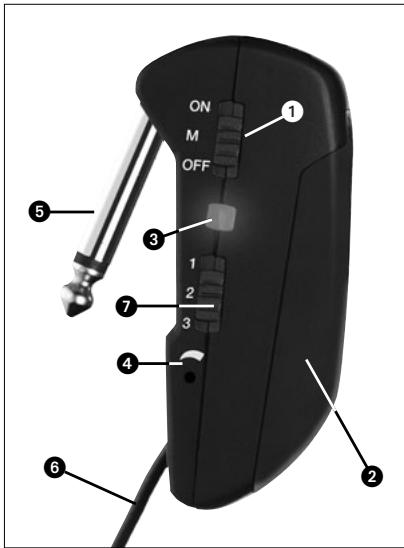
Fig. 1: GB 40 FLEXX controls
3 Status LED: Indicates the transmitter's operating status.
LED lit green: Battery is OK.
LED lit red: From the moment the LED changes to red, the battery capacity will provide a maximum of one operating hour. We recommend replacing the battery with a new one as soon as possible.
4 Input Gain: This rotary pot sets the sensitivity of the transmitter's audio section.
5 Jack plug: 1/4" TS jack plug for plugging the transmitter directly into an instrument output jack.
6 Flexible antenna
7 This slide switch tunes the transmitter to one of three different carrier frequencies within the transmitter's carrier frequency band.
8 Carrier frequency label: The label on the transmitter rear panel indicates the name of the carrier frequency band and the three carrier frequencies of your transmitter. Refer to the Manual Supplement sheet for a color code table.

3 Setting Up
3.1 Inserting/Replacing and Testing Batteries
(refer to fig. 2 on page 14)
- Depress the snap hook on the battery compartment lid (1).
- Pull the battery compartment lid (1) down to remove it from the transmitter.

Important!
The foam pad on the inside of the battery compartment lid (1) holds the battery in place. Do not remove the foam pad. If you do, the battery will not be held in place properly and may cause a rattling noise.
- If there is a dead or defective battery inside the battery compartment, remove the battery.
- Insert the supplied or new battery (2) into the battery compartment as shown in fig. 2.
- Set the ON/MUTE/OFF switch (3) to ON.
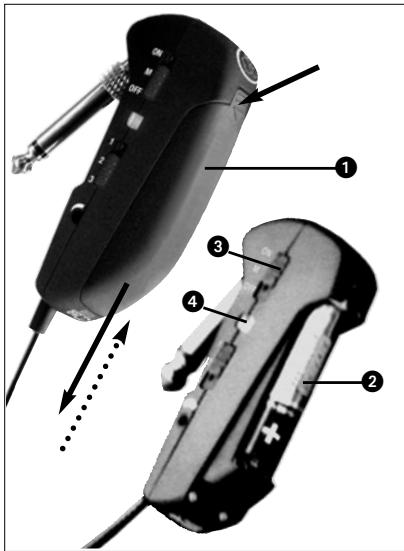
Fig. 2: Inserting a battery.
As long as the battery is in good condition, the status LED (4) will flash red momentarily and will then be lit green constantly.
If the status LED (4) lights red constantly the battery will be dead within about 60 minutes. Replace the battery with a new one as soon as possible.
If the status LED (4) fails to flash momentarily the battery is dead. Insert a new battery.
- Slide the battery compartment lid (1) onto the transmitter against the direction of the arrow to the point that the lid (1) will click shut.
3.2 Using Rechargeable Batteries
Instead of dry batteries, you can also use a 1.2-V rechargeable battery to power the transmitter. We recommend SANYO HR-4U (650 mAh) or Panasonic Rechargeable PRO+ (550 mAh) NiMH rechargeable batteries.
Note: If you use a rechargeable battery, the LED will switch to red 15 to 20 minutes before the battery will be dead!
4.1 Attaching the Transmitter (refer to fig. 3)
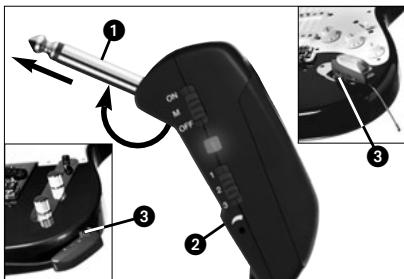
Fig. 3: Fixing the transmitter on the instrument.
- Swivel the jack plug (1) away from the transmitter (2) to the stop.
- Insert the jack plug (1) all the way into the output jack (3) on your instrument. The spring inside the transmitter will hold the transmitter securely in place on the instrument.
The soft plastic pad on the bottom of the transmitter will leave no trace on the instrument surface.
Important! To avoid damaging the transmitter, NEVER place the instrument on top of the transmitter.
4.2 Setting Levels (refer to fig. 1 and SR 40 FLEXX receiver manual)
- Set the frequency selector (7) on the transmitter and the frequency selector on the SR 40 FLEXX receiver to the same positions (1 - 1, 2 - 2, or 3 - 3).
- Use the supplied screwdriver to turn the input gain control (4) on the transmitter to a position halfway between the left and right stops.
- Set the ON/MUTE/OFF switch (1) to ON to switch power to the transmitter on.
- Set the SQUELCH control on the receiver to minimum and switch power to your receiver
and sound system on.
- Turn the volume control on your instrument all the way CW and play a few bars.
- If your instrument sounds distorted turn the input gain control (4) down CCW to the point that you will hear no more distortion. If your instrument sounds too quiet, turn the input gain control (4) up CW. As soon as your instrument sound becomes distorted, turn the input gain control (4) back down CCW to the point that the distortion will stop.
4.3 Instruments with Recessed Output Jacks (refer to fig. 4 on page 16)
If your instrument has a recessed output jack, the jack plug on the transmitter may be too short to make contact between the instrument and transmitter.
In this case, mount the supplied long adapter plug:
- Unscrew the jack plug (1) from the transmitter (2) CCW.
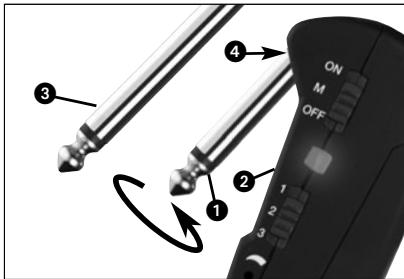
Fig. 4: Mounting the adapter plug.
- Screw the adapter plug (3) onto the threaded plug (4) on the transmitter (2) CW.
4.4 Stabilizing the Transmitter (refer to fig. 5)
- Use the supplied Velcro pads to make the transmitter sit more securely on your instrument:
- Remove the backing from one of the pads and attach it to the transmitter rear panel.
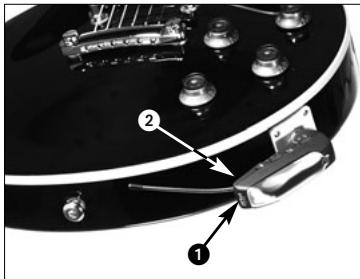
Fig. 5: Stabilizing the transmitter.
- Remove the backing from the other pad and attach it to the instrument.
4.5 Troubleshooting
- For troubleshooting hints, refer to the instruction manual of your SR 40 FLEXX receiver.

5 Cleaning
- To clean the transmitter case, use a soft cloth moistened with water.
| Carrier frequency range | 660 to 865 MHz |
| Modulation | FM |
| Frequency stability (-10°C to +50°C) ±15 kHz | |
| RF output | typ. 5 mW |
| Compander | integrated |
| Audio bandwidth | 40 to 20,000 Hz |
| Audio input impedance | 1 Mohm |
| Max. audio input level | 1100 mV/1 kHz |
| T.H.D. at 1 kHz | typ. 0.8% |
| Signal/noise ratio | typ. 103 dB(A) |
| Power requirement | single 1.5-V AAA size battery |
| Current consumption | typ. 75 mA |
| Battery life | >11/>6 hours (dry/rechargeable battery) |
| Size (WxDxH) | 76 x 20 x 28 mm (3 x 0.8 x 1.1 in.) |
| Net weight | 28 g (1 oz.) |
This product conforms to the standards listed in the Declaration of Conformity. To order a free copy of the Declaration of Conformity, visit http://www.akg.com or contact sales@akg.com.
Page
4.5 Resolver problemas
- Os avisos para resolver problemas encontrará no manual do usuario do receptor SR 40 FLEXX.

5 Limpeza
For other products and distributors worldwide visit www.akg.com


ROHS OK
H A Harman International Company
Cn t t t t t t t t t t t t t t t t t t t t t t t t t t t t t t t t t t t t t t t t t t t t t t t t t t t
Printed in China (P.R.C.)
10/08/9100 U 12910
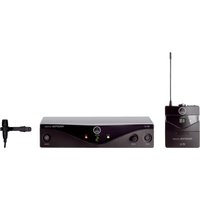
- GB 40 FLEXX guitarbug
- Safety and Environment 11
- Description 12
- Setting Up 13
- Operating Notes 15
- Cleaning 16
- Specifications 17
- FCC Statement
- Safety and Environment
- Safety
- Environment
- Introduction
- Packing List
- Optional Accessories
- Description
- Controls (refer to fig. 1 on page 13)
- Flexible antenna
- Setting Up
- Inserting/Replacing and Testing Batteries
- Important!
- Using Rechargeable Batteries
- Attaching the Transmitter (refer to fig. 3)
- Setting Levels (refer to fig. 1 and SR 40 FLEXX receiver manual)
- Instruments with Recessed Output Jacks (refer to fig. 4 on page 16)
- Stabilizing the Transmitter (refer to fig. 5)
- Troubleshooting
- Cleaning
- Resolver problemas
- Limpeza
Brand : AKG
Model : GB 40 FLEXX GUITARBUG
Category : Wireless Microphone