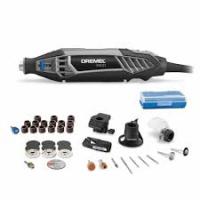
800 - Rotary tool DREMEL - Free user manual and instructions
Find the device manual for free 800 DREMEL in PDF.


| Tool type | Cordless rotary tool |
| Brand | DREMEL |
| Model | 800 |
| Nominal voltage | 10.8 V DC |
| No-load speed | 5,000 - 35,000 rpm (variable) |
| Collet capacities | 0.8 mm / 1.6 mm / 2.4 mm / 3.2 mm |
| Battery type | Removable lithium-ion battery pack |
| Charger | DREMEL No. 856 (fast charger) |
| Charging time | Approximately 3 hours |
| Weight (approx.) | 0.5 kg |
| Jam protection | Automatic stop in case of blockage |
| Power gauge | 3 LED indicators showing charge level |
| Speed control | Continuous adjustment knob (positions 2 to 10) |
| Compatible accessories | Wide range of DREMEL accessories (grinding stones, brushes, cutting discs, drill bits, etc.) |
| Warranty | 5 years (limited, material and workmanship defects) |
| Maintenance and cleaning | Cleaning with compressed air; avoid aggressive solvents |
| Safety | Double insulation, spindle lock button, overload protection system |
| Spare parts and repairability | Repair by authorized center; use of original parts recommended |
Frequently Asked Questions - 800 DREMEL
User questions about 800 DREMEL
0 question about this device. Answer the ones you know or ask your own.
Ask a new question about this device
Download the instructions for your Rotary tool in PDF format for free! Find your manual 800 - DREMEL and take your electronic device back in hand. On this page are published all the documents necessary for the use of your device. 800 by DREMEL.
USER MANUAL 800 DREMEL
Operating/Safety Instructions Model 800 Cordless Rotary Tool
HONESTLY NOW ... Have you read this OWNER'S MANUAL?
Safety
Assembly
Operation
- Accessory Information
Warranty
- Registration Form
Service Parts
Dremel brand products are manufactured and sold by the Dremel Division of Robert Bosch Tool Corporation
General Safety Rules for All Battery Operated Tools

WARNING
Read and understand all instructions. Failure to follow all instructions listed below, may result in electric shock, fire and/or serious personal injury.
SAVE THESE INSTRUCTIONS
Work Area
Keep your work area clean and well lit. Cluttered benches and dark areas invite accidents.
Do not operate power tools in explosive atmospheres, such as in the presence of flammable liquids, gases, or dust. Power tools create sparks which may ignite the dust or fumes.
Keep bystanders, children, and visitors away while operating a power tool. Distractions can cause you to lose control.
Electrical Safety
A battery operated tool with integral batteries or a separate battery pack must be recharged only with the specified charger for the battery. A charger that may be suitable for one type of battery may create a risk of fire when used with another battery.
Use battery operated tool only with specifically designated battery pack. Use of any other batteries may create a risk of fire.
Personal Safety
Stay alert, watch what you are doing, and use common sense when operating a power tool. Do not use tool while tired or under the influence of drugs, alcohol, or medication. A moment of inattention while operating power tools may result in serious personal injury.
Dress properly. Do not wear loose clothing or jewelry. Contain long hair. Keep your hair, clothing, and gloves away from moving parts. Loose clothes, jewelry, or long hair can be caught in moving parts.
Avoid accidental starting. Be sure switch is in the locked or off position before inserting battery pack. Carrying tools with your finger on the switch or inserting the battery pack into a tool with the switch on invites accidents.
Remove adjusting keys or wrenches before turning the tool on. A wrench or a key that is left attached to a rotating part of the tool may result in personal injury.
Do not overreach. Keep proper footing and balance at all times. Proper footing and balance enable better control of the tool in unexpected situations.
Use safety equipment. Always wear eye protection. Dust mask, non-skid safety shoes, hard hat, or hearing protection must be used for appropriate conditions.
Tool Use and Care
Use clamps or other practical way to secure and support the workpiece to a stable platform. Holding the work by hand or against your body is unstable and may lead to loss of control.
Do not force tool. Use the correct tool for your application. The correct tool will do the job better and safer at the rate for which it is designed.
Do not use tool if switch does not turn it on or off. A tool that cannot be controlled with the switch is dangerous and must be repaired.
Disconnect battery pack from tool or place the switch in the locked or off position before making any adjustments, changing accessories, or storing the tool. Such preventive safety measures reduce the risk of starting the tool accidentally.
Store idle tools out of reach of children and other untrained persons. Tools are dangerous in the hands of untrained users.
When battery pack is not in use, keep it away from other metal objects like: paper clips, coins, keys, nails, screws, or other small metal objects that can make a connection from one terminal to another. Shorting the battery terminals together may cause sparks, burns, or a fire.
Maintain tools with care. Keep cutting tools sharp and clean. Properly maintained tools with sharp cutting edge are less likely to bind and are easier to control.
Check for misalignment or binding of moving parts, breakage of parts, and any other condition that may affect the tool's operation. If damaged, have the tool serviced before using. Many accidents are caused by poorly maintained tools.
Use only accessories that are recommended by the manufacturer for your model. Accessories that may be suitable for one tool may create a risk of injury when used on another tool.
Service
Tool service must be performed only by qualified repair personnel. Service or maintenance performed by unqualified personnel may result in a risk of injury.
When servicing a tool, use only identical replacement parts. Follow instructions in the Maintenance section of this manual. Use of unauthorized parts or failure to follow Maintenance Instructions may create a risk of shock or injury.
Safety Rules for Cordless Rotary Tools
Accessories must be rated for at least the speed recommended on the tool warning label. Wheels and other accessories running over rated speed can fly apart and cause injury.
Hold tool by insulated gripping surfaces when performing an operation where the cutting tool may contact hidden wiring. Contact with a "live" wire will make exposed metal parts of the tool "live" and shock the operator. If cutting into existing walls or other blind areas where electrical wiring may exist is unavoidable, disconnect all fuses or circuit breakers feeding this worksite.
Do not operate the flexible shaft with a sharp bend. Over bending the shaft can generate excessive heat on the jacket or hand piece. The recommended minimum is 6^ radius.
Disconnect battery pack from tool or place the switch in the locked or off position before making any assembly, adjustments or changing accessories. Such preventive safety measures reduce the risk of starting the tool accidentally.
Be aware of the switch location, when placing the tool down or when picking the tool up. You may accidentally activate the switch.
Always hold the hand piece firmly in your hands during the start-up. The reaction torque of the motor, as it accelerates to full speed, can cause the shaft to twist.
Always wear safety goggles and dust mask. Use only in well ventilated area. Using personal safety devices and working in safe environment reduces risk of injury.
After changing the bits or making any adjustments, make sure the collet nut and any other adjustment devices are securely tightened. Loose adjustment device can unexpectedly shift, causing loss of control, loose rotating components will be violently thrown.
Do not reach in the area of the spinning bit. The proximity of the spinning bit to your hand may not always be obvious.
Allow brushes to run at operating speed for at least one minute before using wheel. During this time no one is to stand in front or in line with the brush. Loose bristles or wires will be discharged during the run-in time.
Wire and bristle brushes must never be operated at speeds greater than 15,000/min. Direct the discharge of the spinning wire brush away from you. Small particles and tiny wire fragments may be discharged at high velocity during the "cleaning" action with these brushes and may become imbedded in
your skin. Bristles or wires will be discharged from the brush at high speeds.
Wear protective gloves and face shield with wire or bristle brushes. Apply wire or bristle brushes lightly to the work as only the tips of the wire/bristles do the work. "Heavy" pressure on bristles will cause the wire or bristle to become overstressed, resulting in a wiping action and will cause the bristles/wire to be discharged.
Carefully handle both the tool and individual grinding wheels to avoid chipping or cracking. Install a new wheel if tool is dropped while grinding. Do not use a wheel that may be damaged. Fragments from a wheel that bursts during operation will fly away at great velocity possibly striking you or bystanders.
Never use dull or damaged bits. Sharp bits must be handled with care. Damaged bits can snap during use. Dull bits require more force to push the tool, possibly causing the bit to break.
Use clamps to support workpiece whenever practical. Never hold a small workpiece in one hand and the tool in the other hand while in use. Allow for sufficient space, at least 6^ , between your hand and the spinning bit. Round material such as dowel rods, pipes or tubing have a tendency to roll while being cut, and may cause the bit to "bite" or jump toward you. Clamping a small workpiece allows you to use both hands to control the tool.
Inspect your workpiece before cutting. When cutting irregularly shaped workpieces, plan your work so it will not slip and pinch the bit and be torn from your hand. For example, if carving wood, make sure there are no nails or foreign objects in the workpiece. Nails or foreign objects can cause the bit to jump.
Never start the tool when the bit is engaged in the material. The bit cutting edge may grab the material causing loss of control of the cutter.
Avoid bouncing and snagging the wheel, especially when working corners, sharp edges etc. This can cause loss of control and kick-back.
The direction of feed with the bit into the material when carving, routing or cutting is very important. Always feed the bit into the material in the same direction as the cutting edge is exiting from the material (which is the same direction as the chips are thrown). Feeding the tool in the wrong direction, causes the cutting edge of the bit to climb out of the work and pull the tool in the direction of this feed.
If the workpiece or bit becomes jammed or bogged down, turn the tool "OFF" by the switch. Wait for all moving parts to stop and unplug the tool, then
work to free the jammed material. If the switch to the tool is left "ON" the tool could restart unexpectedly causing serious personal injury.
Do not leave a running tool unattended, turn power off. Only when tool comes to a complete stop it is safe to put it down.
Do not grind or sand near flammable materials. Sparks from the wheel could ignite these materials.
Do not touch the bit or collet after use. After use the bit and collet are too hot to be touched by bare hands.
Regularly clean the tool's air vents by compressed air. Excessive accumulation of powdered metal inside the motor housing may cause electrical failures.
Do not allow familiarity gained from frequent use of your rotary tool to become commonplace. Always remember that a careless fraction of a second is sufficient to inflict severe injury.
Do not alter or misuse tool. Any alteration or modification is a misuse and may result in serious personal injury.
This product is not intended for use as a dental drill, in human or veterinary medical applications. Serious personal injury may result.
When using the steel saws, cutoff wheels, high speed cutters or tungsten carbide cutters, always have the work securely clamped. Never attempt to
hold the work with one hand while using any of these accessories. The reason is that these wheels will grab if they become slightly canted in the groove, and can kickback causing loss of control resulting in serious injury. Your second hand should be used to steady and guide the hand holding the tool. When a cutoff wheel grabs, the wheel itself usually breaks. When the steel saw, high speed cutters or tungsten carbide cutter grab, it may jump from the groove and you could lose control of the tool.
WARNING
Some dust created by power sanding, sawing, grinding,
drilling, and other construction activities contains chemicals known to cause cancer, birth defects or other reproductive harm. Some examples of these chemicals are:
- Lead from lead-based paints,
- Crystalline silica from bricks and cement and other masonry products, and
- Arsenic and chromium from chemically treated lumber.
Your risk from these exposures varies, depending on how often you do this type of work. To reduce your exposure to these chemicals: work in a well ventilated area, and work with approved safety equipment, such as those dust masks that are specially designed to filter out microscopic particles.
Battery/Charger
Before using battery charger, read all instructions and cautionary markings on (1) battery charger, (2) battery pack, and (3) product using battery.
Use only the charger which accompanied your product or direct replacement as listed in the catalog or this manual. Do not substitute any other charger. Use only Dremel battery charger No. 856 with your product.
Do not disassemble charger or operate the charger if it has received a sharp blow, been dropped or otherwise damaged in any way. Replace damaged cord or plugs immediately. Incorrect reassembly or damage may result in electric shock or fire.
Do not recharge battery in damp or wet environment. Do not expose charger to rain or snow. If battery case is cracked or otherwise damaged, do not insert into charger. Battery short or fire may result.
Charge only Dremel No. 855 rechargeable batteries with the above listed chargers. Other types of batteries may burst causing personal injury and damage.
Charge battery pack in temperatures above +40 degrees F (4 degrees C) and below +105 degrees F (41 degrees C). Store tool and battery pack in loca
tions where temperatures will not exceed 120 degrees F (49 degrees C). This is important to prevent serious damage to the battery cells.
Battery leakage may occur under extreme usage or temperature conditions. Avoid contact with skin and eyes. The battery liquid is caustic and could cause chemical burns to tissues. If liquid comes in contact with skin, wash quickly with soap and water. If the liquid contacts your eyes, flush them with water for a minimum of 10 minutes and seek medical attention. If contents of an opened cell causes respiratory irritation, provide fresh air and call a doctor.
Place charger on flat non-flammable surfaces and away from flammable materials when re-charging battery pack. The charger and battery pack heat during charging. Carpeting and other heat insulating surfaces block proper air circulation which may cause overheating of the charger and battery pack. If smoke or melting of the case are observed unplug the charger immediately and do not use the battery pack or charger.
Use of an attachment not recommended or sold by Dremel may result in a risk of fire, electric shock or injury to persons.
Battery Care
WARNING
When batteries are not in tool or charger, keep them away from
metal objects. For example, to protect terminals from shorting DO NOT place batteries in a tool box or pocket
with nails, screws, keys, etc. Fire or injury may result.
DO NOT PUT BATTERIES INTO FIRE OR EXPOSE TO HIGH HEAT. They may explode.
Battery Disposal
WARNING
Do not attempt to disassemble the battery or remove any component
projecting from the battery terminals. Fire or injury may result. Prior to disposal, protect exposed terminals with heavy insulating tape to prevent shorting.
Lithium-ion Batteries
If equipped with a lithium-ion battery, the battery must be collected, recycled or disposed of in an environmentally sound manner.

"The EPA certified RBRC Battery Recycling Seal on the lithium-ion (Li-ion) battery indicates Robert Bosch Tool Corporation is voluntarily participating in an industry program to collect and recycle these batteries
at the end of their useful life, when taken out of service in the United States or Canada. The RBRC program provides a convenient alternative to placing used Li-ion batteries into the trash or the municipal waste stream, which may be illegal in your area.
Please call 1-800-8-BATTERY for information on Li-ion battery recycling and disposal bans/restrictions in your area, or return your batteries to a Skil/Bosch/Dremel Service Center for recycling. Robert Bosch Tool Corporation's involvement in this program is part of our commitment to preserving our environment and conserving our natural resources."
Symbols
IMPORTANT: Some of the following symbols may be used on your tool. Please study them and learn their meaning. Proper interpretation of these symbols will allow you to operate the tool better and safer.
| Symbol | Name | Designation/Explanation |
| V | Volts | Voltage (potential) |
| A | Amperes | Current |
| Hz | Hertz | Frequency (cycles per second) |
| W | Watt | Power |
| kg | Kilograms | Weight |
| min | Minutes | Time |
| s | Seconds | Time |
| ∅ | Diameter | Size of drill bits, grinding wheels, etc. |
| n0 | No load speed | Rotational speed, at no load |
| .../min | Revolutions or reciprocation per minute | Revolutions, strokes, surface speed, orbits etc. per minute |
| 0 | Off position | Zero speed, zero torque... |
| 1, 2, 3, ...I, II, III, | Selector settings | Speed, torque or position settings. Higher number means greater speed |
| 0 | Infinitely variable selector with off | Speed is increasing from 0 setting |
| → | Arrow | Action in the direction of arrow |
| ~ | Alternating current | Type or a characteristic of current |
| --- | Direct current | Type or a characteristic of current |
| ~ | Alternating or direct current | Type or a characteristic of current |
| Class II construction | Designates Double Insulated Construction tools. | |
| Earthing terminal | Grounding terminal | |
| Warning symbol | Alerts user to warning messages | |
| Li-ion RBRC seal | Designates Li-ion battery recycling program |

This symbol designates that this tool is listed by Underwriters Laboratories.

This symbol designates that this tool is recognized by Underwriters Laboratories.



This symbol designates that this tool is listed by the Canadian Standards Association, and is listed to US Standards by CSA.

6
This symbol designates that this tool is listed by Underwriters Laboratories, and listed to Canadian Standards by Underwriters Laboratories.
This symbol designates that this tool complies to NOM Mexican Standards.
Functional Description & Specifications

WARNING
Disconnect battery pack from tool or place the switch in the locked or off position before making any assembly, adjustments or changing accessories. Such preventive safety mea
sures reduce the risk of starting the tool accidentally.
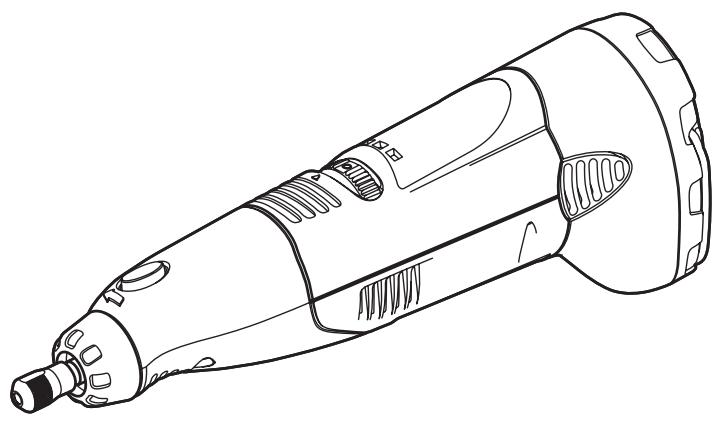
Cordless Rotary Tool
Rotary Tool
Model number 800
Voltage rating 10.8 V =
No load speed n_0 5,000-35,000/min
Collet Capacities 1/32", 1/16", 3/32", 1/8"
Charger
Model number 856
Voltage rating 120 V 60 Hz
Amperage rating 375 mA
Charge time 3 Hr.
Assembly
WARNING ALWAYS BE SURE THE TOOL IS IN THE "0" POSITION BEFORE CHANGING ACCESSORIES, CHANGING COLLETS OR SERVICING YOUR CORDLESS ROTARY TOOL.
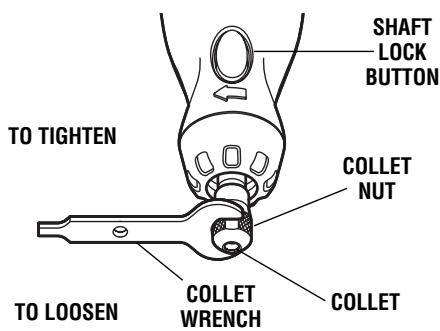
COLLET — To loosen, first press shaft lock button and rotate the shaft by hand until the lock engages the shaft preventing further rotation.
CAUTION Do not engage lock while the Rotary Tool is running.
With the shaft lock engaged use the collet wrench to loosen the collet nut if necessary. Change accessories by inserting the new one into the collet as far as possible to minimize runout and unbalance. With the shaft lock engaged, finger tighten the collet nut until the accessory shank is gripped by the collet. Avoid excessive tightening of the collet nut.
COLLETS — Four different size collets (see illustration), to accommodate different shank sizes, are available for your Cordless Rotary Tool. To install a different collet, remove the collet nut and remove the old collet. Insert the unslotted end of the collet in the hole
COLLET IDENTIFICATION CHART — Collet sizes can be identified by the rings on the back end of collet.
1/32" Collet has one (1) ring.
1/16" Collet has two (2) rings.
3/32" Collet has three (3) rings.
1 / 8^n Collet has no rings.
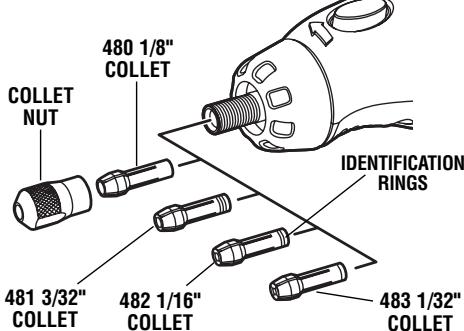
in the end of the tool shaft. Replace collet nut on the shaft. Always use the collet which matches the shank size of the accessory you plan to use. Never force a larger diameter shank into a collet.
BALANCING ACCESSORIES — For precision work, it is important that all accessories be in good balance (much the same as the tires on your automobile). To true up or balance an accessory, slightly loosen collet nut and give the accessory or collet a 1/4 turn. Retighten collet nut and run the Tool. You should be able to tell by the sound and feel if your accessory is running in balance. Continue adjusting in this fashion until best balance is achieved. To maintain balance on abrasive wheel points, before each use, with the wheel point secured in the collet, turn on the Cordless Rotary Tool and run the 415 Dressing Stone lightly against the revolving wheel point. This removes high spots and trues up the wheel point for good balance.
Operation Instructions
Introduction
The Cordless Rotary Tool is a handful of high-speed power. It serves as a carver, a grinder, polishers, sander, cutter, power brush, drill and more.
Your Cordless Rotary Tool has a small, powerful electric motor, is comfortable in the hand, and is made to accept a large variety of accessories including abrasive wheels, drill bits, wire brushes, polishers, engraving cutters, router bits, and cutting wheels. Accessories come in a variety of shapes and permit you to do a number of different jobs. As you become familiar with the range of accessories and their uses, you will learn just how versatile your Cordless Rotary Tool is. You'll see dozens of uses you hadn't thought of before now.
The real secret of the Cordless Rotary Tool is its speed. To understand the advantages of its high speed, you have to know that the standard portable electric drill runs at speeds up to 2,800 revolutions per minute. The typical electric drill is a low-speed, high torque tool; the Cordless Rotary Tool is just the opposite — a high-speed, low torque tool. The chief difference to the user is that in the high speed tools, the speed combined with the accessory mounted in the collet does the work. You don't apply pressure to the tool, but simply hold and guide it. In the low speed tools, you not only guide the tool, but also apply pressure to it, as you do, for example, when drilling a hole.
It is this high speed, along with its compact size and wide variety of special accessories and attachments that makes your Cordless Rotary Tool different from other power tools. The speed enables it to do jobs low speed
tools cannot do, such as cutting hardened steel, engraving glass, etc.
Getting the most out of your Cordless Rotary Tool is a matter of learning how to let this speed work for you.
Read the next sections carefully. They will help you use your Cordless Rotary Tool correctly and help you select the correct accessory for your job.
Stall Protection
This tool has a stall protection feature built into it to protect the motor and battery in the event of a stall. If you stall the tool for too long, or bind the bit in a work piece, especially at high speeds, it will automatically turn itself off. Simply take the tool out of the material you were stalled in, turn it off for 3 seconds, then turn it back on again to continue using it. When the battery becomes close to empty, the tool may shut down automatically more frequent than normal. If this happens, it is time to recharge the battery.
Fuel gauge
This tool is equipped with a Fuel gauge that tells you how much charge your battery has. A fully charged battery is indicated when all three LED lights are illuminated. As the battery discharges, the lights will turn off one by one until only one light is on. When the last light starts "flashing", the battery is almost empty. When the battery is dead, the tool will automatically turn off. This will be a sudden stop as opposed to a gradual winding down of the tool. Simply recharge the battery and reuse.
3 lights · 100% charge remaining
2 lights · 50% charge remaining
1 light 25% charge remaining
1 "Flashing" light ' tool is about to shut off.
Charging the Tool
The Cordless Rotary Tool is not fully charged. The tool is equipped with a removable battery pack. Be sure to charge pack prior to initial use.
To charge the tool:
- Put the switch in the "OFF" position.
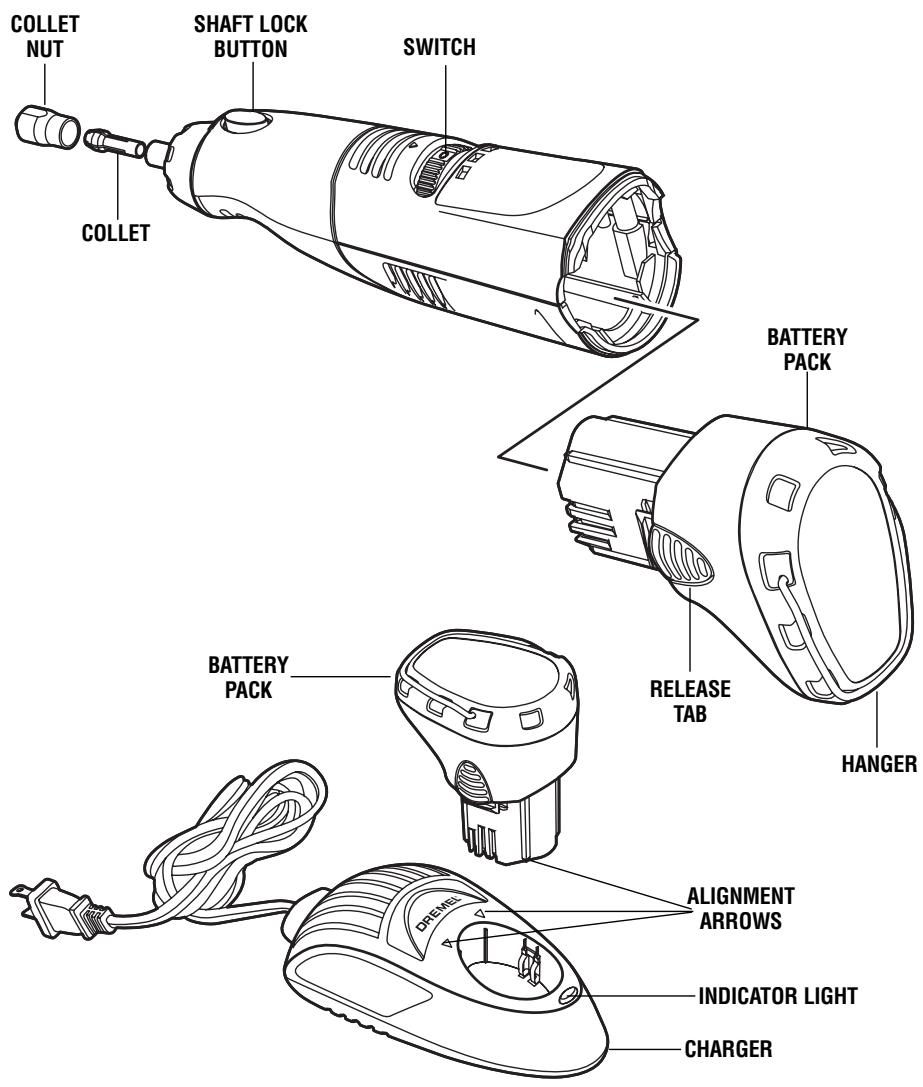
- Squeeze release tabs on both sides of battery pack, and remove pack from back of tool as shown on page 7.
- Align exterior shape of battery pack with exterior shape of charger (alignment arrows on battery column will point to the two arrows located on charger), squeeze release tabs, insert battery pack into charger as shown and release pressure on tabs so it locks in place.
- Plug charger into the power source. The green L.E.D. light indicates connection has been made and the battery pack is charging. Under normal usage the tool normally requires 3 hours charging time to reach full capacity. When charging is complete, LED on charger will turn off.
- When charging is completed, squeeze release tabs on battery pack and remove pack from charger.
- Align exterior shape of battery pack with exterior shape of the housing of tool as shown. Squeeze release tabs, insert battery pack into back of tool, and release pressure on tabs so it locks in place.
Important Charging Notes
- The charger was designed to fast charge the battery only when the battery temperature is between 40^ (4^) and 105^ (41^) .
- A substantial drop in operating time per charge may mean that the battery pack is nearing the end of its life and should be replaced.
- If battery does not charge properly:
a. Check for voltage at outlet by plugging in some other electrical device.
b. Check to see if outlet is connected to a light switch which turns power "off" when lights are turned off.
c. Check battery pack terminals for dirt. Clean with cotton swab and alcohol if necessary.
d. If you still do not get proper charging, take or send tool, battery pack and charger to your Dremel Service Center.
Note: Use of chargers or battery packs not sold by Dremel may void the warranty.
Using the Cordless Rotary Tool
The first step in learning to use the Cordless Rotary Tool is to get the "feel" of it. Hold it in your hand and feel its weight and balance. Feel the taper of the housing. This taper permits the tool to be grasped much like a pen or pencil.
When you turn on the tool for the first time, hold it away from your face. Accessories can be damaged during handling, and can fly apart as they come up to speed. This is not common, but it does happen.
Practice on scrap materials first to see how the Cordless Rotary Tool cuts. Keep in mind that the work is done by the speed of the tool and by the accessory in the collet. You should not lean on or push the tool into the work.
Instead, lower the spinning accessory lightly to the work and allow it to touch the point at which you want cutting (or sanding or etching, etc.) to begin. Concentrate on guiding the tool over the work using very little pressure from your hand. Allow the accessory to do the work.
Usually, it is best to make a series of passes with the tool rather than attempt to do all the work in one pass. To make a cut, for example, pass the tool back and forth over the work, much as you would a small paint brush. Cut a little material on each pass until you reach the desired depth. For most work, the deft, gentle touch is best. With it, you have the best control, are less likely to make errors, and will get the most efficient work out of the accessory.
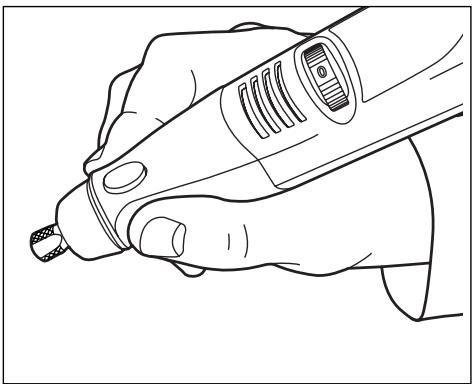
For best control in close work, grip the Rotary Tool like a pencil between your thumb and forefinger.
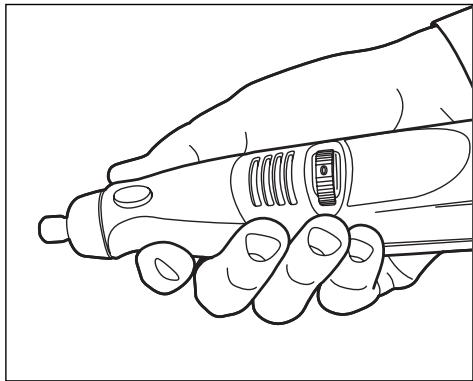
The "handgrip" method of holding the tool is used for operations such as grinding a flat surface or using cutoff wheels.
Operating Speeds For Accessories
Set the speed indicator to fit the job to achieve the best job results when working with different materials.
To select the right speed for each job, use a practice piece of material. Vary speed to find the best speed for the accessory you are using and the job to be done.
Your Cordless RotaryTool is equipped with a variable speed control dial. To turn the tool ON, rotate dial to desired number to select the operating speed needed from 5,000 - 35,000 RPM. To turn tool OFF, rotate dial to the "0" off position.
You can refer to the charts on page 13, 14, and 15 to determine the proper speed, based on the material
being worked and the type of accessory being used. These charts enable you to select both the correct accessory and the optimum speed at a glance.
Needs for Slower Speeds
Certain materials, however, (some plastics, for example) require a relatively slow speed because at high speed the friction of the tool generates heat and causes the plastic to melt.
Most work is done at high speed on your Cordless Rotary Tool. Lower speeds are needed only for certain tasks.
Operating Speeds for Accessories - (cont.)
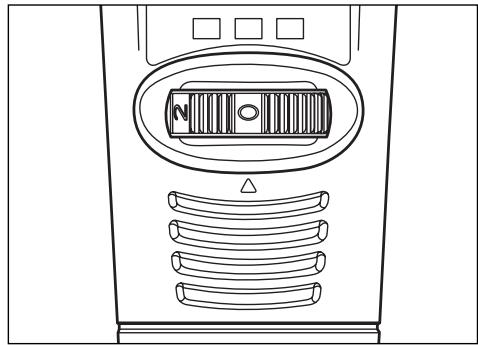
The speed of Model 800 is controlled by rotating this dial to desired setting on dial
| Switch Setting | Speed Range |
| 0 | OFF Position |
| *2 | 5,000 – 11,000 RPM |
| 4 | 12,000 – 20,000 RPM |
| 6 | 21,000 – 25,000 RPM |
| 8 | 26,000 – 30,000 RPM |
| 10 | 31,000 – 35,000 RPM |
*2 is the maximum speed setting for wire brushes.
To aid you in determining the optimum operational speed for different materials and different accessories, we have constructed a series of tables that appear on page 13, 14 and 15. By referring to these tables, you can discover the recommended speeds for each type of accessory. Look these tables over and become familiar with them.
Ultimately, the best way to determine the correct speed for work on any material is to practice for a few minutes on a piece of scrap, even after referring to the chart. You can quickly learn that a slower or faster speed is more effective just by observing what happens as you make a pass or two at different speeds. When working with plastic, for example, start at a slow rate of speed and increase the speed until you observe that the plastic is melting at the point of contact. Then reduce the speed slightly to get the optimum working speed.
Some rules of thumb in regard to speed:
- Plastic and materials that melt at low temperatures should be cut at low speeds.
- Polishing, buffing and cleaning with a wire brush must be done at speeds below 15,000 RPM to prevent damage to the brush.
- Wood should be cut at high speed.
- Iron or steel should be cut at top speed if using tungsten carbide accessory, but at slower speeds if using high speed steel cutters. If a high speed steel cutter starts to chatter — this normally means it is running too slow.
- Aluminum, copper alloys, lead alloys, zinc alloys and tin may be cut at various speeds, depending on the type of cutting being done. Use paraffin or other suitable lubricant on the cutter to prevent the cut material from adhering to the cutter teeth.
Increasing the pressure on the tool is not the answer when it is not cutting as you think it should. Perhaps you should be using a different cutter, and perhaps an adjustment in speed would solve the problem. But leaning on the tool seldom helps.
Your 10.8v Cordless Rotary Tool can be used with all screw-on attachments for added versatility. A few older attachments, such as 2217 Tool Holder, 330 Router, and 231 Shaper / Router Table are not compatible with the 10.8v Cordless Rotary Tool.
The 212 Drill Press requires a free adapter kit (available April 2004) which you can get by calling Dremel at 1-800-4-DREMEL.
The 225 Flex Shaft is compatible with your tool, but you may experience reduced run times when using it.
SPEED SETTINGS
* Speed for light cuts, caution burning on deep grooves.
- Depending on cutting direction relative to grain.
| CATALOG NUMBER | SOFT WOOD | HARD WOOD | LAMINATES PLASTIC | STEEL | ALUMINUM, BRASS, ETC. | SHELL/ STONE | CERAMIC | GLASS |
| HIGH SPEED CUTTERS | ||||||||
| 100, 121, 131 | 8-10 | 8-10 | 4 | 4 | 6 | |||
| 114, 124, 134, 144 | 8-10 | 4 | 2 | 4 | 4 | |||
| 190 | 8-10 | 8-10 | 2 | 6 | 8-10 | |||
| 118, 191, 192, 193, 194 | 8-10 | 8-10 | 2 | 4 | 8-10 | |||
| 116, 117, 125, 196 | 8-10 | 4 | 2 | 4 | 4 | |||
| 115 | 8-10 | 8-10 | 2 | 4 | 4 | |||
| 198 | 8-10 | 6 | 2 | 4 | 4 | |||
| 199 | 8-10 | 6 | 2 | 4 | 4 | |||
| ENGRAVING CUTTERS | ||||||||
| 105, 108 | 8-10 | 8-10 | 6 | 2 | 4 | |||
| 106, 109 | 8-10 | 8-10 | 4 | 2 | 4 | |||
| 107, 110 | 8-10 | 8-10 | 4 | 2 | 4 | |||
| 111 | 8-10* | 8-10* | 6* | 2 | 4 | |||
| 112 | 8-10* | 8-10* | 4* | 2 | 4 | |||
| 113 | 8-10* | 8-10* | 4* | 2 | 4 | |||
| DIAMOND WHEEL POINTS | ||||||||
| 7103, 7105, 7117, 7120, 7122, 7123, 7134, 7144 | 8-10 | 6 | 8-10 | 8-10 | 8-10 | |||
| STRUCTURED TOOTH TUNGSTEN CARBIDE CUTTERS | ||||||||
| 9931, 9932, 9933, 9934, 9935, 9936 | 8-10 | 6 | 2 | 4 | ||||
| TUNGSTEN CARBIDE CUTTERS | ||||||||
| 9901, 9902, 9903, 9904, 9905, 9906, 9912 | 8-10 | 6 | 2 | 8-10 | 4 | 6 | 8-10 | 8-10 |
| 9909, 9910, 9911 | 6 | 8-10 | 8-10 | |||||
Use only Dremel Tested, High Performance Accessories.
SPEED SETTINGS
* Speed for light cuts, caution burning on deep grooves.
- Depending on cutting direction relative to grain.
| CATALOG NUMBER | SOFT WOOD | HARD WOOD | LAMINATES PLASTIC | STEEL | ALUMINUM, BRASS, ETC. | SHELL/ STONE | CERAMIC | GLASS |
| HIGH SPEED ROUTER BITS | ||||||||
| 612, 640 | 8-10* | 6· | ||||||
| 615, 617, 618, 650, 652 | 8-10* | 8-10· | ||||||
| 654 | 8-10* | 6· | ||||||
| SILICON CARBIDE GRINDING STONES | ||||||||
| 83142, 83322, 83702, 84922, 85422, 85602, 85622 | 4 | 8-10 | 2 | 4 | 8-10 | 8-10 | ||
| ABRASIVE POINTS | ||||||||
| 516, 517, 518 | 2-4 | 2-4 | 6 | 4 | ||||
| 500 | 2-4 | 2-4 | 4-6 | 2-4 | ||||
| ALUMINUM OXIDE GRINDING STONES | ||||||||
| 903, 911, 921, 932, 941, 945, 952, 953, 954, 971, 997, 8153, 8175, 8193, 8215 | 8-10 | 8-10 | 6 | 2 | 4 | 8-10 | ||
| 541 | 8-10 | 8-10 | 6 | 2 | 4 | 8-10 | ||
| CHAIN SAW SHARPENING STONES | ||||||||
| 453, 454, 455 | 8-10 | |||||||
| CUTTING ACCESSORIES | ||||||||
| 409, 420, 426, 540 | 2 | 8-10 | 8-10 | 8-10 | 8-10 | |||
| 542 | 8-10 | 6-8 | 2 | |||||
| 545 | 6-8 | 6 | 4-6 | 4-6 | ||||
| 560 | For use on drywall. For best results, use at 30,000 rpm. | |||||||
| 561 | 4-8 | 4-8 | 2 | 8-10 | ||||
| 562 | 8-10 | |||||||
Use only Dremel Tested, High Performance Accessories.
SPEED SETTINGS
* Speed for light cuts, caution burning on deep grooves.
- Depending on cutting direction relative to grain.
| CATALOG NUMBER | SOFT WOOD | HARD WOOD | LAMINATES PLASTIC | STEEL | ALUMINUM, BRASS, ETC. | SHELL/ STONE | CERAMIC | GLASS |
| POLISHING ACCESSORIES | ||||||||
| 461, 462, 463 | 6 | 6 | 6 | 6 | 6 | |||
| 414, 422, 429 | 4 | 4 | 4 | 4 | 4 | |||
| 425, 427 | 6 | 6 | ||||||
| 423 | 4-6 | 4-6 | 4-6 | 4-6 | 4-6 | |||
| 403, 404, 405 | 2 | 2 | 2 | 4 | 4 | |||
| 530, 531, 532 | 2 | 2 | ||||||
| 428, 442, 443 | 2 | 2 | 2 | 2 | 2 | |||
| 535, 536, 537 | 2 | 2 | 2 | 2 | 2 | |||
| SANDING BANDS AND DISCS | ||||||||
| 430, 431, 438 | 2-10 | 2-10 | 2-4 | 8-10 | 8-10 | 2-10 | 2-10 | |
| 439, 440, 444 | 2-10 | 2-10 | 2-4 | 8-10 | 8-10 | 2-10 | 2-10 | |
| 407, 408, 432 | 2-10 | 2-10 | 2-4 | 8-10 | 8-10 | 2-10 | 2-10 | |
| 411, 412, 413 | 6 | 6 | 2 | 2 | ||||
| FLAPWHEELS | ||||||||
| 502, 503, 504, 505 | 8-10 | 6 | 2 | 8-10 | 8-10 | |||
| FINISHING ABRASIVE BUFFS | ||||||||
| 511 | 4 | 4 | 2 | 4 | 4 | |||
| DRILL BIT | ||||||||
| 150 | 8-10 | 8-10 | 2 | 4 | ||||
| GROUT REMOVAL BITS | ||||||||
| 569, 570 | For Use on Wall and Floor Grout | 4-6 | ||||||
Use only Dremel Tested, High Performance Accessories.
Maintenance
Service
WARNING
NO USER SERVICEABLE PARTS INSIDE. Preventive maintenance
performed by unauthorized personnel may result in misplacing of internal wires and components which could cause serious hazard. We recommend that all tool service be performed by a Dremel Service Center. SERVICEMEN: Disconnect tool and/or charger from power source before servicing.
D.C. motors
The motor in your tool has been engineered for many hours of dependable service. To maintain peak efficiency of the motor, we recommend it be examined every six months. Only a genuine Dremel replacement motor specially designed for your tool should be used.
Cleaning
WARNING
To avoid accidents, always disconnect the tool and/or charger
from the power supply before cleaning. The tool may be cleaned most effectively with compressed dry air. Always wear safety goggles when cleaning tools with compressed air.
Ventilation openings and switch levers must be kept clean and free of foreign matter. Do not attempt to clean by inserting pointed objects through opening.

CAUTION
Certain cleaning agents and solvents damage plastic parts. Some
of these are: gasoline, carbon tetrachloride, chlorinated cleaning solvents, ammonia and household detergents that contain ammonia.
Extension Cords
A WARNING
If an extension cord is necessary, a cord with adequate size conduc
tors that is capable of carrying the current necessary for your tool must be used. This will prevent excessive voltage drop, loss of power or overheating. Grounded tools must use 3-wire extension cords that have 3-prong plugs and receptacles.
RECOMMENDED SIZES OF EXTENSION CORDS 120 VOLT ALTERNATING CURRENT TOOLS
| Tool's Ampere Rating | Cord Size in A.W.G. | Wire Sizes in mm2 | ||||||
| Cord Length in Feet | Cord Length in Meters | |||||||
| 25 | 50 | 100 | 150 | 15 | 30 | 60 | 120 | |
| 3-6 | 18 | 16 | 16 | 14 | .75 | .75 | 1.5 | 2.5 |
| 6-8 | 18 | 16 | 14 | 12 | .75 | 1.0 | 2.5 | 4.0 |
| 8-10 | 18 | 16 | 14 | 12 | .75 | 1.0 | 2.5 | 4.0 |
| 10-12 | 16 | 16 | 14 | 12 | 1.0 | 2.5 | 4.0 | — |
| 12-16 | 14 | 12 | — | — | — | — | — | — |
NOTE: The smaller the gauge number, the heavier the cord.
Dremel Accessories

WARNING
Use only Dremel Tested, High Performance Accessories. Other accessories are not designed for this tool and may lead to personal injury or property damage.
The number and variety of accessories for the Rotary Tool are almost limitless. There is a category suited to almost any job you might have to do — and a variety of sizes and shapes within each category which enables you to get the perfect accessory for every need.
Refer to the DREMEL ACCESSORY ORDER FORM for illustrations of the accessories available. These accessories may be found at your local hardware, hobby or home center dealers.
Collets
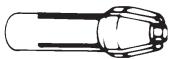
If you expect to use a variety of accessories, we recommend that in the beginning you purchase a complete set of four collets. Store these so that you will have the proper size of collet for any accessory or drill bit you want to use. Currently, the 1/8", 3/32", 1/32" and 1/16" collets accommodate all of the available Dremel accessories. 1/8" collets are included in most rotary tool kits.
Mandrels
A mandrel is a shank with a threaded or screw head, which are required when you use polishing accessories, cutting wheels, sanding discs, and polishing points. The reason mandrels are used is that sanding discs, cutting wheels and similar accessories must be replaced frequently. The mandrel is a permanent shank, allowing you to replace only the worn head when necessary, thus saving the expense of replacing the shaft each time.
Screw Mandrel No. 401

This is a screw mandrel used with the felt polishing tip and felt polishing wheels. 1/8 shank.
Small Screw Mandrel No. 402
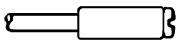
This is a mandrel with a small screw at its tip, and is used with emery and fiberglass cutting wheels, sanding discs and polishing wheels. 1/8" shank.
Threaded Tip Mandrel No. 424
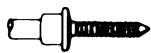
This is a mandrel with a threaded tip which threads into the polishing point accessory No. 427. 1/8" shank.
High Speed Cutters

Available in many shapes, high speed cutters are used in carving, cutting and slotting in wood, plastics and soft metals such as aluminum, copper and brass. These are the accessories to use for freehand routing or carving in wood or plastic, and for precision cutting. Made of high quality steel. 1/8" shank.
Tungsten Carbide Cutters

These are tough, long-lived cutters for use on hardened steel, fired ceramics and other very hard materials. They can be used for engraving on tools and garden equipment. 1/8'' shanks.
Engraving Cutters

This group has a wide variety of sizes and shapes, and are made for intricate work on ceramics (greenware), wood carvings, jewelry and scrimshaw. They often are used in making complicated printed circuit boards. They should not be used on steel and other very hard materials but are excellent on wood, plastic and soft metals. 3 / 32" shank.
Structured Tooth Tungsten Carbide Cutters
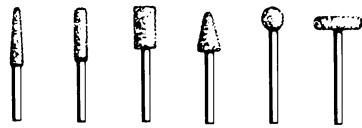
Fast cutting, needle-sharp teeth for greater material removal with minimum loading. Use on fiberglass, wood, plastic, epoxy and rubber. 1/8" and 1/4" shank.
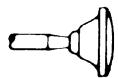
Aluminum Oxide Grinding Stones (red/brown)
Round, pointed, flat — you name the shape and there is one available in this category. These are made of aluminum oxide and cover virtually every possible kind of grinding application. Use them for sharpening lawn mower blades, screwdriver tips, knives, scissors, chisels and other cutting tools. Use to remove flash from metal castings, deburring any metal after cutting, smoothing welded joints, grinding off rivets and removing rust. These grinding stones can be resharped with a dressing stone. In machine shops, high speed drills and cutters normally are ground with aluminum oxide wheels. 1/8" shank.

Silicon Carbide Grinding Stones (blue/green)
Tougher than aluminum oxide points, these are made especially for use on hard materials such as glass and ceramics. Typical uses might be the removal of still marks and excess glaze on ceramics and engraving on glass. 1/8" shank.
Diamond Wheel Points

Excellent for fine detail work on wood, jade, ceramic, glass and other hard material. Bits are covered with diamond particles. 3/32" shanks.
Dremel Accessories - (Cont.)
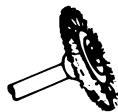
Wire Brushes
Three different shapes of wire brushes are available. For best results wire brushes should be used at speeds not greater than 15,000 RPM. Refer to Operating Speeds section for proper tool speed setting. The three shapes come in three different materials: stainless steel, brass and carbon wire. The stainless steel perform well on pewter, aluminum, stainless steel, and other metals, without leaving "after-rust". Brass brushes are non sparking, and softer than steel; making them good for use on soft metal like gold, cooper and brass. The carbon wire brushes are good for general purpose cleaning.

Bristle Brushes
These are excellent cleaning tools on silverware, jewelry and antiques. The three shapes make it possible to get into tight corners and other difficult places. Bristle brushes can be used with polishing compound for faster cleaning or polishing.
Brushing Pressure
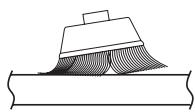
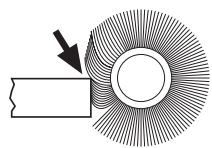
- Remember, the tips of a wire brush do the work. Operate the brush with the lightest pressure so only the tips of the wire come in contact with the work.
- If heavier pressures are used, the wires will be overstressed, resulting in a wiping action; and if this is continued, the life of the brush will be shortened due to wire fatigue.
- Apply the brush to the work in such a way that as much of the brush face as possible is in full contact with the work. Applying the side or edge of the brush to the work will result in wire breakage and shortened brush life.
CORRECT:
Wire tips doing the work.
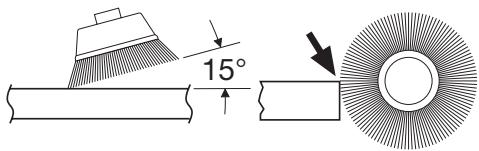
INCORRECT:
Excessive pressure can cause wire breakage.

Polishing Accessories
These include an impregnated polishing point and an impregnated polishing wheel for bringing metal surfaces to smooth finish; a felt polishing tip and felt polishing wheel, and cloth polishing wheel, all used for polishing plastics, metals, jewelry and small parts. Also included in this group is a polishing compound (No. 421) for use with the felt and cloth polishers.
Polishing points make a very smooth surface, but a high luster is obtained using felt or cloth wheels and polishing compound. For best results polishing accessories should be used at speeds not greater than 15,000 RPM.
No polishing compound is needed when using the 425 Polishing Wheel or 427 Polishing point.

Aluminum Oxide Abrasive Wheels
Use to remove paint, deurr metal, polish stainless steel and other metals. Available in fine and medium grits. 1/8" shank.

Sanding Accessories
Sanding discs in fine, medium and coarse grades are made to fit mandrel No. 402. They can be used for nearly any small sanding job you might have, from model making to fine furniture finishing. In addition, there is the drum sander, a tiny drum which fits into the Rotary Tool and makes it possible to shape wood, smooth fiberglass, sand inside curves and other difficult places, and other sanding jobs. You replace the sanding bands on the drum as they become worn and lose their grit. Bands come in fine and coarse grades. Flapwheels grind and polish flat or contoured surfaces. They are used most effectively as a finishing sander after heavier surface sanding and material removal is completed. Flapwheels come in fine and coarse grades. Buffs are a great finishing accessory for cleaning and light sanding. They work effectively on metal, glass, wood, aluminum and plastics. Coarse and medium buffers are sold together. 1/8" shank.

Grinding Wheel
Use for deburring, removing rust, and general purpose grinding. Use with Mandrel #402.

Cutting Wheels
These thin discs of emery or fiberglass are used for slicing, cutting off and similar operations. Use them for cutting off frozen bolt heads and nuts, or to reslot a screw head which has become so damaged that the screwdriver won't work in it. Fine for cutting BX cable, small rods, tubing, cable and cutting rectangular holes in sheet metal.

Drywall Cutting Bit
Gives you fast, clean cuts in drywall.

Tile Cutting Bit
Cuts ceramic wall tile, cement board, and plaster.

Spiral Cutting Bit
Cuts through all types of wood and wood composites.
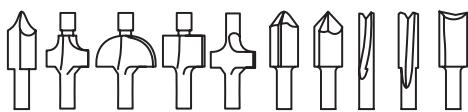
High Speed RouterBits
For routing, inlaying, and mortising in wood and other soft materials. Use with Dremel No. 330 Router attachment and No.231 Shaper/Router table.
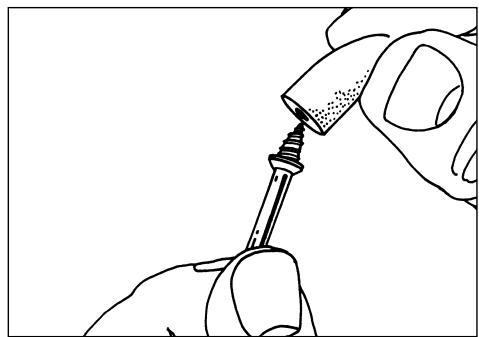
Mandrel No. 401 is used with the felt polishing tip and wheels. Thread the tip on to the screw carefully. The felt tip must thread down straight on the screw Mandrel, and be turned all the way to the collar.
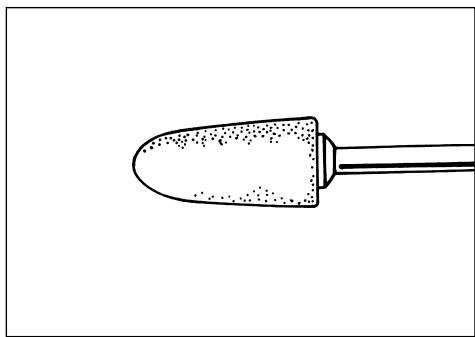
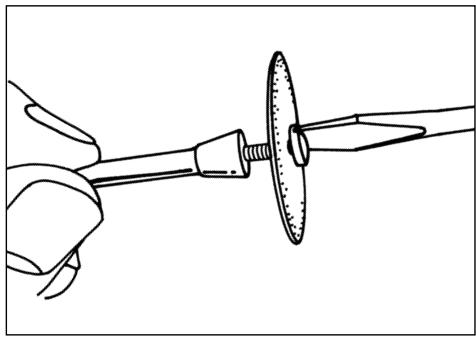
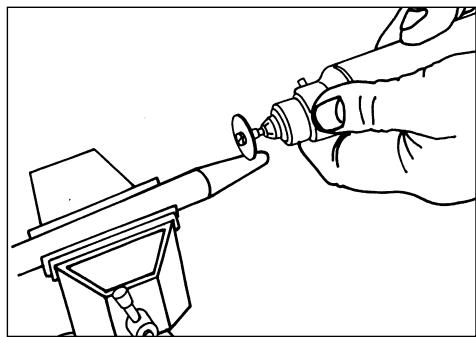
Mandrel No. 402 has a small screw at its tip, and is used with emery cutting wheels and sanding discs. Higher speeds, usually maximum, are best for most work, including cutting steel. Which is shown here.
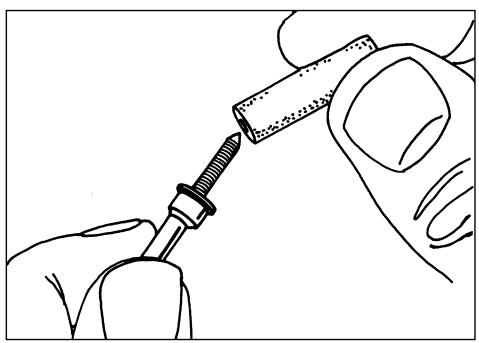
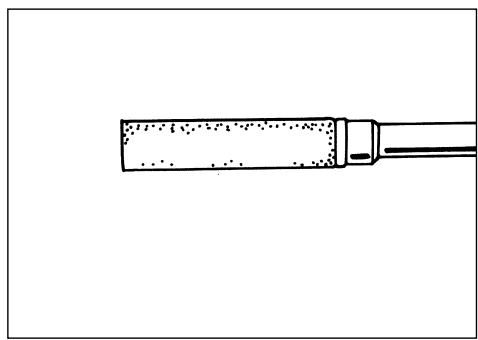
The machine-screw threading on Mandrel No. 424 threads into polishing point No. 427. This and other threaded mandrels must be screwed firmly down to the collar before being used.
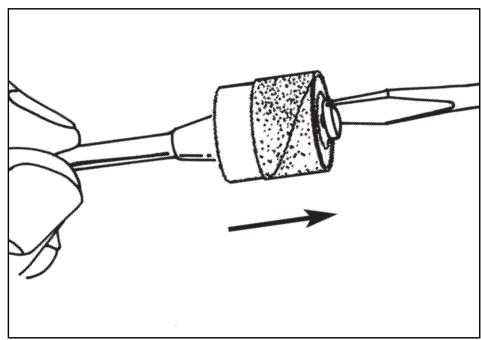
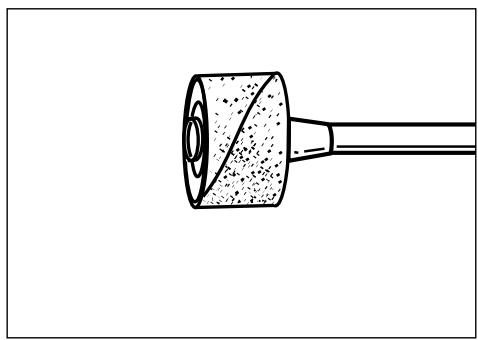
To replace a band on the Drum Sander, loosen the screw without removing it to contract the drum then slide the old band off. Slide the new sanding band on and then expand the drum by tightening the screw once again.

WARNING
Before each use, check to make certain that all components are assembled to accessory shank and that the drum is sufficiently expanded to secure the band during use. If sand-
ing band is loose on the drum during operation it may "fly" off and strike you or bystanders.
Dremel Limited Warranty
Your Dremel product is warranted against defective material or workmanship for a period of two years from date of purchase. In the event of a failure of a product to conform to this written warranty, please take the following action:
- DO NOT return your product to the place of purchase.
- Carefully package the product by itself, with no other items, and return it, freight prepaid, along with:
A. A copy of your dated proof of purchase (please keep a copy for yourself).
B. A written statement about the nature of the problem.
C. Your name, address and phone number to:
UNITED STATES
Dremel Service Center
4915 Twenty-First Street
Racine, Wisconsin 53406
OR
Dremel Service Center
4631 E. Sunny Dunes
Palm Springs, CA 92264
CANADA
Giles Tool Agency
6520 Lawrence Av. East
Scarborough, Ont.
Canada M1C 4A7
1-888-285-3476
OUTSIDE
CONTINENTAL UNITED STATES
See your local distributor or write
to Dremel, 4915 Twenty-First St.
Racine, Wisconsin 53406
We recommend that the package be insured against loss or in transit damage for which we cannot be responsible. This warranty applies only to the original registered purchaser. DAMAGE TO THE PRODUCT RESULTING FROM TAMPERING, ACCIDENT, ABUSE, NEGLIGENCE, UNAUTHORIZED REPAIRS OR ALTERATIONS, UNAPPROVED ATTACHMENTS OR OTHER CAUSES UNRELATED TO PROBLEMS WITH MATERIAL OR WORKMANSHIP ARE NOT COVERED BY THIS WARRANTY.
No employee, agent, dealer or other person is authorized to give any warranties on behalf of Dremel. If Dremel inspection shows that the problem was caused by problems with material or workmanship within the limitations of the warranty, Dremel will repair or replace the product free of charge and return product prepaid. Repairs made necessary by normal wear or abuse, or repair for product outside the warranty period, if they can be made, will be charged at regular factory prices.
DREMEL MAKES NO OTHER WARRANTY OF ANY KIND WHATEVER, EXPRESSED OR IMplied, AND ALL IMPLIED WARRANTY OF MERCHANTABILITY AND FITNESS FOR A PARTICULAR PURPOSE WHICH EXCEED THE ABOVE MENTIONED OBLIGATION ARE HEREBY DISCLAIMED BY DREMEL AND EXCLUDING FROM THIS LIMITED WARRANTY.
This warranty gives you specific legal rights and you may also have other rights which vary from state to state. The obligation of the warrantor is solely to repair or replace the product. The warrantor is not liable for any incidental or consequential damages due to any such alleged defect. Some states do not allow the exclusion or limitation of incidental or consequential damages, so the above limitations or exclusion may not apply to you.
For prices and warranty fulfillment in the continental United States, contact your local Dremel distributor.
Exportado por: Robert Bosch Tool Corporation Mt. Prospect, IL 60056 -2230, E.U.A.
Importado en Mexico por: Robert Bosch, S.A. de C.V., Calle Robert Bosch No. 405, Zona Industrial,
Toluca, Edo. de Mexico, C.P. 50070, Tel. (722) 2792300
DREML
Dremel Service Center
4915 Twenty-First Street
Racine, Wisconsin 53406
1-800-437-3635
0U
Dremel Service Center
4631 E. Sunny Dunes
Palm Springs, California 92264
1-800-437-3635
CANADA
Giles Tool Agency
6520 Lawrence Av. East
Scarborough, Ontario
Canada M1C 4A7
1-888-285-3476
A L'EXTÉRIEUR DU TERRITOIRE
CONTINENTAL DES ETATS-UNIS
4915 Twenty-First St., Racine, Wisconsin 53406
Dremel Service Center
4915 Twenty-First Street
Racine, Wisconsin 53406
0
Dremel Service Center
4631 E. Sunny Dunes
Palm Springs, California 92264
CANADA
Giles Tool Agency
6520 Lawrence Av. East
Scarborough, Ont.
Canada M1C 4A7
1-888-285-3476
oswana a Dremel, 4915 Twenty-First St.
Racine, Wisconsin 53406