
DIAPHANE - Wristwatches SWATCH - Free user manual and instructions
Find the device manual for free DIAPHANE SWATCH in PDF.


| Brand | SWATCH |
| Model | DIAPHANE |
| Product type | Chronograph bracelet watch |
| Movement | Quartz |
| Main functions | Hours, minutes, seconds, date, chronograph (60 minutes, seconds, 1/10th second), tachymeter, Swatch Internet Time |
| Display | Analog with hands and counters |
| Winding crown | Crown with 3 positions (A, B, C) |
| Pushers | 2 pushers (start/stop, reset) |
| Power supply | Button cell battery (type not specified, typically SR927SW or equivalent) |
| Time setting | Pull crown to position C, turn clockwise or counterclockwise |
| Date setting | Pull crown to position B, turn counterclockwise |
| Chronograph | Start/Stop by upper pusher, reset by lower pusher; split time and add functions |
| Tachymeter | Speed measurement based on 100 or 1000 meters |
| Rotating bezel | For diving function (countdown) or Internet browser depending on version |
| Swatch Internet Time | Navigator bezel: align time zone, read Internet time on bezel |
| Chronograph adjustment | After battery change or shock: crown in B, pushers to adjust counters |
| Care and cleaning | Avoid any contact with water unless water resistance is indicated; clean with a soft, dry cloth |
| Safety | Do not expose to extreme temperatures or magnetic fields |
| Spare parts and repairability | Battery replaceable by a watchmaker; interchangeable strap |
| General information | Instructions available in several languages; free PDF download |
Frequently Asked Questions - DIAPHANE SWATCH
User questions about DIAPHANE SWATCH
0 question about this device. Answer the ones you know or ask your own.
Ask a new question about this device
Download the instructions for your Wristwatches in PDF format for free! Find your manual DIAPHANE - SWATCH and take your electronic device back in hand. On this page are published all the documents necessary for the use of your device. DIAPHANE by SWATCH.
USER MANUAL DIAPHANE SWATCH
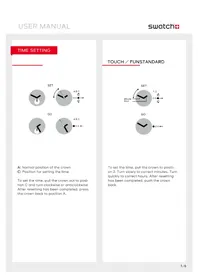
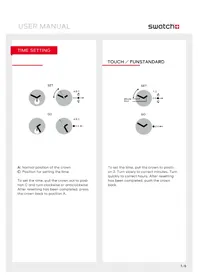
A Normal position of the crown
C Position for setting the time
To set the time, pull the crown out to position C and turn clockwise or anticlockwise. After resetting has been completed, press the crown back to position A.
Date
Set
Go
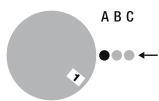
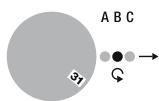
To set the date, pull the crown out to position B, and turn anticlockwise. After resetting has been completed, press the crown back to position A.
Display
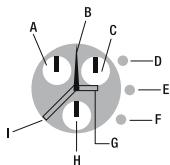
A Minutes counter (60 minutes)
B Seconds counter
C 1 / 0 second counter
D Push-button
E Crown
F Push-button
G Hours hand
H Seconds hand
Minutes hand
Timing mode
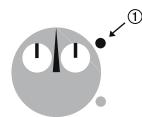
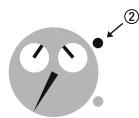
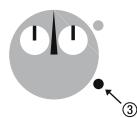
Press...
- The upper push-button to start the chronograph.
- Once again to read the elapsed time.
- The lower push-button to reset.
Split time
Go
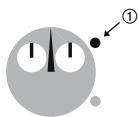
Stop
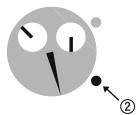
Go
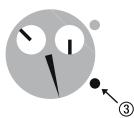
Stop
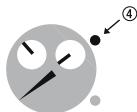
Reset
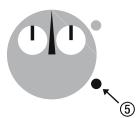
Press...
- The upper push-button to start the chronograph.
- The lower push-button to read the intermediary time.
- Once again to continue (repeat the last two actions as many times as you wish to read the intermediary time while the chrono carries on).
- The upper push-button to stop finally.
- The lower push-button to reset.
Add Functions
Start
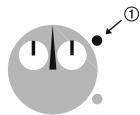
Read
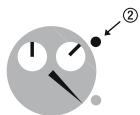
Restart
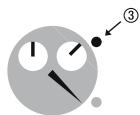
Read
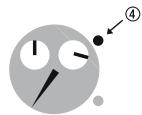
Reset
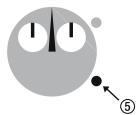
Press...
- The upper push-button to start.
- Press the upper push-button to read the first time.
- Press the upper push-button to restart the chronograph.
- Press the upper push-button to read the additional time (repeat these two steps as many time as you wish).
- Press the lower push-button to reset.
Readjustment
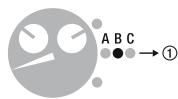
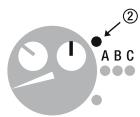
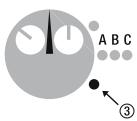
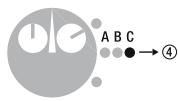
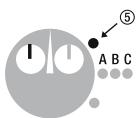
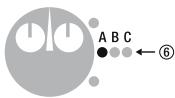
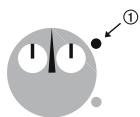
Adjusting the chronograph (ex: after battery change or a hard shock)
- Pull the crown to position B.
- Press the upper button to reach the position 12h00 with the hand of the % sec. counter.
- Pull the lower button to reach the position 12 h 00 with the hand of the seconds.
- Pull the crown to the position C.
- Press the upper button to reach the position 12 h 00 with the hand of the minutes counter.
- Press the crown to position A.
Tachometer
Go
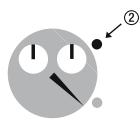
Stop
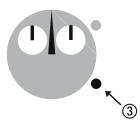
Reset
Measure the speed Base 100 or 1000m
Press...
- The upper push-button when an action starts.
- Once again to stop after a distance of 100 or 1000m . Read the speed indicated by the 60 seconds counter on the tachometer scale (km / h = kph)
- The lower push-button to reset.
turningbezel
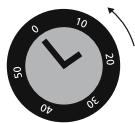
Set
Read
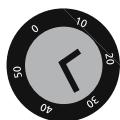
Using the adjustment ring
For setting the start time and duration of an activity. Line up the marker on the adjustment ring with the minute hand. Timing starts at the time indicated by the marker. The elapsed time is indicated by the minute hand pointing the number on the adjustment ring.
The previous text only applies to the adjustment ring for the dive function. Please refer to the enclosure for other functions such as the internet navigator (or similar).
Internet Navigator Bezel
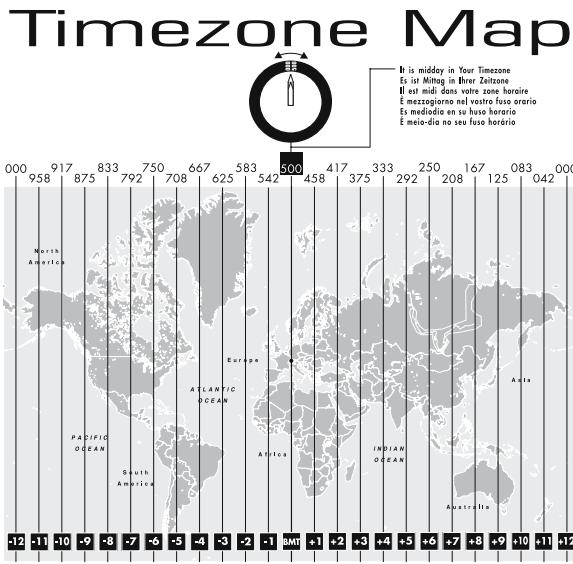
Swatch Internet Time is a universal time, all over the world, without time zones or geographic borders.
The current 24 hours are divided into 1000 Swatch beats. @000 Swatch Internet Time represents midnight (CET-wintertime) in Biel, Switzerland, the home of Swatch. If you live outside of Central European Time (CET-wintertime) refer to the «time zone map» and turn the Navigator Bezel until your indicated time zone number is at the 12 o'clock position. Read the Swatch Internet Time on the bezel that faces the hour hand. (If it is between two numbers, read the lesser numbers).
Note the small numbers on the dial facing the minute hand and add them to the numbers facing the hour hand.
Brand : SWATCH
Model : DIAPHANE
Category : Wristwatches