
BIZHUB C35 - Multifunction Printer KONICA - Free user manual and instructions
Find the device manual for free BIZHUB C35 KONICA in PDF.


User questions about BIZHUB C35 KONICA
0 question about this device. Answer the ones you know or ask your own.
Ask a new question about this device
Download the instructions for your Multifunction Printer in PDF format for free! Find your manual BIZHUB C35 - KONICA and take your electronic device back in hand. On this page are published all the documents necessary for the use of your device. BIZHUB C35 by KONICA.
USER MANUAL BIZHUB C35 KONICA
Safety Information Guide
natural_image
Line drawing of a mechanical printer with lid and control panel (no text or symbols)This section contains detailed instructions on the operation and maintenance of your printer. To achieve optimum printer performance, carefully read and follow these instructions.
Read the following section before plugging in the printer. It contains important information related to user safety and prevention of equipment problems.
Keep this manual near the printer for easy reference.
Note: Some information in this manual may not apply to your specific printer.
■ Warning and Caution Symbols
Both this manual and the printer use labels and symbols to help prevent injury to the operator and others around the printer, and damage to property. The meaning of these labels and symbols is as follows:
 | WARNING | Ignoring this warning could cause serious injury or even death. |
 | CAUTION | Ignoring this caution could cause injury or damage to property. |
●Meaning of Symbols


△ indicates a danger against which you should take precaution.
The symbol shown to the left warns against possible electrical shock.
indicates a prohibited course of action.
The symbol shown to the left warns against dismantling the device.
indicates an imperative course of action.
The symbol shown to the left indicates you must unplug the device.
 | WARNING |
| [C&SH] | Do not attempt to remove the covers and panels which have been fixed to the printer. Some printers have a high-voltage part or a laser beam source inside that could cause an electrical shock or blindness.Do not modify the printer, as a fire, electrical shock, or breakdown could result. If the printer employs a laser, the laser beam source could cause blindness. |
 | Use only the power cord supplied in the package. If a power cord is not supplied, use only the power cord and plug that are specified in the user documentation. Failure to use this cord could result in a fire or electrical shock.Use the power cord supplied in the package only for this printer and NEVER use it for any other product. Failure to observe this precaution could result in a fire or electrical shock.Use only the specified power source voltage. Failure to do that could result in a fire or electrical shock. |
 | Do not use a multiple outlet adapter to connect any other products. Use of a power outlet for more than the marked current value could result in a fire or electrical shock.Do not use an extension cord in principle. Use of an extension cord could cause a fire or electrical shock. Contact your authorized service provider if an extension cord is required.Do not scratch, rub, place a heavy object on, heat, twist, bend, pull on, or damage the power cord. Use of a damaged power cord (exposed core wire, broken wire, etc.) could result in a fire or breakdown. Should any of these conditions be found, immediately turn OFF and unplug the printer, and then call your authorized service provider. |
| [TY15] | Do not unplug and plug in the power cord with wet hands, as an electrical shock could result. |
 | Plug the power cord all the way into the power outlet. Failure to do this could result in a fire or electrical shock. |
 | WARNING |
| [K&D2] | Connect the power cord to an electrical outlet that is equipped with a grounding terminal. |
 | Do not place metal clips, any other small metallic objects, or a container containing liquid on the printer. Liquid and metallic objects dropped inside the printer could result in a fire, electrical shock, or breakdown.Should liquid, a piece of metal, or any other foreign matter fall inside the printer, immediately turn OFF and unplug the printer, and then call your authorized service provider. |
 | Do not use your printer if it becomes inordinately hot, emits smoke or an unusual odor, or makes an unusual noise. Immediately turn OFF and unplug the printer, and then call your authorized service provider. If you continue using it, a fire or electrical shock could result.Do not use this printer if it has been dropped or its cover damaged. Immediately turn OFF and unplug the printer, and then call your authorized service provider. If you continue using it, a fire or electrical shock could result. |
| [ZXG] | Do not burn toner cartridges or toner. The hot toner may scatter and cause burns or other damage. |
 | CAUTION |
| Do not expose the printer to dust, soot, or steam, or place it near a kitchen table, bath, or humidifier. A fire, electrical shock, or breakdown could result.Do not place the printer on an unstable or tilted table, or in a location subject to a lot of vibration and shock. It could fall, causing personal injury or mechanical breakdown. | |
| [ODXW] | After installing this product, place it on a sturdy base. It the printer moves or falls, it may cause personal injury. |
 | The inside of the printer has areas subject to high temperature, which may cause burns.When checking the inside of the printer for malfunctions such as media jams, do not touch the locations (around the fusing unit, etc.) labeled “Caution HOT.” |
| Do not obstruct the printer's ventilation grilles. Heat could accumulate inside the printer, resulting in a fire or malfunction.Do not use flammable sprays, liquids, or gases near the printer, as a fire could result. | |
 | Do not pull on the power cord when unplugging it. Pulling on the power cord could damage it, resulting in a fire or electrical shock.Do not place any objects around the power plug, as it may be difficult to unplug the power cord if an emergency occurs. |
 | Do not store toner cartridges and PC drum units near computer disks or watches that are susceptible to magnetism. They could cause these products to malfunction.Do not leave toner cartridges or PC drum units within reach of children. Ingesting toner could be harmful to your health. |
 | Whenever moving the printer, be sure to disconnect the power cord and other cables. Failure to do this could damage the cord or cable, resulting in a fire, electrical shock, or breakdown.Unplug the printer if you will not be using it for a long period of time. |
| [BYWC] | When moving the printer, always hold it in the locations specified in the user documentation. If the printer falls, it may cause severe personal injury and/or printer damage.Use the printer only in a well-ventilated location. Operating the printer in a poorly ventilated room for an extended period of time could be harmful to your health. Ventilate the room at regular intervals.Remove the power cord from the outlet more than once a year and clean between the plug terminals. Dust that accumulates between the plug terminals may cause a fire. |
■Regulation Notices
- Laser Safety
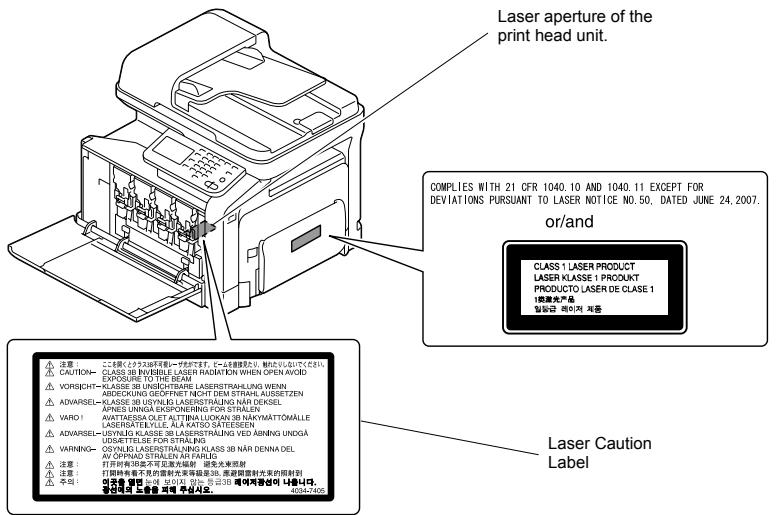
This product employs a Class 3B laser diode having maximum power of 15 mW and wavelength of 770 - 800 nm.
This product is certified as a Class 1 laser product. Since the laser beam is concealed by protective housings, the product does not emit hazardous laser radiation as long as the product is operated according to the instructions in this manual.
•Internal Laser Radiation
Maximum average radiation power: 11.2 μW at the laser aperture of the print head unit.
Wavelength: 770 - 800 nm
text_image
Laser aperture of the print head unit. COMPLIES WITH 21 CFR 1040.10 AND 1040.11 EXCEPT FOR BEVIATIONS PURSUANT TO LASER NOTICE NO.50, DATED JUNE 24, 2007. or/and CLASS 1 LASER PRODUCT LASER KLASSE 1 PRODUKT PRODUCTO LASER DE CLASE 1 1机床产品 일본과 레이의 제품 Laser Caution Label 注意: こと係数とシステム可見するサービスです。この多数需要より、無しめないください。 CAUTION- CLASE 38 INVENTILE LASER RADIATION WHEN OPEN AVOID EXPOSURE TO THE BEAM VORISIGHT- KLASSE 38 UNICHTSME LASERSTRALING WHEN ABDECKUNG GEÖFFNET NICHT DEM STRAHLAUSSETZEN ADIVARSEL- KLASSE 38 USYKLÖ LASERSTRALING NÄR DEXSEL APRES UNIGA EXPOENERING FOR STRAIJEN AVATTASSA OLET ALTINA LUKOKAN 38 NAKYMÄTOMÄLLE LASERGATELLA ALA KATO SATEESEN ADIVARSEL- USYKLÖ KLASSE 38 LASERSTRALING VED ABINNG UNDGA USGETTELISE FOR STRALIK VARNING- OSYKLÖ LASERSTRALING KLASSE 38 NÄR DENNA DEL AV OPINAD STRALIN AR PARIS 注意: 打开时有39座不可見光光辐射 避免光束射 注意: 打开时有者不見的重新光束辐射 38, 滤器即射开关的照射 注意: 安装器 密芯 200kΩ 600mA 50Hz 220Ω 300Ω 快充変換器等の写真です. 40042405CAUTION:
Use of controls, adjustments, or performance of procedures other than those specified in this manual may result in hazardous radiation exposure.
●Interference-Causing Equipment Standard (ICES-003 ISSUE 4)
- For Canadian Users
This Class B digital apparatus complies with Canadian ICES-003.
●FCC Part 15 - Radio Frequency Devices
- For United States Users
| FCC: Declaration of Conformity | |
| Product Type | Color Multi-Function Peripherals (copier, printer, scanner, fax) |
| Product Name | bizhub C35 |
| Options | PF-P08, Expandable Memory |
| This device complies with Part 15 of the FCC RulesOperation is subject to the following two conditions:(1) This device may not cause harmful interference, and(2) this device must accept any interference received, including interference that may cause undesired operation. | |
natural_image
Line drawing of a printer internal structure with cable and connector (no text or symbols)NOTE:
This equipment has been tested and found to comply with the limits for a Class B digital device, pursuant to Part 15 of the FCC Rules. These limits are designed to provide reasonable protection against harmful interference in a residential installation. This equipment generates, uses and can radiate radio frequency energy and, if not installed and used in accordance with the instructions, may cause harmful interference to radio communications. However, there is no guarantee that interference will not occur in a particular installation. If this equipment does cause harmful interference to radio or television reception, which can be determined by turning the equipment off and on, the user is encouraged to try to correct the interference by one or more of the following measures:
• Reorient or relocate the receiving antenna.
- Increase the separation between the equipment and receiver.
- Connect the equipment into an outlet on a circuit different from that to which the receiver is connected.
- Consult the dealer or an experienced radio/TV technician for help.
WARNING:
The design and production of this unit conform to FCC regulations, and any changes or modifications must be registered with the FCC and are subject to FCC control. Any changes made by the purchaser or user without first contacting the manufacturer will be subject to penalty under FCC regulations.
• For European Users
This product complies with the following EU directives:
2004/108/EC and 2006/95/EC
This declaration is valid for the areas of the European Union (EU) or EFTA only.
- Ozone Release
During print operation, a small quantity of ozone is released. This amount is not large enough to harm anyone adversely. However, be sure the room where the machine is being used has adequate ventilation, especially if you are printing a high volume of materials, or if the machine is being used continuously over a long period.
- Battery Replacement
CAUTION:
RISK OF EXPLOSION IF BATTERY IS REPLACED BY AN INCORRECT TYPE. DISPOSE OF USED BATTERIES ACCORDING TO THE USER'S GUIDE.
- For EU member states only
This product complies with RoHS (2002/95/EC) directive.
- Notification for California Customers in United States
This product uses a CR Lithium Battery which contains perchlorate material.
This perchlorate warning applies to perchlorate-containing lithium batteries sold or distributed in California, USA.
"Perchlorate Material - Special handling may apply, See www.dtsc.ca.gov/ hazardouswaste/perchlorate."
- Telephone Cable
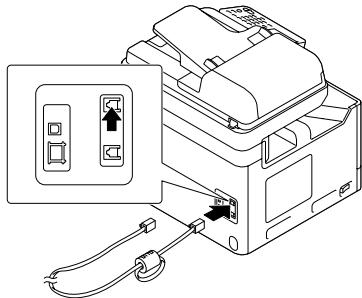
Connect a telephone cable with a ferrite core to the telecommunication port of this machine. (Connect the modular jack on the ferrite-core-equipped end of the telephone cable to the telecommunication port.)
•Special Notice to User
- For Canada
NOTICE:
This product meets the applicable Industry Canada technical specifications. The Ringer Equivalence Number is an indication of the maximum number of devices allowed to be connected to a telephone interface. The termination on an interface may consist of any combination of devices subject only to the requirement that the sum of the RENs of all the devices does not exceed five.
AVIS:
Le present matériel est conforme aux specifications techniques applicables d'Industrie Canada.
This equipment complies with Part 68 of the FCC rules and the requirements adopted by the ACTA. On the cover of this equipment is a label that contains, among other information, a product identifier in the format US:AAAEQ##TXXXX. If required, this information must be provided to the telephone company.
This equipment uses certification jack USOC RJ11C.
A plug and jack used to connect this equipment to the premises wiring and telephone network must comply with the applicable FCC Part 68 rules and requirements adopted by the ACTA.
A compliant telephone cord and modular plug is provided with this product. It is designed to be connected to a compatible modular jack that is also compliant. See installation guide for details.
The REN is used to determine the number of devices that may be connected to a telephone line. Excessive RENs on a telephone line may result in the devices not ringing in response to an incoming call. In most but not all areas, the sum of RENs should not exceed five (5.0).
To be certain of the number of devices that may be connected to a line, as determined by the total RENs, contact the local telephone company For products approved after July 23, 2001, the REN for this product is part of the product identifier that has the format US: US:AAAEQ##TXXXX.. The digits represented by ## are the REN without a decimal point (e.g., 03 is a REN of 0.3). For earlier products, the REN is separately shown on the label.
If bizhub C35 causes harm to the telephone network, the telephone company will notify you in advance that temporary discontinuance of service may be required. But if advance notice isn't practical, the telephone company will notify the customer as soon as possible. Also, you will be advised of your right to file a complaint with the FCC if you believe it is necessary.
The telephone company may make changes in its facilities, equipment, operations or procedures that could affect the operation of the equipment. If this happens the telephone company will provide advance notice in order for you to make necessary modifications to maintain uninterrupted service.
If trouble is experienced with bizhub C35, for repair or warranty information, please contact the Konica Minolta dealer location where you purchased this equipment. If the equipment is causing harm to the telephone network, the telephone company may request that you disconnect the equipment until the problem is resolved.
Connection to party line service is subject to state tariffs. Contact the state public utility commission, public service commission or corporation commission for information. If your home has specially wired alarm equipment connected to the telephone line, ensure the installation of bizhub C35 does not disable you alarm equipment. If you have questions about what will disable alarm equipment, consult your telephone company or a qualified installer.
The Telephone Consumer Protection Act of 1991 makes it unlawful for any person to use a computer or other electronic device, including FAX machines, to send any message unless such message clearly contains in a margin at the top or bottom of each transmitted page or on the first page of the transmission, the date and time it is sent and an identification of the business or other entity, or other individual sending the message and the telephone number of the sending machine or such business, other entity, or individual.
(The telephone number provided may not be a 900 number or any other number for which charges exceed local or long-distance transmission charges.)
WARNING/CAUTION Explained

The exclamation point within an equilateral triangle followed by the word "Warning" is intended to alert the user to the possibility that a disregard for the warning may result in fatal hazards or critical injuries. Be sure to focus your attention on the Warning headings when reading the User's Guide.

The exclamation point within an equilateral triangle followed by the word “Caution” is intended to alert the user to the possibility that a disregard for the caution may result in minor injuries or in physical damage. Be sure to focus your attention on the Caution headings when reading the User's Guide.
- For New Zealand
- This device is equipped with pulse dialing while the Telecom standard is DTMF tone dialing. There is no guarantee that Telecom lines will always continue to support pulse dialing.
- This equipment does not fully meet Telecom's impedance requirements. Performance limitations may occur when used in conjunction with some parts of the network. Telecom will accept no responsibility should difficulties arise in such circumstances.
- The grant of a Telepermit for any item of terminal equipment indicates only that Telecom has accepted that the item complies with minimum conditions for connection to its network. It indicates no endorsement of the product by Telecom, nor does it provide any sort of warranty. Above all, it provides no assurance that any item will work correctly in all respects with another item of Telepermitted equipment of a different make or model, nor does it imply that any product is compatible with all of Telecom's network services.
- The automatic calling functions of this equipment must not be used to cause a nuisance to other customers.
- Telepermitted equipment only may be connected to the auxiliary telephone port. The auxiliary port is not specifically designed for 3-wire connected equipment. 3-wire might not respond to incoming ringing when connected to this port.
- [Admin Setting] - [Fax Settings] - [Comm. Setting] - [Number of RX Call Rings] setting must be configured between 2 and 10.
- For Europe
The Facsimile has been approved in accordance with Council Decision 1999/5/EC for pan-European single terminal connection to the public switched telephone network (PSTN). However, due to differences between the individual PSTNs provided in different countries, the approval does not, of itself, give an unconditional assurance of successful operation on every PSTN network terminal point.
In the event of problems, you should contact your equipment supplier in the first instance.

- For Singapore
The TEL (telephone) port cannot be used in Singapore.
(A121-9560-00A)
Français
natural_image
Diagram of a printer internal structure with cable and connector, showing no text or symbols- Port USB
natural_image
Diagram of a printer internal structure with cable and connector, showing no text or symbols- USB Host
2004/108/EB e 2006/95/EB
natural_image
Diagram of a printer internal structure with cable and connector, showing no text or symbols- Host USB
natural_image
Diagram of a printer internal structure showing cable and connector (no text or symbols)- Host USB
2004/108/CE e 2006/95/CE
text_image
Diagram of a printer internal structure showing a paper feeding into a printer with labeled ports and cable connections.- USB Host
2004/108/ES a 2006/95/ES
natural_image
Diagram of a printer internal structure showing cable and connector, with no visible text or symbols2004/108/WE i 2006/95/WE
natural_image
Diagram of a printer with cable and connector, showing internal components and an open door (no text or symbols)- Host USB
natural_image
Diagram of a printer internal structure with cable and connector, showing no text or symbols- USB-host
2004/108/ES a 2006/95/ES
natural_image
Diagram of a printer internal structure with cable and connector, showing no text or symbols- Hostitel'ská stanica USB
natural_image
Diagram of a printer internal structure with cable and connector, showing no text or symbols• Xoct USB
natural_image
Diagram of a printer internal structure with cable and connector, showing no text or symbols- USB-poort
natural_image
Line drawing of a device with an open panel and cable, showing internal components (no text or symbols)natural_image
Line drawing of an open electronic device with cable and connector, showing internal components and a close-up of the switch (no text or symbols)- USB-värd
natural_image
Diagram of a printer internal structure showing cable and connector, with no visible text or symbols- USB-åbning
natural_image
Diagram of a printer internal structure with cable and connector, showing no text or symbols- USB-vert
natural_image
Diagram of a printer internal structure showing cable and connector, with no visible text or symbols- USB Host
natural_image
Line drawing of a printer internal structure with cable and connector (no text or symbols)- USB Yuvası
natural_image
Diagram of a printer internal structure showing a paper feeding into a paper airplane, with no text or symbols present.●USB Host
natural_image
Diagram of a printer with cable and connector, showing internal components and an open socket (no text or symbols)- USB 主装置
text_image
Diagram of a printer with labeled ports and cable, showing internal components and connection point- USB 主设备
natural_image
Diagram of a printer internal structure with cable and connector, showing no text or symbols- USB 호스트
text_image
Diagram showing a printer with an open socket and cable, indicating internal connection or assembly.USB منفذ ●