
BIZHUB 190F - Multifunction Printer KONICA - Free user manual and instructions
Find the device manual for free BIZHUB 190F KONICA in PDF.


| Brand | KONICA MINOLTA |
| Model | BIZHUB 190F |
| Product type | Multifunction printer (copy, print, scan, fax) |
| Printing technology | Dry electrophotographic |
| Print speed (A4) | 19 ppm |
| Copy speed (A4) | 19 ppm |
| Print resolution | 600 x 600 dpi |
| Scan resolution | 600 x 600 dpi |
| Scan speed (color) | 4 opm |
| Scan speed (mono) | 15 opm |
| Fax standard | Super G3, 33.6 Kbps modem |
| Standard memory | 8 MB (expandable to 40 MB) |
| Standard interface | USB 2.0 |
| Network options | Ethernet 10/100 Base-TX (optional) |
| Standard paper capacity | 550 sheets |
| Maximum paper capacity | 1,050 sheets |
| Automatic document feeder | 80 originals |
| Automatic duplex | Yes (built-in) |
| Dimensions (W x D x H) | 520 x 460 x 461 mm |
| Weight | 21.1 kg |
| Power consumption | max. 940 W |
| Security | User authentication, accounting (up to 100 accounts), secure fax |
| Management software | PageScope Netcare |
| Supported operating systems | Windows 98/ME/NT4.0/2000/XP/Server 2003/Vista |
Frequently Asked Questions - BIZHUB 190F KONICA
User questions about BIZHUB 190F KONICA
0 question about this device. Answer the ones you know or ask your own.
Ask a new question about this device
Download the instructions for your Multifunction Printer in PDF format for free! Find your manual BIZHUB 190F - KONICA and take your electronic device back in hand. On this page are published all the documents necessary for the use of your device. BIZHUB 190F by KONICA.
USER MANUAL BIZHUB 190F KONICA
natural_image
Two Bixhub E311 printer units displayed against a blue background with abstract geometric shapes (no text or symbols visible)bizhub 131f and bizhub 190f
For classic office needs
bizhub 131f and bizhub 190f, office system

natural_image
Abstract geometric composition with overlapping blue squares and a paperclip-like shape (no text or symbols)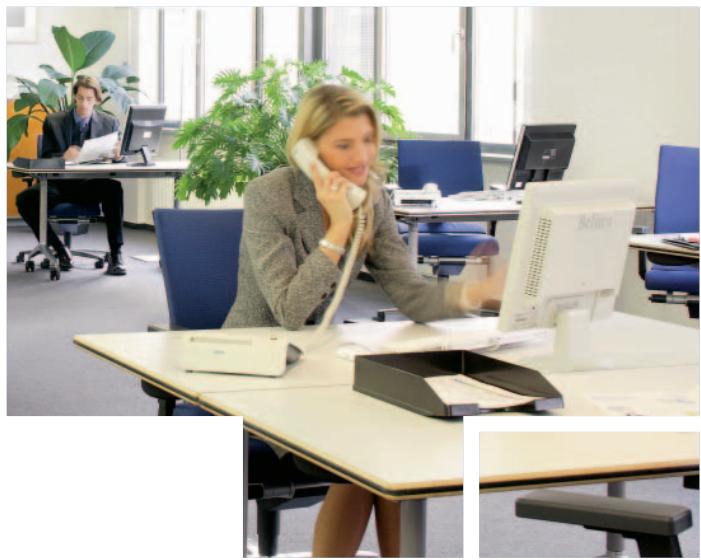
natural_image
Office interior with two women working at desks, one using a landline phone and the other in a modern office environment (no visible text or symbols)The small-office communication-hub
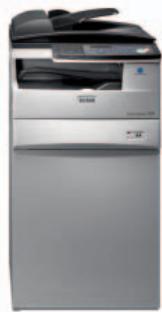
Konica Minolta's new bizhub 131f/190f offers everything for the small office – in more ways than one: Whether installed right at the workplace or in a central office location, its many merits include flexible scanning, comprehensive faxing, speedy printing and convenient copying for single users or the small team.
Innovative technologies make the bizhub 131f/190f highly efficient and economic to operate. A standard multi-page scanner, G3 fax, GDI printer and A4 copier for the individual workplace, the bizhub 131f/190f is easily upgraded into a networked central office device and speedy PCL printer. On top, the amazingly low toner consumption brings attractive cost savings.

The versatile workplace tool ...
With its standard USB 2.0 interface the bizhub 131f/190f is easily connected to any PC as efficient workplace scanner, GDI printer, copier and fax.
It's a local TWAIN scanner for up to A4 originals; and colour TWAIN scanning makes it perfect for example to enhance users' own PowerPoint presentations.
As standard GDI printer it delivers 13 (131f) or 19 (190f) A4 prints per minute at 600 dpi – more than sufficient productivity for most office applications!
Also a standard copier for up to A4 size documents, it is everything a busy user needs. The integrated ADF means extra convenience whenever multiple copies have to be made.

Workflow options
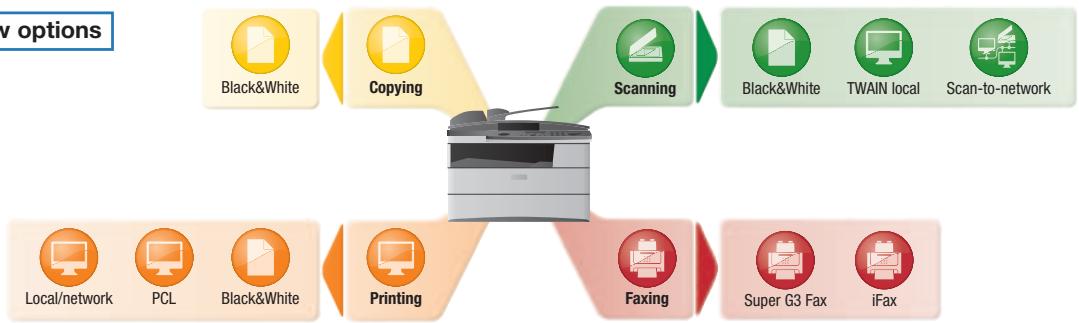
flowchart
graph TD
    A["Printing"] --> B["Scanning"]
    A --> C["Faxing"]
    A --> D["Local/network"]
    A --> E["PCL"]
    A --> F["Black&White"]
    A --> G["Black&White"]
    A --> H["TWAIN local"]
    A --> I["Scan-to-network"]
    A --> J["Super G3 Fax"]
    A --> K["iFax"]


natural_image
Close-up of a stack of white paper sheets against a blurred blue and black background (no text or symbols visible)

... with generous central talents
At the same time the bizhub 131f/190f offers a multitude of merits as central communication device in the small office:
Flexible faxing
The comprehensive fax functionality features standard 8 MB of fax memory, sufficient for up to 650 pages. No incoming faxes are lost due to lack of paper or no power.
Ideal for central fax communication, it brings efficiency and reliability to the task with features like time-send, send via memory, autodial, polling and a spam filter. Password-protected secure faxing keeps incoming confidential information where it belongs.
An integrated address book and generous 40 short dials make fax transmissions even more convenient. iFax enables high-speed fax communication via the Internet and brings attractive savings to telephone charges.
Versatile functions
■ Network printing at 600 dpi with 10-Base-T/100-Base-TX support is available with the optional network interface card, which also enables network TWAIN scanning. Also optional, the IC-902 print controller upgrades the bizhub 131f/190f into a full PCL printer.
■ Multi-access speeds up team work, enabling simultaneous printing and scanning or faxing, and minimising the wait for job completion.
The standard 550-sheet paper capacity on the bizhub 131f/190f can be extended to a generous 1,050 sheets, making interruptions to bigger print and copy jobs a thing of the past.
- On the bizhub 190f a standard duplex unit further increases office efficiency with fully automatic double-sided printing and copying, saving paper and filing space at the same time.
Supports administration
■ Enhanced user support includes advanced user authentication features and a useful accounting functionality. Security is all-embracing and dependable, with restricted user access and reliable monitoring ensuring that confidential information remains confidential.
natural_image
Close-up of a computer keyboard with 'Enter' and 'Pg Dn' labels, next to a blurred mouse on a keyboard (no readable text beyond key symbols)



natural_image
Office scene with a woman working at a desk, another person standing near a kitchen lamp (no visible text or symbols)
natural_image
Blurred image of a mechanical component or device with no visible text or symbolsKonica Minolta's PageScope Netcare makes available convenient device management for the bizhub 131f/190f. This helpful web-based utility minimises administrator intervention. All networked devices are displayed with individual icons, facilitating their configuration and management in a straightforward user interface. Device lists are updated automatically within specified time intervals, including the automatic addition of new devices.
Any small office wanting to optimise essential every-day tasks should give the bizhub 131f/190f some serious thought. Whether installed right at the workplace or as a central communication device, Konica Minolta's versatile little multifunctional is always up to the challenge!

Configurations
natural_image
Exterior view of a modern office building (no signage)
KONICA MINOLTA


Technical specifications
Copier specifications
Copying process
Dry electrostaticphotographic
transfer system
Toner system
Polymerised toner
Copy/print speed A4
13 ppm (bizhub 131f)
19 ppm (bizhub 190f)
1st Copy/print time
12 sec. (bizhub 131f)
10 sec. (bizhub 190f)
Warm-up time
less than 23 sec
Copy resolution
600 x 600 dpi
Gradation
256 gradations
Multi-copy
1–99 countdown,
Original format
A5-A4
Magnification
25–400% in 1% steps
Copy features
Contrast adjustment, combine 2in1,
electronic sorting, auto tray selection
Printer specifications
Print resolution
600 x 600 dpi
Page description language
GDI
PCL 6/5e (optional)
Operating systems
Windows 98/ME/NT4.0/2000/XP 32/
Server 2003/VISTA
Scanner specifications
Scan speed
Colour up to 4 opm (A4)
Mono up to 15 opm (A4)
Scan resolution
600 x 600 dpi
Scan modes
TWAIN scan
Scan-to-box
Fax specifications
Fax standard
Super G3
Fax resolution
Standard, fine, super fine
Fax compression
MH, MR, MMH, JBIG
Fax modem
33.6 Kbps
Fax back-up memory
8 MB (up to 40 MB)
Up to 650 pages (up to 3.370 pages)
Fax destinations
40x One-touch + 160x Speed-dial +
30x Direct-dial
Fax functions
Polling, memory receiving, delayed trans-
mission, iFax, secure receive, spamfilter
System specifications
System memory
Standard: 8 MB
Max.: 40 MB
Interface
USB 2.0 (standard)
Parallel IEEE1284 (optional)
10-Base-T/100-Base-TX Ethernet
(optional)
Automatic document feeder
Max.: 80 originals
Paper size
A5-A4
Paper weight
60–120 gsm
Paper input capacity
Standard: 550 sheets
Max.: 1,050 sheets
Paper output capacity
Max.: 250 sheets
Automatic duplexing (bizhub 190f)
A4
60–90 gsm
Copy/print volume
bizhub 131f:
Recommended: 2,000
Max.: 5,000
bizhub 190f:
Recommended: 3,000
Max.: 7,500
Power consumption
max. 940 W
System dimensions (W x D x H, mm)
520 x 450 x 446 (bizhub 131f)
520 x 460 x 461 (bizhub 190f)
System weight
20.8 kg (bizhub 131f)
21.1 kg (bizhub 190f)
System features
Security
User authentication
Accounting
Up to 100 accounts
Software
PageScope Netcare
All specifications relating to paper capacity refer to A4-size paper of 80 gsm quality.
All specifications relating to scanning, copying or printing speeds refer to A4-size paper that is scanned, copied or printed crosswise in multipage, simplex mode.
Some of the product illustrations contain optional accessories.
Konica Minolta does not warrant that any prices or specifications mentioned will be error-free.
Specifications are subject to change without notice.
Microsoft, Windows and the Windows logo are trademarks, or registered trademarks, of Microsoft Corporation in the United States and/or other countries.
All other brand and product names may be registered trademarks or trademarks of their respective holders and are hereby acknowledged.
Printed in Germany on chlorine-free bleached paper.
Your Konica Minolta Business Solutions Partner: