
DC390KB - Circular saw DEWALT - Free user manual and instructions
Find the device manual for free DC390KB DEWALT in PDF.



| Product type | Cordless circular saw |
| Brand | DEWALT |
| Model | DC390KB |
| Voltage | 18 V DC |
| Useful power (max) | 390 W |
| No-load speed | 3,700 min⁻¹ |
| Blade diameter | 165 mm |
| Blade bore | 20 mm |
| Max cutting depth | 55 mm |
| Bevel adjustment | 0° - 50° |
| Weight (without battery pack) | 3.15 kg |
| Compatible battery type | NiCd or NiMH 18 V (DE9096, DE9039) |
| Battery capacity | 2.4 Ah (DE9096) / 3.0 Ah (DE9039) |
| Compatible charger | DE9116 (230 V AC, charge in 60/70 min) |
| Sound pressure (LDA) | 95 dB(A) |
| Sound power (LWA) | 104 dB(A) |
| Vibration (weighted average value) | < 2.5 m/s² |
| Safety devices | Lower guard, riving knife, lock/unlock button, shaft lock |
| Main functions | Straight, bevel, plunge cuts; compatible dust extraction |
| Maintenance and cleaning | Regular cleaning of ventilation slots; no lubrication required |
| Warranty | 1 year (parts and labor); 30-day refund |
Frequently Asked Questions - DC390KB DEWALT
User questions about DC390KB DEWALT
0 question about this device. Answer the ones you know or ask your own.
Ask a new question about this device
Download the instructions for your Circular saw in PDF format for free! Find your manual DC390KB - DEWALT and take your electronic device back in hand. On this page are published all the documents necessary for the use of your device. DC390KB by DEWALT.
USER MANUAL DC390KB DEWALT
AKLU-HANDKREISSÄGE DC390
You have chosen a DeWALT tool. Years of experience, thorough product development and innovation make DeWALT one of the most reliable partners for professional power tool users.
Technical data
| DC390 | ||
| Voltage | VDC | 18 |
| Max. power output | W | 390 |
| No-load speed | min-1 | 3,700 |
| Blade diameter | mm | 165 |
| Depth of cut | mm | 55 |
| Blade bore | mm | 20 |
| Bevel angle adjustment | 0 - 50° | |
| Weight (without battery pack) | kg | 3.15 |
| Battery pack | DE9096 | DE9039 |
| Battery type | NiCd | NiMH |
| Voltage | VDC 18 | 18 |
| Capacity | Ah 2.4 | 3.0 |
| Weight | kg 1.0 | 1.0 |
| Charger | DE9116 | |
| Mains voltage | VAC | 230 |
| Battery type | NiCd/NiMH | |
| Approx. charging time | min | 60/70 |
| Weight | kg | 0.4 |
| Fuses: | ||
| Europe | 230 V tools | 10 Amperes, mains |
| U.K. & Ireland | 230 V tools | 13 Amperes, in plugs |
The following symbols are used throughout this manual:

Denotes risk of personal injury, loss of life or damage to the tool in case of non-observation of the instructions in this manual.

Denotes risk of electric shock.

Fire hazard.
EC-Declaration of conformity

DC390
DeWALT declares that these power tools have been designed in compliance with: 98/37/EEC, 89/336/EEC, 73/23/EEC, EN 50144, EN 55014-2, EN 55014-1, EN 50260, EN 60335, EN 61000-3-2 & EN 61000.
For more information, please contact DeWALT at the address below, or refer to the back of the manual.
| DC390 | ||
| LpA (sound pressure) | dB(A)* | 95 |
| LwA (acoustic power) | dB(A) | 104 |
| Weighted RMS acceleration value | m/s2 | < 2.5 m/s2 |
- at the operator's ear
Director Engineering and Product Development Horst Großmann
When using power tools, always observe the safety regulations applicable in your country to reduce the risk of fire, electric shock and personal injury.
Read all of this manual carefully before operating the tool.
Save this manual for future reference.
General
1 Keep work area clean
Cluttered areas and benches can cause accidents.
2 Consider work area environment
Do not expose the tool to rain. Do not use the tool in damp or wet conditions. Keep the work area well lit (250 - 300 Lux). Do not use the tool where there is a risk of causing fire or explosion, e.g. in the presence of flammable liquids and gases.
3 Keep children away
Do not allow children, visitors or animals to come near the work area or to touch the tool or the mains cable.
4 Dress properly
Do not wear loose clothing or jewellery, as these can be caught in moving parts. Wear protective hair covering to keep long hair out of the way. When working outdoors, preferably wear suitable gloves and non-slip footwear.
5 Personal protection
Always use safety glasses. Use a face or dust mask whenever the operations may produce dust or flying particles. If these particles might be considerably hot, also wear a heat-resistant apron. Wear ear protection at all times. Wear a safety helmet at all times.
6 Do not overreach
Keep proper footing and balance at all times.
7 Stay alert
Watch what you are doing. Use common sense. Do not operate the tool when you are tired.
8 Secure workpiece
Use clamps or a vice to hold the workpiece. It is safer and it frees both hands to operate the tool.
9 Connect dust extraction equipment
If devices are provided for the connection of dust extraction and collection facilities, ensure that these are connected and properly used.
10 Remove adjusting keys and wrenches
Always check that adjusting keys and wrenches are removed from the tool before operating the tool.
11 Use appropriate tool
The intended use is described in this instruction manual. Do not force small tools or attachments to do the job of a heavy-duty tool. The tool will do the job better and safer at the rate for which it was intended. Do not force the tool.
Warning! The use of any accessory or attachment or performance of any operation with this tool other than those recommended in this instruction manual may present a risk of personal injury.
12 Check for damaged parts
Before use, carefully check the tool and mains cable for damage. Check for misalignment and seizure of moving parts, breakage of parts, damage to guards and switches and any other conditions that may affect its operation.
Ensure that the tool will operate properly and perform its intended function. Do not use the tool if any part is damaged or defective. Do not use the tool if the switch does not turn it on and off. Have any damaged or defective parts replaced by an authorised DeWALT repair agent. Never attempt any repairs yourself.
13 Remove the battery pack
Switch off and wait for the tool to come to a complete standstill before leaving it unattended. Remove the battery pack when not in use, before changing any parts of the tools, accessories or attachments and before servicing.
14 Avoid unintentional starting
Do not carry the tool with a finger on the switch. Be sure that the tool is switched off before inserting the battery pack.
15 Store idle tools
When not in use, tools must be stored in a dry place and locked up securely, out of reach of children.
16 Maintain tools with care
Keep the tools in good condition and clean for better and safer performance. Follow the instructions for maintenance and changing accessories. Keep all handles and switches dry, clean and free from oil and grease.
17 Repairs
This tool is in accordance with the relevant safety regulations. Have your tool repaired by an authorised DEWALT repair agent. Repairs should only be carried out by qualified persons using original spare parts; otherwise this may result in considerable danger to the user.
Safety instructions for chargers and battery packs
- Only use battery packs that are intended to be used with the tool.
- Make sure that the battery pack is dry and clean before inserting it into the charger.
- A battery pack must only be charged using the charger recommended with the battery pack. Incorrect use may result in a risk of electric shock, or overheating or leakage of the battery pack.
- Never carry the charger by its cord. Never pull the cord to disconnect from the socket. Keep the cord away from heat, oil and sharp edges.
- Always follow the instructions in the back of this manual for battery pack disposal.
- When not in use, chargers and battery packs must be stored in a dry place and locked up securely, out of reach of children.
Additional safety instructions for battery packs

Fire hazard! Avoid metal short circuiting the contacts of a detached battery pack. Do not store or carry the battery pack without the battery cap placed over the contacts.
- The battery fluid, a 25 - 30% solution of potassium hydroxide, can be harmful. In case of skin contact, flush immediately with water. Neutralize with a mild acid such as lemon juice or vinegar. In case of eye contact, rinse abundantly with clean water for at least 10 minutes. Consult a physician.
- Never attempt to open a battery pack for any reason.
Labels on charger and battery pack
In addition to the pictographs used in this manual, the labels on the charger and the battery pack show the following pictographs:
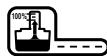
Battery charging

Battery charged

Battery defective

Do not probe with conductive objects

Do not charge damaged battery packs

Read instruction manual before use

Use only with DeWALT battery packs, others may burst, causing personal injury and damage

Do not expose to water

Have defective cords replaced immediately

Charge only between 4° C and 40° C

Discard the battery pack with due care for the environment

Do not incinerate the battery pack

MH
Cd
Charges NiMH and NiCd battery packs

See technical data for charging time
Additional safety rules for circular saws
Plugging into the mains, switching on and off
Always ensure that the saw is switched off before inserting the battery pack.
- Remove the blade changing spanner from the saw blade locking screw before switching on.
- Do not switch off before the saw blade is running freely.
When sawing
- Remove all nails and metal objects from the workpiece before starting work.
- Do not attempt to saw extremely small workpieces.
- After switching off, never attempt to stop the saw blade by pressing against the side of the blade.
- Never put the saw down on a table or work bench unless it is switched off and the blade has stopped running.
Always use the riving knife, except for inserted cuts.
Operational protection devices
- The circular saw must only be used for cutting wood or plastic.
- Ensure that all devices screening the saw blade are in perfect working order.
- Never jam the saw blade guards.
Free a jammed saw blade guard immediately and do not use the saw if the guard is jammed. - Do not remove the riving knife, except when plunge cutting.
- The riving knife should be correctly set; the distance between the toothed rim and the riving knife should be 5mm and the height difference should be 5mm or less.
Checking and changing the saw blade
- Do not use blades with a body thickness greater or a width of tooth smaller than the thickness of the riving knife.
- Only saw blades conforming to the specifications contained in these operating instructions may be used.
- Saw blades made of high alloy, high speed steel (HSS steel) should not be used. Good results are achieved using carbide-tipped or CrV saw blades.
- Only sharp saw blades in perfect working condition should be used; cracked or bent saw blades should be discarded and replaced at once.
- Ensure that the saw blade is securely fixed and rotates in the correct direction.
Applications
- When using a saw bench ensure that the width of the sawing gap is sufficient to take the saw blade being used.
- When cutting narrow workpieces (width less than 80 mm) longitudinally, use a rip fence guide along the longitudinal edge.
- When sawing with the workpiece clamped tight, devices should be used to prevent the workpiece kicking back.
- When sawing circular sections of wood use a device to hold the workpiece steady on both sides of the saw blade to prevent slipping.
- Ensure that pieces of wood sawn off the workpiece cannot be caught up by the teeth of the saw blade and thrown in the air.
Guard against kickback
- Kickback occurs when the saw begins to stall rapidly and is driven back towards the operator. Release the switch immediately if the blade sticks or the saw stalls.
- Keep the saw blades sharp.
- Support large panels near the cutting area.
- Use a fence or straight edge guide when ripping; do not force the tool.
- Do not remove the saw from the work during a cut while the saw blade is rotating. Release the on/off switch and wait for the saw blade to come to a halt.
Package contents
The package contains:
1 Cordless circular saw
1 Saw blade
1 Allen key
2 Battery packs, NiCd (DC390KA)
2 Battery packs, NiMH (DC390KB)
1 Charger (DC390KA/DC390KB)
1 Kitbox (DC390KA/DC390KB)
1 Instruction manual
1 Exploded drawing
- Check for damage to the tool, parts or accessories which may have occurred during transport.
- Take the time to thoroughly read and understand this manual prior to operation.
Description (fig. A)
Your DC390 cordless circular saw has been designed for professional sawing applications.
1 On/off switch
2 Lock-off button
3 Front handle
4 Spindle lock
5 Dust spout
6 Saw shoe
7 Riving knife
8 Lower guard retracting lever
9 Lower guard
10 Saw blade
11 Bevel adjustment knob
12 Kerf indicator
13 Depth adjustment knob
14 Battery pack
Charger
Your charger DE9116 accepts DeWALT NiCd/NiMH battery packs ranging from 7.2 to 18 V.
14 Battery pack
15 Release buttons
16 Charger
17 Charging indicator (red)
Electrical safety
The electric motor has been designed for one voltage only. Always check that the battery pack voltage corresponds to the voltage on the rating plate. Also make sure that the voltage of your charger corresponds to that of your mains.

Your DEWALT charger is double insulated in accordance with EN 60335.
Mains plug replacement (U.K. & Ireland only)
- Should your mains plug need replacing and you are competent to do this, proceed as instructed below. If you are in doubt, contact an authorized DeWALT repair agent or a qualified electrician.
- Disconnect the plug from the supply.
- Cut off the plug and dispose of it safely; a plug with bared copper conductors is dangerous if engaged in a live socket outlet.
-
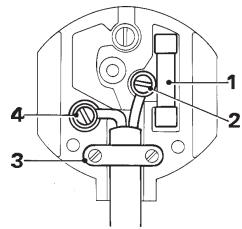
Only fit 13 Amperes BS1363A approved plugs fitted with the correctly rated fuse (1).
-
The cable wire colours, or a letter, will be marked at the connection points of most good quality plugs. Attach the wires to their respective points in the plug (see below). Brown is for Live (L) (2) and Blue is for Neutral (N) (4).
- Before replacing the top cover of the mains plug ensure that the cable restraint (3) is holding the outer sheath of the cable firmly and that the two leads are correctly fixed at the terminal screws.

Never use a light socket.
Never connect the live (L) or neutral (N) wires to the earth pin marked E or 1/± .
Using an extension cable
An extension cord should not be used unless absolutely necessary. Use an approved extension cable suitable for the power input of your charger (see technical data). The minimum conductor size is 1mm2 ; the maximum length is 30m .
Assembly and adjustment

- Prior to assembly and adjustment, always remove the battery pack.
Always switch off the tool before inserting or removing the battery pack.

Use only DeWALT battery packs and chargers.
Battery pack (fig. A & B)
Charging the battery pack
When charging the battery pack for the first time, or after prolonged storage, it will only accept an 80% charge. After several charge and discharge cycles, the battery pack will attain full capacity.
Always check the mains prior to charging the battery pack.
If the mains is functioning but the battery pack does not charge, take your charger to an authorised DeWALT repair agent. Whilst charging, the charger and the battery pack may become warm to touch. This is a normal condition and does not indicate a problem.

Do not charge the battery pack at ambient temperatures < 4°C or >40°C . Recommended charging temperature: approx. 24°C .
- To charge the battery pack (14), insert it into the charger (16) as shown and plug in the charger. Be sure that the battery pack is fully seated in the charger. The red charging indicator (17) will blink. After approx. 1 hour, it will stop blinking and remain on. The battery pack is now fully charged. The battery pack can be removed at any time or left in the connected charger for a longer period of time (with a maximum of 14 days).
Inserting and removing the battery pack
- Insert the battery pack into the grip until it clicks in place.
- To remove the battery pack, press the two release buttons (15) simultaneously and pull the pack out of the grip.
Battery cap (fig. B)
A protective cap is supplied to cover the contacts of a detached battery pack. Without the protective cap in place, loose metal objects could short circuit the contacts, causing a fire hazard and damaging the battery pack.
- Take off the protective cap (18) before placing the battery pack (14) in the charger or tool.
- Place the protective cap over the contacts immediately after removing the battery pack from the charger or tool.

Make sure the protective cap is in place before storing or carrying a detached battery pack.
Automatic refresh

The automatic refresh mode will equalize or balance the individual cells in the battery pack at its peak capacity. Battery packs should be refreshed overnight after every 10th charge/discharge cycle or whenever the pack no longer delivers the same amount of work.
- To refresh your battery pack, place the battery in the charger as usual. The red light will blink continuously indicating that the charge cycle has started.
- When the 1-hour charge cycle has completed, the light will stay on continuously and will no longer blink. The pack is fully charged and can be used at this time.
- If the pack is left in the charger after the initial 1-hour charge, the charger will automatically initiate the refresh mode. This mode will continue up to 8 hours, but the battery pack can be removed at any time during the refresh mode.
Hot/Cold Pack Delay
When the charger detects a battery that is too hot or too cold, it automatically starts a Hot/Cold Pack Delay, suspending charging until the battery has reached an appropriate temperature. The charger then automatically switches to the pack charging mode. This feature ensures maximum battery life. The red indicator blinks long, then short while in the Hot/Cold Pack Delay mode.
Depth of cut adjustment (fig. A & C)
- Loosen the depth adjustment knob (13).
- Move the shoe (6) to obtain the correct depth of cut.
- Tighten the depth adjustment knob (13).

For optimal results, allow the saw blade to protrude from the workpiece by about 3 mm (see inset in figure C).
Bevel adjustment (fig. D)
The bevel angle can be adjusted between 0° and 50° .
-
Loosen the bevel adjustment knob (11).
-
Set the bevel angle by tilting the saw shoe (6) until the mark indicates the desired angle on the scale.
- Tighten the bevel adjustment knob (11).
Shoe adjustment for 90° cuts (fig. D)
- Adjust the saw to 0° bevel.
- Retract the blade guard using the lever (8) and place the saw on the blade side.
- Loosen the bevel adjustment knob (11).
- Place a square against the blade and shoe to adjust the 90° setting.
Replacing the saw blade (fig. E)
- Engage the blade lock button (4) and unscrew the blade clamping screw (19) by turning counterclockwise using the Allen key supplied with the tool.
- Retract the lower blade guard (9) using the lever (8) and replace the blade (10). Reinstall the washers (20 & 21) in the correct position.
- Check the direction of rotation of the blade.
- Thread on the blade clamping screw (19) by hand to hold the washer in position.
Turn clockwise. - Press the blade lock button (4) while turning the spindle until the blade stops rotating.
- Tighten the blade clamping screw firmly using the Allen key.
Adjusting the riving knife (fig. E)
For the correct adjustment of the riving knife (7), refer to the inset in figure E. Adjust the clearance of the riving knife after changing the saw blade or whenever necessary.
- Loosen the screw (22) and pull out the riving knife to its maximum length.
- Adjust the clearance and tighten the screw.
Instructions for use

- Always observe the safety instructions and applicable regulations.
- Ensure the material to be sawn is firmly secured in place.
- Apply only a gentle pressure to the tool and do not exert side pressure on the saw blade.
- Avoid overloading.
Prior to operation:
- Make sure your battery pack is (fully) charged.
- Make sure the guards have been mounted correctly. The saw blade guard must be in closed position.
- Make sure the saw blade rotates in the direction of the arrow on the blade.
- Do not use excessively worn saw blades.
Switching on and off (fig. A)
For safety reasons the on/off switch (1) of your tool is equipped with a lock-off button (2).
- Press the lock-off button to unlock the tool.
- To run the tool, press the on/off switch (1).
As soon as the on/off switch is released the lockoff switch is automatically activated to prevent unintended starting of the machine.

Do not switch the tool on or off when the saw blade touches the workpiece or other materials.
Holding and guiding the tool (fig. A)
- Hold the tool by the main grip and the front handle (3) to guide the saw properly.
- For optimum results, clamp the workpiece bottom up.
- Use the kerf indicator (12) to follow the line drawn on the workpiece. The kerf indicator lines up with the left side of the saw blade when set to 50° bevel. The kerf indicator lines up with the right side of the saw blade when set to 0° bevel.

Dust extraction (fig. A)
Your tool is fitted with a dust extraction outlet (5).
- Always use a vacuum extractor designed in compliance with the applicable Directives regarding dust emission when sawing wood. Vacuum hoses of most common vacuum cleaners will fit directly into the dust extraction spout.

Do not use a vacuum extractor without proper spark protection when sawing metal.
Consult your dealer for further information on the appropriate accessories.
Maintenance
Your DEWALT power tool has been designed to operate over a long period of time with a minimum of maintenance. Continuous satisfactory operation depends upon proper tool care and regular cleaning.

Lubrication
Your power tool requires no additional lubrication.

Cleaning
- Unplug the charger before cleaning the housing with a soft cloth.
- Remove the battery pack before cleaning your power tool.
- Keep the ventilation slots clear and regularly clean the housing with a soft cloth.
Environment

Rechargeable battery pack
This long life battery pack must be recharged when it fails to produce sufficient power on jobs which were easily done before. At the end of its technical life, discard it with due care for our environment:
- Run the battery pack down completely, then remove it from the tool.
- NiCd and NiMH cells are recyclable. Take them to your dealer or a local recycling station. The collected battery packs will be recycled or disposed of properly.

Unwanted tools
Take your tool to an authorised DEWALT repair agent where it will be disposed of in an environmentally safe way.
GUARANTEE
30 DAY NO RISK SATISFACTION GUARANTEE
If you are not completely satisfied with the performance of your DEWALT tool, simply return it within 30 days, complete as purchased, to the point of purchase, for a full refund or exchange. Proof of purchase must be produced.
- ONE YEAR FREE SERVICE CONTRACT
If you need maintenance or service for your DeWALT tool, in the 12 months following purchase, it will be undertaken free of charge at an authorized DeWALT repair agent. Proof of purchase must be produced. Includes labour and spare parts for Power Tools. Excludes accessories.
- ONE YEAR FULL WARRANTY
If your DEWALT product becomes defective due to faulty materials or workmanship within 12 months from the date of purchase, we guarantee to replace all defective parts free of charge or, at our discretion, replace the unit free of charge provided that:
- The product has not been misused.
- Repairs have not been attempted by unauthorized persons.
Proof of purchase date is produced. This guarantee is offered as an extra benefit and is additional to consumers statutory rights.
For the location of your nearest authorized DeWALT repair agent, please use the appropriate telephone number on the back of this manual. Alternatively, a list of authorized DeWALT repair agents and full details on our after-sales service are available on the Internet at www.2helpU.com.
SIERRA CIRCULAR SIN CABLE DC390
Enhorabuena!
Director Engineering and Product Development Horst Großmann

Lea Completely is manual after deutilizar la herramienta.
13 Retirer le pack-batteries
Pack-batteries charge
L'emballage contient:
1 Scie circulaire sans fil
1 Lame de scie
1 Clé Allen
2 Packs-batteries, NiCd (DC390KA)
2 Packs-batteries, NiMH (DC390KB)
1 Chargeur (DC390KA/DC390KB)
1 Coffret de transport (DC390KA/DC390KB)
1 Manuel d'instructions
1 Dessin éclaté
Packs-batteries rechargeable
Director Engineering and Product Development Horst Großmann

DeWALT, Richard-Klinger-Straße 11, D-65510, Idstein, Duitsland
Director Engineering and Product Development Horst Großmann

DeWALT, Richard-Klinger-Straße 11, D-65510, Idstein, Tyskland
- 1 ARS FRI VEDLIKEHOLDSERVICE
Director Engineering and Product Development Horst Großmann

DeWALT, Richard-Klinger-Straße 11, D-65510, Idstein, Alemanha
10 Retire as chaves de ajuste
Director Engineering and Product Development Horst Großmann

Director Engineering and Product Development Horst Großmann

DeWALT, Richard-Klinger-StraBe 11, D-65510, Idstein, Tyskland
11XpnoiunoiieTe to oWToEpyaaleio
- AKLU-HANDKREISSÄGE DC390
- EC-DECLARATION OF CONFORMITY
- DC390
- GENERAL
- 1 KEEP WORK AREA CLEAN
- 2 CONSIDER WORK AREA ENVIRONMENT
- 3 KEEP CHILDREN AWAY
- 4 DRESS PROPERLY
- 5 PERSONAL PROTECTION
- 6 DO NOT OVERREACH
- 7 STAY ALERT
- 8 SECURE WORKPIECE
- 9 CONNECT DUST EXTRACTION EQUIPMENT
- 10 REMOVE ADJUSTING KEYS AND WRENCHES
- 11 USE APPROPRIATE TOOL
- 12 CHECK FOR DAMAGED PARTS
- 13 REMOVE THE BATTERY PACK
- 14 AVOID UNINTENTIONAL STARTING
- 15 STORE IDLE TOOLS
- 16 MAINTAIN TOOLS WITH CARE
- 17 REPAIRS
- SAFETY INSTRUCTIONS FOR CHARGERS AND BATTERY PACKS
- ADDITIONAL SAFETY INSTRUCTIONS FOR BATTERY PACKS
- LABELS ON CHARGER AND BATTERY PACK
- ADDITIONAL SAFETY RULES FOR CIRCULAR SAWS
- WHEN SAWING
- OPERATIONAL PROTECTION DEVICES
- CHECKING AND CHANGING THE SAW BLADE
- APPLICATIONS
- GUARD AGAINST KICKBACK
- PACKAGE CONTENTS
- DESCRIPTION (FIG. A)
- CHARGER
- ELECTRICAL SAFETY
- MAINS PLUG REPLACEMENT (U.K. & IRELAND ONLY)
- USING AN EXTENSION CABLE
- ASSEMBLY AND ADJUSTMENT
- BATTERY PACK (FIG. A & B)
- CHARGING THE BATTERY PACK
- INSERTING AND REMOVING THE BATTERY PACK
- BATTERY CAP (FIG. B)
- HOT/COLD PACK DELAY
- DEPTH OF CUT ADJUSTMENT (FIG. A & C)
- BEVEL ADJUSTMENT (FIG. D)
- SHOE ADJUSTMENT FOR 90° CUTS (FIG. D)
- REPLACING THE SAW BLADE (FIG. E)
- ADJUSTING THE RIVING KNIFE (FIG. E)
- INSTRUCTIONS FOR USE
- PRIOR TO OPERATION
- SWITCHING ON AND OFF (FIG. A)
- HOLDING AND GUIDING THE TOOL (FIG. A)
- DUST EXTRACTION (FIG. A)
- MAINTENANCE
- LUBRICATION
- CLEANING
- ENVIRONMENT
- RECHARGEABLE BATTERY PACK
- UNWANTED TOOLS
- GUARANTEE
- 30 DAY NO RISK SATISFACTION GUARANTEE
- ONE YEAR FREE SERVICE CONTRACT
- ONE YEAR FULL WARRANTY
- SIERRA CIRCULAR SIN CABLE DC390
- ENHORABUENA
- PACKS-BATTERIES RECHARGEABLE
- 1 ARS FRI VEDLIKEHOLDSERVICE
- 11XPNOIUNOIIETE TO OWTOEPYAALEIO
Brand : DEWALT
Model : DC390KB
Category : Circular saw