
SP2500 - Speakers CORSAIR - Free user manual and instructions
Find the device manual for free SP2500 CORSAIR in PDF.


| Brand | CORSAIR |
| Model | SP2500 |
| Product Type | 2.1 Speakers (subwoofer + 2 satellites) |
| Total Power | 220 W RMS |
| Frequency Response | 35 Hz - 20 kHz ±3 dB |
| Subwoofer | 20.3 cm (8") driver, 120 W (Class D digital amplifier) |
| Satellites (speakers) | 76.2 mm (3") midrange + 25.4 mm (1") titanium tweeter, 50 W per satellite (Class D amplifier) |
| Subwoofer Dimensions | 46 x 25.8 x 29.7 cm |
| Satellite Dimensions | 10.8 x 12 x 15.9 cm |
| Power Supply | 100-240 V AC, 50/60 Hz, 2.2 A |
| Audio Inputs | Line-in (RCA), AUX1 (3.5 mm on subwoofer), AUX2 (3.5 mm on remote) |
| Headphone Output | 3.5 mm jack on remote (automatically cuts speakers) |
| Remote Control | Wired (D-Sub 15-pin connection), control wheel, buttons: Power, Menu, Volume, Subwoofer |
| Audio Functions | Programs (Late Night, Karaoke, Stadium, etc.) and equalizers (Classical, Pop, Jazz, FPS, etc.) |
| Display | Display on remote, adjustable backlight |
| Box Contents | 1 subwoofer, 2 satellites, 2 wedges, 1 remote with cable, 2 satellite cables, 1 RCA to 3.5 mm audio cable, 1 power cable, adhesive pads, quick start guide |
| Care and Cleaning | Clean with a dry soft cloth. Do not use solvents or abrasive products. |
| Safety | Do not open the device (risk of electric shock). No user-serviceable parts. |
| Spare Parts and Repairability | No spare parts available. Contact CORSAIR technical support for any repairs. |
| Compliance | FCC Part 15, 47 CFR 15 B, 21 CFR 1040.10 |
Frequently Asked Questions - SP2500 CORSAIR
User questions about SP2500 CORSAIR
0 question about this device. Answer the ones you know or ask your own.
Ask a new question about this device
Download the instructions for your Speakers in PDF format for free! Find your manual SP2500 - CORSAIR and take your electronic device back in hand. On this page are published all the documents necessary for the use of your device. SP2500 by CORSAIR.
USER MANUAL SP2500 CORSAIR
High-power 2.1 PC Speaker System
MEASURED
POWER
220
WATTS
FTC METHOD

Gaming Audio Series™ SP2500
ENGLISH 3
FRANCAIS 9
DEUTsCH 15
ITALIANO 21
ESPANOL 27
PYCCKN 33
Keeping in touch
You can learn more about your Gaming Audio Series SP2500 and stay in contact with other SP2500 owners by:
- Becoming a fan on Facebook at facebook.com/corsairmemory
- Subscribing to the Corsair blog at blog.corsair.com
- Following us on Twitter at twitter.com/corsairmemory
- Visiting the Corsair audio page at corsair.com/audio
For technical support contact information, see Technical Support later in this guide.
Important safety information
No user serviceable parts inside. Risk of electric shock - do not open. This device uses 100-240VAC 50/60Hz, 2.2 Amperes.
This device complies with part 15 of the FCC rules. Operation is subject to the following two conditions: (1) This device may not cause harmful interference, and (2) this device must accept any interference received, including interference that may cause undesired operation.
Complies with rules 47CFR 15 B and 21 CFR 1040.10.
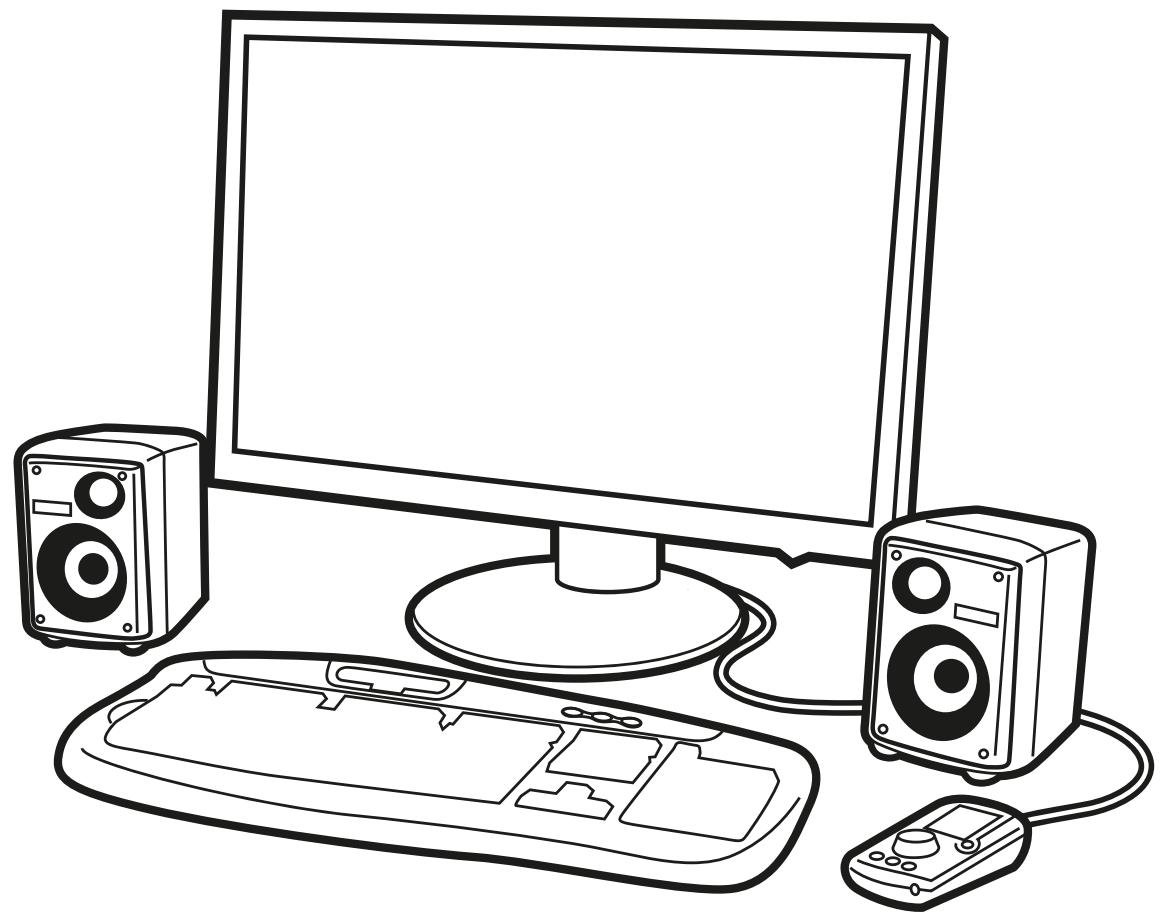
- Subwoofer
- Satellites (two)
- Satellite stands (two)
- Desktop controller with attached interface cable
- Satellite cable set (two cables)
3.5mm-to-RCA PC audio cable
Power cable - Hook-and-loop fastening tape dots
- Quick start guide (this booklet)
Proper satellite placement
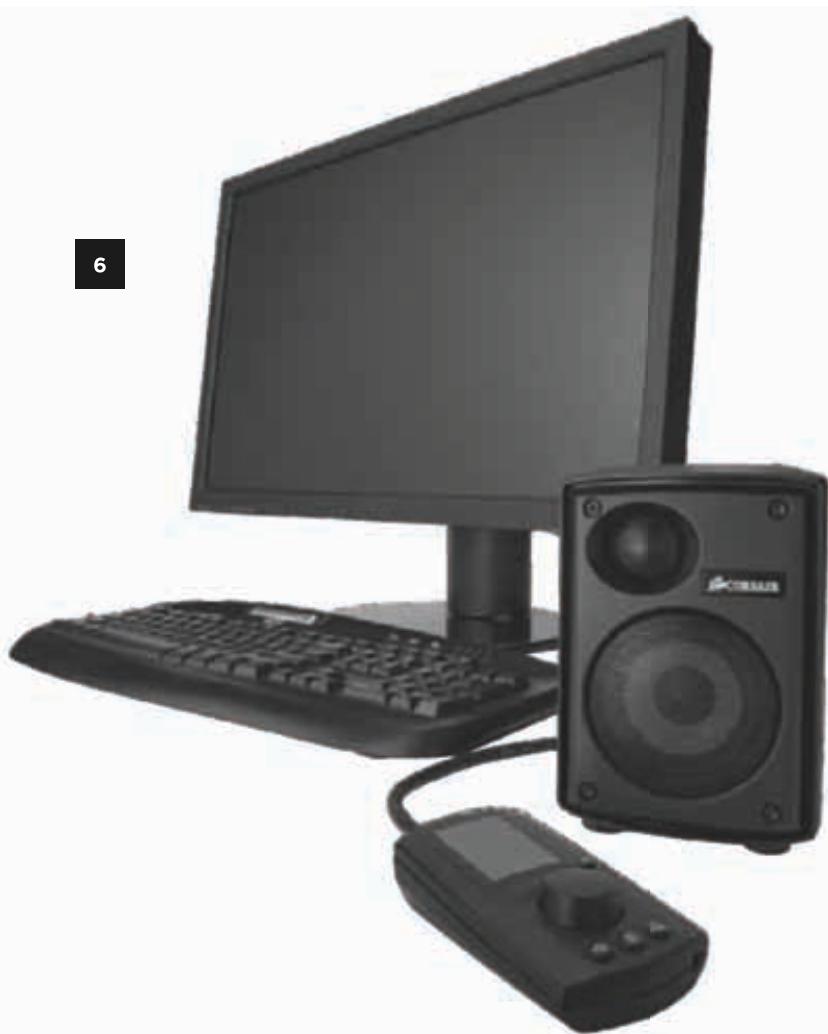
The satellites have an asymmetrical design, with the tweeter closer to the center of the sound field. This design philosophy, similar to that used with studio monitors, allows for superior stereo imaging and for the use of sufficiently large drivers in a compact enclosure. When placing the satellites on the desktop, make sure they are oriented as shown in the illustration.
Optional: using the satellite stands
While the Gaming Audio Series SP2500 will provide fantastic sound at almost any angle, for optimal stereo imaging, you will want to make sure that the satellites are aimed at the listener. See "Tips for the best sound" later in this guide for more information.
The satellites have an upward angle of 2.5 degrees. To increase the upward angle to 11 degrees, place the satellite stands under the front feet. To give the satellites a downward angle (for instance, if you will be placing them on a shelf), place the stands under the rear feet.
Tips for subwoofer placement
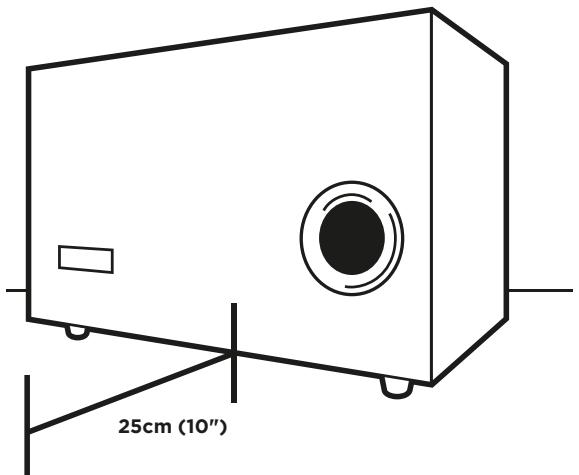
For best results, place the subwoofer with the port facing towards you. In case of placement near an object in front of the port, you should allow at least 25cm (10 inches) of clearance between the port and the object.
Connecting the satellites to the subwoofer
Each satellite is connected to the subwoofer using the included satellite cable. The ATX connectors are keyed and color coded to ensure a correct connection: Right is RED and Left is WHITE. Press each connector lightly into the back of the subwoofer and the satellite until you hear a light click. To release the connector, press the tab.
Tip: Four-pole ATX connectors and heavy gauge wire provide a succinct solution for the challenge of providing discrete amplified signals to the midrange and tweeter. They eliminate the need to run two pairs of speaker cables to each satellite. If you'd like to replace or extend these cables, check your local electronics store, or visit the Corsair store at store.corsair.com.
Connecting the subwoofer to your PC
Use the included two-meter stereo audio cable to connect the Line In input on the subwoofer (the RCA connectors) to your PC's 3.5mm stereo line level output. On most desktop PCs with color-coded audio outputs, this connector will be colored lime green. On some desktop PCs and most notebook PCs, this output will be marked with a headphone icon. You can alternatively use the lime green colored AUX1 audio input on the back of the subwoofer by using your own 3.5mm stereo audio cable.
Connecting the subwoofer to a console gaming system
Most gaming systems provide audio output via stereo RCA cables. You may connect your gaming system to the SP2500 subwoofer with a standard stereo RCA cable set, available at most any consumer electronics retailer. If the PC is connected to the Line In RCA connectors on the subwoofer, you can alternatively connect the console to the 3.5mm AUX1 audio input on the back of the subwoofer.
Connecting the desktop controller to the subwoofer
The desktop controller connects to the subwoofer via the 15-pin D-Sub connector.
WARNING: do not connect the controller to a VGA card, or any other 15-pin connector other than the one found on the SP2500 subwoofer.
Tip: we have included hook-and-loop fastening tape dots if you'd like to help secure the controller to your desk. Use of the tape dots is strictly optional, and we recommend applying them only after you've used the desktop controller and you have a good feeling for its natural home on your desk.
Tip: the USB connector on the back of the desktop controller is used for optional firmware updates. It is not necessary to connect the desktop controller to your PC via USB for normal use. The SP2500 is not a USB audio device.
Optional: connecting auxiliary devices and headphones
In addition to your PC, you can connect two more devices to the SP2500 via the auxiliary inputs. The first is built in to the desktop controller, and the second can be found on the subwoofer. If you would like to listen to audio from a device that has only audio out via RCA connectors, such as a gaming console, RCA-to-3.5mm adapters are readily available at stores that carry electronics and audio.
If you have a pair of analog headphones with a stereo 3.5mm cable, you can connect it to the headphone output on the desktop controller. Connecting a pair of headphones automatically mutes output to the speakers, so you will probably not want to connect your headphones right away.
WARNING: take care when connecting headphones to the SP2500 the first time. We recommend turning the SP2500 volume down all the way before wearing your headphones, and then slowly turning it up.
Turn on the SP2500
You are now ready to start using the desktop controller and enjoy listening to game, music and movie audio on your SP2500.
- Turn on your PC
- Press the POWER button on the desktop controller
WARNING: Before playing an audio source, see Using the desktop controller for instructions on adjusting the volume.
About the controller
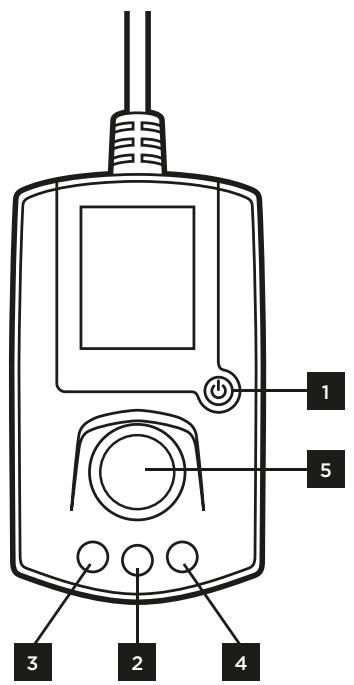
The desktop controller is used to adjust volume, select the input source (your PC, or one of the two auxiliary connectors), and select EQ and program settings (more on this later). There are four controls:
- POWER: toggles the power.
- MENU: displays the main menu.
- VOLUME: displays the master volume control.
- SUBWOOFER: displays the subwoofer output.
- CONTROL DIAL: allows you to scroll through menus and menu selections, adjust master volume, and subwoofer output.
The desktop controller will automatically switch to the volume screen after a short period of inactivity.
First-time use: selecting the display language
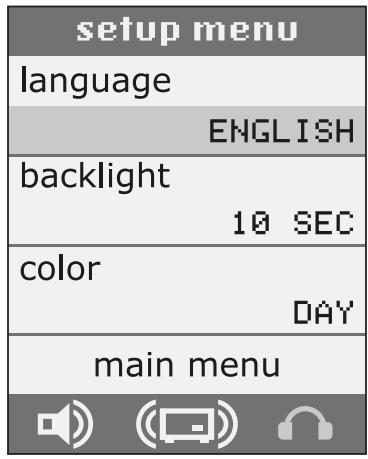
The first time you turn on the SP2500, the desktop controller will display the setup menu. The first option in the setup menu allows you to choose your display language. Rotate the dial to highlight language, click the wheel to select the language menu, and then rotate the wheel to scroll through the language choices. Click the wheel again to select your preferred language.
You can change the language at any time by returning to the setup menu. Press the MENU button, scrolling to highlight setup menu, and click the wheel.
Selecting an audio source
If the screen is not displaying the main menu, press MENU to activate it. Rotate the dial to highlight input, and then press the dial. Rotate the dial again to scroll through the input options, and then press the dial again to select your source:
LINE IN: the stereo RCA inputs on the back of the subwoofer.
AUX1: the 3.5mm stereo input located on the subwoofer.
AUX2: the 3.5mm stereo input located on the desktop controller.
Adjusting volume and subwoofer output
The master volume controls the output of both the satellites and the subwoofer.
To adjust the master volume, press the VOLUME button. The master volume screen will appear. Rotate the dial to adjust the volume. Press the dial to mute the audio.
To adjust subwoofer output on its own, press the SUBWOOFER button to display the subwoofer output screen. Rotate the dial to adjust the volume, and press the dial to mute the subwoofer.
Using the setup menu
The setup menu contains options that you probably won't be setting every day:
backlight: adjusts the length of time before the backlight fades after you've used the controller.
color: allows you to toggle between the Day and Night interface color schemes.
Selecting a program or EQ mode
Programs and EQ modes are selected from the main menu. Press the MENU button, if necessary, to display the main menu, scroll to program or EQ and press the dial, and then rotate the dial again to scroll through the options. Press the dial again to select an option.
Details on each of the programs and EQ settings are covered on the next page.
Programs
Programs harness the power of the Gaming Audio Series SP2500 Digital Signal Processor (DSP) to provide dynamic audio effects that can't be accomplished with equalization alone.
None
This default setting has no audio programs applied.
Late Night
This setting allows you to listen without disturbing others. It lowers the subwoofer output, adjusts the digital crossover so that bass tones are directed to the satellites, and applies dynamic range compression to help prevent sudden volume changes.
Wide
Provides a more spacious sound and simulates the effect of the satellite speakers being farther apart than they are.
Karaoke
Reduces or eliminates the vocals in songs. It works best with tracks where the vocals are mixed to the center.
Dynamic Pop
Combines dynamic range compression, as well as applying an equalization curve that enhances the bass and treble. It produces an effect similar to the experience of listening to music on many popular all-in-one audio systems.
Stadium, Concert Hall, Club and Theatre
Applies reverb, delay, and echo to simulate a huge, large, medium-large or medium-sized environment.
Firmware updates
The USB connector on the desktop controller is used for possible firmware updates. No firmware updates are yet planned, but see Keeping in touch, earlier in this guide, to learn how to stay on top of the latest news.
EQ settings
Reference
The default setting, with no equalization applied.
Mod X^TM
The audio for many films is mastered to an equalization curve called the "X Curve," which is optimized to make the audio sound great when you are in a theatre - that is, a large room with the speakers far away. If the audio is not remasted when the film is released on DVD or Blu-Ray, it won't sound as good as it can. Selecting Mod X applies an equalization curve that modifies the X Curve mastering, which results in equalization that's more appropriate for a typical home listening environment.
Classical, Pop, and Jazz
EQ settings tuned for particular musical genres.
Action and Drama
These cinematic settings apply Mod X processing along with genre-specific EQ settings. Drama helps provide clear dialog, and Action helps ensure that those explosions sound great.
FPS and Action Gaming
The FPS setting is ideal for multi-player games and other games where clear vocals are important. Relating to other players primarily via automatic weapons? Choose Action Gaming.
Headphones
Many inexpensive and midrange headphones do not reproduce midrange sounds as well as higher-quality headphones. This setting compensates for this, by applying diffuse field equalization to produce a more pleasing frequency response curve. If you own a pair of high-quality headphones, you probably won't need this setting. We recommend that when using headphones, you try listening with this setting both on and off, and choose the setting that sounds best for you.
Setting the output level on your PC and your other devices
Most PCs with built-in audio, as well as most PC sound cards, have audio circuitry that's capable of playing at 100% volume without distortion. For best results, we recommend setting your PC's audio output to maximum, and using the Gaming Audio Series SP2500 controller to adjust the volume. Of course, there are exceptions, and if you detect distortion when your PC's volume is set to 100% , lower it accordingly.
However, many portable digital audio players use audio circuitry that cannot be used at 100% volume without noticeable distortion. When connecting a digital audio player to the SP2500, we recommend setting the player's volume at approximately 80% , and lowering it if you detect distortion.
Use a high-quality sound card
A high-quality speaker system is just one part of getting great sound out of your PC. If you've connected the SP2500 to your PC's built-in audio circuitry, consider making the investment in a high-quality add-in sound card. Dedicated sound cards often provide greater dynamic range, a higher signal-to-noise ratio, and lower distortion than the audio circuitry built into motherboards.
Don't forget the satellite stands
The SP2500 satellites are engineered to provide excellent soundstaging - that level of sonic accuracy that allows you to close your eyes and get a strong feeling for the audio environment and the exact placement of the performers (or sound effects) within it. As with all speaker systems, the SP2500 has a "sweet spot" in which the best sound staging presentation is heard, and you'll be in that sweet spot when the satellites are directed toward your ears.
The satellite feet are designed to angle the satellites upward, but don't hesitate to place the satellite stands under the front feet if you need a little more lift. Likewise, if you'll be placing the satellites above your head, you can place the stands under the rear feat to give them a downward angle.
Specifications
Frequency response: 35Hz - 20kHz± 3dB
220 Watts total power
Subwoofer dimensions: 46 × 25.8 × 29.7 cm
Satellite dimensions: 10.8 × 12 × 15.9 cm
Subwoofer
20.3cm 120W (IEC60268-5 24hr continuous rating) subwoofer with durable rubber surround
■ Bridged dual 60 Watt class-D amplifiers with integrated DSP for 120 Watts of power
Ultra-efficient integral power supply with 100V - 240V AC input
Satellites
■ Bi-amplified, two-way design 76.2mm 40W (IEC60268-5 24hr continuous rating) midrange drivers
25.4mm 40W (IEC60268-5 24hr continuous rating) ferrofluid-cooled silk diaphragm tweeters
50 Watts per satellite:
40 Watt midrange amplifiers
- 10 Watt tweeter amplifiers
Restez en contact
| setup menu |
| language |
| ENGLISH |
| backlight |
| 10 SEC |
| color |
| DAY |
| main menu |
| setup menu |
| language |
| ENGLISH |
| backlight 10 SEC |
| color DAY |
| main menu |
Ucnolb3OBaHne yCTaHOBOuHOro MeHIO
UCTAHOBOCHOE MeHIO COePjNT NyHKtbl, KOTOpbI Bbl BpIa IIN 6ByTe NaCTpaNBAbT KaJdbI DeHb:
NODCBETKa peRyIInpyeT IpomExyToK BpeMeHn, IIO NCTeUeHn KOTOPOro NODCBETKa KOHTpolJIepa rachet, eCNI OH He INCNoJIb3YeTcA.
ZBETA N03BOJIAETIpeKJIIOUaTbCMAeJyDHeBHOINHOCHOI CBETOBbIMCNXeMaMNIHTepΦeCa
Bb6op nporpaMMblnnpexkmaKbaa3epa
IcnoIb3OBaHHe BbICOKOkaYeCTBeHHo3ByKOB0nLaTbI
BbICOKoKaueCTBeHHaCnCTema rPOMKOrOBOpHTeJIe — 3To IINMb OINH 13ФaKTOpOB DocTInKeHna 6e3yIpeHoro 3Byka HBaWem PIK. EcIn BaWa SP2500 NODKIIuOHeA K INTErTpRupOBaHHo aYdNOnPiATE KOMMbTOpeA, paccMOTpNTe BO3MOXHOCTb BLOKeHn CpeCTB V BbICOKoKaueCTBeHHUO DNCKPeTHyIO 3BYKOBUIO PAnTy. DInckPcETbIe 3BYKOBbIE PAnTbI qAcTo oBecneuBaOT LyuShin DInHAMueCKn DnIaNa3OH, 6OJIee BeBCOKOE COOTHOWeHne CmHaJI-7Um M MeHbShn YpOBeH NCKaKeHn NO CpABHeHIO C aYdNOnPiTaMn, INTErPtIPoBAHHbIM B CnCTeMHbIe PAnTbI KOMNbIOTePOB.
He 3a6bvaIte O cToKax rPOMKOROBOpnteIe
Corsair Limited Warranty
This User Agreement (the "Agreement") is a legal agreement between you ("You"), and Corsair Memory. You are agreeing to be bound by the terms of this agreement, as defined below, by using the Corsair Gaming Audio Series SP2500. If you have any questions or concerns about the terms of this agreement, please contact us at http://www.corsair.com/company/contacts.aspx. If, prior to using the Product, you decide you are unwilling to agree to the terms of this agreement, promptly return the Product and the accompanying items (including written materials and binders or other containers) to Corsair Memory or the Corsair Memory authorized distributor from whom you obtained the Product and accompanying items. If you have already paid for the Product, provide us with your proof of purchase and we will refund the fees you have paid for these items to you.
Limited Warranty and Limitation of Liability
The Product is guaranteed for twenty four (24) months from the date of delivery to the end-user against defects in materials or workmanship. During this period, the Product will be repaired or have parts replaced, at our discretion, provided that: (I) the Product is returned to the agent from whom it was purchased with shipping prepaid; (II) the Product has been purchased by the end-user and not used for hire purposes; (III) the Product has not been misused, handled carelessly, or other than in accordance with any instructions provided with respect to its use; (IV) the Product has not been damaged due to acts of nature, such as lighting, fire, flood, or earthquake; (V) the warranty stickers have not been removed or tampered with.
Corsair Memory's warranty on the Product is to the first end user or consumer only, in accordance with the Corsair Memory's Limited Warranty. All warranties express or implied, including without limitation the implied warranties of merchantability and fitness for a particular purpose, shall be limited to the duration of the guarantee above. The repair, replacement, or refund as provided under this express limited warranty is the exclusive remedy of the consumer, and is provided in lieu of all other warranties, express or implied. In no event shall Corsair Memory be liable, whether in contract or tort (including negligence) for damages in excess of the purchase price of the product, or accessory, or for any indirect, incidental, special or consequential damages of any kind, or loss of revenue or profits, loss of business, loss of information or data, software or applications or other financial loss arising out of or in connection with the ability or inability to use the products or accessories to the full extent these damages may be disclaimed by law.
Corsair Memory's total liability, whether for breach of contract, warranty, tort (including negligence), indemnification or otherwise, is limited to the price of the Product sold under these terms with respect to which losses or damages are claimed. In no event will Corsair Memory be liable for any loss of use, loss of time, inconvenience, commercial loss, lost profits or savings or other indirect, incidental, special or consequential damages to the full extent that may be disclaimed by law. The limitations, exclusions and disclaimers in these terms shall survive a fundamental breach or breach or the failure of the essential purpose of these terms or of any remedy contained herein. No action will be brought for any breach of these terms more than one year after the accrual of such cause of action. For the purpose of this paragraph, "Corsair Memory" includes its affiliates and its and their respective directors, officers, employees and agents, each of whom shall be considered as a trust beneficiary.
- Gaming Audio Series™ SP2500
- Keeping in touch
- Important safety information
- Proper satellite placement
- Optional: using the satellite stands
- Tips for subwoofer placement
- Connecting the satellites to the subwoofer
- Connecting the subwoofer to your PC
- Connecting the subwoofer to a console gaming system
- Connecting the desktop controller to the subwoofer
- Optional: connecting auxiliary devices and headphones
- Turn on the SP2500
- About the controller
- First-time use: selecting the display language
- Selecting an audio source
- Adjusting volume and subwoofer output
- Using the setup menu
- Selecting a program or EQ mode
- Programs
- None
- Late Night
- Wide
- Karaoke
- Dynamic Pop
- Stadium, Concert Hall, Club and Theatre
- Firmware updates
- EQ settings
- Reference
- Mod XTM
- Classical, Pop, and Jazz
- Action and Drama
- FPS and Action Gaming
- Headphones
- Setting the output level on your PC and your other devices
- Use a high-quality sound card
- Don't forget the satellite stands
- Specifications
- Subwoofer
- Satellites
- Restez en contact
- Ucnolb3OBaHne yCTaHOBOuHOro MeHIO
- Bb6op nporpaMMblnnpexkmaKbaa3epa
- IcnoIb3OBaHHe BbICOKOkaYeCTBeHHo3ByKOB0nLaTbI
- He 3a6bvaIte O cToKax rPOMKOROBOpnteIe
- Corsair Limited Warranty
- Limited Warranty and Limitation of Liability
Brand : CORSAIR
Model : SP2500
Category : Speakers