
HA-860 - TV TEKA - Free user manual and instructions
Find the device manual for free HA-860 TEKA in PDF.


| Product Type | Multifunction built-in oven |
| Brand | TEKA |
| Model | HA-860 |
| Main functions | Grill, fan-assisted heat, 12 automatic programs (meats, poultry, pastries, pizza, bread), memory function |
| Maximum temperature | 250 °C |
| Maximum cooking time | 360 minutes (6 hours continuous) |
| Automatic programs | Pork roast, veal roast, whole poultry, poultry thighs, fillet, fish, beef roast, sheet cake, tray cakes, pizza, bread, white bread, soufflé |
| Cooking modes | Grill, fan-assisted heat |
| Display | Temperature, remaining time, preheating indicator (dot) |
| Controls | Retractable rotary knobs (program and time selector) with anti-misadjustment lock |
| Memory function | Allows resumption of an accidentally interrupted program |
| Preheating | Built-in for Pizza, Bread and White Bread programs; not necessary for other dishes |
| Maintenance and cleaning | Oven interior and trays coated with easy-clean enamel. Use protective gloves to handle hot trays. |
| Safety | Automatic shut-off after maximum 6 hours; retractable knobs to prevent accidental changes |
| Included accessories | Rack, telescopic guides, baking tray, roasting tray, removable tray handle |
| Spare parts and repairability | Spare parts available from the manufacturer. The manual does not provide details on repairability. |
| Installation | Built-in appliance with cabinet fixing |
| General information | TEKA HA-860 multifunction built-in oven. User manual and instruction booklet free to download. |
Frequently Asked Questions - HA-860 TEKA
User questions about HA-860 TEKA
0 question about this device. Answer the ones you know or ask your own.
Ask a new question about this device
Download the instructions for your TV in PDF format for free! Find your manual HA-860 - TEKA and take your electronic device back in hand. On this page are published all the documents necessary for the use of your device. HA-860 by TEKA.
USER MANUAL HA-860 TEKA
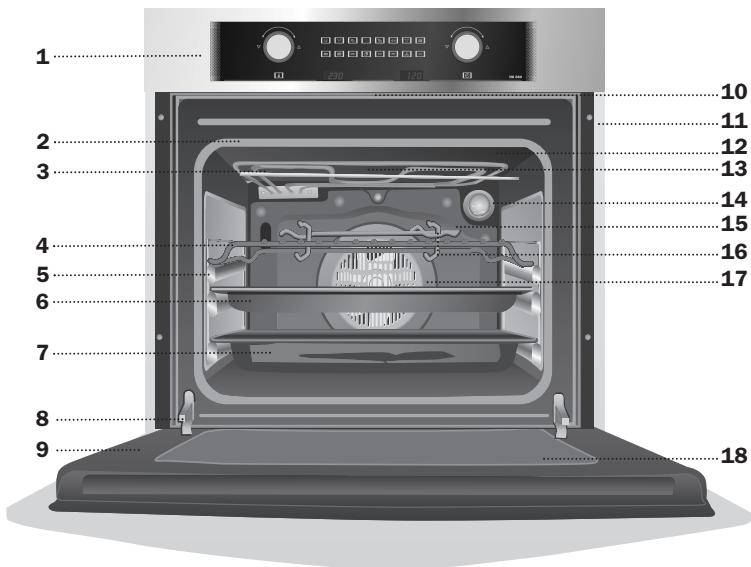
(^*) Inside oven and trays with easy cleaning enamel.
1 Control Panel
2 Oven Seal
3 Grill element
4 Grid
5 Telescopic Guides
6 Cake Tray*
7 Roasting Tray*
8 Hinge
9 Door
10 Air Outlet
11 Fixing to Unit
12 Grill Screen
13 Smoke Outlet
14 Light
15 Rear Panel
16 Tray Handle
17 Fan
18 Large Interior Glass Door
Control Panel
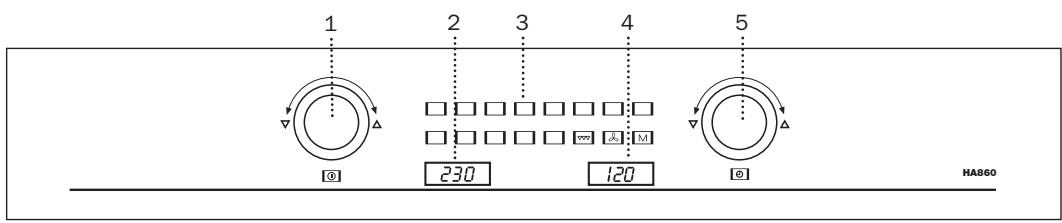
Model HA-860
1 On / Off switch
Knob for selecting the different operating modes and for setting / adjusting the temperature.
2 Oven temperature display with preheat indicator (dot).
3 Symbols for cooking programmes, "Memory-function".
4 Display of set cooking time (remaining time display).
5 Knob for setting / adjusting the cooking time.
Overview of the Cooking Programmes
The baking and roasting programmes are based on 1 kg of meat, 500 gr. of pastry/dough or 1 kg potatoes or raw vegetables. Adjust the temperature and cooking time if you are cooking larger or smaller quantities than this. If you are cooking larger quantities,
you should reduce the temperature slightly and increase the cooking time by around 10 minutes per kg. For smaller quantities use a high temperature and a shorter cooking time.
The programmes and figures in the tables are for a cold oven, unless otherwise stated.
| Dial symbol | Name | Preset temperature (range available) | Preset cooking time | Operating mode | Applications |
| Roast pork | 160°C (150-170°C) | 100 min. | Fan assisted grilling* | Pork, game | |
| Roast veal | 160°C (150-170°C) | 80 min. | Fan assisted grilling* | Veal, gammon. rib of pork, stuffed joint, rack of game, meat loaf | |
| Poultry (whole bird) | 180°C (170-190°C) | 55 min. | Fan assisted grilling* | Poultry (whole bird), e.g. chicken, duck, goose | |
| Chicken drumsticks | 180°C (170-190°C) | 45 min. | Fan assisted grilling* | Poultry pieces, e.g. chicken drumsticks, breast of duck | |
| Flet steak | 180°C (170-190°C) | 55 min. | Fan assisted grilling* | Steak, e.g. game, veal, pork, beef | |
| Fish | 160°C (150-170°C) | 55 min. | Fan assisted grilling* | Whole fish | |
| Joint of beef | 160°C (150-170°C) | 120 min. | Hot air convection | Beef, lamb, knuckle of veal | |
| Gugelhupf | 160°C (150-170°C) | 70 min. | Hot air convection | Cakes in tins, e.g. cake mixture, yeast dough, cheesecake, fruit loaf | |
| Tray-baked fruit cake | 170°C (160-180°C) | 60 min. | Hot air convection | Tray-baked cakes, sponges, yeast dough, short pastry with fruit topping | |
| Pizza | 200°C (170-210°C) | 25 min. | Hot air convection + preheating at 230°C | Pizza and speciality doughs | |
| Bread | 180°C (170-190°C) | 70 min. | Hot air convection + pre-heating at 230°C** | Leaven or yeast-based bread | |
| White bread | 180°C (170-190°C) | 30 min. | Hot air convection + pre-heating at 180°C** | White bread, rolls | |
| Casserole | 180°C (170-190°C) | 60 min. | Hot air convection | Gratin dishes and casseroles with raw and cooked vegetables, potatoes, noodles |
- Fan assisted grilling: a combination of both operating methods. The fan is switched on and off during the programme.
** A temperature of 230/180^ is maintained for 10 minutes after preheating and then reduced to the selected temperature.
The Operating Modes
You can choose from two different operating modes:Grilling and Hot air convection.
Grill :
Only the grill heats up.
Preset temperature: 290^
Use this mode for grilling and browning toppings.
Hot air convection
The convection element heats up and the fan at
the rear of the oven circulates the heat evenly throughout the oven.
Preset temperature: 160^
This mode is especially suitable for baking on several levels at the same time, and for defrosting.
You are required to set a temperature for both of these operating modes. You can preset a cooking time. If you do not set a cooking time, the oven will continue for a maximum 6 hours before shutting off.
Use of the Oven
When the oven has been in operation for some minutes, both control knobs are secured against accidental changing: the control knobs have to be turned slightly first before they are reactivated and the cooking time/cooking temperature can be changed.
Switching on the Oven
When the programme dial (1) is flush with the facia, the oven is switched off.
Press the programme dial (1) to pop it out. The oven is now switched on and you can select your programme. The symbols will light green to confirm.
Select a Programme or Operating Mode
Turn the programme dial (1) until the desired programme or operating mode lights up red.
Your oven will start working after three seconds. You will hear a buzzer and the oven will start to heat.
The programme dial is disabled once the programme has started. If you wish to choose another programme, you will need to switch the oven off first.
Each operating mode has a predefined nominal cooking temperature. Each programme starts with a predefined nominal cooking temperature and cooking time. You can change any of these nominal values.
Changing the Cooking Temperature
When you select a programme, you can only set the cooking temperature within certain limits.
The operating modes allow you to set any temperature you like from 0 (no temperature setting) to 250^ .
The temperature you have chosen will appear in the display (2).
You can change the temperature by turning the programme dial (1) while the programme is running.
Setting the Cooking time
You can set the cooking time to anything between 1 - 360 minutes.
When you select a cooking programme, you can alter the cooking time; when you select a operating mode, no cooking time is preset and the oven will run for a total of 6 hours maximum, or until you switch it off.
To set the desired cooking time, turn the time selector knob (5).
"Memory-function" M
The «Memory-function» is a special case. If you accidentally switch the oven off while a programme is still running, you can return to the previous programme by selecting the «Memory-function» .
Example: You are using the roast pork programme. You press the programme dial (1) although the roast must be cooked for further 30 minutes.
Push the dial again to pop it out, and turn it until the «Memory-function» M is highlighted red. The roast pork programme will be shown in orange. A few seconds later, the oven will start and continue for the remaining 30 minutes.
Preheating
Most dishes do not require the oven to be preheated. Simply place your food straight into the oven. You will save the time and energy!
Please note that our programmes and the recommendations listed in the tables are based on the use of a cold (not preheated) oven!
A preheating time is already incorporated in the programmes Pizza , Bread and Whitebread
Switching off the Buzzer
If a buzzer sounds, such as at the end of a programme, you can switch it off by turning a knob, or if the programme has just finished, by pushing in the programme dial (1).
Switching the Oven Off
By pressing the programme dial (1) briefly in, the oven is switched off.
Pushing the programme dial in will stop the programme in progress. If the happens by accident you can still continue with the programme by using the «Memory-function» M
Tray Handle
The tray handle is used when you need to move the tray to check the cook. See figures. To handle the tray out the oven, you need to use gloves to protect yourself.
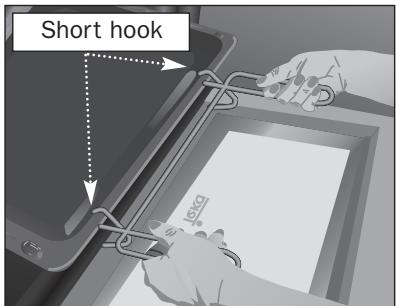
Cake tray handle position. You must put the short hook over the tray.
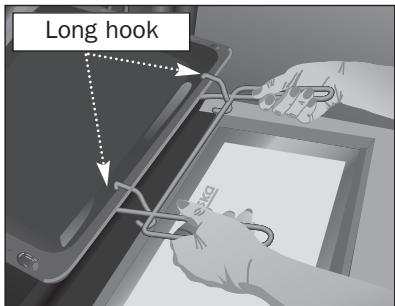
Roasting tray handle position. You must put the long hook over the tray.