RQ 2300 - Mixer PEAVEY - Free user manual and instructions

Find the device manual for free RQ 2300 PEAVEY in PDF.

📄 48 pages English EN 💬 AI Question
Notice PEAVEY RQ 2300 - page 3
View the manual : Français FR Deutsch DE English EN Español ES
Manual assistant
Powered by ChatGPT
Waiting for your message
Product information

Brand : PEAVEY

Model : RQ 2300

Category : Mixer

Download the instructions for your Mixer in PDF format for free! Find your manual RQ 2300 - PEAVEY and take your electronic device back in hand. On this page are published all the documents necessary for the use of your device. RQ 2300 by PEAVEY.

USER MANUAL RQ 2300 PEAVEY
O P E R AT I N G G U I D E Intended to alert the user to the presence of uninsulated “dangerous voltage” within the product’s enclosure that may be of sufficient magnitude to constitute a risk of electric shock to persons. Intended to alert the user of the presence of important operating and maintenance (servicing) instructions in the literature accompanying the product. CAUTION: Risk of electrical shock — DO NOT OPEN! CAUTION: To reduce the risk of electric shock, do not remove cover. No user serviceable parts inside. Refer servicing to qualified service personnel.

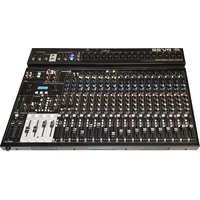
ENGLISH RQ™ 2300 Compact Console The all new RQ™ 2300 Series mixer is a compact unit that can be used in sound reinforcement or recording applications. Its low noise design and extensive list of features make it the ideal mixing console for almost any application. NOTE: This manual covers all RQ™ 2300 Series mixers. Differences in the various models are noted where applicable. GENERAL DESCRIPTION: All RQ 2300 Series mixers share the same master section. The various models provide different channel configurations in order to suit the needs of the user. The following features are found throughout the series. FEATURES:

  • Balanced (XLR) and Unbalanced (1/4") Left and Right Outputs (mains)
  • Balanced (XLR) and Unbalanced (1/4") Mon 1 and 2 Outputs (monitors)
  • Balanced (XLR) and Unbalanced (1/4") Mono Outputs (mono mains)
  • Two Effects Sends (1 and 2) each with stereo Returns (L and R)
  • Mic (XLR) and Line (1/4") Inputs for all input channels
  • Insert jacks (1/4") on all input channels except Super and Stereo input channels
  • Pad and Polarity switches on Super Mic input channels
  • Stereo (L and R) line inputs (1/4") on Stereo input channels
  • PFL function on all input channels and on Monitor 1 and 2
  • Low noise mic preamps on all input channels
  • Mute/Peak and Signal/PFL indicators on all input channels and on Monitor 1 and 2
  • Stereo LED level indicators for L/R mains
  • Mute switch and 3-band EQ on each input channel
  • Sweepable mid-EQ control on all input channels (except Stereo channels)
  • Seperate Mic and Line Gain controls on Stereo Channels
  • Stereo RCA Tape In/Out Jacks
  • Stereo Headphone Output with level control
  • Switchable +48 V Phantom Power with LED indicator POWER This section describes the application of power to your RQ Series mixer. Please note all caution signs for your safety as well as your equipment. The following features are found on the rear panel of the unit unless otherwise noted.

Removable AC Power Cord This receptacle is for the IEC line cord (included), which provides AC power to the unit. Connect the line cord to this connector and to a properly grounded AC supply. Damage to the equipment may occur if an improper line voltage is used. (See voltage marking on unit.) Never remove or cut the ground pin of the line cord plug. This unit is supplied with a properly rated line cord. When lost or damaged, replace this cord with one of the proper ratings. NOTE: FOR UK ONLYAs the colors of the wires in the mains lead of this apparatus may not correspond with the colored markings identifying the terminals in your plug, proceed as follows: (1) The wire which is colored green and

yellow must be connected to the terminal which is marked by the letter E, or by the earth symbol, or colored green or green and yellow. (2) The wire which is colored blue must be connected to the terminal which is marked with the letter N, or the color black. (3) The wire which is colored brown must be connected to the terminal which is marked with the letter L or color red.

POWER: This is the mixer’s main power switch. To turn the power on place the switch in the (|) position. Place the switch in the (O) position to turn the power off. The power-on LED indicator will light when the unit is on.

POWER LED: This LED illuminates to indicate that power has been applied to the unit.

You must first connect your RQ to outboard equipment in order to better understand the remaining functions. This section describes the inputs and outputs found on the rear of the RQ Series mixer. The channel inputs are found in the “Input Channels” section of this manual in order to help you understand the internal signal flow of your RQ mixer.

Warning: Always connect to the following jacks while the RQ and its associated equipment

are turned off. It is also recommended to turn the Master and Monitor Faders (see “Master Section”) completely down before the unit is turned on to ensure that any signal being applied to the RQ mixer is defeated before the outputs.

RETURN INPUTS: 1/4" balanced (TRS) high impedance input for high level signals. These are designed for effect returns, but can be used for additional stereo inputs. The tip is the positive input, which should also be used for unbalanced inputs. The Left/Mono input supplies signal to both the left and right inputs if there is no input connected to the right input jack.

EFFECTS OUT: 1/4" unbalanced TS output jack of the corresponding Effects mix. It can be used to feed an external monitor system or effect unit.

MONITOR 1 OUT: 1/4" unbalanced TS and a fully balanced XLR output of the Monitor 1 mix designed to feed an external monitor system. (The tip is positive.) The output level is set by the individual channel Monitor 1 send controls and by the master Monitor 1 fader (33). Both outputs can be used simultaneously.

MONITOR 2 OUT: 1/4" unbalanced TS and a fully balanced XLR output of the Monitor 2 mix designed to feed an external monitor system. (The tip is positive.) The output level is set by the individual channel Monitor 2 send controls and by the master Monitor 2 fader (34). Both outputs can be used simultaneously.

MAIN LEFT/RIGHT OUTPUTS: 1/4" TS and a fully balanced XLR output of the Left and Right mixes. The output level is set by the Master Left and Right Faders (35). Both outputs can be used simultaneously.

MAIN MONO OUTPUTS: 1/4" TS and a fully balanced XLR output of the mono mix (left/right summed). The output level is set by the Master Mono Fader (36). MASTER SECTION The Master Section contains all the master level controls, effects send/return controls, headphone and tape controls as well as the level meters. It is important that this area of the board be set up properly in order to get the most from the Input Channel Section of your RQ.

Warning: Keep all faders at the lowest position until you are ready to set your final levels.

Having the master faders in any other position while setting up the Input Channel Section could result in accidental signal overload and/or sudden burst of signal at high levels.

TAPE INPUT/OUTPUT: The Tape Input jacks are set up for a -10 dBV input from a stereo tape deck or CD player. The output jacks can provide a 0 dBu output signal to a stereo tape deck. This output is the same as the L/R mains.

TAPE TO MONITOR 1 LEVEL: Adjusts the level of the Tape Input signal (10) supplied to the Monitor 1 mix. This control is independent of the Tape L/R Level.

TAPE TO MONITOR 2 LEVEL: Adjusts the level of the Tape Input signal (10) supplied to the Monitor 2 mix. This control is independent of the tape L/R level.

TAPE TO L/R LEVEL: Adjusts the level of the Tape Input signal (10) supplied to the L/R mix.

PHANTOM POWER SWITCH: Applies 48VDC voltage to the input XLR connectors to power microphones that require it. If phantom power is used, do not connect unbalanced dynamic microphones or other devices to the XLR inputs that cannot handle this voltage. (Some wireless receivers may be damaged. Consult their manuals.) The line input jacks (38) are not connected to the 48V supply and are safe for all inputs (balanced or unbalanced).

PHANTOM POWER LED: This LED illuminates to indicate that phantom power has been switched on by the Phantom Power Switch (14).

HEADPHONE OUTPUT: This stereo jack (TRS) provides the signal to drive stereo headphones. The level is set by the Headphone Level control (17). Tip= Left, Ring= Right, Shield= Ground.

HEADPHONE/PFL LEVEL: Adjusts the level of the Headphone Output. The source changes from the L-R output to the PFL mix whenever the PFL is active.

PFL ACTIVE: This LED blinks when the PFL is active and its signal is overriding the standard L-R mix in the Headphone and at the L/R meters. The signals that are present in the PFL mix can be located by the individually illuminated channel PFL LEDs.

RETURN 1 TO MONITOR 1: Sets the level of the Return 1 signal (effects) that is added to the Monitor 1 mix. This is a mono mix of the left and right signals.

RETURN 1 TO MONITOR 2: Sets the level of the Return 1 signal (effects) that is added to the monitor 2 mix. This is a mono mix of the left and right signals.

RETURN 1 TO L/R: Sets the level of the Return 1 signal that is added to the L/R mix.

RETURN 2 TO MONITOR 1: Sets the level of the Return 2 signal (effects) that is added to the Monitor 1 mix. This is a mono mix of the left and right signals.

RETURN 2 TO MONITOR 2: Sets the level of the Return 2 signal (effects) that is added to the monitor 2 mix. This is a mono mix of the left and right signals.

RETURN 2 TO L/R: Sets the level of the Return 2 signal that is added to the L/R mix.

EFFECTS 1 SEND: Adjusts the level of the Effects 1 mix sent to the Effects 1 Output (5). Unity gain is at the center detent position and +10 dB of gain in maximum.

EFFECTS 2 SEND: Adjusts the level of the Effects 2 mix sent to the Effects 2 Output (5). Unity gain is at the center detent position and +10 dB of gain in maximum.

LED METERS: Two 12-segment LED arrays monitor the levels of the main L/R outputs. The 0 dB reference level corresponds to +0 dBu at the 1/4" jacks and XLR. (See 8.)

MONITOR PEAK LED: Indicates that the monitor mix level is nearing the overload point. It illuminates at +19 dBu and warns that gain or EQ boost should be reduced. There is roughly 2 dB of headroom remaining when it lights.

MONITOR SIGNAL/PFL LED: Normally indicates that a signal is present in the monitor of –20 dBu or greater. If the Monitor PFL switch (32) is depressed, it lights continuously to indicate that the monitor mix has been assigned to the PFL mix.

MONITOR PFL Switch: Connects the monitor’s pre-fader signal to the PFL mix and switches the headphone source from the L/R mix to the PFL mix.

MONITOR 1 FADER: Sets the overall level of the monitor signal that is sent to the Monitor 1 Output jacks (6). The optimum setting for this control is the “0” (unity gain) position.

MONITOR 2 FADER: Sets the overall level of the monitor signal that is sent to the Monitor 2 Output jacks (7). The optimum setting for this control is the “0” (unity gain) position.

MASTER LEFT/RIGHT FADERS: Master L/R level controls. Since the tape and headphone outputs come from this mix, they will also be affected by its adjustment. The output levels are monitored by the left and right meters. The optimum setting for this control is the “0” (unity gain) position.

MONO OUTPUT FADER: Sets the output of the Mono (L+R) signal found at the Mono Output (9).

INPUT CHANNELS This section describes the many features found on the input channels. The RQ Series mixer you have purchased utilizes multiple channel configurations. Some channels do differ from others. It is important that you recognize these differences in order to take advantage of each channel’s features and avoid confusion. Channel Functions 1 — 6 (RQ 2310), 1 — 10 (RQ 2314) and 1 — 14 (RQ 2318):

MIC INPUT: XLR balanced low impedance channel input optimized for a microphone or other low impedance source. Pin 2 is the positive input. Because of the wide range of gain adjustment, signal levels up to +10 dBu can be accommodated.

LINE INPUT: 1/4" balanced (TRS) high impedance input for high level signals. The tip is the positive input, which should also be used for unbalanced inputs. This input is connected through a 20 dB pad to the MIC input (37). The two inputs cannot be used simultaneously.

INSERT: Channels 1 — 4 (RQ 2310), 1 — 8 (RQ 2314) and 1 — 12 (RQ 2318) 1/4" stereo (TRS) jack which allows an external device to be inserted into the signal path before the tone equalization. The tip carries the send signal; the ring is the return input. A switch in the jack normally connects the send to the return until a plug is inserted. When plugged in partway (first click), the jack can be used as a pre-amp output without interrupting the channel.

GAIN: Varies the input gain to allow for a wide dynamic range. It affects both the Line and Mic inputs (Channels 1 — 6). Proper adjustment of the input gain will maximize the signal-to-noise ratio. It should be set by depressing the PFL switch (53) and adjusting it for a 0 dBu level at the L-R meters. At this point there is 22 dB of headroom remaining.

HI EQ: A shelving type of active tone control that varies the treble frequency levels +/-15 dB at 10 kHz. It is designed to remove noise or to add brilliance to the signal, depending on the quality of the source. MID EQ: A bandpass (peak/notch) type of active tone control that varies the midrange frequency levels +/-15 dB. On the first six channels of the RQ 2310 (first 10 channels - RQ2314, first 14 channels - RQ2318), the frequency of the boost or cut is set by the Mid Frequency control (43). The other channels have a fixed frequency of 850 Hz.

FREQUENCY (Not found on Stereo Mic Channels): Sets the frequency affected by the Mid control (42). The range is 200 Hz to 6000 Hz.

LOW EQ: A shelving type of active tone control that varies the bass frequency levels +/-15 dB at 70 Hz. It will add depth to thin signals or clean up muddy ones.

MON 1: Adjusts the level of the channel signal (pre-EQ) that is added to the Monitor 1 mix. This is a mono mix of the left and right signals in the stereo channels. The center detent is the unity gain position.

MON 2: Adjusts the level of the channel signal (pre-EQ) that is added to the Monitor 2 mix. This is a mono mix of the left and right signals in the stereo channels. The center detent is the unity gain position.

EFFECTS 1: Adjusts the level of the channel signal that is added to the Effects 1 mix. It is post-fader, designed for use as an effects send, that can also be used for another monitor send. This is a mono mix of the left and right signals. The center detent is the unity gain position.

EFFECTS 2: Adjusts the level of the channel signal that is added to the Effects 2 mix. It is post-fader, designed for use as an effects send, that can also be used for another monitor send. This is a mono mix of the left and right signals. The center detent is the unity gain position.

PAN: Sets the channel's position in the L-R stereo field.

MUTE: Mutes all channel bus sends (Mon1, Mon2, EFX 1,EFX 2, Left and Right) when depressed. The PFL signal is independent of this switch, and can be used to check the channel and adjust its input gain even when muted. The Mute/Peak LED will glow red continuously when the corresponding channel is muted.

MUTE/PEAK LED (red): Normally indicates that the channel signal level is nearing the overload point. This circuit monitors the input gain, equalization, and post-fader stages for overload. It illuminates at +19 dBu and warns that gain or EQ boost should be reduced. There is roughly 2 dB of headroom remaining when it lights. If the Mute switch (50) is depressed, it lights continuously to indicate that this channel has been muted.

SIGNAL/PFL LED (yellow): Normally indicates that a signal is present in the channel of –20 dBu or greater. If the PFL switch (53) is depressed, it lights continuously to indicate that this channel has been assigned to the PFL mix.

PFL: Connects the channel’s pre-fader signal to the PFL mix and switches the headphone source from the L-R mix to the PFL mix. It also connects the PFL signal to the L-R meters to aid in the setting of the input gain (40). The Signal/PFL LED will illuminate when this switch is pressed to identify the PFL source.

FADER: Channel output level control. The level of the channel can be adjusted from off to +10 dB of gain. The optimum setting is the “0” (unity gain) position. Channel Functions 5 — 6 (RQ 2310), 9 — 10 RQ 2314 and 13 — 14 (RQ 2318): In these two channels all controls are identical to the previous channels with the exception of the insert jack. It is replaced by pad and polarity switches.

PAD: When pressed it attenuates the input signal by 20 dB. This will increase the dynamic range to accommodate a higher input level before clipping which may be necessary when close miking loud guitar amplifiers or drum kits.

POLARITY: When pressed it reverses the phase of the input signal. This will compensate for an out of phase input that would otherwise cause frequency cancellations in the mix. (Often needed for drum mics where both sides of the drum head are picked up in multiple mic situations.)

Channel Functions 7/8 — 9/10 (RQ 2310), 11/12 — 13/14 RQ 2314 and 15/16 — 17/18 (RQ 2318): The Mic and Line inputs of these stereo channels can be used simultaneously. The following features are found only on the the stereo channels.

STEREO INPUTS: 1/4" balanced (TRS) high impedance input for high level signals. The tip is the positive input, which should also be used for unbalanced inputs. The Left/Mono Input supplies signal to both the left and right inputs if there is no input connected to the right input jack. If the channel's input is mono, the signal should be connected to the Left/Mono Input .

MIC GAIN: Varies the input gain of the Mic Input to allow for a wide dynamic range. Proper adjustment of the input gain will maximize the signal to noise ratio. It should be set by depressing the PFL switch (53) and adjusting it for a 0 dBu level at the L-R meters. At this point there is 22 dB of headroom remaining.

LINE GAIN: Varies the input gain of the Line Input to allow for a wide dynamic range. Proper adjustment of the input gain will maximize the signal to noise ratio. It should be set by depressing the PFL switch (53) and adjusting it for a 0 dBu level at the L-R meters. At this point there is 22 dB of headroom remaining.

  • Nominal settings are defined as all controls set a 0 dB (or 50% rotation for rotary pots) except the gain adjustment pot, which is as specified.

Output Specifications: Function Main L/R Monitors Mono Minimum Load Ohms Min**

Output Level Bal/ UnBal. Connector Max Effects Sends

Gain: Mic Input Gain Adjustment Range: Mic Input to L/R Balance Output Mic Input Longest Path 10 dB to 58 dB 78 dB (Max. Gain) 91 dB (Max. Gain) Line Input Gain Adjustment Range: Line Input to L/R Bal. Output Line Input to longest Path -10 dB to 38 dB 60 dB (Max. Gain) 73 dB (Max. Gain) Stereo Line Input Gain Adjustment Range Stereo Line Input to L/R Balance Output Stereo Line Input Longest Path 10 dB 36 dB (Max. Gain) 46 dB (Max. Gain) Aux Return to L/R Balance Output 34 dB (Max. Gain) Frequency Response: Mic Input to L-R Output 11 Hz to 42 kHz +0 dB/-1 dB Total Harmonic Distortion (THD): <0.008% 20 Hz to 20 kHz Mic to L-R Output (10 Hz to 80 kHz BW) Hum and Noise: Output Master L/R Mono Monitors Effects Sends Residual Noise S/N Ratio Ref. 0 dBu Test Conditions -100 dBu 100 dB All faders down -88 dBu 88 dB Master fader nominal, Channel faders down, All channels muted -84 dBu 84 dB All controls nominal, mic gain min. -100 dBu 100 dB -88 dBu 88 dB -102 dBu 102 dB -90 dBu 90 dB Master fader nominal, All channels muted -95 dBu 95 dB All controls off -82 dBu 82 dB All channel sends nominal All faders down Master fader nominal, Channel faders down, All channels muted (Hum and Noise Measurements: 22 Hz to 22 kHz BW)

WARNING: When using electric products, basic cautions should always be followed, including the following:

Read these instructions.

Keep these instructions.

Follow all instructions.

Do not use this apparatus near water. For example, near or in a bathtub, swimming pool, sink, wet basement, etc.

Clean only with a damp cloth.

Do not block any of the ventilation openings. Install in accordance with manufacturer’s instructions. It should not be placed flat against a wall or placed in a built-in enclosure that will impede the flow of cooling air.

Do not install near any heat sources such as radiators, heat registers, stoves or other apparatus (including amplifiers) that produce heat.

Do not defeat the safety purpose of the polarized or grounding-type plug. A polarized plug has two blades with one wider than the other. A grounding type plug has two blades and a third grounding plug. The wide blade or third prong is provided for your safety. When the provided plug does not fit into your inlet, consult an electrician for replacement of the obsolete outlet. Never break off the grounding. Write for our free booklet “Shock Hazard and Grounding”. Connect only to a power supply of the type marked on the unit adjacent to the power supply cord. 10. Protect the power cord from being walked on or pinched, particularly at plugs, convenience receptacles, and the point they exit from the apparatus.

11. Only use attachments/accessories provided by the manufacturer.

12. Use only with a cart, stand, tripod, bracket, or table specified by the manufacturer, or sold with the apparatus. When a cart is used, use caution when moving the cart/apparatus combination to avoid injury from tip-over.

13. Unplug this apparatus during lightning storms or when unused for long periods of time.

14. Refer all servicing to qualified service personnel. Servicing is required when the apparatus has been damaged in any way, such as powersupply cord or plug is damaged, liquid has been spilled or objects have fallen into the apparatus, the apparatus has been exposed to rain or moisture, does not operate normally, or has been dropped.

15. If this product is to be mounted in an equipment rack, rear support should be provided.

16. Exposure to extremely high noise levels may cause a permanent hearing loss. Individuals vary considerably in susceptibility to noise-induced hearing loss, but nearly everyone will lose some hearing if exposed to sufficiently intense noise for a sufficient time. The U.S. Government’s Occupational and Health Administration (OSHA) has specified the following permissible noise level exposures: Duration Per Day In Hours

According to OSHA, any exposure in excess of the above permissible limits could result in some hearing loss. Ear plugs or protectors to the ear canals or over the ears must be worn when operating this amplification system in order to prevent a permanent hearing loss, if exposure is in excess of the limits as set forth above. To ensure against potentially dangerous exposure to high sound pressure levels, it is recommended that all persons exposed to equipment capable of producing high sound pressure levels such as this amplification system be protected by hearing protectors while this unit is in operation. SAVE THESE INSTRUCTIONS!

Effective Date: July 1, 1998 What This Warranty Covers Your Peavey Warranty covers defects in material and workmanship in Peavey products purchased and serviced in the U.S.A. and Canada. What This Warranty Does Not Cover The Warranty does not cover: (1) damage caused by accident, misuse, abuse, improper installation or operation, rental, product modification or neglect; (2) damage occurring during shipment; (3) damage caused by repair or service performed by persons not authorized by Peavey; (4) products on which the serial number has been altered, defaced or removed; (5) products not purchased from an Authorized Peavey Dealer. Who This Warranty Protects This Warranty protects only the original retail purchaser of the product. How Long This Warranty Lasts The Warranty begins on the date of purchase by the original retail purchaser. The duration of the Warranty is as follows: Product Category Duration Guitars/Basses, Amplifiers, Pre-Amplifiers, Mixers, Electronic Crossovers and Equalizers 2 years *(+ 3 years) Drums 2 years *(+ 1 year) Enclosures 3 years *(+ 2 years) Digital Effect Devices and Keyboard and MIDI Controllers 1 year *(+ 1 year) Microphones 2 years Speaker Components (incl. speakers, baskets, drivers, diaphragm replacement kits and passive crossovers) and all Accessories 1 year Tubes and Meters 90 days [*denotes additional warranty period applicable if optional Warranty Registration Card is completed and returned to Peavey by original retail purchaser within 90 days of purchase.] What Peavey Will Do We will repair or replace (at Peavey's discretion) products covered by warranty at no charge for labor or materials. If the product or component must be shipped to Peavey for warranty service, the consumer must pay initial shipping charges. If the repairs are covered by warranty, Peavey will pay the return shipping charges. How To Get Warranty Service (1) Take the defective item and your sales receipt or other proof of date of purchase to your Authorized Peavey Dealer or Authorized Peavey Service Center. (2) Ship the defective item, prepaid, to Peavey Electronics Corporation, International Service Center, 412 Highway 11 & 80 East, Meridian, MS 39301 or Peavey Canada Ltd., 95 Shields Court, Markham, Ontario, Canada L3R 9T5. Include a detailed description of the problem, together with a copy of your sales receipt or other proof of date of purchase as evidence of warranty coverage. Also provide a complete return address. Limitation of Implied Warranties ANY IMPLIED WARRANTIES, INCLUDING WARRANTIES OF MERCHANTABILITY AND FITNESS FOR A PARTICULAR PURPOSE, ARE LIMITED IN DURATION TO THE LENGTH OF THIS WARRANTY. Some states do not allow limitations on how long an implied warranty lasts, so the above limitation may not apply to you. Exclusions of Damages PEAVEY'S LIABILITY FOR ANY DEFECTIVE PRODUCT IS LIMITED TO THE REPAIR OR REPLACEMENT OF THE PRODUCT, AT PEAVEY'S OPTION. IF WE ELECT TO REPLACE THE PRODUCT, THE REPLACEMENT MAY BE A RECONDITIONED UNIT. PEAVEY SHALL NOT BE LIABLE FOR DAMAGES BASED ON INCONVENIENCE, LOSS OF USE, LOST PROFITS, LOST SAVINGS, DAMAGE TO ANY OTHER EQUIPMENT OR OTHER ITEMS AT THE SITE OF USE, OR ANY OTHER DAMAGES WHETHER INCIDENTAL, CONSEQUENTIAL OR OTHERWISE, EVEN IF PEAVEY HAS BEEN ADVISED OF THE POSSIBILITY OF SUCH DAMAGES. Some states do not allow the exclusion or limitation of incidental or consequential damages, so the above limitation or exclusion may not apply to you. This Warranty gives you specific legal rights, and you may also have other rights which vary from state to state. If you have any questions about this warranty or service received or if you need assistance in locating an Authorized Service Center, please contact the Peavey International Service Center at (601) 483-5365 / Peavey Canada Ltd. at (905) 475-2578. Features and specifications subject to change without notice.