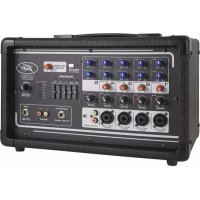
XR s - Mixer PEAVEY - Free user manual and instructions
Find the device manual for free XR s PEAVEY in PDF.


Pick your language and provide your email: we'll send you a specifically translated version.
| Product Type | Powered Mixer |
| Model | XR s |
| Brand | Peavey |
| Number of Channels | 12 |
| Built-in Amplifier Power | 1000W total (500W per side) |
| EQ Bands per Channel | 3-band EQ (High, Mid, Low) |
| Built-in Effects | 16 digital effects |
| Phantom Power | +48V |
| Dimensions (W x H x D) | 17.2 in x 12.5 in x 6.7 in |
| Weight | 18.5 lbs |
| Power Supply | AC 120V, 60Hz (US model) |
| Main Output Connectors | XLR and 1/4" TRS |
| Aux Sends | 2 |
| Channels with Insert Points | Channels 1-4 |
| Cleaning | Use a dry, soft cloth; avoid abrasive cleaners |
| Safety Features | Overload protection, thermal protection |
| Spare Parts Availability | Contact Peavey authorized service centers |
| Repairability | Modular design with replaceable modules |
Frequently Asked Questions - XR s PEAVEY
How do I connect microphones to the XR s mixer?
Connect XLR cables from your microphones to the XLR inputs on channels 1-12. Make sure phantom power (+48V) is enabled if using condenser microphones.
How do I enable phantom power?
Locate the +48V button on the top panel and press it. The LED indicator will light up when phantom power is active.
What should I do if there is no sound from the speakers?
Check that the mixer is powered on and the master volume is turned up. Verify that the amplifier channel mute buttons are not engaged. Also check speaker connections.
How do I use the built-in effects?
Press the Effects button to select an effect type using the rotary encoder. Adjust the FX send level on each channel and the master FX return level.
How do I set the EQ for each channel?
Each channel has a 3-band EQ with High, Mid, and Low knobs. Turn clockwise to boost, counterclockwise to cut.
Can I connect external effects processors?
Yes, use the Aux Send outputs to feed external processors and return them via unused input channels or the FX Return jacks.
How do I prevent feedback?
Position microphones away from speakers, reduce channel gain and EQ boosts on feedback frequencies, and use the graphic EQ if available.
What type of speakers can I connect?
Connect passive speakers to the Speaker Output jacks using speaker cables. The amplifier is rated for 4-8 ohm loads per channel.
How do I clean the mixer?
Disconnect power. Use a soft, dry cloth to wipe surfaces. Do not use liquid or abrasive cleaners. Keep vents clear of dust.
What is the warranty period?
Peavey offers a two-year limited warranty from the date of purchase. Keep your receipt for service claims.
User questions about XR s PEAVEY
0 question about this device. Answer the ones you know or ask your own.
Ask a new question about this device
No questions yet. Be the first to ask one.
Download the instructions for your Mixer in PDF format for free! Find your manual XR s - PEAVEY and take your electronic device back in hand. On this page are published all the documents necessary for the use of your device. XR s by PEAVEY.
USER MANUAL XR s PEAVEY


Manual assistant
Powered by Anthropic
Waiting for your message
Product information
Brand : PEAVEY
Model : XR s
Category : Mixer