
DUAL DELTAFEX - Guitar Multi-Effects PEAVEY - Free user manual and instructions
Find the device manual for free DUAL DELTAFEX PEAVEY in PDF.


| Product Type | Multi-effects digital processor for guitar |
| Brand and model | Peavey Dual DeltaFex |
| Dimensions (H x W x D) | 4.44 cm x 48.26 cm x 20.32 cm |
| Weight | 2.8 kg with power supply, 2.3 kg without power supply |
| Power supply | External transformer 16 VAC, 1.1 A (ref. Peavey #70900660) |
| Frequency response | 20 Hz - 20 kHz |
| Converters | 24-bit |
| Number of presets | 200 (100 user, 100 factory) |
| Effect types | 16 types: reverbs (plate, hall, room), delays (short, bright, dark), pitch shifter, compressor, chorus, flanger, phaser, tremolo, rotary, distortion, exciter, karaoke |
| Processor configurations | Series, parallel, dual mono, summed mono |
| Controls | Input level, output level, selection wheel, Store, Mode, Config buttons |
| Audio inputs | 2 balanced inputs (L/Mono and R) - if R is not connected, L feeds both |
| Audio outputs | 2 balanced outputs (L/Mono and R) - if R is not connected, L feeds both |
| Footswitch | Footswitch jack for Defeat mode or Rotary speed change |
| Display | Digital screen + edit and configuration LEDs |
| Defeat function | Bypass or Mute modes, accessible via footswitch or Mode button (long press) |
| Maintenance and cleaning | Use a dry cloth to clean the unit. Do not expose to water or moisture. |
| Safety precautions | Do not open the device (risk of electric shock). Use only the supplied power supply. Avoid heat sources and moisture. |
| Spare parts and repairability | Repair only by a Peavey authorized technician. Replace the power supply with the original model (ref. 70900660). |
Frequently Asked Questions - DUAL DELTAFEX PEAVEY
User questions about DUAL DELTAFEX PEAVEY
0 question about this device. Answer the ones you know or ask your own.
Ask a new question about this device
Download the instructions for your Guitar Multi-Effects in PDF format for free! Find your manual DUAL DELTAFEX - PEAVEY and take your electronic device back in hand. On this page are published all the documents necessary for the use of your device. DUAL DELTAFEX by PEAVEY.
USER MANUAL DUAL DELTAFEX PEAVEY
Intended to alert the user to the presence of uninsulated "dangerous voltage" within the product's enclosure that may be of sufficient magnitude to constitute a risk of electric shock to persons.

Intended to alert the user of the presence of important operating and maintenance (servicing) instructions in the literature accompanying the product.
CAUTION: Risk of electrical shock — DO NOT OPEN!
CAUTION: To reduce the risk of electric shock, do not remove cover. No user serviceable parts inside. Refer servicing to qualified service personnel.
WARNING: To prevent electrical shock or fire hazard, this apparatus should not be exposed to rain or moisture, and objects filled with liquids, such as vases, should not be placed on this apparatus. Before using this apparatus, read the operating guide for further warnings.

WARNING: When using electrical products, basic cautions should always be followed, including the following:
- Read these instructions.
- Keep these instructions.
- Heed all warnings.
- Follow all instructions.
- Do not use this apparatus near water.
- Clean only with a dry cloth.
- Do not block any of the ventilation openings. Install in accordance with manufacturer's instructions.
- Do not install near any heat sources such as radiators, heat registers, stoves or other apparatus (including amplifiers) that produce heat.
- Do not defeat the safety purpose of the polarized or grounding-type plug. A polarized plug has two blades with one wider than the other. A grounding type plug has two blades and a third grounding plug. The wide blade or third prong is provided for your safety. If the provided plug does not fit into your outlet, consult an electrician for replacement of the obsolete outlet.
- Protect the power cord from being walked on or pinched, particularly at plugs, convenience receptacles, and the point they exit from the apparatus.
- Only use attachments/accessories provided by the manufacturer.
- Use only with a cart, stand, tripod, bracket, or table specified by the manufacturer, or sold with the apparatus. When a cart is used, use caution when moving the cart/apparatus combination to avoid injury from tip-over.
- Unplug this apparatus during lightning storms or when unused for long periods of time.
Refer all servicing to qualified service personnel. Servicing is required when the apparatus has been damaged in any way, such as power-supply cord or plug is damaged, liquid has been spilled or objects have fallen into the apparatus, the apparatus has been exposed to rain or moisture, does not operate normally, or has been dropped. - Never break off the ground pin. Write for our free booklet "Shock Hazard and Grounding." Connect only to a power supply of the type marked on the unit adjacent to the power supply cord.
- If this product is to be mounted in an equipment rack, rear support should be provided.
- Note for UK only: If the colors of the wires in the mains lead of this unit do not correspond with the terminals in your plug, proceed as follows:
a) The wire that is colored green and yellow must be connected to the terminal that is marked by the letter E, the earth symbol, colored green or colored green and yellow.
b) The wire that is colored blue must be connected to the terminal that is marked with the letter N or the color black.
c) The wire that is colored brown must be connected to the terminal that is marked with the letter L or the color red.
- This electrical apparatus should not be exposed to dripping or splashing and care should be taken not to place objects containing liquids, such as vases, upon the apparatus.
- Exposure to extremely high noise levels may cause a permanent hearing loss. Individuals vary considerably in susceptibility to noise-induced hearing loss, but nearly everyone will lose some hearing if exposed to sufficiently intense noise for a sufficient time. The U.S. Government's Occupational Safety and Health Administration (OSHA) has specified the following permissible noise level exposures:
| Duration Per Day In Hours | Sound Level dBA, Slow Response |
| 8 | 90 |
| 6 | 92 |
| 4 | 95 |
| 3 | 97 |
| 2 | 100 |
| 1 1/2 | 102 |
| 1 | 105 |
| 1/2 | 110 |
| 1/4 or less | 115 |
According to OSHA, any exposure in excess of the above permissible limits could result in some hearing loss. Ear plugs or protectors to the ear canals or over the ears must be worn when operating this amplification system in order to prevent a permanent hearing loss, if exposure is in excess of the limits as set forth above. To ensure against potentially dangerous exposure to high sound pressure levels, it is recommended that all persons exposed to equipment capable of producing high sound pressure levels such as this amplification system be protected by hearing protectors while this unit is in operation.
Digital Effects Processor
Congratulations on your purchase of the Peavey Dual DeltaFex digital effects processor. You now have two programmable effect engines that can be used in four different configurations. Each engine can have one of 16 effect types, making the Dual DeltaFex useful for studios, P.A. systems or instrument processing.

CAUTION: Use only the 16.5 volt power supply provided with this product. If the original power supply must be replaced, consult your Peavey dealer or the factory for the correct replacement. Failure to use the correct power supply could result in fire, shock hazard, extensive circuit damage, decreased performance or non-operation.
FEATURES:
- Intuitive interface for preset recalling, editing, and storing
- 200 presets (100 user/100 factory)
- 24-bit converters and processing
- 16 effect types, including reversbs, delays, modulations, distortion, karaoke, etc.
- Dual engines can be configured in series, parallel, dual mono or summed mono
- Four adjustments per effect (mix, param1, param2, level)
- Footswitch jack for effects defeat or rotary effect speed toggle
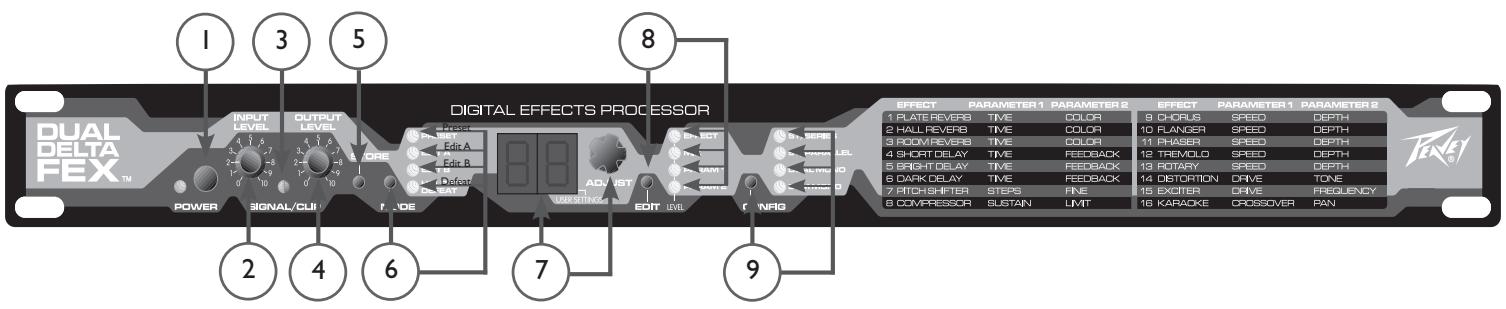
Power Button/LED (1)
Power (and LED) will be ON when switch is pushed in.
Input Level Control (2)
This knob attenuates or boosts the incoming signals (left and right). Set this so that the Signal/Clip LED turns red only on extreme peaks (or not at all).
Signal/Clip LED (3)
This will illuminate green when either of the input signals reaches 18 dB under clipping. It will switch to red when the level reaches 3 dB under clipping.
Output Level Control (4)
This knob controls the volume of the Left and Right outputs.
Store Button (5)
Press this to enter Preset Store mode, which allows you to store the current effect settings. A destination (oo.-99.) can be selected, and a second "press" will store the data. (Pressing one of the other buttons instead of a second press of Store will exit Store mode.)
Mode Button/LEDs (6)
Pressing the Mode button will scroll through the top three LEDs (Preset mode, Edit A mode, Edit B mode). Holding for one second will enter Defeat mode, after which a simple press will exit Defeat mode.
Numerical Display/Data Wheel (7)
This is the main editing tool. The wheel allows editing of the parameter that is currently displayed, indicated by the discrete LEDs.
Edit Button/LEDs (8)
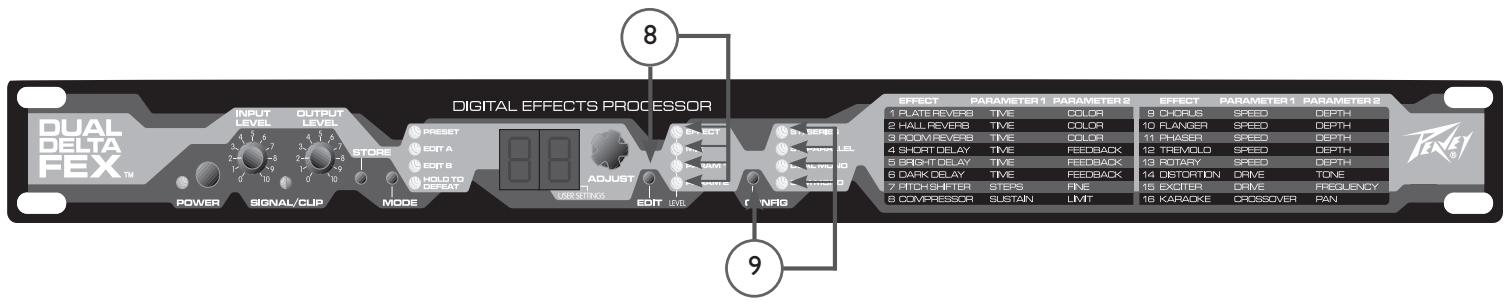
When in Edit A or Edit B mode, one of these LEDs (or all 4) will be illuminated, indicating which parameter is active for editing. All will be OFF when not in Edit mode. (When all are ON, you will be editing the output level for effect A or B.)
Configuration Button/LEDs (9)
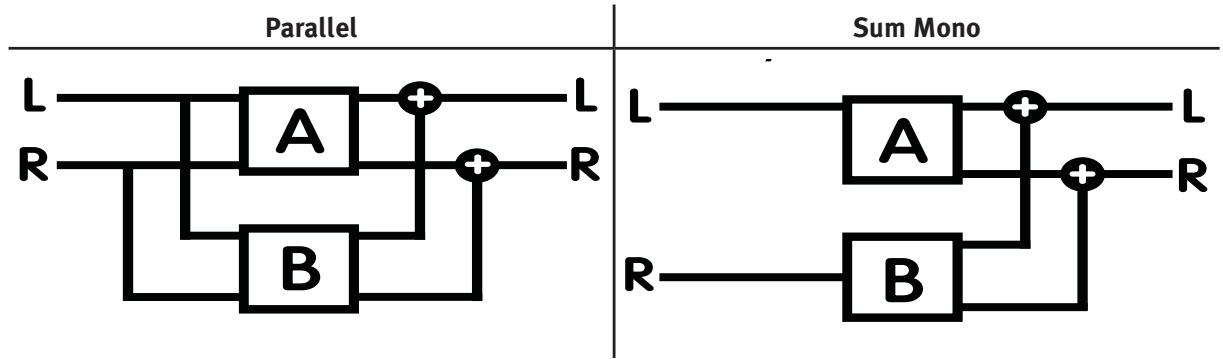
These LEDs indicate the routing of two effect engines for the current preset - series, parallel, dual mono or sum mono. Use the button to step through the choices.


Rotary Speaker Speed/D defeat (1)
A momentary mono footswitch will allow effect defeat (bypass or mute) or rotary speed toggle. The polarity of the footswitch will be sensed at power-up to allow normally closed or normally open types without the need for a global parameter (so make sure the footswitch is connected before you power up).
Audio Outputs (2)
These are Right and Left/Mono line-level outputs. Without a connection to the Right jack, the Left jack will go into Mono mode. This will sum certain individual effects to mono, but it will not combine the outputs of a preset with the dual mono configuration.
Audio Inputs (3)
These are Right and Left/Mono line-level inputs. Without a connection to the Right jack, the Left jack will feed both sides.
Power (4)
Input for the 16 VAC, 1.1 amp power adapter.
NOTE: Use only Peavey part #70900660, which is a DV-1611A.

Preset Recall Mode:
This is the default power-up mode. The Preset mode LED will be lit, the display will show the preset number and the data wheel will scroll through presets. Setting the mode Select button to “Preset” will put the unit into this mode at any time.
User Presets oo. - 99. will be shown first (with the decimal point lit), while fixed Factory Presets oo - 99 will be shown next (without the decimal point lit).
Note: The unit can be re-initialized to factory default settings by holding STORE and MODE while powering up. This will copy the Factory presets to the User presets, and initialize any globals (like bypass vs. mute) to their default setting. You will see "in" on the display for a few seconds while the unit restores its default setting.
A preset consists of: the settings for both effect engines (effect type, mix, parameters 1 & 2, level) and the configuration (routing).
Store Mode:
Press the Store button to activate Store mode. The destination number will blink. If you are on a User preset, the destination will initially be the same as the preset. If you are on a Factory preset, the default destination will be the same preset number, but in the User bank. At this point, you have three options:
- Press the Store button again to store into the current destination
- Use the data wheel to choose a different location and then store
- Press any other button to escape Store
Edit Mode:
Press the Select button to enter Edit A or Edit B mode. (Shortcut: pressing the EDIT button when in Preset mode will also enter Edit A mode.) One of the four LEDs to the right of the display will light. Once in Edit mode, the EDIT button will scroll down through five parameters (if the effect is not off): the four shown next to each LED, and all LEDs on, indicating output level for effect A or B. At each stop the display will show the value, and the data wheel can be used to edit it.
The parameter being edited/displayed belongs to either effect block A or B, indicated by the Mode LEDs.
The CONFIG button will step through the four configurations (see page 9), which control how the two effect engines are routed between the inputs and outputs for the current preset. Typically, you would set this before editing the parameters, since it can (and most likely will) affect the overall sound - mix ratios, depths, etc.
Defeat Mode:
This mode can be entered via a momentary footswitch plugged into the DEFEAT jack on the rear of the unit. It can also be entered by holding the MODE switch for a full second.
Defeat mode can be exited by another press of the footswitch, or a normal press of the MODE switch.
The display will read "by" when in Bypass mode, and "mu" when in Mute mode. To change which mode is used, press the CONFIG button to alternate between them while in the Defeat mode. This is a global setting that the unit will remember when powered down.
The data wheel can still be used to select presets while defeated. You will see the preset number for a moment, after which the "by" or "mu" will return to the display. The preset will load inaudibly, so you will hear it almost immediately when exiting defeat mode. If you need to simply see the current preset number while defeated, press the EDIT button to see it for a couple seconds. The display will switch back to "by" or "mu" automatically.
Bypass Mode:
In this mode, the left input will be routed to the left output, and the right input will be routed to the right output (the input and output level knobs will still be active - it's not a hard-wired bypass). Use this mode when the unit is in a serial-type loop, such as a guitar amp's effects loop, between a mixer and amplifier, etc.
Mute Mode:
When in this mode, the outputs will be muted. Use this mode when the unit is in a parallel loop, like a mixer's aux send, etc. If used in series with an instrument or as a channel insert, it will disable the channel.
Editing tip: Choose Bypass or Mute prior to editing presets. The default mix parameters will be 99 (100%) when in Mute mode – saving you time from having to set them there.

Effect:
This is the Effect Type currently assigned to the engine. The 16 types are listed on the front panel. You can also edit below 1 to turn the engine off (shown as "--"). You can assign any effect to either engine - even the same effect in both.
Mix:
Most of the effects (all except Compressor and Tremolo) have a wet/dry mix (adjustable when the MIX LED is lit). 00 is fully dry, 50 is equal amounts of wet and dry and 99 is fully wet. When using in an aux send (P.A. or studio), set the mix to 99 to get an "all effect" feed to the aux return or channel. When used in the effects loop of a guitar amp, increasing mix levels from 0 to 50 will result in more audible effect while still hearing plenty of dry sound.
Level:
All of the effects have an output level that is adjustable when all four EDIT LEDs are lit. When used in parallel, this is useful to balance the outputs. In series configuration, engine B's level is basically a programmable preset level, while engine A's level can be used to control the level driving engine B.
Output level range is:
0-99 - 0-100% (20% audio taper)
b1- b6 - Boosted by 1 dB - 6 dB
Parameters 1 and 2:
These parameter names are listed on the front of the unit for convenience. The descriptions of these for each effect type are below.
1 Plate Reverb
2 Hall Reverb
3 Room Reverb
These effects simulate different reverberant spaces by creating dense layers of echoes. Plate is a popular electronic reverb type, while Hall and Room are designed to simulate those environments.
Parameter 1 (Time) – Reverberation time – from 1 second up to 10 seconds. There are half-second intervals near the bottom of the range, then 1 second intervals for the remainder.
Parameter 2 (Color) - This provides a way to make the reverb darker sounding via a high-cut filter. The settings (in kHz.) are 1, 2, 4, 8, and "br" for bright, which disables the filter.

4 Short Delay
5 Bright Delay
6 Dark Delay
The delay effects create discrete echoes. The short delay can be used to really fine tune a short duration, or extremely short and mixed with the dry for a fixed comb filter (flange) effect. The Bright Delay is a longer delay. The Dark Delay is also long, but cuts a significant amount of treble from the wet signal to simulate vintage tape and analog echo units.
Parameter 1 (Time) - Delay time from 1 to 99 ms. on the Short delay, and 10 ms. to 1.4 seconds on the Bright and Dark delays.
For the Bright and Dark (long) Delays, the display will read as follows:
10-90 -10-90 ms.
- -99. - 100-990 ms. (picture a "zero" on the right instead of the decimal)
0.0.-4.1. -1.00-1.41 seconds (picture a "1" on the left instead of the decimals)
Parameter 2 (Feedback) – The amount of delay output that is fed back to the delay input, resulting in more echoes being repeated. Range is 0% to 99% .
7 Pitch Shifter
This effect can be used totally wet (mix=99) to bring an instrument down a half step or more, or mixed with the dry sound to create a harmonized (using Steps) or detuned (using Fine) effect.
Parameter 1 (Steps) – This sets the coarse shift amount in semi-tones. Range is +/- 12.
Parameter 2 (Fine) – This will fine-tune the amount of pitch shift in between semitones. It's useful when Steps is zero and mixed with the dry sound for a detuning effect. Range is +/-9 .
Tip: When using two pitch shifters in parallel, it can be useful to mix them both fully wet with equal steps, but detune one slightly for some extra thickness.
8 Compressor
The Compressor effect reduces high signal levels and boosts small signal levels. The net result is a more consistent output volume and increased sustain.
Parameter 1 (Sustain) – This sets the maximum amount of gain that the compressor can use to amplify the signal up to the Limit level. It can be thought of as an intelligent drive control. Range is 0 to 6.
Parameter 2 (Limit) – This sets the maximum level that the compressor will allow on the output (even though transient peaks may exceed it for a short time since the attack time isn’t instantaneous). Lower values will result in more apparent compression (which can be made up for with the output level). Range is 0% to 99% .

9 Chorus
10 Flanger
11 Phaser
12 Tremolo
These are the standard modulation effects. The chorus modulates a left and right delay to create a detuned doubling. The flanger uses a shorter delay and feedback to create a modulated comb filter. The phaser uses modulated all-pass filters to create a different type of swept comb filter. The tremolo effect is the traditional amplitude-modulated effect.
Parameter 1 (Speed) - Rate of modulation, 0 - 99% .
Parameter 2 (Depth) - Intensity (width) of modulation, 0 - 99% .
13 Rotary
This effect simulates a two-way rotary speaker cabinet popular with organists (but is very useful on guitar and other signals). The signal is split into low and high frequencies and modulated separately and at slightly different speeds.
Parameter 1 (Speed) – Rate of modulation, 0 - 99% . Pressing the footswitch will allow you to toggle between two speeds, and you can set these low and high speeds however you want. (One of the speeds will be shown with the decimal point, and the other without.) The Rotary effect will ramp the speed between these values, just like a real rotating speaker.
If you want the footswitch to still act as a defeat, set either speed to “oF” for off, and the Dual DeltaFex® will enter Defeat (Bypass/Mute) mode instead of toggling the speed. (When editing Rotary, pressing the footswitch will always toggle the speed values to allow you to change the “oF” back to a real speed value.)
Parameter 2 (Depth) - Intensity (width) of modulation, 0 - 99% .
14 Distortion
The Distortion effect consists of a digital distortion followed by a tone section, then an optional speaker simulator for full-range systems (which removes a lot of the treble frequencies that a typical guitar cabinet does not reproduce). This effect does have a mix, which is something you don't get with most distortion devices.
Tip: Experiment with running some dry sound along with the distortion to regain some note definition.
Parameter 1 (Drive) – The amount of gain, or distortion amount. Range: off, 0-10 (choose off to bypass the distortion and use the tone and speaker simulator by themselves).
Parameter 2 (Tone) - This cuts high end as you turn it down, like a tone knob on a distortion pedal. Range: oo - 99 (non-cab simulated), then oo. - 99. (cab simulated).
| EFFECT | PARAMETER1 | PARAMETER2 | EFFECT | PARAMETER1 | PARAMETER2 |
| 1. PLATE REVERB | TIME | COLOR | 9. CHORUS | SPEED | DEPTH |
| 2. HALL REVERB | TIME | COLOR | 10 FLANGER | SPEED | DEPTH |
| 3. ROOM REVERB | TIME | COLOR | 11 PHASER | SPEED | DEPTH |
| 4. SHORT DELAY | TIME | FEEDBACK | 12 TREMOLO | SPEED | DEPTH |
| 5. BRIGHT DELAY | TIME | FEEDBACK | 13 ROTARY | SPEED | DEPTH |
| 6. DARK DELAY | TIME | FEEDBACK | 14 DISTORTION | DRIVE | TONE |
| 7. PITCH SHIFTER | STEPS | FINE | 15 EXCITER | DRIVE | FREQUENCY |
| 8. COMPRESSOR | SUSTAIN | LIMIT | 16 KARAOKE | CROSSOVER | PAN |
15 Exciter
The Exciter effect adds harmonics as an enhancement to the dry signal. A popular use is to add a high-end "sheen" to vocals, acoustic guitars, etc.
Parameter 1 (Drive) – The amount of gain into the exciter, 0 - 99% . Higher gains produce more harmonics.
Parameter 2 (Frequency) – This controls the frequency of a low-cut filter preceding the exciter, allowing it to generate harmonics based on the higher frequencies.
16 Karaoke
This is a vocal removal effect that cancels any audio (above the crossover point) that is mixed down the center of the stereo field. Lead vocals are usually mixed this way, whereas instruments (and some background vocals) are usually panned away from center or stereo-mixed in other ways. Vocals mixed to center often have stereo effects added to them, so you will hear only the effects in many cases.
Note: Due to the nature of this effect, it will only work correctly under the following circumstances:
- Engine A in series mode (typical usage), or Engine B if Engine A is off
- Engine A or B in parallel mode with the other engine off (muted)
Parameter 1 (Crossover) – Frequencies lower than this point will not be canceled. Bass and kick drum are popular choices for mixing down the center, and the goal is for that low end to still be audible. Increase it for more bass, decrease for more cancellation on low-pitched vocals. Range is 100Hz - 190Hz (display shows o.o. - 9.o.).
Parameter 2 (Pan) – This will control the balance between the left/right mix (treble side, after the crossover). This could be used to get less cancellation when wanted, or get more cancellation in cases where the vocal may be slightly panned (or the source left and right signals are not the same exact level). Range is +/-9 (default is 0).
Tip: What happens if you drive a mono signal into this effect? Interestingly enough, it acts as a drastic midrange scoop. Raising the Crossover point will increase the bass, and moving the Cancel Amt away from zero will increase the midrange. There is usually a substantial volume loss, but the output level can add 6 dB, and the other effect block can add more if used in series. Factory presets 71 and 81 use the Karaoke effect as a mid scoop for guitar.
The following page shows the mapping for the 100 factory presets. These presets are always available as 00-99 (without the decimal point), and also reside in the user presets when the unit is initialized from the factory.
Presents oo to 49 are designed for mixer aux sends and parallel effects loops (where the audio from the Dual DeltaFex® is adding to the already audible dry sound). Most mix settings will be full. These are typically used with the defeat mode set to Mute.
Presents 50 to 99 are designed for series-type applications (guitar amp serial effects loops, between guitar and amp, between CD player and mixer, etc.) Mix parameters are generally set for the dry sound to come through the unit with the effected sound added to it. These are typically used with the Defeat mode set to Bypass.
Configuration notation: series + parallel | dual mono / sum mono
00-49 - Parallel effects (mixer aux send, parallel effects loop, etc.) Use Mute mode for defeat footswitch.
| Reverbs | Delays | Ambience (reverb/delay combos) | Enhancement | Combos |
| oo Normal Plate | 10 Short slap | 20 Bright Delay→Hall | 30 Exciter | 40 Plate→Chorus (Chorused reverb tail) |
| o1 Long Plate | 11 Short slap with feedback | 21 Short Delay→Plate | 31 Distortion | 41 Hall→Phaser (Phased reverb tail) |
| o2 Normal Hall | 12 Bright echo short | 22 Dark Delay + Plate | 32 Chorus | 42 Exciter→Plate |
| o3 Long Hall | 13 Bright echo medium | 23 Short Delay + Room | 33 Chorus + Chorus | 43 Pitch Shifter + Chorus |
| o4 Room | 14 Bright echo long | 24 Bright Delay | Hall | 34 Flanger | 44 Distortion→Bright Delay |
| o5 Plate with 100ms Predelay | 15 Dark echo short | 25 Dark Delay | Plate | 35 Phaser | 45 Chorus | Plate |
| o6 Hall with 250ms Predelay | 16 Dark echo medium | 26 Short Delay | Room | 36 Pitch Shifter (detune) | 46 Exciter | Room |
| o7 Room left / Plate right | 17 Dark echo long | 27 Bright Delay / Hall | 37 Rotary + Chorus | 47 Rotary | Hall |
| o8 Room left | Plate right | 18 Short left / Dark right | 28 Dark Delay / Plate | 38 Exciter | Chorus | 48 Pitch Shifter / Plate |
| o9 Plate + Hall | 19 Bright left | Dark right | 29 Short Delay / Room | 39 Chorus / Flanger | 49 Exciter / Hall |
50-99 - Series effects (series effects loop, between instrument and amp, etc.) Use Bypass mode for defeat footswitch.
| Modulation | Series effects (Guitar amp effects loop, etc.) | Preamp (Between Guitar and amp, etc.) | Preamp Direct (Between guitar and PA/full range) | Pedal Steel |
| 50 Chorus | 60 Plate Reverb | 70 Compressor | 80 Cabinet Simulator (treble roll off / tweeter filter) | 90 Plate Reverb |
| 51 Chorus + Chorus | 61 Dark Delay | 71 Distortion→Karaoke (mid scoop) | 81 Distortion→Karaoke (mid scoop) | 91 Slap Delay→Room |
| 52 Chorus + Pitch Shifter (detune) | 62 Dark Delay→Plate | 72 Compressor→Distortion | 82 Compressor→Distortion | 92 Rotary→Room |
| 53 Flanger | 63 Short Delay + Room | 73 Distortion→Plate | 83 Distortion→Plate | 93 Chorus→Plate |
| 54 Flanger + Chorus | 64 Bright Delay→Hall | 74 Distortion→Dark Delay | 84 Distortion→Dark Delay | 94 Distortion→Dark Delay |
| 55 Phaser | 65 Pitch Shifter + Pitch Shifter (harmonized) | 75 Distortion→Chorus | 85 Distortion→Chorus | Karaoke (vocal eliminator) |
| 56 Tremolo | 66 Tremolo→Hall | 76 Distortion→Phaser | 86 Distortion→Phaser | 95 Karaoke 2 notes down |
| 57 Phaser→Tremolo | 67 Pitch Shifter (E-flat) | 77 Distortion→Tremolo | 87 Distortion→Tremolo | 96 Karaoke 1 note down |
| 58 Rotary | 68 Rotary→Plate | 78 Distortion→Rotary | 88 Distortion→Rotary | 97 Karaoke |
| 59 Rotary + Chorus | 69 Phaser→Dark Delay | 79 Distortion→Pitch Shifter | 89 Distortion→Pitch Shifter | 98 Karaoke 1 note up |
| 99 Karaoke 2 notes up | ||||
Dual DeltaFex®
Digital Effects Processor
SPECIFICATIONS
Frequency Response:
20 Hz - 20 kHz
A/D and D/A Conversion:
Rate: 44.1 kHz
Quantization: 24 bit
Signal-to-noise ratio:
98 dB (unweighted) minimum
THD: Less than .005 %
Inputs:
Left, right: -12 dBv nominal
+18 dBv maximum
Impedance: 100k ohm
Outputs:
Left, right: +12 dBV maximum
Impedance: 1k ohm
Headroom:
Clip indication at 3 dB before clipping
Presets:
100 user/100 factory
Power Requirement:
External 16 VAC, 1.1 amp Power Supply
(Peavey #70900660)
Dimensions:
1.75" H x 19.00" W x 8.00" D
(4.44 cm x 48.26 cm x 20.32 cm)
Weight:
6.2 lbs. (2.8kg) with power supply
5.1 lbs. (2.3kg) without power supply
DEUTSCH
Dual DeltaFex®
Rotary Speaker Speed/D defeat (1)
1 Plate Reverb
2 Hall Reverb
3 Room Reverb
Bouton Edit /LEDs (8)
1 Plate Reverb
2 Hall Reverb
3 Room Reverb
Conversion A/D and D/A:
Taux: 44.1 kHz
Quantification:24 bits
Ratio signal bruit:
98 dB minimum(non balance)
THD: moins de.005 %
Entrées:
Droite,gauche: -12 dBv nominal
+18 dBv maximum
Impedance: 100k ohm
Outputs:
Left, right: +12 dBV maximum
Impedance: 1k ohm
Marge dynamique (Headroom):
This is the Effect Type currently assigned to the engine. The 16 types are listed on the front panel. You can also edit below 1 to turn the engine off (shown as "--"). You can assign any effect to either engine - even the same effect in both.
Mezcla:
What This Warranty Covers
Your Peavey Warranty covers defects in material and workmanship in Peavey products purchased and serviced in the U.S.A. and Canada.
What This Warranty Does Not Cover
The Warranty does not cover: (1) damage caused by accident, misuse, abuse, improper installation or operation, rental, product modification or neglect; (2) damage occurring during shipment; (3) damage caused by repair or service performed by persons not authorized by Peavey; (4) products on which the serial number has been altered, defaced or removed; (5) products not purchased from an Authorized Peavey Dealer.
Who This Warranty Protects
This Warranty protects only the original retail purchaser of the product.
How Long This Warranty Lasts
The Warranty begins on the date of purchase by the original retail purchaser. The duration of the Warranty is as follows:
| Product Category | Duration |
| Guitars/Basses, Amplifiers, Pre-Amplifiers, Mixers, Electronic Crossovers and Equalizers | 2 years * (+ 3 years) |
| Drums | 2 years * (+ 1 year) |
| Enclosures | 3 years * (+ 2 years) |
| Digital Effect Devices and Keyboard and MIDI Controllers | 1 year * (+ 1 year) |
| Microphones | 2 years |
| Speaker Components (incl. speakers, baskets, drivers, diaphragm replacement kits and passive crossovers) and all Accessories | 1 year |
| Tubes and Meters | 90 days |
[Denotes additional warranty period applicable if optional Warranty Registration Card is completed and returned to Peavey by original retail purchaser within 90 days of purchase.]
What Peavey Will Do
We will repair or replace (at Peavey's discretion) products covered by warranty at no charge for labor or materials. If the product or component must be shipped to Peavey for warranty service, the consumer must pay initial shipping charges. If the repairs are covered by warranty, Peavey will pay the return shipping charges.
How To Get Warranty Service
(1) Take the defective item and your sales receipt or other proof of date of purchase to your Authorized Peavey Dealer or Authorized Peavey Service Center. OR
(2) Ship the defective item, prepaid, to Peavey Electronics Corporation, International Service Center, 412 Highway 11 & 80 East, Meridian, MS 39301 or Peavey Canada Ltd., 95 Shields Court, Markham, Ontario, Canada L3R 9T5. Include a detailed description of the problem, together with a copy of your sales receipt or other proof of date of purchase as evidence of warranty coverage. Also provide a complete return address.
Limitation of Implied Warranties
ANY IMPLIED WARRANTY, INCLUDING WARRANTY OF MERCHANTABILITY AND FITNESS FOR A PARTICULAR PURPOSE, ARE LIMITED IN DURATION TO THE LENGTH OF THIS WARRANTY.
Some states do not allow limitations on how long an implied warranty lasts, so the above limitation may not apply to you.
Exclusions of Damages
PEAVEY'S LIABILITY FOR ANY DEFECTIVE PRODUCT IS LIMITED TO THE REPAIR OR REPLACEMENT OF THE PRODUCT, AT PEAVEY'S OPTION. IF WE ELECT TO REPLACE THE PRODUCT, THE REPLACEMENT MAY BE A RECONDITIONED UNIT. PEAVEY SHALL NOT BE LIABLE FOR DAMAGES BASED ON INCONVENIENCE, LOSS OF USE, LOST PROFITS, LOST SAVINGS, DAMAGE TO ANY OTHER EQUIPMENT OR OTHER ITEMS AT THE SITE OF USE, OR ANY OTHER DAMAGES WHEATHER INCIDENTAL, CONSEQUENTIAL OR OTHERWISE, EVEN IF PEAVEY HAS BEEN ADVISED OF THE POSSIBILITY OF SUCH DAMAGES.
Some states do not allow the exclusion or limitation of incidental or consequential damages, so the above limitation or exclusion may not apply to you.
This Warranty gives you specific legal rights, and you may also have other rights which vary from state to state.
If you have any questions about this warranty or service received or if you need assistance in locating an Authorized Service Center, please contact the Peavey International Service Center at (601) 483-5365 / Peavey Canada Ltd. at (905) 475-2578.
FEATURES AND SPECIFICATIONS SUBJECT TO CHANGE WITHOUT NOTICE.

Features and specifications subject to change without notice.
Peavey Electronics Corporation • 711 A Street • Meridian, MS 39301
(601) 483-5365 • FAX (601) 486-1278 • www.peavey.com
EX000012
- FEATURES:
- Power Button/LED (1)
- Input Level Control (2)
- Signal/Clip LED (3)
- Output Level Control (4)
- Store Button (5)
- Mode Button/LEDs (6)
- Numerical Display/Data Wheel (7)
- Edit Button/LEDs (8)
- Configuration Button/LEDs (9)
- Rotary Speaker Speed/D defeat (1)
- Audio Outputs (2)
- Audio Inputs (3)
- Power (4)
- Preset Recall Mode:
- Store Mode:
- Edit Mode:
- Defeat Mode:
- Bypass Mode:
- Mute Mode:
- Effect:
- Mix:
- Level:
- Output level range is:
- Parameters 1 and 2:
- Pitch Shifter
- Compressor
- Chorus
- Flanger
- Phaser
- Tremolo
- Rotary
- Distortion
- Exciter
- Karaoke
- Dual DeltaFex®
- Digital Effects Processor
- SPECIFICATIONS
- Frequency Response:
- A/D and D/A Conversion:
- Signal-to-noise ratio:
- Inputs:
- Outputs:
- Headroom:
- Presets:
- Power Requirement:
- Dimensions:
- Weight:
- DEUTSCH
- Bouton Edit /LEDs (8)
- Mezcla:
- What This Warranty Covers
- What This Warranty Does Not Cover
- Who This Warranty Protects
- How Long This Warranty Lasts
- What Peavey Will Do
- How To Get Warranty Service
- Limitation of Implied Warranties
- Exclusions of Damages
Brand : PEAVEY
Model : DUAL DELTAFEX
Category : Guitar Multi-Effects