
845 26 - Electrical switch LEGRAND - Free user manual and instructions
Find the device manual for free 845 26 LEGRAND in PDF.



| Product type | Electric switch for roller shutter |
| Brand | LEGRAND |
| Model | 845 26 |
| Dimensions (H x W x D) | 45 x 45 x 40 mm |
| Weight | 100 g |
| Power supply | 100 - 240 V~, 50-60 Hz |
| Cable cross-section | 2 x 2.5 mm² |
| Minimum recessing depth | 40 mm |
| Operating temperature | -5°C to +45°C |
| Standards | Power line carrier EN 50065, IEC 60669-2-1 |
| Main functions | Roller shutter control (Up/Stop/Down), scenario programming, multi-product learning, infrared reception |
| Number of keys | 3 (Up, Stop, Down) + 1 Learn key |
| Control type | Wired and power line carrier |
| Indicator light | Programming indicator |
| Maintenance and cleaning | Clean with a soft, dry cloth. Do not use abrasive products or solvents. |
| Safety | Cut off power before any intervention. Installation by a qualified professional. |
| Spare parts and repairability | No spare parts available. Have it repaired by a certified electrician. |
| General information | Individual switch for roller shutter from the In One by Legrand range. Allows creating scenarios with other compatible products. |
Frequently Asked Questions - 845 26 LEGRAND
User questions about 845 26 LEGRAND
0 question about this device. Answer the ones you know or ask your own.
Ask a new question about this device
Download the instructions for your Electrical switch in PDF format for free! Find your manual 845 26 - LEGRAND and take your electronic device back in hand. On this page are published all the documents necessary for the use of your device. 845 26 by LEGRAND.
USER MANUAL 845 26 LEGRAND
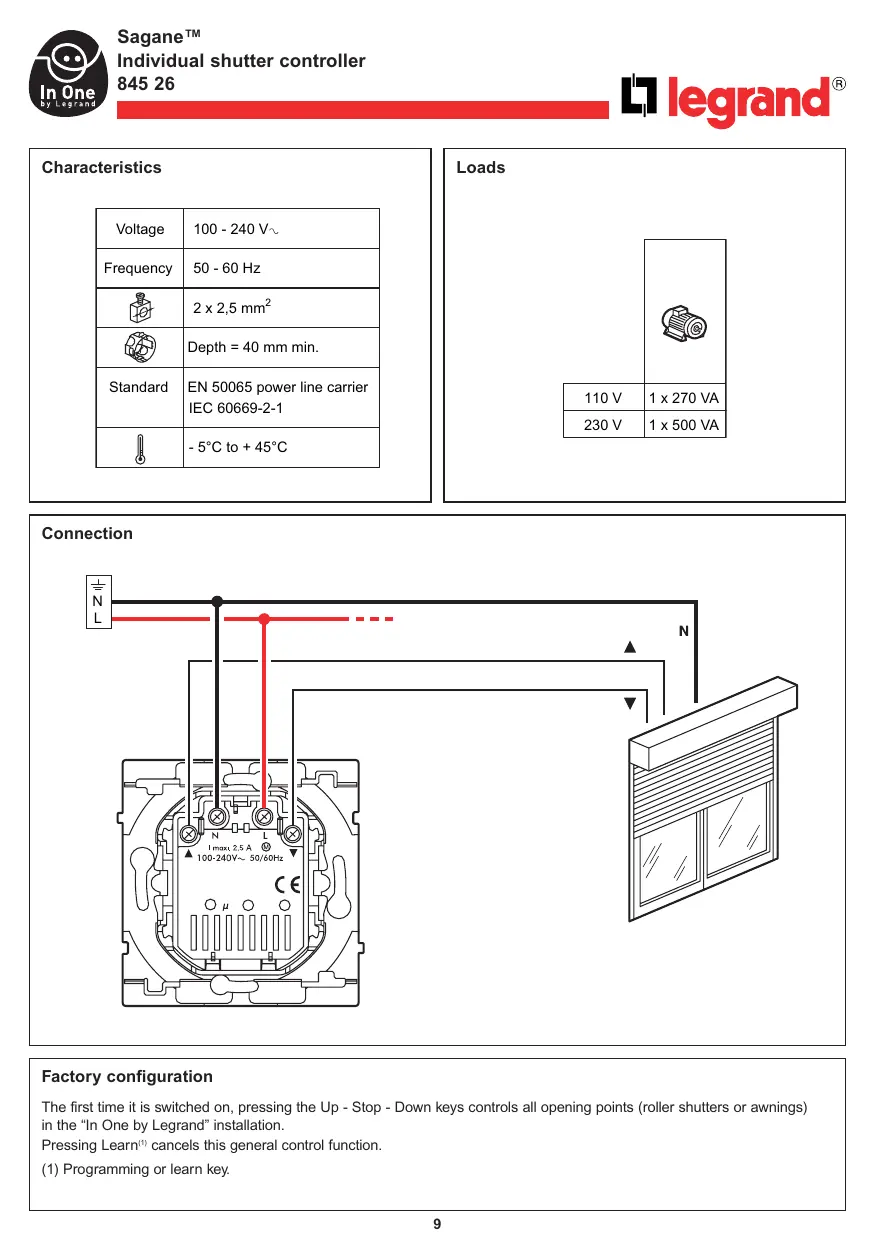
The first time it is switched on, pressing the Up - Stop - Down keys controls all opening points (roller shutters or awnings) in the "In One by Legrand" installation.
Pressing Learn(1) cancels this general control function.
(1) Programming or learn key.
Description
Operation
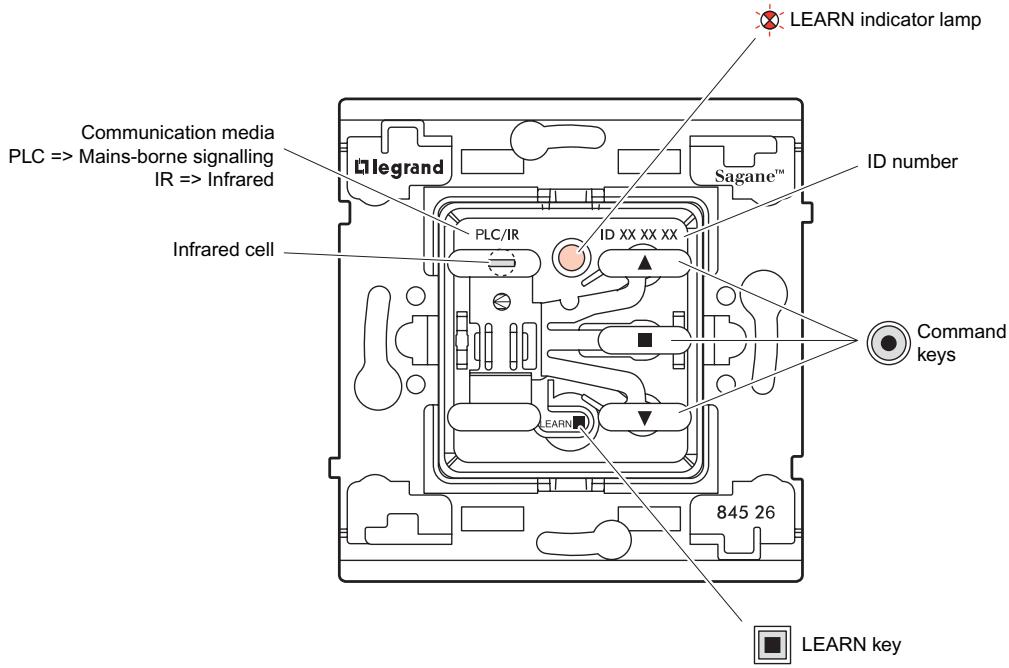
The individual shutter controller:
- Can simultaneously control a set of products (actors) that have been associated with it during the learn phase ^(1) . It is then the Leader of the scenario ^(2) .
- Can be controlled by other Leader products. It is then an Actor in the scenario.
As Leader:
The individual shutter controller can control the following using its Up - Stop - Down keys:
- The opening that is connected to its terminals
- The openings that are connected to the terminals of the other products associated with it (the actors).
Note: It is only necessary to learn the Up key. The Stop and Down keys are learned automatically.
As Actor:
The individual shutter controller can participate in 16 different scenarios, locally executing the Up - Stop - Down commands from the other Leaders.
It has an interface for the infrared signals that is used to control its scenarios and/or other products in the installation.
(1) Learn phase: Operation to associate products so that they can be controlled simultaneously from a central point. This association is carried out by applying the learn scenario procedure on page 11.
(2) Scenario: Corresponds to the set of products (actors) that are associated with a command key.
Learn scenario
Step 1: Start the learn phase (on the LEADER)


Press LEARN


Press the command key that is to control the scenario
Step 2: Add an actor to the scenario (on the ACTOR)


Press LEARN


Press the command key that is to be associated with the leader

To add a number of products to the scenario, repeat
operations 3 and 4 for each actor.
Step 3: Record the scenario (on the LEADER)


Press LEARN

The indicator lamps of all the products go off. The scenario is recorded.
Modification of a scenario
Step 1: Open the scenario (on the LEADER)


Press LEARN


Press the command key that controls the scenario
The indicator lamps of all the products in the scenario blink.
Step 2: Modify the state of an actor in the scenario (on the ACTOR)


Press LEARN


Press LEARN r To remove the product from the scenario, go to step 3
Press the command key that is to be associated
Step 3: Record the scenario (on the LEADER)


The indicator lamps of all the products go off. The scenario is recorded.
Clearing a scenario
Clear all the scenarios linked with the command key (on the LEADER)


Press LEARN


The scenario is cleared
Press the command key and hold it down for 10 s

Clear all the scenarios linked to this product (on the LEADER)


Press LEARN


Return the product to factory configuration
Press LEARN and hold down for 10 s
Key
The indicator lamp goes off

The indicator lamp blinks slowly

The indicator lamp blinks quickly

The indicator lamp flashes
Brand : LEGRAND
Model : 845 26
Category : Electrical switch