Proindustry Portable - Fan CECOTEC - Free user manual and instructions
Find the device manual for free Proindustry Portable CECOTEC in PDF.


User questions about Proindustry Portable CECOTEC
0 question about this device. Answer the ones you know or ask your own.
Ask a new question about this device
Download the instructions for your Fan in PDF format for free! Find your manual Proindustry Portable - CECOTEC and take your electronic device back in hand. On this page are published all the documents necessary for the use of your device. Proindustry Portable by CECOTEC.
USER MANUAL Proindustry Portable CECOTEC
Safety instructions 7
-
Parts and components 39
-
Before use 39
-
Assembly 40
-
Operation 40
-
Cleaning and maintenance 41
-
Troubleshooting 42
-
Technical specifications 42
-
Disposal of old electrical and electronic
appliances 43
-
Technical support and warranty 43
-
Copyright 43
-
Simplified EU Declaration of Conformity 44
SOMMAIRE
EU01_106722_ProIndustry Portable
EN • The coding in this manual is generic and applies to all code variants of the appliance.
Read these instructions thoroughly before using the appliance. Keep this instruction manual for future reference or new users.
- All safety instructions must be closely followed when using the appliance.
- This appliance can be used by children aged from 8 years and above and persons with reduced physical, sensory or mental capabilities or lack of experience and knowledge if they have been given supervision or instruction concerning use of the appliance in a safe way and understand the hazards involved. Children must not play with the appliance. Cleaning and user maintenance should not be carried out by unsupervised children.
- This appliance is designed for domestic use only and is not intended for bars, restaurants, farmhouses, hotels, motels, and offices.
- Make sure that the mains voltage matches the voltage stated on the appliance marking and that the wall outlet is earthed.
- Check the power cable regularly for visible damage. If the power cable is damaged, it must be replaced by the official Cecotec Technical Support Service.
- Do not immerse the cable, plug, or any other non-removable part of the appliance in water or any other liquid or expose electrical connections to water. Make sure your hands are completely dry before handling the plug or switching on the appliance.
- If the appliance falls accidentally into water, unplug it immediately. Do not touch the water!
- Do not operate the appliance if any fault or unusual sign is detected.
- Keep hair, loose clothing, fingers, and other parts of the body away from the openings and moving parts of the appliance.
- Make sure the appliance is placed on a flat and stable surface during operation.
- Do not use the device next to windows, as exposure to rain could cause electric shock.
- Do not operate the product under or next to curtains.
- Do not cover the grilles and do not place the product cord under carpets or other objects during operation. Keep the sides, front, and back of the appliance at a minimum safety distance of 20 cm from any object or wall.
- Always turn off and unplug the device when not in use and before moving it to a new location. Pull from the plug, not the cable, to disconnect it from the outlet.
INSTRUCTIONS DE SÉCURITÉ
- 360° adjustment piece
- Light
- Adjustment piece
- Carrying handle
- Control panel
- Type-C input port
- USB output port
- Hook
- Type-C cable
- Bracket
NOTE:
The graphics in this manual are schematic representations and may not exactly match the product.
2. BEFORE USE
- This appliance is packaged in a way as to protect it during transport. Take the appliance out of its box and remove all packaging materials. You can keep the original box and other packaging elements in a safe place. This will help you prevent damage to the machine when transporting it in the future. In case the original packaging is disposed of, make sure all packaging materials are recycled accordingly.
- Make sure all parts and components are included and in good conditions. If there is any piece missing or in bad conditions, contact the official Cecotec Technical Support Service immediately.
Box content
- Industrial floor fan
- Instruction manual
- Do not remove the serial number of the appliance in order to keep a correct traceability of it in case of assistance.
3. ASSEMBLY
How to attach the main body to the bracket
Fig. 2
- Remove the fan, bracket and 2 adjustment pieces from the packing box.
- Place the bracket on the floor, align the fan with the two holes in the bracket and insert the screws from the adjustment pieces on both sides of the bracket and the fan.
- Then tighten both adjustment pieces by turning them clockwise.
- Tilt the fan to the desired position and tighten the adjustment pieces if necessary.
How to attach the hook
Fig. 3
The fan includes a hook at the top of its structure, designed to hang the unit on elevated surfaces, such as bars or pipes.
- To install the hook, align it with the desired surface, ensuring the clamping mechanism fits firmly.
- Slide the hook over the surface, checking that it locks securely and stably.
- Ensure the fan is properly suspended and the supporting surface is strong enough to bear its weight.
4. OPERATION
Control panel
Fig. 4
Fig. 4 key:
- Increase icon
- Decrease icon
- Power icon
- Light icon
- Speed level indicator light
- Battery level indicator light
Operation
- To turn on the fan, press the power icon ⏻. The fan will operate at medium speed by default. In addition, the display will show "6" and the remaining battery level. Press the touch icon again to turn off the fan.
- Press the "+" icon to increase the fan speed. The highest is level 9.
- Press the “-” icon to reduce the fan speed. The lowest is level 1.
- Press the light icon 📋 to adjust the light tone and brightness. The setting follows this order: white light and high brightness, white light and low brightness, yellow light and high brightness, yellow light and low brightness, off.
Note: The light can be turned on even when the fan is off.
Charging the product
- Locate the USB-C charging port on the fan. Fig. 1
- Connect one end of the included USB-C cable to the fan's charging port. Fig. 1
- Connect the other end of the USB-C cable to a USB power adapter (not included). Make sure that the power adapter is compatible with charging this product.
- Plug the adapter into a power socket.
- During charging, the battery level icon will flash, and you will not be able to turn on the fan.
- Once the fan is fully charged, the icon will remain steady, and the fan can be put back into operation.
5. CLEANING AND MAINTENANCE
- Before performing any cleaning or maintenance tasks, turn off the fan and ensure it is not connected to a power socket.
IMPORTANT: The fan only requires external cleaning.
- Clean only the grille and blades. Regularly remove dust accumulated on the grille with a soft cloth or feather duster. You can also use a vacuum cleaner with a brush to clean it.
- Make sure that no water comes into contact with the motor. Do not spray the fan or immerse it in water.
- To prevent the housing from discolouring or deforming, never use harsh or corrosive cleaning products.
- If the fan is not going to be used for an extended period, place it in its original box and store it in a cool, dry place. Make sure that the fan is not exposed to extreme temperatures.
Removing the battery
For proper battery removal for subsequent recycling, you must:
- Unplug and turn off the fan.
- Remove the 4 screws from the back of the product.
- Remove the 2 screws from the piece securing the battery in position.
- Carefully remove the connectors joining the battery to the PCB.
- Remove the battery and take it to a collection point designated by local authorities.
Warning: this procedure is only for recycling the battery at the end of its useful life, not for replacement.
6. TROUBLESHOOTING
| Problem | Possible cause | Solution |
| The appliance does not turn on. | The fan is turned off. | Turn on the fan by pressing the power icon. |
| The fan is discharged. | Charge the fan battery. | |
| The fan gives off an unusual smell. | This usually happens the first time it is used. This smell will disappear within the first week of use. | No action is required. |
| The fan vibrates and makes noise. | It is not placed on a flat surface. | Place it on a flat surface or place something underneath to reduce vibrations. |
| The appliance may be damaged. | If the fan is damaged, stop using it and contact the official Cecotec Technical Support Service. |
Note:
If none of these situations matches your problem, do not attempt to disassemble or repair the appliance yourself. Repairs carried out by unqualified people may result in injury or serious malfunctions. Please contact the place where you bought the appliance or the official Cecotec Technical Support Service. The repair must be carried out by an authorised technician, and you must only use original spare parts.
7. TECHNICAL SPECIFICATIONS
Product reference: EU01_106722
Product: ProIndustry Portable
Product input voltage and current: 5 V =, 3 A / 9 V =, 2 A / 12 V =, 1.5 A
Battery technical specifications: Li-ion, 3.7 V, 12000 mAh, 44.4 Wh
Light power: 3 W
Class III
To recharge the battery, it is recommended to use a power adapter with the following characteristics:
Input: 100-240 V\~, 50/60 Hz
Output: 5 V =, 3 A / 9 V =, 2 A / 12 V =, 1.5 A
Technical specifications may change without prior notification to improve product quality. Made in China | Designed in Spain
8. DISPOSAL OF OLD ELECTRICAL AND ELECTRONIC APPLIANCES

This symbol indicates that, according to the applicable regulations, the product and/or battery must be disposed of separately from household waste. When this product reaches the end of its shelf life, you should dispose of the cells/batteries/accumulators and take them to a collection point designated by the local authorities.
For detailed information on how to properly dispose of electrical and electronic appliances and/or batteries, consumers should contact their local authorities.
Compliance with the above guidelines will help protecting the environment.
9. TECHNICAL SUPPORT AND WARRANTY
Cecotec shall be liable to the end user or consumer for any lack of conformity that exists at the time of delivery of the product under the terms, conditions and deadlines established by the applicable regulations.
Repairs should be carried out by qualified personnel.
If at any moment you detect any problem with your product or have any doubt, do not hesitate to contact the official Cecotec Technical Support Service at +34 96 321 07 28.
10. COPYRIGHT
The intellectual property rights over the texts in this manual belong to CECOTEC INNOVACIONES, S.L. All rights reserved. The contents of this publication may not, in whole or in part, be reproduced, stored in a retrieval system, transmitted, or distributed by any means (electronic, mechanical, photocopying, recording or similar) without the prior authorization of CECOTEC INNOVACIONES, S.L.
11. SIMPLIFIED EU DECLARATION OF CONFORMITY
CE Cecotec Innovaciones hereby declares that this appliance complies with the essential requirements and other relevant provisions of the regulations applicable in the European Union. This appliance has been designed, manufactured and tested in compliance with required safety and quality standards. The full text of the EU Declaration of Conformity can be found on the following website: https://cecotec.es/es/information/declaration-of-conformity
1. PIÈCES ET COMPOSANTS
Image 1
Product: ProIndustry Portable
Fig./Img./Abb./Afb./ Rys. 1
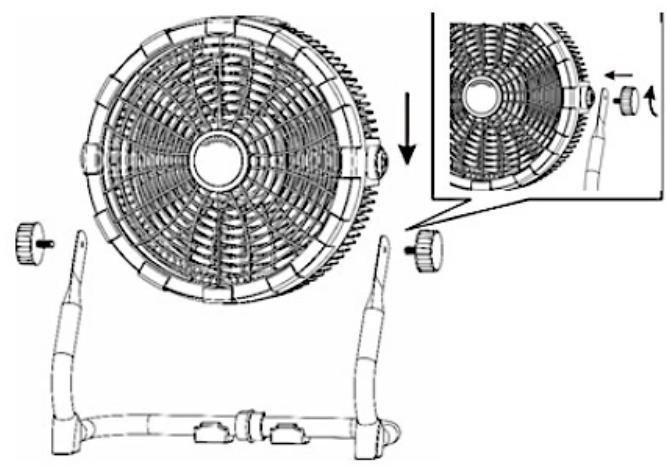
Fig./Img./Abb./Afb./Rys.2

Fig./Img./Abb./Afb./Rys. 4

Fig./Img./Abb./Afb./Rys. 4
www.cecotec.es
- SOMMAIRE
- INSTRUCTIONS DE SÉCURITÉ
- NOTE
- BEFORE USE
- BOX CONTENT
- ASSEMBLY
- HOW TO ATTACH THE MAIN BODY TO THE BRACKET
- FIG. 2
- HOW TO ATTACH THE HOOK
- FIG. 3
- OPERATION
- CONTROL PANEL
- FIG. 4
- CHARGING THE PRODUCT
- CLEANING AND MAINTENANCE
- REMOVING THE BATTERY
- TROUBLESHOOTING
- TECHNICAL SPECIFICATIONS
- DISPOSAL OF OLD ELECTRICAL AND ELECTRONIC APPLIANCES
- TECHNICAL SUPPORT AND WARRANTY
- COPYRIGHT
- SIMPLIFIED EU DECLARATION OF CONFORMITY
- PIÈCES ET COMPOSANTS
- IMAGE 1
Brand : CECOTEC
Model : Proindustry Portable
Category : Fan