
ADAPTATEUR USB BLUETOOTH #F8T009FR - Bluetooth Adapter BELKIN - Free user manual and instructions
Find the device manual for free ADAPTATEUR USB BLUETOOTH #F8T009FR BELKIN in PDF.



User questions about ADAPTATEUR USB BLUETOOTH #F8T009FR BELKIN
0 question about this device. Answer the ones you know or ask your own.
Ask a new question about this device
Download the instructions for your Bluetooth Adapter in PDF format for free! Find your manual ADAPTATEUR USB BLUETOOTH #F8T009FR - BELKIN and take your electronic device back in hand. On this page are published all the documents necessary for the use of your device. ADAPTATEUR USB BLUETOOTH #F8T009FR by BELKIN.
USER MANUAL ADAPTATEUR USB BLUETOOTH #F8T009FR BELKIN
Connect your peripherals and computing devices, without cables
Connect your peripherals and computing devices, without cables

User Manual

Bluetooth
Table of Contents
Introduction 2
Product Features. 3
System Requirements 4
Package Contents 5
USB Adapter Specifications 6
Supported Profiles 7
Software Setup 9
Hardware Setup 14
Initial Configuration Wizard 17
Uninstalling the Software 20
Glossary 21
Information 23
Thank you for purchasing the Bluetooth USB Adapter (the USB Adapter) from Belkin.
The USB Adapter features the breakthrough Bluetooth wireless technology that lets you create efficient communications between your USB desktop PC or notebook and devices using Bluetooth wireless technology—without physical connectors or cables.
Before you install and start using your new USB Adapter, please take a few minutes to review some of the terms that you will be seeing throughout the document. You will find a brief Glossary on page 21 of this manual.
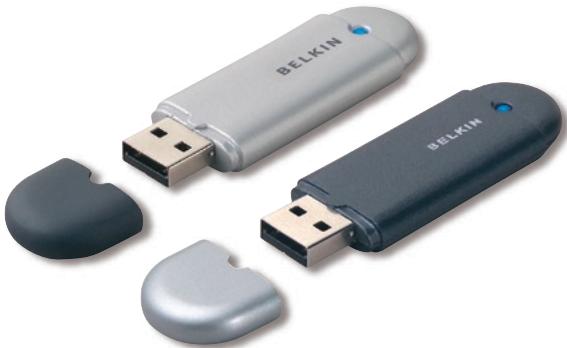
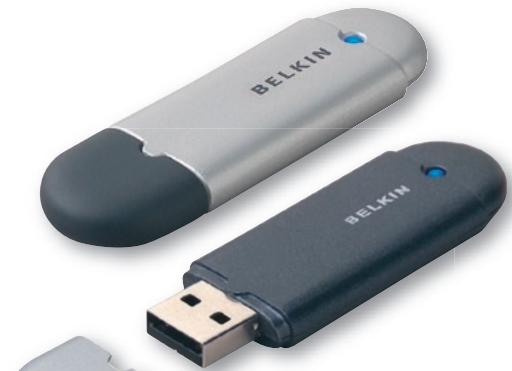
The USB Adapter is compliant with Bluetooth standard version 1.2 and provides:
- Compliancy with Bluetooth specification v1.2 devices
- USB bus powering: no external power supply necessary
- Support for Microsoft® Windows® 98 SE, Me, 2000, and XP
- Compatible with Mac OS® X v10.3 and higher*
- Operating distance of up to 10 meters (F8T009) or 100 meters (F8T008)**
- Point-to-multipoint connections
- Support for data rates up to 723/57.6Kbps
Built-in security: up to 128-bit encryption and authentication - Compatibility with USB desktop and notebook computers
*Mac OS X driver and software provided by Apple®.
**10m/100m range is dependent upon environment, number of users, and other wireless devices within proximity.
PC System Requirements
PC-compatible computer, CPU speed of 200MHz or above
Memory: 64MB or above, 128MB recommended
One available USB port, USB 1.1 standard
- Windows 98 SE, Me, 2000, and XP
Mac® System Requirements
- One available USB port, USB 1.1 standard
Mac OS X v10.3 and higher*
*Mac OS X driver and software provided by Apple.
Package Contents
- Bluetooth USB Adapter
- CD-ROM for installation software and documentation
- User Manual
- Quick Installation Guide
- Registration Card
For a complete explanation of the Belkin Bluetooth software, refer to the software manual contained in the included CD-ROM.
USB Adapter Specifications
Bluetooth Compliance: Version 1.2
Physical Interface: USB UHCI/OHCI 1.2-compliant
Operating Frequency: 2.4 to 2.4835GHz
Output Power: (F8T008) 4~20 dBm, Class I (F8T009) -6~4 dBm, Class II
Sensitivity: <0.1% BER @ -80 dBm
Data Rate: 723/57.6Kbps
Typical Power
Consumption: (F8T008) Tx: 150mA, Rx 80mA (F8T009) Tx: 65mA, Rx 45mA
Operating Range: (F8T008) 100-meter radius
indoors
indoors
Network Topology: Point-to-Multipoint
Packet Support: 1/3/5 Slots Packet
Operation: Master/Slave
Frequency Stability: +/- 10PPM
LED Indicator: Power On/Data Traffic
Antenna Type: Integrated, 0 + / - 1 dBi
Dimensions: 58mm (L) x 18mm (W) x 8mm (H)
Weight: 0.2oz. (7g)
Operating Temp: 0 to 70 degrees Celsius
Storage Temp: -30 to 80 degrees Celsius
Humidity: 5-90% (non-condensing)
Supply Voltage: 5.0V DC
Nominal Current: 100mA
Spread Spectrum: FHSS (Frequency Hopping Spread Spectrum)
Modulation: GFSK (Gaussian Frequency Shift Keying)
Certifications: FCC, CE, ICES, C-Tick, BQB, WHQL for XP
Warranty: Manufacturer's Lifetime Warranty
Supported Languages: English, German, Japanese, Spanish, French
Specifications are subject to change without notice.
The services supported by your USB Adapter are defined as "Profiles". Available profiles include:
- Generic Access
Service Discovery
Personal Area Network - Hardcopy Cable Replacement
- Serial Port
- LAN Access
- Dial-Up Networking
-
Generic Object Exchange
-
Object Push
- File Transfer
- Synchronization
- Fax
Human Interface Device - Headset
Audio Gateway
Your USB Adapter gives you the ability to do the following—without cables:
- Transfer files
- Access dial-up networks
- Connect to local area networks
- Perform an ActiveSync® session
- Connect to serial ports
Exchange PIM data
- Send or exchange business cards
- Connect to mice and keyboards
- Print
The basic functions of the Bluetooth Neighborhood include:
Device Discovery
Service Discovery
- Establishing links with remote devices
Software Setup for Windows 98 SE, Me, 2000, and XP
To install the software for the USB Adapter, follow the instructions below:
Note: The installation process for Windows XP may look slightly different from Windows 98 SE, Me, and 2000.
Note: Do not insert the USB Adapter into the USB port prior to software installation.
- Insert the software installation CD-ROM into the PC's CD-ROM drive.
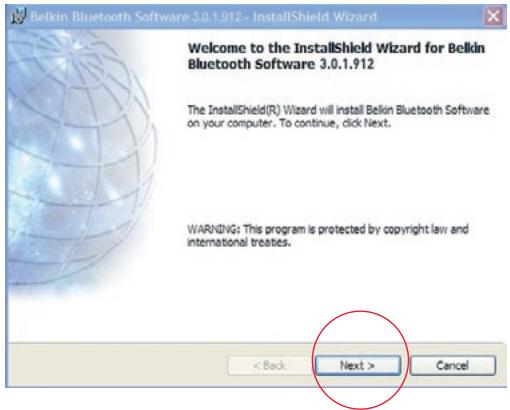
- The "Software InstallShield Wizard" window appears. Click on "Next" to begin the installation process.
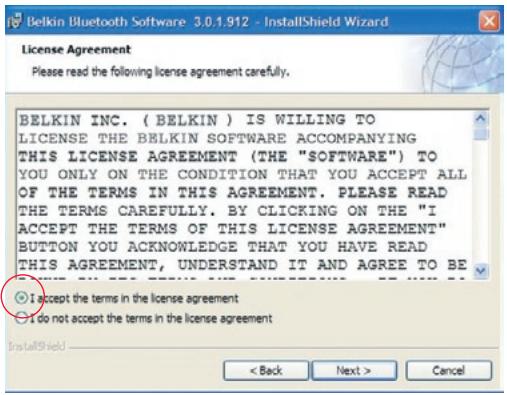
- Choose "I accept the terms in the license agreement" to accept the license agreement. Click on "Next" to continue.
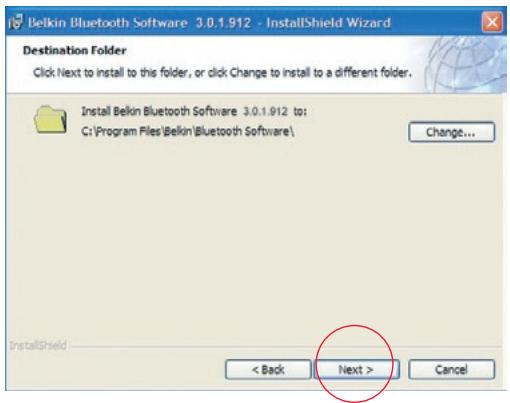
- Specify the location where the software files will be installed on your hard drive. It is recommended that you install the software in the default directory "C:\Program Files\belkin\Bluetooth\Software". Click on "Next" to continue.
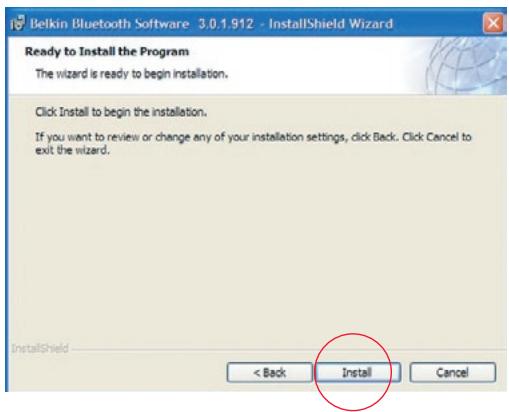
- Confirm that the device software is ready to be installed and click on "Install".
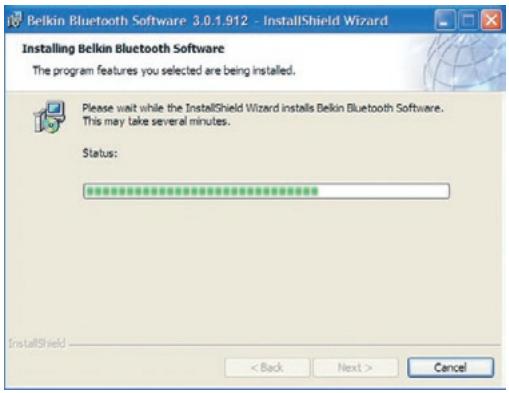
- The InstallShield Wizard will begin to install the Belkin Bluetooth Software. This may take several minutes.
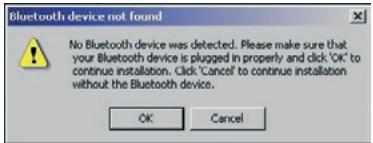
- During the installation process you may be prompted to insert your USB Adapter. If your USB Adapter is not plugged into your computer at this time, you may insert it into an available USB 1.1-compliant port on your desktop or notebook computer, then click "OK" to continue. Click on "Cancel" to continue installation without the Bluetooth device inserted. Refer to the "Hardware Installation" section of this User Manual for instructions for installing the hardware.
Note: If at any time during the installation process you receive a "Driver Signature Notice", click "OK" to continue the installation process.
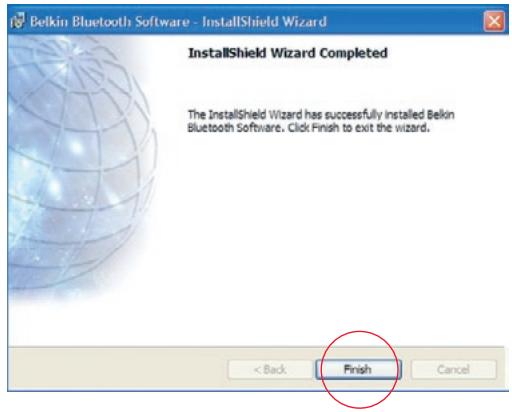
- Confirm the completion of the software installation; click "Finish" and restart the system if prompted to do so.
Hardware Setup for Windows 98 SE, Me, 2000, and XP
Follow these instructions to install your USB Adapter on your PC.
Note: Your USB Adapter is sensitive to static electricity, which can damage its delicate electrical components. To protect your device, always touch the metal chassis of your computer before handing the USB Adapter. This will ground any potential electrostatic discharge. Avoid touching the metal connector when handling the USB Adapter. Dry weather conditions or walking across carpeted floors may cause you to acquire an
electrostatic charge.
- Connect the USB Adapter directly to an available USB A-type connector on your desktop or notebook computer. Your system should register a new USB device found.
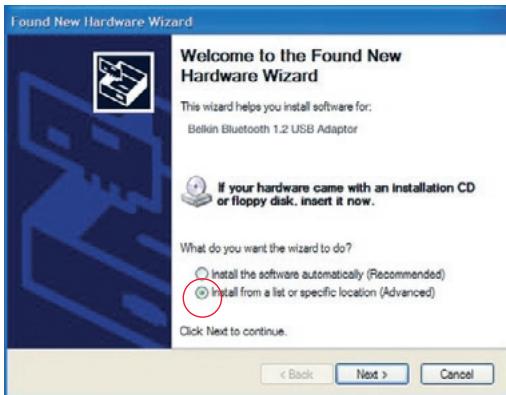
- Choose "Install from a list or specific location"; then click "Next".
- Browse for the location of the device driver :\Program Files\Belkin\ Bluetooth\Software\bin" then click "Next".
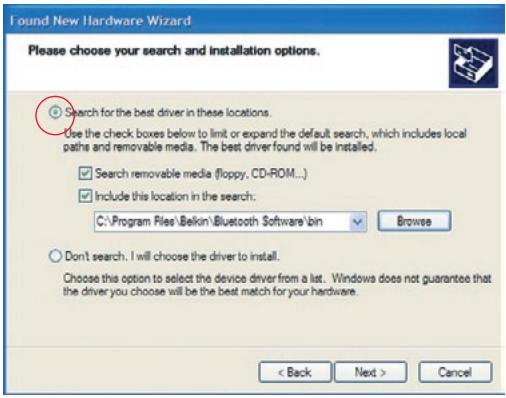
- If you receive the following "Hardware installation notice", click on "Continue Anyway" to continue with the installation process.
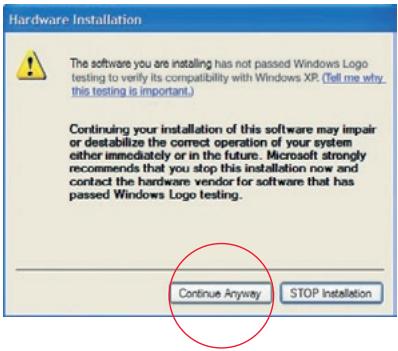
- A window will appear that confirms the completion of the hardware installation; click on "Finish" to complete the installation process.
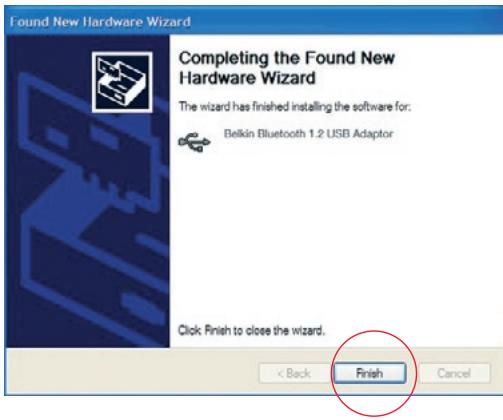
Configuring your computer for Windows 98 SE, Me, 2000, and XP
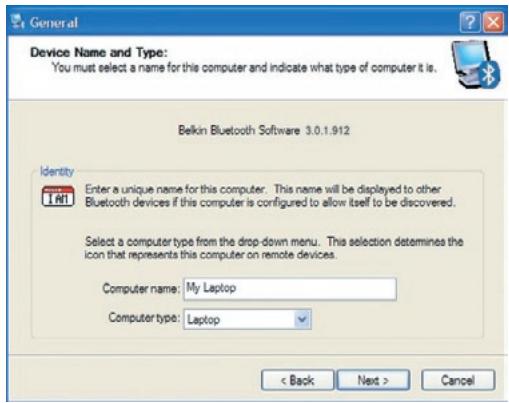
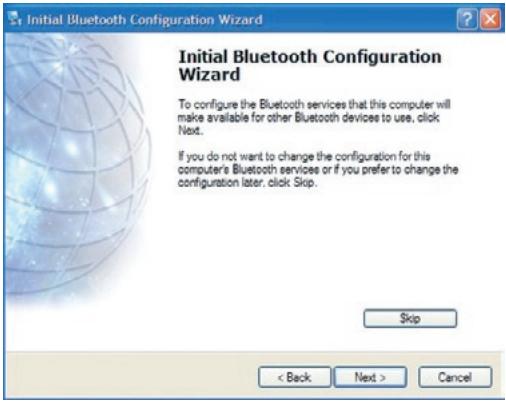
- Once the installation process is complete you will be prompted by the "Initial Bluetooth Configuration Wizard". This Wizard will guide you through the initial setup of your Bluetooth device. Please follow the Wizard as prompted.
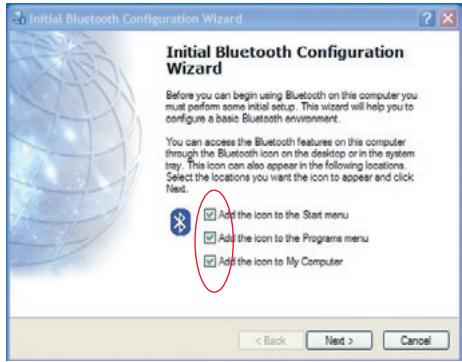
- Name your computer with a friendly name. This is name will be made available when your computer is discovered by other Bluetooth devices.
Initial Configuration Wizard
-
Choose the type of computer you have installed the USB Adapter to in the drop-down menu.
-
Continue the Wizard to configure the Bluetooth services that this computer will make available of other Bluetooth devices to use. Click "Next".
Initial Configuration Wizard
-
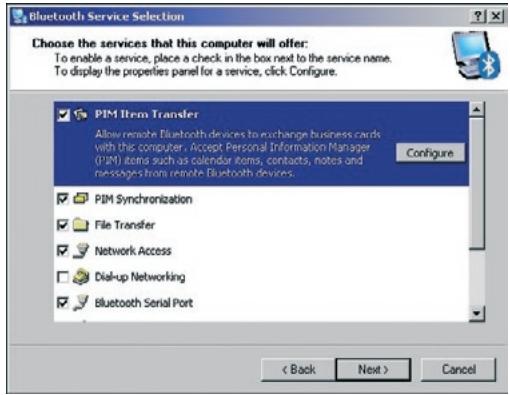
Choose the Bluetooth services your computer will offer. The most common service for your computer type will be checked by default.
-
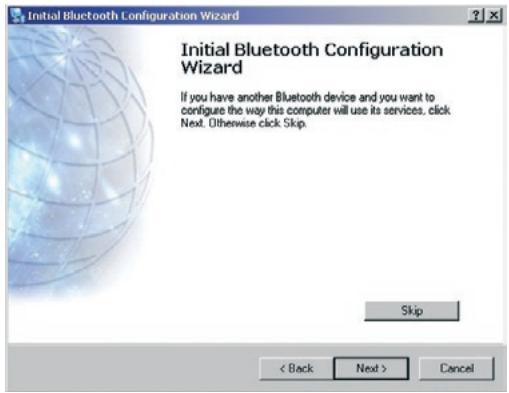
If you have another Bluetooth device and you want to configure the way this computer will use its services, click "Next". Otherwise click "Skip".
Uninstalling the Software for Windows 98 SE, Me, 2000, and XP
Follow these instructions to uninstall your USB Adapter on your PC.
- Insert the CD-ROM included with your USB Adapter.
- This "InstallShield Wizard" should automatically load. If it does not load, explore the CD and run the "Setup.exe" file.
- The "InstallShield" window should now appear. Click "Next" to continue with the uninstall process.
Authentication
Security feature that requires users to verify a numeric password before exchanging data.
Authorization Security
feature that requires user approval before another user is allowed to share data.
Bluetooth Neighborhood
A collection of Bluetooth devices.
Bonded Device
Recognized by your device so as not to require authentication or authorization.
Device
Device enabled with Bluetooth technology.
Device Address
Unique electronic address of a Bluetooth device.
Device Discovery
The location and recognition of one Bluetooth device by another.
Device Group
Compilation of several Bluetooth devices into a group, normally to conduct related tasks.
Device Name
Name that a Bluetooth device provides when discovered by another device.
Service Discovery
Determines which applications other devices have in common with yours.
DECLARATION OF CONFORMITY WITH FCC RULES FOR ELECTROMAGNETIC COMPATIBILITY
We, Belkin Corporation, of 501 West Walnut Street, Compton, CA 90220, declare under our sole responsibility that the product,
F8T008,F8T009
to which this declaration relates, complies with Part 15 of the FCC Rules. Operation is subject to the following two conditions: (1) this device may not cause harmful interference, and (2) this device must accept any interference received, including interference that may cause undesired operation.
Caution: Exposure to Radio Frequency Radiation.
The radiated output power of this device is far below the FCC radio frequency exposure limits. Nevertheless, the device shall be used in such manner that the potential for human contact normal operation is minimized.
When connecting an external antenna to the device, the antenna shall be placed in such a manner to minimize the potential for human contact during normal operation. In order to avoid the possibility of exceeding the FCC radio frequency exposure limits, human proximity to the antenna shall not be less than 20cm (8 inches) during normal operation.
Federal Communications Commission Notice
This equipment has been tested and found to comply with the limits for a Class B digital device, pursuant to Part 15 of the FCC Rules. These limits are designed to provide reasonable protection against harmful interference in a residential installation.
This equipment generates, uses, and can radiate radio frequency energy. If not installed and used in accordance with the instructions, it may cause harmful interference to radio or television reception, which can be determined by turning the equipment off and on, the user is encouraged to try and correct the interference by one or more of the following measures:
- Reorient or relocate the receiving antenna.
- Increase the distance between the equipment and the receiver.
- Connect the equipment to an outlet on a circuit different from that to which the receiver is connected.
- Consult the dealer or an experienced radio/TV technician for help.
Modifications
The FCC requires the user to be notified that any changes or modifications to this device that are not expressly approved by Belkin Corporation may void the users authority to operate the equipment.
Canada-Industry Canada (IC)
The wireless radio of this device complies with RSS 139 & RSS 210 Industry Canada. This Class B digital complies with Canadian ICES-003.
Radio products with the CE alert marking comply
with the R&TTE Directive (1995/5/EC) issued by the Commission
of the European Community.

Compliance with this directive implies conformity to the following European Norms (in brackets are the equivalent international standards).
EN 60950 (IEC60950) - Product Safety
- EN 300 328 Technical requirement for radio equipment
- ETS 300 826 General EMC requirements for radio equipment.
To determine the type of transmitter, check the identification label on your Belkin product.
Products with the CE marking comply with the EMC Directive (89/336/EEC) and the Low Voltage Directive (72/23/EEC) issued by the Commission of the European Community. Compliance with these directives implies conformity to the following European Norms (in brackets are the equivalent international standards).
- EN 55022 (CISPR 22) - Electromagnetic Interference
EN 55024 (IEC61000-4-2,3,4,5,6,8,11)-Electromagnetic Immunity - EN 61000-3-2 (IEC61000-3-2) - Power Line Harmonics
EN 61000-3-3 (IEC610000) - Power Line Flicker
EN 60950 (IEC60950) - Product Safety
Products that contain the radio transmitter are labeled with CE alert marking and may also carry the CE logo.
Manufacturer's Lifetime Warranty
Belkin Corporation warrants this product against defects in materials and workmanship for its warranty period. If a defect is discovered, Belkin will, at its option, repair or replace the product at no charge provided it is returned during the warranty period, with transportation charges prepaid, to the authorized Belkin dealer from whom you purchased the product. Proof of purchase may be required.
This warranty does not apply if the product has been damaged by accident, abuse, misuse, or misapplication; if the product has been modified without the written permission of Belkin; or if any Belkin serial number has been removed or defaced.
THE WARRANTY AND REMEDIES SET FORTH ABOVE ARE EXCLUSIVE IN LIEU OF ALL OTHERS, WHETHER ORAL OR WRITTEN, EXPRESSED OR IMPLIED. BELKIN SPECIFICALLY DISCLAIMS ANY AND ALL IMPLIED WARRANTY, INCLUDING, WITHOUT LIMITATION, WARRANTY OF MERCHANTABILITY AND FITNESS FOR A PARTICULAR PURPOSE.
No Belkin dealer, agent, or employee is authorized to make any modification, extension, or addition to this warranty.
BELKIN IS NOT RESPONSIBLE FOR SPECIAL, INCIDENTAL, OR CONSEQUENTIAL DAMAGES RESULTING FROM ANY BREACH OF WARRANTY, OR UNDER ANY OTHER LEGAL THEORY, INCLUDING BUT NOT LIMITED TO, LOST PROFITS, DOWNTIME, GOODWILL, DAMAGE TO OR REPROGRAMMING, OR REPRODUCING ANY PROGRAM OR DATA STORED IN, OR USED WITH, BELKIN PRODUCTS.
Some states do not allow the exclusion or limitation of incidental or consequential damages or exclusions of implied warranties, so the above limitations of exclusions may not apply to you. This warranty gives you specific legal rights, and you may also have other rights that vary from state to state.
BELKIN®
www.belkin.com
Belkin Corporation
501 West Walnut Street,
Compton, CA 90220-5221, USA
+13108981100
+1 310 898 1111 fax
Belkin Ltd.
Express Business Park, Shipton Way
Rushden NN10 6GL, United Kingdom
+44 (0) 1933 35 2000
+44 (0) 1933 31 2000 fax
Belkin Tech Support
Europe: 00 800 223 55 460
Belkin B.V.
Starparc Building, Boeing Avenue 333
1119 PH Schiphol-Rijk, The Netherlands
+31 (0) 206547300
+31 (0) 20 654 7349 fax
Belkin GmbH
Hanebergstrasse 2
80637 Munich, Germany
+49 (0) 89 143405 0
+49 (0) 89 143405 100 fax
Belkin SAS
Dimensions: 58 mm (L) x 18 mm (l) x 8 mm (H)
Poids: 0.2oz. (7g)
Température
FHSS (Frequency Hopping
Spread Spectrum -
Modulation: GFSK (Gaussian Frequency
Shift Keying)
Certifications :
FCC, CE, ICES, C-Tick, BQB
WHQL pour XP
This Class B digital complies with Canadian ICES-003.
Assistance Technique Belkin
Europe: 00 800 223 55 460
Belkin B.V.
Starparc Building, Boeing Avenue 333
1119 PH Schiphol-Rijk, Pays-Bas
+31 (0) 206547300
+31 (0) 20 654 7349 fax
Belkin GmbH
MaBe: 58mm (L) x 18mm (B) x 8mm (H)
Gewicht: 7g
Modulation: GFSK (Gaussian Frequency Shift Keying)
Please choose your search and installation options.


arch for the best driver in these locations
- Use the check boxes below to limit or expand the default search, which includes local paths and removable media. The best driver found will be installed.

Search removable media (floppy, CD-ROM...)

Include this location in the search:
C:Program Files\Belkin\Bluetooth Software\bin

Browne
Don't search. I will choose the driver to install.
Choose this option to select the device driver from a list. Windows does not guarantee that the driver you choose will be the best match for your hardware.
<Back
Next>
Cancel
Hardware Installation

The software you are installing has not passed Windows Logo testing to verify its compatibility with Windows XP. (Tell me why this testing is important.)
Continuing your installation of this software may impair or destabilize the correct operation of your system either immediately or in the future. Microsoft strongly recommends that you stop this installation now and contact the hardware vendor for software that has passed Windows Logo testing.
Continue Anyway
STOP Installation
Canada-Industry Canada (IC)
501 West Walnut Street,
Compton, CA 90220-5221, USA
+13108981100
+1 310 898 1111 fax
Belkin Ltd.
Express Business Park, Shipton Way
Rushden NN10 6GL, Großbritannien
+44 (0) 1933 35 2000
+44 (0) 1933 31 2000 fax
Bediening: Master/slave
Frequeniestabilitieit: +/- 10PPM
Spread Spectrum: FHSS (Frequency Hopping Spread Spectrum)
Modulation: GFSK (Gaussian Frequency Shift Keying)
Canada-Industry Canada (IC)
501 West Walnut Street,
Compton, CA 90220-5221, USA
+13108981100
+1 310 898 1111 fax
Belkin Ltd.
Express Business Park, Shipton Way
Rushden NN10 6GL, Verenigd Koninklijk
+44 (0) 1933 35 2000
+44 (0) 1933 31 2000 fax
Belkin B.V.
Starparc Building, Boeing Avenue 333
1119 PH Schiphol-Rijk, Nederland
+31 (0) 206547300
+31 (0) 20 654 7349 fax
Belkin GmbH
Hanebergstrasse 2
80637 Munich, Duitsland
+49 (0) 89143405 0
+49 (0) 89 143405 100 fax
Belkin SAS
130 rue de Silly
92100 Boulogne-Billancourt, Frankrijk
+33 (0) 1 41 03 14 40
+33 (0) 1 41 31 01 72 fax
Belkin Nordic
Knarrarnasgatan 7
164 40 Kista, Zweden
+46 (0) 852291870
+46 (0) 8 5229 1874 fax
Belkin technische ondersteuning
Europe: 00 800 223 55 460
GFSK (Gaussian Frequency Shift Keying)
Bluetooth Neighborhood
Canada- Industry Canada (IC)
501 West Walnut Street,
Compton, CA 90220-5221, USA
+1 310 898 1100
+1 310 898 1111 fax
Belkin Ltd.
Express Business Park, Shipton Way
Rushden NN10 6GL, Regno Unito
+44 (0) 1933 35 2000
+44 (0) 1933 31 2000 fax
501 West Walnut Street,
Compton, CA 90220-5221, USA
+13108981100
+1 310 898 1111 fax
Belkin Ltd.
Express Business Park, Shipton Way
Rushden NN10 6GL, United Kingdom
+44 (0) 1933 35 2000
+44 (0) 1933 31 2000 fax
Belkin Tech Support
Europe: 00 800 223 55 460
Belkin B.V.
Starparc Building, Boeing Avenue 333
1119 PH Schiphol-Rijk, The Netherlands
+31 (0) 206547300
+31 (0) 20 654 7349 fax
Belkin GmbH
Hanebergstrasse 2
80637 Munich, Germany
+49 (0) 89 143405 0
+49 (0) 89 143405 100 fax
Belkin SAS