
PINPRO - Laser rangefinder BUSHNELL - Free user manual and instructions
Find the device manual for free PINPRO BUSHNELL in PDF.


| Product Type | Laser Rangefinder |
| Brand | Bushnell |
| Model | PinPro |
| Dimensions | 15.7 × 8.1 × 3 cm |
| Weight | 184 g |
| Power Supply | 9V alkaline battery |
| Accuracy | ± 1 yard (0.9 m) |
| Minimum Range | 5 yards (6.4 m) |
| Maximum Range (reflective targets) | 330 yards (301 m) |
| Maximum Range (non-reflective targets) | 450 yards (411 m) |
| Display | External LCD screen |
| Measurement Modes | Target acquisition mode (reflective targets), non-target acquisition mode (non-reflective targets) |
| Viewfinder | Red dot sight |
| Built-in carabiner | Yes |
| Waterproof | Yes |
| Measurement Unit | Yards or meters (selectable) |
| Case included | Yes |
| Cleaning | Soft cloth, avoid liquid directly on lenses |
| Warranty | Limited two-year warranty |
| Repairability | Bushnell after-sales service, shipping and handling fee of $10 |
Frequently Asked Questions - PINPRO BUSHNELL
User questions about PINPRO BUSHNELL
0 question about this device. Answer the ones you know or ask your own.
Ask a new question about this device
Download the instructions for your Laser rangefinder in PDF format for free! Find your manual PINPRO - BUSHNELL and take your electronic device back in hand. On this page are published all the documents necessary for the use of your device. PINPRO by BUSHNELL.
USER MANUAL PINPRO BUSHNELL
CONGRATULATIONS on the purchase of a Bushnell Laser Rangefinder. Your Bushnell® PinPro™ is a precision electronic measuring device designed to provide many years of enjoyment. This booklet will help you achieve optimum performance by explaining its adjustments and features as well as how to care for this precise laser rangefinding instrument. To ensure optimal performance and longevity, please read these instructions before using your PinPro.
INTRODUCTION
With its red dot sighting system, the PinPro allows you to quickly point and shoot your way to accuracy on the golf course. Featuring a single hand pistol grip, simply lock onto a non-reflective target (such as trees) within 450 yards or up to 330 yards to a reflective prism located on the top of the flag. The Red Dot Sighting system assures you're on target and the digital external liquid crystal display clearly displays your distance in yards or meters.
HOW IT WORKS
Your Bushnell PinPro was designed to provide fast and simple distance measurements to flags and trees in the golf course. Using Digital Technology the PinPro delivers accurate range performance to +/- one yard under most circumstances and was designed to work with a specially designed reflective prism placed on top of the flagstick. The PinPro emits invisible, eye safe, infrared energy pulses. Sophisticated digital technology instantaneously calculates distances by measuring the time it takes for each pulse to travel from the rangefinder to the target and back.
RANGING PERFORMANCE
The maximum range of the instrument depends on the reflectivity of the target. The maximum distance for flags with a reflective prism installed is 330 yards/301 meters while for non-reflective objects such as trees is approximately 450 yards/411 meters. Note: You will get both longer and shorter maximum distances depending on the reflective properties of the particular target and the environmental conditions at the time the distance is being measured.
The color, surface finish, size and shape of the target all affect reflectivity and range. The brighter the color, the longer the range. White is highly reflective, for example, and allows longer ranges than the color black, which is the least reflective color. A shiny finish provides more range than a dull one. A small target is more difficult to range than a larger target. The angle to the target also has an effect. Shooting to a target at a 90 degree angle (where the target surface is perpendicular to the flight path of the emitted energy pulses) provides good range while a steep angle on the other hand, provides limited ranging. In addition, lighting conditions (e.g. the amount of sunlight) will affect the ranging capabilities of the unit. The less light (e.g. overcast skies) the farther the unit's maximum range will be. Very sunny days will decrease the unit's maximum range.
GETTING STARTED
INSERTING THE BATTERY
The battery door is located beneath the To remove, slide the battery door downward towards the carabineer. Next, pull the top portion of the battery door and remove it from the body. Insert one 9-volt alkaline battery into the slot as indicated. Next, set the battery door bottom in place and slide upwards until it closes.
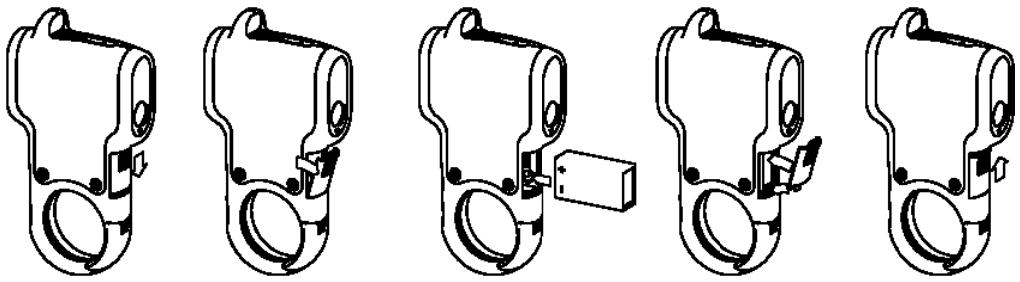
USING THE CARABINEER CLIP
The handle of the PinPro was designed with an integrated carabiner clip easily allowing the golfer to conveniently attach the PinPro to a golf bag when not in use. When it's time to determine distance to the next object on the course, simply detach the PinPro from the bag; hold at arm-length, and "point and shoot" your way to lower scores.
OPERATIONAL SUMMARY
While holding the product in your hand at arm-length, turn the unit ON by quickly pressing and releasing the trigger with your index finger. All liquid crystal segments and icons will initially be displayed. The trigger is located underneath the objective lenses and when depressed again for ranging generates an audio beep. Next, look through the red dot sighting system and locate the red dot. The object you intend to acquire distance to can easily be targeted by placing the red dot upon the object.
The PinPro features two targeting modes, PinFire Mode and Non-PinFire Mode. When a target is acquired in PinFire Mode the audio alarm sounds two beeps and distance is displayed on the external LCD. When a target is acquired in Non-PinFire Mode the audio alarm sounds three beeps and the distance is displayed on the external LCD. Once the unit is ON, PinFire Mode is initiated by a quick press and release of the trigger. PinFire Mode should be used when the REFLECTIVE prism is attached to the top of the flag stick. While in this mode, the laser pulses will continue firing for approximately 5 seconds and then stop.
If the trigger is pressed and held the unit will go into Non-PinFire Mode and will hit most anything without a reflective prism to 450 yards. This mode can be activated by pressing the trigger button after 2-3 seconds of PinFire mode. You may either hold the button from the initial press, or press and hold the trigger anytime after the 2 - 3 seconds of PinFire Mode (i.e. quick press-release, wait 2 - 3s , press and hold). Non-PinFire Mode is maintained as long as the trigger is pressed, a valid reading is obtained, or the timeout expires.
Note:
- Once activated, the PinPro LCD will remain active and display the last distance measurement for 15 seconds. You can depress the trigger again at any time to distance to a new target. As with any laser device, it is not recommended to directly view the emissions for long periods of time with magnified lenses.
- Make sure you aiming the PinPro to objects at least 7 yards away as this is the minimum distance it is capable.
- PinFire Mode will provide distances much faster than Non-PinFire Mode as long as the intended target contains a reflective prism.
FEATURES
Your PinPro's LCD incorporates illuminated indicators and audio tones that advise you unit of measure, when the laser is active, the battery charge is low, and when a target has been acquired. A summary of these features is presented below:
ILLUMINATING INDICATORS
Low Battery - When the external liquid crystal display reads 108 (i.e. low battery), the battery charge is getting low and the 9-volt alkaline battery should be replaced.
Unit of Measure - The PinPro can be used to measure distances in yards or meters. The unit of measure indicators are located towards the top portion of the LCD. To select between yards and meters, the unit should be off. Then press and hold the trigger for approximately 5 seconds. During this time all liquid crystal segments and icons will be displayed. The PinPro will beep twice and either the "Y" for Yards or "M" for Meters will be displayed. As you continue to depress the trigger, the display will toggle back and forth between Yards and Meters. Once the unit of measure desired is displayed, simply release the trigger. The PinPro will return to the last unit of measure setting used each time the unit is turned on.
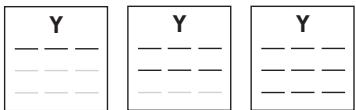
PinFire Mode - The PinPro is ready to fire when the external display shows a solid " -". A quick press and release activates PinFire Mode and the PinPro will beep once. In this mode the display horizontally scrolls line segments as follows:

Non-PinFire Mode - NON-PinFire Mode is indicated by a vertical scroll of all 3 '--' segments in the numeric display.
AUDIO TONES:
One Beep:
- Upon initial firing indicates the laser is active and pulses are being emitted from the objective lens.
- The laser has finished firing and distance was not acquired.
Two Beeps:
- Indicates a target has been acquired in PinFire Mode.
- Heard during unit of measure set-up
Three Beeps:
- Indicates a target is acquired in Non-PinFire mode.
SPECIFICATIONS
Dimensions: 6.2 × 3.2 × 1.2 inches
Weight: 6.5 oz.
Accuracy: + / - 1 yard
Display: External Liquid Crystal Display
Power Source: 9 volt alkaline battery
Single Button Operation
Water Resistant
Unit of Measure: Yards or Meters
7-yard minimum, 450 yards to trees and
330 yards to a reflective prism
Integrated Carabineer Clip
Red Dot Sighting System
Includes Case
CLEANING
Gently blow away any dust or debris on the lenses (or use a soft lens brush). To remove dirt or fingerprints, clean with a soft cotton cloth, rubbing in a circular motion. Use of a coarse cloth or unnecessary rubbing may scratch the lens surface and eventually cause permanent damage. For a more thorough cleaning, photographic lens tissue and photographic-type lens cleaning fluid or isopropyl alcohol may be used. Always apply the fluid to the cleaning cloth - never directly on the lens.
WARRANTY/REPAIR - TWO-YEAR LIMITED WARRANTY
Your Bushnell® product is warranted to be free of defects in materials and workmanship for two years after the date of purchase. In the event of a defect under this warranty, we will, at our option, repair or replace the product, provided that you return the product postage prepaid. This warranty does not cover damages caused by misuse, improper handling, installation, or maintenance provided by someone other than a Bushnell Authorized Service Department.
Any return made under this warranty must be accompanied by the items listed below:
1) A check/money order in the amount of S10.00 to cover the cost of postage and handling
2) Name and address for product return
3) An explanation of the defect
4) Proof of Date Purchased
5) Product should be well packed in a sturdy outside shipping carton, to prevent damage in transit, with return postage prepaid to the address listed below:
IN U.S.A. Send To:
Bushnell Outdoor Products
Attn.: Repairs
8500 Marshall Drive
Lenexa, Kansas 66214
IN CANADA Send To:
Bushnell Outdoor Products
Attn.: Repairs
25A East Pearce Street, Unit 1
Richmond Hill, Ontario L4B 2M9
For products purchased outside the United States or Canada please contact your local dealer for applicable warranty information.
In Europe you may also contact Bushnell at:
BUSHNELL Outdoor Products GmbH
European Service Centre
MORSESTRASSE 4
D-50769 KÖLN
GERMANY
Tel: +49 (0) 221 709 939 3 Fox: +49 (0) 221 709 939 8
This warranty gives you specific legal rights. may have other rights which vary from country to country.
2008 Bushnell Outdoor Products
TROUBLE SHOOTING TABLE
If unit does not turn on – LCD does not illuminate:
Depress trigger.
- Check and if necessary, replace battery.
If unit powers down (display goes blank when attempting to power the laser):
- The battery is either weak or low quality. Replace the battery with a good quality alkaline battery. Heavy Duty alkaline batteries are NOT recommended.
The last range reading is still displayed before ranging another target:
- The last range reading does not need to be cleared before ranging another target. Simply aim at the new target using the red dot sighting system and depress the trigger.
If target range cannot be obtained:
Make sure LCD is illuminated.
- Make sure that the trigger is being depressed
- Make sure that nothing, such as your hand or finger, is blocking the objective lenses (lenses closest to the target) that emit and receive the laser pulses.
- Make sure unit is held steady while depressing trigger.
- Make sure a reflective prism is installed on top of the flag as this product was designed specifically for courses with reflective prisms.
FCC NOTE
This equipment has been tested and found to comply with the limits for a Class B digital device, pursuant to Part 15 of the FCC Rules. These limits are designed to provide reasonable protection against harmful interference in a residential installation. This equipment generates, uses and can radiate radio frequency energy and, if not installed and used in accordance with the instructions, may cause harmful interference to radio communications. However, there is no guarantee that interference will not occur in a particular installation. If this equipment does cause harmful interference to radio or television reception, which can be determined by turning the equipment off and on, the user is encouraged to try to correct the interference by one or more of the following measures:
- Reorient or relocate the receiving antenna.
- Increase the separation between the equipment and receiver.
- Connect the equipment into an outlet on a circuit different from that to which the receiver is connected.
- Consult the dealer or an experienced radio/TV technician for help.
Shielded interface cable must be used with the equipment in order to comply with the limits for a digital device pursuant to Subpart B of Part 15 of FCC Rules.
Specifications and designs are subject to change without any notice or obligation on the part of the manufacturer.
Laser Radiation: Do not view directly with optical instruments
Class 1M Laser product
Complies with 21 CFR 1040.10 and 1040.11 for laser products except for deviations pursuant to
Laser Notice No. 50, dated June 24, 2007
FCC
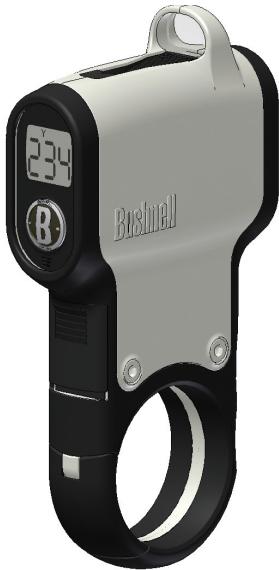
Bushnell
LASER RANGEFINDERS
PINPRO
LA DISTANCE JUSQU'AU DRAPEAU À CHAQUE MESURE!
Bushnell Outdoor Products
Bushnell Outdoor Products
Attn.: Repairs
Attn.: Repairs
8500 Marshall Drive
25A East Pearce Street, Unit 1
Lenexa, Kansas 66214
Richmond Hill, Ontario L4B 2M9
BUSHNELL Outdoor Products GmbH
European Service Centre
MORSESTRASSE 4
D-50769 KOLN GERMANY
Tel: +49 (0) 221 709 939 3
Fax: +49 (0) 221 709 939 8
Bushnell Outdoor Products
Attn.: Repairs
8500 Marshall Drive
Lenexa, Kansas 66214
EN CANADA enviar a:
Bushnell Outdoor Products
Attn.: Repairs
25A East Pearce Street, Unit 1
Richmond Hill, Ontario L4B 2M9
BUSHNELL Outdoor Products GmbH
European Service Centre
MORSESTRASSE 4
D-50769 KOLN GERMANY
Tél: +49 (0) 221 709 939 3 Fax: +49 (0) 221 709 939 8
Bushnell Outdoor Products
Attn.: Repairs
8500 Marshall Drive
Lenexa, Kansas 66214
Adresse in KANADA:
Bushnell Outdoor Products
Attn.: Repairs
25A East Pearce Street, Unit 1
Richmond Hill, Ontario L4B 2M9
BUSHNELL Outdoor Products GmbH
European Service Centre
MORSESTRASSE 4
D-50769 KOLN
GERMANY DEUTSCHLAND
Tel: +49 (0) 221 709 939 3
Fax: +49 (0) 221 709 939 8
Bushnell Outdoor Products
Attn.: Repairs
8500 Marshall Drive
Lenexa, Kansas 66214
Recapito in Canada:
Bushnell Outdoor Products
Attn.: Repairs
25A East Pearce Street, Unit 1
Richmond Hill, Ontario L4B 2M9
European Service Centre
MORSESTRASSE 4
D-50769-Cologne
Germania
Tél: +49 (0) 221 709 939 3
Fax:+49(0)2217099398
2008 Bushnell Outdoor Products
Bushnell Outdoor Products
Attn.: Repairs
8500 Marshall Drive
Lenexa, Kansas 66214
NO CANADÁ REMETER PARA:
Bushnell Outdoor Products
Attn.: Repairs
25A East Pearce Street, Unit 1
Richmond Hill, Ontario L4B 2M9
Para produits adquiridos fora dos Estados Unidos ou do Canada favorshipsurvevededor local quano a informacoes aplicaveis referentes a sua garantia. A Bushnell también pode ser contatada na Europa pelo telephone: BUSHNELL Outdoor Products GmbH
European Service Centre
MORSESTRASSE 4
D-50769 KOLN
Alemanha
Tel: +49 (0) 221 709 939 3
Fax: +49 (0) 221 709 939 8
©2008 Bushnell Outdoor Products
Antes do envio para conserto, consulte a Tabela de Resolucao de Problemas a seguir.
©2008 Bushnell Outdoor Products
Bushnell,™, ©, denotes trademark of Bushnell Outdoor Products
Literature #: 98-0271/04-08
- INTRODUCTION
- HOW IT WORKS
- RANGING PERFORMANCE
- GETTING STARTED
- INSERTING THE BATTERY
- USING THE CARABINEER CLIP
- OPERATIONAL SUMMARY
- Note:
- FEATURES
- ILLUMINATING INDICATORS
- AUDIO TONES:
- One Beep:
- Two Beeps:
- Three Beeps:
- SPECIFICATIONS
- CLEANING
- WARRANTY/REPAIR - TWO-YEAR LIMITED WARRANTY
- IN U.S.A. Send To:
- IN CANADA Send To:
- In Europe you may also contact Bushnell at:
- TROUBLE SHOOTING TABLE
- FCC NOTE
- Bushnell
- PINPRO
- Recapito in Canada:
- NO CANADÁ REMETER PARA:
Brand : BUSHNELL
Model : PINPRO
Category : Laser rangefinder