
M3000 - Bluetooth Headset PLANTRONICS - Free user manual and instructions
Find the device manual for free M3000 PLANTRONICS in PDF.



| Brand | Plantronics |
| Model | M3000 |
| Product Type | Bluetooth Headset (headset with microphone) |
| Wireless Technology | Bluetooth 2.4 GHz |
| Supported Bluetooth Profiles | Headset profile and hands-free profile |
| Power Supply | Built-in rechargeable battery, charging via mains charger (5V / 180 mA) |
| Initial Charging Time | 8 hours (first use) |
| Normal Charging Time | 90 minutes |
| Charge Indication | Red LED (charging), green (charge complete) |
| Main Functions | Call control, volume, mute, call reject, last number redial, call transfer, noise-canceling microphone |
| Ear Adjustment | Left or right with removable earhook (small and large sizes supplied) |
| Maintenance and Cleaning | Clean the exterior with a dry cloth once a month. Do not immerse in water. |
| Safety | Turn off in regulated areas (airplanes, hospitals). Use only the supplied charger. Recycle the battery. |
| Available Spare Parts | M3000 battery, earhook assortments (standard and ultra-comfortable), stabilizer, neckband, chargers, car adapter, carrying case |
| Warranty | 2 years against manufacturing defects |
| Phone Support | 0825 0825 99 |
| Website | www.plantronics.com |
Frequently Asked Questions - M3000 PLANTRONICS
User questions about M3000 PLANTRONICS
0 question about this device. Answer the ones you know or ask your own.
Ask a new question about this device
Download the instructions for your Bluetooth Headset in PDF format for free! Find your manual M3000 - PLANTRONICS and take your electronic device back in hand. On this page are published all the documents necessary for the use of your device. M3000 by PLANTRONICS.
USER MANUAL M3000 PLANTRONICS
Plantronics Ltd, Interface Business Park, Bincknoll Lane,
Wootton Bassett, Wiltshire SN4 8QQ. ENGLAND
www.plantronics.com

PLANTRONICS
World Leader in Communications Headsets
C€ 0682①
aannnnae aee
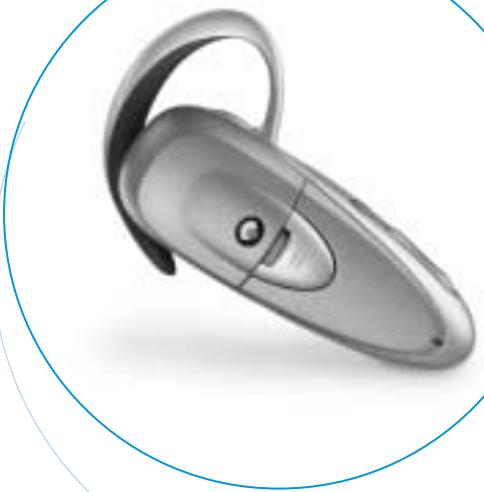
M3000
BLUETOOTH™ HEADSET
User Guide
Bedienungsanleitung
Brugervejledning
Manual del usuario
Plantronics 2 year Warranty and Repair Service
UK Products under warranty are replaced free of charge.
- All units serviced to full production standards using original factory parts.
0800 410014
Thank you for selecting the M3000 Headset from Plantronics. The M3000 uses 2.4GHz Bluetooth™ technology to provide lightweight, hands-free, private and secure communication - without the inconvenience of wires.
Your M3000 is compatible with devices that support the Bluetooth™ Headset and/or Handsfree Profiles.
For the latest compatibility information and pairing instructions for your model of telephone please visit
www.plantronics.com or call
UK:0800410014
Ireland: 1800551896
Australia: 001 1800 5444 6600
Canada:8005444660
New Zealand: 0 0800 5444 6600
www.plantronics.com
DIAGRAM KEY
1 Call Control Button
6 Earloop
2 Indicator Light
7 Speaker
3 Power/Mute Function
8 AC Charger Port
4 Volume Up
9 Noise-cancelling Microphone
5 Volume Down
1. GETTING STARTED
To use your Plantronics M3000 Bluetooth™ headset, please follow these simple steps:
i. Charge your headset battery.
ii. Switch your headset on.
iii. Pair your headset with a Bluetooth™ Telephone.
i. CHARGING THE BATTERY
NOTE: The battery pack for your M3000 is already installed when you purchase your headset. If the battery pack has been removed, or for instructions on re-installing the battery, see Section 5.
FIG. 2.1 Connect the included AC Charger to the mains power supply and then to the headset charger port. Within a few seconds, the INDICATOR will illuminate red. Charge the headset overnight or for at least 8 hours before first use.
Subsequent charges take just 90 minutes and the INDICATOR will turn green when the headset is fully charged.
LOW BATTERY WARNING
When the headset is on and the battery becomes low, the headset emits a beep every 20 seconds.
The INDICATOR also flashes red when the battery needs to be recharged. Recharge the battery as described in Section 1.i.
Tip: Fully draining the battery once a month can improve battery life. Otherwise, it is best to charge your headset whenever possible. Avoid charging in excessive heat (above 104^ / 40^ ) or cold (below 50^ / 10^ ).
The headset may also be charged using a car lighter adapter, available as an optional accessory.
The battery used in your headset must be recycled or disposed of properly. Contact your local recycling centre for proper disposal instructions.
ii. SWITCHING YOUR HEADSET ON
FIG. 2.2 To turn your headset on, unplug your headset from the AC Charger and then PRESS and HOLD the POWER/MUTE button until the INDICATOR flashes green.
FIG. 2.3 The INDICATOR light will flash green every 2-3 seconds whilst the headset is on.
To turn your headset off, PRESS and HOLD the POWER/MUTE button until the INDICATOR lights red.
iii. PAIRING YOUR HEADSET
Prior to using your headset for the first time, you MUST pair it with another Bluetooth™ device, such as a mobile telephone. The information below describes pairing instructions for a typical device. For specific instructions, refer to your mobile telephone user guide, or visit www.plantronics.com to view pairing instructions for your model of telephone.
TURN ON BOTH DEVICES
FIG. 3.1 Once both devices are turned on, place the headset and telephone where they are easily viewable. Make sure the Bluetooth™ feature of your telephone is turned on.
SELECT PAIRING MODE
FIG. 3.2 On your headset, PRESS and HOLD both the CALL CONTROL and VOLUME UP keys for about 2 seconds until the INDICATOR light begins to flash red then green.
Your headset will remain discoverable by other Bluetooth™ devices for 60 seconds.
FIG. 3.3 On your telephone, search for devices by selecting DISCOVER from the Bluetooth™ options menu. Check your mobile telephone display and follow any instructions.
When prompted by your telephone, enter four zeros (0000). This is your headset passkey. Some devices may not require a passkey.
When pairing is successful, the headset will sound a tone and return to standby mode. Check your mobile telephone display to see if pairing succeeded and follow any instructions. You should now be able to make and receive calls using your headset.
NOTE: If pairing is not completed within 60 seconds, the headset will return to on/standby mode without sounding a success tone.
Refer to your telephone user guide and repeat the pairing process.
2. GETTING THE PERFECT FIT
SELECT LEFT OR RIGHT EAR
FIG. 4.1 The headset, as packaged, is ready to be worn on your right ear - a letter R on the earloop is facing outward.
For left ear wear, simply unsnap the earloop from the headset by pulling gently at the base of the earloop ring.
Flip the earloop over (with the letter L facing outward) and snap it back onto the headset by applying gentle pressure on the base of the earloop ring.
SLIDE THE HEADSET OVER YOUR EAR
FIG. 4.2 Using one hand, gently slide the earloop behind your ear in a twisting motion until you achieve a snug, comfortable fit.
ADJUST FOR SOUND AND COMFORT
FIG. 4.3 Adjust the MICROPHONE so it aligns with your mouth. Make sure that the headset speaker is positioned correctly over your ear and that the earloop does not cause discomfort.
Your headset, as packaged, is configured with a small-size earloop. Alternatively, install the larger earloop included in your package by following the instructions above for left/right ear selection.
3. USING YOUR HEADSET
ANSWERING A CALL
FIG. 5.1 To answer a call, wait for the headset to ring, then PRESS and RELEASE the CALL CONTROL button.
If the connection to your telephone fails when answering a call, you will hear two short tones. Check the display on your telephone to continue the call.
During a call, the headset INDICATOR light will flash green showing a call is in progress.
ENDING A CALL
To end a call, PRESS and RELEASE the CALL CONTROL button any time during a call.
MAKING A CALL
To make a call, dial using your telephone keypad or voice-dialing capabilities.
TRANSFERING TO THE HEADSET
If you are using your telephone handset, you can transfer the call to your headset by pressing and releasing the CALL CONTROL button.
NOTE: Refer to your telephone user guide for additional instructions for using a headset.
ADJUSTING THE VOLUME & USING MUTE FEATURE
FIG. 5.2 To increase the volume level, PRESS and RELEASE the VOLUME UP button. To decrease the volume level, PRESS and RELEASE the VOLUME DOWN button.
When the maximum or minimum volume level is reached, the headset sounds two short tones.
MUTE FEATURE
The mute feature, when activated, allows you to hear the person you are calling, but they cannot hear you.
FIG. 5.2 To mute a call, PRESS and RELEASE the POWER/MUTE button. Two tones indicate the mute function is on. When MUTE is enabled, the headset sounds two short tones every 60 seconds.
To de-activate mute, PRESS and RELEASE the POWER/MUTE button again.
Two tones indicate the Mute function is off.
4. ADDITIONAL FEATURES
NOTE: These features may be available if your telephone supports the Handsfree Profile. Functionality varies depending on the telephone model you have. Refer to your telephone user guide for additional information, or visit www.plantronics.com.
CALL TRANSFER
FIG. 5.3 When using your headset during a call, you can transfer the call back to your telephone. PRESS and HOLD the CALL CONTROL button. You will hear a tone when you press the CALL CONTROL button.
When you hear a second tone, the call has been transferred and you may release the CALL CONTROL button.
CALL REJECT
FIG. 5.3 When your telephone handset is ringing, you can reject the call without answering. PRESS and HOLD the CALL CONTROL button. You will hear a tone when you press the CALL CONTROL button.
When you hear a second tone, the call has been rejected and you may release the CALL CONTROL button.
LAST NUMBER REDIAL
FIG. 5.3 When making a call, you can dial the last number called using your headset. PRESS the CALL CONTROL button twice to radial the last number. Each time you press the CALL CONTROL button you will hear a tone. You will hear another tone when the last number has been redialled.
Check the display on your telephone for call progress.
5. REPLACING OR INSTALLING A NEW BATTERY
IMPORTANT: If your headset stops responding to button presses, remove and re-install the battery as described below.
FIG. 6.1 Open the battery compartment by pushing back on the battery door.
FIG. 6.2 Remove the battery by pulling on the tab to expose the red and black wires and battery connector. Gently pull at the base of the wires to unplug the battery.
FIG. 6.3 To install a new battery, insert the battery plug as shown in the illustration. Fold the wire under the battery pack and gently push the battery in place. Replace the battery door by pushing it forward until it snaps shut.
6. TROUBLESHOOTING
PROBLEM
My headset stops responding to button presses.
Remove and re-install the battery pack (see Section 5).
PROBLEM
My headset does not work with my telephone.
Ensure your headset is turned on. See Section 1.ii for detailed instructions.
Ensure the battery is fully charged.
Ensure your telephone is turned on, properly charged, and able to make calls.
Ensure the Bluetooth™ feature of your telephone is turned on.
Refer to your mobile telephone user guide for specific instructions, or visit www.plantronics.com to view pairing instructions for your model of telephone.
PROBLEM
Callers cannot hear me.
Ensure the microphone (see Figure 4.3) is positioned properly toward your mouth.
Check that the headset is not in mute mode (see Figure 5.2).
PROBLEM
I cannot hear callers.
Increase the volume using the VOLUME UP control (see Figure 5.2).
Ensure the headset speaker (see Figure 4.2) is positioned snugly over your ear.
PROBLEM
The headset is uncomfortable.
Select the correct size earloop for your ear. Both a small and a large earloop are included with your headset.
Ensure the earloop is correctly positioned so no pressure is being exerted on any part of your ear.
PROBLEM
How do I use the headset on my left ear?
The headset, as packaged, is ready to be used on your right ear. However, with one very simple adjustment, the headset is easily configured for your left ear. See Figure 4.1 for detailed instructions.
IF YOU NEED ADDITIONAL ASSISTANCE, PLEASE VISIT
www.plantronics.com OR CALL:
UK: 0800 410014
Ireland: 1800551896
Australia: 001 1800 5444 6600
Canada:8005444660
New Zealand: 0 0800 5444 6600
MAINTENANCE HINTS FOR OPTIMAL PERFORMANCE
- STORING YOUR HEADSET. Consider turning your headset off before placing it in your pocket or bag. If the TALK button is accidentally depressed, your telephone may place an unintended call.
- OUTDOOR USE. Your headset's noise-cancelling feature may make it difficult for callers to hear you in windy conditions. Try to find a sheltered location when using your headset outdoors.
- Replace the headset's rechargeable battery every 12 months.
- Clean the outside of the headset with a dry cloth once a month.
7. PARTS AND ACCESSORIES
M3000 BATTERY - Replacement headset battery pack.
M3000 EARLOOP SET - One large and one small replacement ear-loop.
M3000 EXTRA COMFORT EARLOOP SET - A set of 3 softer ear-loops (S/M/L).
M3000 Headband – Over-the-head headband for long-term wearing comfort.
M3000 Neckband - Behind-the-head neckband for discrete long-term wearing comfort.
AC Charger - UK AC Charger Euro AC Adapte
TRAVEL AC Charger - Lightweight multi-voltage adapter. European and UK versions available.
CARRY CASE -Soft case to protect your headset. Includes belt clip.
CAR LIGHTER ADAPTER - To charge your M3000 headset from any 12 / 24v car lighter socket.
8. WARRANTY AND SERVICE
- The following 2 year warranty and service information applies only to product purchased and used in the countries listed on page 5. For warranty information in other countries, refer to the additional warranty card included in your package, or visit www.plantronics.com/warranty. You may also contact your local retail dealer for warranty information in your country.
- Plantronics guarantees the satisfactory condition of the equipment with regard to manufacturing and material defects for 2 years from the date of purchase. (Please keep your original receipt safely).
- This product must be installed and used in accordance with the instructions contained in this User Guide, and serviced at an approved Plantronics Service Centre. Failure to comply with these conditions may render the warranty invalid.
- Register your headset online. To receive important updates and other valuable information, visit www.plantronics.com and click on "on-line registration".
9. IMPORTANT SAFETY INFORMATION
SAFETY
Check local laws regarding use of a mobile phone and headset while driving. If you use the product while driving ensure your attention and focus remains on your responsibility of driving safely.
CHILDREN
Never allow children to play with the headset—small parts may be a choking hazard.
Batteries can be swallowed by children and are dangerous if swallowed. Always store and dispose of batteries where children can't reach them.
This headset contains a very low power radio, which when turned on, receives and sends Radio Frequency (RF) signals. It is well below all safety standard guidelines for RF exposure.
Observe all signs that require an electrical device or RF radio product to be switched off in designated areas. These could include hospitals, blasting areas, and potentially explosive atmospheres.
Turn off your headset prior to boarding an aircraft. Do not use your headset in an aircraft.
Never mount or store your headset over any air bag deployment area as serious injury may result when an air bag deploys.
BATTERY
CAUTION: To reduce the risk of fire or injury to persons, read and follow these instructions.
- Use only the battery pack supplied with this product.
- Do not dispose of battery in a fire - it may explode. Check with local regulations regarding battery recycling and disposal.
- Do not open or mutilate the battery pack. Released electrolyte is corrosive and may cause damage to eyes or skin and may be toxic if swallowed.
- Exercise care in handling the battery in order not to "short" the battery contacts with conducting materials such as rings, bracelets, or keys. The battery or conductor may overheat and cause burns.
-
Charge the battery in accordance with the instructions supplied with this headset.
-
Observe proper orientation between battery and charger contacts.
- Avoid charging in excessive heat (above 104^ / 40^ ) or cold (below 50^ / 10^ ).
- Always remove the AC Charger before opening the battery door.
CHARGING
CAUTION: Use only the supplied Class 2 AC adapter to charge the headset from an AC voltage or wall outlet.
CAUTION: If the headset becomes hot during charging, disconnect the AC adapter from the wall and contact qualified service personnel.
CAUTION: Do not disassemble the AC adapter of this product as it may expose you to dangerous voltages or other risks. Incorrect reassembly can cause electric shock when the product is subsequently used.
CAUTION: Do not use the charger outdoors or in damp areas.
Only charge the headset battery in accordance with the instructions of this manual.
Charger Output: 5V/180mA maximum, centre contact positive.
CARE
Never submerge your headset in water or other liquids.
Protect your headset from spills, excessive rain, and wet locations.
Do not use liquid cleaners or aerosol cleaners as they may damage the headset or finish of the headset.
Use a dry cloth to clean the external portions of the headset.
Do not stick anything inside the product as this may damage internal components.
EXPOSURE TO RADIO FREQUENCY RADIATION
The internal wireless radio operates within guidelines found in radio frequency safety standards and recommendations, which reflect the consensus of the scientific community.
Plantronics therefore believes the internal wireless radio is safe for use by consumers. The level of energy emitted is far less than the electromagnetic energy emitted by wireless devices such as mobile phones. However, the use of wireless radios may be restricted in some situations or environments, such as aboard airplanes. If you are unsure of restrictions, you are encouraged to ask for authorization before turning on the wireless radio.
REGULATORY INFORMATION
Hereby, Plantronics BV declares that this M3000 Headset is in compliance with the essential requirements and other relevant provisions of Directive 1999/5/EC.
To view the Declaration of Conformity for this product please see www.plantronics.com/documentation.
WILLKOMMEN
Bluetooth™ -Headset M3000
ii. ANSCHALTEN IHRES HEADSETS
iii. PAAREN IHRES HEADSETS
INFORMATIONEN ZU VORSCHRIFTEN
TIP TIL VEDLIGEHOLDELSF FOR AT OPNA OPTIMAL YDEEVNE
ii. MISE SOUS TENSION DU MICRO-CASQUE
TRANSFERER AU MICRO-CASQUE
ACCENSIONE DI ENTRAMBI I DISPOSITIVI
7. RICAMBI E ACCESSORI
VEDLIKEHOLDSTIPS FOR OPTIMAL YTHENSE
BE/LUX:0080075268766
www.plantronics.com
VERKLARING BIJ HET SCHEMA
BATTERIJ-BIJNA-LEEG-WAARSCHUWING
iii. DE HEADSET AFSTEMMEN
SCHAKEL BEIDE APPARATEN IN
RADIO MET LAAG VERMOGEN (RF
- PLANTRONICS
- M3000
- BLUETOOTH™ HEADSET
- Plantronics 2 year Warranty and Repair Service
- DIAGRAM KEY
- GETTING STARTED
- i. CHARGING THE BATTERY
- LOW BATTERY WARNING
- ii. SWITCHING YOUR HEADSET ON
- iii. PAIRING YOUR HEADSET
- TURN ON BOTH DEVICES
- SELECT PAIRING MODE
- GETTING THE PERFECT FIT
- SELECT LEFT OR RIGHT EAR
- SLIDE THE HEADSET OVER YOUR EAR
- ADJUST FOR SOUND AND COMFORT
- USING YOUR HEADSET
- ANSWERING A CALL
- ENDING A CALL
- MAKING A CALL
- TRANSFERING TO THE HEADSET
- ADJUSTING THE VOLUME & USING MUTE FEATURE
- MUTE FEATURE
- ADDITIONAL FEATURES
- CALL TRANSFER
- CALL REJECT
- LAST NUMBER REDIAL
- REPLACING OR INSTALLING A NEW BATTERY
- TROUBLESHOOTING
- PROBLEM
- IF YOU NEED ADDITIONAL ASSISTANCE, PLEASE VISIT
- MAINTENANCE HINTS FOR OPTIMAL PERFORMANCE
- PARTS AND ACCESSORIES
- WARRANTY AND SERVICE
- IMPORTANT SAFETY INFORMATION
- SAFETY
- CHILDREN
- BATTERY
- CHARGING
- CARE
- EXPOSURE TO RADIO FREQUENCY RADIATION
- REGULATORY INFORMATION
- WILLKOMMEN
- Bluetooth™ -Headset M3000
- ii. ANSCHALTEN IHRES HEADSETS
- iii. PAAREN IHRES HEADSETS
- INFORMATIONEN ZU VORSCHRIFTEN
- TIP TIL VEDLIGEHOLDELSF FOR AT OPNA OPTIMAL YDEEVNE
- ii. MISE SOUS TENSION DU MICRO-CASQUE
- TRANSFERER AU MICRO-CASQUE
- ACCENSIONE DI ENTRAMBI I DISPOSITIVI
- RICAMBI E ACCESSORI
- VEDLIKEHOLDSTIPS FOR OPTIMAL YTHENSE
- VERKLARING BIJ HET SCHEMA
- BATTERIJ-BIJNA-LEEG-WAARSCHUWING
- iii. DE HEADSET AFSTEMMEN
- SCHAKEL BEIDE APPARATEN IN
- RADIO MET LAAG VERMOGEN (RF
Brand : PLANTRONICS
Model : M3000
Category : Bluetooth Headset