
HL 10 - Audio accessory PLANTRONICS - Free user manual and instructions
Find the device manual for free HL 10 PLANTRONICS in PDF.



| Product type | Telephone handset lifter lever |
| Brand | Plantronics |
| Model | HL10 |
| Dimensions (approx.) | Approximately 7 cm x 5 cm x 3 cm (estimate) |
| Weight | Approximately 50 g (estimate) |
| Power | None (mechanical, connected to the headset amplifier) |
| Main function | Automatically lift and replace the handset for hands-free calls |
| Compatibility | Designed for phones with standard handset and Plantronics headsets |
| Adjustments | 3 heights/angles via switch (low, medium, high position) |
| Included accessories | Lever power cable, mounting clips, extension pole with stabilizers, optional built-in speaker microphone |
| Installation | Adhesive attachment to phone base; requires height adjustment |
| Maintenance and cleaning | Clean with a damp cloth; no liquid or aerosol cleaners |
| Safety | Do not disassemble; unplug before cleaning; keep fingers and objects away from the lever |
| Repairability | Contact Plantronics technical support for any repairs |
Frequently Asked Questions - HL 10 PLANTRONICS
User questions about HL 10 PLANTRONICS
0 question about this device. Answer the ones you know or ask your own.
Ask a new question about this device
Download the instructions for your Audio accessory in PDF format for free! Find your manual HL 10 - PLANTRONICS and take your electronic device back in hand. On this page are published all the documents necessary for the use of your device. HL 10 by PLANTRONICS.
USER MANUAL HL 10 PLANTRONICS
Plantronics Acoustics
Italia Srl
Milano, Italia
Numero Verde: 800 950934
+39 02951 1900
Plantronics Iberia, S.L.
Madrid, Espana
Tel: 902 41 51 91 (ES)
800 844 517 (PT)
Nordic Region
Tel: Finland: 0800 117 095
Tel: Sverige: 02002 14681
Tel: Danmark: 8088 4610
Tel: Norge: 800 113 36
Plantronics Middle East,
Eastern Europe, and Africa
Tel: 800 0441 8026
+44(0)1793 842443
Plantronics Inc.
345 Encinal Street
Santa Cruz, CA 95060
USA Tel: (800) 544-4660


PLANTRONICS
SOUND INNOVATION
www.plantronics.com
HL10
HANDSET LIFTER ACCESSORY
ANTRONICS
SOUND INNOVATION
USERGUIDE
BENUTZERHANDBUCH
BRUGERVEJLEDNING
GUIA DEL USUARIO
GUIDE DE L'UTILISATEUR
GUIDA DELL'UTENTE
BRUKERHANDBOK
GEBRUIKERSHANDLEIDING
MANUAL DO UTILIZADOR
ANVANDARHANDBOK
KÄYTTÖOPAS
CONTENTS
UK English 8
DE Deutch 14
DK Dansk 20
ES Espanol 26
FR Francais 32
IT Italiano 38
NO Norsk 44
NL Nederlands 50
PT Portugues 56
SE Svenska 62
SF Suomi/Finnish 68
COMPONENTS
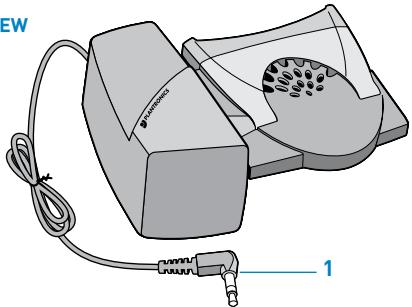
TOP VIEW
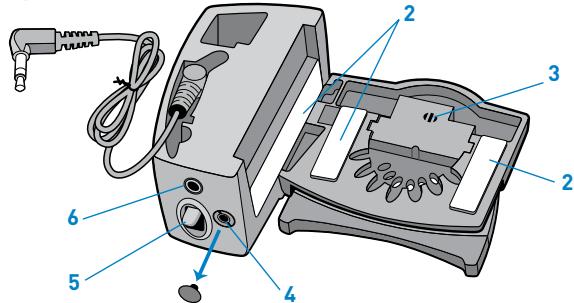
UNDERSIDE VIEW
EXTENDER ARM
(if required)

RINGER MICROPHONE
(if required)
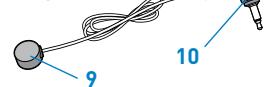
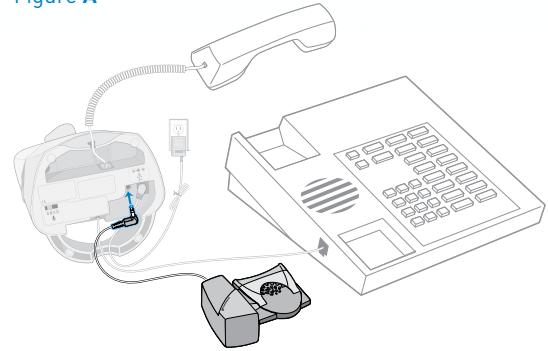
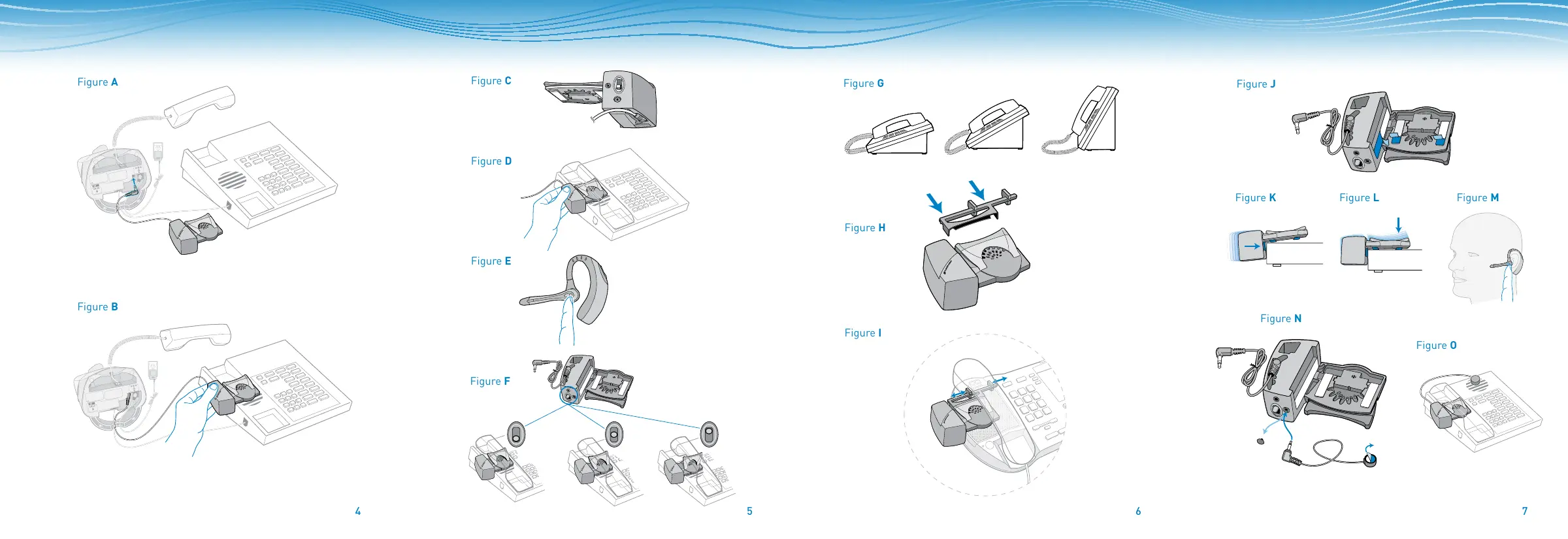
Figure A
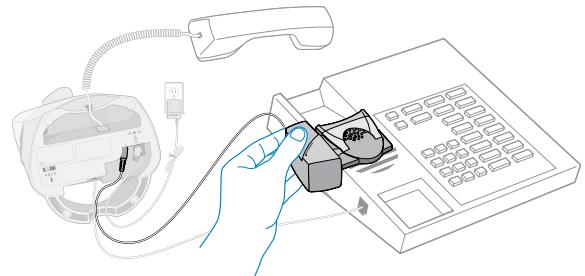
Figure B
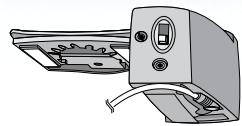
Figure C
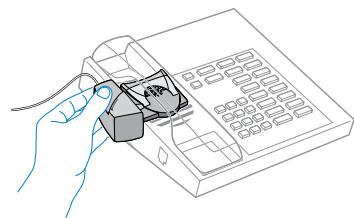
Figure D
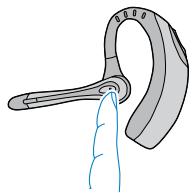
Figure E
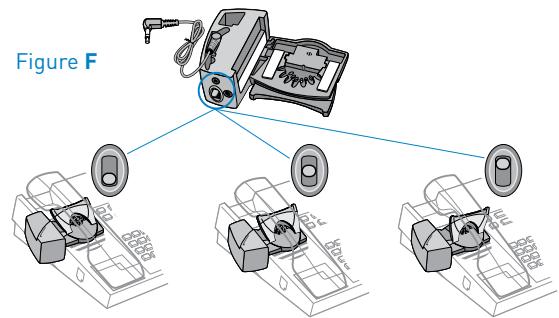
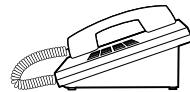
Figure G
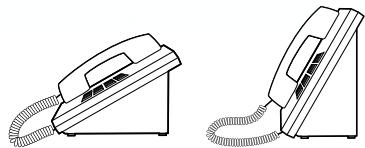
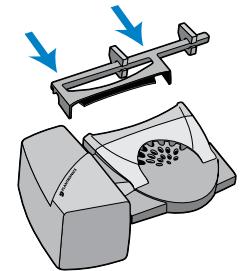
Figure H
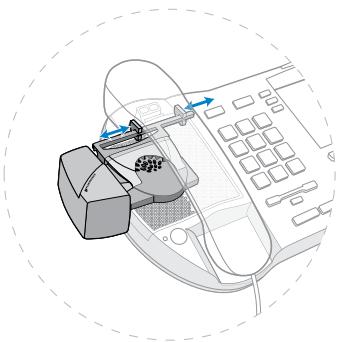
Figure I
Figure J
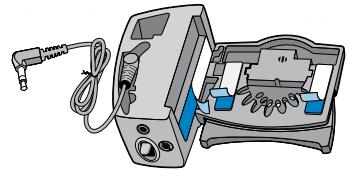
Figure L
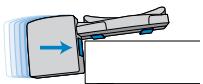
Figure K
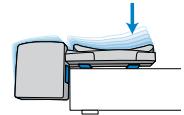

Figure M
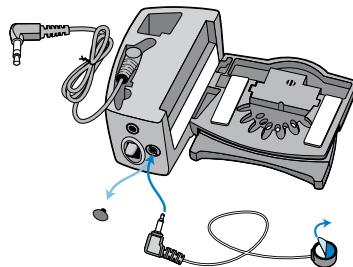
Figure N
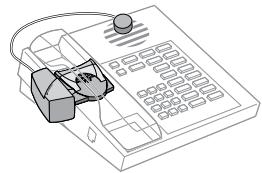
Figure 0
HL10 HANDSET LIFTER ACCESSORY
COMPONENTS KEY
1 Lifter Power Cord
2 Mounting Strips
3 Microphone
4 Ringer Microphone Jack
5 Handset Height Switch
6 Accessory Jack
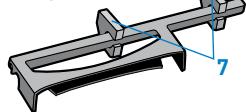
7 Stabilizers
8 Nortel i2004 phones only
9 Ringer Microphone
10 Ringer Microphone Plug
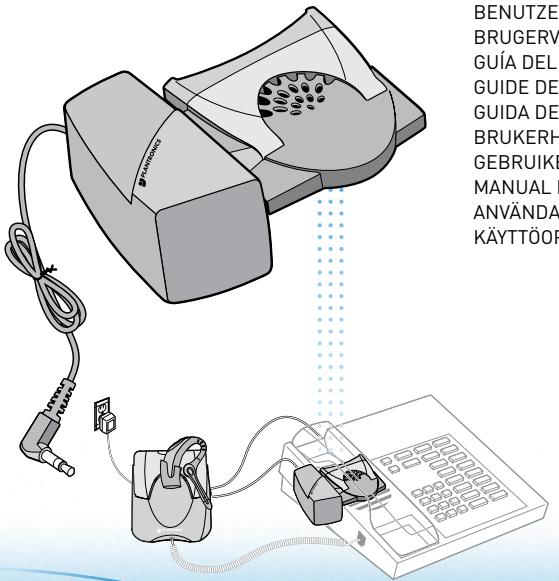
The HL10 Handset Lifter Accessory is designed to be used with a Plantronics Headset System. Please read these instructions to setup and use your HL10. Make sure your Plantronics Headset Wireless System is fully charged.
IMPORTANT: Follow setup instructions carefully.
SETTING UP THE HL10
IMPORTANT: Do not remove the mounting strip covers until all adjustments have been made.
- Connect the Lifter Power Cord (1) to the Accessory Jack (6) on the Plantronics amplifier. Be sure to press firmly for a tight fit.
- Remove the handset from the cradle or telephone base (Fig. A).
-
Clean the cradle and speaker areas of the phone and replace the handset.
-
Temporarily, place the HL10 on the phone under the handset and hold in place. The top edge of the lifter should touch the earpiece of the handset when the handset is placed in the cradle (Fig. B).
- Verify that the microphone on the HL10 is located above the telephone ringer speaker. If not, you will need to attach the Ringer Microphone [9].
ADJUSTING THE HL10 FOR YOUR TELEPHONE
The HL10 raises the handset to three heights and angles by sliding the Handset Height Switch (5) on the back of the Handset Lifter.
- Begin with the Handset Height Switch (5) in the lowest position (Fig. C).
- While holding the HL10 on the telephone base and wearing your headset, place the handset on the HL10 (Fig. D).
- Press the talk button on the headset to lift the handset from the cradle. Listen for a dial tone (Fig E).
- Press the talk button again to lower the handset and disconnect (Fig. E).
NOTE: If the HL10 does not lift the handset far enough to go off hook and return to the cradle easily, slide the Handset Height Switch (5) up to another position (Fig. F).
If the handset falls off the lifter, move the Handset Height Switch (5) down. The Stabilizers (7) on the Extender Arm can help steady the handset for more reliable operation.
NOTE: If your phone has an adjustable height, a lower setting may improve the performance of the HL10 (Fig. G).
If the handset still does not lift and lower smoothly, your telephone may require the Extender Arm accessory.
ATTACHING THE EXTENDER ARM (IF REQUIRED)
The Extender Arm is intended to increase the distance from the HL10 to the earpiece of the handset. The Stabilizers [7] can be shifted to the left or right to improve the stability of the handset on the HL10.
- Slide the Extender Arm onto the HL10 (Fig. H).
- Position the Stabilizers (7) on the outsides of the handset to gently grip the phone (Fig. 1).
- Read "Adjusting the HL10 for Your Telephone" to determine the correct HL10 height.
MOUNTING THE HL10 IN A PERMANENT POSITION
Once you have determined the best position for the Handset Height Switch (5), you can mount the HL10 on your telephone base.
- Remove the protective covers from the Mounting Strips (2) on the underside of the HL10 (Fig. J).
NOTE: If the side of the phone is curved, the protective cover on the side can be left on to improve the fit.
- Gently, place the HL10 into the position you have identified. Test that the lifter works (Fig. K).
- Once you have located the appropriate position, firmly press down on the top of the HL10 to attach the lifter to the telephone base (Fig. L).
NOTE: Use a rolling motion to attach the lifter.
- Place the handset on the HL10.
MAKING AND RECEIVING CALLS
While wearing your headset, press the talk button to activate the HL10. When you hear a dial tone, use the telephone key pad to dial the number (Fig. M).
To end the call, press the talk button again. The HL10 will return the handset to the cradle and disconnect the call.
If your headset does not beep when the phone rings, you may need to adjust the ringer on your phone.
- For best results, choose a traditional ring pattern on your phone.
- Set the telephone ring volume at mid range.
- If necessary, try different settings of ring pattern and volume until the headset beeps when the phone rings.
If your headset still does not ring, attach the Ringer Microphone Plug [10] to your HL10 and place the Ringer Microphone [9] over the ringer speaker of your phone.
USING THE RINGER MICROPHONE (IF REQUIRED)
If the HL10 microphone is not located above the ringer speaker on your phone, you must install the optional Ringer Microphone (Fig. N and Fig. 0).
- Remove the cover from the Ringer Microphone Jack (4) on the HL10.
- Connect the Ringer Microphone Plug (10) to the Ringer Microphone Jack (4).
- Place the Ringer Microphone [9] over the ringer speaker on the telephone. You should hear a beep in the headset when you receive a call.
- Remove the protective cover from the mounting tape and attach the Ringer Microphone [9] to the telephone ringer speaker.
IMPORTANT SAFETY INFORMATION
- Read all instructions before using.
- The intended purpose of this HL10 Handset Lifter Accessory is to lift and lower the telephone handset in conjunction with Plantronics amplifiers manufactured for use with the HL10 Handset Lifter. It should not be used for any other purpose.
- Modification of the product will void the warranty.
- Do not allow anything other than the telephone handset to rest on this product or locate it in an area where normal operation can be hampered. Additional weight will prevent the lifter from working.

WARNING
- When using telephone equipment and accessories, basic safety precautions should be taken to reduce risk of fire, electric shock, and injury to persons.
- Keep fingers and other objects clear of the lifting pad.
- To reduce risk of electric shock, do not disassemble this product. Contact the Plantronics Technical Assistance Center when service or repair work is required.
- Unplug the lifter from the amplifier or the amplifier from the power source (wall outlet) before cleaning. Do not use liquid cleaners or aerosol cleaners. Use a damp cloth for cleaning.
TELEFONHÖRER-LIFTER-ZUBEHÖR HL10
RINGA OCH TA EMOT SAMTAL
- PLANTRONICS
- HL10
- ANTRONICS
- CONTENTS
- COMPONENTS
- HL10 HANDSET LIFTER ACCESSORY
- COMPONENTS KEY
- SETTING UP THE HL10
- ADJUSTING THE HL10 FOR YOUR TELEPHONE
- ATTACHING THE EXTENDER ARM (IF REQUIRED)
- MOUNTING THE HL10 IN A PERMANENT POSITION
- MAKING AND RECEIVING CALLS
- USING THE RINGER MICROPHONE (IF REQUIRED)
- IMPORTANT SAFETY INFORMATION
- WARNING
- TELEFONHÖRER-LIFTER-ZUBEHÖR HL10
- RINGA OCH TA EMOT SAMTAL
Brand : PLANTRONICS
Model : HL 10
Category : Audio accessory