
HBH-20 - Bluetooth Headset ERICSSON - Free user manual and instructions
Find the device manual for free HBH-20 ERICSSON in PDF.



| Product Type | Bluetooth Hands-free Headset |
| Brand | Ericsson |
| Model | HBH-20 |
| Connectivity | Bluetooth (Headset profile) |
| Range | Up to 10 meters (without obstacles) |
| Battery type | Integrated rechargeable Li-ion |
| Charging time | Approximately 1 hour to 1h30 |
| Talk time | Approximately 3 hours (estimated) |
| Charging indicator | Red light (charging), green light (charged) |
| Buttons | On/Off, Volume +/-, Multi-function button |
| Main functions | Answer/end calls, voice dialing, call rejection, mute, volume adjustment |
| Pairing | Requires passkey (0000) |
| Compatibility | Ericsson Bluetooth phones and other brands (Headset profile) |
| Weight | Approximately 25 g |
| Maintenance and cleaning | Soft cloth, avoid liquids and extreme temperatures |
| Safety instructions | Turn off in airplanes, dangerous areas; do not expose to moisture |
| Warranty | 1 year (parts and labor) |
Frequently Asked Questions - HBH-20 ERICSSON
User questions about HBH-20 ERICSSON
0 question about this device. Answer the ones you know or ask your own.
Ask a new question about this device
Download the instructions for your Bluetooth Headset in PDF format for free! Find your manual HBH-20 - ERICSSON and take your electronic device back in hand. On this page are published all the documents necessary for the use of your device. HBH-20 by ERICSSON.
USER MANUAL HBH-20 ERICSSON
This device complies with Part 15 of the FCC rules. Operation is subject to the following two conditions: (1) This device may not cause harmful interference, and (2) This device must accept any interference received, including interference that may cause undesired operation.
Not for Commercial Use Ericsson Mobile Communications AB
English
Introduction 2
Preparing the handsfree 2
Using the handsfree 8
Troubleshooting 10
Additional Information 11
Declaration of Conformity 87
Ericsson HBH-20
First edition (July 2001)
This manual is published by Ericsson Mobile Communications AB, without any warranty. Improvements and changes to this manual necessitated by typographical errors, inaccuracies of current information, or improvements to programs and/or equipment, may be made by Ericsson Mobile Communications AB at any time and without notice. Such changes will, however, be incorporated into new editions of this manual.
All rights reserved.
©Ericsson Mobile Communications AB, 2001
Publication number: LZT 108 5119 R1A
INNOVATRON PATENTS.
Some of the services in this manual are not supported by all networks. This also applies to the GSM International Emergency Number 112.
Contact your network operator or service provider if you are in doubt whether you can use a particular service or not.
BLUETOOTH is a trademark owned by the Bluetooth SIG, Inc.
Important Information
Caution! Changes or modifications not expressly approved by Ericsson will void the user's authority to operate the equipment.
Introduction
The Bluetooth™ handsfree HBH-20 is a portable handsfree solution based on Bluetooth wireless technology.
See "Guidelines for safe and efficient use" on page 11 and "Limited warranty" on page 13 before using your handsfree.
What is Bluetooth wireless technology?
The Bluetooth wireless technology makes it possible to connect any compatible portable and stationary communications device without using cables. The technology is based on a radio link that offers fast and reliable transmission of voice and data information. It does not require a line-of-sight connection in order to establish communication. Bluetooth wireless technology uses a globally available frequency range intended to ensure communication compatibility worldwide.
When can I use my handsfree?
You can connect your HBH-20 handsfree to your mobile phone or PC - or any device with Bluetooth wireless technology that supports the Headset profile -
to keep your hands free for more important tasks when you are at the office or in the car. This user's guide focuses on how to use the handsfree with your mobile phone. When the handsfree is connected to your mobile phone, you can use voice control to make calls (if your phone supports this function). The phone can be tucked away in your pocket or in a bag. You can handle incoming and outgoing calls, and adjust the volume, using the buttons on the handsfree.
Preparing the handsfree
To be able to use the handsfree together with a mobile phone, you need to have a phone with built-in Bluetooth capability, or a phone with a Bluetooth adapter connected to it.
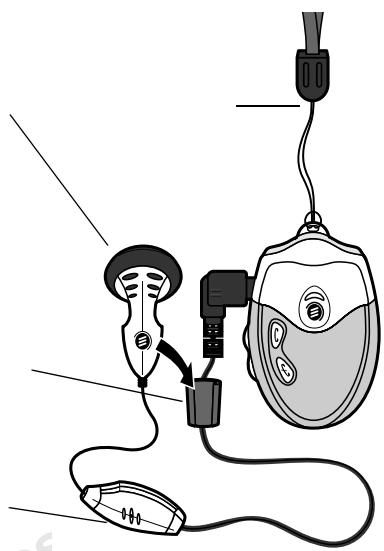
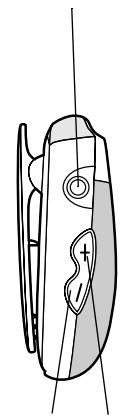
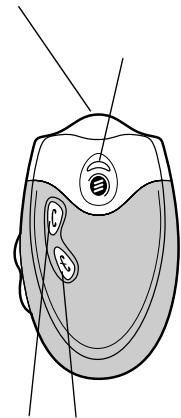
Overview
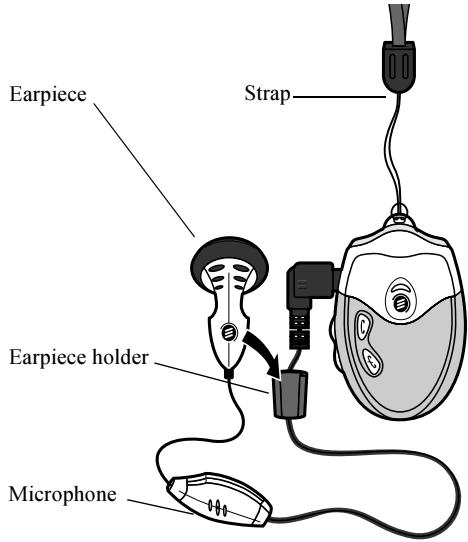
Note: Always handle the handsfree with care!
Handsfree connector
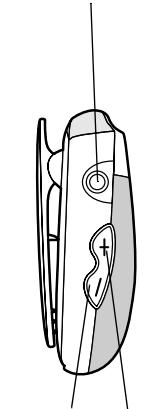
Volume buttons
Charging connector
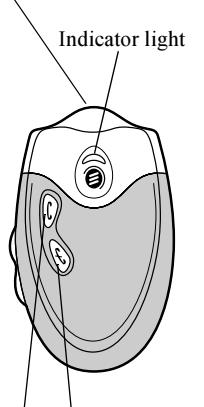
Call handling buttons
Getting Started
Before you start using the handsfree with a phone or other device for the first time, you should:
- Charge the handsfree using an appropriate Ericsson charger.
- Pair the handsfree with a device, for example, a mobile phone.
- Make sure the handsfree is within range (up to 10m/30 ft with no solid objects in between).
Charging
The handsfree comes with a built-in rechargeable battery. The battery is not fully charged when you buy the handsfree. We recommend that you charge the handsfree until the indicator light turns green before using it for the first time.
- To remind you that you will soon need to recharge the battery, the handsfree indicator light flashes red when the handsfree is on.
- It takes 1-1.5 hours to fully recharge the battery.
-
During charging, the indicator light shows a steady red light when the handsfree is turned off, and flashes red when the handsfree is on.
-
When the battery is fully charged, the indicator shows a steady green light if the handsfree is off, or a flashing green light if the handsfree is on.
Compatible chargers
You can attach the following chargers to the HBH-20:
Ericsson Travel Charger CTR-10
Ericsson Standard Charger CST-13
Cigarette Lighter Adapter CLA-11
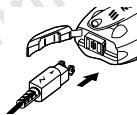
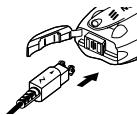
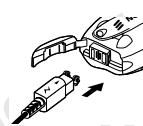
To charge the battery
- Open the rubber plug at the top right of the handsfree. Hold the handsfree with the clip upwards.
- Connect the charger to the handsfree and to the mains. The flash symbol on the plug must face upwards.
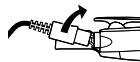
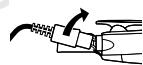
To disconnect the charger
- Tilt the charger plug upwards to remove it.
- Push the rubber plug back into place.
Instructions
Instructions in this user's guide are based on handsfree buttons and phone keys. For example, the button or the key on the phone can be used to answer a call.
To turn the handsfree on
- Press and hold the button until you hear a short low tone followed by a short high tone.
The handsfree indicator light flashes green. If the battery is low, the light flashes red.
Note: The first time the handsfree is turned on it will automatically be ready for pairing.
To turn the handsfree off
- Press and hold the button until you hear a short high tone followed by a short low tone. The handsfree indicator light is switched off.
Pairing the handsfree
Before you start using the handsfree for the first time, you must pair the handsfree with the device you want to use it with, for example, a mobile phone. This section describes three ways of pairing the handsfree:
-
With an Ericsson phone with built-in Bluetooth capability.
-
With an Ericsson phone with a Bluetooth phone adapter attached.
- With another Bluetooth device or non-Ericsson phone.
Using an Ericsson phone with built-in Bluetooth capability
You pair the handsfree with your phone by adding it to a list of paired devices in the phone. They then recognize each other when they connect.
To pair the handsfree with the phone
- With the handsfree turned off, press and hold both the and buttons for up to 10 seconds until the indicator light on the handsfree flashes green and red.
- In the phone, scroll to Extras or Connect, YES, Bluetooth, YES, Paired devices, YES, Add device, YES, Phone initiates, YES.
- A list of device types that you can pair with your phone appears. Scroll to Headset and press yes. Make sure the handsfree and the phone are not too far apart.
- HBH-20 appears in the display. Press YES.
- Enter the handsfree passkey (0000) and press YES. The phone pairing procedure starts.
- You may now replace the given handsfree name with a personal name tag and then press Yes. When pairing
has been completed, the handsfree indicator light flashes green.
Note: The handsfree passkey is 0000.
Using an Ericsson phone with a Bluetooth adapter attached
You pair the handsfree with your phone adapter by adding it to a list of paired devices in the phone. They then recognize each other when they connect.
To pair the handsfree with the phone adapter
- Attach the Bluetooth adapter to the phone and turn on the phone.
- With the handsfree turned off, press and hold the and buttons for up to 10 seconds until the indicator light on the handsfree flashes green and red.
- Scroll to Extras or Connect, YES, Accessories, YES, DBA-10, YES, Paired devices, YES, Headset, YES, Add device?. Make sure the handsfree and the phone are not too far apart.
- Press Yes on the phone. The pairing procedure starts.
- HBH-20. Add to paired devices? appears. Press YES.
- Enter the handsfree passkey (0000) and press YES. When pairing has been completed, the handsfree indicator light flashes green.
Using another device or a non-Ericsson phone The device or phone must have Bluetooth capability and support the Headset profile.
To pair the handsfree with another device
- Activate the Bluetooth function in the other device if necessary. To do this, please refer to the user documentation for the device.
- With the handsfree turned off, press and hold the and buttons for up to 10 seconds until the indicator light on the handsfree flashes green and red. Make sure the handsfree and the other device are not too far apart.
- Initiate Bluetooth pairing in the other device to pair it with the handsfree. To do this, please refer to the user documentation for the device.
When asked, enter the handsfree passkey (0000) and press the accept key or its equivalent. When pairing has been completed, the handsfree indicator light flashes green.
Resetting the handsfree
You may want to reset the handsfree to its default settings. This also clears all current pairings.
To reset the handsfree
- With the handsfree turned off, press and hold the and buttons for up to 10 seconds until the indicator light on the handsfree flashes green and red. Then release the buttons.
- Press and hold the button until you hear two beeps, followed a moment later by a third beep. The handsfree is now turned off. Keep the handsfree off for at least 30 seconds. The handsfree has now been reset.
Adjusting the volume
Adjusting the earpiece volume
You can adjust the handsfree earpiece volume during a call.
To adjust the earpiece volume
To increase the volume, press the + button.
To decrease the volume, press the button.
Adjusting the ring volume
You can adjust the handsfree ring volume when you are not engaged in a call.
To adjust the ring volume
- To increase the ring volume, press the button.
- To decrease the ring volume, press the button. Note: The handsfree uses increasing volume. For safety reasons, it starts with a low volume level before the maximum set level is reached.
Wearing and positioning the handsfree
Once the handsfree and other device are set up:
- Place the earpiece in your ear.
- Clip the HBH-20 high up on your body, or attach it to the strap to wear around your neck.
- Make sure the microphone on the cable is pointing towards your mouth. It is now ready for use.
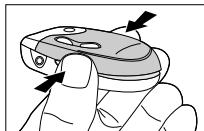
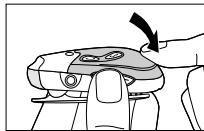
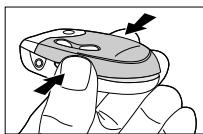
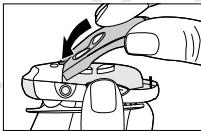
To change the cover
- Make sure the handsfree is turned off. Then squeeze the handsfree cover below the volume buttons.
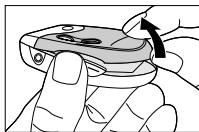
- Gently remove the cover.
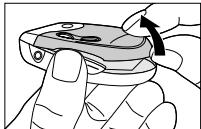
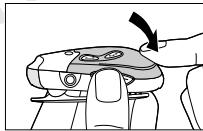
- Slide the top of the replacement cover into position.
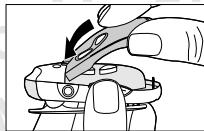
- Gently press the replacement cover until it clicks into place.
Using the handsfree
Once you have paired the handsfree with your phone, you can make and receive calls using the handsfree as long as it is turned on and within range of the phone (up to 10m / 30 ft with no solid objects in between).
If your phone supports voice dialling and it is activated, you can use this feature with the handsfree. Please refer to your phone's user documentation for more information on voice control.
The following instructions cover the use of the handsfree with an Ericsson phone with built-in Bluetooth capability, or a Bluetooth phone adapter from Ericsson and an Ericsson phone.
Making calls
Phone functionality is still available when the handsfree is connected. You can make a call with the phone or with the handsfree.
To make a call using voice dialling
- Make sure the phone and the handsfree are on and within range of each other. Press and hold the button.
- After the beep, voice dial as you normally would. If using the Bluetooth phone adapter: Say the voice
command after the phone beep (not after the handsfree beep). To know when the phone beeps in relation to the handsfree beep, make a test call using voice dialling.
- End the call by pressing the handsfree button. You can also make a call using the phone's keypad or phone book (if, for example, your phone does not support voice dialling).
Answering calls
To answer a call using the button
- When the handsfree rings, press the button. Note: If the phone rings first, wait until the handsfree rings, then press the button.
- End the call by pressing the button. Note: For non-Ericsson phones, end the call with the button.
To answer a second call
- You have to use the phone keypad to answer and handle a second call, but you can still use the handsfree for talking and listening. You cannot use the handsfree buttons during a second call. Refer to the phone's user documentation on how to handle more than one call simultaneously.
To reject a call
- When the handsfree rings, press the button.
To turn off the microphone
- During a call, press both the + and - buttons to turn off the microphone. A repeated beep is heard while the microphone is turned off.
- Press and hold both the (+) and (- buttons again to resume the conversation.
Lost connection to handsfree
If the connection to the handsfree is lost during an ongoing call you must confirm the sound transfer to the phone by pressing the YES key on the phone, otherwise the call is disconnected after 30 seconds.
If the handsfree and the phone are within range, you can transfer the sound to the handsfree by pressing and holding the button.
Headset battery status
The handsfree comes with a built-in battery.
To check the battery status
- Make sure the handsfree is turned on. Then press both + and - buttons.
- The battery status is indicated by one of these three levels:
High - three green flashes
Medium - two green flashes
- Low - one green flash
Troubleshooting
This section lists some problems that you might encounter while using your handsfree.
No sound contact between handsfree and other device
The handsfree and the device you are using with it have to be paired to recognize each other.
They also have to be within range of each other. During pairing it is recommended that the handsfree and the device you are using it with are no more than 1m / 3 ft. apart, with no solid objects in between.
The handsfree indicator light flashes red
This indicates that the handsfree has only limited talk and standby time left. Charge the handsfree battery for approximately 1 to 1.5 hours.
No indication of charging Is shown
If you charge a handsfree battery that is empty, or has not been used for a long time, it may take several minutes before a light to indicate charging (a steady red light) appears.
Some handsfree functions do not work
If you notice that you cannot make use of all the features in the HBH-20 handsfree, please check with an Ericsson Service Partner, or visit the HBH-20 page on http://mobileinternet.ericsson.com for more information.
Additional Information
Guidelines for safe and efficient use
Note: Read this information before using your Bluetooth Handsfree.
Changes or modifications to this Bluetooth Handsfree not expressly approved by Ericsson may void the user's authority to operate the equipment.
Please check for any exceptions, due to national requirements or limitations, in usage of Bluetooth equipment before using this product.
Product care
Please note only Ericsson Service Partners should remove or replace the battery.
Do not expose your product to liquid or moisture or to humidity.
Do not expose your product to extreme high or low temperatures.
Do not expose your product to lit candles, cigarettes, or cigars, or to open flames etc.
Do not drop, throw or try to bend the product as rough treatment could damage it.
Do not use any other accessories than Ericsson originals. Use of non-Ericsson original accessories may result in loss of performance, damage to the product, fire, electric shock or injury. The warranty does not cover product failures which have been caused by use of non-Ericsson original accessories.
Do not attempt to disassemble your product. The product does not contain consumer serviceable or replaceable components. Only Ericsson Service Partners should perform service.
Do not keep the product in an area prone to dust and dirt. Only use a soft damp cloth to clean your product.
If you will not be using the product for a while, store it in a place that is dry, free from damp, dust and extreme temperatures.
Radio frequency exposure
Your Bluetooth Handsfree is a radio transmitter and receiver. When in operation, it communicates with a Bluetooth equipped mobile device by receiving and transmitting radio frequency (RF) electromagnetic fields
(microwaves) in the frequency range 2400 to 2500MHz . The output power of the radio transmitter is low, 0.001 watt.
Your Bluetooth Handsfree is designed to operate in compliance with the RF exposure guidelines and limits set by national authorities and international health agencies when used with any compatible Ericsson mobile phone.
Driving
Check the laws and regulations on the use of mobile phones and hands free equipment in the areas where you drive.
Always give full attention to driving and pull off the road and park before making or answering a call if driving conditions so require.
RF energy may affect some electronic systems in motor vehicles such as car stereo, safety equipment etc. Check with your vehicle manufacturer's representative to be sure that you mobile phone or Bluetooth Handsfree will not affect the electronic systems in your vehicle.
Electronic equipment
Most modern electronic equipment is shielded from RF energy. However, certain electronic equipment is not, therefore:
Do not use your Bluetooth Handsfree near medical equipment without requesting permission. If you are using any personal medical devices, e.g. a pacemaker or a hearing aid, please read in your mobile phone's User's Guide for further information.
Aircraft
Turn your Bluetooth Handsfree OFF before boarding any aircraft. To prevent interference with communication systems, you must not use your Bluetooth Handsfree while the plane is in the air.
Blasting areas
Turn off all your electronic devices when in a blasting area or in areas posted turn off two-way radio to avoid interfering with blasting operations. Construction crews often use remote control RF devices to set off explosives.
Potentially explosive atmospheres
Turn off your electronic device when in any area with a potentially explosive atmosphere. It is rare, but your electronic device could generate sparks. Sparks in such areas could cause an explosion or fire resulting in bodily injury or even death.
Areas with a potentially explosive atmosphere are often, but not always, clearly marked.
Power supply
Connect the AC power adapter only to designated power sources as marked on the product.
To reduce risk of damage to the electric cord, remove it from the outlet by holding onto the AC adapter rather than the cord.
Make sure the cord is positioned so that it will not be stepped on, tripped over or otherwise subjected to damage or stress.
To reduce risk of electric shock, unplug the unit from any power source before attempting to clean it.
The AC power adapter must not be used outdoors or in damp areas.
DANGER - Never alter the AC cord or plug. If the plug will not fit into the outlet, have a proper outlet installed by a qualified electrician.
Improper connection can result in risk of electric shock.
Placing
Ericsson recommends that the Bluetooth Handsfree is worn in positions where it will not be subject to pressure since such pressure may result in bodily injury or damage to the product.
Children
Do not allow children to play with your Bluetooth Handsfree since it contains small parts that could become detached and create a choking hazard.
Emergency calls
IMPORTANT!
This Bluetooth Handsfree and the electronic device connected to the hands free operate using radio signals, cellular and landline networks as well as user-programmed functions, which cannot guarantee connection under all
conditions. Therefore you should never rely solely upon any electronic device for essential communications (e.g. medical emergencies).
Remember, in order to make or receive calls, the hands free and the electronic device connected to the hands free must be switched on and in a service area with adequate cellular signal strength. Emergency calls may not be possible on all cellular phone networks or when certain network services and/or phone features are in use. Check with your local service provider.
Battery information
Please note that only Ericsson Service Partners are able to remove or replace the battery in a proper way.
A rechargeable battery has a long service life if treated properly.
A new battery or one that has not been used for a long period of time could have reduced capacity the first few times it is used.
Use only Ericsson original accessories. Using non-original Ericsson accessories could be dangerous and the warranty does not cover product failures which have been caused by use of non-Ericsson original accessories.
Do not expose the battery to extreme temperatures, never above +55^ (+131^) . For maximum battery capacity, use the battery in room temperature. If the battery is used in low temperatures, the battery capacity will be reduced.
The battery can only be charged in temperatures between +10^ (+50^) and +45^ (+113^) .
Recycling the battery in your Bluetooth Handsfree
The battery in your Bluetooth Handsfree must be disposed of properly and should never be placed in municipal waste. The Ericsson Service Partner removing or replacing the battery will dispose of it according to local regulations.
Limited warranty
Thank you for purchasing this Ericsson Product. To get maximum use of your new Product, we recommend that you follow a few simple steps:
Read the Guidelines for Safe and Efficient Use.
Read all the terms and conditions of your Ericsson Warranty.
Save your original receipt. You will need it for warranty repair claims. Should your Ericsson Product need warranty service, please return it to the dealer from whom it was purchased, or contact your local Ericsson Certified Call Center or visit www.ericsson.com/consumers to get further information.
Our warranty
Ericsson Mobile Communications AB, Torshamsgatan 27, 164 80 Stockholm, Sweden, warrants this Product to be free from defects in material and workmanship at the time of its original purchase by a consumer, and for a subsequent period of one (1) year.
What we will do
If, during the warranty period, this Product fails to operate under normal use and service, due to improper materials or workmanship, Ericsson subsidiaries, authorised distributors or Service Partners will, at their option, either repair or replace the Product in accordance with the terms and conditions stipulated herein.
Conditions
- The warranty is valid only if the original receipt issued to the original purchaser by the dealer, specifying the date of purchase and serial number, is presented with the Product to be repaired or replaced. Ericsson reserves the right to refuse warranty service if this information has been removed or changed after the original purchase of the Product from the dealer.
-
If Ericsson repairs or replaces the Product, the repaired or replaced Product shall be warranted for the remaining time of the original warranty period or for ninety (90) days from the date of repair/ replacement, whichever is longer. Repair or replacement may involve the use of functionally equivalent reconditioned units. Replaced faulty parts or components will become the property of Ericsson.
-
This warranty does not cover any failure of the Product due to normal wear and tear, or due to misuse, including but not limited to use in other than the normal and customary manner, in accordance with Ericsson's instructions for use and maintenance of the Product. Nor does this warranty cover any failure of the Product due to accident, modification or adjustment, acts of God, improper ventilation or damages resulting from liquid.
- This warranty does not cover Product failures due to improper repair installations, modifications or service performed by a non-Ericsson Service Partner or opening of the Product by non-Ericsson certified persons.
- The warranty does not cover Product failures which have been caused by use of non-Ericsson original accessories.
- Tampering with any of the seals on the Product will void the warranty.
- THERE ARE NO EXPRESS WARRANTYES, WHETHER WRITTEN OR ORAL, OTHER THAN THIS PRINTED LIMITED WARRANTY. ALL IMPLIED WARRANTYES, INCLUDING WITHOUT LIMITATION THE IMPLIED WARRANTYES OF MERCHANTABILITY OR FITNESS FOR A PARTICULAR PURPOSE, ARE LIMITED TO THE DURATION OF THIS LIMITED WARRANTY. IN NO EVENT SHALL ERICSSON BE LIABLE FOR INCIDENTAL OR CONSEQUENTIAL DAMAGE OF ANY NATURE WHATSOEVER, INCLUDING BUT NOT LIMITED TO LOST PROFITS OR COMMERCIAL LOSS, TO THE FULL EXTENT THOSE DAMAGES CAN BE DISCLAIMED BY LAW.
Some countries/states do not allow the exclusion or limitation of incidental or consequential damage, or limitation of the duration of implied warranties, so the preceding limitations or exclusions may not apply to you.
The warranty provided does not affect the consumer's statutory rights under national legislation in force, nor does it affect the consumer's rights against the dealer arising from their sales/purchase contract.
Supported Bluetooth functions
This product supports the Headset profile.
Deutsch
Einführung 15
Declaration of Conformity 87
Ericsson HBH-20
©Ericsson Mobile Communications AB, 2001
Declaration of Conformity 87
Ericsson HBH-20
©Ericsson Mobile Communications AB, 2001
Declaration of Conformity 87
Ericsson HBH-20
©Ericsson Mobile Communications AB, 2001
Numero de publication: LZT 108 5119 R1A
INNOVATRON PATENTS.
Declaration of Conformity 87
Ericsson HBH-20
Ericsson Travel Charger CTR-10
Ericsson Standard Charger CTR-13
Cigarette Lighter Adapter CLA-11
©Ericsson Mobile Communications AB, 2001: LZT 108 5119 R1A
INNOVATRON PATENTS:
。GSM112 ,
BLUETOOTH Bluetooth SIG, Inc.
Ericsson
Ericsson CTR-10
Ericsson CST-13
CLA-11
- 2.
- 2.
YES


:

Bluetooth
Bluetooth
Bluetooth
Ericsson
Ericsson
Ericsson
Bluetooth
Ericsson
1.

10
2.
,
Bluetooth, Y
YES,
YES,
, YES。
3.
YES。
4.HBH-20
YES,
5.
(0000)
YES。
6.
,
YES
:
0000。
Bluetooth
Ericsson
- Bluetooth
2.

10

3.
DBA-10, Y
?。
,YES, ,YES,
YES,
, YES,
4.
HBH-20。
YES。
6.
(0000)
YES
Ericsson
Bluetooth
- , Bluetooth
2.

10
- Bluetooth
.
(0000)
,
- 10 ,2.
30
- 1
HBH-20
- 00
1.
10 /30
),
2.
Bluetooth
Ericsson
Ericsson
Ericsson
Bluetooth
3.
,
4.
Declaration of Conformity
We, Ericsson Mobile Communications AB of Torshamngatan 27
S-164 80 Stockholm, Sweden
declare under our sole responsibility that our product
Ericsson type 850 5002
to which this declaration relates is in conformity with the appropriate standards ETS 300 328, ETS 300 342-1, ETS 300 826 and EN 60950 following the provisions of Radio Equipment and Telecommunication Equipment directive 1995/5/EC with requirements covering EMC directive 89/336/EEC and Low voltage directive 73/23/EEC.
Stockholm, July 2001
Place and date of issue
(0682)
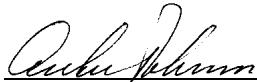
Anders Torstensson, Vice President Product Development
www.ericsson.com/consumers