USER MANUAL TH688 ERICSSON
QUICK REFERENCE GUIDE - TH688 when connected to an MD110 DECT network
Tone Ringer Character
| 1. Access menu | select Settings | select Ring type |
| 2. Select type of call | | |
| 3. Select sound or melody | | |
Phone Lock
| To lock or unlock | select: Access | Enter lock code |
| To change lock code(Default codes: 0000) | select: Access | select: Change code |
Key Lock
| Manual | selectKeylock On | |
| Automatic | | |
| 1. Access menu | selectSettings | selectKeylock |
| 2. On (Auto)/Off (Manual) | | |
| To use when locked | | Make your call or enter 6. menu |
Display Language
| 1. Access menu | select Settings | select Language |
| 2. Select language | | |
Display light
| 1. Access menu | select Settings | select Light | select On/Off/Auto |
Answering Mode
| 1. Access menu | select Settings | select Answering mode |
| 2. Select Any key/Auto | | |
| 3. Select On/Off | | |
Key Sound
| 1. Access menu | select Settings | select Key sound |
| 2. Select Click/Tone/Off | | |
Symbol Explanations
| Scroll up | select Store | Scroll to a specific menu |
| Scroll down | px2 | Press repeatedly the key as many times as shown |
| Scroll up or down | (0-9) | Press one of the keys 0-9 |
text_image
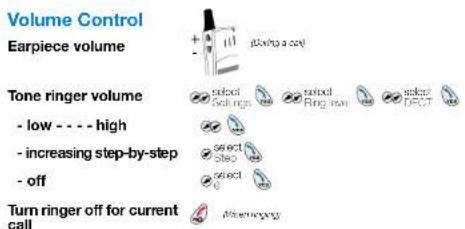
Volume Control
Earpiece volume
Tone ringer volume
- low - - - high
- increasing step-by-step
- off
Turn ringer off for current call
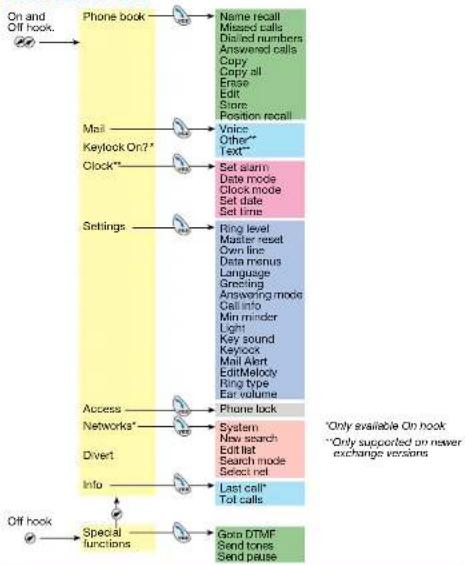
Menu Structure
flowchart
graph TD
    A["On and Off hook."] --> B["Phone book"]
    B --> C["Name recall"]
    C --> D["Missed calls"]
    C --> E["Distined numbers"]
    C --> F["Answered calls"]
    C --> G["Copy"]
    C --> H["Copy all"]
    C --> I["Emase"]
    C --> J["Edit"]
    C --> K["Store"]
    C --> L["Position recall"]
    B --> M["Mail"]
    M --> N["Voice"]
    N --> O["Other**"]
    O --> P["Text**"]
    B --> Q["Keylock On?*"]
    Q --> R["Clock**"]
    R --> S["Set alarm"]
    S --> T["Date mode"]
    S --> U["Clock mode"]
    S --> V["Set date"]
    S --> W["Set time"]
    B --> X["Settings"]
    X --> Y["Ring level"]
    Y --> Z["Master reset"]
    Y --> AA["Own line"]
    Y --> AB["Data menus"]
    Y --> AC["Language"]
    Y --> AD["Specting"]
    Y --> AE["Answering mode"]
    Y --> AF["Call into"]
    Y --> AG["Min minder"]
    Y --> AH["Light"]
    Y --> AI["Key sound"]
    Y --> AJ["Keylock"]
    Y --> AK["Mail Alert"]
    Y --> AL["EditMelody"]
    Y --> AM["Ring type"]
    Y --> AN["Ear volume"]
    B --> AO["Access"]
    AO --> AP["Phone lock"]
    AO --> AQ["Networks*"]
    AQ --> AR["System"]
    AQ --> AS["New search"]
    AQ --> AT["Edit list"]
    AQ --> AU["Search mode"]
    AQ --> AV["Select net"]
    AO --> AW["Divert"]
    AW --> AX["Info"]
    AX --> AY["Last call*"]
    AX --> AZ["Tot calls"]
    AY --> BA["Special functions"]
    BA --> BB["Grip DTMF"]
    BB --> BC["Send tones"]
    BB --> BD["Send pause"]
Ericsson Enterprise A8
All rights reserved. For questions regarding
the product, please contact your
Ericsson Enterprise Center, www. Ericsson enterprise
©Ericsson Enterprise AB 2001
ENLZT 103 25 R1A
- A 100% of the
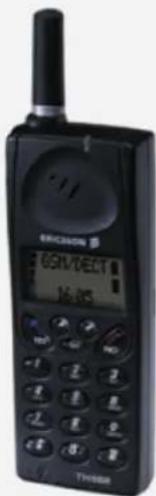
TH688
GSM/DECT Dual Mode Telephone
Quick Reference Guide
- when connected to an MD110 DECT Network
text_image
ERICSON 80/16/DCB
16/16
THYSEM
ERICSSON

QUICK REFERENCE GUIDE - TH688 when connected to an MD110 DECT network
Switch On/Off
| Switch on | Ares and the decay (and so) | Check that DECT network is connected. If not, change network. | |
| To change network | sake1 Networking | sake1 System | sake1 DECT |
| Switch off | (See with the display menu here) |
Free Seating*
| Log on | *11 * #HMSU auth. code * Ext. # | |
| Log off | #11 # | |
Answer Calls
| Answer | Call the ringing extension |
| Answer for another extension (Call pick-up) | Notel in France. 4 . In Swicero. 8 |
Make Calls
| Normal calls | Dial number | |
| Abbreviated number Common | Dial abbreviated number | |
| Individual (Speed dialling) | (1-9) | |
| Call by name (example: Eva) |
| Quick Call by name (example: Bob) | 2. (Press pressed for app: 1 sec.) | 2. (Press quickly!) | ∞ | ∞ |
Redial
| Last external number | *** |
| Nobel (in Federal and Sweden) *** 0 |
| One of last 15 numbers | *** |
| One of last 15 numbers | select | select answered |
| Answered Calls | | |
| One of last 5 columns | select | select answered |
| One of last 5 callers | Phone book | A line out cake | ### |
| Missed CallsOne of last 5 callers |
| selectPhone book | selectMissed calls |
| Note: "All is shown when there are new missed calls. |
During Connected Calls
| End call | | |
| Mute, activate or cancel | GALB | |
| Dial digits | 2 | Dial digits |
On Hold
| Put on hold | |
| Resume call | |
| Resume call that was put on hold on another telephone | Call the extension where the call was put on hold |
| Natal in February, 1980, & Associate. |
Inquiry
| Ongoing conversation | Call the 3rd party |
| Refer back | Note in Section |
Transfer
| Ongoing conversation | Call the 3rd party | What is you know in after answer |
Conference
| Ongoing conversation | Call the 3rd party | 3 (have after answer) |
When Busy Tone or No Answer
| Callback | # 37* Ext. # |
| Cancel Individual Callback |
| Cancel all Callbacks | # 37# |
| Activate Call waiting | # (4 days expected) |
| Note in French, Poland and Sweden |
Call Forwarding
| Personal number* | * 10 * (1-5) # |
| Bypass diversion | * 60 * Ext. # |
| Follow-the | ★ 21 ★ (双)投. # | # | # |
| Cancel | # 31 # | # | # |
| Ganuel | #21## | ### |
| Note in U.K. #2## and #2## are used for following: |
| External follow-me | * 22# | externacoder'sc. | # | ### |
Voice Mail*
| Entering your mailbox In general |
| When is shown | Dal Voice Mail number | Follow recorded instructions |
| select Mail | select Voice | follow recorded instructions |
Absence Information*
| Activate | * 23 * Cause | * MMDD # |
| # | # | # |
Phone Book
Enter letters, digits, etc.
Press a key repeatedly until the wanted letter, digit, etc., is shown in the display.
| Key | Character | Key | Character |
| 1 | Qun -?L:::*<=>{1} | 7 | POB67P2 |
| 2 | ABCÄLEaC2Γ | 8 | TUVÜü |
| 3 | DEFbE3ΔΦ | 9 | WXYZ |
| 4 | GH114 | 0 | -äG:ön%$Yg↓06EHQ |
| 5 | JKLS A | ★ | Lumm/yymm/xx |
| 6 | MNÖNÖöö | ++ | ## |
Add Name and Number
| 1. Access menu | selectPhone book | selectScore |
| 2. Enter name | | |
| 3. Enter number | Enter number |
Add Number from Telephone Memory Lists
| 1. Access menu | selectPhone book | Dialled Numbers orAntewarded calls |
| 2. Select number | selectnumber | selectSlices |
| 3. Enter name(example: Eva) | 2x 3x 8 | 1x 2 |
Edit Name, Number or Position
| 1. Access menu | selectPhone cook | selectEdit | select |
| 2. Select position or name | select Position or Name | |
| 3. Enter position | Enter eighth or fifth |
| #. Enter position number, or name | Enter lights or letters |
| 4. Select item(Cursor at the end of a row) | # |
Erase Name & Number
| 1. Access menu | selectPhone book | selectErase | |
| 2. Enter position number | Enter digits |
| number |
| 3. Scroll to find name | # |

