
Dialog 3185MW - Phone ERICSSON - Free user manual and instructions
Find the device manual for free Dialog 3185MW ERICSSON in PDF.


| Product Type | Analog telephone for MD110 Communication System |
| Model | Dialog 3185MW (with message waiting lamp) |
| Display | 16-character alphanumeric LCD |
| Programmable Keys | 10 keys (upper and lower memory, 20 total) |
| Message Waiting Lamp | Flashing light (MW model only) |
| Dialling Modes | Tone (DTMF) and pulse dialling, switchable |
| Handsfree Operation | Loudspeaker and microphone for handsfree calls |
| Mute Function | Microphone on/off during calls |
| Volume Control | Handset and speaker volume keys; ring volume slide switch (soft/medium/loud) |
| Ring Signal Character | Selectable bass or treble |
| R-Key (Register Recall) | Flash (timed break) or Earth mode, switchable |
| Redial / Pause Key | Last number redial; insert pause |
| Clock | 24-hour clock with date; programmable via handset |
| Call Timer | Displays call duration on outgoing calls |
| Hearing Aid Compatibility | Inductive coupler for telecoil (T-position) |
| Dimensions (approx) | 22 x 18 x 10 cm (typical desktop telephone) |
| Weight (approx) | 0.7 kg |
| Power Supply | Powered via analog telephone line (no external power) |
| Installation | Desk or wall mount; cables included |
| Cleaning | Use slightly damp or anti-static cloth; avoid solvents |
| Compliance | CE (R&TTE 1999/5/EC) |
| Warranty | See user manual; no explicit duration given |
Frequently Asked Questions - Dialog 3185MW ERICSSON
User questions about Dialog 3185MW ERICSSON
0 question about this device. Answer the ones you know or ask your own.
Ask a new question about this device
Download the instructions for your Phone in PDF format for free! Find your manual Dialog 3185MW - ERICSSON and take your electronic device back in hand. On this page are published all the documents necessary for the use of your device. Dialog 3185MW by ERICSSON.
USER MANUAL Dialog 3185MW ERICSSON
Dialog 3185 and 3185MW
Analog Telephones for MD110 Communication System
User Guide
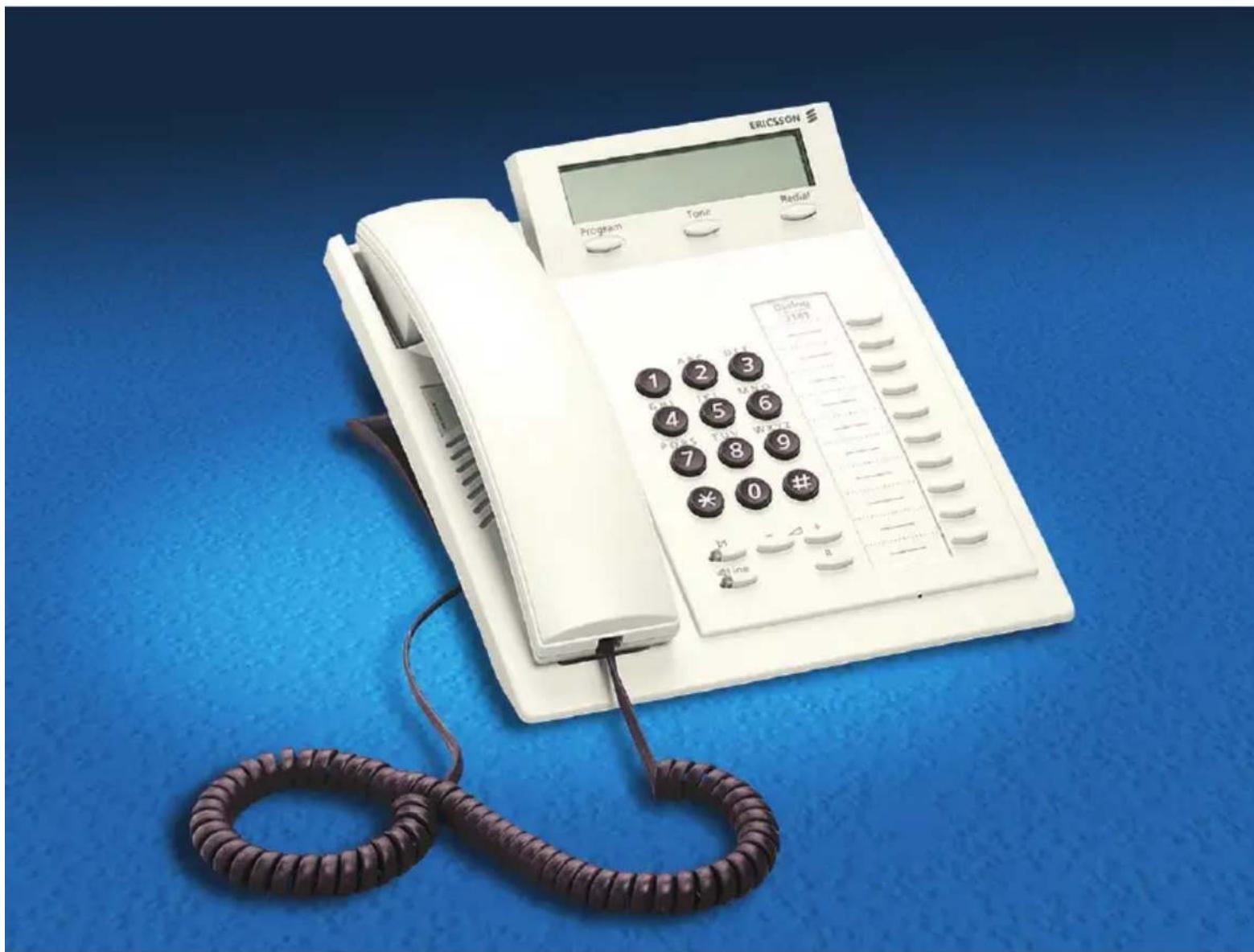
Welcome to the User Guide for the Ericsson Analog 3185 and 3185MW telephones in the Ericsson MD110 Communication System. It is a state-of-the-art Communication System. Its alliance of features and facilities effectively improves communications for virtually any kind of organization.
To take full advantage of these advanced features and facilities there is a line of telephones, designed for ease of use in every situation.
Some markets use differing codes for some functions. In this guide, all functions are described using the most common code for every specific function. As a note the markets and their differing code is shown.
The latest version of this User Guide can also be downloaded from: http://www.ericsson.com/enterprise/archive/manuals.shtml
Note: Since the Ericsson Analog 3185 and 3185MW telephones easily can be switched between pulse and tone dialling they can be connected to all types of telephone exchanges, but remember that analog telephones must be connected to analog lines.
ERICSSON MAKES NO WARRANTY OF ANY KIND WITH REGARD TO THIS MATERIAL, INCLUDING, BUT NOT LIMITED TO, THE IMPLIED WARRANTIES OF MERCHANTABILITY AND FITNESS FOR A PARTICULAR PURPOSE. Ericsson shall not be liable for errors contained herein nor for incidental or consequential damages in connection with the furnishing, performance or use of this material.
Hereby, Ericsson Enterprise AB, declares that this telephone, is in conformity with the essential requirements and other relevant provisions of the European R&TTE directive 1999/5/EC.
Please refer to http://www.ericsson.com/sdoc.
EN/LZT 103 41 R1A
© Ericsson Enterprise AB 2002
All rights reserved. No parts of this publication may be reproduced, stored in retrieval system, or transmitted in any form or by any means, electronic, mechanical, photocopying, recording or otherwise, without prior written permission of the publisher.
Table of Contents
page
Description - Dialog 3185 and
3185MW Telephone 4
Free Seating (optional) 7
Incoming Calls 9
Outgoing Calls 11
During Calls 14
When You Receive a Busy Tone 19
Call Forwarding 23
Internal Messages 35
Voice Mail 37
Information 41
Abbreviated Numbers 44
Group Facilities 48
Other Useful Facilities 51
Paging (optional) 57
Date and Time 64
Authority 65
Adjustments 70
Audible Signals 72
Installation 74
Troubleshooting 77
Index 78
Description - Dialog 3185 and 3185MW Telephone
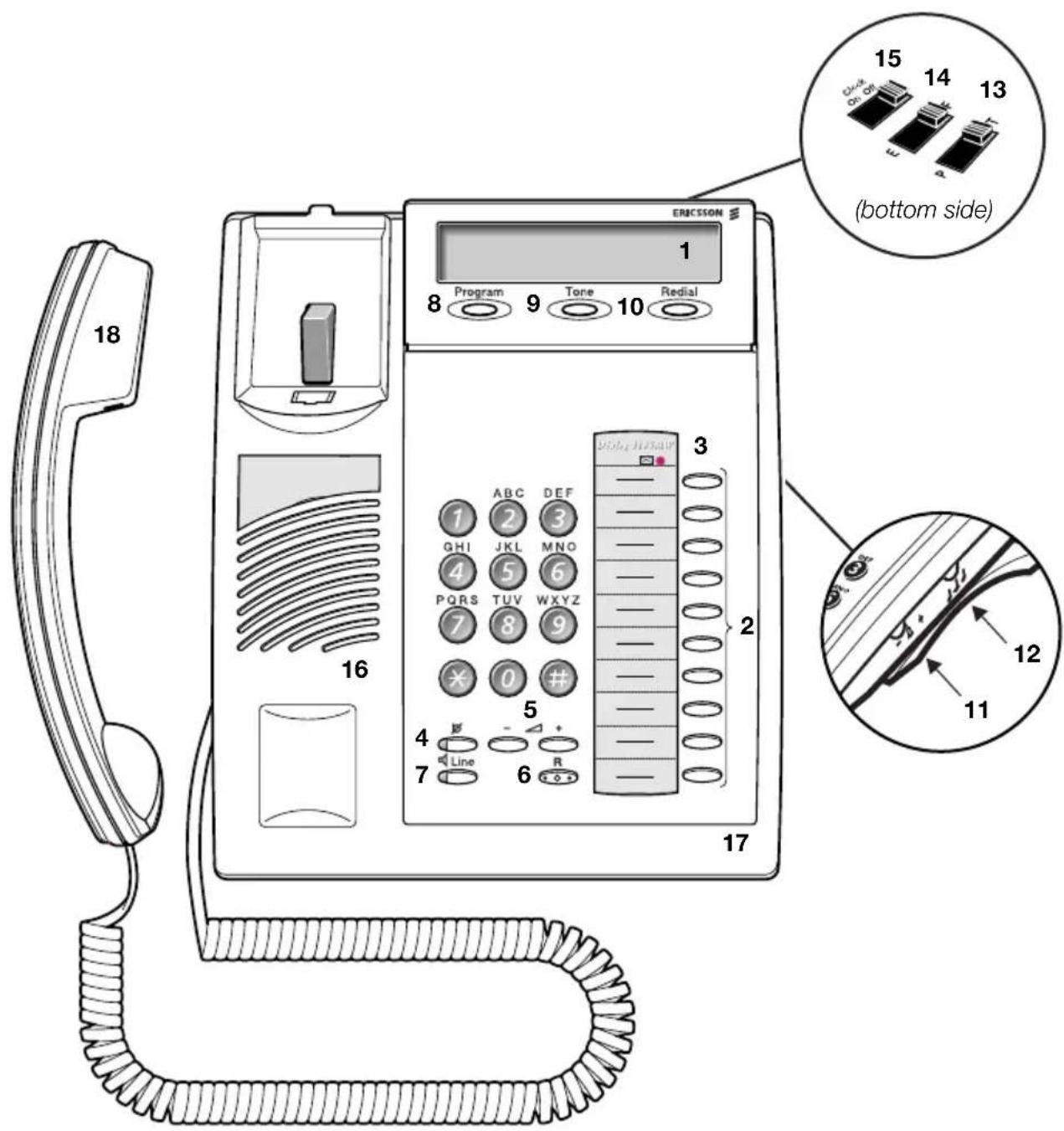
The Dialog 3185 telephone is not equipped with a Message Waiting lamp.
1 Display
16 characters. Indicates call duration or date and time.
2 Programmable keys
Ten keys for storing frequently called numbers. You can store two numbers per key (upper and lower), see section “Abbreviated Numbers” on page 44.
3 Message Waiting lamp
A flashing light indicates a waiting message. See section “Internal Messages” on page 35.
Note: This function is only valid for the Dialog 3185 MW (Article number DBVA 404 4053/208 R1A).
4 Mute
To switch the microphone on or off. See section "During Calls" on page 14.
5 Handset and speaker volume
To adjust the volume. See section "Adjustments" on page 70.
6 R-key
Used for example to make an inquiry, to transfer a call or to establish a conference, see section “During Calls” on page 14. Can be set to two different modes, see section “Adjustments” on page 70.
7 Line / Loudspeaker on/off
a. Line key for in and outgoing calls. b. Loudspeaker on or off. See section "During Calls" on page 14.
8 Program
Storing numbers. See section “Abbreviated Numbers” on page 44. Setting the clock. See section “Other Useful Facilities” on page 51.
9 Tone
Temporary change to tone dialling. See section “During Calls” on page 14.
10 Last Number Redial / Pause key
a. Redial last number dialled. b. Insert a pause if you have to wait for dial tone.
11 Ring signal volume
Adjust ring signal volume. See section "Adjustments" on page 70.
12 Ring signal character
Adjust ring signal character. See section "Adjustments" on page 70.
13 Tone / Pulse dialling
Switch between tone or pulse dialling. See section “Adjustments” on page 70.
14 Flash / Earth mode
Switch between “flash” (timed break) or “earth” mode for the R-key. See section “Adjustments” on page 70.
15 Clock on/off
See section "Date and Time" on page 64.
16 Loudspeaker
17 Microphone
18 Handset with hearing aid function
See section "Adjustments" on page 70.
Please note: The handset may retain small metal objects in the earcap region.
Free Seating (optional)
The Free Seating function is used for persons who have an office extension number but no telephone set of their own. For example, flexible office workers, persons mostly working outside the office, etc. As a Free Seating user and working from the office, you logon to any free telephone set that temporarily will be assigned with your extension number and your system authorities.
To log on

Lift the handset
*11*
Press

※ Enter the authorization code and press

# Enter your telephone number and press

Replace the handset to finish the procedure
Note: An earlier version of the Free Seating function use another procedure:
To log on, press *10* extension No. #.
To log off

Lift the handset
11
Press

Replace the handset to finish the procedure
Note: An earlier version of the Free Seating function use another procedure:
To log off, press # 10#.
Incoming Calls
A ring signal indicates an incoming internal or external call.

Answer calls
Lift the handset
On another extension
You can answer a call to another extension from any phone in your office.


Lift the handset and call the ringing extension
You receive busy tone.
8 Press
Note: France press 4 ; Sweden press 6
Answer a second call
A call waiting tone will inform you, during a conversation, that a second call is waiting on your phone. You have two options.
Option 1:
Finish the ongoing call:

Replace the handset
The new call will be signalled on your phone.

Lift the handset to receive the new call
Option 2:
Ask your conversation partner to wait:

Press and replace the handset
The waiting call will be signalled on your phone.

Lift the handset to receive the new call
After finishing the new call:

Replace the handset
Your first call will be signalled on your phone.

Lift the handset to receive the first call again
Handsfree
Line

You can also answer calls handsfree.
Press without lifting the handset
You are connected to the caller via the loudspeaker and microphone.
Line

Press to terminate a handsfree call
Outgoing Calls
Sometimes you make a call but the person is not available. These functions will help you in your attempts to establish contact with the called party.
Make calls
How to make internal and external calls.


0
Lift the handset and dial either:
An extension number to make an internal call,
or
Dial the digit or digits to get an external line
Dial tone.
Note: Which digit or digits to press for an external line, depends on the configuration of the system.

Replace the handset to end the call
Notes: You can make your calls faster, using common abbreviated numbers and by programming your own abbreviated numbers.
If you receive a queue tone when the digit or digits to get an external line are dialled (optional function Least Cost Routing is used in the system), keep waiting. Once a line becomes free you will receive a dial tone. If a warning tone is heard, the selected line is marked “Expensive”.

Wait for dial tone
Sometimes it is required to wait for a new dial tone after dialling the prefix digit when making an external call. In such situations, you must store the pause for a new dial tone into the number:
Press
Handsfree
You can also make handsfree calls.
Press without lifting the handset
Dial the number
You are connected to the caller via the loudspeaker and microphone.
Press to terminate a handsfree call
Individual External Line
To make a call on a specific external line:

Lift the handset

Press


Dial the individual external line number and press

Dial the digit or digits to get an external line and the external number
Last External Number Redial
When you initiate an external call the system automatically stores all the dialled digits, irrespective of whether the call was successful or not.
Note: To redial a number that incorporates a wait for a new dial tone, you must indicate to the telephone where in the number it must pause and wait for the new dial tone. To do this, press the redial-key at the proper place in the number. See section "Make calls" on page 11.


Lift the handset and press to redial last dialled external number
Call Timer
When you make an outgoing call, the Call Timer starts after 4 seconds, showing the duration of your call. When the call is finished the duration is displayed for 15 seconds. If you want to see the duration of your last call (idle phone):


Lift the handset and press
Display example:
00:00:35
During Calls
The MD110 Communication System allows you to handle calls in many different ways. You can for instance make an inquiry, transfer the call or create a conference.
Monitoring
You have an ongoing conversation via the handset.
Press to switch the loudspeaker on



Replace the handset
The loudspeaker monitors the call.
Note: When the loudspeaker is on, the microphone is automatically switched off in the handset. You can adjust the volume, see section "Adjustments" on page 70.


Press to end the call

From Monitoring to handset
Lift the handset
Continue your conversation via the handset.
Mute
You have an ongoing conversation.

Press to switch the microphone on or off
When the lamp lights, the caller will not be able to hear the conversation in your room.
Inquiry
During an ongoing conversation you like to make an inquiry to an internal or external party.
Press
The first party is put on hold.

Call the second party
When the party answers you can switch between the calls (Refer Back), transfer the call, create a conference and end one of the calls.
2 Press to return to the first party
Note: Sweden press R
Refer Back
You can switch between connected parties:
2 Press to put the ongoing conversation on hold
The first party is connected.
Note: Sweden press R
Transfer
You have an ongoing internal or external conversation and you want to transfer the ongoing call.
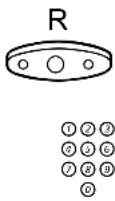
Press
Call the second party
You can transfer the call before answer or wait for answer
Note: Make sure, that you are connected to the desired party.

Replace the handset
The call is transferred.
Note: If you have put more than one call on hold, the last call that was put on hold will be transferred. If the dialled extension is busy or Transfer is not allowed, your phone will ring again.
Conference
With this procedure you can include up to seven parties in a conference. Only the conference leader can admit participants. During the conference a tone will be heard every 15th second.
Note: The conference tone might be disabled for your system.
You have an ongoing conversation and want to establish a telephone conference. You will become the conference leader.
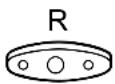

Press
Call the second party
Wait for answer.
3 Press to establish a three party conference
Now you have established a three party conference.
Note: Sweden press R
Repeat the procedure to include other persons to the conference

Replace the handset to leave the conference
Dial mode
If your telephone is in the pulse dialling mode, and you want to use any of the automated data services that require tone dialling, you can switch temporarily to tone dialling during a call, e.g. when calling interactive tele services or controlling telephone answering machines remotely.
Note: After you end the call, dialling is reset to pulse dialling.
Tone

Press to switch to tones
On Hold
You can temporarily put the ongoing call on hold. Calls put on hold can be resumed on your own telephone or another.
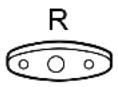

Press and replace the handset

To resume the call on your own extension
Lift the handset

To resume the call on another extension
Lift the handset

Call the extension where the call was put on hold
8 Press
Note: France press 4 ; Sweden press 6
When You Receive a Busy Tone
Busy extension or external line
If you call an extension and receive a busy tone or get no answer or all external lines are busy you can use these methods:
Automatic Callback
If a called extension is busy or there is no answer:
6 Press
Note: France, Finland and Sweden press 5

Replace the handset to finish procedure
You are called back (recall ring signal) when the ongoing call is finished or the next time a new call is finished. You have to answer within eight seconds, otherwise the Callback service is cancelled.

Lift the handset when you are called back
The system calls the extension.
Note: Callbacks can be activated on several extensions at the same time.
If all external lines are busy (after dialling the digit or digits to get a line):
6 Press
Note: France, Finland and Sweden press 5

# Dial the external number and press

Replace the handset to finish procedure
When an external line becomes free you will be called back (recall ring signal). You have to answer within eight seconds, otherwise the Callback service is cancelled.

Lift the handset when you are called back
The system calls the external number.
Note: Only one Callback can be activated on a busy external line.

Cancel any single Callback
Lift the handset
#37\*

Press and dial the extension number
Note: To cancel a single Callback on a specific external line, dial the digit or digits to get a line instead of the extension number.
#

Press and replace the handset
Cancel all callbacks

Lift the handset
#37#
Press

Replace the handset
Call Waiting
If you urgently wish to contact a busy extension or external line, you can notify it by a call waiting signal.
5 Press
Note: France and Finland press 6; Sweden press 4
Keep handset off-hook. When the called extension or the external line becomes free, it will be called automatically.
Note: The Call Waiting function might be blocked for use on your extension (programmed by system administrator). If Call Waiting is not allowed you will continue to receive a busy tone.
Intrusion on a busy extension
You can intrude on an ongoing call on a busy extension.
4 Press
Note: France and Sweden press 8
Before the Intrusion is executed a warning tone is sent to the parties in the ongoing call. A three party call is established and a warning tone is heard.
Notes:
The warning tone might be disabled for your system.
The Intrusion function might be blocked for use on your extension (programmed by system administrator). If Intrusion is not allowed you will continue to receive a busy tone.
Intrusion on a busy external line
You can intrude on an ongoing call on a busy external line.
*44* ①②③ ④⑤⑥ ⑦⑧⑨ ⑩
Press and dial the individual external line number
① ② ③ ④ ⑤ ⑥ ⑦ ⑧ ⑨ ⑩
Press and dial the digit or digits to get an external line
Busy tone.
4 Press
Note: France and Sweden press 8
Before the Intrusion is executed a warning tone is sent to the parties in the ongoing call. A three party call is established and a warning tone is heard.
Notes:
The warning tone might be disabled for your system.
The Intrusion function might be blocked for use on your extension (programmed by system administrator). If Intrusion is not allowed you will continue to receive a busy tone.
Call Forwarding
Diversion
If you do not want to be disturbed or will be out of the office, you can have all calls to your extension diverted to a pre-programmed answering position. During Diversion you will hear a special dial tone. You can still make calls as usual.
Diversion can be direct, on no answer, on busy or to another information service facility.
Order direct Diversion from your own extension
The call is diverted to an individual position or up to three predetermined common answering positions (depending on the type of the incoming call). Programmed by the system administrator.

*21#
Lift the handset
Press
Note: U.K. press *2#

Replace the handset
Note: Diversion can also be ordered and cancelled from the answering position, use the same procedure as in section "Internal Follow-me" on page 26.
Cancel direct Diversion from your own extension

Lift the handset
21
Press
Note: U.K. press #2#

Replace the handset
Note: Diversion can also be ordered and cancelled from the answering position, use the same procedure as in section "Internal Follow-me" on page 26.
Diversion when there is no answer

Lift the handset
*211#
Press to order
Note: Finland and Norway press *6 1#

Replace the handset
The incoming call is diverted after 3 signals.
To cancel:

Lift the handset
211
Press
Note: Finland and Norway press #61#

Replace the handset
Diversion when caller receives a busy tone

Lift the handset
*212#
Press to order
Note: Finland and Norway press *67#

Replace the handset
To cancel:

Lift the handset
212
Press
Note: Finland and Norway press #67#

Replace the handset

Diversion to another information service facility
*218#
Lift the handset
Press

Replace the handset
To cancel:

Lift the handset
218
Press

Replace the handset
Internal Follow-me
All calls to your extension are diverted to an extension of your choice (within the private network). During Follow-me you will hear a special dial tone. You can still make calls as usual.
Order from your own extension

Lift the handset
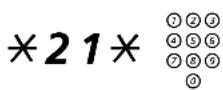
Press and dial the answering position number
Note: U.K. press *2* No.

Press and replace the handset

Cancel from your own extension
Lift the handset
21
Press
Note: U.K. press #2#

Replace the handset

Redirect from answering position
Lift the handset
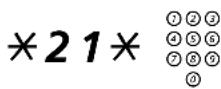
Press and dial your own extension number
Note: U.K. press *2* No.
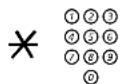
Press and dial the diversion number

Press and replace the handset
Calls are diverted to the answering position.
Note: Internal Follow-me must be ordered from your own extension before you can redirect from answering position.
Cancel from answering position

Lift the handset
21* ①②③
④⑤⑥ ⑦⑧⑨ ⑩
Press and dial your own extension number
Note: U.K. press #2 * No.
#

Press and replace the handset
External Follow-me
If External Follow-me is allowed you can have all calls to your extension diverted to an external number of your choice. A special dial tone will be heard. You can still make calls as usual.

Order
Lift the handset
*22#

Press and dial the digit or digits to get an external line and the external number
#

Press and replace the handset
Cancel

Lift the handset
22
Press

Replace the handset
Bypass Diversion
If Bypass Diversion is allowed from your extension, you can bypass an activated Diversion/Follow-me on a specific extension.

Lift the handset
*60*

Press and dial the extension number
# Press and wait for answer
Personal Number (optional)
With this function you can be reached on your normal office telephone number even if you are in another room, out of the office, at home, etc. Depending on the functionality of your office exchange, you can have either one individual single search profile or you can choose between five individual search profiles. A search profile can be designed to fit the situation, i.e. In the office, On travel, At home, etc. Both internal or external telephone numbers can be used in a profile.
On your request, the search profiles are programmed or modified by the system administrator. See section “To design and order your search profiles” on page 31.
When the function is activated, incoming calls are transferred to different telephones or back-up services in your decided order. If an answering position in the profile is busy, the call can be transferred to another predefined position in the profile, i.e. Voice Mail or a colleague. You can activate the function from your own office telephone or when out of the office, by using the Direct Inward System Access function (DISA).
To activate or change to another profile from your office telephone

Lift the handset
*10*
Press
(1-5)
Dial the search profile digit
#

Press and replace the handset
Note: If the operator is included in the activated profile as an answering position, always inform the operator if you are absent. Use the Absence Information function or call the operator. If Voice Mail is included in the activated profile, always update your greeting with Absence Information.
To cancel from your office telephone

Lift the handset
10
Press

Replace the handset
To activate or change to another profile from an external telephone
The external telephone must be of push button type provided with hash ( # ) and star ( × ) keys or a mobile telephone adapted for dial tone pulses (DTMF).
Call the DISA function at your office
Dial tone.
*75*
Press

※ Enter the authorization code and press

# Dial your own extension number and press Dial tone.
*10*
Press

※ Dial your own extension number and press
(1 - 5)
Dial the search profile digit

Press and replace the handset
Note: If the operator is included in the activated profile as an answering position, always inform the operator if you are absent. Use the Absence Information function or call the operator. If Voice Mail is included in the activated profile, always update your greeting with Absence Information.
To cancel from an external telephone
The external telephone must be of push button type provided with hash (#) and star ( × ) keys or a mobile telephone adapted for dial tone pulses (DTMF).

Call the DISA function at your office
Dial tone.
*75*
Press

* Enter the authorization code and press

# Dial your own extension number and press Dial tone.
10*
Press

# Dial your own extension number and press

Replace the handset
To design and order your search profiles
The search profiles are installed or changed by the system administrator. In order to set up your profiles, copy the setting form, fill in your new or changed profiles and give it to your system administrator.
Note: If Personal Screen Call Server is connected to your system, you can edit the profiles via your Intranet. See instructions for the server!
Important notes when designing your search profiles:
- Avoid a ring time longer than 45 seconds for your profiles
Usually the caller hangs up after 3-6 ring signals. If you need a longer ring time, the maximum time is 60 sec.
- Consider the time you need to react and answer on each answering position in your profiles
You might need up to 15 seconds to react and answer on a desk or cordless telephone and 20-25 seconds for a mobile telephone.
- There must be an answering position at the end of every profile (Voice Mail or operator/secretary)
If not, calls might end up unanswered.
- Consider what should happen when you are busy on a telephone
The available options are:
- Diversion to Voice Mail
- Diversion to the operator
- If an answering machine, a FAX or other answering service is used as an early answering position, it might interrupt the searching
Disconnect the answering service, or design the ring times so they do not affect the searching.
- If your system admits just one single personal profile, design the profile only with your 2-3 most frequently used positions
If you add more numbers, there is a risk that the caller hangs up before a late position is called.
- If your system admits 1-5 personal profiles, design the different profiles to fit your most used positions
Make sure you use as few answering positions as possible for each profile. Profile examples:
- In office
- At home
- On travel
– Absent/not reachable
Example:
How to fill in your setting form for search profiles:
Profile 1 In office
| Search order | Type of telephone or answering position* Telephone number | Ring time (seconds) |
| 1 Desk 123 | 4 10 | |
| 2 Cordless | 5234 15 | |
| 3 Voice Mail |
* Examples: Desk, Cordless, Mobile, External, Voice Mail, Operator, etc.
Profile 2 At home
| Search order | Type of telephone or answering position* Telephone number | Ring time (seconds) |
| 1 External 2 | 22222 20 | |
| 2 Mobile 07 | 06666666 25 | |
| 3 Voice Mail |
Setting form for search profiles
Name:
Department:
Telephone No:
Account:
Profile 1 ....
| Search order | Type of telephone or answering position* Telephone number | Ring time (seconds) |
| 1 | ||
| 2 | ||
| 3 | ||
| 4 |
* Examples: Desk, Cordless, Mobile, External, Voice Mail, Operator, etc.
Profile 2 ......
| Search order | Type of telephone or answering position* Telephone number | Ring time (seconds) |
| 1 | ||
| 2 | ||
| 3 | ||
| 4 |
Profile 3 ......
| Search order | Type of telephone or answering position* Telephone number | Ring time (seconds) |
| 1 | ||
| 2 | ||
| 3 | ||
| 4 |
Profile 4 ......
| Search order | Type of telephone or answering position* Telephone number | Ring time (seconds) |
| 1 | ||
| 2 | ||
| 3 | ||
| 4 |
Profile 5 ......
| Search order | Type of telephone or answering position* Telephone number | Ring time (seconds) |
| 1 | ||
| 2 | ||
| 3 | ||
| 4 |
Internal Messages
Regarding incoming messages, see section "Voice Mail" on page 37.
Manual Message Waiting (MMW)
If there is a message waiting for you, you will hear a special dial tone after lifting the handset. For Dialog 3185MW there is also a lamp indication.
Answer MMW at your own extension

Lift the handset

Cancel MMW at your own extension
Lift the handset
31
Press

Replace the handset
Order MMW to another extension
When you call an extension and receive busy tone or get no answer you can make a call to order a message waiting indication on that telephone.

Lift the handset
*31*
Press

Dial the extension number

Press and replace the handset

Cancel MMW to another extension
Lift the handset
31*
Press

Dial the extension number

Press and replace the handset
Voice Mail
Your incoming messages can be indicated by a rapidly flashing Message Waiting lamp (Dialog 3185MW telephone).
While you are away from the office, callers can leave messages in your mailbox.
Integrated Voice Mail (optional)
This function allows you to leave a voice message to the caller when you are unable to answer calls, e.g. when out of office, in a meeting, etc. Then the caller can leave a message in your mailbox. When back in office you can enter your mailbox and listen to received messages.
You can choose to divert all incoming calls to your mailbox, or calls when there is no answer, or calls when your telephone is busy.
When you enter your mailbox, you will hear recorded instructions how to handle listening, recording, storing and deleting messages, and how to change your security code.
To activate and deactivate your mailbox
For all incoming calls:
See Call Forwarding, section Internal Follow-me (function code 21). Use the number to the voice mail system as the "answering position number".
When incoming calls get no answer:
See Call Forwarding, section Diversion when there is no answer (function code 211).
When incoming calls get a busy tone:
See Call Forwarding, section Diversion when caller receives a busy tone (function code 212).
To enter your mailbox
Please ask the system administrator for your defined voice mail system number.
Once you have entered the voice mail system, you can handle your messages/greetings and change your security code, see section "To handle the mailbox" on page 40.
From your office telephone:

Lift the handset

Dial the number to the voice mail system
If you are asked to enter your security code:

Enter your security code
Code at delivery = your extension number.
Follow the recorded instructions
From another telephone:

Lift the handset

Dial the number to the voice mail system
If you are asked to enter your security code (the used telephone has a mailbox of its own):
# Press

Enter your mailbox number
(normally your office extension number)

Enter your security code (if required)
Follow the recorded instructions
To enter someone else's mailbox

Lift the handset

Dial the number to the voice mail system
If you are asked to enter your security code (the used telephone has a mailbox of its own):
# Press

Enter the mailbox number
(normally the office extension number of the person served)

Enter the security code of the person served (if required)
Follow the recorded instructions
To handle the mailbox
Recorded information on the line informs about the number of new and stored messages. If you have too many messages stored, you will first be asked to delete saved messages.
Recorded instructions ask you to press different digits in order to listen to caller's messages, record your own greetings, change your password or exit your mailbox, etc.
The following diagram gives an overview of the mailbox system and the digits to be used.
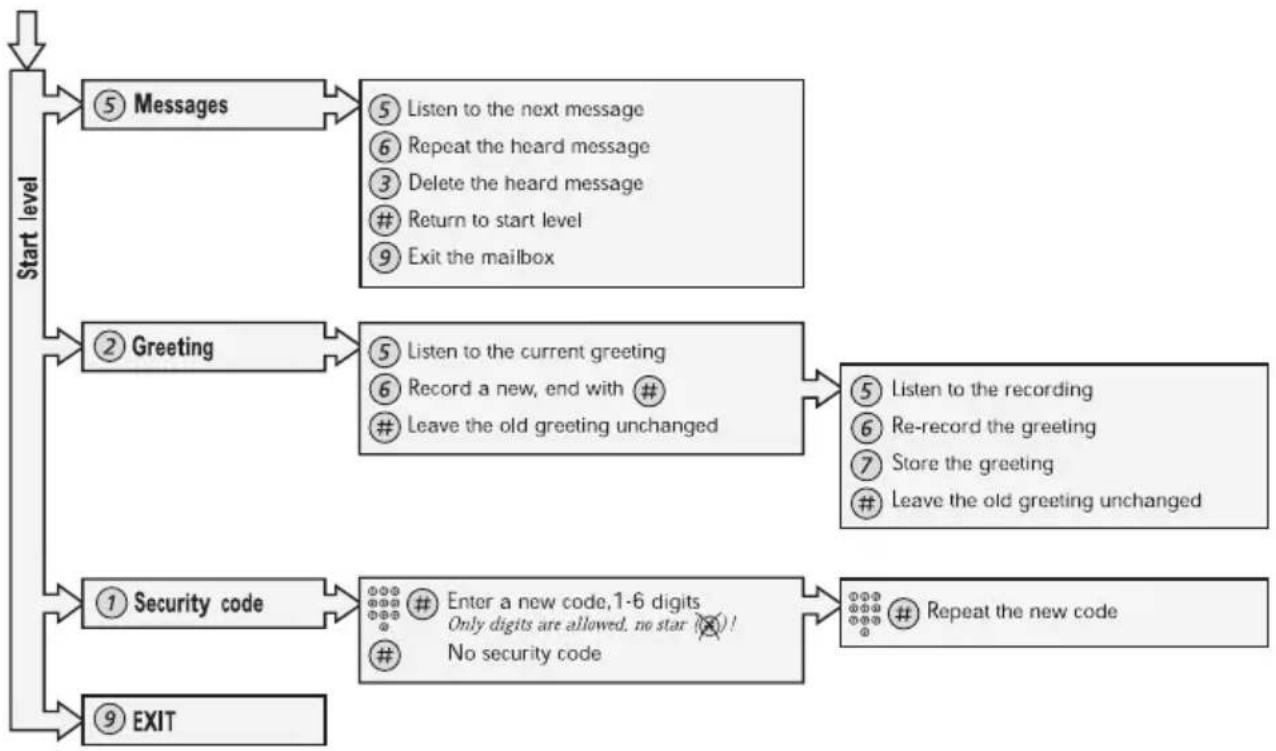
flowchart
graph TD
    A["Start level"] --> B["⑤ Messages"]
    B --> C["⑤ Listen to the next message\n⑥ Repeat the heard message\n③ Delete the heard message\n# Return to start level\n⑨ Exit the mailbox"]
    A --> D["② Greeting"]
    D --> E["⑤ Listen to the current greeting\n⑥ Record a new, end with #\n# Leave the old greeting unchanged"]
    E --> F["⑤ Listen to the recording\n⑥ Re-record the greeting\n⑦ Store the greeting\n# Leave the old greeting unchanged"]
    A --> G["① Security code"]
    G --> H["Enter a new code, 1-6 digits\nOnly digits are allowed, no star (✗)!\n# No security code"]
    H --> I["Repeat the new code"]
    A --> J["⑨ EXIT"]
Information
If you are not in the office for a certain period of time (e.g. meeting, vacation, lunch, illness), this feature allows you to inform your callers why you are absent. External callers will be routed to the operator who also has access to your absence info.
Absence Information (optional)
To be used during absence to inform callers about the reason and time or date of your return. If you are authorized, you can also enter absence information on another extension from your own extension.
Order
To store text information.
Example: Back on September 15th (=0915).

Lift the handset
*23*
Press
(0 - 9)
Enter the absence code
Note: The absence codes consist of one digit which depends on the system connected to the exchange. Contact your system administrator regarding your available absence codes.
*0915
Press and enter the date (MMDD) or time (HHMM) of your return
Note: If no return time or date is needed, this step can be excluded.
#
Press to enter the information

Replace the handset
Internal callers receive the information on the display (or as spoken information to callers without display phone).
External callers will be routed to the operator who also has access to your absent info.
Cancel

Lift the handset
#23#
Press

Replace the handset
The programmed information is erased.
Order for another extension

Lift the handset
\*230\*
Press


Dial the extension number and press
(0 - 9)
Enter the absence code
\*0915
Press and enter the date or time of the other person's return
#
Press

Replace the handset
Cancel for another extension

Lift the handset
230*

Press
#
Dial the extension number and press
Note: If the special dial tone is received, the authorization code for the other extension is required. Add the code and press # before replacing the handset.

Replace the handset
Abbreviated Numbers
By using abbreviated numbers, you can make calls simply by pressing a few keys. The common abbreviated numbers consist of 1-5 digits and are stored in the exchange (by the system administrator).
Up to 10 “individual abbreviated numbers” (your personal most frequently used external numbers) can be stored and used on the keys “ 0 ” to “ 9 ” (if this function is allowed).
Note: In Finland up to nine numbers, keys 1-9.
Common abbreviated numbers

Lift the handset

Dial the common abbreviated number
Please refer to your telephone directory.
Individual abbreviated numbers
You can program and activate your most frequently used external numbers on the keys 0 to 9 .


Lift the handset and press

Dial the abbreviated number
A number between 0 and 9.
Note: Finland press (1-9) ; Sweden press (0-9)#
Program individual abbreviated number
How to program external numbers on the keys 0 to 9.

Lift the handset
*51*
Press


Select an abbreviated number between 0 and 9 and press
Note: Finland press (1 - 9) *
0

Dial the digit or digits to get an external line and the external number
Note: The programmed number may consist of a maximum of 20 digits plus a "✗", which indicates the second dial tone from the public network.
#
Press

Replace the handset

51*
Erase one programmed number
Lift the handset and press

#
Enter the number you want to erase (0-9) and press
Note: Finland press (1 - 9) #

Replace the handset

51
Erase all programmed numbers
Lift the handset and press

Replace the handset
Dial By a Function Key
You can program and activate directory numbers (extensions and common abbreviated numbers) on the programmable keys. It is possible to store 20 numbers and the number can consist of maximum 20 digits.

Lift the handset
Head Office

Press to make a call (pre-programmed)
Note: One press will activate the number in the upper memory, a double press will activate the number in the lower memory.
Program
How to program a directory number on the programmable keys.

Lift the handset
Program

Press

Dial the number
You can use any directory number, e.g. a common abbreviated number or a colleague's extension number. You can also store codes that contain *, #, R and Tone. To store a number that incorporates a wait for a new dial tone, see section "Outgoing Calls" on page 11.

Press a programmable key
Note: One press will store the number in the upper memory, a double press will store the number in the lower memory. You can remove the transparent cover in order to write the names beside the keys. If a number is already stored, it will be erased automatically. If you would like to erase a dial-by-name number, store a "0" instead of the telephone number.

Replace the handset
Checking stored numbers
How to see a programmed directory number.

Lift the handset
Program

Press

Press the desired programmable key to see the programmed number
Note: One press will display the number in the upper memory, a double press will display the number in the lower memory.

Replace the handset
Group Facilities
Call Pick-up Group
People working in a team can have their telephones programmed by the system administrator to form Call Pick-up groups.
In a Call Pick-up Group, any member can answer any individual call to group members.

Lift the handset
8
Press to answer
Notes:
One Call Pick-up Group can serve as an alternative to another group. Calls to the alternative group can only be answered when there are no calls to your own group.
Finland and Sweden press 0
Common Bell Group
Calls are signalled on a common bell.

Lift the handset
8
Press to answer
Note: Finland and Sweden press
0
Group Hunting
As a member of a group of extensions that is called by a common number, you can temporarily leave the group.

Lift the handset
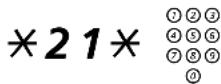
Press and dial your own extension number
Note: U.K. press *2* No.
# Press

Replace the handset
To re-enter the group

Lift the handset
21
Press
Note: U.K. press #2#

Replace the handset
If you are authorized you can divert all calls to a group to another extension or group:

Lift the handset
*24*
Press

* Dial the number of the group to be diverted and press

Dial the extension number of the new answering position
# Press

Replace the handset
To cancel the Diversion:

Lift the handset
24*
Press

Dial the number of the group that has been diverted
# Press

Replace the handset
Other Useful Facilities
Account Code (optional)
This function is used to charge a call to an account number or to prevent unauthorised calls from your telephone. The account code can have 1 to 15 digits.

Lift the handset
*61*
Press
Note: Finland and Norway press *71*

#
Enter the account code and press
Dial tone.

Dial the digit or digits to get an external line and the external number
General Cancellation
The following features can be simultaneously cancelled:
- Callback (all Callbacks are cancelled).
- Diversion/Internal and External Follow-me.
- Manual Message Waiting/Message Diversion.
- Do Not Disturb.
- Flexible Night Service.

001
Order
Lift the handset
Press

Replace the handset
Night Service
When the exchange is in night service mode, all your incoming calls to the operator are transferred to a selected extension or group of extensions. The exchange is equipped with four different night service modes:
Common Night Service
All incoming calls to the operator are transferred to one specific extension. Answer the call in the normal way.
Individual Night Service
Selected external calls to the operator are transferred to one specific extension. Answer the call in the normal way.
Universal Night Service
All incoming calls to the operator are transferred to a universal signalling device, e.g. the common bell. Answer the call as described in section “Common Bell Group” on page 48.
Flexible Night Service
This function permits you to order an external line and connect it directly to your telephone. Ask your operator for the external line numbers.
To order Flexible Night Service

Lift the handset
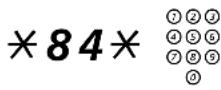
Press and dial the digit or digits to get a line
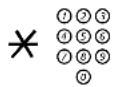
Press and dial the external line number
# Press

Replace the handset

Cancel
Lift the handset
84

Press and dial your own extension number

Replace the handset
Hot Line
Ask your system administrator if you require this function.
Delayed Hot Line
When the handset of the delayed hot line telephone is lifted or when the line key is pressed, a timer is started. If no digit is pressed before time out, a call is automatically generated to a specific extension or external line. If a digit is pressed before time out the telephone works as an ordinary telephone.
Note: This function is only available in newer versions of the telephone exchange.
Direct Hot Line
The same function as described above, but no delay. Only hot line calls can be placed from this line. To be used e.g. as alarm phone, door phone etc.
Alarm extension
An extension can be programmed by system administrator as an alarm extension. A call to an alarm extension obtains automatic intrusion if the extension is busy. Up to seven calling parties may be connected at the same time.
Emergency state
In the event of an emergency the operator can switch the exchange into emergency state, during which only pre-programmed extensions are permitted to make calls.
Data communication
Your telephone can be used together with a PC as an integrated voice and data terminal. Contact your system administrator if you require this function.
Direct Inward System Access (DISA) (optional)
If you are assigned to use this function and you are working externally, you can call your office and get access to an external line in order to make business calls. The business call will be charged your office extension number or an account number. You will just be charged for the call to the office.
The external telephone must be of push button type provided with hash (#) and star (*) keys or a mobile telephone adapted for dial tone pulses (DTMF).
After a completed DISA call you must hang up before a new DISA call can be made.
Depending on the type of authorization code and if an account code is used, different procedures must be used:
With common authorization code

Call the DISA function at your office Dial tone.
*72*
Press

#
Enter the authorization code and press Dial tone.

Dial the external number
With individual authorization code

Call the DISA function at your office Dial tone.

Press

※ Enter the authorization code and press

# Dial your own extension number and press Dial tone.

Dial the external number
Paging (optional)
Persons equipped with a wireless paging receiver or assigned to a lamp signal, can be paged from a telephone set. Depending on the type of paging system it is possible to send digit messages or voice messages to the paged person.
Paging can also be initiated and answered during an ongoing call. Make an inquiry call and proceed according to the appropriate procedure for the type of connected paging system. You can then either return to the ongoing call or transfer the paging call to the person that was put on hold. If this person is an external subscriber, your exchange must be programmed for this function.
If you receive a congestion tone when paging, this indicates that the paged person has his paging receiver in the charging rack and is probably out of the office.
Paging receivers without a display and Paging via lamp signals
To initiate
When there is no answer or a busy tone, keep the handset off hook:
7 Press
Wait for an answer with the handset off hook.
If you want to start Paging without calling the person:

*81*
Lift the handset
Press

#
Dial the extension number and press
Wait for an answer with the handset off hook.
To answer
From any telephone within the system and within the predetermined paging time:

*82*
Lift the handset
Press

#
Dial your own extension number and press
Or if only one paging call is permitted at the time:

*82#
Lift the handset
Press
Paging receivers with a display
To initiate
When there is no answer or a busy tone, keep the handset off hook:

Press and replace the handset
Wait for the paged person to call back.
If you want to start Paging without calling the person:

Lift the handset
*81*
Press

#
Dial the extension number and press
Wait for the acknowledgement tone.

Replace the handset
Wait for the paged person to call back.
If you want to send a digit message code:

Lift the handset
*81*
Press

※ Dial the extension number and press

# Dial the message code (1-10 digits) and press
Wait for the acknowledgement tone.

Replace the handset
If expected, wait for the paged person to call back.
To answer
From the nearest telephone within the system: Call the extension number shown in the display of your paging receiver. If zeros are shown it indicates that you are being paged from an external subscriber. To answer:

Lift the handset
*82*
Press

# Dial your own extension number and press
Or if only one paging call is permitted at the time:

Lift the handset
*82#
Press
If a message code is shown in the display, take the appropriate action.
Paging receivers with voice message
To initiate
When there is no answer or a busy tone, keep the handset off hook:
7 Press
Leave your message after the tone. Just before the predetermined speech time is ended, a warning tone will be heard.
If you want to start Paging without calling the person:

Lift the handset
\*81\*
Press

#
Dial the extension number and press
Leave your message after the tone. Just before the predetermined speech time is ended, a warning tone will be heard.
To answer
If your paging receiver has bothway voice connection, press the answer button to speak. If no bothway connection exists, take the appropriate action according to the message or answer the paging in the same way as Paging without a voice message.
Alarm Paging
To initiate

Lift the handset
*810*
Press

#
Dial the extension number and press
Wait for the acknowledgement tone.

Replace the handset
If you want to send an alarm message code:

Lift the handset
*810*
Press

*
Dial the extension number and press

#
Dial the message code (1-5 digits) and press
Wait for the acknowledgement tone.

Replace the handset
To acknowledge an alarm
You must acknowledge the alarm to be terminated:

Lift the handset
*820*
Press

# Dial your own extension number and press
To acknowledge an alarm for another extension:

Lift the handset
*820*
Press

※ Dial the other extension number and press

# Dial your own extension number and press
Date and Time
Your telephone has a built in 24-hour clock, which is displayed when the handset is on-hook (idle phone). To change the date and time:

Slide the clock switch to "ON"

Lift the handset

Press and hold
The default date and time is displayed. The indication for “month” is flashing.
01-01 12:00


Enter month (two digits) and press
The indication for "day" is flashing.
Enter day (two digits) and press
The indication for "hour" is flashing.
Enter hour (two digits) and press
The indication for "minute" is flashing.
Enter minute (two digits) and press to activate
The colon between hour and minute is flashing to indicate that the clock is running.
Note: If a telephone connected in parallel with the Premium telephone is used for more than 1 1/2 hours, the clock will stop and must be set again.
Authority
Data Privacy
Data Privacy allows you to make a call without any disturbances, i.e. Intrusion. This function is automatically cancelled when the call is finished.
Order
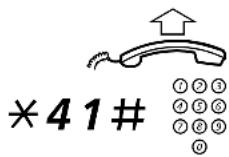
Lift the handset
Press and dial the number
Do Not Disturb, DND
When you activate DND, calls to your extension are not indicated. Outgoing calls can be made as usual.
\*27#
Dial to activate
Special dial tone.
or
#27#
Dial to deactivate

Replace the handset to finish activation/deactivation
Group Do Not Disturb
If your extension is defined as a master extension (programmed by system administrator), you can mark a group of extensions as Group Do Not Disturb. The group can be bypassed by you.

Order
Lift the handset
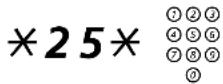
Press and dial the group number
Note: Germany and South Africa press ✦ 2 8 ✦ No.
# Press
Special dial tone.

Replace the handset

Cancel
Lift the handset
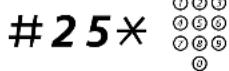
Press and dial the group number
Note: Germany and South Africa press #28* No.

Press and replace the handset

Bypass
Lift the handset
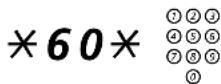
Press and dial the extension number
# Press
The call is made to the specified extension in the group.
Authorization code, common (optional)
If you are assigned to use a common authorization code (1 to 7 digits) you can temporarily change any used telephone within the exchange to the authority level connected to this code. You can use the code for one call only or you can open the phone for some calls and lock it when leaving the phone.
To use for a single call

Lift the handset
*72*
Press

#
Enter authorization code and press
Verification tone.

Dial the digit or digits to get an external line and the external number
To open an extension for some calls

Lift the handset
73*
Press

#
Enter authorization code and press
Verification tone.
To lock an extension

Lift the handset
*73*
Press

#
Enter authorization code and press
Verification tone.
Authorization code, individual (optional)
If you are assigned to an individual authorization code (1 to 7 digits, affiliated to your own extension) you can lock your own extension to a common authority level, e.g. when out of the office. You can also temporarily change any other used telephone within the exchange to the same authority level as you have on your own phone.
The individual code can be changed from your own extension.
To lock your telephone

Lift the handset
*76*
Press

#
Enter authorization code and press
Verification tone.
To make calls with your authority level when your telephone is locked

Lift the handset
*75*
Press

#
Enter authorization code and press
Verification tone.

Dial the digit or digits to get an external line and the external number
To open your telephone

Lift the handset
76*
Press

#
Enter authorization code and press
Verification tone.
To assign your own authority level to another telephone

Lift the handset
*75*
Press

* Enter authorization code and press Verification tone.

# Dial your own extension number and press Verification tone.

Dial the digit or digits to get an external line and the external number
To change your individual authority code

Lift the handset
*74*
Press

※ Enter old authorization code and press

# Enter new authorization code and press Verification tone.
Adjustments
Handset and loudspeaker volume
Use the volume keys. During a call, adjust the listening volume (handset- or monitor mode). The volume is reset when you hang up.
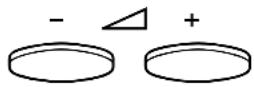
Press to change the volume
Ring signal volume
The ring signal volume can be adjusted in three steps: soft, medium and loud. Adjust the ring signal volume using the slide switch.

Slide to change the volume
Ring signal character
The ring signal character can be adjusted with two different characters: bass and treble. Adjust the ring signal character using the slide switch.

Slide to change the character
Tone/Pulse dialling
On delivery, your telephone is set to tone dialling mode. To find out if you can use tone dialling, proceed as follows:
Lift the handset and dial the number
The usual way of making an outgoing call. If the call goes through, you don't have to change your telephone to pulse dialling.
If, however, the dial tone continues without interruption when you start to dial the number, you are connected to an exchange/PBX that requires pulse dialling and you need to set it to pulse dialling.

Slide to change
Notes: You can also temporarily switch your telephone to tone dialling, see section "During Calls" on page 14.
Flash/Earth mode
On delivery, your telephone is set to flash mode. The R-button (register recall) can be set to two different modes: "timed break" (flash) and "earth". To find out if you have to change the mode of the R-button, proceed as follows:

Lift the handset

Make a call and use any of the services that require R
If you cannot use the service, you need to change the mode of the R-button to the "earth" position.

Slide to change
Hearing aid compatibility
Since your telephone has a built-in inductive coupler for the hard-of-hearing, anyone so desiring can use the telecoil in his/her hearing aid while telephoning. To do so, simply switch the hearing aid in the T position.
Audible Signals
The following different tones and signals are sent from the exchange to your telephone.
Tone characteristics
The tones shown in this section are the most used tones worldwide. Many markets use a differing tone for one or more situations.
Dial tone
Special dial tone
Ringing tone or Queue tone every 4th second
Busy tone
Congestion tone
Number unobtainable tone
Call waiting tone
Intrusion tone
Conference tone every 15th second (to all parties)
Verification tone
Warning tone, expensive route
Ring signals
Three different ring signals inform you about the type of the incoming call. The signals shown in this section are the most used signals worldwide. Many markets use signals that are adapted for the local standards. If you get a signal that is not described or you cannot identify, ask your system administrator.
Internal ringing signal
External ringing signal
Recall signal (automatic callback reminder)

Installation
Install cables
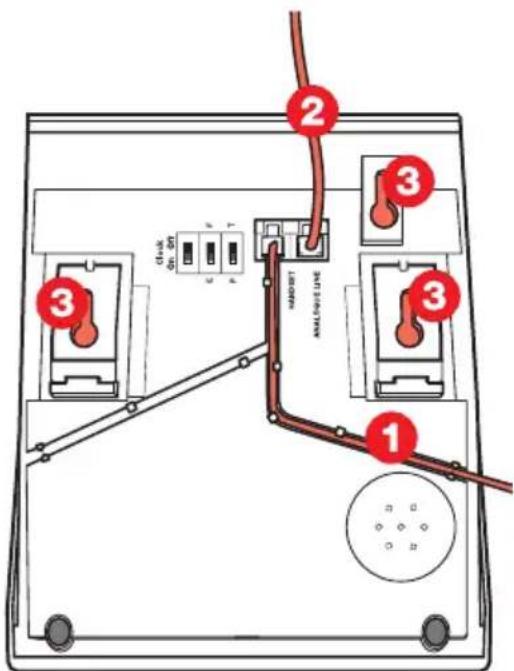
1 Cable to handset
2 Cable to exchange
3 Wall mounting screw holes
You can put the cable to the handset in any of the two notches underneath the telephone. The cable to the exchange has to be plugged in "ANALOGUE LINE".
Change cables
To remove a cable, push down the plug's stop. Use a screw-driver to unlock the stop.
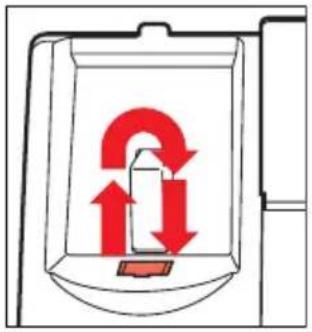
Wall mounting handset hook
When mounting on a wall, you have to pull out and turn the hook.
natural_image
Diagram of a mechanical component with red arrows indicating rotational or directional motion (no text or symbols)Install stand and adjust telephone
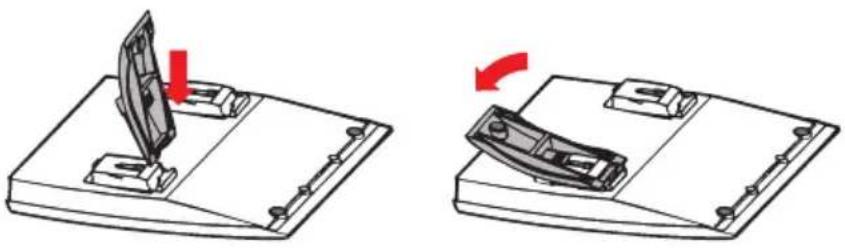
natural_image
Two technical diagrams showing a folding mechanism: one with a slide and arrow, the other with a boat handle (no text or symbols)Press to decrease angle Pull to increase angle
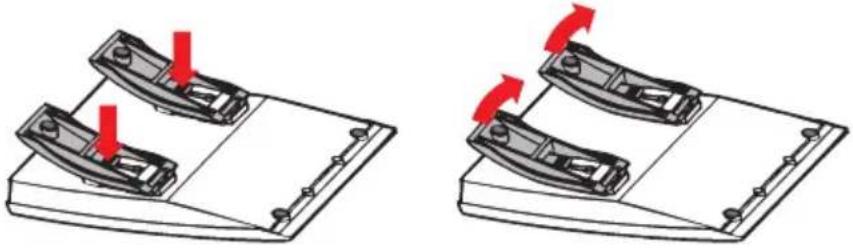
natural_image
Two identical diagrams showing a mechanical component with red arrows indicating force or movement, no text or symbols present.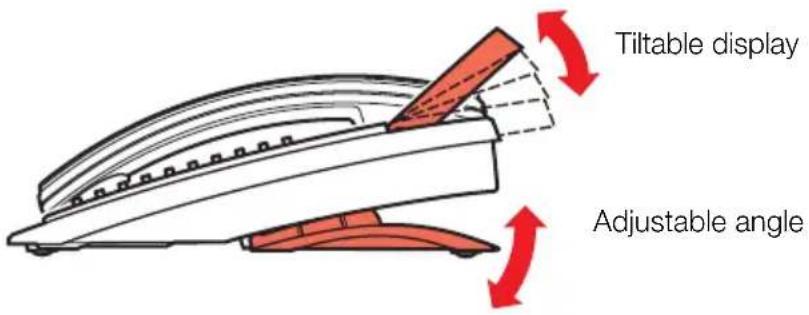
Placing the telephone
- Do not place your telephone on sensitive surfaces. Use a non-slippery pad to protect your furniture from possible damage.
- Do not place your telephone near sources of extreme heat, e.g. near the radiator.
- Make sure that the line cable isn't creased.
Cleaning the telephone
Use a slightly moistened (not wet) cleaning-rag or an anti-static rag and wipe off the telephone carefully. Do not use rough rags, solvents or aggressive cleaning fluids. Any damages of the telephone, that are caused by non-observance of these instructions, are not part of the liability given by the manufacturer.
Troubleshooting
This section contains information on how to solve common operational problems. Go through the following steps if you encounter any problems. If this does not solve the problem, contact your system administrator. If others have similar problems, there may be a system error.
Fault check list
- Make sure your telephone is connected to an analog line
- Read the Installation chapter
To make sure that you have done everything correctly and that everything is properly connected.
- Disconnect all extra equipment
If your telephone is working properly when done, the problem lies in the extra equipment.
- Connect a functioning telephone instead of the faulty one
If that telephone is working properly, the problem is probably in your telephone, contact your system administrator.
- Check for operational problems
If operational problems are found, the problem is in the telephone network, contact the local telephone service or the local telephone company.
Index
A
Abbreviated Numbers 44
Common abbreviated numbers 44
Individual abbreviated numbers 44
Absence Information 41
Account Code 51
Account number 51
Adjustments 70
Flash/Earth mode 71
Handset and loudspeaker volume 70
Hearing aid compatibility 71
Ring signal character 70
Ring signal volume 70
Tone/Pulse dialling 71
Alarm extension 54
Answer Calls 9
Audible Signals 72
Ring signals 73
Tone characteristics 72
Authority 65
Authorization code, common (optional) 67
Authorization code, individual (optional) 68
Data Privacy 65
Do Not Disturb, DND 65
Group Do Not Disturb 66
Authorization code, common (optional) 67
Authorization code, individual (optional) 68
Automatic Callback 19
B
Busy extension or external line 19
Bypass Call Forwarding 28
Bypass Diverson 28
Bypass locked extension 68
C
Call Forwarding 23
Bypass Diversion 28
Diversion 23
Call Pick-up Group 48
Call Timer 13
Call Waiting 21
Cleaning the telephone 76
Common abbreviated numbers 44
Common Bell Group 48
Conference 17
D
Data communication 55
Data Privacy 65
Description 4
Dial mode 17
Direct Inward System Access (DISA) 55
Diversion 23
Do Not Disturb, DND 65
During Calls 14
Conference 17
Dial mode 17
Inquiry 15
Monitoring 14
Mute 15
On Hold 18
Transfer 16
E
Emergency state 54
General Cancellation 52
Group Do Not Disturb 66
Group Facilities 48
Call Pick-up Group 48
Common Bell Group 48
Group Hunting 49
Group Hunting 49
H
Handset and loudspeaker volume 70
Handsfree 12
Hearing aid compatibility 71
Hot Line 54
|
Incoming Calls 9
Answer calls 9
Individual abbreviated numbers 44
Individual External Line 12
Information 41
Absence Information 41
Inquiry 15
Install cables 74
Install stand and adjust telephone 75
Installation 74
Cleaning the telephone 76
Install cables 74
Install stand and adjust telephone 75
Placing the telephone 76
Wall mounting handset hook 75
Integrated Voice Mail (optional) 37
Internal Follow-me 26
Internal Messages 35
Manual Message Waiting (MMW) 35
Intrusion on a busy extension 21
Intrusion on a busy external line 22
L
Last External Number Redial 13
Log off 8
Log on 7
M
Make calls 11
Manual Message Waiting (MMW) 35
Monitoring 14
Mute 15
N
Night Service 52
0
On Hold 18
Otehr Useful Facilities
Emergency state 54
Other Useful Facilities 51
Account Code 51
Alarm extension 54
Data communication 55
Direct Inward System Access (DISA) 55
General Cancellation 52
Hot Line 54
Night Service 52
Outgoing Calls 11
Call Timer 13
Handsfree 12
Individual External Line 12
Last External Number Redial 13
Make calls 11
P
Paging 57
Alarm Paging 62
Paging receivers with voice message 61
Paging receivers without a display and
Paging via lamp signals 58
Paginng
Paging receivers with a display 59
Personal number 28
Placing the telephone 76
R
Ring signal character 70
Ring signal volume 70
Ring signals 73
T
Tone characteristics 72
Tone/Pulse dialling 71
Transfer 16
Troubleshooting 77
Fault check list 77
V
Voice Mail 37
Integrated Voice Mail (optional) 37
W
Wall mounting handset hook 75
When You Receive a Busy Tone 19
Busy extension or external line 19
Ericsson is shaping the future of Mobile and Broadband Internet communications through its continuous technology leadership. Providing innovative solutions in more than 140 countries, Ericsson is helping to create the most powerful communication companies in the world.
- Dialog 3185 and 3185MW
- Table of Contents
- Display
- Programmable keys
- Message Waiting lamp
- Mute
- Handset and speaker volume
- R-key
- Line / Loudspeaker on/off
- Program
- Tone
- Last Number Redial / Pause key
- Ring signal volume
- Ring signal character
- Tone / Pulse dialling
- Flash / Earth mode
- Clock on/off
- Loudspeaker
- Microphone
- Handset with hearing aid function
- Free Seating (optional)
- To log on
- To log off
- 11
- Replace the handset to finish the procedure
- Incoming Calls
- Answer calls
- On another extension
- Lift the handset and call the ringing extension
- Press
- Answer a second call
- Replace the handset
- Lift the handset to receive the new call
- Press and replace the handset
- Lift the handset to receive the first call again
- Handsfree
- Press without lifting the handset
- Press to terminate a handsfree call
- Outgoing Calls
- Make calls
- 0
- Wait for dial tone
- Press
- Dial the number
- Individual External Line
- Lift the handset
- Dial the individual external line number and press
- Dial the digit or digits to get an external line and the external number
- Last External Number Redial
- Lift the handset and press to redial last dialled external number
- Call Timer
- Lift the handset and press
- During Calls
- Monitoring
- Press to switch the loudspeaker on
- Press to end the call
- From Monitoring to handset
- Mute
- Press to switch the microphone on or off
- Inquiry
- Call the second party
- Press to return to the first party
- Refer Back
- Press to put the ongoing conversation on hold
- Transfer
- Conference
- Press to establish a three party conference
- Repeat the procedure to include other persons to the conference
- Replace the handset to leave the conference
- Dial mode
- Tone
- Press to switch to tones
- On Hold
- When You Receive a Busy Tone
- Busy extension or external line
- Automatic Callback
- Press
- Replace the handset to finish procedure
- Lift the handset when you are called back
- # Dial the external number and press
- Cancel any single Callback
- #37\*
- Press and dial the extension number
- #
- Cancel all callbacks
- #37#
- Call Waiting
- Press
- Intrusion on a busy extension
- Press
- Notes:
- Intrusion on a busy external line
- Call Forwarding
- Diversion
- Order direct Diversion from your own extension
- Cancel direct Diversion from your own extension
- 21
- Diversion when there is no answer
- 211
- Diversion when caller receives a busy tone
- 212
- Diversion to another information service facility
- 218
- Internal Follow-me
- Order from your own extension
- Cancel from answering position
- 21* ①②③
- Press and dial your own extension number
- External Follow-me
- Order
- Cancel
- 22
- Bypass Diversion
- Personal Number (optional)
- To activate or change to another profile from your office telephone
- To cancel from your office telephone
- 10
- To activate or change to another profile from an external telephone
- Call the DISA function at your office
- To cancel from an external telephone
- 10*
- To design and order your search profiles
- Example:
- Setting form for search profiles
- Internal Messages
- Manual Message Waiting (MMW)
- Answer MMW at your own extension
- 31
- Order MMW to another extension
- 31*
- Voice Mail
- Integrated Voice Mail (optional)
- To activate and deactivate your mailbox
- To enter your mailbox
- Dial the number to the voice mail system
- Enter your security code
- Follow the recorded instructions
- # Press
- Enter your mailbox number
- Enter your security code (if required)
- To enter someone else's mailbox
- Enter the mailbox number
- Enter the security code of the person served (if required)
- To handle the mailbox
- Information
- Absence Information (optional)
- Press to enter the information
- #23#
- Order for another extension
- \*230\*
- Dial the extension number and press
- (0 - 9)
- Enter the absence code
- \*0915
- Press and enter the date or time of the other person's return
- Cancel for another extension
- 230*
- Abbreviated Numbers
- Common abbreviated numbers
- Individual abbreviated numbers
- Program individual abbreviated number
- 51*
- 51
- Dial By a Function Key
- Program
- Press a programmable key
- Checking stored numbers
- Press the desired programmable key to see the programmed number
- Group Facilities
- Call Pick-up Group
- 8
- Press to answer
- Common Bell Group
- Group Hunting
- 24*
- Other Useful Facilities
- Account Code (optional)
- General Cancellation
- 001
- Night Service
- Common Night Service
- Individual Night Service
- Universal Night Service
- Flexible Night Service
- To order Flexible Night Service
- 84
- Hot Line
- Delayed Hot Line
- Direct Hot Line
- Alarm extension
- Emergency state
- Data communication
- Direct Inward System Access (DISA) (optional)
- With common authorization code
- With individual authorization code
- Paging (optional)
- Paging receivers without a display and Paging via lamp signals
- To initiate
- Press
- To answer
- Dial your own extension number and press
- Paging receivers with a display
- Paging receivers with voice message
- \*81\*
- Alarm Paging
- To acknowledge an alarm
- Date and Time
- Slide the clock switch to "ON"
- Press and hold
- Enter month (two digits) and press
- Enter day (two digits) and press
- Enter hour (two digits) and press
- Enter minute (two digits) and press to activate
- Authority
- Data Privacy
- Do Not Disturb, DND
- \*27#
- Dial to activate
- #27#
- Group Do Not Disturb
- Press and dial the group number
- Bypass
- Authorization code, common (optional)
- To use for a single call
- To open an extension for some calls
- 73*
- To lock an extension
- Authorization code, individual (optional)
- To lock your telephone
- To open your telephone
- 76*
- To assign your own authority level to another telephone
- To change your individual authority code
- Adjustments
- Handset and loudspeaker volume
- Ring signal volume
- Ring signal character
- Tone/Pulse dialling
- Lift the handset and dial the number
- Slide to change
- Flash/Earth mode
- Make a call and use any of the services that require R
- Hearing aid compatibility
- Audible Signals
- Tone characteristics
- Ring signals
- Installation
- Install cables
- Change cables
- Wall mounting handset hook
- Install stand and adjust telephone
- Placing the telephone
- Cleaning the telephone
- Troubleshooting
- Fault check list
- Index
- A
- B
- C
- D
- E
- H
- |
- L
- M
- N
- P
- R
- T
- V
- W
Brand : ERICSSON
Model : Dialog 3185MW
Category : Phone