
7910 DTMHS UPDATECD1 2 - CD Player BECKER - Free user manual and instructions
Find the device manual for free 7910 DTMHS UPDATECD1 2 BECKER in PDF.


| Product type | Car navigation CD player |
| Brand | BECKER |
| Model | 7910 DTMHS UPDATECD1 2 |
| Supported format | Navigation CD (installation CD 2.x) |
| Main functions | Navigation with two CDs northern/southern Europe, speed limit display, software update |
| Power supply | 12 V (vehicle) |
| Dimensions (estimated) | 1 DIN (178 x 50 x 160 mm) |
| Weight (estimated) | Approximately 1 kg |
| Display | Built-in screen (size not specified) |
| Updates | Via update CD (do not interrupt the process) |
| Navigation zones | Northern Europe (CD no.1) and Southern Europe (CD no.2) |
| Speed limit | Display can be enabled/disabled, based on CD data |
| Maintenance and cleaning | Clean the laser lens with a soft cloth; avoid scratches |
| Safety | Do not use the player while driving; do not insert foreign objects |
| Spare parts and repairability | Contact BECKER after-sales service for parts |
| Operating temperature | -10 °C to +60 °C (estimated) |
Frequently Asked Questions - 7910 DTMHS UPDATECD1 2 BECKER
User questions about 7910 DTMHS UPDATECD1 2 BECKER
0 question about this device. Answer the ones you know or ask your own.
Ask a new question about this device
Download the instructions for your CD Player in PDF format for free! Find your manual 7910 DTMHS UPDATECD1 2 - BECKER and take your electronic device back in hand. On this page are published all the documents necessary for the use of your device. 7910 DTMHS UPDATECD1 2 by BECKER.
USER MANUAL 7910 DTMHS UPDATECD1 2 BECKER
If you received this operation guide update when purchasing a new unit, the functions and modifications described from page 7 are intended as a supplement to your operation guide.
If you received this operation guide update together with an update CD, the update procedure and the new functions and modifications are described on the following pages.
Installation of CD 2.X
In order to install CD 2.X, remove the old CD and insert the new CD 2.X.
After a short time, the following display or a similar display appears.
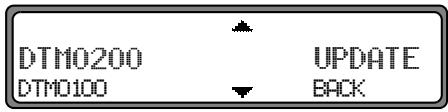
Using the right rotary control select, UPDATE and press to confirm.
The navigation and radio software is updated.
A progress bar appears on the display.
During updating, the ignition should be switched on and the vehicle should not be moved.
Modifications to navigation mode
The following modifications have been made to navigation mode or the following new functions have been added.
- Navigation CDs
- Switching the speed limits display on/off
Navigation CDs
Two navigation CDs are supplied with the navigation unit. These CDs contain a digitised street map. One CD for Northern Europe (CD no. 1) and one CD for Southern Europe (CD no. 2) are supplied.
The complete trunk road network and all destination centres in the digitised area of Northern and Southern Europe are available on the CDs.
All digitised roads of the northern countries are also included on the Northern Europe CD. All digitised roads of the southern countries are also included on the Southern Europe CD.
In these detailed areas of the Northern or Southern Europe CD road map, motorways, regional roads and unclassified roads as well as country roads are stored. Larger cities and communities are comprehensively covered. For smaller towns and communities, the regional and unclassified roads or access roads and the town centres are included.
One-way streets, pedestrian zones, turning bans and other traffic regulations are taken into account as far as possible.
There may be discrepancies between the data on the navigation CD and the actual local situation, due to permanent changes to road systems and their traffic regulations.
Navigation with two European CDs
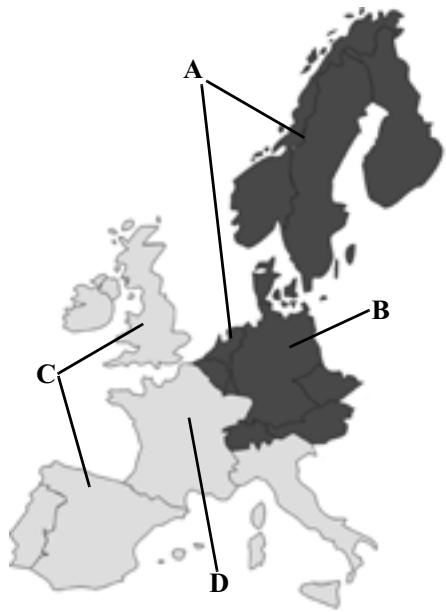
A Area of Northern Europe CD with all digitised roads.
B For example, a town or an address in Germany (on the Northern Europe CD).
C Area of Southern Europe CD with all digitised roads.
D For example, a town or an address in France (on the Southern Europe CD).
For example, if you wish to navigate from a town on the Southern Europe CD (D) to a town on the Northern Europe CD (B), enter your destination address as usual. After entering the town, you will be prompted to insert navigation CD No. 1 by the display PLEASE INSERT HAV CD 1. After inserting the relevant CD, enter the road and, if required, the house number or the town centre.
The required map data is loaded and stored internally after route calculation has started.
Note: For Norway, Sweden, Finland and Denmark, non-verified data has been used to achieve a high depth of digitisation; i.e. with this data, the navigation system cannot refer to information such as motorway, trunk road, 30 zone, one-way street or other traffic regulations, as this is not recorded.
All roads can be used, but optimum route guidance cannot be guaranteed.
Switching the speed limits display on/off
If the speed limits display is ON, the system will inform you of the maximum permissible speed limit for the route along which you are travelling during route guidance, insofar as this information is available.

Warning
Accident hazard
Road traffic regulations always take priority when a vehicle is being driven in traffic. Road signs en-route should always be heeded. In some cases, the speed limit indicated by the navigation system may be incorrect. At all times, the driver must decide whether or not to heed the speed limit indicated. We do not accept liability for erroneous data provided by the navigation system.
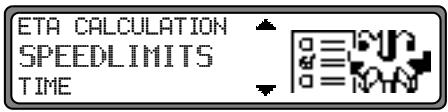
Set and confirm SPEEDDLimits in the System Settings menu.
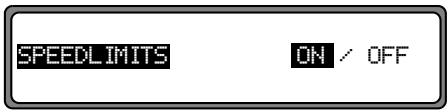
By pressing the right rotary control selection can be made between speed limits display OH or OFF.
Setting is confirmed and accepted by pressing and holding the right rotary control
If, when the speed limit display is ON, you travel along a route with a speed limit and this speed limit is stored on the navigation CD, the corresponding symbol will appear on the right-hand side of the display indicating the speed limit.
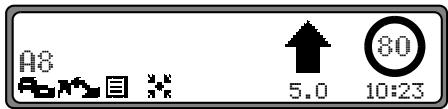
The distance to the next point at which for example a turn should be made is displayed below the navigation arrow, which appears in reduced format.
On routes with variable speed limits (dependent on weather conditions, time of day etc.) a symbol with the text D-m or a speed with an underscore (e.g.: "80") draws the driver's attention to the fact that the speed limit is variable.
Note: As temporary speed limits (e.g. due to road works) are usually short-lived, these have not been included on the CD.
Con然是, we can find a solution for the problem of how to compute the probability of a collision.
Brand : BECKER
Model : 7910 DTMHS UPDATECD1 2
Category : CD Player