
INVADER - Bluetooth speaker JBL - Free user manual and instructions
Find the device manual for free INVADER JBL in PDF.





| Product type | 2.1 speaker system with subwoofer |
| Brand | JBL |
| Model | INVADER |
| Manufacturer | Harman Multimedia |
| Satellite speakers | PHOENIX SE (full range) |
| Subwoofer speaker | MAGNUM 11.5 cm |
| Satellite power (per speaker) | 12 watts at 1% THD |
| Subwoofer power | 32 watts at 1% THD |
| Crossover frequency (subwoofer) | 150 Hz |
| Frequency response | 40 - 20 kHz |
| Signal-to-noise ratio | >85 dB |
| Input impedance | >5 kohms |
| Input sensitivity | 400 mV RMS for rated power |
| Power supply | 220-230 V AC, 50 Hz |
| Maximum power consumption | 120 watts |
| Satellite dimensions (W x D x H) | 7.5 x 10.0 x 24.0 cm |
| Subwoofer dimensions (W x D x H) | 19.0 x 22.5 x 30.0 cm |
| Certifications | UL, ULC, CE |
| Magnetic shielding | Yes (satellites and subwoofer) |
| Controls | Volume (right speaker), bass and treble (subwoofer) |
| Maintenance and cleaning | Soft dry cloth; use a damp cloth without solvent if necessary |
| Safety | Do not expose to rain or moisture; do not open the enclosure |
| Spare parts and repairability | No user-serviceable parts; contact Harman Multimedia |
Frequently Asked Questions - INVADER JBL
User questions about INVADER JBL
0 question about this device. Answer the ones you know or ask your own.
Ask a new question about this device
Download the instructions for your Bluetooth speaker in PDF format for free! Find your manual INVADER - JBL and take your electronic device back in hand. On this page are published all the documents necessary for the use of your device. INVADER by JBL.
USER MANUAL INVADER JBL
Please read the following operation precautions before use:
- Read instructions --- All the safety and operating instructions should be read thoroughly before attempting to operate this audio system.
- Retain instructions for future reference. Heed warnings --- All warnings on this audio system and in the operating instructions should be adhered to.
- Follow instructions --- All operating and use instructions should be followed.
- TO PREVENT THE RISK OF ELECTRIC SHOCK, DO NOT REMOVE THE COVER (OR BACK). THERE ARE NO USER SERVICEABLE PARTS INSIDE THIS UNIT, PLEASE REFER SERVICING TO QUALIFIED HARMAN MULTIMEDIA CORPORATION SERVICE PERSONNEL.
- Do not expose the speakers to liquid or solvent.
- Never remove grille covers in order to service the speaker system. The speaker system does not contain any user serviceable parts. Refer all servicing to the Harman Multimedia Technical Support Group.
- Do not expose the speaker system to temperature or humidity extremes, direct sunlight, excessive dust, or vibrations.
- Place the speaker system on a stable, level surface. Do not drop, apply excessive force to the controls, or put heavy objects on top of the speaker. If cleaning is required, use a soft dry cloth. If necessary, use a damp cloth without any solvents.
- In order to protect the speaker system, avoid microphone feedback, continuous output from electronic musical instruments, or distorted output from any signal source.
- Do not place the speakers close to fluorescent light sources, or neon light fixtures.
- Although the speakers are magnetically shielded, keep magnetic storage media (disks and tapes) at least four inches from the speaker system in order to avoid data loss. WARNING: To reduce the risk of fire or electric shock, do not expose this speaker system to rain or moisture.
Introduction
The INVADER is the latest innovation from JBL, a long time leader in the manufacture of high-end component and computer audio systems. JBL's audio heritage combined with continual research has provided the unique technologies included in the INVADER.
The Harman Multimedia PHOENIX SE transducer is a unique full range transducer designed specifically for small speaker enclosures while providing significant mid bass. In addition to the bass, the small, rigid and light inverted aluminum cone provides performance that will rival any tweeter used in multimedia speakers today. The result is an elegant satellite speaker that perfectly integrates with the subwoofer while providing superior midrange and highs.
The Magnum series subwoofer transducer provides deep bass. This Magnum series of subwoofers are designed specifically to match with the Harman Multimedia PHOENIX SE transducers. The same approach of providing solid bass from a small subwoofer enclosure guided the development of these Magnum transducers.
As described in the Using the speaker system section of the user's guide, the control knob on the front of the right satellite speaker controls the system volume level. Rotating the knob clockwise increases the system volume level.
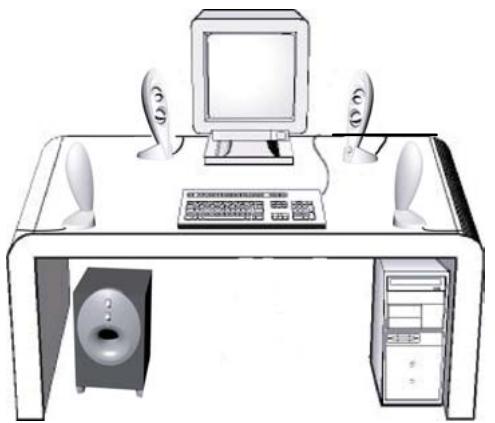
Treble and bass level adjust knobs are located on the front of the subwoofer unit. A system on/off switch is also provided on the rear of the subwoofer unit. The system includes four desktop speakers and a subwoofer that can be placed either on the floor or on your desk. All satellite speakers are magnetically shielded to provide the greatest protection against computer monitor image distortion.
Setup
Carefully unpack your speaker system and identify all components:
A Control/Right front Satellite speaker B Auxiliary/Left front Satellite speaker C Auxiliary/Left Rear Satellite speaker D Auxiliary/Right Rear Satellite speaker E Subwoofer F Audio Input Cable G AC Power Cable
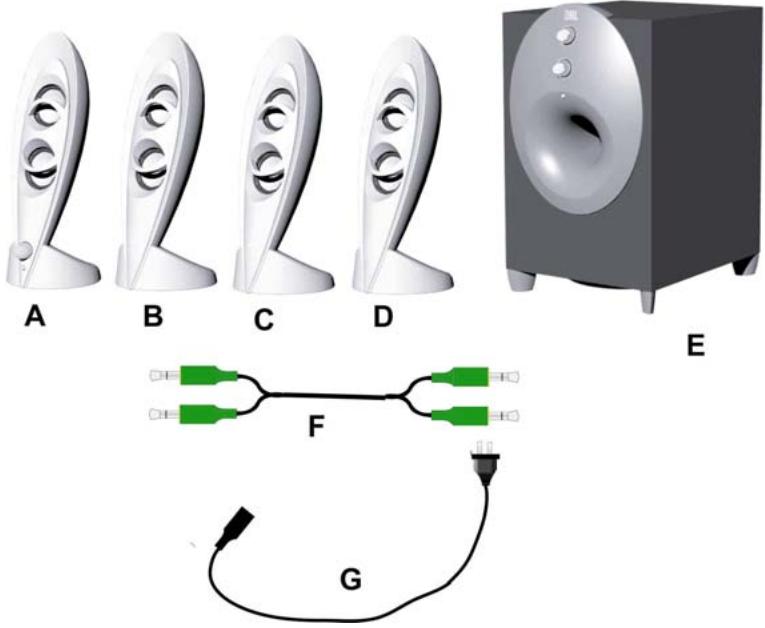
Connect the speaker system as shown in the Connecting the speaker system to sound card illustrations. Once the speaker system is properly connected, turn on the power switch located on the rear of the subwoofer.
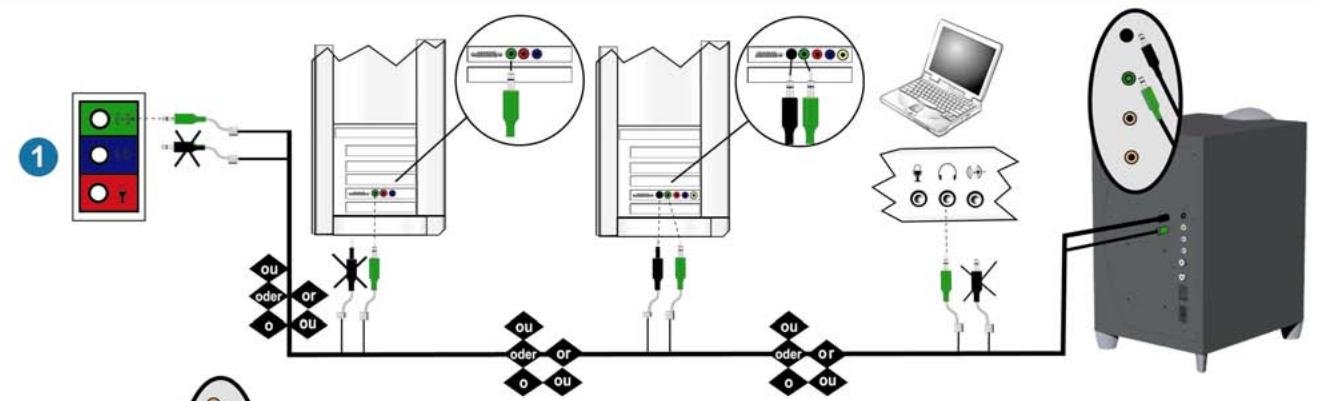
Step 1 Connecting the speaker system to the computer:
- If you have an integrated sound solution or a stereo sound card; connect the green connector from the subwoofer into the green jack on the computer. Do not connect the black connector to the sound card.
- If you have a multi-channel sound card; connect the green connector from the subwoofer into the green jack on the computer. Connect the black connector to the black jack on your sound card.
- If you have a portable computer; connect the green connector from the subwoofer into the headphone jack on the computer. Do not connect the black connector to the sound card.
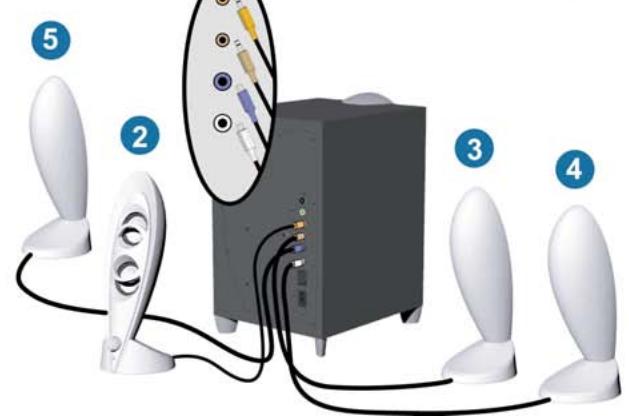
Step 2 Plug the orange connector from the right front/control satellite into the orange jack on the subwoofer.
Step 3 Plug the brown connector from the left front satellite into the brown jack on the subwoofer.
Step 4 Plug the blue connector from the right rear satellite into the blue jack on the subwoofer.
Step 5 Plug the white connector from the left rear satellite into the white jack on the subwoofer.
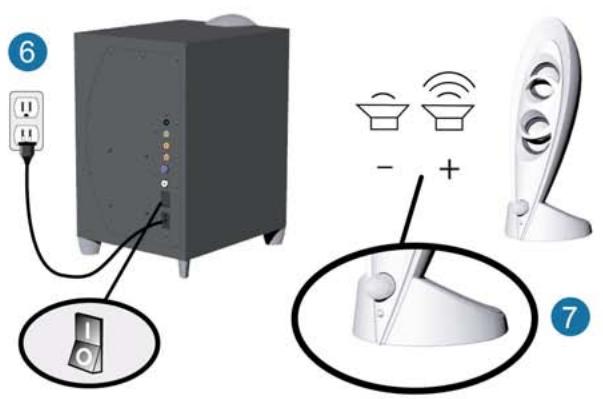
Step 6 Plug the AC plug into the wall outlet.
Step 7 Turn on the speaker set and adjust the volume accordingly.
Connecting the Speaker System to the Computer
Connecting the Speaker System to the Computer
Placement of speakers
The speakers are magnetically shielded and can be placed close to a computer monitor without distorting the image. For optimal stereo imaging, separate the speakers from each other by a distance equal to your distance from the speakers.
The subwoofer's sound is non-directional; therefore, it does not have to be placed in any particular relationship to the satellites.
Using the speaker system
On/Off Switch
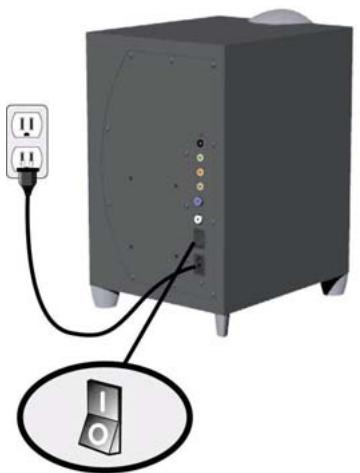
An on/off switch is located on the rear of the subwoofer.
There is a green LED located on front of the right satellite speaker. There is also a green LED located on the front of the subwoofer. Both LEDs should illuminate when the system is connected correctly and receiving power. Turn the speaker off if it will not be used for a long period.
Volume Control
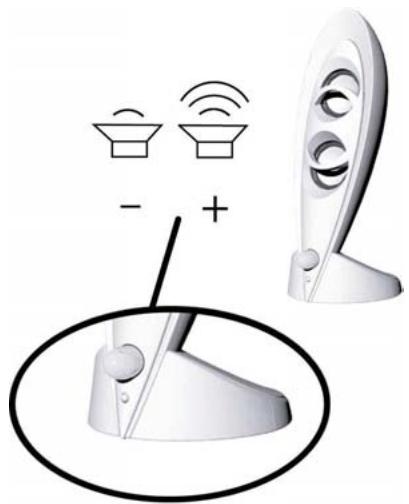
The volume control can be found on the front of the control/right satellite speaker. Turning the control knob clockwise increases the system volume level. Turning the volume control knob counter-clockwise decreases the system volume.
Muting
Turning the volume control knob completely counter-clockwise mutes the system.
Controls on the Subwoofer
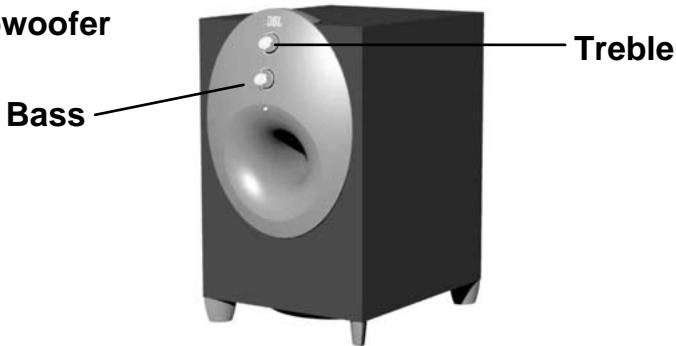
Bass - Turn the knob marked Bass clockwise to increase the subwoofer level or counterclockwise to decrease the subwoofer level.
Treble - Turn the knob marked Treble clockwise to increase the treble level or counterclockwise to decrease the treble level.
Troubleshooting
| SYMPTOM | POSSIBLE PROBLEM | SOLUTION | NOTE |
| No sound from Speakers | No power to unit. | Make sure wall power outlet or power strip has power. Make sure all switches for outlet/power strip are on and that all switches for speaker system are on. | Check green power LED on the sub. Are the LED's on? If the sub's led is not on, power is not getting to your speaker system. Try the solutions shown. |
| Is the control/right satellite of your INVADER plugged in correctly? | Ensure that the control speaker connector is pushed in properly. Remove the control /right speaker connector from the subwoofer, then re-connect this cable ensuring that the connector is pushed in properly. | There is an LED located in the bottom of each of the two satellite speakers. These should both be lit. If they are, your speakers are both plugged in correctly. | |
| Distortion (static, crackling or hissing sounds) | Noise may be caused by interference from the monitor. | Turn monitor off to see if noise is eliminated. Move speaker cables farther away from monitor. | |
| Speaker is being overdriven by an amplified audio source. | Ensure that speaker is connected to the appropriate receptacle. Check color-coding on connectors when making connections. Make sure that all signal cables are inserted snugly into receptacles. | ||
| Volume level on sound card may be too high. | Check volume of sound card via Windows Volume Control. | ||
| Sound card or audio source material may be cause of problem. | Check speakers with another audio source. | Disconnect speaker input cable (green connector) from sound card and plug into CD ROM headphone jack. If static is eliminated, troubleshoot the soundcard. | |
| Check the speaker control settings. | Set each of the two knobs (treble, bass level) on front of the subwoofer back the their center /nominal positions. | ||
| Too much bass or treble. | Bass/Treble level is set too high | Turn Bass/Treble down or return their settings to the center position. | |
| Subwoofer emits a loud hum or buzzing noise. | Input cables not plugged in properly | Check input cable connection | |
| Speaker system experiences radio frequency interference or picks up a radio station | Input cable may be picking up interference | Wrap up excess input cable in order to make as short as possible | |
| Purchase a ferrite clamp and attach over input cable. A clamp can be purchased at your local electronics store |
SPECIFICATIONS
| Manufacturer | Harman Multimedia |
| Model | JBL INVADER |
| Drivers (satellite) | Phoenix SE |
| Drivers (subwoofer) | One 6 inch Magnum woofer |
| Power (satellite) | 12 watts per satellite at 1% THD |
| Power (subwoofer) | 32 watts at 1% THD |
| Crossover Frequency (subwoofer) | 150 Hz |
| Dimensions | |
| Width: | |
| Satellite | 3.0 inches 75mm |
| Subwoofer | 7.5 inches 190mm |
| Depth: | |
| Satellite | 4.0 inches 100mm |
| Subwoofer | 9.0 inches 225mm |
| Height: | |
| Satellite | 9.5 inches 240mm |
| Subwoofer | 12 inches 300mm |
| Input Impedance | >5k Ohm |
| Signal-to-Noise ratio | >85dB |
| Frequency Response | 40 – 20 kHz |
| Input Sensitivity | 400 mV rms for rated power output |
| USA/Canada Power | 120 volts, 60Hz AC |
| Maximum Power Consumption | 120 watts |
| UL/CUL/CE Approved |
Regulatory
FCC Statement and Warning
This equipment has been tested and found to comply with the limits for a Class B digital device, pursuant to Part 15 of the FCC rules. These limits are designed to provide reasonable protection against harmful interference in a residential installation. This equipment generates, uses and can radiate radio frequency energy and, if not installed and used in accordance with the instructions, may cause harmful interference to radio communications. However, there is no guarantee that interference will not occur in a particular installation. If this equipment does cause harmful interference to radio or television reception, which can be determined by turning the equipment off and on, the user is encouraged to try to correct the interference by one or more of the following measures:
a) Re-orient or relocate the receiving antenna. b) Increase the separation between the equipment and receiver. c) Connect the equipment to an outlet on a circuit different from that to which the receiver is connected. d) Consult the dealer or an experienced radio/TV technician for help.
MODIFICATIONS NOT EXPRESSLY APPROVED BY THE MANUFACTURER COULD VOID THE USER AUTHORITY TO OPERATE THE EQUIPMENT UNDER FCC RULES.
JBL
invader
Technical Assistance



Brand : JBL
Model : INVADER
Category : Bluetooth speaker