USER MANUAL ME-70 BOSS
Before using this unit, carefully read the sections entitled: "USING THE UNIT SAFELY" (p. E-18) and "Important Notes" (p. E-19). These sections provide important information concerning the proper operation of the unit. Additionally, in order to feel assured that you have gained a good grasp of every feature provided by your new unit, Owner's Manual should be read in its entirety. The manual should be saved and kept on hand as a convenient reference.
Copyright © 2008 BOSS CORPORATION
All rights reserved. No part of this publication may be reproduced in any form without the written permission of BOSS CORPORATION.
All product names mentioned in this document are trademarks or registered trademarks of their respective owners.
Printing Conventions and icons in This Manual
| Text or numerals enclosed in square brackets [] | Indicate buttons.
[WRITE] WRITE button |
| NOTE | Indicates information that you should be aware of when using the ME-70. |
| MEMO | Indicates supplementary information about an operation. |
| TIP | Indicates information about a convenient operation. |
| cf.
(p. E-**) | Indicates a reference page. |
COSM
Technology that simulates existing physical structures, materials, and the like using different, virtual means is called "modeling technology."
COSM (Composite Object Sound Modeling) is a technical innovation from Roland that combines a number of such sound-modeling technologies to create even newer sounds.
Creating Sounds E-2
Using the Effects. E-4
COMP/FX (Compressor/Effects) E-4
OD/DS (Overdrive/Distortion) E-5
MODULATION E-6
DELAY E-7
PREAMP E-8
Saving/Calling Up and Using Tones (Memory Mode) ... E-10
Changing Between the Manual and Memory Modes. E-10
Saving Tones (Patch Write) E-10
Calling Up Tones (Patches) E-11
Changing Tone Settings (Memory Edit Mode) E-11
Convenient Functions. E-12
Creating Tones with Ease (EZ Tone) .E-12
Checking the Values of Controls. E-12
Tuning the Guitar (Tuner) .E-13
Using External Foot Switches. E-13
Applying Effects in Time with the Song Tempo (Tap Tempo) .........E-14
Phrase Loop Play. E-15
Making the Settings for Control Operation .E-15
Restoring the Factory Settings (Factory Reset) E-16
Adjusting the Expression Pedal E-16
Appendices E-17
USING THE UNIT SAFELY. E-18
Important Notes. E-19
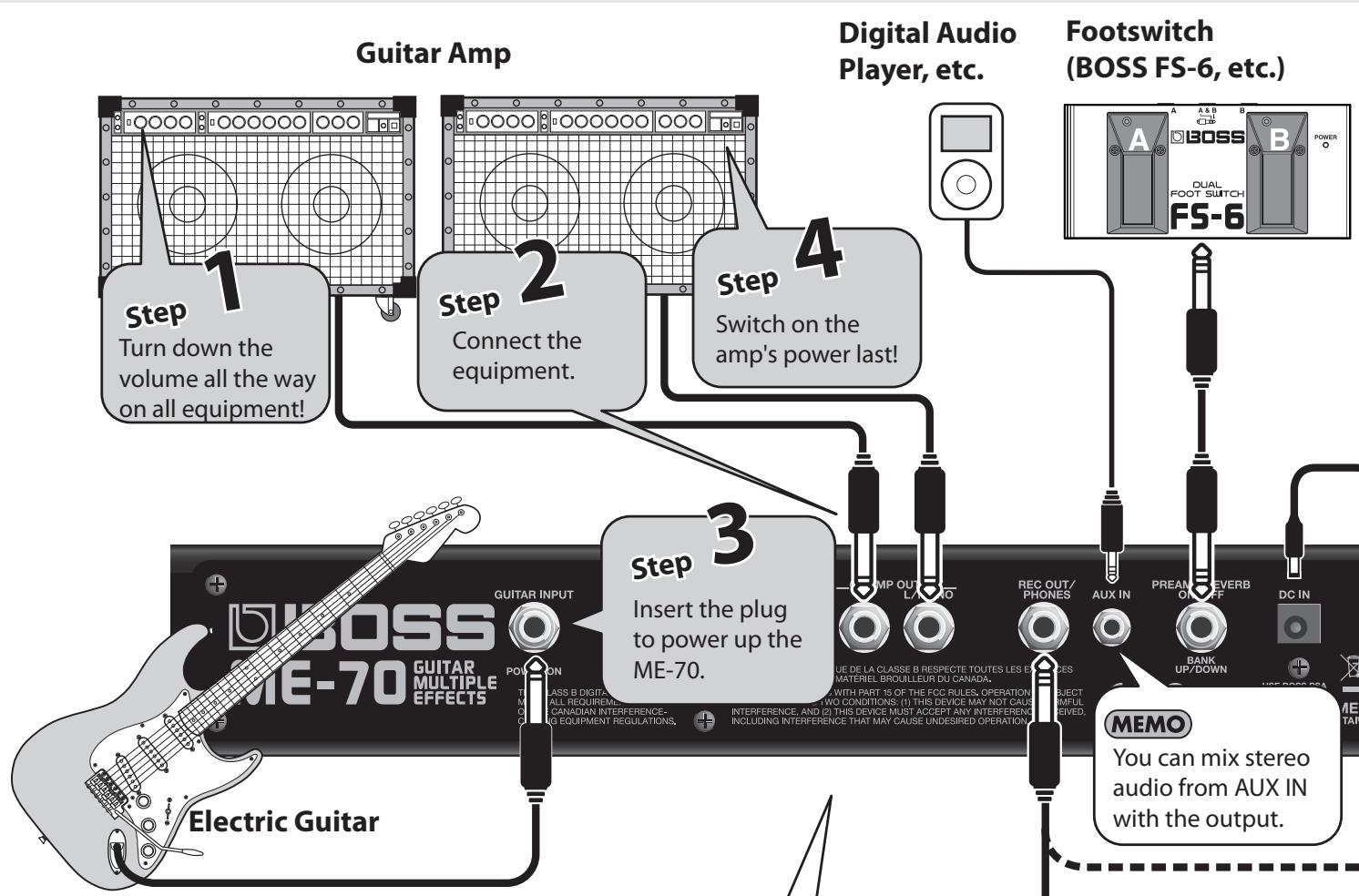
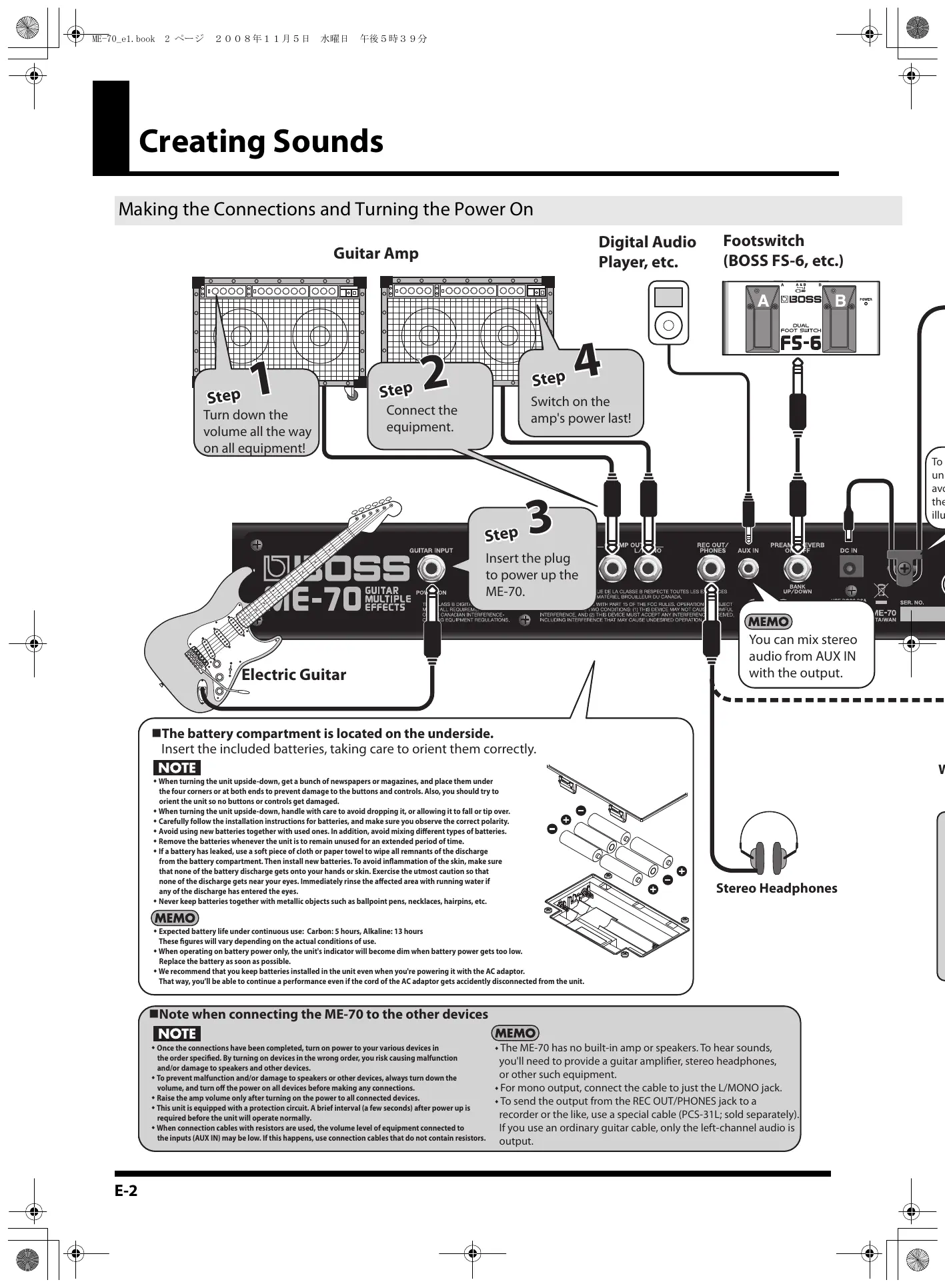
Making the Connections and Turning the Power On
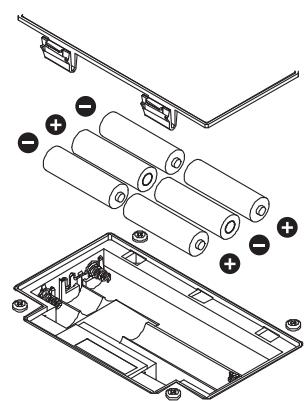
The battery compartment is located on the underside. Insert the included batteries, taking care to orient them correct.
NOTE
- When turning the unit upside-down, get a bunch of newspapers or magazines, and place them under the four corners so that both ends to prevent damage to the buttons and controls. Also, you should try to orient the unit so no buttons or controls get damaged.
- When turning the unit upside-down, handle with care to avoid dropping it, or allowing it to fall or tip over.
Carefully follow the installation instructions for batteries, and make sure you observe the correct polarity.
Avoid using new batteries together with used ones. In addition, avoid mixing different types of batteries.
- Remove the batteries whenever the unit is to remain unused for an extended period of time.
- If a battery has leaked, use a soft piece of cloth or paper towel to wipe all remnants of the discharge from the battery compartment. Then install new batteries. To avoid inflammation of the skin, make sure that none of the battery discharge gets onto your hands or skin. Exercise the utmost caution so that none of the discharge gets near your eyes. Immediately rinse the affected area with running water if any of the discharge has entered the eyes.
- Never keep batteries together with metallic objects such as ballpoint pens, necklaces, hairpins, etc.
MEMO
Expected battery life under continuous use: Carbon: 5 hours, Alkaline: 13 hours
These figures will vary depending on the actual conditions of use.
- When operating on battery power only, the unit's indicator will become dim when battery power gets too low. Replace the battery as soon as possible.
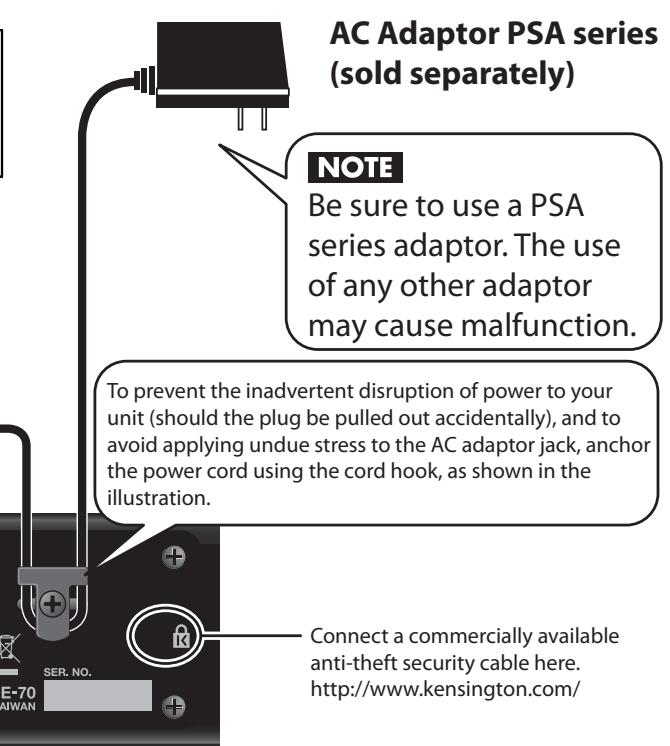
- We recommend that you keep batteries installed in the unit even when you're powering it with the AC adaptor. That way, you'll be able to continue a performance even if the cord of the AC adaptor gets accidently disconnected from the unit.
You can mix stereo audio from AUX IN with the output.
Stereo Headphones
Note when connecting the ME-70 to the other devices
NOTE
- Once the connections have been completed, turn on power to your various devices in the order specified. By turning on devices in the wrong order, you risk causing malfunction and/or damage to speakers and other devices.
- To prevent malfunction and/or damage to speakers or other devices, always turn down the volume, and turn off the power on all devices before making any connections.
- Raise the amp volume only after turning on the power to all connected devices.
This unit is equipped with a protection circuit. A brief interval (a few seconds) after power up is required before the unit will operate normally.
- When connection cables with resistors are used, the volume level of equipment connected to the inputs (AUX IN) may be low. If this happens, use connection cables that do not contain resistors.
MEMO
- The ME-70 has no built-in amp or speakers. To hear sounds, you'll need to provide a guitar amplifier, stereo headphones, or other such equipment.
- For mono output, connect the cable to just the L/MONO jack.
- To send the output from the REC OUT/PHONES jack to a recorder or the like, use a special cable (PCS-31L; sold separately).
If you use an ordinary guitar cable, only the left-channel audio is output.
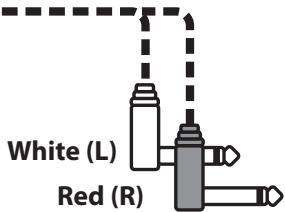
PCS-31L cable
(Sold separately)
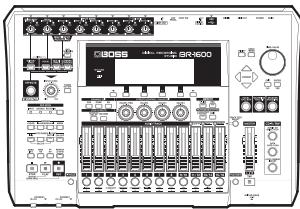
Digital Recorder, etc.
- Inserting a plug into the REC OUT/PHONES jack automatically activates the built-in guitar-amp simulator, enabling you to enjoy impressive guitar sound even with headphones.
The same effect is applied to Gt. AMP OUTPUT at this time, too.
- When you're performing using a guitar amp connected to Gt. AMP OUTPUT, disconnect the plug from the REC OUT/PHONES jack.
Adjusting the Volume
- Adjust the OUTPUT LEVEL knob.

MEMO
- Raising the OUTPUT LEVEL knob too much may result in sound distortion.
- When the OUTPUT LEVEL knob is centered and all effects are off, input and output are at the same level.
Turning Off the Power
- Turn down the volume all the way on all equipment (this unit, the amplifier, and everything else).
- Switch off the amp and other connected devices.
- Unplug the guitar or other instrument connected to the INPUT jack on the ME-70.
The power to the ME-70 is switched off.

Should you encounter unexpected results, such as no sound being produced, check the following.
- Are connections to other devices correctly made?
Check the connections once more.
Is the volume turned down?
Check the volume levels on any connected amp or mixer.
- Can you hear sound through the headphones when headphones are connected?
If you can hear sounds, it may be that there is a short in the cable used to connect the amp or other device, or perhaps a mistake in an external device's settings. Check the connecting cables and external devices once more.
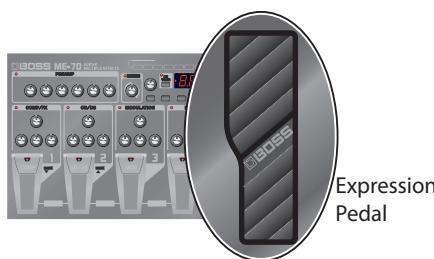
- Has the level been lowered with the expression pedal?
Sounds are not output when the toe of the expression pedal is in the raised position while the pedal is set to function as a volume pedal (p. E-9).
All product names mentioned in this document are trademarks or registered trademarks of their respective owners.
Those companies are not affiliated with BOSS and have not licensed or authorized BOSS's ME-70. Their marks are used solely to identify the equipment whose sound is simulated by BOSS's ME-70.
COMP/FX (Compressor/Effects)
You can select from among a wide variety of original effects, such as those that equalize the volume levels, or extend the sound without distorting it (sustain).
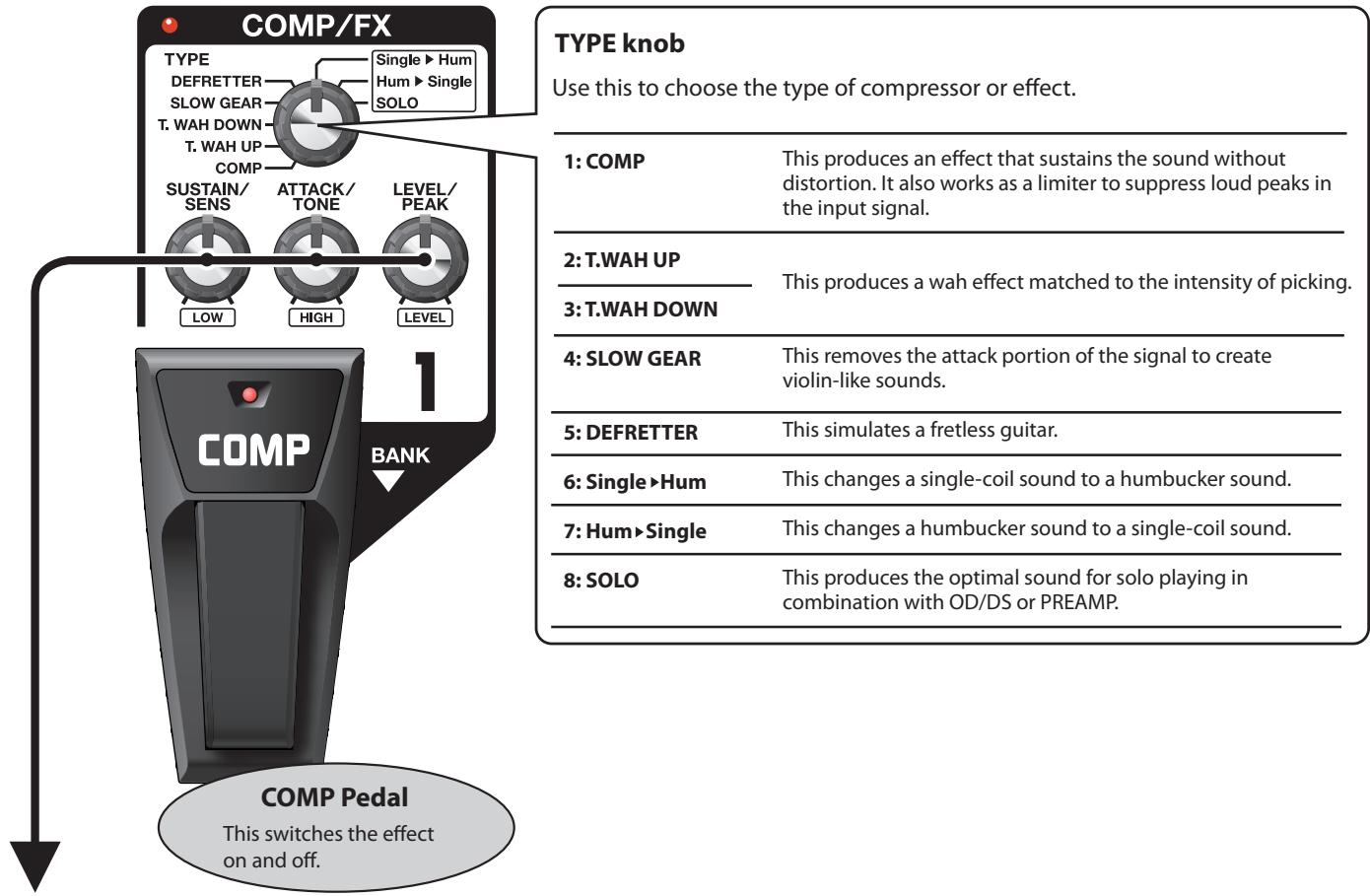
| TYPE | What the controls do |
| COMP | SUSTAIN | ATTACK | LEVEL |
| This sets the sustain for the sound. | This sets the attack (onset) of the sound. | This sets the volume level of the effect. |
| T.WAH UP/T.WAH DOWN | SENS | TONE | PEAK |
| This sets the sensitivity of response to the input sound. | This sets the tone (brightness) of the wah. | This sets the intensity of the wah sound. |
| SLOW GEAR | SENS | ATTACK | LEVEL |
| This sets the sensitivity of response to the input sound. | Adjusts the time needed for the volume to reach its maximum. | This sets the volume level of the effect. |
| DEFRETTER | SENS | TONE | LEVEL |
| This sets the sensitivity of response to the input sound. | This sets the tone. | This sets the volume level of the effect. |
| Single>Hum | LOW | HIGH | LEVEL |
| This adjusts the tone of the low frequency range. | This adjusts the tone of the high frequency range. | This sets the volume level of the effect. |
| Hum>Single | LOW | HIGH | LEVEL |
| This adjusts the tone of the low frequency range. | This adjusts the tone of the high frequency range. | This sets the volume level of the effect. |
| SOLO | LOW | HIGH | LEVEL |
| This adjusts the tone of the low frequency range. | This adjusts the tone of the high frequency range. | This sets the volume level of the effect. |
OD/DS (Overdrive/Distortion)
These effects add distinctive distortion or sustain.
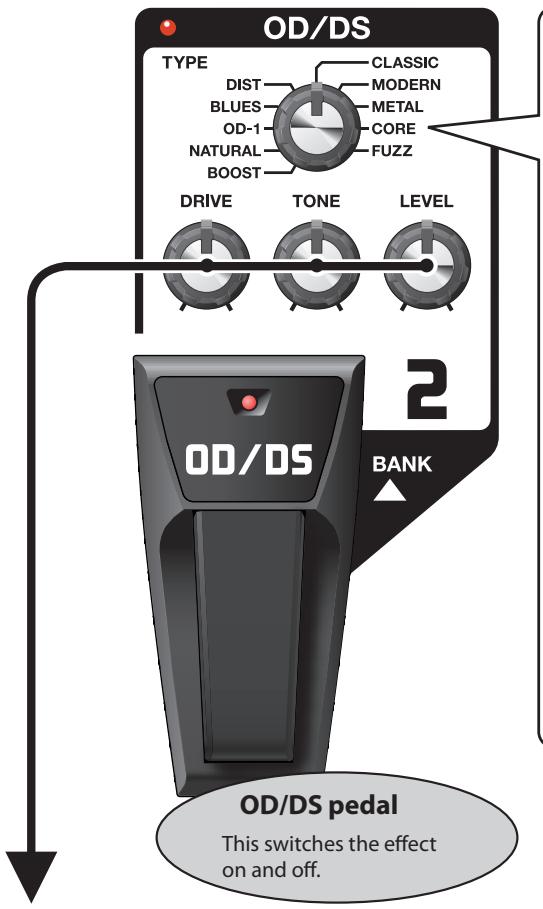
TYPE knob
Use this to choose the type of overdrive or distortion.
| 1: BOOST | This is a gain booster. It works well for creating distortion with a COSM preamp, or for creating punchy clean tones when used alone. |
| 2: NATURAL | This is an overdrive sound with natural-sounding distortion. |
| 3: OD-1 | This is the sound of the BOSS OD-1. It produces sweet, mild distortion. |
| 4: BLUES | This is a unique overdrive that faithfully reproduces the nuances of picking. |
| 5: DIST | This is a sharp distortion with rich sustain. |
| 6: CLASSIC | This is the sound of a vintage stack-type amp. |
| 7: MODERN | This is the sound of a large high-gain amp. |
| 8: METAL | This is a distortion that emphasizes the midrange. |
| 9: CORE | This is a distortion that cuts the midrange. |
| 10: FUZZ | This is a distortion that is distinctively rough and heavy. |
What the controls do
DRIVE
Sets the intensity of the distortion.
TONE
Sets the brightness of the sound.
LEVEL
Sets the volume level for OD/DS.
MODULATION
These effects broaden, modulate, and/or pitch shift the sound.
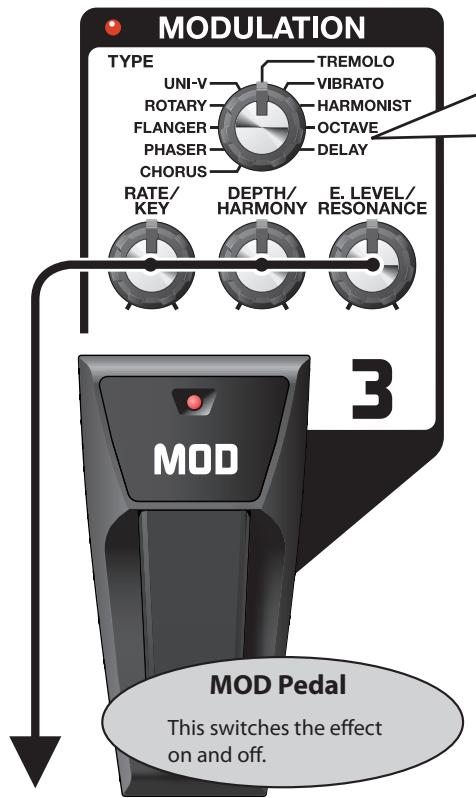
TYPE knob
Use this to choose the type of modulation.
| 1:CHORUS | This effect adds subtle wavering to transform the tone into one that is broader, thicker, and more beautiful. |
| 2:PHASER | This effect creates a sweeping, phase-shifted sound. |
| 3:FLANGER | This creates a modulation effect like the rising and falling sound of a jet engine |
| 4:ROTARY | This effect produces the sound of rotating speakers. |
| 5:UNI-V | This models the Uni-Vibe, an effect that's part of the rock sound of the 1960s. |
| 6:TREMOLO | This produces a retro effect through cyclical changes in the volume level. |
| 7:VIBRATO | This produces an intense vibrato effect unobtainable with normal guitar playing. |
| 8:HARMONIST | This creates harmonies reminiscent of twin guitars. |
| MEMOPlay only single notes when using the harmonist effect. |
| 9:OCTAVE | This imparts thickness by adding sound an octave lower. |
| MEMOPlay only single notes when using the octave effect. |
| 10:DELAY | This delays the sound to produce an echo-like effect. At delay times of 100 to 990 ms (milliseconds), you can use it as a secondary delay. |
| TYPE | What the controls do |
| CHORUS | RATE | DEPTH | E. LEVEL |
| This sets the speed of the effect. | This sets the richness of the effect. | This sets the volume level of the effect. |
| PHASER | RATE | DEPTH | RESONANCE |
| This sets the speed of the effect. | This sets the richness of the effect. | This sets the intensity of the effect. |
| FLANGER | RATE | DEPTH | RESONANCE |
| This sets the speed of the effect. | This sets the richness of the effect. | This sets the intensity of the effect. |
| ROTARY | RATE | DEPTH | E. LEVEL |
| This sets the speed of the effect. | This sets the richness of the effect. | This sets the volume level of the effect. |
| UNI-V | RATE | DEPTH | E. LEVEL |
| This sets the speed of the effect. | This sets the richness of the effect. | This sets the volume level of the effect. |
| TREMOLO | RATE | DEPTH | E. LEVEL |
| This sets the speed of the effect. | This sets the richness of the effect. | This sets the volume level of the effect. |
| VIBRATO | RATE | DEPTH | E. LEVEL |
| This sets the speed of the effect. | This sets the richness of the effect. | This sets the volume level of the effect. |
| HARMONIST | KEY | HARMONY | E. LEVEL |
| This sets the musical key of the song being played. | This sets the pitch of the harmony. | This sets the volume level of the effect. |
| Ex. (E) 88 (F#) 88 10000000000000000000000000000000000000000000000000000000000000000000000000000000000000000000000000000 | -1 Octave -1 Octave -1 Octave -1 Octave -1 Octave -1 Octave -1 Octave -1 Octave -1 Octave -1 Octave -1 Octave -1 Octave -1 Octave -1 Octave -1 Octave -1 Octave -1 Octave -1 Octave -1 Octave -1 Octave -1 Octave -1 Octave -1 Octave -1 Octave -1 Octave -1 Octave | E. LEVEL |
| This sets the volume level of the effect. |
| OCTAVE | — | D. LEVEL | E. LEVEL |
| This sets the volume level of the direct sound. | This sets the volume level of the effect. |
| DELAY | TIME | FEEDBACK | E. LEVEL |
| This sets the delay time (10 to 990 ms), in steps of 10 ms. | This set the number of repetitions for the delay. | This sets the volume level of the effect. |

You can control the RATE parameter using the expression pedal. For more information, read "Using Pedal FX" (p. E-9).
DELAY
This delays the sound to produce an echo-like effect. It lets you add thickness and create complex sounds.
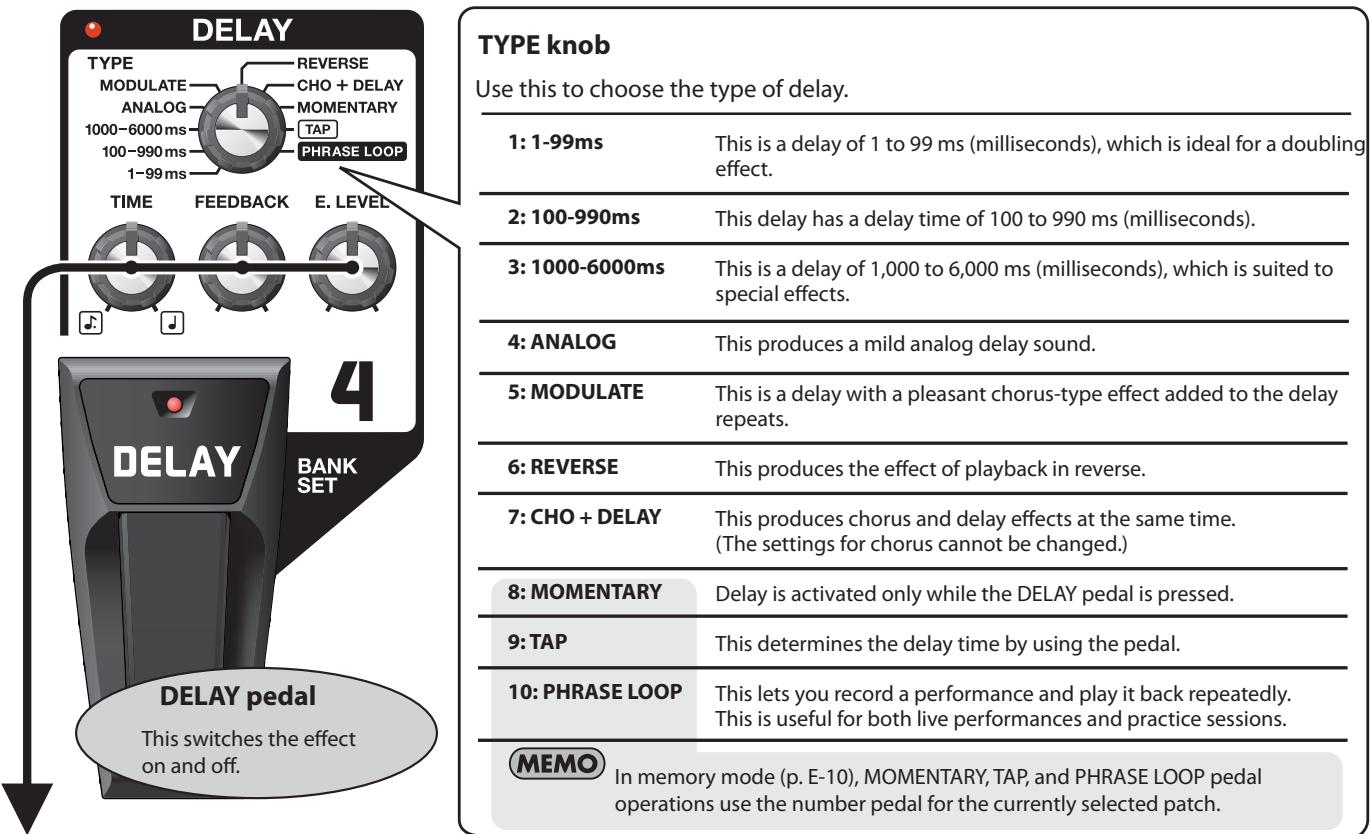
| TYPE | What the controls do |
| 1-99 ms | TIME Ex.2ms 99ms 99.99%MANUAL MANUAL This sets the delay time in steps of 1 ms. | FEEDBACKThis sets the number of repetitions for the delay. | E. LEVELThis sets the volume level of the delay sound. |
|
| This sets the delay time in steps of 1 ms. |
| 100-990 ms | TIME Ex.120ms 990ms 98.99%MANUAL MANUAL This sets the delay time in steps of 10 ms. | FEEDBACKThis sets the number of repetitions for the delay. | E. LEVELThis sets the volume level of the delay sound. |
|
| This sets the delay time in steps of 10 ms. |
| 1000-6000 ms | TIME Ex.1200ms 6000ms 68.99%MANUAL MANUAL This sets the delay time in steps of 100 ms. | FEEDBACKThis sets the number of repetitions for the delay. | E. LEVELThis sets the volume level of the delay sound. |
|
| This sets the delay time in steps of 100 ms. |
| ANALOG MODULATEREVERSECHO + DELAY MOMENTARY | TIME Ex.120ms 990ms 98.99%MANUAL MANUAL This sets the delay time (10 to 990 ms), in steps of 10 ms. | FEEDBACKThis sets the number of repetitions for the delay. | E. LEVELThis sets the volume level of the effect.MEMOWhen TYPE is set to REVERSE, this adjusts the balance of direct and effect sound. |
|
| This sets the delay time (10 to 990 ms), in steps of 10 ms. |
| TAP | Ex.68.99%MANUAL MANUAL This sets the beat for the delay sound.cf. “Applying Effects in Time with the Song Tempo (Tap Tempo)” (p. E-14) | FEEDBACKThis sets the number of repetitions for the delay. | E. LEVELThis sets the volume level of the delay sound. |
|
|
|
| PHRASE LOOP | — | — | E. LEVELThis sets the volume level of the phrase loop.cf. “Phrase Loop Play” (p. E-15) |

You can control the E. LEVEL parameter using the expression pedal. For more information, read "Using Pedal FX" (p. E-9).
PREAMP
This models preamp response. You can also use it as an equalizer.
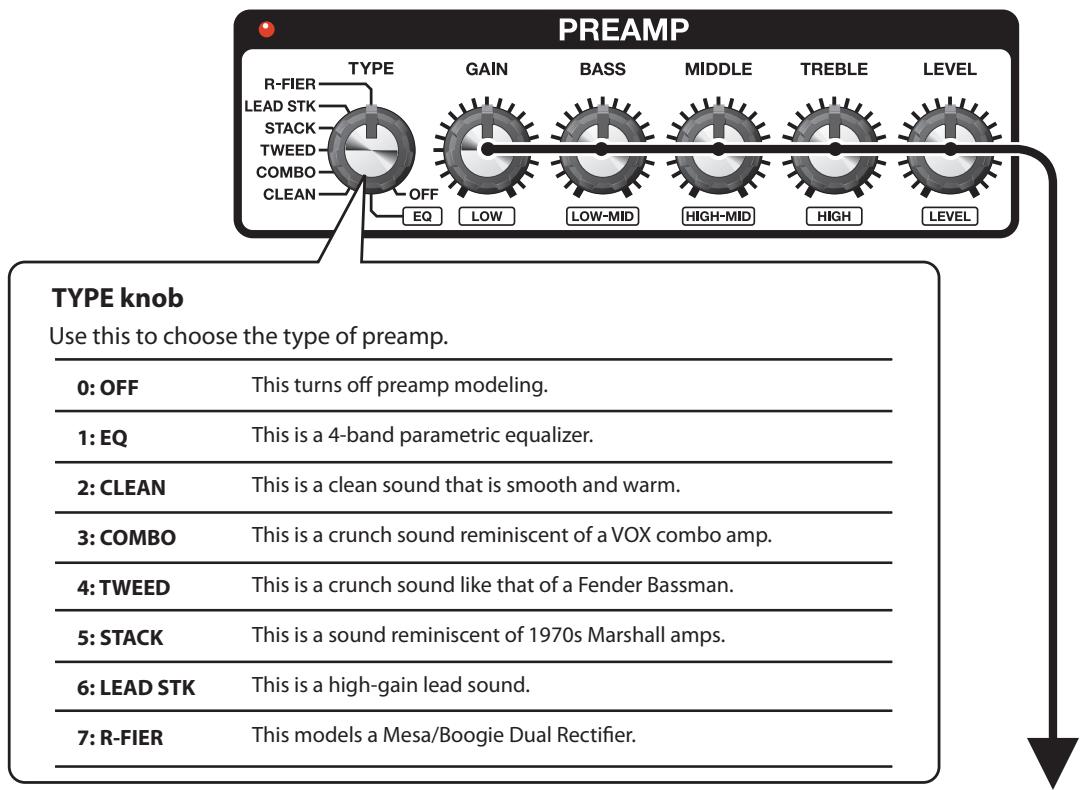
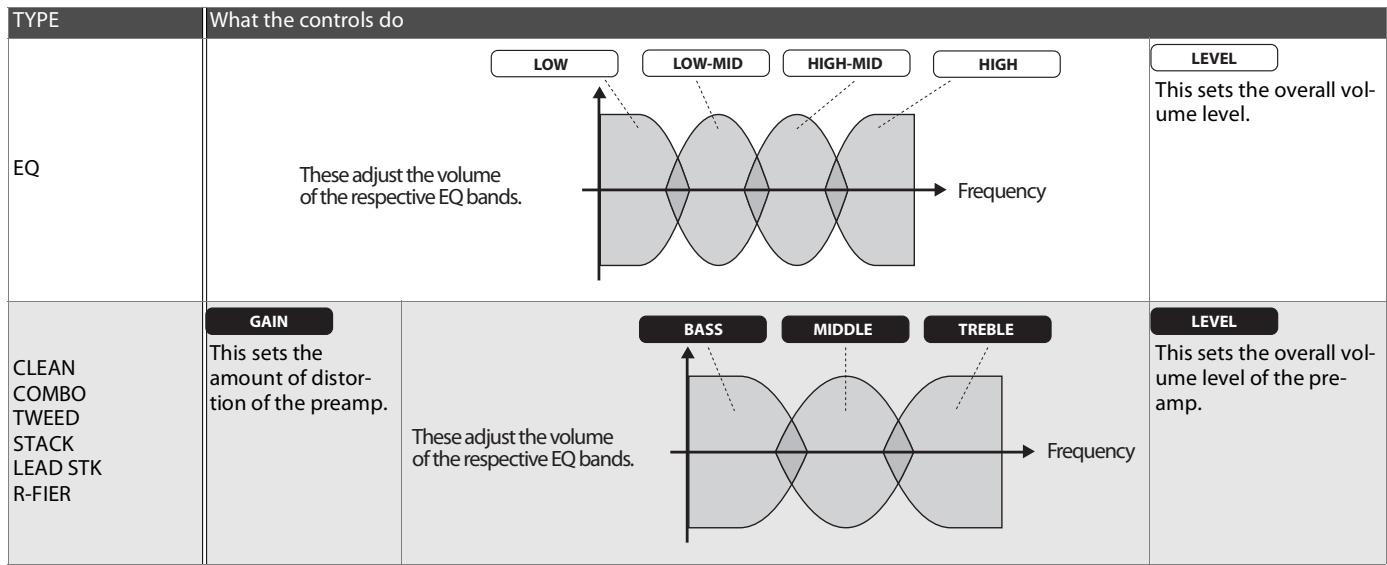
This suppresses the noise and hum picked up by the guitar's pickup.
This adjusts the effect in response to the level of noise. A value of 0 switches off the noise suppressor.

Setting this higher than necessary may cause no sound to be produced when the guitar is played at low volume.
REVERB
This adds lingering reverberations to the sound.
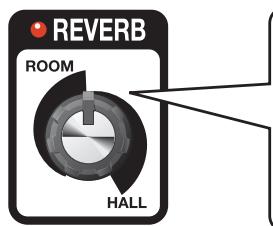
This adjusts the type of reverb and the size of the effect.
ROOM
This simulates the reverberations inside a room (setting value: 0. through 49.)
HALL
This simulates the reverberations inside a hall (setting value: 0. through 49.)
Display example
ROOM 12

HALL 49

The dot indicates that the effect is HALL reverb.
PEDAL FX (Pedal Effects)
This produces a variety of effects using the unit's expression pedal.
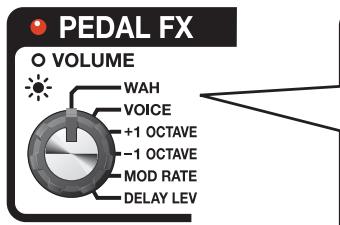
Use this to choose the type of PEDAL FX.
1:WAH
This is a wah effect.
2:VOICE
This lets you create sounds that simulate a human voice.
3: +1 OCTAVE
This lets continuously vary the pitch up to one octave higher or lower than the original sound.

Play single notes.
5: MOD RATE
This lets you control the rate of the MODULATION effect.

The MODULATION effect's RATE knob determines the maximum value of the range controlled with the expression pedal.
6: DELAY LEV
This lets you control delay level when you're using the DELAY effect.

The DELAY effect's E. LEVEL knob determines the maximum value of the range controlled with the expression pedal.
Using Pedal FX
PEDAL FX
Indicator
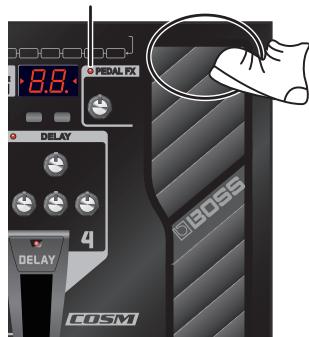
Firmly pressing the toe of the expression pedal (while putting some weight into it) switches the function of the expression pedal.
| PEDAL FX Indicator | Explanation |
| Dark | Functions as VOLUME (volume pedal). |
| Lit | Functions as the effect selected using the PEDAL FX knob. |
Saving/Calling Up and Using Tones (Memory Mode)
The ME-70 has two primary operating modes: Manual mode and Memory mode. In Manual mode, the tones are produced by the actual positions of the front-panel knobs for the various effects. In contrast, Memory mode allows you to save tone settings and recall them for later use.
Patches and Banks
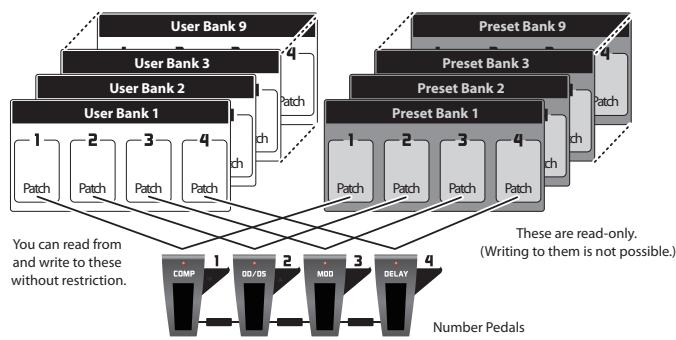
In Memory mode, a combination (or set) of effects together with a group of parameter settings is called a "patch."
A group of four patches is called a "bank," and the respective patches in a bank correspond to the number pedals.
The banks are organized into nine "user banks" that you can freely read from or write to, and nine read-only "preset banks."
In total, the ME-70 has 72 patches.
Changing Between the Manual and Memory Modes
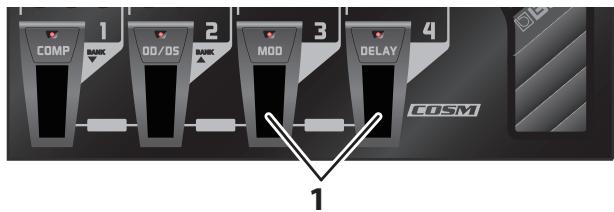
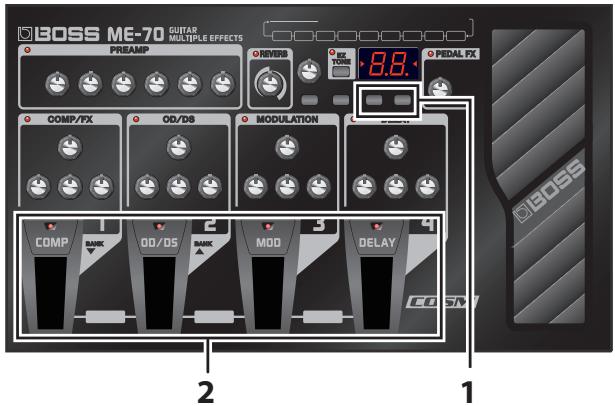
- Press number pedals 3 and 4 at the same time.
- Each press switches the ME-70 between Manual mode and Memory mode.
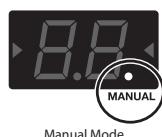
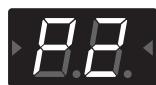
When the unit is in Manual mode, the dot at the bottom right of the display lights up. When the unit is in Memory mode, the currently selected bank number is displayed.
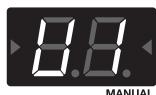
Memory Mode (User Bank 1)
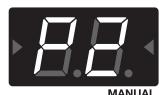
Memory Mode (Preset Bank 2)
Saving Tones (Patch Write)
This saves the control settings in a patch.
MEMO
- You can perform patch-write operations either in Manual mode or in Memory mode.
Performing a patch-write operation switches the unit into Memory mode.
NOTE
- Until you perform a patch-write operation, switching off the power or changing patches will cause any tones you've created to be lost.
- Carrying out a write operation causes any tone already saved at the destination patch to be lost.
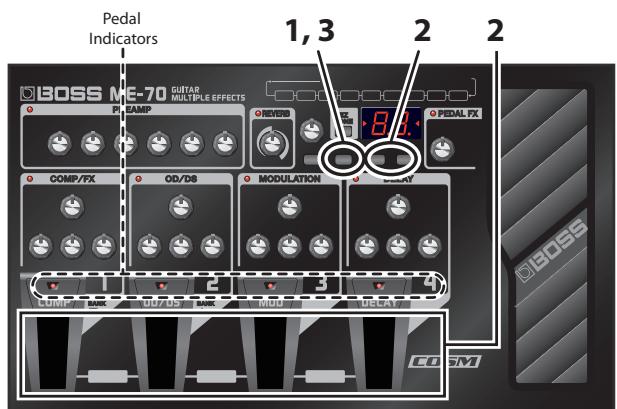
- Press [WRITE].
The pedal indicators flash.
-
Choose the user bank and patch number where you'd like to save the patch.
-
Choose the user bank number by pressing BANK [ ] and [ ].
- Choose the patch number by pressing a number pedal (1 through 4).
MEMO
To stop the Write procedure, press [EDIT/EXIT].
- Press [WRITE] again.
The tone is saved.
TIP
To copy a patch, call up the patch you want to copy (p. E-11), then simply carry out a write operation. You can copy the patch by choosing a different patch number and saving it there.
Calling Up Tones (Patches)
To switch patches, use BANK [ ] [ ] and the number pedals (1-4).
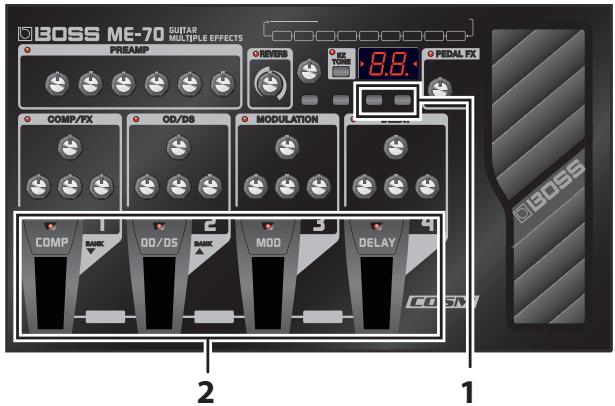
- Press BANK[ ] [ ].
Choose the bank number to which you want to switch.
The displayed bank number flashes. (At this time, the tones are not yet switched.)
MEMO
For the bank number, you can choose a user bank from U1 through U9 or a preset bank from P1 through P9.
TIP
Pressing number pedals 1 and 2 at the same time enables bank selection using number pedals 1 and 2. After choosing the bank, you confirm the selection by pressing number pedal 3 or 4.
- Press any one of the number pedals from 1 through 4.
The unit switches to the patch with in the bank number you chose in Step 1.
TIP
When you're selecting a patch within the same bank, you can skip Step 1.
cf.
You can also switch bank numbers using a foot switch. For more information, read "Using External Foot Switches" (p. E-13).
Changing Tone Settings (Memory Edit Mode)
In Memory mode, editing effects or changing the noise-suppressor threshold (NS THRES) is not possible.
When you want to make these changes, put the unit in Memory Edit mode.
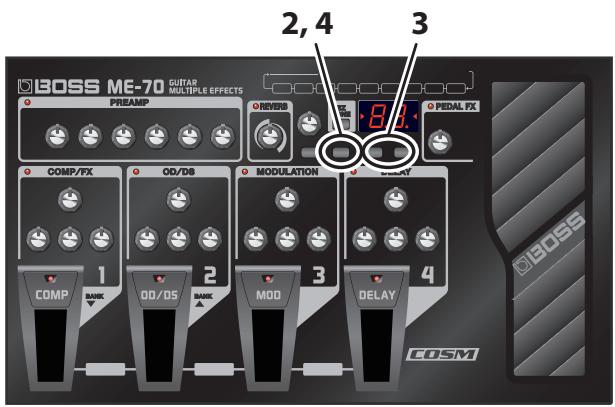
- Refer to "Calling Up Tones (Patches)" and call up the patch whose settings you want to change.
- Press [EDIT/EXIT].
The unit switches to Memory mode and "Ed" appears in the display.
3. Use the controls, pedals, and buttons to modify the tone.
In Memory Edit mode, in Manual mode, the number pedals switch effects on and off, and [ ] and [ ] manipulate the NS THRES parameter.
4. Press [EDIT/EXIT].
The unit returns to Memory mode.
5. If you want to save the tone whose settings you've changed, carry out a patch-write operation (p. E-10).
NOTE
Until you perform a patch-write operation, switching off the power or changing patches will cause any tones you've created to be lost.
Creating Tones with Ease (EZ Tone)
EZ Tone is a feature for creating sounds quickly and easily by calling up saved parameter settings for each individual effect type.
The ME-70 comes from the factory with optimal settings for each effect type saved as EZ Tones. If you like, you can edit an EZ Tone and save your changes over the factory setting. This allows you to use EZ Tone to quickly call up your favorite settings for each effect type.
Choosing (Calling Up) an EZ Tone
When EZ TONE is on, you call up the saved settings for an effect with its TYPE knob.
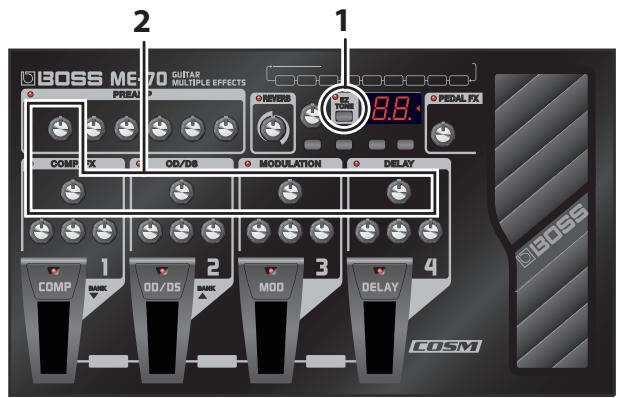
1. Press [EZ TONE].
The EZ TONE indicator lights.
MEMO
- You can use the number pedals to switch the effects on and off, allowing you to check each effect's sound by itself.
To switch off PREAMP, use the TYPE knob to select OFF.
2. Use an effect's TYPE knob to choose its EZ Tone.
Optimal effect parameters for the chosen TYPE value are set automatically.
TIP
After you choose an EZ Tone, you can use the effect's controls to fine-tune the sound as desired.
Saving the Created Tone as an EZ Tone
If you edit an EZ Tone with an effect's controls, you can save the changes.
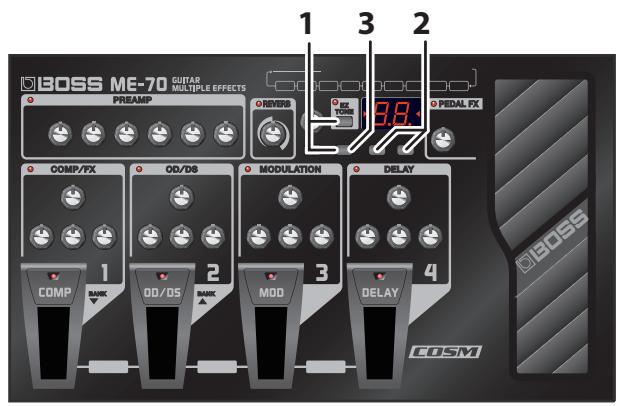
1. Hold down [EZ TONE] and press [WRITE].
The indicator for the save-destination effect flashes.
MEMO
Pressing only [WRITE] commences the procedure for saving the current settings for all effects as a patch.
2. Use BANK [ ] and [ ] to choose the effect you want to save.
The selection cycles through the choices in this sequence, with the current choice flashing: COMP/FX OD/DS MODULATION DELAY PREAMP all effects COMP/FX ...
MEMO
When you select "all effects," you're saving the EZ Tones for every effect.
3. Press [WRITE].
The edited EZ Tone is stored in memory at the location now selected by the TYPE knob.
NOTE
Performing a save operation causes any previous EZ Tone already saved at the TYPE destination to be lost.
Checking the Values of Controls
Operations such as calling up patches or EZ Tones may result in discrepancies between the set parameters and the positions shown by the controls.
You can get the actual parameter values to appear in the display so you can check them.
1. Hold down [EDIT/EXIT] and turn the control for the value you want to check.
The value of the control appears in the display for a brief time.
Tuning the Guitar (Tuner)
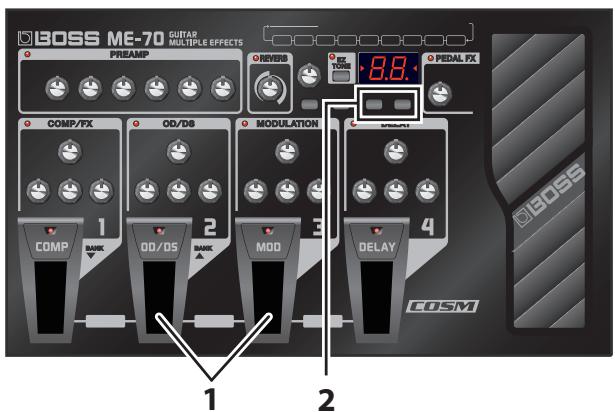
1. Press number pedals 2 and 3 at the same time.
Each press switches the tuner on or off.
2. If necessary, you can change the reference pitch.
When the tuner is on, you can change the reference pitch by pressing NS THRES/BANK [ ] or [ ].
| Display | Pitch |
| 35-45 | 435-445 (Hz) |
MEMO
The reference pitch appears in the display for a brief time.
- The reference pitch setting is saved automatically, so there is no need to make this setting each time you tune.
- The reference pitch was set to 40 (440 Hz) when the unit was shipped from the factory.
3. Play a single open note on the string to be tuned.
The name of the note closest to the pitch of the string played appears in the display.
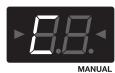
(C)
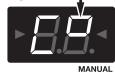
(#sign)
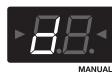
(D)
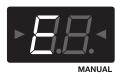
(E)

(F)
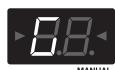
(G)
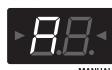
(A)
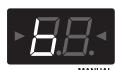
(B)
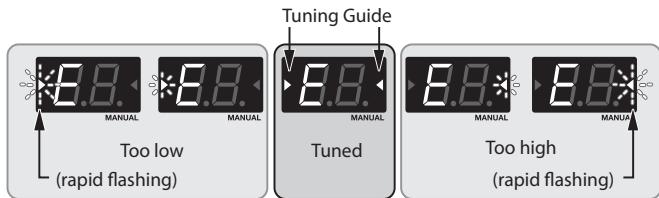
4. Tune so that the desired pitch is displayed and both tuning guide indicators light up.
Bypass Feature (BYPASS)
In Tuner mode, the sound output is the same as the input sound, with no effects applied (bypass).
You can use the expression pedal to control the volume.
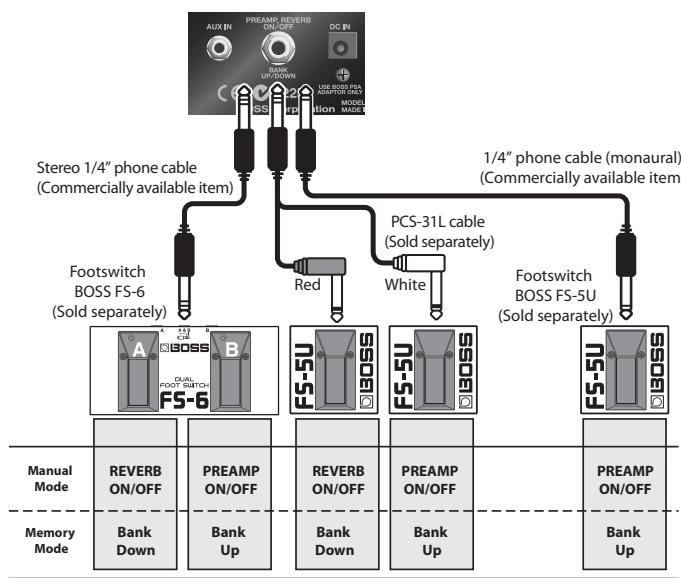
Connecting an optional footswitch (the BOSS FS-5U or FS-6) lets you carry out the following operations.
| Mode | Function |
| Manual | Switches the PREAMP effect on or off
Switches the REVERB effect on or off |
| Memory | Bank Number Up, Bank Number Down |
NOTE
To prevent malfunction and/or damage to speakers or other devices, always turn down the volume and turn off the power to all devices before making any connections. Disconnecting or connecting plugs during startup may switch the PREAMP effect or REVERB effect on or off.
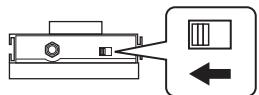
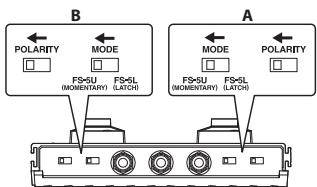
If you're using an FS-5U switch, set the POLARITY switch as shown in the following.
If you're using an FS-6 switch, set the MODE and POLARITY switches as shown below.
Applying Effects in Time with the Song Tempo (Tap Tempo)
When the DELAY effect is set to TAP, you can set the delay's tempo by pressing a pedal in time with tempo of a song.
MEMO
This section describes how to carry out the operation when in Manual mode. When you're in Memory mode, you can accomplish the same operation by using the number pedal for the currently selected patch.
- Set the DELAY effect's TYPE knob to TAP.
The pedal's indicator flashes in time with the currently set delay time.
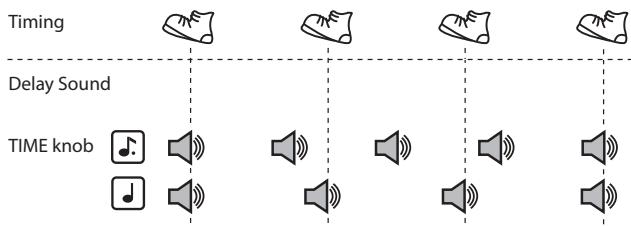
- Set the TIME knob at or .
Choose the rhythm for the delay sound that's produced (dotted eighth note or quarter note).
- Press the DELAY pedal at least twice in time with the song's tempo.
The timing of the delay sound is determined by the timing with which you press the pedal. The ME-70 interprets each press as a quarter-note interval, and sets the delay according to the note value set in Step 2. The pedal's indicator flashes in time with the tempo you input.
Setting Modulation Speed and Delay Time Using the Pedals
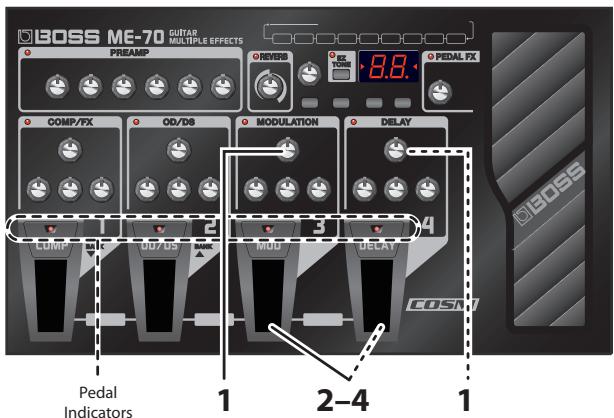
In addition to adjusting the speed (frequency) of modulation and the delay time using the knobs, you can also set the timings you want using the pedals.
MEMO
- This section describes how to carry out the operation when in the Manual mode. When you're in the Memory mode, you can accomplish the same operation by using the number pedal for the currently selected patch.
-
When you're in Memory mode and the MODULATION and DELAY effects are both on, you can make the setting for only the delay time.
-
Use the TYPE knobs for the MODULATION and DELAY effects to choose the desired effects types.
MEMO
When one of the TYPE settings shown below has been selected for the MODULATION or DELAY effect, the settings described in this section cannot be made using the pedals.
| Effect | TYPE value |
| MODULATION | HARMONIST
OCTAVE |
| DELAY | MOMENTARY
TAP
PHRASE LOOP |
MEMO
If you wish to select TAP as the DELAY effect, use the procedure described in "Applying Effects in Time with the Song Tempo (Tap Tempo)" to set the delay time with a pedal.
- Hold down the MOD or DELAY pedal for at least two seconds.
Two seconds after you begin pressing the pedal, the pedal's indicator starts to flash.
- Press the MOD or DELAY pedal at least twice at the speed you want.
The speed of the effect is set by the timing with which you press the pedal. The pedal's indicator flashes in time with the modulation rate or the delay sound.
- Once again hold down the MOD or DELAY pedal for at least two seconds.
The setting for the speed is completed, and the effect is turned on. The pedal's indicator stops flashing and stays steadily illuminated.
MEMO
After you've finished making the settings, moving the RATE knob or the TIME knob deactivates the effect timing set using the pedal and returns priority to the knob setting.
Phrase Loop Play
You can record up to 38 seconds of a performance and play back the recorded section over and over. You can also layer additional performances with the recording as it plays back (over dubbing). This lets you create realtime backing performances on the fly.
MEMO
This section describes how to carry out the operation when in Manual mode. When you're in Memory mode, you can accomplish the same operation by using the number pedal for the currently selected patch.
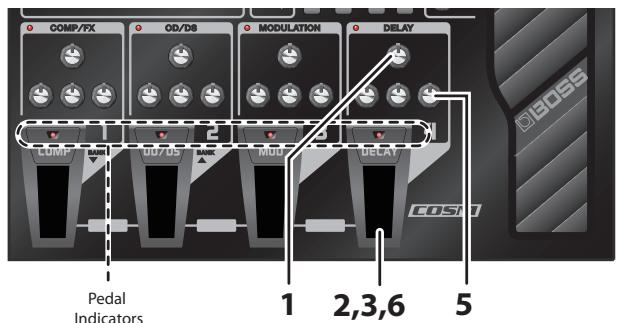
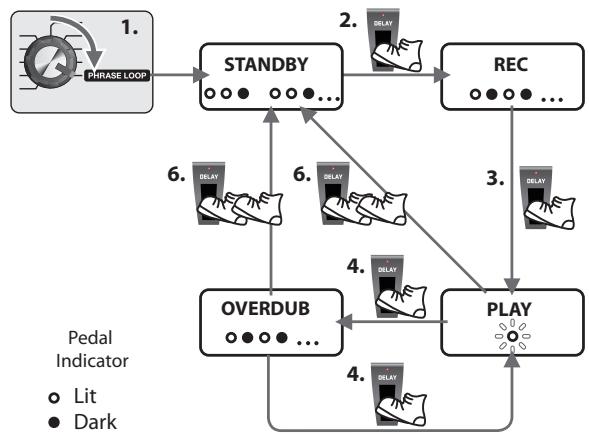
- Set the DELAY effect's TYPE knob to PHRASE LOOP.
The unit goes into recording standby and the pedal's indicator flashes at a fixed interval.
- Press the DELAY pedal.
Recording starts as soon as you press the DELAY pedal, and the pedal's indicator flashes rapidly.
- Press the DELAY pedal again.
Recording ends. As soon as recording stops, repeated playback of what's been recorded starts, and the pedal's indicator lights continuously.
MEMO
An oscillating sound may be audible with extremely short recording times.
- To layer additional recordings (over dubbing), repeat Steps 2 and 3.
MEMO
When you switch the DELAY effect's TYPE knob to another position or turn the power off, the recorded data is deleted.
- Adjust the phrase loop's volume as desired with the DELAY effect's E. LEVEL knob.
- Press the pedal twice switch to stop the playback.
The unit returns to recording standby.
MEMO
- Press the DELAY pedal twice within the span of one second.
- When playback ends, the recorded data is deleted.
Making the Settings for Control Operation
When you call up patches or EZ Tones, an effect's parameters may not reflect the actual position of the control knobs. You can set how the parameters behave when the control knobs are moved in this state.

- Press number pedals 3 and 4 at the same time to change to Manual mode (p. E-10).
- Hold down [EDIT/EXIT] and press the COMP pedal.
- Use NS THRES/BANK [←] or [▶] to select the method of control operation.
| Display | Control operation |
| n0 | The value changes immediately as the knob is turned (factory setting). |
| n1 | The value changes once the knob is turned past the position corresponding to the currently set value. |
- Press [WRITE].
The setting is stored in memory.
Restoring the Factory Settings (Factory Reset)
You can restore the settings in the ME-70 (User patch, tuner reference pitch, and knob response method (p. E-15)) to the values set when the unit was shipped from the factory.
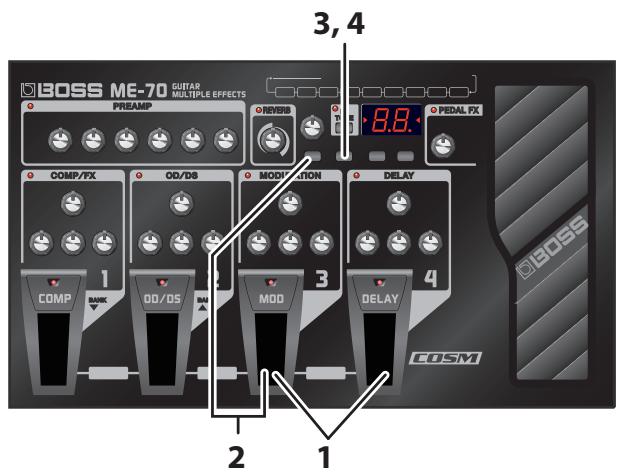
- Press number pedals 3 and 4 at the same time to switch to Manual mode (p. E-10).
- Hold down [EDIT/EXIT] press MOD Pedal. "F" appears in the display.
- Press [WRITE]. The Tuning Guide flashes.
- Press [WRITE] again. The display flashes and the factory reset is executed.
NOTE
Never turn off the power while Factory Reset is in progress.
Adjusting the Expression Pedal
The ME-70's expression pedal has been set for optimal operation at the factory. However, extended use and certain operating environments can result in the pedal going out of adjustment. If you encounter problems such as the expression pedal's ON/OFF switch not functioning or the volume pedal not fully cutting off the sound, you can use the following procedure to readjust the pedal.
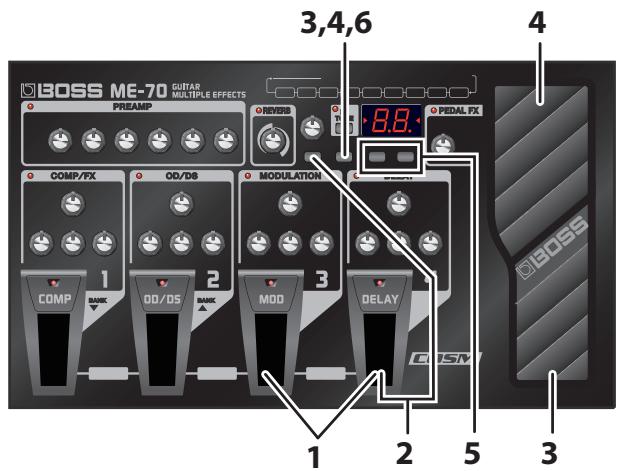
NOTE
When operating the expression pedal, be careful not to get your fingers pinched between the movable part and the panel. In places with small children, an adult should provide supervision and guidance until the child is capable of following all the rules essential for the safe operation of the unit.
- Press number pedals 3 and 4 at the same time to switch to Manual mode (p. E-10).
- Hold down [EDIT/EXIT] press DELAY Pedal. The display shows "Pd," then "Up."
- Move the heel of the expression pedal all the way down, then release the pedal and press [WRITE]. The display shows "dn."
- Move the toe of the expression pedal all the way down, then release the pedal and press [WRITE]. A value indicating the current stiffness (sensitivity) of the expression pedal switch appears in the display.
MEMO
If the display flashes in Steps 3 or 4, press the pedal again, and then press [WRITE].
- Use NS THRES/BANK [ ] and [▶] to adjust the stiffness (sensitivity) of the expression pedal switch.
The lower the value, the more easily the switch will respond, even when pressed lightly.
MEMO
This is set to "5" when shipped from the factory.
- Press [WRITE].
The setting is saved in memory.
Preset Patch List
| Patch Number | Explanation | PU |
| 1-1 | Rough distortion sound, good for backing. | S/H |
| 1-2 | Well sustained distortion sound, good for solos. | S/H |
| 1-3 | Crunch sound suitable for blues. | S/H |
| 1-4 | Clean sound for arpeggio. | S/H |
| 2-1 | Metal sound good for riffs. | H |
| 2-2 | Fuzz sound of the 60s with UNI-V. Speed of UNI-V effect can be changed with expression pedal. | S |
| 2-3 | Crunch sound, good for chord strokes. | S/H |
| 2-4 | Tight, clean sound, good for rhythm. | S/H |
| 3-1 | Drive sound for 70s hard rock. | S/H |
| 3-2 | Metal sound, good for single-coil pickups. | S |
| 3-3 | Rotary sound of the 70s. Speed of ROTARY effect can be changed with expression pedal. | S/H |
| 3-4 | Jazz sound, suitable for neck pickup. | H |
| 4-1 | Sweet drive sound for latin rock. Level of DELAY effect can be controlled with expression pedal. | H |
| 4-2 | This is a whimsical sound suited to 1970s progressive rock. | S |
| 4-3 | Tremolo sound, good for 60s surf rock. | S |
| 4-4 | Clean sound with T.WAH for funk. | S |
| 5-1 | Distortion sound for 80s metal. | H |
| 5-2 | This raises the pitch by an octave when the expression pedal is operated. It is suited to single-note phrases. | S/H |
| 5-3 | Crunch sound with COMPRESSOR for solos. | S |
| 5-4 | Phaser sound, good for rhythm. | S/H |
| 6-1 | Drive sound, good for punk rock. | S/H |
| 6-2 | Twin-lead-like distortion sound for single-note phrases in A minor (C major.) | S/H |
| 6-3 | 90s alternative-rock sound. | S/H |
| 6-4 | Clean sound with pedal wah, good for rhythm. | S/H |
| 7-1 | Mild lead sound for jazz-fusion. | S/H |
| 7-2 | This produces an effect like a talk box when the pedal is operated. | S/H |
| 7-3 | Slap-back echo sound for country. | S |
| 7-4 | Clean tone for 60s Liverpool sound. | S |
| 8-1 | Heavy distortion combining sound an octave lower. | H |
| 8-2 | Wild distortion with FLANGER. | H |
| 8-3 | Hard rock sound with PHASER. | H |
| 8-4 | Changes a single-coil-pickup sound to a clean, humbucker sound. | S |
| 9-1 | This tone is suited to solos that combine PEDAL WAH and DISTORTION. | S/H |
| 9-2 | Synth-like sound using SLOW GEAR. | S |
| 9-3 | This is a crunch sound that uses a dotted eighth note delay. Pressing the number pedals changes the delay time. | S |
| 9-4 | Fretless guitar sound. | S |
MEMO
The entries under "PU" in the chart indicate the type of pickup suited to the respective patch.
- S = Patch that is optimal for a single-coil pickup
- H = Patch that is optimal for a humbucking pickup
Specifications
ME-70: GUITAR MULTIPLE EFFECTS
| AD Conversion | 24-bit + AF method
♦ AF method (Adaptive Focus method)
This is a proprietary method from Roland & BOSS that vastly improves the signal-to-noise (S/N) ratio of the A/D and D/A converters. |
| DA Conversion | 24-bit |
| Sampling Frequency | 44.1 kHz |
| Patch | 36 (User) + 36 (Preset) |
| Nominal Input Level | GUITAR INPUT: -10 dBu |
| AUX IN: -18 dBu |
| Input Impedance | GUITAR INPUT: 1M ohm |
| AUX IN: 22k ohms |
| Nominal Output Level | -10 dBu |
| Output Impedance | 2k ohms |
| Display | 7 segments, 2 digits LED |
| Power Supply | DC 9 V |
| Dry Batteries (R6/LR6(AA) type) x 6
AC Adaptor (BOSS PSA series: sold separately) |
| Current Draw | 130 mA |
| Expected battery life under continuous use | Alkaline: 12 hours
Carbon: 3.5 hours
(These figures will vary depending on the actual conditions of use.) |
| Dimensions | 384 (W) x 229 (D) x 74 (H) mm
15-1/8 (W) x 9-1/16 (D) x 2-15/16 (H) inches |
| Maximum height:
384 (W) x 229 (D) x 100 (H) mm
15-1/8 (W) x 9-1/16 (D) x 3-15/16 (H) inches |
| Weight | 3.5 kg, 7 lbs 12 oz (including batteries) |
| Accessories | Owner's Manual
Dry Batteries (Alkaline: LR6 (AA) type) x 6
Roland Service (Information Sheet) |
| Options | AC Adaptor: BOSS PSA series
Footswitch: BOSS FS-5U, FS-6 |
0dBu = 0.775Vrms
In the interest of product improvement, the specifications and/or appearance of this unit are subject to change without prior notice.
USING THE UNIT SAFELY
INSTRUCTIONS FOR THE PREVENTION OF FIRE, ELECTRIC SHOCK, OR INJURY TO PERSONS
About WARNING and CAUTION Notices
| WARNING | Used for instructions intended to alert the user to the risk of death or severe injury should the unit be used improperly. |
| CAUTION | Used for instructions intended to alert the user to the risk of injury or material damage should the unit be used improperly.
* Material damage refers to damage or other adverse effects caused with respect to the home and all its furnishings, as well to domestic animals or pets. |
About the Symbols
| △ | The △symbol alerts the user to important instructions or warnings. The specific meaning of the symbol is determined by the design contained within the triangle. In the case of the symbol at left, it is used for general cautions, warnings, or alerts to danger. |
| ▲ | The ⊙symbol alerts the user to items that must never be carried out (are forbidden). The specific thing that must not be done is indicated by the design contained within the circle. In the case of the symbol at left, it means that the unit must never be disassembled. |
| ◎ | The ●symbol alerts the user to things that must be carried out. The specific thing that must be done is indicated by the design contained within the circle. In the case of the symbol at left, it means that the power-cord plug must be unplugged from the outlet. |
ALWAYS OBSERVE THE FOLLOWING
WARNING
- Do not open (or modify in any way) the unit or its AC adaptor.

- Do not attempt to repair the unit, or replace parts within it (except when this manual provides specific instructions directing you to do so). Refer all servicing to your retailer, the nearest Roland Service Center, or an authorized Roland distributor, as listed on the "Information" page.

-
Never install the unit in any of the following locations.
-
Subject to temperature extremes (e.g., direct sunlight in an enclosed vehicle, near a heating duct on top of heat-generating equipment); or are
- Damp (e.g., baths, washrooms, on wet floors); or are
- Exposed to steam or smoke; or are
Subject to salt exposure; or are
- Humid; or are
- Exposed to rain; or are
Dusty or sandy; or are
- Subject to high levels of vibration and shakiness.
Make sure you always have the unit placed so it is level and sure to remain stable. Never place it on stands that could wobble, or on inclined surfaces.

Use only the specified AC adaptor (PSA series), and make sure the line voltage at the installation matches the input voltage specified on the AC adaptor's body. Other AC adaptors may use a different polarity, or be designed for a different voltage, so their use could result in damage, malfunction, or electric shock.

- Do not excessively twist or bend the power cord, nor place heavy objects on it. Doing so can damage the cord, producing severed elements and short circuits. Damaged cords are fire and shock hazards!

- Do not allow any objects (e.g., flammable material, coins, pins); or liquids of any kind (water, soft drinks, etc.) to penetrate the unit.


This unit, either alone or in combination with an amplifier and headphones or speakers, may be capable of producing sound levels that could cause hearing loss. Do not operate for period of time at a high volume at a level that is uncomfortable experience any hearing loss or the ears, you should immediately using the unit, and consult an


-
Immediately turn the power off, remove the AC adaptor from the outlet, and request servicing by your retailer, the nearest Roland Service Center, or an authorized Roland distributor, as listed on the "Information" page when:
-
The AC adaptor or the power-supply cord has been damaged; or
If smoke or unusual odor occurs
- Objects have fallen into, or liquid has been spilled onto the unit; or
- The unit has been exposed to rain (or otherwise has become wet); or
-
The unit does not appear to operate normally or exhibits a marked change in performance.
-
In households with small children, an adult should provide supervision until the child is capable of following all the rules essential for the safe operation of the unit.

- Protect the unit from strong impact. (Do not drop it!)

- Do not force the unit's power-supply cord to share an outlet with an unreasonable number of other devices. Be especially careful when using extension cords—the total power used by all devices you have connected to the extension cord's outlet must never exceed the power rating (watts/amperes) for the extension cord. Excessive loads can cause the insulation on the cord to heat up and eventually melt through.

Before using the unit in a foreign country, consult with your retailer, the nearest Roland Service Center, or an authorized Roland distributor, as listed on the "Information" page.

WARNING
- Batteries must never be recharged, heated, taken apart, or thrown into fire or water.


- Never expose Battery to excessive heat such as sunshine, fire or the like.

CAUTION
The unit and the AC adaptor should be located so their location or position does not interfere with their proper ventilation.

Always grasp only the output plug or the body of the AC adaptor when plugging into, or unplugging from, this unit or an outlet.

- At regular intervals, you should unplug the AC adaptor and clean it by using a dry cloth to wipe all dust and other accumulations away from its prongs. Also, disconnect the power plug from the power outlet whenever the unit is to remain unused for an extended period of time. Any accumulation of dust between the power plug and the power outlet can result in poor insulation and lead to fire.

Try to prevent cords and cables from becoming entangled. Also all cords and cables should be placed so they are out of the reach of children.

- Never climb on top of, nor place heavy objects on the unit.

- Never handle the AC adaptor body, or its output plugs, with wet hands when plugging into, or unplugging from, an outlet or this unit.

CAUTION
Before moving the unit, disconnect the AC adaptor and all cords coming from external devices.

Before cleaning the unit, turn off the power and unplug the AC adaptor from the outlet (p. E-3).

- Whenever you suspect the possibility of lightning in your area, disconnect the AC adaptor from the outlet.

If used improperly, batteries may explode or leak and cause damage or injury. In the interest of safety, please read and observe the following precautions (p. E-2).

- Carefully follow the installation instructions for batteries, and make sure you observe the correct polarity.

- Avoid using new batteries together with used ones. In addition, avoid mixing different types of batteries.
- Remove the batteries whenever the unit is to remain unused for an extended period of time.
If a battery has leaked, use a soft piece of cloth or paper towel to wipe all remnants of the discharge from the battery compartment. Then install new batteries. To avoid inflammation of the skin, make sure that none of the battery discharge gets onto your hands or skin. Exercise the utmost caution so that none of the discharge gets near your eyes. Immediately rinse the affected area with running water if any of the discharge has entered the eyes.
- Never keep batteries together with metallic objects such as ballpoint pens, necklaces, hairpins, etc.
Used batteries must be disposed of in compliance with whatever regulations for their safe disposal that may be observed in the region in which you live.

For China -
有关产品中所含有害物质的说明
Power Supply: Use of Batteries
- Do not connect this unit to same electrical outlet that is being used by an electrical appliance that is controlled by an inverter (such as a refrigerator, washing machine, microwave oven, or air conditioner), or that contains a motor. Depending on the way in which the electrical appliance is used, power supply noise may cause this unit to malfunction or may produce audible noise. If it is not practical to use a separate electrical outlet, connect a power supply noise filter between this unit and the electrical outlet.
The AC adaptor will begin to generate heat after long hours of consecutive use. This is normal, and is not a cause for concern.
The use of an AC adaptor is recommended as the unit's power consumption is relatively high. Should you prefer to use batteries, please use the alkaline type.
- Batteries should always be installed or replaced before connecting any other devices. This way, you can prevent malfunction and/or damage to speakers or other devices.
- Batteries are supplied with the unit. The life of these batteries may be limited, however, since their primary purpose was to enable testing.
Before connecting this unit to other devices, turn off the power to all units. This will help prevent malfunctions and/or damage to speakers or other devices.
Placement
Using the unit near power amplifiers (or other equipment containing large power transformers) may induce hum. To alleviate the problem, change the orientation of this unit; or move it farther away from the source of interference.
This device may interfere with radio and television reception. Do not use this device in the vicinity of such receivers.
- Noise may be produced if wireless communications devices, such as cell phones, are operated in the vicinity of this unit. Such noise could occur when receiving or initiating a call, or while conversing. Should you experience such problems, you should relocate such wireless devices so they are at a greater distance from this unit, or switch them off.
- When moved from one location to another where the temperature and/or humidity is very different, water droplets (condensation) may form inside the unit. Damage or malfunction may result if you attempt to use the unit in this condition. Therefore, before using the unit, you must allow it to stand for several hours, until the condensation has completely evaporated.
Depending on the material and temperature of the surface on which you place the unit, its rubber feet may discolor or mar the surface. You can place a piece of felt or cloth under the rubber feet to prevent this from happening. If you do so, please make sure that the unit will not slip or move accidentally.
Maintenance
- For everyday cleaning wipe the unit with a soft, dry cloth or one that has been slightly dampened with water. To remove stubborn dirt, use a cloth impregnated with a mild, non-abrasive detergent. Afterwards, be sure to wipe the unit thoroughly with a soft, dry cloth.
- Never use benzine, thinners, alcohol or solvents of any kind, to avoid the possibility of discoloration and/or deformation.
Repairs and Data
Please be aware that all data contained in the unit's memory may be lost when the unit is sent for repairs. Important data should always be written down on paper (when possible). During repairs, due care is taken to avoid the loss of data. However, in certain cases (such as when circuitry related to memory itself is out of order), we regret that it may not be possible to restore the data, and Roland assumes no liability concerning such loss of data.
Additional Precautions
- Please be aware that the contents of memory can be irretrievably lost as a result of a malfunction, or the improper operation of the unit. To protect yourself against the risk of loosing important data, we recommend that you periodically write down an important data you have stored in the unit's memory on paper.
Unfortunately, it may be impossible to restore the contents of data that was stored in the unit's memory once it has been lost. Roland Corporation assumes no liability concerning such loss of data.
Use a reasonable amount of care when using the unit's buttons, sliders, or other controls; and when using its jacks and connectors. Rough handling can lead to malfunctions.
- When connecting / disconnecting all cables, grasp the connector itself—never pull on the cable. This way you will avoid causing shorts, or damage to the cable's internal elements.
- To avoid disturbing your neighbors, try to keep the unit's volume at reasonable levels. You may prefer to use headphones, so you do not need to be concerned about those around you (especially when it is late at night).
- When you need to transport the unit, package it in the box (including padding) that it came in, if possible. Otherwise, you will need to use equivalent packaging materials.
- Some connection cables contain resistors. Do not use cables that incorporate resistors for connecting to this unit. The use of such cables can cause the sound level to be extremely low, or impossible to hear. For information on cable specifications, contact the manufacturer of the cable.
For EU Countries

This b t h a . Products bearing this symbol must not be discarded together with household waste.
Dieles Symbol bedetut, dass dieser Produkt in EU-Ländern getemt von humsaill gesammelt werden muss gemäß den regionalen Bestimmungen. Mit thisem Symbol gekennzeichnete Produkte durdent nicht zusammen mit den humsaill entsorgt werden.
FR Ce symbole indique que dans les pays de l'Union europeenne, ce produit doit etre collecte séparation des ordures menagères selon les directives en vigueur dans chacun de ces pays. Les produits portant ce symbole ne doivent pas etre mis au rebut avec les ordures menagères.
Nt i si a 15.
Este semoblo indica que en los payses de la Unión Europea this product be decogete除去 the residuos domesticos, tal como estag regulado en zona canada. Los products con este semoblo no se deponen depositar con los residuos domesticos.
Pf Este symbolo indica que nos paises da UE, a recohaledge requisite ser feita segaradamente do lixo domestico, de accordo com os regulamentos de cada regiao. Os produits que aparecem este symbolo não devore ser eliminados juntamente com o lixo domestico.
NL Dit symbol geeft aan dat in landen van de EU dit product gescheiden van huishoudelijk afval moet worden angeboden, zoals bepaald per gemeente of regio. Producten die van dit symbol voorzien, moogen Niet samen met huishoudelijk afval worden verwijdend.
Dette symbol angiver, at EU-lande skal dette produkt opssamles adskit fra hushdningssaffald, som defineret i her enkelt region. Produktmer detchte symbol maiske smides ud sammen ded hushdningssaffald.
Dette symbolet indikerer at Produkten tet behandlos som spezialavfall i EU-land, it. til retningslinjer for den enkelte regionen, og ikke kastesammen med vanlig hushholdingsavfall. Produktuer som er merket med dette symbolet, mamiekastesammen med vanlig hushholdingsavfall.
Symbolen angert EU-lander maste den hr produmen kasseras separ fr hushalssavfall, i enlighent med varjei bestemilmser. Produktmer den hr symbolen fir inte kasseras tilsamansm med hushalssavfall.
1 Talmi merkinti imalau, ette tu on EU-maisa kerittiva ernilin koutalousajttistke kunkin aleun voimaa oleven mahrysten mukaisesti. Talmi merkinnil varustueta tuvaetica si aea livvittai kalotalousijtikee mukana.
Ez a szimbolum azj leni, hagy az Europai Unioban ezt a termeket a haztarasi hulladektol elkoulntive, az adott regiob erenyes szabalyozaszerint kgyjteni. Aezzel a szimbolummal ellatot termeket ne szabad a haztarasi hulladek kozde dobni.
Symbol oznacea, ze zoegnada z regulacioni wademwidin regione, w krajach UE produktu no sleazy wurzuaedz o dadamomi domowymi. Produktow opatronychy sym tynthem sie maybe utolyizowae razem z odamani domowymi.
Tento symbol udivá, à v zemich EU muis y tóto tóvebrek shbrán odómicho odpadu, ja je urécnpo pro kády region Výrobyk nésou tento symbol es mezymh avazopov sulo sámcdom opadn.
Tento symboly vjdrajre, zv krajnch EU musi zer toto produyt yokonovat' odolene di domohede opadu, podfa niaradien platyhk v konkrtenej krajine. Prodysy tymto symbolom s naemvi hydavozvat spolu s domovym odapm.
See sumbol ni tabet, et EL-i daases tuleb see toode olemprigist eradi koguda, nii nagu on igas pirkonnas mirlaretled. Selle smbjoliga mrigtud teoodi etoi rava visata koos olerprrgita.
Sis similis rodo, kad ES salyse sis produktu turi biti surekamaksitraui nuo butiniu atiulek, kaip nustatyia kiekviename rignce. Suio similupsanpaklenlisi produturi tetniuti biti isometami katu zu biintematis omeklios.
Sis Symbols norada, ka ES valtsi s produktu jievici an mjaasainmicbta akritumien, kneitaeks katrigna. Produktu as r so simulbo nidrj zimnest kop kaj mjaasainmicbta akritumien.
Ta: Simbol ozaunej, da te reba proyvd zo r vzahav EU zbirati loeano od gospodjskin odpadkov, tako kot je doloevo v vsaki regiji. Proyvdostem z tem znakom vo dinolveten odaglati sukaj zo gospodjskini odpidki.
TO uOIOAo vTo oToDnOweoiOnCgocN E.E.To OvOxOeiooYoOoiOyTei va OuAeYerTa OooTAto Ta VToOaOta OuaOeAoOoOaOa, oOoVoe oMu OooNIOeIoVTa oE OooQyO. Ta oOIOVAo fOeOyo To OvOxOeiooYoOoiDeVo TAs OTOA OTOA OTOA
For the U.K.
IMPORTANT: THE WIRES IN THIS MAINS LEAD ARE COLOURED IN ACCORDANCE WITH THE FOLLOWING CODE.
BLUE: NEUTRAL BROWN: LIVE
As the colours of the wires in the mains lead of this apparatus may not correspond with the coloured markings identifying the terminals in your plug, proceed as follows:
The wire which is coloured BROWN must be connected to the terminal which is marked with the letter N or coloured BLACK. The wire which is coloured BROWN must be connected to the terminal which is marked with the letter L or coloured RED. Under no circumstances must either of the above wires be connected to the earth terminal of a three pin plug.

This product complies with the requirements of EMC Directive 2004/108/EC.
—For EU Countries
For the USA
FEDERAL COMMUNICATIONS COMMISSION RADIO FREQUENCY INTERFERENCE STATEMENT
This equipment has been tested and found to comply with the limits for a Class 8 digital device, pursuant to Part 15 of the FCC Rules. These limits are designed to provide reasonable protection against harmful interference in a residential installation. This equipment generates, uses, and can radiate radio frequency energy and, if not installed and used in accordance with the instructions, may cause harmful interference to radio communications. However, there is no guarantee that interference will not occur in a particular installation. If this equipment does cause harmful interference to radio or television reception, which can be determined by turning the equipment off and on, the user is encouraged to try to correct the interference by one or more of the following measures:
Reorient or relocate the receiving antenna. Increase the separation between the equipment and receiver.
- Connect the equipment into an outlet on a circuit different from that to which the receiver is connected.
- Consult the dealer or an experienced radio/TV technician for help.
This device complies with Part 15 of the FCC Rules. Operation is subject to the following two conditions: (1) this device may not cause harmful interference and,
(2) this device must accept any interference received, including interference that may cause undesired operation.
Unauthorized changes or modification to this system can void the users authority to operate this equipment. This equipment requires shielded interface cables in order to meet FCC class B Limit.
For Canada
NOTICE
This Class B digital apparatus meets all requirements of the Canadian Interference-Caising Equipment Regulations.
AVIS
This product contains chemicals known to cause cancer, birth defects and other reproductive harm, including lead.
Index
A
ANALOG E-7
ATTACK E-4
AUX IN E-2
B
BANK E-10-11
BYPASS E-13
C
CHO+DELAY E-7
CHORUS E-6
CLEAN E-8
COMBO E-8
COMP E-4
COMP/FX E-4
D
D. LEVEL E-6
DEFRETTER E-4
DELAY E-6-7
DEPTH E-6
DRIVE E-5
DS E-5
E
EQ E-8
EZ TONE E-12
F
FEEDBACK E-6-7
FLANGER E-6
G
GAIN E-8
Gt.AMP OUTPUT E-3
GUITAR INPUT E-2
guitar-amp simulate E-3
H
HARMONIST E-6
HARMONY E-6
HIGH E-4
Hum>Single E-4
K
KEY E-6
L
LEAD STK E-8
LEVEL E-8
LOW E-4
M
MEMORY MODE E-10
MODULATE E-7
MODULATION E-6
MOMENTARY E-7
N
NS E-8
NS THRES E-8
0
OCTAVE E-6
OD E-5
OUTPUT LEVEL E-3
P
PEAK E-4
PEDAL FX E-9
PEDAL FX Switch E-9
PHASER E-6
PHONES E-3
PHRASELOOP E-7
POWER ON E-3
PREAMP E-8
R
RATE E-6
REC OUT E-3
RESONANCE E-6
REVERB E-9
REVERSE E-7
R-FIER E-8
ROTARY E-6
s
SENS E-4
Single>Hum E-4
SLOW GEAR E-4
SOLO E-4
STACK E-8
SUSTAIN E-4
T
T.WAH E-4
TAP E-7
TIME E-6-7
TONE E-4-5
TREMOLO E-6
TUNER E-13
TWEED E-8
U
UNI-V E-6
V
VIBRATO E-6
W
Write E-10
Bedienungsanleitung
Copyright © 2008 BOSS CORPORATION
OD/DS (Overdrive/Distortion)
IMPORTANT: THE WIRES IN THIS MAINS LEAD ARE COLOURED IN ACCORDANCE WITH THE FOLLOWING CODE.
BLUE: NEUTRAL BROWN: LIVE
As the colours of the wires in the mains lead of this apparatus may not correspond with the coloured markings identifying the terminals in your plug, proceed as follows:
The wire which is coloured BROWN must be connected to the terminal which is marked with the letter N or coloured BLACK. The wire which is coloured BROWN must be connected to the terminal which is marked with the letter L or coloured RED. Under no circumstances must either of the above wires be connected to the earth terminal of a three pin plug.

This product complies with the requirements of EMC Directive 2004/108/EC.
—For EU Countries
For the USA
FEDERAL COMMUNICATIONS COMMISSION RADIO FREQUENCY INTERFERENCE STATEMENT
This equipment has been tested and found to comply with the limits for a Class B digital device, pursuant to Part 15 of the FCC Rules. These limits are designed to provide reasonable protection against harmful interference in a residential installation. This equipment generates, uses, and can radiate radio frequency energy and, if not installed and used in accordance with the instructions, may cause harmful interference to radio communications. However, there is no guarantee that interference will not occur in a particular installation. If this equipment does cause harmful interference to radio or television reception, which can be determined by turning the equipment off and on, the user is encouraged to try to correct the interference by one or more of the following measures:
Reorient or relocate the receiving antenna. Increase the separation between the equipment and receiver.
- Connect the equipment into an outlet on a circuit different from that to which the receiver is connected.
- Consult the dealer or an experienced radio/TV technician for help.
This device complies with Part 15 of the FCC Rules. Operation is subject to the following two conditions: (1). This device may not cause harmful interference and,
(2) this device must accept any interference received, including interference that may cause undesired operation.
Unauthorized changes or modification to this system can void the users authority to operate this equipment. This equipment requires shielded interface cables in order to meet FCC class B Limit.
For Canada
NOTICE
This Class B digital apparatus meets all requirements of the Canadian Interference-Caising Equipment Regulations.
AVIS
This product contains chemicals known to cause cancer, birth defects and other reproductive harm, including lead.
Copyright © 2008 BOSS CORPORATION
OD/DS (Saturation/Distorsion) . F-5
MODULATION F-6
DELAY F-7
OD/DS (Saturation/Distorsion)
MANUAL
Mode Memory (User Bank 1)
Mode Memory (Preset Bank 2)
IMPORTANT: THE WIRES IN THIS MAINS LEAD ARE COLOURED IN ACCORDANCE WITH THE FOLLOWING CODE.
BLUE: NEUTRAL BROWN: LIVE
As the colours of the wires in the mains lead of this apparatus may not correspond with the coloured markings identifying the terminals in your plug, proceed as follows:
The wire which is coloured BROWN must be connected to the terminal which is marked with the letter N or coloured BLACK. The wire which is coloured BROWN must be connected to the terminal which is marked with the letter L or coloured RED. Under no circumstances must either of the above wires be connected to the earth terminal of a three pin plug.

-For EU Countries
This product complies with the requirements of EMC Directive 2004/108/EC.
For the USA
FEDERAL COMMUNICATIONS COMMISSION RADIO FREQUENCY INTERFERENCE STATEMENT
This equipment has been tested and found to comply with the limits for a Class B digital device, pursuant to Part 15 of the FCC Rules. These limits are designed to provide reasonable protection against harmful interference in a residential installation. This equipment generates, uses, and can radiate radio frequency energy and, if not installed and used in accordance with the instructions, may cause harmful interference to radio communications. However, there is no guarantee that interference will not occur in a particular installation. If this equipment does cause harmful interference to radio or television reception, which can be determined by turning the equipment off and on, the user is encouraged to try to correct the interference by one or more of the following measures:
- Increase the separation between the equipment and receiver.
- Connect the equipment into an outlet on a circuit different from that to which the receiver is connected.
- Consult the dealer or an experienced radio/TV technician for help.
This device complies with Part 15 of the FCC Rules. Operation is subject to the following two conditions: (1). This device may not cause harmful interference and,
(2) this device must accept any interference received, including interference that may cause undesired operation.
Unauthorized changes or modification to this system can void the users authority to operate this equipment. This equipment requires shielded interface cables in order to meet FCC class B Limit.
For Canada
NOTICE
This Class B digital apparatus meets all requirements of the Canadian Interference-Caising Equipment Regulations.
AVIS
This product contains chemicals known to cause cancer, birth defects and other reproductive harm, including lead.
Index
A
ANALOG F-7
ATTACK F-4
AUX IN F-2
B
BANK F-11
BYPASS F-13
C
CHO+DELAY F-7
CHORUS F-6
CLEAN F-8
COMBO F-8
COMP F-4
COMP/FX F-4
D
D. LEVEL F-6
DEFRETTER F-4
DELAY F-6-7
DEPTH F-6
DRIVE F-5
DS F-5
E
EQ F-8
EZ TONE F-12
F
FEEDBACK F-6-7
FLANGER F-6
fonction Tuner F-13
G
GAIN F-8
Gt.AMP OUTPUT F-3
GUITAR INPUT F-2
H
HARMONIST F-6
HARMONY F-6
HIGH F-4
Hum>Single F-4
K
KEY F-6
L
LEAD STK F-8
LEVEL F-8
LOW F-4
M
modeMemory F-10
MODULATE F-7
MODULATION F-6
MOMENTARY F-7
N
NS F-8
NS THRES F-8
0
OCTAVE F-6
OD F-5
OUTPUT LEVEL F-3
P
PEAK F-4
PEDAL FX F-9
PHASER F-6
PHONES F-3
PHRASELOOP F-7
POWER ON F-3
PREAMP F-8
R
RATE F-6
REC OUT F-3
RESONANCE F-6
REVERB F-9
REVERSE F-7
R-FIER F-8
ROTARY F-6
s
SENS F-4
Copyright © 2008 BOSS CORPORATION
IMPORTANT: THE WIRES IN THIS MAINS LEAD ARE COLOURED IN ACCORDANCE WITH THE FOLLOWING CODE.
BLUE: NEUTRAL BROWN: LIVE
As the colours of the wires in the mains lead of this apparatus may not correspond with the coloured markings identifying the terminals in your plug, proceed as follows:
The wire which is coloured BROWN must be connected to the terminal which is marked with the letter N or coloured BLACK. The wire which is coloured BROWN must be connected to the terminal which is marked with the letter L or coloured RED. Under no circumstances must either of the above wires be connected to the earth terminal of a three pin plug.

This product complies with the requirements of EMC Directive 2004/108/EC.
-For EU Countries
For the USA
FEDERAL COMMUNICATIONS COMMISSION RADIO FREQUENCY INTERFERENCE STATEMENT
This equipment has been tested and found to comply with the limits for a Class B digital device, pursuant to Part 15 of the FCC Rules. These limits are designed to provide reasonable protection against harmful interference in a residential installation. This equipment generates, uses, and can radiate radio frequency energy and, if not installed and used in accordance with the instructions, may cause harmful interference to radio communications. However, there is no guarantee that interference will not occur in a particular installation. If this equipment does cause harmful interference to radio or television reception, which can be determined by turning the equipment off and on, the user is encouraged to try to correct the interference by one or more of the following measures:
Reorient or relocate the receiving antenna. Increase the separation between the equipment and receiver.
- Connect the equipment into an outlet on a circuit different from that to which the receiver is connected.
- Consult the dealer or an experienced radio/TV technician for help.
This device complies with Part 15 of the FCC Rules. Operation is subject to the following two conditions: (1) this device may not cause harmful interference, and
(2) this device must accept any interference received, including interference that may cause undesired operation.
Unauthorized changes or modification to this system can void the users authority to operate this equipment. This equipment requires shielded interface cables in order to meet FCC class B Limit.
For Canada
NOTICE
This Class B digital apparatus meets all requirements of the Canadian Interference-Caising Equipment Regulations.
AVIS
This product contains chemicals known to cause cancer, birth defects and other reproductive harm, including lead.
Indice
A
Accordatore 1-13
ANALOG 1-7
ATTACK 1-4
AUX IN 1-2
B
BANK I-11
BYPASS 1-13
C
CHO + DELAY 1-7
CHORUS 1-6
CLEAN 1-8
COMBO 1-8
COMP 1-4
COMP/FX 1-4
D
D. LEVEL 1-6
DEFRETTER 1-4
DELAY 1-6-7
DEPTH 1-6
DRIVE 1-5
DS 1-5
E
EQ 1-8
EZ TONE I-12
F
FEEDBACK 1-6
FLANGER 1-6
G
GAIN 1-8
Gt.AMP OUTPUT 1-3
GUITAR INPUT 1-2
H
HARMONIST 1-6
HARMONY 1-6
HIGH 1-4
Hum>Single 1-4
K
KEY 1-6
L
LEAD STK 1-8
LEVEL 1-8
LOW 1-4
M
MEMORY MODE I-10
MODULATE 1-7
MODULATION 1-6
MOMENTARY 1-7
N
NS 1-8
NS THRES 1-8
0
OCTAVE 1-6
OD 1-5
OUTPUT LEVEL 1-3
P
PEAK 1-4
PEDAL FX 1-9
PEDAL FX Switch 1-9
PHASER 1-6
PHONES 1-3
PHRASE LOOP 1-7
POWER ON 1-3
PREAMP 1-8
R
RATE 1-6
REC OUT 1-3
RESONANCE 1-6
REVERB 1-9
REVERSE 1-7
R-FIER 1-8
ROTARY 1-6
s
SENS 1-4
Copyright © 2008 BOSS CORPORATION
De BOSS CORPORATION.
El volumenuedecontrolarseconelpedaldeexpresion.
IMPORTANT: THE WIRES IN THIS MAINS LEAD ARE COLOURED IN ACCORDANCE WITH THE FOLLOWING CODE.
BLUE: NEUTRAL BROWN: LIVE
As the colours of the wires in the mains lead of this apparatus may not correspond with the coloured markings identifying the terminals in your plug, proceed as follows:
The wire which is coloured BROWN must be connected to the terminal which is marked with the letter N or coloured BLACK. The wire which is coloured BROWN must be connected to the terminal which is marked with the letter L or coloured RED. Under no circumstances must either of the above wires be connected to the earth terminal of a three pin plug.

This product complies with the requirements of EMC Directive 2004/108/EC.
-For EU Countries
For the USA
FEDERAL COMMUNICATIONS COMMISSION RADIO FREQUENCY INTERFERENCE STATEMENT
This equipment has been tested and found to comply with the limits for a Class B digital device, pursuant to Part 15 of the FCC Rules. These limits are designed to provide reasonable protection against harmful interference in a residential installation. This equipment generates, uses, and can radiate radio frequency energy and, if not installed and used in accordance with the instructions, may cause harmful interference to radio communications. However, there is no guarantee that interference will not occur in a particular installation. If this equipment does cause harmful interference to radio or television reception, which can be determined by turning the equipment off and on, the user is encouraged to try to correct the interference by one or more of the following measures:
- Reorient of relocate the receiving antenna.
- Increase the separation between the equipment and receiver.
- Connect the equipment into an outlet on a circuit different from that to which the receiver is connected.
- Consult the dealer or an experienced radio/TV technician for help.
This device complies with Part 15 of the FCC Rules. Operation is subject to the following two conditions: (1) this device may not cause harmful interference, and
(2) this device must accept any interference received, including interference that may cause undesired operation.
Unauthorized changes or modification to this system can void the users authority to operate this equipment. This equipment requires shielded interface cables in order to meet FCC class B Limit.
For Canada
NOTICE
This Class B digital apparatus meets all requirements of the Canadian Interference-Caising Equipment Regulations.
AVIS
This product contains chemicals known to cause cancer, birth defects and other reproductive harm, including lead.
Induce
A
Afinador S-13
Copyright © 2008 BOSS CORPORATION
OD/DS (overdrive/distortion) P-5
MODULATION P-6
DELAY P-7
PREAMP P-8
Selectionando Patches
Para alternar patches, use BANK [←] [▶] e os pedais numerados (de 1 a 4).
- Pressione BANK[ ] [ ].
Recursos bypass (BYPASS)
IMPORTANT: THE WIRES IN THIS MAINS LEAD ARE COLOURED IN ACCORDANCE WITH THE FOLLOWING CODE.
BLUE: NEUTRAL BROWN: LIVE
As the colours of the wires in the mains lead of this apparatus may not correspond with the coloured markings identifying the terminals in your plug, proceed as follows:
The wire which is coloured BROWN must be connected to the terminal which is marked with the letter N or coloured BLACK. The wire which is coloured BROWN must be connected to the terminal which is marked with the letter L or coloured RED. Under no circumstances must either of the above wires be connected to the earth terminal of a three pin plug.

This product complies with the requirements of EMC Directive 2004/108/EC.
—For EU Countries
For the USA
FEDERAL COMMUNICATIONS COMMISSION RADIO FREQUENCY INTERFERENCE STATEMENT
This equipment has been tested and found to comply with the limits for a Class B digital device, pursuant to Part 15 of the FCC Rules. These limits are designed to provide reasonable protection against harmful interference in a residential installation. This equipment generates, uses, and can radiate radio frequency energy and, if not installed and used in accordance with the instructions, may cause harmful interference to radio communications. However, there is no guarantee that interference will not occur in a particular installation. If this equipment does cause harmful interference to radio or television reception, which can be determined by turning the equipment off and on, the user is encouraged to try to correct the interference by one or more of the following measures:
- Increase the separation between the equipment and receiver.
- Connect the equipment into an outlet on a circuit different from that to which the receiver is connected.
- Consult the dealer or an experienced radio/TV technician for help.
This device complies with Part 15 of the FCC Rules. Operation is subject to the following two conditions: (1). This device may not cause harmful interference and,
(2) this device must accept any interference received, including interference that may cause undesired operation.
Unauthorized changes or modification to this system can void the users authority to operate this equipment. This equipment requires shielded interface cables in order to meet FCC class B Limit.
For Canada
NOTICE
This Class B digital apparatus meets all requirements of the Canadian Interference-Caising Equipment Regulations.
AVIS
This product contains chemicals known to cause cancer, birth defects and other reproductive harm, including lead.
Indices
A
afinador P-13
ANALOG P-7
ATTACK P-4
AUX IN P-2
B
BANK P-11
BYPASS P-13
C
CHO + DELAY P-7
CHORUS P-6
CLEAN P-8
COMBO P-8
COMP P-4
COMP/FX P-4
D
D. LEVEL P-6
DEFRETTER P-4
DELAY P-6-7
DEPTH P-6
DRIVE P-5
DS P-5
E
EQ P-8
EZ TONE P-12
F
FEEDBACK P-6
FLANGER P-6
G
GAIN P-8
Gt.AMP OUTPUT P-3
GUITAR INPUT P-2
H
HARMONIST P-6
HARMONY P-6
HIGH P-4
Hum>Single P-4
K
KEY P-6
L
LEAD STK P-8
LEVEL P-8
LOW P-4
V
MEMORY MODE P-10
MODULATE P-7
MODULATION P-6
MOMENTARY P-7
N
NS P-8
NS THRES P-8
0
OCTAVE P-6
OD P-5
OUTPUT LEVEL P-3
P
PEAK P-4
PEDAL FX P-9
PEDAL FX Switch P-9
PHASER P-6
PHONES P-3
PHRASE LOOP P-7
POWER ON P-3
PREAMP P-8
R
RATE P-6
REC OUT P-3
RESONANCE P-6
REVERB P-9
REVERSE P-7
R-FIER P-8
ROTARY P-6
S
SENS P-4
Copyright © 2008 BOSS CORPORATION
OD/DS (Overdrive/Distortion) D-5
MODULATION D-6
DELAY D-7
PREAMP. D-8
NS (Ruisonderdrukker) D-8
REVERB. D-9
Phrase Loop Play. D-15
OD/DS (Overdrive/Distortion)
Dit当场 had delayed the way to the beachside.

IMPORTANT: THE WIRES IN THIS MAINS LEAD ARE COLOURED IN ACCORDANCE WITH THE FOLLOWING CODE.
BLUE: NEUTRAL BROWN: LIVE
As the colours of the wires in the mains lead of this apparatus may not correspond with the coloured markings identifying the terminals in your plug, proceed as follows:
The wire which is coloured BROWN must be connected to the terminal which is marked with the letter N or coloured BLACK. The wire which is coloured BROWN must be connected to the terminal which is marked with the letter L or coloured RED. Under no circumstances must either of the above wires be connected to the earth terminal of a three pin plug.

This product complies with the requirements of EMC Directive 2004/108/EC.
—For EU Countries
For the USA
FEDERAL COMMUNICATIONS COMMISSION RADIO FREQUENCY INTERFERENCE STATEMENT
This equipment has been tested and found to comply with the limits for a Class B digital device, pursuant to Part 15 of the FCC Rules. These limits are designed to provide reasonable protection against harmful interference in a residential installation. This equipment generates, uses, and can radiate radio frequency energy and, if not installed and used in accordance with the instructions, may cause harmful interference to radio communications. However, there is no guarantee that interference will not occur in a particular installation. If this equipment does cause harmful interference to radio or television reception, which can be determined by turning the equipment off and on, the user is encouraged to try to correct the interference by one or more of the following measures:
Reorient or relocate the receiving antenna. Increase the separation between the equipment and receiver.
- Connect the equipment into an outlet on a circuit different from that to which the receiver is connected.
- Consult the dealer or an experienced radio/TV technician for help.
This device complies with Part 15 of the FCC Rules. Operation is subject to the following two conditions:
(1) this device may not cause harmful interference, and
(2) this device must accept any interference received, including interference that may cause undesired operation.
Unauthorized changes or modification to this system can void the users authority to operate this equipment.
This equipment requires shielded interface cables in order to meet FCC class B limit.
For Canada
NOTICE
This Class B digital apparatus meets all requirements of the Canadian Interference-Caising Equipment Regulations.
AVIS
This product contains chemicals known to cause cancer, birth defects and other reproductive harm, including lead.
Index
A
ANALOG D-7
ATTACK D-4
AUX IN D-2
B
BANK D-11
BYPASS D-13
C
CHO+DELAY D-7
CHORUS D-6
CLEAN D-8
COMBO D-8
COMP D-4
COMP/FX D-4
D
D. LEVEL D-6
DEFRETTER D-4
DELAY D-6-7
DEPTH D-6
DRIVE D-5
DS D-5
E
EQ D-8
EZ TONE D-12
F
FEEDBACK D-6-7
FLANGER D-6
G
GAIN D-8
Geheugenmodus D-10