UP-DT1 - Audio accessory ONKYO - Free user manual and instructions
Find the device manual for free UP-DT1 ONKYO in PDF.



| Product Type | DAB tuner module for Universal Port |
| Brand | ONKYO |
| Model | UP-DT1 |
| Dimensions (W x D x H) | 115 x 70 x 30 mm |
| Weight | 200 g |
| Power supply | Via the Universal Port connector of the host product |
| Frequency range | Band III (5A-13F) and L-band (LA-LW) |
| Station presets | 40 presets |
| Auto scan | Yes (WorldWide or U.K) |
| Main features | DAB information display (station name, program type, bitrate, signal quality, multiplex) |
| DRC (Dynamic Range Control) | Yes (3 levels: off, light reduction, heavy reduction) |
| Mode selector | TUNER, THROUGH, AUTO |
| Antenna | DAB antenna supplied, screw onto the DAB antenna jack |
| Remote control | Can be controlled via the host product's Universal Port remote control |
| Maintenance and cleaning | Wipe with a dry cloth; do not use solvents |
| Safety | Do not expose to water; refer all repairs to qualified service personnel |
| Spare parts and repairability | Not user-serviceable; contact customer service |
| General information | Compatible with Onkyo devices equipped with a Universal Port |
Frequently Asked Questions - UP-DT1 ONKYO
User questions about UP-DT1 ONKYO
0 question about this device. Answer the ones you know or ask your own.
Ask a new question about this device
Download the instructions for your Audio accessory in PDF format for free! Find your manual UP-DT1 - ONKYO and take your electronic device back in hand. On this page are published all the documents necessary for the use of your device. UP-DT1 by ONKYO.
USER MANUAL UP-DT1 ONKYO
Thank you for purchasing an Onkyo product. Please read this manual carefully before making any connections or using this product. By following these instructions, you'll get the best audio performance and the most listening pleasure from your Onkyo product. Keep this manual for future reference.
WARNING:
TO REDUCE THE RISK OF FIRE OR ELECTRIC SHOCK,DO NOT EXPOSE THIS APPARATUS TO RAIN OR MOISTURE.
CAUTION:
TO REDUCE THE RISK OF ELECTRIC SHOCK,DO NOT REMOVE COVER (OR BACK).NO USER-SERVICEABLE PARTS INSIDE. REFER SERVICING TO QUALIFIED SERVICE PERSONNEL.

WARNING
RISK OF ELECTRIC SHOCK
DO NOT OPEN
AVIS
RISQUE DE CHOC ELECTRIQUE
NE PAS OUVRIR


The lightning flash with arrowhead symbol, within an equilateral triangle, is intended to alert the user to the presence of uninsulated "dangerous voltage" within the product's enclosure that may be of sufficient magnitude to constitute a risk of electric shock to persons.

The exclamation point within an equilateral triangle is intended to alert the user to the presence of important operating and maintenance (servicing) instructions in the literature accompanying the appliance.
- Read these instructions.
- Keep these instructions.
- Heed all warnings.
- Follow all instructions.
- Do not use this apparatus near water.
- Clean only with dry cloth.
- Do not block any ventilation openings. Install in accordance with the manufacturer's instructions.
- Do not install near any heat sources such as radiators, heat registers, stoves, or other apparatus (including amplifiers) that produce heat.
- Do not defeat the safety purpose of the polarized or grounding-type plug. A polarized plug has two blades with one wider than the other. A grounding type plug has two blades and a third grounding prong. The wide blade or the third prong are provided for your safety. If the provided plug does not fit into your outlet, consult an electrician for replacement of the obsolete outlet.
- Protect the power cord from being walked on or pinched particularly at plugs, convenience receptacles, and the point where they exit from the apparatus.
- Only use attachments/accessories specified by the manufacturer.
- Unplug this apparatus during lightning storms or when unused for long periods of time.
-
Refer all servicing to qualified service personnel. Servicing is required when the apparatus has been damaged in any way, such as power-supply cord or plug is damaged, liquid has been spilled or objects have fallen into the apparatus, the apparatus has been exposed to rain or moisture, does not operate normally, or has been dropped.
-
Damage Requiring Service
Unplug the apparatus from the wall outlet and refer servicing to qualified service personnel under the following conditions:
A. When the power-supply cord or plug is damaged,
B. If liquid has been spilled, or objects have fallen into the apparatus,
C. If the apparatus has been exposed to rain or water,
D. If the apparatus does not operate normally by following the operating instructions. Adjust only those controls that are covered by the operating instructions as an improper adjustment of other controls may result in damage and will often require extensive work by a qualified technician to restore the apparatus to its normal operation,
E. If the apparatus has been dropped or damaged in any way, and
F. When the apparatus exhibits a distinct change in performance this indicates a need for service.
- Recording Copyright—Unless it's for personal use only, recording copyrighted material is illegal without the permission of the copyright holder.
- Care—Occasionally you should dust the unit all over with a soft cloth. For stubborn stains, use a soft cloth dampened with a weak solution of mild detergent and water. Dry the unit immediately afterwards with a clean cloth. Don't use abrasive cloths, thinners, alcohol, or other chemical solvents, because they may damage the finish or remove the panel lettering.
- Never Touch this Unit with Wet Hands—Never handle this unit or its power cord while your hands are wet or damp. If water or any other liquid gets inside this unit, have it checked by your Onkyo dealer.
-
Handling Notes
-
If you need to transport this unit, use the original packaging to pack it how it was when you originally bought it.
- Do not leave rubber or plastic items on this unit for a long time, because they may leave marks on the case.
- If you do not use this unit for a long time, it may not work properly the next time you turn it on, so be sure to use it occasionally.
Memory backup
The UP-DT1 uses a battery-less memory backup system in order to retain radio settings when it's unplugged or in the case of a power failure.
Features
Auto scanning (Band III/L-Band)
□ 40 presets
Through mode for connecting additional options
Supplied Accessories

DAB antenna
About the UP-DT1
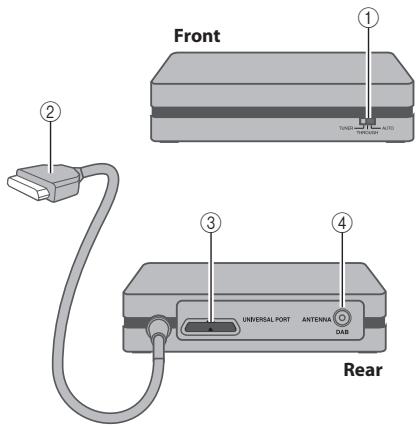
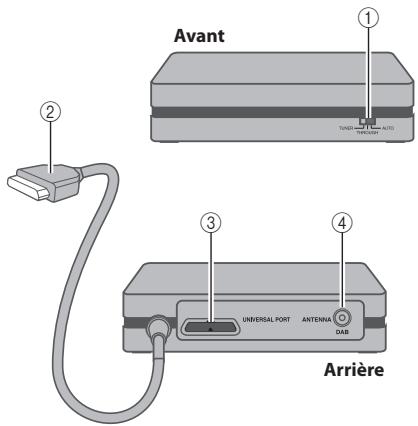
① Mode selector
② Universal Port cable
③ UNIVERSALPORT
④ DAB antenna jack
Connecting the UP-DT1
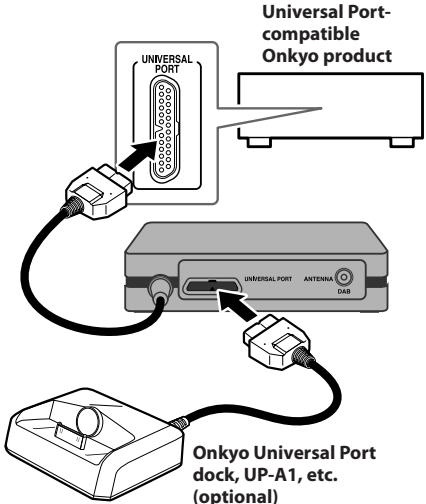
Turn off your Universal Port-compatible Onkyo product. Connect the UP-DT1 to its UNIVERSAL PORT. Set the UP-DT1's Mode selector.
Setting the Mode Selector
Turn off the Universal Port-compatible Onkyo product before setting the Mode selector.
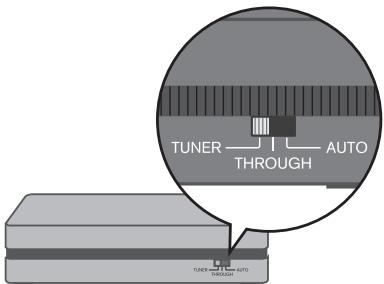
TUNER: Select this to listen to DAB Digital Radio.
- THROUGH: Select this to listen to the device connected to the UP-DT1's Universal Port, for example, an iPod in a UP-A1 dock.
- AUTO: When AUTO is selected, the source is selected automatically when the input source is changed on the Universal Port-compatible Onkyo product. For example, selecting the TUNER input source selects the UP-DT1, while selecting the
DOCK input source selects the dock (UP-A1, etc.) connected to the UP-DT1's Universal Port. Note that some Universal Port-compatible Onkyo products do not support this functionality, in which case you will need to set the Mode Selector manually.
Connecting the DAB Antenna
1. Screw the supplied DAB antenna's plug onto the DAB ANTENNA jack.
Once the UP-DT1 is ready for use, you'll need to select a DAB station and adjust the position of the DAB antenna to achieve the best possible reception.
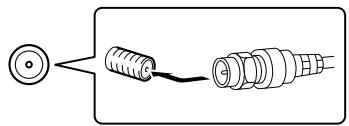
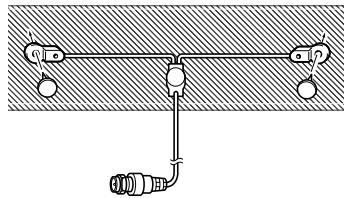
2. Use thumbtacks or something similar to fix the DAB antenna into position.
Remote Controller
You can control the UP-DT1 with your Universal Port-compatible Onkyo product's remote controller. Aim it at your Universal Port-compatible Onkyo product, not the UP-DT1. The layout of the remote controller's buttons varies depending on the Universal Port-compatible Onkyo product you are using.
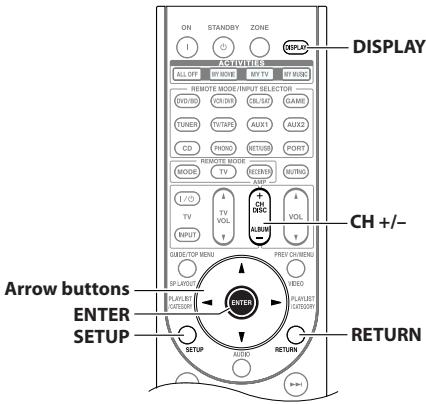
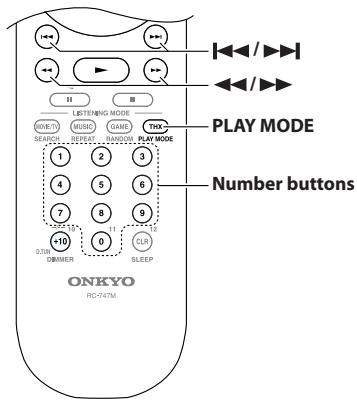
(An Onkyo AV receiver's remote controller is shown here.)
You can use the following buttons on your Universal Port-compatible Onkyo product's remote controller.
| Button | Function | Explanation |
| 0-9 | Preset | Used to select radio presets by number. |
| DISPLAY | Display Change | Used to view various information on the display. |
| PLAY MODE | Station Listing | Used to switch the listing mode: alphabetical order, multiplex order, or active stations order. |
| SETUP | Setup/Return | Selects Setup mode. |
| RETURN | Return | Returns to the previous display. |
| Arrow [▲]/[▼] buttons | Tuning Up/Down | Used to select DAB station. |
| Setup Up/Down | In Setup menu, used to select SCAN, DRC or Preset Write. | |
| Arrow [▲]/[▼] buttons | Setup Up/Down | In Setup menu, used to adjust settings. |
| ENTER | Enter | Used to confirm various functions and settings. |
| CH +/- | Preset Up/Down | Used to select radio presets. |
| |←/→| | Preset Down/Up | Used to select radio presets. |
| ←/→ | Tuning Down/Up | Used to select DAB station. |
Listening to DAB Digital Radio
Selecting DAB for the Very First Time
Turn on the Universal Port-compatible Onkyo product which the UP-DT1 is connected. Press the [PORT] remote mode button on your remote controller to select the PORT input source. The UP-DT1 starts to scan the stations in Worldwide mode automatically. Scanning progress is shown on the display.
1 1 1 1 1 1 1 1 1 1 1 1 1 1 1 1 1 1 1 1 1 1 1 1 1 1 1 1 1 1 1 1 1
Once the scanning process is complete, the first station that was detected is selected.
Using the Auto Tuning Function Manually
If a new DAB station is introduced, or you move to a new area, you can run the Auto Tuning function again.
- Press the [SETUP] button.
- Use the [] / [] buttons to select "SCAN".
- Use the Left/Right Arrow [<] [/> ] buttons to select "U.K" or "WorldWide".
U.K: Band III (10A to 13F).
WorldWide: Band III (5A to 13F) and L-Band (LA to LW).
- Press the [ENTER] button to scanning DAB station.
Selecting DAB Stations
- Use the [] / [] buttons to select a station.
Displaying DAB Radio Information
Press the [DISPLAY] button repeatedly to display more information about the current DAB station.
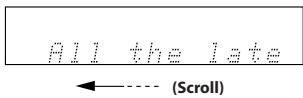
1. DLS (Dynamic Label Segment)
When tuned to a station that's broadcasting DLS text data, the text will scroll across the display.
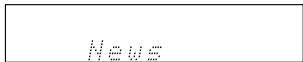
2. Program Type
Displays the type of program.
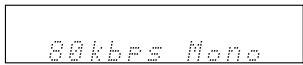
3. Bit Rate and Audio Mode
Displays the station's bit rate and audio mode (stereo, mono, or joint stereo).
4. Signal Quality
Displays the signal quality.
0-59: Poor reception
60-79: Good reception
80-100: Excellent reception
Quality 86
5. Multiplex Name
Displays the name of the current multiplex.
BBC DAB
6. Multiplex Number and Frequency
Displays the number and frequency of the current multiplex.
125 225.6MHz
Selecting Tuning Mode (Station Listing)
You can sort the available stations alphabetically, by multiplex, or active stations.
Use the [PLAY MODE] button to select the following options.
Alphabet: Sort stations alphabetically.
Multiplex: Sort stations by multiplex.
Active ST: Sort by active stations. Receivable stations appear at the top of the list. stations that cannot be received properly appear at the bottom of the list.
Selecting DRC Value
With the DRC (Dynamic Range Control) setting, you can reduce the dynamic range of DAB digital radio so that you can still hear quiet parts even when listening at low volume levels—ideal for listening to the radio late at night when you don't want to disturb anyone.
- Press the [SETUP] button.
- Use the [] / [] buttons to select "DRC".
- Use the Left/Right Arrow [<]/[▶] buttons to select following options.
0: DRC off.
1/2: Small reduction in dynamic range.
1: Large reduction in dynamic range.
Presetting Your Favorite Stations
With the Preset Write function, you can preset individual DAB digital radio stations. Presets make it easy to select your favorite stations and eliminate the need to tune the radio manually each time you want to change stations. You can store up to 40 stations as presets.
- Tune into the station you want to store as a preset.
- Press the [SETUP] button, and then use the Up/Down Arrow []/[] buttons to select "Preset Write?"
- Press [ENTER].
- Use the Left/Right Arrow [] / [] buttons or [ ] / [ ] buttons to select a preset.
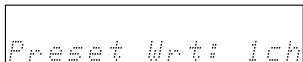
5. To store the station, press [ENTER].
The preset is stored and "Complete" appears on the display.
Selecting Preset Stations
You must store some presets before you can select them.
- Use the CH [+] /[-] or [ ] / [ ] buttons to select a preset.
Press the CH [-] or [ ] buttons to select the previous preset. Press the CH [+] or [ ] buttons to select the next preset.
You can also use the number buttons to select presets.
Using a UP-A1 Dock
When the UP-DT1's Mode Selector is set to TUNER, the iPod in the connected UP-A1 dock will not be charged. If you change the Mode Selector from TUNER to THROUGH while your Universal Port-compatible Onkyo product is in Standby mode, you must remove and reinsert the iPod in the UP-A1 to start charging.
- iPod is a trademark of Apple Inc., registered in the U.S. and other countries.
Troubleshooting
If you have any trouble using the UP-DT1, look for a solution in this section.
The UP-DT1 is not recognized by your Universal Port-compatible Onkyo product
- Make sure the UP-DT1 is properly connected to the UNIVERSAL PORT on your Universal Port-compatible Onkyo product.
- Turn off all devices before connecting to a UNIVERSAL PORT.
No sound
- Make sure your amplifier's volume control is not set to minimum.
- Check all connections and correct as necessary (see page 6).
The UP-DT1 is connected to a Universal Port-compatible Onkyo product but doesn't work
- Turn off all devices, and then set the UP-DT1's Mode selector to TUNER.
Can't control the UP-DT1 by using the buttons on the front panel of the Universal Port-compatible Onkyo product
- This is normal. The UP-DT1 can be controlled only by using the Universal Port-compatible Onkyo product's remote controller. (However, some products can control using the front panel's buttons.)
- Press the [PORT] remote mode button on your remote controller to select the PORT remote mode.
The displays shown in this manual differ to what's displayed on your Universal Port-compatible Onkyo product
- The exact information displayed depends on your Universal Port-compatible Onkyo product. The displays shown in this instruction manual serve as examples only.
If you can't resolve an issue yourself, try resetting the UP-DT1 as follows before contacting your Onkyo dealer.
Connect the UP-DT1 to your Universal Port-compatible Onkyo product. On your Universal Port-compatible Onkyo product, select the PORT input source.
When the UP-DT1 has been recognized, while holding down the [PORT] button on the front panel of the product, press the [STANDBY/ON] button on the front panel of the product. (The reset procedure may vary depending on your Universal Port-compatible Onkyo product, so refer to its instruction manual as well.)
Specifications
40 preset stations
Tuning frequency range:
Band III: 5A-13F, 174.93-239.20 MHz
L-Band: LA-LW, 1452.96-1490.62 MHz
Rating:
12V,300mA
Dimensions (W× H× D)
140 × 32.5 × 110 ~mm (5-1/2" x 1-1/4" x 4-5/16")
Weight:
0.4 kg (0.9 lbs.)
A propos de I'UP-DT1
1. DLS (Dynamic Label Segment)
Band III: 5A~13F, 174.93~239.20 MHz
L-Band: LA~LW, 1452.96~1490.62 MHz
Alimentation:
12V, 300mA
1. DLS (Dynamic Label Segment)
1. DLS (Dynamic Label Segment)
Band III: 5A~13F, 174.93~239.20 MHz
L-Band: LA~LW, 1452.96~1490.62 MHz
Voeding:
12V, 300mA
Afmetingen (B× H× D)
140 × 32.5 × 110 mm
Gewicht:
0,4kg
1. DLS (Dynamic Label Segment)-text
Band III: 5A-13F, 174.93-239.20 MHz
L-Band: LA-LW, 1452.96-1490.62 MHz
Markdata:
12V,300mA
Matt (B× H× D)
140× 32,5× 110mm
Vikt:
0,4 kg
ONKYO CORPORATION
Sales & Product Planning Div.: 2-1, Nisshin-cho, Neyagawa-shi, OSAKA 572-8540, JAPAN
Tel: 072-831-8023 Fax: 072-831-8124
18 Park Way, Upper Saddle River, N.J. 07458, U.S.A.
Tel: 201-785-2600 Fax: 201-785-2650 http://www.us.onkyo.com/
ONKYO EUROPE ELECTRONICS GmbH
Liegnitzerstrasse 6, 82194 Groebenzell, GERMANY
Tel: +49-8142-4401-0 Fax: +49-8142-4401-555 http://www.eu.onkyo.com/
ONKYO EUROPE UK Office
Suite 1, Gregories Court, Gregories Road, Beaconsfield, Buckinghamshire, HP9 1HQ
UNITED KINGDOM Tel: +44-(0)1494-681515 Fax: +44(0)-1494-680452
ONKYO CHINA LIMITED
Unit 1&12, 9/F, Ever Gain PlazaTower 1, 88, Container Port Road, Kwai Chung,
N.T., HONG KONG Tel: 852-2429-3118 Fax: 852-2428-9039
http://www.ch.onkyo.com/

10907-1