ZU0800013 - Thermostat FERROLI - Free user manual and instructions
Find the device manual for free ZU0800013 FERROLI in PDF.


Pick your language and provide your email: we'll send you a specifically translated version.
| Product Type | Thermostat |
| Brand | Ferroli |
| Model | ZU0800013 |
| Dimensions (WxHxD) | 86 x 86 x 30 mm |
| Weight | 150 g |
| Power Supply | 2 x AAA batteries (1.5V) |
| Battery Life | Approximately 1 year |
| Control Type | Digital (push buttons) |
| Display | LCD, backlit |
| Temperature Range | 5°C to 35°C |
| Accuracy | ±0.5°C |
| Programming | Daily and weekly schedules |
| Number of Programs | 4 time periods per day |
| Compatibility | Gas, oil, electric heating systems |
| Mounting | Wall-mounted (screws included) |
| Protection Class | IP20 |
| Maintenance | Clean with dry cloth; replace batteries annually |
| Safety | Frost protection mode, child lock |
| Spare Parts | Batteries, wall plugs, screws |
| Repairability | Replaceable batteries; internal components not user-serviceable |
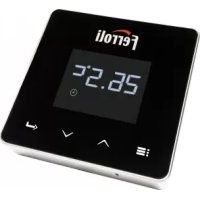
| General Information | Ferroli ZU0800013 is a programmable digital thermostat for home heating control. |
Frequently Asked Questions - ZU0800013 FERROLI
How do I install the Ferroli ZU0800013 thermostat?
Mount the thermostat on a wall at about 1.5 m height, away from heat sources. Use the included screws and wall plugs. Insert batteries and follow the pairing procedure in the manual.
How do I set the time and day on the thermostat?
Press and hold the Menu button for 3 seconds. Use the arrow buttons to adjust hour, minute, and day. Press OK to confirm each setting.
How do I program a heating schedule?
Press the Program button. Select a day or group of days. Set up to 4 time periods with target temperatures for each. Use the arrows to adjust times and temperature, then press OK to save.
How do I replace the batteries?
Remove the thermostat from its wall plate by gently pulling it off. Open the battery compartment on the back, replace two AAA batteries, close the compartment, and snap the thermostat back onto the plate.
What does the frost protection mode do?
Frost protection keeps the heating at a minimum temperature (usually 5°C) to prevent pipes from freezing when the house is unoccupied. It is activated in the settings menu.
Can I use the thermostat with electric underfloor heating?
Yes, the ZU0800013 is compatible with most electric underfloor heating systems, but it is recommended to use a floor sensor (sold separately) for accurate temperature control.
How do I reset the thermostat to factory defaults?
Press and hold the Reset button (located in the battery compartment) for 5 seconds using a paperclip. All settings will be erased and the device will restart.
What do the symbols on the display mean?
Common symbols include: sun for comfort mode, moon for night setback, snowflake for frost protection, clock for program mode, and flame when heating is active.
Why is the thermostat not responding?
Check if the batteries are correctly installed and have sufficient charge. If the display is blank, replace the batteries. If it still doesn't respond, perform a factory reset.
Is the thermostat compatible with smart home systems?
No, the Ferroli ZU0800013 is a standalone thermostat and does not have Wi-Fi or smart home connectivity.
User questions about ZU0800013 FERROLI
0 question about this device. Answer the ones you know or ask your own.
Ask a new question about this device
No questions yet. Be the first to ask one.
Download the instructions for your Thermostat in PDF format for free! Find your manual ZU0800013 - FERROLI and take your electronic device back in hand. On this page are published all the documents necessary for the use of your device. ZU0800013 by FERROLI.
USER MANUAL ZU0800013 FERROLI


Manual assistant
Powered by Anthropic
Waiting for your message
Product information
Brand : FERROLI
Model : ZU0800013
Category : Thermostat