
100 CLASSIC BOOKS - Video Games NINTENDO - Free user manual and instructions
Find the device manual for free 100 CLASSIC BOOKS NINTENDO in PDF.


| Product Type | Video game on cartridge |
| Platform | Nintendo DS |
| Content | 100 classic full-length works |
| Literary genres | Novels, plays, tales, poetry, etc. |
| Available languages | French, English (translation possible via email) |
| Wireless features | Book download, local sharing, demo sending |
| Nintendo Wi-Fi Connection | Download additional content and update rankings |
| Reading mode | Touch or button navigation, bookmarks, scroll bar |
| Customization | Font, background music, screen orientation, menu design |
| Save | Automatic (last page, settings) |
| Rankings | Book ratings, popularity ranking |
| Reading guide | Personalized questionnaire for recommendations |
| Maintenance | Avoid shocks, humidity, extreme temperatures. Clean with a soft, dry cloth. |
| Safety | Warnings about epilepsy, repetitive motions, lithium-ion battery |
| Warranty | 12 months for the console, 3 months for the game (parts and labor) |
| After-sales service | Nintendo Support: 1-800-255-3700 (U.S./Canada), support.nintendo.com |
Frequently Asked Questions - 100 CLASSIC BOOKS NINTENDO
User questions about 100 CLASSIC BOOKS NINTENDO
0 question about this device. Answer the ones you know or ask your own.
Ask a new question about this device
Download the instructions for your Video Games in PDF format for free! Find your manual 100 CLASSIC BOOKS - NINTENDO and take your electronic device back in hand. On this page are published all the documents necessary for the use of your device. 100 CLASSIC BOOKS by NINTENDO.
USER MANUAL 100 CLASSIC BOOKS NINTENDO
NEED HELP WITH INSTALLATION, MAINTENANCE OR SERVICE?
NINTENDOCUSTOMER SERVICE
SUPPORT.NINTENDO.COM
or call 1-800-255-3700
MON.-SUN., 6:00 a.m. to 7:00 p.m., Pacific Time
(Times subject to change)
BESOIN D'AIDE POUR L'INSTALLATION, L'ENTRETIEN OU LA RÉPARATION?
SERVICE à LA CLIENTÉLE DE NINTENDO SUPPORT.NINTENDO.COM
PLEASE CAREFULLY READ THE SEPARATE HEALTH AND SAFETY PRECAUTIONS BOOKLET INCLUDED WITH THIS PRODUCT BEFORE USING YOUR NINTENDO® HARDWARE SYSTEM, GAME CARD OR ACCESSORY. THIS BOOKLET CONTAINS IMPORTANT HEALTH AND SAFETY INFORMATION.
IMPORTANT SAFETY INFORMATION: READ THE FOLLOWING WARNINGS BEFORE YOU OR YOUR CHILD PLAY VIDEO GAMES.
WARNING - Seizures
- Some people (about 1 in 4000) may have seizures or blackouts triggered by light flashes or patterns, and this may occur while they are watching TV or playing video games, even if they have never had a seizure before.
- Anyone who has had a seizure, loss of awareness, or other symptom linked to an epileptic condition should consult a doctor before playing a video game.
- Parents should watch their children play video games. Stop playing and consult a doctor if you or your child has any of the following symptoms:
Convulsions Altered vision
Eye or muscle twitching Involuntary movements
Loss of awareness Disorientation
-
To reduce the likelihood of a seizure when playing video games:
-
Sit or stand as far from the screen as possible.
- Play video games on the smallest available television screen.
- Do not play if you are tired or need sleep.
- Play in a well-lit room.
- Take a 10 to 15 minute break every hour.
WARNING - Radio Frequency Interference
The Nintendo DS can emit radio waves that can affect the operation of nearby electronics, including cardiac pacemakers.
- Do not operate the Nintendo DS within 9 inches of a pacemaker while using the wireless feature.
- If you have a pacemaker or other implanted medical device, do not use the wireless feature of the Nintendo DS without first consulting your doctor or the manufacturer of your medical device.
- Observe and follow all regulations and rules regarding use of wireless devices in locations such as hospitals, airports, and on board aircraft. Operation in those locations may interfere with or cause malfunctions of equipment, with resulting injuries to persons or damage to property.
WARNING - Repetitive Motion Injuries and Eyestrain
Playing video games can make your muscles, joints, skin or eyes hurt. Follow these instructions to avoid problems such as tendinitis, carpal tunnel syndrome, skin irritation or eyestrain:
- Avoid excessive play. Parents should monitor their children for appropriate play.
Take a 10 to 15 minute break every hour, even if you don't think you need it. - When using the stylus, you do not need to grip it tightly or press it hard against the screen. Doing so may cause fatigue or discomfort.
- If your hands, wrists, arms or eyes become tired or sore while playing, or if you feel symptoms such as tingling, numbness, burning or stiffness, stop and rest for several hours before playing again.
- If you continue to have any of the above symptoms or other discomfort during or after play, stop playing and see a doctor.
WARNING - Battery Leakage
The Nintendo DS contains a rechargeable lithium ion battery pack. Leakage of ingredients contained within the battery pack, or the combustion products of the ingredients, can cause personal injury as well as damage to your Nintendo DS.
If battery leakage occurs, avoid contact with skin. If contact occurs, immediately wash thoroughly with soap and water. If liquid leaking from a battery pack comes into contact with your eyes, immediately flush thoroughly with water and see a doctor.
To avoid battery leakage:
- Do not expose battery to excessive physical shock, vibration, or liquids.
- Do not disassemble, attempt to repair or deform the battery.
- Do not dispose of battery pack in a fire.
- Do not touch the terminals of the battery, or cause a short between the terminals with a metal object.
- Do not peel or damage the battery label.
Important Legal Information
This Nintendo game is not designed for use with any unauthorized device. Use of any such device will invalidate your Nintendo product warranty. Copying of any Nintendo game is illegal and is strictly prohibited by domestic and international intellectual property laws. "Back-up" or "archival" copies are not authorized and are not necessary to protect your software. Violators will be prosecuted.
The official seal is your assurance that this product is licensed or manufactured by Nintendo. Always look for this seal when buying
video game systems, accessories, games and related products.
Nintendo does not license the sale or use of products without the Official Nintendo Seal.
THIS GAME CARD WILL WORK
Wireless DS Single-Card
Download Play
THIS GAME ALLOWS WIRELESS MULTIPLAYER
GAMES DOWNLOADED FROM ONE GAME CARD.

Wireless DS Multi-Card
THIS GAME ALLOWS WIRELESS MULTIPLAYER
GAMES WITH EACH DS SYSTEM CONTAINING
A SEPARATE GAME CARD.
Recorded tips for many titles are available on Nintendo's Power Line at (425) 885-7529. This may be a long-distance call, so please ask permission from whoever pays the phone bill.
If the information you need is not on the Power Line, you may want to try using your favorite Internet search engine to find tips for the game you are playing. Some helpful words to include in the search, along with the game's title, are: "walk through," "FAQ," "codes," and "tips."
Nintendo
Contents
Chapter One - Introduction 6
Basic Controls 7
Getting Started 8
Chapter Two - Choosing a Book 11
The Bookshelf 12
The Book Guide 14
Chapter Three - Reading a Book 15
Book Menu 16
Controls in Reading Mode 18
Chapter Four - Discover More 21
DS Wireless Communications 22
How to Hold the Nintendo DS system
You will need to hold the Nintendo DS™ system vertically for using 100 CLASSIC BOOKS. When you use the software for the first time, you will be asked if you would like to use the software with the Touch Screen on the left or the right. You can reconfigure this later in the Settings Menu (see page 10).
In this instruction booklet, explanations will be given with the Touch Screen on the right. The left screen (top screen) will be marked with a red frame and the right screen (Touch Screen) with a brown frame.
Chapter One
Introduction
Basic Controls
Most operations can be performed using the Touch Screen. For information on controls in Reading Mode refer to pages 18 - 20.
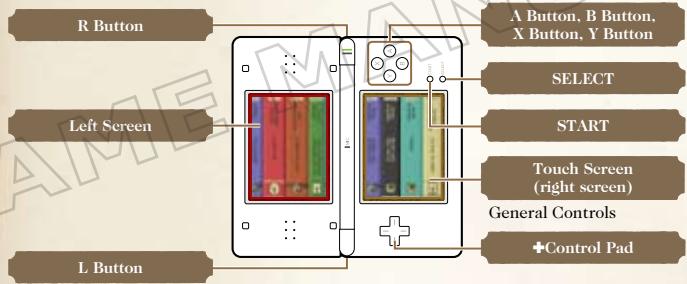
Either the +Control Pad or the A, B, and X Buttons (depending on the orientation of the Nintendo DS system) can also be used to turn the pages in Reading Mode. These buttons can be configured in the Settings Menu (see page 10).
Holding the L Button, R Button, START, and SELECT simultaneously at any point in the software will take you back to the Title Screen.
If you close the Nintendo DS system during game play, the system will go into energy-saving Sleep Mode. Open the Nintendo DS system again to resume.
Getting Started
With 100 CLASSIC BOOKS, you will have the opportunity to read a wide variety of well-loved works and perhaps even be introduced to authors and books you haven't heard of before. Follow the steps below, and you'll be reading in no time! Note: These classic books are presented in their original form. The texts may include expressions, themes, or elements that could be considered inappropriate for young children.
1 Make sure your Nintendo DS system is turned off and insert the 100 CLASSIC BOOKS Game Card firmly into the Game Card slot until it clicks into place.
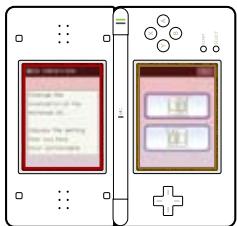
2 Turn the system on and the Health and Safety Screen as shown on the right will appear. Touch the Touch Screen to continue once you have read the message.
3 On the Nintendo DS Menu Screen, touch the 100 Classic Books Panel. After doing so, the software will start.
Note: If the Nintendo DS system has been set to AUTO MODE, this step will be skipped. See the instruction booklet for your Nintendo DS system for details.

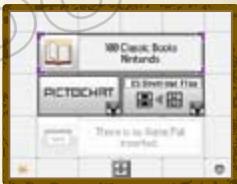
4 If this is the first time you have used 100 CLASSIC BOOKS, you'll be asked which way you would like to hold your Nintendo DS system. Once you have confirmed your choice, you will be taken to the Main Menu.
If this is not the first time you have used 100 CLASSIC BOOKS and you had been reading in a previous session, you will be asked if you'd like to continue that session. Touch YES to continue reading from where you left off. Touch NO to go to the Main Menu. Otherwise, the Main Menu will be displayed.
Main Menu
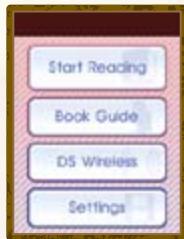
There are four options available on the Main Menu.
START READING (pages 12-13)
Choose a book from the bookshelf and start reading.
BOOKGUIDE (page14)
If you want help choosing a book or would like to check Book Rankings, touch BOOK GUIDE.
DS WIRELESS (pages 22-30)
Download new books, exchange books with other 100 CLASSIC BOOKS users, or send a demo version to Nintendo DS users who don't own 100 CLASSIC BOOKS.
SETTINGS (page 10)
Configure the software settings.
Settings Menu
Select SETTINGS from either the Main Menu or from the Reading Menu (see page 20) to display the Settings Menu. There are four available options here.
READING BGM
Change the background music played in Reading Mode.
FONT SETTINGS
Change the font size and how page numbers are displayed.
MENUDesign
Change the appearance of the menu to one of four different designs.
BUTTON SETTINGS
Configure the button functions when in Reading Mode.
DS ORIENTATION
Change the orientation of the Nintendo DS system.
Saving and Deleting Data
Your place in a book and other settings will be saved automatically. To delete all data saved on the Game Card, after selecting the 100 Classic Books panel on the Nintendo DS Menu Screen and before the 100 CLASSIC BOOKS Title Screen appears, press the A, B, X, Y, L, and R Buttons simultaneously.
Note: Deleted save data cannot be recovered. Downloaded books will also be deleted.
Chapter Two
Choosing a Book
The Bookshelf
Browsing the Bookshelf
Touch START READING on the Main Menu to go to the bookshelf.
Choosing a Book Yourself
Browse the bookshelf by sliding the stylus left and right on the Touch Screen or by tapping the bottom of the Touch Screen to display the scroll bar. When you see a book you'd like to read, tap on the spine of the book to view the Book Menu for that title.
Note: You can also use the Control Pad or the B Button and X Button (depending on the orientation of the Nintendo DS system) to browse the bookshelf. To change these settings, please select BUTTON SETTINGS from the Settings Menu.
Touch the top part of the Touch Screen to display the Bookshelf Menu. From here, the following options are available:
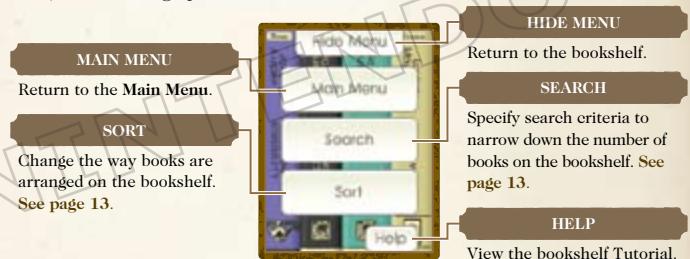
SEARCH
Touch SEARCH to narrow down the selection on the Bookshelf by specifying criteria. Set your criteria and then touch OK to view books which match the search criteria. Selecting CLEAR will clear the criteria.
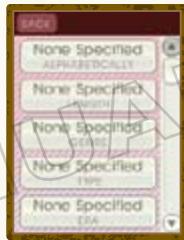
ALPHABETICALLY Search by author or title alphabetically.
SEARCH by book length.
GENRE Search by genre.
TYPE Search by the type of work (for example, novels, plays, or short stories).
ERA Search by the time period in which a book was written.
ORIG Search by the author's land of origin.
READING
DIFFICULTY Search by the book's reading level.
MY HISTORY Search by whether you've read a book or whether you have any books that are currently bookmarked.
DESCRIPTIONS Search by the descriptions you've given different books.
SORT
Set how the books are arranged on the bookshelf. Choose either alphabetically by title, author or genre.
HELP
Touch to view the Bookshelf Tutorial.
The Book Guide
Getting Help Choosing a Book
Touch BOOK GUIDE on the Main Menu to get help in choosing a book.
QUIZ
By answering some simple questions, you will receive customized recommendations. Touch a book title to start reading.
RANKINGS
There are two types of rankings you can use to help you choose a book. The rankings will vary accor
ding to the data stored on the Game Card. Make sure you have updated your rankings recently to have the latest ones available (see page 30).
RATINGS
Books will be ranked according to the collated results of the scores given by readers (see page 17).
DESCRIPTIONS
Books will be ranked in groups according to the collated results of the descriptions given by readers. You will be presented with the ten highest-rated books for that category.
Chapter Three
Reading a Book
Book Menu
After you select a book, either from the bookshelf or with the Book Guide's help, the Book Menu will be displayed. Select from the following options and start reading!

Book Menu


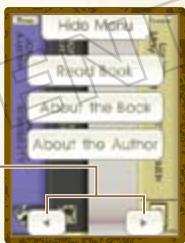
The following options are available on the Book Menu:
HIDE MENU
Return to bookshelf.
READ BOOK
Read selected book.
ABOUT THE BOOK
Read an introduction to the book.
ABOUT THE AUTHO
Discover more about the author.
BOOK REVIEW
View or revise your book review. This option will be available only for books that you have read and reviewed.

Book Reviews and Rankings

Once you finish a book, you can give it a review by rating it out of ten and selecting the word which best describes the story. The book will also be marked on the bookshelf by a small letter R on the book's spine.
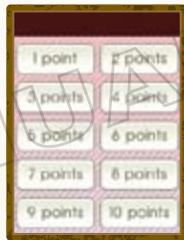
You can change this book review later by selecting BOOK REVIEW from the Book Menu. If you want to delete your book review entirely and return a book to an unread state, press and hold START on the book's Book Menu. Please be aware that you cannot recover deleted save data.
When you update rankings your Book Reviews will be automatically uploaded and collated with other Book Reviews from users of 100 CLASSIC BOOKS (see page 30).

Downloaded Books
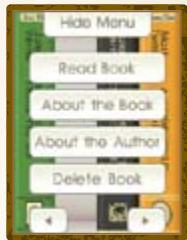
You cannot review downloaded books (see page 29), some downloaded books may not have additional information about the author or book. An option giving you the choice to delete downloaded books will be added to the Book Menu.
Note: There is a limit to the number of additional books that can be stored on the bookshelf. If you run out of space, please delete downloaded books you no longer need.
Controls in Reading Mode
There will be a tutorial when you start reading for the first time. This tutorial can be repeated by selecting HELP on the Touch Screen (see page 20).

Reading Screen

Use the stylus to turn the pages. Alternatively, configure the button settings by selecting BUTTON SETTINGS on the Settings Menu (see page 10).
Turning Forward a Page
Tap the right side of the Touch Screen to move forward through the book. Alternatively, slide the stylus from right to left.
Turning Back a Page
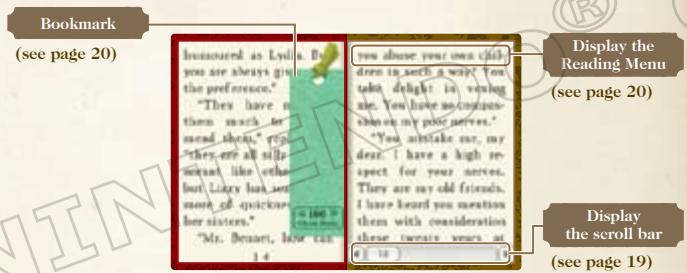
Tap the left side of the Touch Screen to move back through the book. Alternatively, slide the stylus from left to right.
Scroll Bar
Touch the bottom section of the Touch Screen to display the scroll bar. Use the scroll bar to jump to another page. Displaying the scroll bar will also display any placed bookmarks. Touching a bookmark will jump to the marked page. Touch anywhere outside the options to return to your reading.
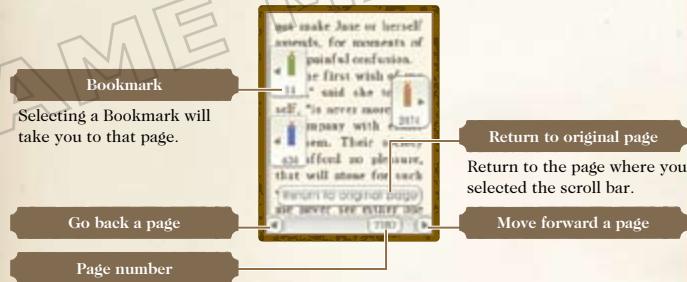
Page number is displayed in the middle of the bar.
Reading Menu
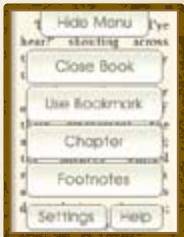
Touch the top part of the Touch Screen to display the Reading Menu. The screen on the right will be displayed. To exit the Reading Menu, touch HIDE MENU.
HIDE MENU
Return to book.
CLOSE BOOK
Stop reading and return to the Book Menu.
Place a bookmark on the page currently open. You can use up to three bookmarks in each book and one bookmark in each book introduction. When on a page which has already been bookmarked, the option will change to TAKE BOOKMARK. Selecting this will remove the bookmark on that page.
CHAPTER
Go to the Chapter Menu where you can select a chapter. The options in the Chapter Menu will vary depending on the book. If chapter titles have been shortened you can view the whole title on the top screen by touching the option. To jump to the beginning of the selected chapter, select OK.
FOOTNOTES
Some books may also include footnotes. This option will appear in the menu when available. Select this option to view the footnotes.
SETTINGS
Change the background music, font options, button setup, and orientation of the Nintendo DS system (see page 10).
HELP
Touch to view the Reading Tutorial.
Chapter Four
Discover More
DS Wireless Communications
Local Wireless
Select DS WIRELESS on the Main Menu, and then LOCAL WIRELESS to go to the Local Wireless Menu. From this menu, you can use the wireless communications function of the Nintendo DS to send a demo version of 100 CLASSIC BOOKS to a user who doesn't own a 100 CLASSIC BOOKS Game Card yet or share books with other users of 100 CLASSIC BOOKS.
Local Wireless Menu
There are three options available.
SEND TRIAL (see page 23)
Send a trial version to other Nintendo DS systems so that others can try the 100 CLASSIC BOOKS for themselves.
SEND BOOK (page 24)
Send books that you have downloaded (see page 29) to other owners of a 100 CLASSIC BOOKS Game Card.
RECEIVE BOOK (see page 24)
Receive books sent by other users.
Sending a Trial
Send a trial to another Nintendo DS system using the DS Download Play function of the Nintendo DS system. For more information on Single-Card Play, please see page 25.
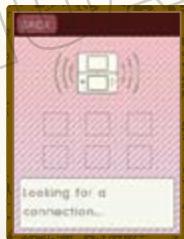
1 The user who owns a 100 CLASSIC BOOKS Game Card (the Host System) should select SEND TRIAL. The screen on the right will be displayed. Please wait for other users to accept.
The user or users who want to download the trial (the Client Systems) should select the book that they wish to download from the Game List Screen.
3 The Host System will then transmit a trial version to be downloaded by the Client System or Client Systems.
The trial will start automatically on the Client System and after a short tutorial, you can start reading!
Note: When the Client System is turned off, the trial version will be lost.
Sending and Receiving Books
Send books you've downloaded (see page 29) to other 100 CLASSIC BOOKS users. After completing the steps on page 26, follow the instructions below to send and receive books.
Books received in this way will not be deleted when the Nintendo DS is turned off. Any books sent will also be retained by the Host System's Game Card and will not be deleted.
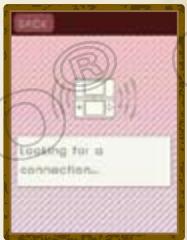
1 The user who is going to send a book (the Host System) should select SEND BOOK. The user who is going to receive a book (the Client System) should select RECEIVE BOOK.
The Host System will need to wait for the Client System. The Client System can select a book from those displayed to download.
3 The book will be transferred from the Host System to the Client System. When the transfer is complete, the Client System will be prompted to choose another book if there are more available to download. Otherwise, the Host System and the Client System will be returned to the DS Wireless Menu.
DS Wireless Communications
(Single-Card Play)
Here is an explanation of how to play using Single-Card Play.
The Things You'll Need
Nintendo DS system . One for each player
100 CLASSIC BOOKS Game Card. One
Connection Procedures
Host System:
- Make sure that the power is turned off on all systems, and insert the Game Card into the system.
- Turn the power on. If the Start-up Mode of your system is set to MANUAL MODE, the Nintendo DS Menu Screen will be displayed. In case it is set to AUTO MODE, skip the next step and go on with step 4.
- Touch the 100 CLASSIC BOOKS Panel.
- Now, follow the instructions on page 23.
Client System:
- Turn the power on. The Nintendo DS Menu Screen will be displayed.
NOTE: Make sure the Start-up Mode of your system is set to MANUAL MODE. For further details on how to set up the Start-up Mode, please refer to the Instruction Booklet of your Nintendo DS system. - Touch DS DOWNLOAD PLAY. The Game List Screen will appear.
- Touch the 100 CLASSIC BOOKS Panel.
- You will be asked to confirm your choice. Touch YES to download game information from the Host System.
- You can now enjoy the trial version.
DS Wireless Communications
(Multi-Card Play)
Here is an explanation of how to play using Multi-Card Play.
The Things You'll Need
Nintendo DS system One for each player
100 CLASSIC BOOKS Game Card. One for each player
Connection Procedures
- Make sure that the power is turned off on all systems, and insert the Game Card into each system.
- Turn the power on. If the Start-up Mode of your system is set to MANUAL MODE, the Nintendo DS Menu Screen will be displayed. In case it is set to AUTO MODE, skip the next step and go on with step 4.
- Touch the 100 CLASSIC BOOKS Panel.
- Now, follow the instructions on page 24.
Nintendo Wi-Fi Connection
Nintendo Wi-Fi Connection allows 100 Classic Books owners to access extra features and downloadable content.
- To play Nintendo DS games over the internet, you must first set up the Nintendo Wi-Fi Connection (Nintendo WFC) on your Nintendo DS system. Please see the Nintendo Wi-Fi Connection Instruction Manual, available at www.nintendocom/consumer/manuals, if you need directions on setting up your Nintendo Wi-Fi Connection.
- To complete the Nintendo WFC setup, you will also need access to a PC that has a wireless network device installed (such as a wireless router) and an active broadband or DSL internet account.
- Nintendo Wi-Fi Connection game play uses more battery power than other game play. You may prefer to use the AC Adapter to prevent running out of power when using the Nintendo Wi-Fi Connection.
- You can also play Nintendo WFC compatible games at selected Internet hotspots without additional setup.
- See the Terms of Use Agreement (page 31) which governs Nintendo Wi-Fi Connection game play and is also available online at www.nintendo.com/games/wifi/ds.
For additional information on the Nintendo WFC, setting up your Nintendo DS, or a list of available internet hotspots, visit www.nintendo.com/games/wifi (USA, Canada and Latin America) or call 1-800-895-1672 (USA/Canada only).
Nintendo Wi-Fi Connection
From the Main Menu select DS WIRELESS, and then NINTENDO Wi-Fi CONNECTION to connect to Nintendo WFC Menu where you can download new books and get the latest Book Rankings.

Nintendo WFC Menu
There are three options available.
DOWNLOAD BOOKS (see page 29)
Download books using Nintendo Wi-Fi Connection.
UPDATE RANKINGS (see page 30)
Get updated reviews from other users of 100 CLASSIC BOOK COLLECTION and upload your own reviews.
SETTINGS
Change your Nintendo DS system's Nintendo Wi-Fi Connection Settings.

Book Download

Follow the instructions below to download new books via Nintendo Wi-Fi Connection.
Note: This service may be terminated at any time and without notice.

Touch DOWNLOAD BOOKS and you will be asked to confirm if you wish to connect to Nintendo Wi-Fi Connection. Touch YES to proceed.
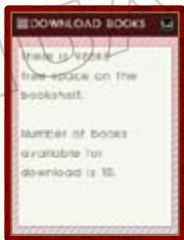

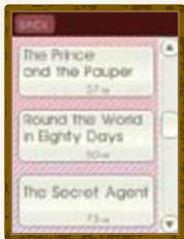
A list of available titles will be displayed. Select the book or books that you wish to download. It may be necessary to use the scroll bar to view all available books.
Note: Downloaded books will be saved to the Game Card. However, there is a limit to the space on the Game Card and the number of downloaded books that can be stored. When you start to run low on space, you will need to delete books that you've downloaded if you wish to download new books. Delete books by selecting the book from the bookshelf and selecting DELETE BOOK from its Book Menu. See page 17 for more details on deleting books.

You will be asked to confirm the download. Select YES to start the download. Downloaded books will automatically appear on your bookshelf and be marked with the letters DL on the spine.
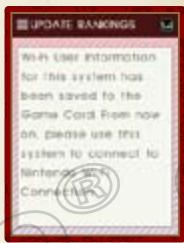
Upload your own Book Reviews and also download collated reviews from other users.
See page 14 for more information on rankings.
Note: Ranking Update may take longer than a minute. Books that have received good ratings from users will show a sticker on their cover.
Note on the Nintendo DS system and Game Card
Nintendo Wi-Fi Connection treats your Game Card and Nintendo DS system as a set. Be aware that if you use a different Nintendo DS system later, your Nintendo Wi-Fi Connection user information will be updated.
TERMS OF USE AGREEMENT
The Nintedos DS System ("DS") comes equipped with the ability for wireless game play through the use of the Nintendo Wi-Fi Connection service and access to the Internet through the use of the Nintendo DS Browser, which must be purchased separately, (collectively the "Service"). Such Service is provided by Nintendo of America Inc., together with its subsidiaries, affiliates, agents, licensors and licensees (collectively, "Nintendo," and sometimes referenced herein by "we" or "our"). Nintendo provides the Service to you subject to the terms of use set forth in this agreement ("Agreement"). PLEASE READ THIS AGREEMENT CAREFULLY BEFORE USING THE SERVICE AND/OR DS. BY USING THE SERVICE AND/OR DS, YOU ARE AGREEING TO BE BOUND BY THIS AGREEMENT.
The terms of use contained in this Agreement shall apply to you until you no longer use or access the Service, or until your use of the Service is terminated. If at any time you no longer agree to abide by these or any future terms of use, your only recourse is to immediately cease use of the Service. We reserve the right, at our sole discretion, to change, modify, add, or delete portions of this Agreement and to discontinue or modify the Service at any time without further notice. Your continued use of the Service after any such changes, constitutes your acceptance of the new terms of use. It is your responsibility to regularly review this Agreement. You can review the most current version of this Agreement at any time by visiting www. NintendoWiFi.com/terms.
USER CONDUCT
It is important that you do your part to keep the Service a friendly and clean environment. In particular, you may not use the Service to:
- Upload, transmit, or otherwise make available any content that is unlawful, harmful, harassing, or otherwise objectionable;
- harm minors in any way;
- misrepresent your identity or impersonate any person, including the use or attempt to use another's user ID, service or system;
- manipulate identifiers in order to disguise the origin of any content transmitted through the Service;
- upload, post, email, transmit or otherwise make available: (a) any content that you do not have a legal right to make available; (b) any content that infringes any patent, trademark, trade secret, copyright or other proprietary rights of any party; (c) any unsolicited or unauthorized advertising or promotional materials (e.g. "spam"); or (d) any material that contains software viruses or similar code or programs designed to interrupt, destroy or limit the functionality of any computer software or hardware or telecommunications equipment.
- use any portion of the Service for any unlawful purpose;
- engage in any activity that disrupts, diminishes the quality of, interferes with the performance of, or impairs the functionality of, the Services or networks connected to the Service; or
undertake any other act that we determine to be harmful or disruptive to Nintendo, the Service, any user, or any other third party, as set forth in a revised version of this Agreement.
Further, you agree not to post, reveal or otherwise make available any personal information, such as your real name, birth date, age, location, e-mail address or any other personally identifiable information ("Personal Information"), on or through the Service, as any Personal Information provided by you may be visible to others.
TERMS OF USE AGREEMENT (cont.)
SUBMISSIONS
All User Content posted on, transmitted through, or linked from the Service, whether or not solicited by Nintendo (collectively, "Submissions"), is the sole responsibility of the person from whom such Submissions originated. Nintendo is not obligated: (a) to maintain any Submissions in confidence; (b) to store or maintain the Submissions, electronically or otherwise, (c) to pay any compensation for any Submissions or any use thereof; or (d) to respond to any user in connection with or to use any Submissions. Nintendo shall not be liable for any use or disclosure of any Submissions.
DISCLAIMER OF WARRANTY; LIMITATION OF LIABILITY; INDEMNIFICATION
THE SERVICE AND THE NINTENDO CONTENT, USER CONTENT, DATA OR SOFTWARE AVAILABLE THROUGH IT (COLLECTIVELY, THE "CONTENT") ARE PROVIDED ON AN "AS IS" AND "AS AVAILABLE" BASIS. USE OF THE SERVICE, INCLUDING ALL CONTENT, DISTRIBUTED BY, DROWNOLED OR ACCESSED FROM OR THROUGH IT, IS AT YOUR SOLE RISK AND NINTENDO ASSUMES NO RESPONSIBILITY FOR THE CONTENT OR YOUR USE OR INABILITY TO USE ANY OF THE FOREIGNING. WE DO NOT GUARANTEE THE CONTENT ACCESSIBLE OR TRANSMITTED THROUGH, OR AVAILABLE FOR DOWNLOAD FROM THE SERVICE WILL REMAIN CONFIDENTIAL OR IS OR WILL REMAIN FREE OF INFECTION BY VIRUSES, WORMS, TROJAN HORSES OR OTHER CODE THAT MANIFESTS CONTAMINATING OR DESTRUCTIVE PROPERTIES. TO THE FULlest EXTENT PERMISSIBLE PURSUANT TO APPLICABLE LAW, NINTENDO DISCLAIMS ALL WARRANTYES OF ANY KIND, WHETHER EXPRESS OR IMplied, WITH RESPECT TO THE SERVICE AND ALL CONTENT AVAILABLE THROUGH THE SERVICE, INCLUDING WITHOUT LIMITATION ANY WARRANTY OF MERCHANTABILITY, FITNESS FOR A PARTICULAR PURPOSE OR NON-INFRINGEMENT. NINTENDO ASSUMES NO RESPONSIBILITY FOR ANY DAMAGES SUFFERED BY A USER, INCLUDING, BUT NOT LIMITED TO, LOSS OF DATA FROM DELAYS, NONDELIVERIES OF CONTENT, ERRORS, SYSTEM DOWN TIME, MISDELIVERIES OF CONTENT, NETWORK OR SYSTEM OUTAGES, FILE CORRUCTION, OR SERVICE INTERR UATIONS CAUSED BY THE NEGLIGENCE OF NINTENDO OR A USER'S OWN ERRORS AND/OR OMISSIONS EXCEPT AS SPECIFICALLY PROVIDED HEREIN. YOU UNDERSTAND AND AGREE THAT YOU WILL BE SOLELY RESPONSIBLE FOR ANY DAMAGE TO YOUR DS OR LOSS OF DATA THAT RESULTS FROM THE DOWNLOAD OF ANY CONTENT.
UNDER NO CIRCUMSTANCES, INCLUDING, WITHOUT LIMITATION, NEGLIGENCE, SHALL NINTENDO OR ITS OFFICERS, DIRECTORS, OR EMPLOYEES BE LIABLE FOR ANY DIRECT, INDIRECT, INCIDENTAL, SPECIAL OR CONSEQUENTIAL DAMAGES ASING FROM OR IN CONNECTION WITH THE USE OF OR THE INABILITY TO USE THE SERVICE OR ANY CONTENT CONTAINED THEREON, OR RESULTING FROM UNAUTHORIZED ACCESS TO OR ALTERATION OF YOUR TRANSMISONS OR CONTENT THAT IS SENT OR RECEIVED OR NOT SENT OR RECEIVED, INCLUDING BUT NOT LIMITED TO, DAMAGES FOR USE OR OTHER INTANGIBLES, EVEN IF NINTENDO HAS BEEN ADVISED OF THE POTIBILITY OF SUCH DAMAGES.
You agree to indemnify, defend and hold harmless Nintendo and its service providers from and against all liabilities, losses, expenses, damages and costs, including reasonable attorneys' fees, arising from: (1) any violation of this Agreement by you; (2) your violation of any rights of a third party; (3) your violation of any applicable law or regulation; (4) information or content that you submit, post, transmit or make available through the Service, or (5) your use of the Service or the DS.
TERMS OF USE AGREEMENT (cont.)
ACCESS TO THIRD PARTY CONTENT
Through your access to the Service, you may obtain, or third parties may provide access to other World Wide Web resources where you may be able to upload or download content, data or software. Because Mintendo has no control over such sites and resources, we explicitly disclaim any responsibility for the accuracy, content, or availability of information found on such sites or through such resources. We do not make any representations or warranties as to the security of any information (including, without limitation, credit card and other Personal Information) you may provide to any third party, and you hereby irrevocably waive any claim against us with respect to such sites and third-party content.
FRIEND ROSTER
As part of the Service, Nintendo may provide you with access to and use of a friend roster where you may store user IDs provided to you by others ("Friend Roster"). We cannot and do not represent the security of the contents of such Friend Roster from unauthorized third parties. Transfer or disposal of your DS, or failure to safeguard your DS from loss or misuse, may lead to unauthorized access to and use of your Friend Roster. In addition, unauthorized persons may gain access to one or more Friend Rosters that contain your information without your knowledge. Nintendo will not monitor use of or access to individual Friend Rosters and it is your responsibility to monitor your interactions with other users of the Service.
PRIVACY
Nintendo cares about the privacy of its users. By using the Service you agree to our Privacy Policy which is available at www.nintendo.com/privacy.
DISCLAIMER OF RESPONSIBILITY FOR USER CONTENT AND SUBMISSIONS
We have the right, but are not obligated, to strictly enforce this Agreement through self-help, active investigation, litigation and prosecution. Nintendo does not warrant, verify or guarantee, and is not liable for, the quality, accuracy or integrity of any User Content or Submissions that you may access. However, we reserve the right to, at our sole discretion, remove, take down, destroy or delete any User Content or Submissions at any time and for any reason. We may access, use and disclose any Submissions or User Content transmitted by you via or in connection with the Service, to the extent permitted by law, in order to comply with the law (e.g., a lawful subpoena); to protect our rights or property, or to protect users of the Service from fraudulent, abusive, or unlawful use of the Service. Any use of the Service in violation of the foregoing is in violation of these terms and may result in, among other things, the termination or suspension of your rights to use the Service.
GENERAL
This Agreement constitutes the entire agreement between you and Nintendo and governs your use of the Service, superseding any prior agreements between you and Nintendo with respect to use of the Service. You also may be subject to additional terms and conditions that may apply when you use affiliate services, third-party content or third-party software. Nintendo's failure to exercise or enforce any right or provision of this Agreement shall not constitute a waiver of such right or provision. By using the Service, you agree that the laws of the State of Washington, without regard to principles of conflict of laws, will govern this Agreement and any dispute of any sort that might arise between you and Nintendo. If any of the terms of this Agreement shall be deemed invalid, void or for any reason unenforceable, that term shall be deemed severable and shall not affect the validity and enforceability of any remaining terms. Nintendo may terminate this Agreement, or terminate or suspend your access to the Service at any time, with or without cause, with or without notice.
CONTACT US:
Nintendo of America Online Privacy Administrator, 4820 150th Ave NE, Redmond, WA 98052 or visit www.nintendowifi.com.
WARRANTY & SERVICE INFORMATION
You may need only simple instructions to correct a problem with your product. Try our website at support.nintendo.com or call our Consumer Assistance Hotline at 1-800-255-3700, rather than going to your retailer. Hours of operation are 6 a.m. to 7 p.m., Pacific Time, Monday - Sunday (times subject to change). If the problem cannot be solved with the troubleshooting information available online or over the telephone, you will be offered express factory service through Nintendo. Please do not send any products to Nintendo without contacting us first.
HARDWARE WARRANTY
Nintendo of America Inc. ("Nintendo") warrants to the original purchaser that the hardware product shall be free from defects in material and workmanship for twelve (12) months from the date of purchase. If a defect covered by this warranty occurs during this warranty period, Nintendo will repair or replace the defective hardware product or component, free of charge. The original purchaser is entitled to this warranty only if the date of purchase is registered at point of sale or the consumer can demonstrate, to Nintendo's satisfaction, that the product was purchased within the last 12 months.
GAME & ACCESSORY WARRANTY
Nintendo warrants to the original purchaser that the product (games and accessories) shall be free from defects in material and workmanship for a period of three (3) months from the date of purchase. If a defect covered by this warranty occurs during this three (3) month warranty period, Nintendo will repair or replace the defective product, free of charge."
SERVICE AFTER EXPIRATION OF WARRANTY
Please try our website at support.nintendo.com or call the Consumer Assistance Hotline at 1-800-255-3700 for troubleshooting information and repair or replacement options and pricing."
*In some instances, it may be necessary for you to ship the complete product, FREIGHT PREPAID AND INSURED FOR LOSS OR DAMAGE, to Nintendo, Please do not send any products to Nintendo without contacting us first.
WARRANTY LIMITATIONS
THIS WARRANTY SHALL NOT APPLY IF THIS PRODUCT: (a) IS USED WITH PRODUCTS NOT SOLD OR LICENSED BY NINTENDO (INCLUDING, BUT NOT LIMITED TO, NON-Licensed GAME ENHANCEMENT AND COPIER DEVICES, ADAPTERS, SOFTWARE, AND POWER SUPPLIES); (b) IS USED FOR COMMERCIAL PURPOSES (INCLUDING RENTAL); (c) IS MODIFIED OR TAMPERED WITH; (d) IS DAMAGED BY NEGLIGENCE. ACCIDENT, UNREASONABLE USE, OR BY OTHER CAUSES UNRELATED TO DEFECTIVE MATERIALS OR WORKMANSHIP; OR (e) HAS HAD THE SERIAL NUMBER ALTERED, DEFACED OR REMOVED.
ANY APPLICABLE IMPLIED WARRANTY, INCLUDING WARRANTY OF MERCHANTABILITY AND FITNESS FOR A PARTICULAR PURPOSE ARE HEREBY LIMITED IN DURATION TO THE WARRANTY PERIODS DESCRIBED ABOVE (12 MONTHS OR 3 MONTHS, AS APPLICABLE). IN NO EVENT SHALL NINTENDO BE LIABLE FOR CONSEQUENTIAL OR INCIDENTAL DAMAGES RESULTING FROM THE BREACH OF ANY IMPLIED OR EXPRESS WARRANTY. SOME STATES DO NOT ALLOW LIMITATIONS ON HOW LONG AN IMPLIED WARRANTY LASTS OR EXCLUSION OF CONSEQUENTIAL OR INCIDENTAL DAMAGES, SO THE ABOVE LIMITATIONS MAY NOT APPLY TO YOU.
This warranty gives you specific legal rights. You may also have other rights which vary from state to state or province to province.
Nintendo's address is: Nintendo of America Inc., P.O. Box 957, Redmond, WA 98073-0957 U.S.A.
This warranty is only valid in the United States and Canada.
ABOUT THE BOOK [À PROPOS DU LIVRE]
BOOK REVIEW [CRITIQUE]