
DS CROSSWORDS - Video Games NINTENDO - Free user manual and instructions
Find the device manual for free DS CROSSWORDS NINTENDO in PDF.


| Product type | Video game for Nintendo DS |
| Brand | Nintendo |
| Model | DS Crosswords |
| Category | Video games |
| Dimensions (game card) | Approximately 3.4 cm x 3.4 cm |
| Weight (game card) | Approximately 3.5 g |
| Power supply | Uses the power supply of the Nintendo DS console |
| Main features | Crosswords, word searches, anagrams, several difficulty levels (Easy, Medium, Hard), profile creation (up to 4), tutorials, hint system (clues, letters, words), entry assistant, zoom, progress saving. |
| Game modes | Practice (tutorials) and Main Game (crosswords, word searches, anagrams) |
| Number of crossword grids | 20 grids per difficulty level, with a special grid unlockable after completing all grids on a page |
| Number of word search grids | 20 grids per theme, with unlockable bonus grids |
| Anagrams | Three levels: Short (3-4 letter words), Medium (4-5 letters), Long (3-6 letters) |
| User profiles | Up to 4 profiles, with left-handed/right-handed orientation, possibility to rename or delete a profile |
| Maintenance and cleaning | Clean with a soft, dry cloth. Do not use solvents. Avoid moisture and extreme temperatures. |
| Safety | Contains warnings about epilepsy (flashing lights), repetitive motions, radio interference (pacemakers), and battery leakage (console). Take breaks of 10-15 minutes per hour. |
| Spare parts and repairability | Not applicable (sealed product). No spare parts available. In case of issue, contact Nintendo support. |
| Warranty | 3 months for the game (parts and labor). Warranty void if used with unauthorized products. |
| Support | Nintendo Support: 1-800-255-3700 (USA and Canada) or support.nintendo.com. |
| Languages | French and English (depending on the downloaded manual) |
| Compatibility | Nintendo DS console only |
Frequently Asked Questions - DS CROSSWORDS NINTENDO
User questions about DS CROSSWORDS NINTENDO
0 question about this device. Answer the ones you know or ask your own.
Ask a new question about this device
Download the instructions for your Video Games in PDF format for free! Find your manual DS CROSSWORDS - NINTENDO and take your electronic device back in hand. On this page are published all the documents necessary for the use of your device. DS CROSSWORDS by NINTENDO.
USER MANUAL DS CROSSWORDS NINTENDO
NEED HELP WITH INSTALLATION, MAINTENANCE OR SERVICE?
NINTENDO CUSTOMER SERVICE SUPPORT.NINTENDO.COM
or call 1-800-255-3700
MON.-SUN., 6:00 a.m. to 7:00 p.m., Pacific Time (Times subject to change)
BESOIN D'AIDE POUR L'INSTALLATION, L'ENTRETIEN OU LA RÉPARATION?
SERVICE À LA CLIENTÉLE DE NINTENDO SUPPORT.NINTENDO.COM
ouappelezle1800255-3700
INSTRUCTION BOOKLET/MANUEL D INSTRUCTIONS
PLEASE CAREFULLY READ THE SEPARATE HEALTH AND SAFETY PRECAUTIONS BOOKLET INCLUDED WITH THIS PRODUCT BEFORE USING YOUR NINTENDO® HARDWARE SYSTEM, GAME CARD OR ACCESSORY. THIS BOOKLET CONTAINS IMPORTANT HEALTH AND SAFETY INFORMATION.
IMPORTANT SAFETY INFORMATION: READ THE FOLLOWING WARNINGS BEFORE YOU OR YOUR CHILD PLAY VIDEO GAMES.
WARNING - Seizures
Some people (about 1 in 4000) may have seizures or blackouts triggered by light flashes or patterns, such as while watching TV or playing video games, even if they have never had a seizure before.
- Anyone who has had a seizure, loss of awareness, or other symptom linked to an epileptic condition should consult a doctor before playing a video game.
- Parents should watch when their children play video games. Stop playing and consult a doctor if you or your child have any of the following symptoms:
Convulsions
Altered vision
Eye or muscle twitching
Involuntary movements
Loss of awareness
Disorientation
To reduce the likelihood of a seizure when playing video games:
- Sit or stand as far from the screen as possible.
- Play video games on the smallest available television screen.
- Do not play if you are tired or need sleep.
- Play in a well-lit room.
- Take a 10 to 15 minute break every hour.
WARNING - Radio Frequency Interference
The Nintendo DS can emit radio waves that can affect the operation of nearby electronics, including cardiac pacemakers.
- Do not operate the Nintendo DS within 9 inches of a pacemaker while using the wireless feature.
- If you have a pacemaker or other implanted medical device, do not use the wireless feature of the Nintendo DS without first consulting your doctor or the manufacturer of your medical device.
- Observe and follow all regulations and rules regarding use of wireless devices in locations such as hospitals, airports, and on board aircraft. Operation in those locations may interfere with or cause malfunctions of equipment, with resulting injuries to persons or damage to property.
WARNING - Repetitive Motion Injuries and Eyestrain
Playing video games can make your muscles, joints, skin or eyes hurt after a few hours. Follow these instructions to avoid problems such as tendinitis, carpal tunnel syndrome, skin irritation or eyestrain.
- Avoid excessive play. It is recommended that parents monitor their children for appropriate play.
Take a 10 to 15 minute break every hour, even if you don't think you need it. - When using the stylus, you do not need to grip it tightly or press it hard against the screen. Doing so may cause fatigue or discomfort.
- If your hands, wrists, arms or eyes become tired or sore while playing, stop and rest them for several hours before playing again.
If you continue to have sore hands, wrists, arms or eyes during or after play, stop playing and see a doctor.
WARNING - Battery Leakage
The Nintendo DS contains a rechargeable lithium ion battery pack. Leakage of ingredients contained within the battery pack, or the combustion products of the ingredients, can cause personal injury as well as damage to your Nintendo DS.
If battery leakage occurs, avoid contact with skin. If contact occurs, immediately wash thoroughly with soap and water. If liquid leaking from a battery pack comes into contact with your eyes, immediately flush thoroughly with water and see a doctor.
To avoid battery leakage:
- Do not expose battery to excessive physical shock, vibration, or liquids.
- Do not disassemble, attempt to repair or deform the battery.
- Do not dispose of battery pack in a fire.
- Do not touch the terminals of the battery, or cause a short between the terminals with a metal object.
- Do not peel or damage the battery label.
Important Legal Information
This Nintendo game is not designed for use with any unauthorized device. Use of any such device will invalidate your Nintendo product warranty. Copying of any Nintendo game is illegal and is strictly prohibited by domestic and international intellectual property laws. "Back-up" or "archival" copies are not authorized and are not necessary to protect your software. Violators will be prosecuted.
REV-E
The official seal is your assurance that this product is licensed or manufactured by Nintendo. Always look for this seal when buying
video game systems, accessories, games and related products.
Nintendo does not license the sale or use of products without the Official Nintendo Seal.
THIS GAME CARD WILL WORK
ONLY WITH THE NINTENDO DS^TM
VIDEO GAME SYSTEM.
EVERYONE

CONTENT RATED BY
ESRB
Recorded tips for many titles are available on Nintendo's Power Line at (425) 885-7529. This may be a long-distance call, so please ask permission from whoever pays the phone bill.
If the information you need is not on the Power Line, you may want to try using your favourite Internet search engine to find tips for the game you are playing. Some helpful words to include in the search, along with the game's title, are: "walk through," "FAQ," "codes," and "tips."
Decuma
©2008 Nintendo. TM, © and the Nintendo DS logo are trademarks of Nintendo. ©2008 Nintendo. This product employs Decuma® Handwriting Recognition Engine from ZI corporation. Decuma® is a registered trademark of ZI corporation.
CONTENTS
GETTING STARTED 6
CREATING A PROFILE 8
SELECTING A GAME 9
PUZZLE CONTROLS 10
CROSSWORDS 12
WORDSEARCH 19
ANAGRAMS 22
OPTIONS 24
CREDITS 25
MANUEL EN FRANÇAIS 30
GETTING STARTED
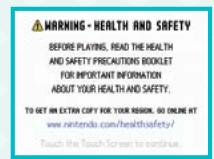
- Confirm that your Nintendo DS is turned off. Insert your Crosswords DS Game Card and turn the power on, and the screen on the right will appear. Once you've read this screen, tap the Touch Screen to proceed.
- To start the game, touch the Crosswords DS panel on the DS Menu Screen.
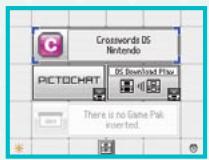
*If you have your Nintendo DS Start Mode set to Auto, the DS Menu Screen will not appear. See your Nintendo DS Instruction Booklet for more details.
TITLE SCREEN
At the title screen, you can choose from two options: Training and Main Game.
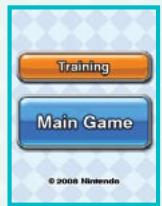
TRAINING
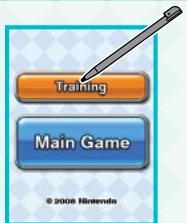
When you tap Training, you will enter the Training mode. In this mode, you can select any of the listed games for a short tutorial. Each tutorial will demonstrate how to use the various buttons and features found in the selected game.
*You can return to the title screen by touching
MAIN GAME
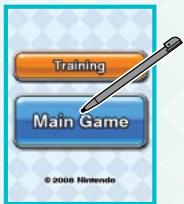
By selecting Main Game, you will be taken to the profile-selection screen and the game-selection screen.
CREATING A PROFILE
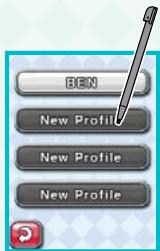
The profile-selection screen will allow you to create four unique profiles or select a previously created profile.
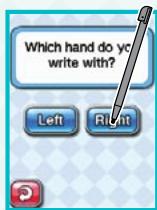
To create a new profile, tap New Profile. When asked which hand you write with, tap either left or right. This will orient the Nintendo DS based on your primary writing hand.
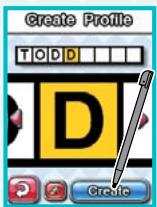
On the Create Profile screen, write your name one letter at a time in the yellow box on the Touch Screen.
If you make a mistake, you can use to erase the incorrect letter. Or you can write the new letter on top of the incorrect letter. To accept the name, touch Create.
*You can change your profile information under Options. See page 24.
SELECTING A GAME
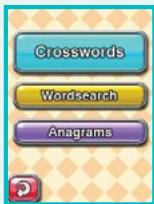
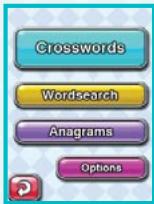
On the game-selection screen, you can select to play Crosswords, Wordsearch, or Anagrams. Tap the game button to begin.
CROSSWORDS
Crosswords DS puzzles are played in the same manner as newspaper puzzles. Instead of using a pen or pencil, use the Nintendo DS stylus to write your answers on the Touch Screen.
Puzzles are separated into four levels of difficulty. Not all difficulties are available when you first start.
PUZZLE SELECTION
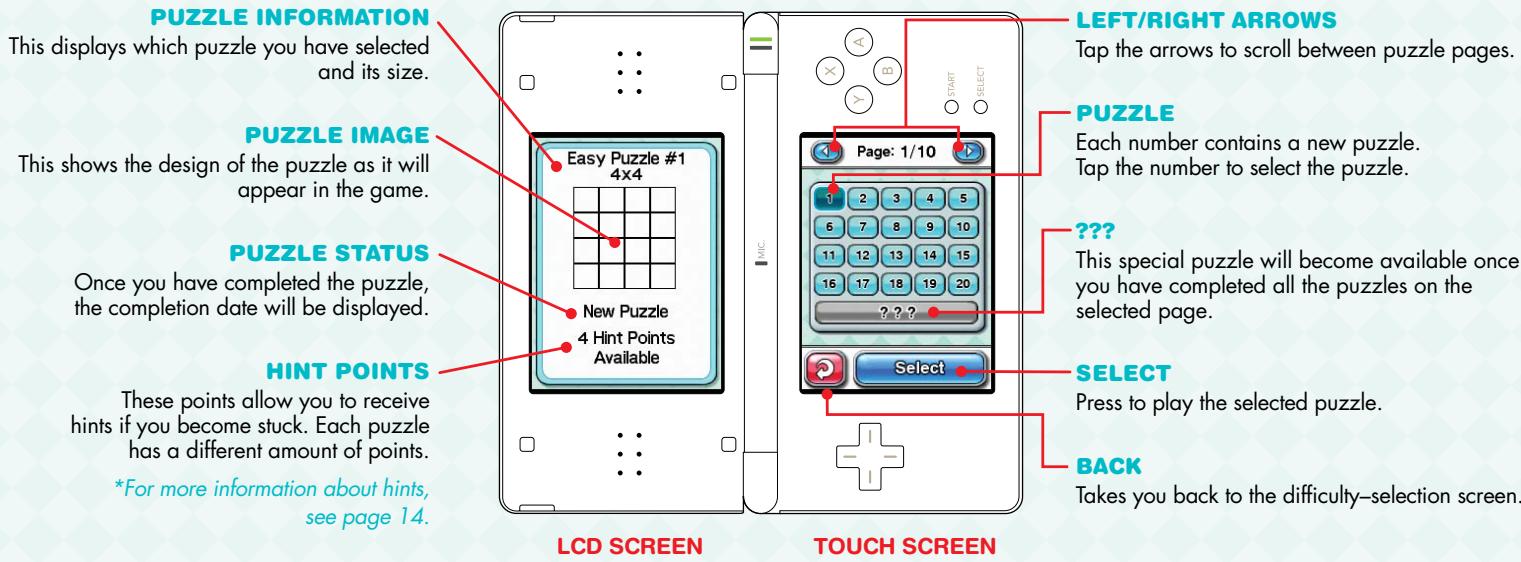
To select the puzzle you wish to play, press one of the 20 numbered tiles and then tap Select.
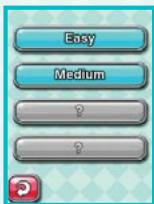
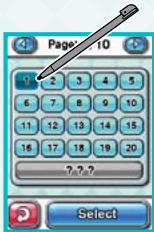
PUZZLE CONTROLS
CROSSWORDS
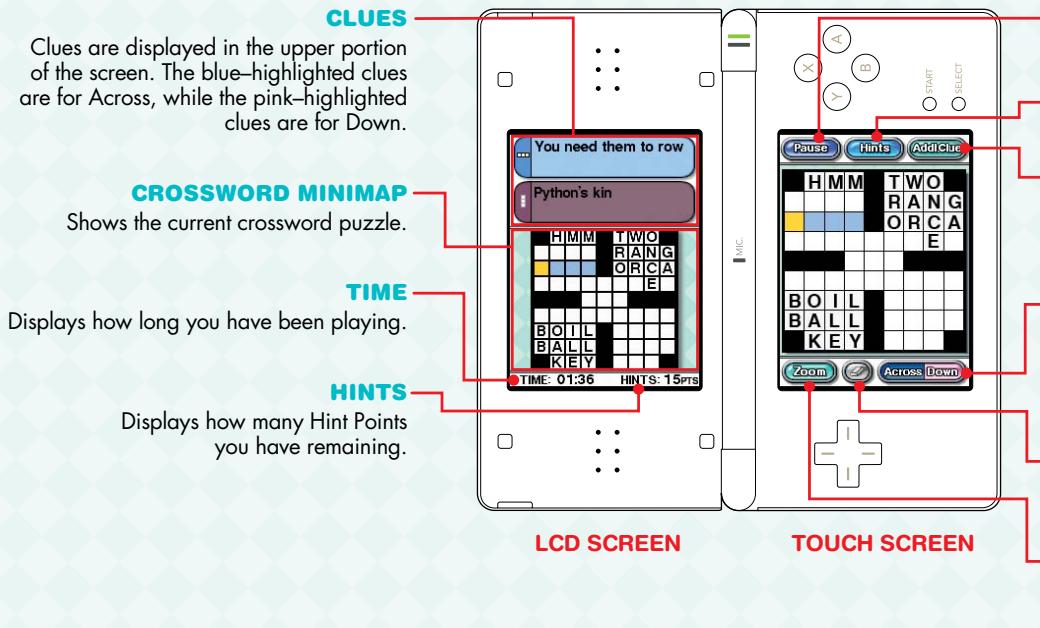
PAUSE
Tap this button to save your progress or give up.
HINTS
See page 14.
ADDL.CLUE
This button will become active from the Hints menu (see page 14). Once active, tap this button to switch between clues.
ACROSS/DOWN
Tap this button to switch between Across and Down squares. Across squares will appear blue, while Down squares appear pink. This button also changes the highlighted clue on the opposite screen.
ERASER
Tap this button to erase the current letter if you've made a mistake.
ZOOM
Tap this button to zoom in and out. You can also zoom by tapping the puzzle square twice.
HINTS
If you become stuck, tap Hints. This will allow you to select from three different types of hints. You can choose to receive an Additional Clue, show a letter in the current selected word, or have the word solved by Show Word.
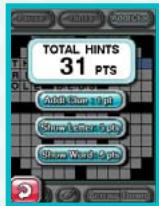
When you use a hint, you will lose Hint Points and receive a time penalty, which will be added to your puzzle-completion time.
LETTER ENTRY
To solve a crossword puzzle, you must fill in each puzzle box with a letter. To enter the letter into the puzzle, use the following steps.
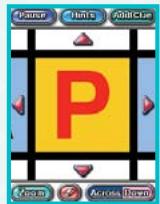
Touch the square in which you want to write your answer. The square will turn yellow when selected.
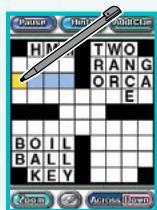
Tap Zoom or touch the highlighted square a second time.
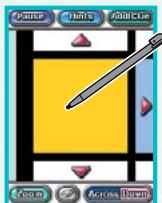
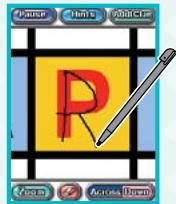
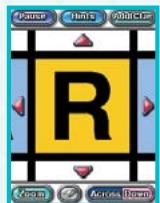
Once zoomed in, use the stylus to write a letter in the yellow square. If correct, the letter will turn black, and the puzzle will automatically move to the next square so you can write the remaining letters.
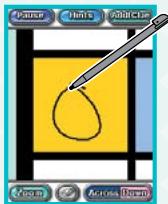
ENTRY ASSIST
Entry Assist will prompt you when you have written an incorrect letter by displaying the letter in red and giving you an audio cue. In addition, the puzzle will not automatically scroll to the next letter, so you can fix the error.
You can fix the incorrect letter by touching to erase the letter. You can also write a new letter on top of the incorrect letter. Once the correct letter has been written, the puzzle will move to the next square.
You will be given the option to turn Entry Assist off in Medium and Hard difficulties.
COMPLETION SCREEN
Once you have solved the crossword puzzle, you will be taken to the completion screen.
PUZZLE COMPLETION
When you complete a puzzle, you will receive a "Completed" stamp. This will also be displayed on the puzzle-selection screen.
PUZZLE GRADE
Factors like using Entry Assist and Hints can lower your grade.
*In Easy, the highest grade is an "A," as Entry Assist cannot be turned off.
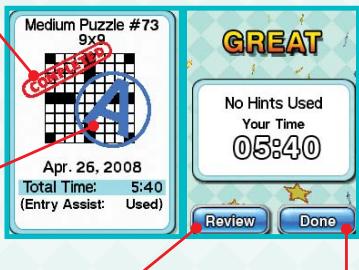
REVIEW
Allows you to review the completed puzzle.
DONE
Takes you to the puzzle-selection screen.
DIPLOMAS
As you progress through Crosswords DS, you will receive diplomas for each section of the game. There are three diploma levels (Novice, Expert, and Master) that are awarded based on puzzle difficulty or if you use assistance.
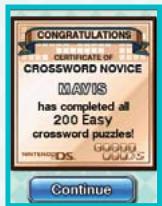
Note: You can only receive an Expert Diploma for Wordsearch.
WORDSEARCH
In Wordsearch, you will be given a list of randomly selected words that you must locate in a screen of letters. Your goal is to find the words in the fastest time possible. The size of the puzzle and amount of words that must be found are based on the puzzle size you select.
Small
Locate up to 14 words.
Large
Locate up to 42 words.
Bonus
Locate up to 28 words.
*Bonus puzzles are not immediately available but can be opened by solving puzzles in the other sections.
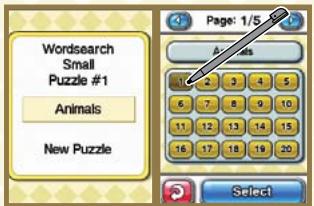
PUZZLE SELECTION
To select the puzzle you wish to play, press one of the 20 numbered tiles and then tap Select. Each puzzle has a unique theme, and the words found in the puzzle will relate to the chosen theme.
PAGE SELECTION
Each difficulty mode has multiple pages of puzzles. Press to scroll through each page of puzzles.
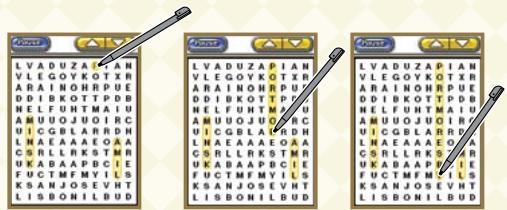
HIGHLIGHTING WORDS
To highlight a word, touch the first or last letter of the word with the stylus and slide over the entire word. Once you have highlighted the word, lift the stylus from the screen. If the word is valid, it will
remain highlighted
and also will be highlighted in the word list on the opposite screen.
UP/DOWN BUTTON
To scroll through longer word lists, tap 1 in the upper-right corner of the puzzle screen in the direction you wish to scroll the word list.
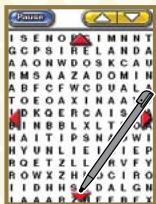
PUZZLE SCROLL BUTTONS
When playing larger puzzles, you will notice red direction arrows on the puzzle screen. By touching these arrows, you can move the puzzle screen in order to locate words in other areas of the puzzle.
ANAGRAMS
In Anagrams, your goal is to create as many unique words as possible using a set of randomly selected letters. The length of the words are chosen by the game type you select.
Short
Create three- and four-letter words to win.
Medium
Create three-, four-, and five-letter words to win.
Long
Create three-, four-, five-, and six-letter words to win.
SPELLING A WORD
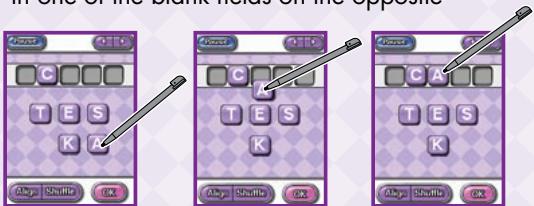
Use the stylus to drag the letter tiles into the letter holders as shown below. Tap OK once you have spelled a word. If it is a valid word, it will appear in one of the blank fields on the opposite
screen.
Arrow Buttons
To scroll through the word list on the opposite page, tap in the upper-right corner of the puzzle screen in the direction you wish to scroll the list.
Align/Shuffle Button
Use Align Shuffle to rearrange the letter tiles in different orders.
Give Up Button
Once you have located over half of the required words,
Give up will appear in the Pause menu. Once this button
is pressed, the remaining newfound words will be filled in.
Since you chose Give Up, you will not get credit for completing the puzzle.
OPTIONS
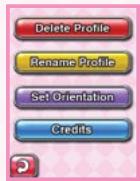
Delete Profile
Allows you to delete your profile. Once deleted, all progress and saved data will be lost.
Rename Profile
Allows you to rename the currently selected profile.
Set Orientation
Allows you to change the screen orientation for left- or right-handed writing.
Credits
Allows you to view the credits.
CREDITS
GAME DEVELOPED BY
Nuevo Retro Games
Producer:
Shigeki Yamashiro
Nintendo Co., Ltd.
Executive Producer:
Satoru Iwata
Nuevo Retro Games
Design and Programming:
Paul Hellier
Additional Text Writing:
Osamu Shibamiya
Inbound Games
Producer:
Masao Yamamoto
Project Manager:
Catherine Volkoff
Nintendo
of America, Inc.
Project Coordinator:
Project Coordinator:
Kiyohiko Ando
Art Lead:
Marcel Kralik
Outsider Development
Todd Buechele
Business Development:
Mike Fukuda
Tom Prata
Nintendo Software
Technology
Corporation
Game Director:
Yukimi Shimura
Design Department:
Ross Hirai
Mia Brooks
David Pauls
Art Director:
Kunitake Aoki
Product Testing
Coordinator:
Audio Adviser:
Lawrence Schwedler
Ed Ridgeway
Production Associate:
Mika Kurosawa
Product Testing
Text Editing:
Teresa Lillygren
All rights, including the copyrights of Game, Scenario, Music and Program, reserved by Nintendo.
NOTES
NOTES
NOTES
WARRANTY & SERVICE INFORMATION
You may need only simple instructions to correct a problem with your product. Try our website at support_nintendo.com or call our Consumer Assistance Hotline at 1-800-255-3700, rather than going to your retailer. Hours of operation are 6 a.m. to 7 p.m., Pacific Time, Monday - Sunday (times subject to change). If the problem cannot be solved with the troubleshooting information available online or over the telephone, you will be offered express factory service through Nintendo. Please do not send any products to Nintendo without contacting us first.
HARDWARE WARRANTY
Nintendo of America Inc. ("Nintendo") warrants to the original purchaser that the hardware product shall be free from defects in material and workmanship for twelve (12) months from the date of purchase. If a defect covered by this warranty occurs during this warranty period, Nintendo will repair or replace the defective hardware product or component, free of charge. The original purchaser is entitled to this warranty only if the date of purchase is registered at point of sale or the consumer can demonstrate, to Nintendo's satisfaction, that the product was purchased within the last 12 months.
GAME & ACCESSORY WARRANTY
Nintendo warrants to the original purchaser that the product (games and accessories) shall be free from defects in material and workmanship for a period of three (3) months from the date of purchase. If a defect covered by this warranty occurs during this three (3) month warranty period, Nintendo will repair or replace the defective product, free of charge."
SERVICE AFTER EXPIRATION OF WARRANTY
Please try our website at support.nintendo.com or call the Consumer Assistance Hotline at 1-800-255-3700 for troubleshooting information and repair or replacement options and pricing.
*In some instances, it may be necessary for you to ship the complete product, FREIGHT PREPAID AND INSURED FOR LOSS OR DAMAGE, to Nintendo. Please do not send any products to Nintendo without contacting us first.
WARRANTY LIMITATIONS
THIS WARRANTY SHALL NOT APPLY IF THIS PRODUCT: (a) IS USED WITH PRODUCTS NOT SOLD OR LICENSED BY NINTENDO (INCLUDING, BUT NOT LIMITED TO, NON-LICENSED GAME ENHANCEMENT AND COPIER DEVICES, ADAPTERS, AND POWER SUPPLIES); (b) IS USED FOR COMMERCIAL PURPOSES (INCLUDING RENTAL); (c) MODIFIED OR TAMPERED WITH; (d) IS DAMAGED BY NEGLIGENCE, ACCIDENT, UNREASONABLE USE, OR BY OTHER CAUSES UNRELATED TO DEFECTIVE MATERIALS OR WORKMANSHIP; OR (e) HAS HAD THE SERIAL NUMBER ALTERED, DEFACED OR REMOVED.
ANY APPLICABLE IMplied WARRANTY, INCLUDING WARRANTY OF MERCHANTABILITY AND FITNESS FOR A PARTICULAR PURPOSE, ARE HEREBY LIMITED IN DURATION TO THE WARRANTY PERIODS DESCRIBED ABOVE (12 MONTHS OR 3 MONTHS, AS APPLICABLE), IN NO EVENT SHALL NINTENDO BE LIABLE FOR CONSEQUENTIAL OR INCIDENTIAL DAMAGES RESULTING FROM THE BREACH OF ANY IMPLIED OR EXPRESS WARRANTY. SOME STATES DO NOT ALLOW LIMITATIONS ON HOW LONG AN IMPLIED WARRANTY LASTS OR EXCLUSION OF CONSEQUENTIAL OR INCIDENTIAL DAMAGES, SO THE ABOVE LIMITATIONS MAY NOT APPLY TO YOU.
This warranty gives you specific legal rights. You may also have other rights which vary from state to state or province to province.
Nintendo's address is: Nintendo of America Inc., P.O. Box 957, Redmond, WA 98073-0957 U.S.A.
This warranty is only valid in the United States and Canada.
AVERTISSEMENT: VEUILLEZ LIRE ATTENTIVEMENT LE MANUEL SPECIFIQUE DE PRECAUTIONS COMPRIS AVEC CE PRODUIT, AVANT D'UTILISER VOITE APPAREIL NINTENDO®, UNE CARTE DE JEU OU UN ACCESSOIRE. IL CONTIENT DES RENSEIGNEMENTS IMPORTANTS CONCERNANT LA SANTÉ ET LA SECURITE.
RENSEIGNEMENTS IMPORTANTS SUR LA SÉCURITÉ - VEUILLEZ LIRE ATTENTIVÉMENT LES AVERTISSEMENTS SUIVANTS AVANT QUE VOUS OU VOTRE ENFANT NE JOUIEZ À DES JEux VIDÉO.

©2008 Nintendo. TM, © and the Nintendo DS logo are trademarks of Nintendo. ©2008 Nintendo. This product employs Decuma® Handwriting Recognition Engine from ZI corporation. Decuma® is a registered trademark of ZI corporation.
TABLE DES MATIÈRES
COMMENCER 34
CRÉER UN PROFIL 36
CHOISIR UN JEU 37
COMMANDES 38
MOTS CROISÉS 40
MOTS CACHÉS 47
ANAGRAMMES 50
OPTIONS 52
GÉNÉRIQUE 53
COMMENCER
Bouton alignment/mélange
Outsider Development
All rights, including the copyrights of Game, Scenario, Music and Program, reserved by Nintendo.
- WARNING - Seizures
- WARNING - Radio Frequency Interference
- WARNING - Repetitive Motion Injuries and Eyestrain
- WARNING - Battery Leakage
- Important Legal Information
- CONTENTS
- GETTING STARTED
- TITLE SCREEN
- TRAINING
- MAIN GAME
- CREATING A PROFILE
- SELECTING A GAME
- CROSSWORDS
- PUZZLE SELECTION
- PUZZLE CONTROLS
- PAUSE
- HINTS
- ADDL.CLUE
- ACROSS/DOWN
- ERASER
- ZOOM
- LETTER ENTRY
- ENTRY ASSIST
- COMPLETION SCREEN
- PUZZLE COMPLETION
- PUZZLE GRADE
- REVIEW
- DONE
- DIPLOMAS
- WORDSEARCH
- Small
- Large
- Bonus
- PAGE SELECTION
- HIGHLIGHTING WORDS
- UP/DOWN BUTTON
- PUZZLE SCROLL BUTTONS
- ANAGRAMS
- Short
- Medium
- Long
- SPELLING A WORD
- Arrow Buttons
- Align/Shuffle Button
- Give Up Button
- OPTIONS
- Delete Profile
- Rename Profile
- Set Orientation
- Credits
- GAME DEVELOPED BY
- Nintendo Co., Ltd.
- Nuevo Retro Games
- Nintendo
- Nintendo Software
- Technology
- Corporation
- NOTES
- WARRANTY & SERVICE INFORMATION
- HARDWARE WARRANTY
- GAME & ACCESSORY WARRANTY
- SERVICE AFTER EXPIRATION OF WARRANTY
- WARRANTY LIMITATIONS
- TABLE DES MATIÈRES
- COMMENCER
- Bouton alignment/mélange
Brand : NINTENDO
Model : DS CROSSWORDS
Category : Video Games