
DS PERSONAL TRAINER WALKING - Video Games NINTENDO - Free user manual and instructions
Find the device manual for free DS PERSONAL TRAINER WALKING NINTENDO in PDF.


| Product type | Video game for Nintendo DS console |
| Platform | Nintendo DS, Nintendo DS Lite, Nintendo DSi |
| Required accessories | Personal Trainer: Walking infrared game card, activity meter (pedometer), Nintendo DS console |
| Main functions | Count steps, measure biorhythm, create a Mii or a dog, walking-based games, worldwide rankings via Wi-Fi |
| Number of players | Up to 4 players (each with their own activity meter) |
| Infrared communication | Between activity meter and game card (distance < 5 cm) |
| Nintendo Wi-Fi Connection | Yes, for online games and worldwide rankings |
| Available languages | English, French, Spanish (depending on console settings) |
| Activity meter power supply | Lithium-ion battery (non-rechargeable) |
| Activity meter storage capacity | Biorhythm: up to 7 days (minimum 4 days). Steps: approximately 30 days |
| Data backup | On the infrared card (up to 4 players) |
| Maintenance | Clean with a dry cloth; avoid moisture and shocks |
| Safety | Follow warnings about epilepsy, repetitive movements, wireless use, and batteries |
| Warranty | 3 months for the game, 12 months for the console |
| Dimensions (game card) | Approximately 33 x 35 x 4 mm |
| Weight (game card) | Approximately 8 g |
| Repairability | Not user-repairable; contact Nintendo for support |
Frequently Asked Questions - DS PERSONAL TRAINER WALKING NINTENDO
User questions about DS PERSONAL TRAINER WALKING NINTENDO
0 question about this device. Answer the ones you know or ask your own.
Ask a new question about this device
Download the instructions for your Video Games in PDF format for free! Find your manual DS PERSONAL TRAINER WALKING - NINTENDO and take your electronic device back in hand. On this page are published all the documents necessary for the use of your device. DS PERSONAL TRAINER WALKING by NINTENDO.
USER MANUAL DS PERSONAL TRAINER WALKING NINTENDO
NEED HELP WITH INSTALLATION, MAINTENANCE OR SERVICE?
NINTENDO CUSTOMER SERVICE SUPPORT.NINTENDO.COM
or call 1-800-255-3700
MON.-SUN., 6:00 a.m. to 7:00 p.m., Pacific Time (Times subject to change)
BESOIN D'AIDE POUR L'INSTALLATION, L'ENTRETIEN OU LA RÉPARATION?
SERVICE À LA CLIENTÉLE DE NINTENDO SUPPORT.NINTENDO.COM
PLEASE CAREFULLY READ THE SEPARATE HEALTH AND SAFETY PRECAUTIONS BOOKLET INCLUDED WITH THIS PRODUCT BEFORE USING YOUR NINTENDO® HARDWARE SYSTEM, GAME CARD OR ACCESSORY. THIS BOOKLET CONTAINS IMPORTANT HEALTH AND SAFETY INFORMATION.
IMPORTANT SAFETY INFORMATION: READ THE FOLLOWING WARNINGS BEFORE YOU OR YOUR CHILD PLAY VIDEO GAMES.
WARNING - Seizures
- Some people (about 1 in 4000) may have seizures or blackouts triggered by light flashes or patterns, and this may occur while they are watching TV or playing video games, even if they have never had a seizure before.
- Anyone who has had a seizure, loss of awareness, or other symptom linked to an epileptic condition should consult a doctor before playing a video game.
Parents should watch their children play video games. Stop playing and consult a doctor if you or your child has any of the following symptoms:
Convulsions Altered vision
Eye or muscle twitching Involuntary movements
Loss of awareness Disorientation
-
To reduce the likelihood of a seizure when playing video games:
-
Sit or stand as far from the screen as possible.
- Play video games on the smallest available television screen.
- Do not play if you are tired or need sleep.
- Play in a well-lit room.
- Take a 10 to 15 minute break every hour.
WARNING - Radio Frequency Interference
The Nintendo DS can emit radio waves that can affect the operation of nearby electronics, including cardiac pacemakers.
- Do not operate the Nintendo DS within 9 inches of a pacemaker while using the wireless feature.
- If you have a pacemaker or other implanted medical device, do not use the wireless feature of the Nintendo DS without first consulting your doctor or the manufacturer of your medical device.
- Observe and follow all regulations and rules regarding use of wireless devices in locations such as hospitals, airports, and on board aircraft. Operation in those locations may interfere with or cause malfunctions of equipment, with resulting injuries to persons or damage to property.
WARNING - Repetitive Motion Injuries and Eyestrain
Playing video games can make your muscles, joints, skin or eyes hurt. Follow these instructions to avoid problems such as tendinitis, carpal tunnel syndrome, skin irritation or eyestrain:
- Avoid excessive play. Parents should monitor their children for appropriate play.
Take a 10 to 15 minute break every hour, even if you don't think you need it. - If your hands, wrists, arms or eyes become tired or sore while playing, or if you feel symptoms such as tingling, numbness, burning or stiffness, stop and rest for several hours before playing again.
- If you continue to have any of the above symptoms or other discomfort during or after play, stop playing and see a doctor.
WARNING - Battery Leakage
The Nintendo DS contains a rechargeable lithium ion battery pack. Leakage of ingredients contained within the battery pack, or the combustion products of the ingredients, can cause personal injury as well as damage to your Nintendo DS.
If battery leakage occurs, avoid contact with skin. If contact occurs, immediately wash thoroughly with soap and water. If liquid leaking from a battery pack comes into contact with your eyes, immediately flush thoroughly with water and see a doctor.
To avoid battery leakage:
- Do not expose battery to excessive physical shock, vibration, or liquids.
- Do not disassemble, attempt to repair or deform the battery.
- Do not dispose of battery pack in a fire.
- Do not touch the terminals of the battery, or cause a short between the terminals with a metal object.
- Do not peel or damage the battery label.
Important Legal Information
This Nintendo game is not designed for use with any unauthorized device. Use of any such device will invalidate your Nintendo product warranty. Copying of any Nintendo game is illegal and is strictly prohibited by domestic and international intellectual property laws. "Back-up" or "archival" copies are not authorized and are not necessary to protect your software. Violators will be prosecuted.
REV-E
Nintendo does not license the sale or use of products without the Official Nintendo Seal.

Recorded tips for many titles are available on Nintendo's Power Line at (425) 885-7529. This may be a long-distance call, so please ask permission from whoever pays the phone bill.
If the information you need is not on the Power Line, you may want to try using your favorite Internet search engine to find tips for the game you are playing. Some helpful words to include in the search, along with the game's title, are: "walk through," "FAQ," "codes," and "tips."
Nintendo

DecimaTM


© 2008 - 2009 Nintendo/Creatures Inc. TM, © and the Nintendo DS logo are trademarks of Nintendo.
© 2009 Nintendo.
This product uses the LC Font by Sharp Corporation, except some characters. LCFONT, LC Font and the LC logo mark are trademarks of Sharp Corporation. This product includes RSA BSAFE Cryptographic software from RSA Security Inc. RSA and BSAFE are registered trademarks of RSA Security Inc. in the United States and/or other countries. © 2005 RSA Security Inc. All rights reserved. Ubiquitous TCP/IP+SSL © 2001-2005 Ubiquitous Corp.
Contents
About Personal Trainer: Walking 6 Records
Things You'll Need 6 Select a Player 24
Getting Started 8 View Records 25
Registering a Player Play with Records 31
Registration Process 10 Edit Player 37
Creating a Mii Character or a Dog 12 Manage Data 38
Let's Get Walking! 20 Handwriting Help 39
Please read before using
PERSONAL TRAINER: WALKING uses an Infrared Game Card to connect to an Activity Meter™ accessory. The Infrared Game Card is a Nintendo DS Game Card with an infrared connection feature, and the Activity Meter accessory measures your life rhythm and step count. You can check the data recorded by the Activity Meter accessory and use it to play various games by sending it to this software using the infrared connection. (Your life rhythm and step count cannot be checked using the Activity Meter accessory by itself.)
One Activity Meter accessory can store only one player's data.
- Up to four Activity Meter accessories can be used with this software (see page 10).
- Be sure to read the Activity Meter Operations Manual before using this Game Card.
Things you'll need
Apart from this software, you'll need a Nintendo DS system* (sold separately) and an Activity Meter accessory.
- "Nintendo DS system" is a general term for the Nintendo DS, Nintendo DS Lite, or Nintendo DSi systems

Personal Trainer: Walking Infrared Game Card
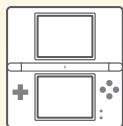
Nintendo DS system (sold separately)


Activity Meter accessory
Note: In order for the Activity Meter accessory to start measuring your step count, you first need to register a player. To do so, please follow the instructions given under Registering a Player (see page 10).
In this manual,

represents the top screen and

represents the Touch Screen.
PERSONAL TRAINER: WALKING uses the Nintendo DS system's clock function. Please ensure that the time setting of your Nintendo DS system is correct. If you are using more than one system, be sure to synchronize each system's time setting before use.
Changing the Nintendo DS system's time setting after registering a player will cause life-rhythm and step-count data to be recorded incorrectly, and could also cause recorded data to be lost when the Activity Meter accessory's battery is changed.
Note: To learn how to change the DS system's date and time settings, please refer to the operations manual for your DS system.
CAUTION - Injury Due to Pre-existing Conditions
Using the Activity Meter accessory may require varying amounts of physical activity. Consult a doctor before using this product if:
you are or may be pregnant,
you have heart, respiratory, back, joint or other orthopedic conditions,
you have high blood pressure,
you have difficulty with physical exercise, or
you have been instructed to restrict physical activity.
While using the Activity Meter accessory, if you experience excessive fatigue, shortness of breath, chest tightness, dizziness, discomfort or pain, STOP USE IMMEDIATELY and consult a doctor.
Getting Started
Make sure the Nintendo DS system is off, then push the PERSONAL TRAINER: WALKING Infrared Game Card into the Nintendo DS Game Card slot until you hear it click.
1 Turn on the power, and the Health and Safety Screen will appear. After reading the text, touch the Touch Screen with the stylus to proceed to the DS Menu Screen.
2 Touch the PERSONAL TRAINER: WALKING panel on the DS Menu Screen to begin. The title screen will then appear.
- If you have your DS system set to Auto Mode, you do not need to do this. For more information, please refer to the operations manual for your DS system.
WARNING - HEALTH AND SAFETY
BEFORE PLAYING, READ THE HEALTH
AND SAFETY PRECAUTIONS BOOKLET
FOR IMPORTANT INFORMATION
ABOUT YOUR HEALTH AND SAFETY.
TO GET AN EXTRA COPY FOR YOUR REGION, GO ONLINE AT
www.nintendocom/healthsafety/
Touch the Touch Screen to continue.
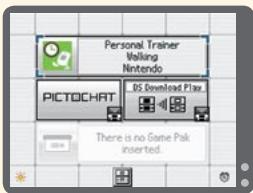
The in-game language depends on the one that is set on the system. In this game, you can choose between three different languages: English, French, and Spanish. If your Nintendo DS system is already set to one of these, that same language will be displayed in the game. If your Nintendo DS system is set to another language, the in-game default language will be English. You can change the in-game language by changing the language setting of your system. For further instructions about how to change language settings, please refer to the operations manual for your Nintendo DS system.
The title screen
The first time you start this software, only REGISTER A PLAYER will be displayed on the Touch Screen. Touch it to start registering a player.
If you have already registered a player, the following options will be displayed:
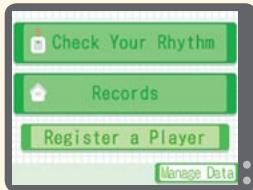
| CHECK YOUR RHYTHM (see page 22) | Check your life rhythm by connecting the Activity Meter accessory to the Infrared Game Card. |
| RECORDS (see page 24) | View players' records and play games using the recorded data. |
| REGISTER A PLAYER (see page 10) | Register a new player. |
| MANAGE DATA (see page 38) | Erase or transfer player data. |
About recorded data
Your life-rhythm data will be saved when you connect the Activity Meter accessory to the Infrared Game Card.
Data is also automatically saved when you change certain settings and at certain special times. Up to four players' data can be stored on one Infrared Game Card.
Note: You can erase all data and reset the software to factory settings by holding down the A Button, B Button, X Button, Y Button, L Button, and R Button simultaneously immediately after step 2 of Getting Started (see page 8). Please be careful when erasing data, as erased data cannot be recovered.
Registering a Player / Registration Process
One Activity Meter accessory can store one player's measured data, and up to four players can be registered on one Infrared Game Card. Why not try registering your family?
Note: A separate Activity Meter accessory is required for each registered player.
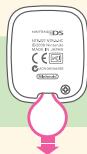
Before using the Activity Meter accessory for the first time Please remove the plastic tab from the Activity Meter accessory and dispose of it immediately to avoid it being swallowed by children or pets.
1 Touch REGISTER A PLAYER on the title screen. Touch NEXT, then push the Communication Button to connect the Activity Meter accessory to the Infrared Game Card as shown on the top screen.
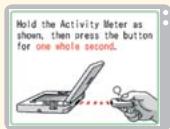
- Ensure that the Activity Meter accessory and the PERSONAL TRAINER: WALKING Infrared Game Card's sensors are facing each other at a distance of no greater than 2 inches, and that they are kept still.
- In order to use the Activity Meter accessory, necessary data will be sent from the Infrared Game Card to the Activity Meter accessory.
- When data is being sent, the Activity Meter accessory's light will flash red.
- If there is a problem with the infrared connection, please consult the Infrared Connection and Troubleshooting sections of the Activity Meter Operations Manual.
2 After an introduction to the Activity Meter accessory, the date and time settings of your Nintendo DS system will be displayed. You'll be asked if the settings are correct. If they are, touch YES to use them and the Activity Meter accessory's date and time will be set accordingly. If the date and time settings are incorrect, touch NO, restart the DS system, and set the correct date and time.
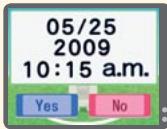
- To learn how to change the system's date and time settings, refer to the operations manual for your Nintendo DS system.
If the system's date and time settings are changed after registering a player, there is a possibility that life-rhythm and step-count data will not be saved correctly.
3 Create your player by first selecting the player type - person or dog (see pages 12 - 19).
4 When you've finished creating your player, connect the Activity Meter accessory to the Infrared Game Card. You are now ready to record your life rhythm!
When registering on another Infrared Game Card
- Touch REGISTER A PLAYER and create your player again.
- Even if you register on another Infrared Game Card, your player data will not be erased from the original Infrared Game Card.
- If the date and time of the original Nintendo DS system is different from that of the new system, there is a possibility that your records won't be stored correctly. Please synchronize the two systems before registering a player.
Registering a Player / Creating a Mii Character or a Dog
Human players can create a Mii™ character using this software or import a Mii character from a Wii™ console. Use this software to create dog characters for your dog.
The player creation process
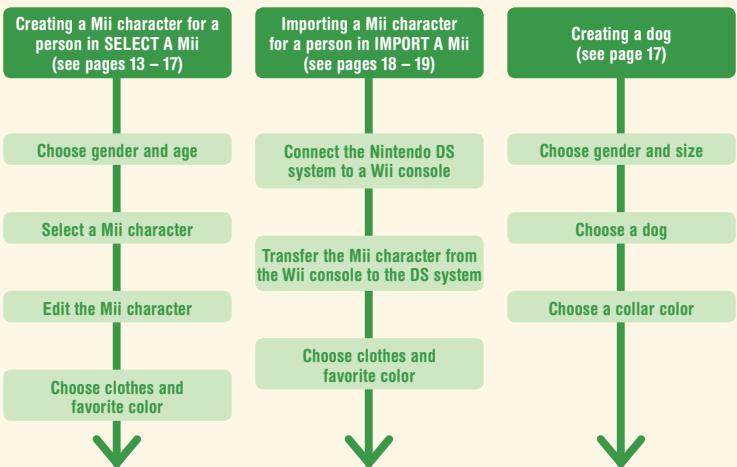
Enter a name, family name (if you are the first player to register), and birthday to complete registration
What is a Mii character?
A Mii is a character that represents you, which you can create according to your own tastes by choosing facial features, your favorite color, and so on. You can also use Mii characters imported from a Wii console in this software (see pages 18 - 19).
Creating a Mii character for a human player with SELECT A Mii
Use this software to create a Mii for your player.

Choose gender and age, then select a Mii
Please select your player's gender and age (adult or child). A selection of Mii characters will then appear on the Touch Screen. Touch the Mii character you would like to use for your player, then touch OK. This Mii character can be edited freely (see page 14).
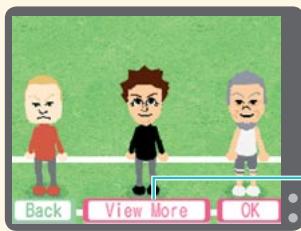
VIEW MORE
Touch to see a different selection of Mii characters.
You can edit the face of the Mii character you have selected. When asked if you would like to edit this Mii character, touch YES. The screen shown below will be displayed. You can then edit the Mii character – refer to the next page for further details.
If you touch NO, the software will skip this step and proceed to choosing clothes and a favorite color for your Mii character (see page 16).
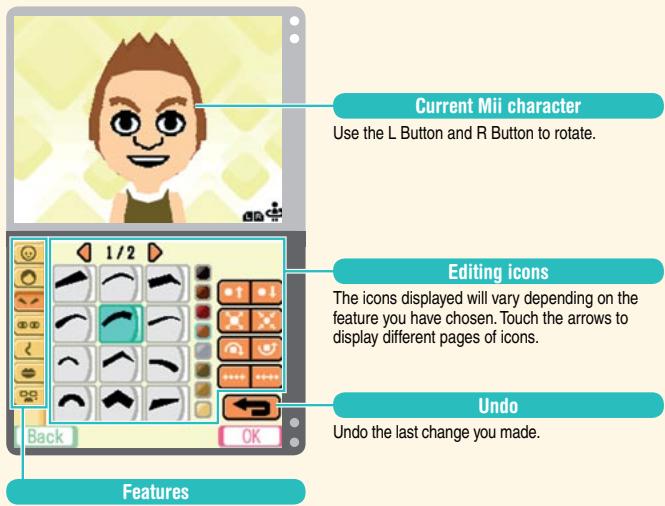
Current Mii character
Use the L Button and R Button to rotate.
Editing icons
The icons displayed will vary depending on the feature you have chosen. Touch the arrows to display different pages of icons.
Undo
Undo the last change you made.
1 Touch the feature you want to edit.
Features:
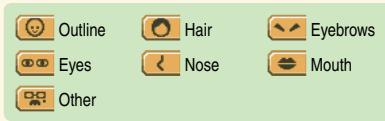
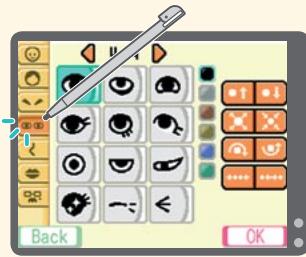
2 Touch a feature to select it, then touch the editing icons to change the color, location, and so on.
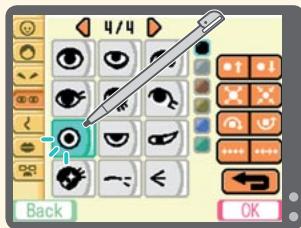
3 Repeat steps 1 and 2 until you have finished creating your Mii character, then touch OK.
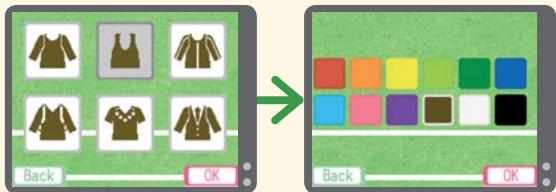
Select the outfit that you'd like, then select your favorite color.

Enter your name
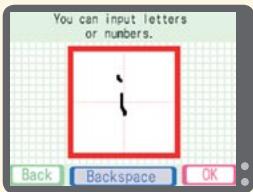
Enter your first name by writing it on the Touch Screen.

Enter your family name
Enter your family name by writing it on the Touch Screen as you did with your name. This family name will be used for all registered players.
Note: This step only appears the first time you register a player. For subsequent players, this step will be skipped.
Use and to enter your birthday, then select OK to continue. All the data you've entered will be displayed on the top screen. Once you have confirmed that this data is correct, touch YES to complete player registration.
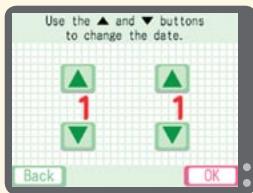
Your name, birthday, and other details can be changed at any point by going to EDIT PLAYER (see page 37).

Creating a dog character
To create a character for your dog, please follow the steps below.
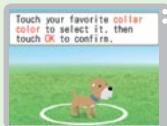
-
Select the gender and size of your dog.
-
Select a dog from the ones displayed on the Touch Screen.
-
Select a collar color.
-
Enter your dog's name, your family name (if this is the first player you've registered), and your dog's birthday. Confirm this data to finish creating a dog character for your dog.
Creating a Mii character for a person with IMPORT A Mii
Instructions in black are for the Nintendo DS system, and instructions in green are for the Wii console.
1 Touch IMPORT A Mii, then touch CONNECT.
2 Turn on the Wii console. From the Wii Menu, select the Wii Channel and then START. When the Wii Channel is displayed, point the Wii Remote controller away from the screen and press the A Button, B Button, 1 Button, and 2 Button on the Wii Remote in that order, holding down the 2 Button (press only one button at a time). You will be asked if you'd like to start DS Wireless Communications. Select YES to start the connection between the Nintendo DS system and the Wii console.
3 When the screen shown on the right is displayed, grab the Mii character you'd like to import using the A Button and B Button, then drop it into the frame at the top of the screen. The import of your Mii character will begin.
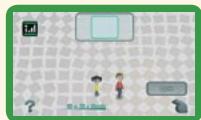
4 Once the Mii character has been imported, touch OK to end the connection. The Mii character's nickname will be used as your player's name. Select your clothes and favorite color, then enter your family name (if this is the first player you've registered) and birthday to finish creating your player. The CONNECT TO DS button will also be added to the Mii Channel.
Note: If you are registering the first player and importing a Mii character, you will be allowed to enter a family name and new name for the Mii character. You will not be able to change the Mii character's name later.
When you have performed this process once, you can select the CONNECT TO DS button to start importing a Mii character anytime you wish to repeat this process in the future.
- For details on how to create a Mii character, refer to the Wii Operations Manual - Channels & Settings.
- Mii characters imported from Wii consoles will not be deleted from the Mii Channel.
- Mii characters created in this software cannot be exported to Wii consoles.
- The nickname and features of Mii characters imported from Wii consoles cannot be edited in this software once they have been imported. The clothes, favorite color, and birthday for the Mii character can be edited by going to EDIT PLAYER (see page 37).
Guidelines for communications
For best results when using the wireless communications feature, follow these guidelines.
The icon is an indicator of wireless communications. It appears on the DS Menu Screen or game screen of the Nintendo DS system.
The DS Wireless icon indicates that the associated choice will activate the wireless communications function.
The icon, which is displayed on the Nintendo DS system during wireless communications, is an indicator of the current wireless signal strength. There are four levels of signal strength, each level represented by a bar. A stronger signal reception will provide smoother wireless communications play.
Note: When wireless communications are in progress, the Power Indicator LED of the Nintendo DS system will blink rapidly.
For best results, follow these guidelines:
- Begin with the distance between the Nintendo DS system and the Wii console at about 33 feet or less and move closer or farther apart as desired, keeping the signal strength at two or more bars for best results.
- Avoid having people or other obstructions between the Nintendo DS system and the Wii console.
- Avoid interference from other devices. If communications seem to be affected by other devices (wireless LAN, microwave ovens, cordless devices, computers), move the Wii console to another location or turn off the interfering device.
Let's Get Walking!
Once you have registered your player, it's time to start walking - carrying the Activity Meter accessory with you, of course! By recording your steps with the Activity Meter accessory, it's easy to check your life rhythm.
Your daily step target
At first, your target number of steps for one day will be set to 3,000. You can change your step target freely, so try to find a step target that is suitable for you. You can set your daily step target with CHANGE STEP TARGET (see page 37).
Checking if you've reached your step target
You can check if you have reached your daily step target by shaking the Activity Meter accessory and looking at its light. (The actual number of steps taken can only be checked using this software).
Step target not reached

The light flashes
red
once.

Step target reached

The light flashes
green
twice.

The amount of data that can be saved on the Activity Meter accessory
Please refer to this chart for the amount of data that the Activity Meter accessory can store. When the amount of data that can be saved is exceeded, old data will be overwritten, starting with the oldest.
Steps walked in minute increments)
Step count → Approx. 30 days (steps walked in hourly or daily increments)
- If you erase a registered player (see page 38) or reset the software to factory settings, the data stored on the Activity Meter accessory cannot be reflected in the software. Please be careful when using these options.
- For more details, see the Calculating Your Steps Walked and Life Rhythm section of the Activity Meter Operations Manual.
When the Activity Meter accessory's battery runs low
When the Activity Meter accessory's battery starts to run low, the screen on the right will automatically be displayed. Be sure to replace the battery as soon as possible. For more details, see the Checking Battery Power and Replacing the Battery section of the Activity Meter Operations Manual.

The Activity Meter's battery is running low. It is recommended that you replace the battery as soon as possible.
To ensure quality measurement, only periods of walking of 10 seconds or more count toward your step total.
Checking Your Life Rhythm
Using CHECK YOUR RHYTHM, you can see at what times you walked and how many steps you took. Use the procedure below to check your step count and look back at your life rhythm.
1 On the title screen, touch CHECK YOUR RHYTHM and follow the instructions on the top screen to connect the Activity Meter accessory to the Infrared Game Card.
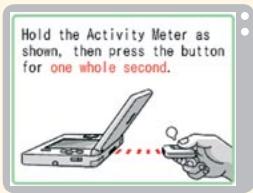
- Ensure that the Activity Meter accessory and the PERSONAL TRAINER: WALKING Infrared Game Card's sensors are facing each other at a distance of no greater than 2 inches, and that they are kept still.
- Measured data will be sent from the Activity Meter accessory to the Infrared Game Card.
- When data is being sent, the Activity Meter accessory's light will flash red.
- If there is a problem with the infrared connection, please consult the Infrared Connection and Troubleshooting sections of the Activity Meter Operations Manual.
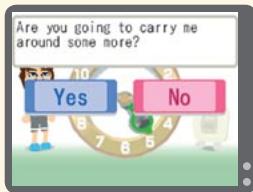
2 Once the data has been sent to the Infrared Game Card, you will be able to check the periods in which you walked and the number of steps you took. Next, the Activity Meter accessory will ask you if you're going to carry it around some more - please touch YES or NO as appropriate. Touch YES if you intend to walk some more that day. You will be returned to the title screen.
Touching NO will advance you to Step 3.
Note: If you have unchecked records from the previous day, those records will be checked before the current day's step count and walking periods.
3 You will also be asked if you achieved your mini target. (Mini targets are simple, casual goals for the day, meant to improve your quality of life.) Please touch YES or NO as appropriate. You'll then be able to see at which times of day you were most active and view detailed results for both the day being checked as well as recent days.
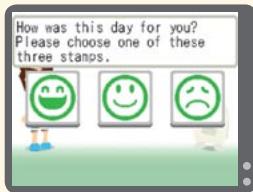
4 After viewing your daily results, you'll then be asked to evaluate the day by choosing one of three stamps. Finally, you'll receive your mini target for the next day.
Note: If you reached your daily step target (see page 20), your stamp will be green. If the daily step target was not reached, your stamp will be red.
Records / Select a Player
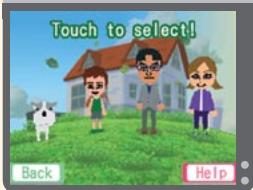
View the records of the players registered on your Infrared Game Card and use their data to play games. Why not check out other people's records while you check your own life rhythm?
Records screen
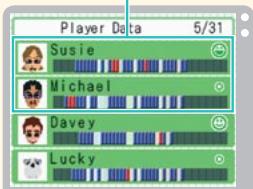
Touch a player's Mii character or dog to view their records. The menu below will be displayed. Touch the various options to proceed to that screen.
Note: If your Privacy Setting (see page 37) is set to KEEP PRIVATE, then you will need to connect the corresponding Activity Meter accessory to the Infrared Game Card when you select your Mii character or dog.
VIEW RECORDS → Page 25
PLAY WITH RECORDS → Page 31
EDIT PLAYER → Page 37
Today's life rhythm and rating
Records / View Records
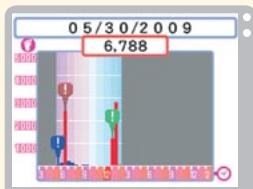
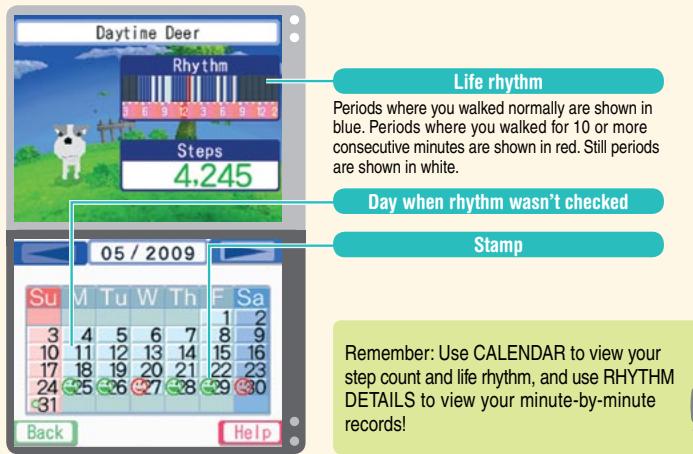
Use RHYTHM DETAILS to look back at your recent records minute by minute, and use CALENDAR to look back at all your records so far. You can also see how your life rhythm changes over time.
Rhythm details
Look back at your recorded step count and the amount of time you walked, minute by minute. Touch the day you'd like to see records for. Use A and to scroll through the list.
Note: You can also select records by pressing up and down on the
- Control Pad.
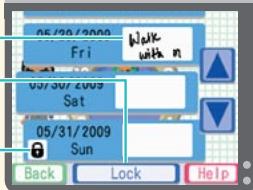
Note for the day (see page 27)
LOCK (see page 26)
Use this to prevent records from being erased.
Lock icon
Displayed on locked records.
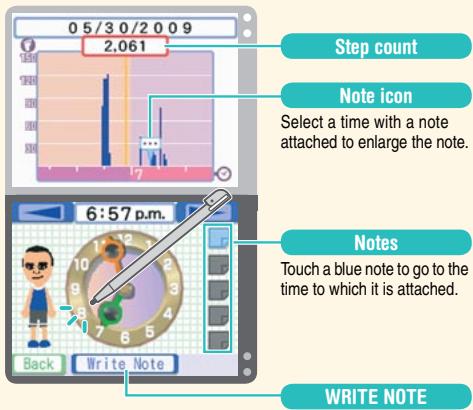
The number of steps you took every minute is recorded in RHYTHM DETAILS. You can move the hands of the clock backward and forward to find the time you'd like to check by dragging them with the stylus or by touching → and → .
Note: The hands of the clock can also be moved backward and forward using the L Button and the R Button respectively.
About saving and locking records
After 28 days, old records are erased from RHYTHM DETAILS. (They will still be available to view in CALENDAR.) If there is a certain day's records that you want to protect, select that day's records and then touch LOCK to prevent them from being erased. You can lock up to 20 records in this way.
Note: You can remove the lock from locked records by touching UNLOCK. This will allow that day's records to be erased.
Writing notes
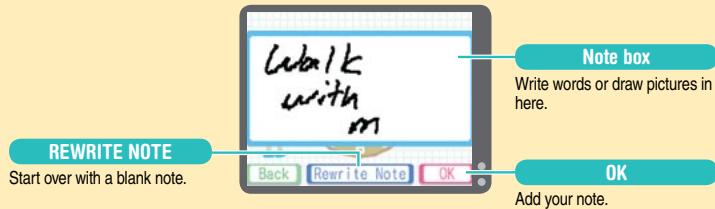
Any words or pictures you draw or write on a note will appear exactly as you entered them. Touch WRITE NOTE to make a blank note appear on the Touch Screen. Feel free to draw or write anything you like. You can add up to five notes to any one day's records.
Note: A new note cannot be added to a point in your records that is within five minutes of another note.
Removing a note
If you select a time that already has a note attached in your minute-by-minute records, DELETE NOTE will appear instead of WRITE NOTE. Touch DELETE NOTE to remove the note.
Be sure to lock any records that you do not want erased! Don't forget, adding notes to a day's records will make it easier to remember your activities that day.

Calendar
This displays the calendar. Touch a day to see your life rhythm and step count for that day. Use → and → to change the month displayed.
- You can also use the + Control Pad to select a day and the L Button and R Button to change the month displayed.
- Records are stored on your calendar for up to five years.
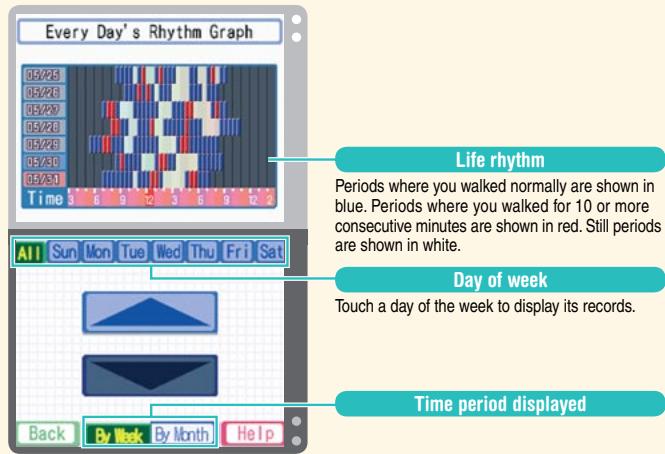
Rhythm graphs
View your life rhythm to date on various graphs. Use and or press up or down on the lubsuit Control Pad to scroll through the dates displayed on the graph. Graphs can be displayed by week or by month.
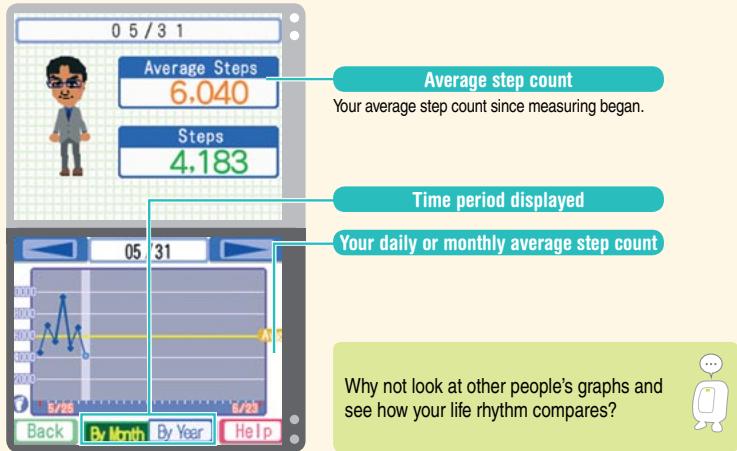
Step graph
View your step count to date on a graph. You can select the day you wish to view by touching the graph, touching and or by using the L Button and R Button. The graph can be displayed by month or by year.
Note: Displaying the graph by month shows your daily step count, while displaying the graph by year shows your average step count for each month.
Records / Play with Records
Use your records to make your own illustrated world map or combine your steps with other players to illuminate your house! You can also view rankings and play using Nintendo Wi-Fi Connection (see page 34).
Walk the world
Draw pictures on the face of the Earth using the total number of steps you have walked so far. Touch START and your character will automatically start drawing the picture.
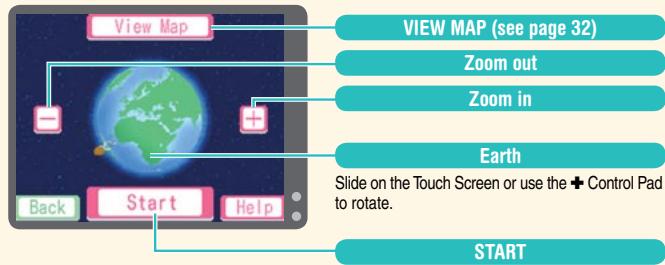
Touch VIEW MAP to display a map of the world. Pictures you have completed will be displayed as icons on the map. Slide on the Touch Screen or use the lubsuit Control Pad to scroll the world map. Touch an icon to display the completed picture again.
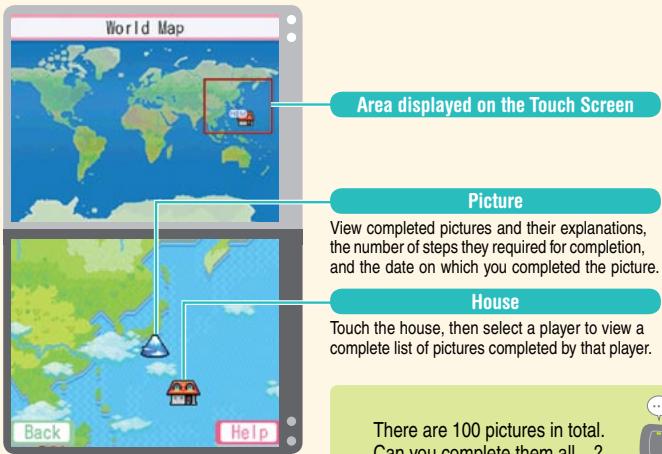
rea displayed on the Touch Screen
Picture
View completed pictures and their explanations, the number of steps they required for completion, and the date on which you completed the picture.
House
Touch the house, then select a player to view a complete list of pictures completed by that player.
There are 100 pictures in total. Can you complete them all...?

Illuminate
Brighten up your house with every player's life rhythm for the current day.
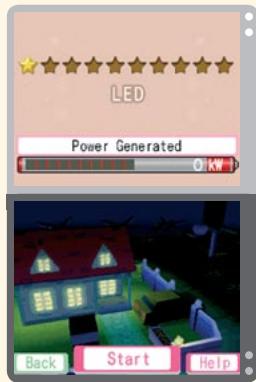
Touch START to begin lighting up your house.

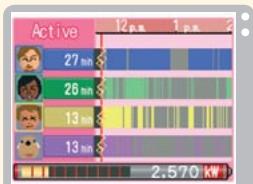
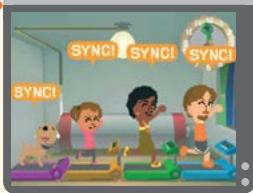
The players will generate a certain amount of electricity based on their records, and brighten up your house.
Your house will gradually become darker, so the trick is to carry on walking to keep it bright! If players walk at the same times as each other, the house will get an extra brightness boost. ILLUMINATE uses the current day's data, so be sure to use CHECK YOUR RHYTHM (see page 22) before starting.

Rankings
View rankings for registered players based on various recorded data. Touch RANKINGS LIST to select the ranking you'd like to view.
Nintendo Wi-Fi Connection
View worldwide rankings and play games using your records with Nintendo® Wi-Fi Connection. Select from UPDATE DATA, SPACE WALK, WORLD RANKING, or SETTINGS.
Note: The first time you select NINTENDO Wi-Fi CONNECTION, only UPDATE DATA and SETTINGS will be available. After you have selected UPDATE DATA for the first time, SPACE WALK and WORLD RANKING will become available.
Router and broadband access required for online play. For more info, go to Nintendo.com.

Receiving updated data
Update the records used in SPACE WALK and WORLD RANKING with the latest records by receiving data from players all over the world.
- Please wait at least five minutes between connections if you want to receive the latest data two or more times in a row.
- If the date and time setting of your Nintendo DS system is incorrect, you may be unable to receive updated data.
Data sent over Nintendo Wi-Fi Connection
Your player data is automatically sent when you select UPDATE DATA.
Data that is sent:
- Your Mii character (or dog)
- Your highest step count for one day and total steps for the week
- Your total steps since measuring started

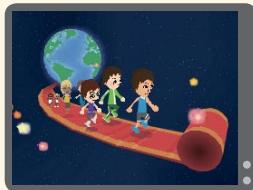
Space Walk
Combine your total steps with players from all over the world and find out which planets you can reach.
Note: Total steps are updated every five minutes.

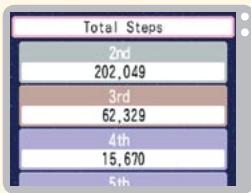
World Ranking
See the rankings of players from all over the world based on their step counts. Find out where you stand in the global rankings!
Note: Rankings are updated at midnight every Sunday (GMT).

Settings
Set the connection environment for Nintendo Wi-Fi Connection.
Note: For more information about Nintendo Wi-Fi Connection, refer to the Nintendo Wi-Fi Connection (Nintendo WFC) Instruction Manual. If you experience problems with Nintendo WFC, please refer to the Troubleshooting section of the Nintendo Wi-Fi Connection Instruction Manual.
About Nintendo Wi-Fi Connection
Nintendo Wi-Fi Connection allows multiple PERSONAL TRAINER: WALKING owners to play together over the Internet - even when separated by long distances.
To play Nintendo DS games over the internet, you must first set up the Nintendo Wi-Fi Connection (Nintendo WFC) on your Nintendo DS system. Please see the Nintendo Wi-Fi Connection Instruction Manual, available at www.nintendocom/consumer/manuals, if you need directions on setting up your Nintendo Wi-Fi Connection.
- To complete the Nintendo WFC setup, you will also need access to a PC that has a wireless network device installed (such as a wireless router) and an active broadband or DSL internet account.
- Nintendo Wi-Fi Connection game play uses more battery power than other game play. You may prefer to use the AC Adapter to prevent running out of power when using the Nintendo Wi-Fi Connection.
- You can also play Nintendo WFC compatible games at selected Internet hotspots without additional setup.
- See the Terms of Use Agreement (page 40) which governs Nintendo Wi-Fi Connection game play and is also available online at www.nintendo.com/games/wifi/ds.
- The nickname you use will be seen by others when playing multiplayer games using Nintendo WFC.
- To protect your privacy, do not share personal information about yourself such as your last name, phone number, birth date, age, school, e-mail or home address when communicating with others. Additionally, do not use personal information in your nickname since it will be seen by others when playing multiplayer games using Nintendo WFC. See the Nintendo Wi-Fi Connection Instruction Manual for more privacy information.
For additional information on the Nintendo WFC, setting up your Nintendo DS, or a list of available internet hotspots, visit www.nintendocom/games/wifi (USA, Canada and Latin America) or call 1-800-895-1672 (USA/Canada only).
Records / Edit Player
Change various aspects of your player, such as appearance, name, and favorite color. You can also set your daily step target and change your privacy settings.
Edit Player menu
Use this menu to customize your player. Your current player's profile and daily step target will be displayed on the top screen.
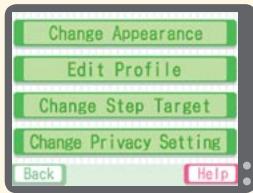
| CHANGE APPEARANCE | Change your Mii character or dog's appearance, clothes, and favorite color. |
| EDIT PROFILE | Change family name, name, and birthday. If you change your family name, this change will be reflected for all players using this Infrared Game Card. |
| CHANGE STEP TARGET | Change your step target from the next day onward. Touch AVERAGE STEPS and your daily step target will be set to your average step count for the past 30 days. |
| CHANGE PRIVACY SETTING | Set your records so that they cannot be seen by others in VIEW RECORDS. You can also reverse this setting. |
Manage Data
Erase player data or transfer player data to another Activity Meter accessory. Select ERASE PLAYER DATA or TRANSFER PLAYER DATA as appropriate.
Erase Player Data
You can erase a registered player. Touch the player that you'd like to erase and follow the instructions on-screen. Data that has been erased cannot be recovered, so please be careful.
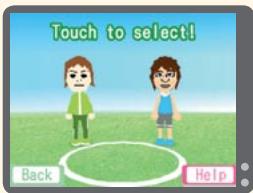
Transfer Player Data
You can transfer your player's data to another Activity Meter accessory. Touch the player whose data you'd like to transfer and follow the instructions on-screen.
Use this feature if you happen to lose or break your Activity Meter accessory.
Handwriting Help
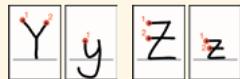
Please take a look through this section, where you can find pictures showing the best way to write letters so that they can be recognized by the software.
The circles and numbers will show where strokes are supposed to begin and in what order they should be written.
Letters




TERMS OF USE AGREEMENT
The Nintendo DS System ("DS") comes equipped with the ability for wireless game play through the use of the Nintendo Wi-Fi Connection service and access to the Internet through the use of the Nintendo DS Browser, which must be purchased separately, (collectively the "Service"). Such Service is provided by Nintendo of America Inc., together with its subsidiaries, affiliates, agents, licensors and licensees (collectively, "Nintendo," and sometimes referenced herein by "we" or "our"). Nintendo provides the Service to you subject to the terms of use set forth in this agreement ("Agreement"). PLEASE READ THIS AGREEMENT CAREFULLY BEFORE USING THE SERVICE AND/OR DS. BY USING THE SERVICE AND/OR DS, YOU ARE AGREEING TO BE BOUND BY THIS AGREEMENT.
The terms of use contained in this Agreement shall apply to you until you no longer use or access the Service, or until your use of the Service is terminated. If at any time you no longer agree to abide by these or any future terms of use, your only recourse is to immediately cease use of the Service. We reserve the right, at our sole discretion, to change, modify, odd, or delete portions of this Agreement and to discontinue or modify the Service at any time without further notice. Your continued use of the Service after any such changes, constitutes your acceptance of the new terms of use. It is your responsibility to regularly review this Agreement. You can review the most current version of this Agreement at any time by visiting www. NintendoWiFi.com/terms.
USER CONDUCT
It is important that you do your part to keep the Service a friendly and clean environment. In particular, you may not use the Service to:
- Upload, transmit, or otherwise make available any content that is unlawful, harmful, harassing, or otherwise objectionable;
- harm minors in any way;
- misrepresent your identity or impersonate any person, including the use or attempt to use another's user ID, service or system;
- manipulate identifiers in order to disguise the origin of any content transmitted through the Service;
- upload, post, email, transmit or otherwise make available: (a) any content that you do not have a legal right to make available; (b) any content that infringes any patent, trademark, trade secret, copyright or other proprietary rights of any party; (c) any unsolicited or unauthorized advertising or promotional materials (e.g. "spam"); or (d) any material that contains software viruses or similar code or programs designed to interrupt, destroy or limit the functionality of any computer software or hardware or telecommunications equipment.
- use any portion of the Service for any unlawful purpose;
- engage in any activity that disrupts, diminishes the quality of, interferes with the performance of, or impairs the functionality of, the Services or networks connected to the Service; or
- undertake any other act that we determine to be harmful or disruptive to Nintendo, the Service, any user, or any other third party, as set forth in a revised version of this Agreement.
Further, you agree not to post, reveal or otherwise make available any personal information, such as your real name, birth date, age, location, e-mail address or any other personally identifiable information ("Personal Information"), on or through the Service, as any Personal Information provided by you may be visible to others.
TERMS OF USE AGREEMENT (cont.)
SUBMISSIONS
All User Content posted on, transmitted through, or linked from the Service, whether or not solicited by Nintendo (collectively, "Submissions"), is the sole responsibility of the person from whom such Submissions originated. Nintendo is not obligated: (a) to maintain any Submissions in confidence; (b) to store or maintain the Submissions, electronically or otherwise, (c) to pay any compensation for any Submissions or any use thereof; or (d) to respond to any user in connection with or to use any Submissions. Nintendo shall not be liable for any use or disclosure of any Submissions.
DISCLAIMER OF WARRANTY; LIMITATION OF LIABILITY; INDEMNIFICATION
THE SERVICE AND THE NINTENDO CONTENT, USER CONTENT, DATA OR SOFTWARE AVAILABLE THROUGH IT (COLLECTIVELY, THE "CONTENT") ARE PROVED ON AN "AS IS" AND "AS AVAILABLE" BASIS. USE OF THE SERVICE, INCLUDING ALL CONTENT, DISTRIBUTED BY, DROUNLOADED OR ACCESSED FROM OR THROUGH IT, IS AT YOUR SOLE RISK AND NINTENDO ASSUMES NO RESPONSIBILITY FOR THE CONTENT OR YOUR USE OR INABILITY TO USE ANY OF THE FOREIGNING. WE DO NOT GUARANTEE THE CONTENT ACCESSIBLE OR TRANSMITTED THROUGH, OR AVAILABLE FOR DOWNLOAD FROM THE SERVICE WILL REMAIN CONFIDENTIAL OR IS OR WILL REMAIN FREE OF INFECTION BY VIRUSES, WORMS, TROJAN HORSES OR OTHER CODE THAT MANIFESTS CONTAMINATING OR DESTRUCTIVE PROPERTIES. TO THE FULlest EXTENT PERMISSIBLE PURSUANT TO APPLICABLE LAW, NINTENDO DISCLAIMS ALL WARRANTY OF ANY KIND, WHETHER EXPRESS OR IMplied, WITH RESPECT TO THE SERVICE AND ALL CONTENT AVAILABLE THROUGH THE SERVICE, INCLUDING WITHOUT LIMITATION ANY WARRANTY OF MERCHANTABILITY, FITNESS FOR A PARTICULAR PURPOSE OR NON-INFRINGEMENT. NINTENDO ASSUMES NO RESPONSIBILITY FOR ANY DAMAGE SUFFERED BY A USER, INCLUDING, BUT NOT LIMITED TO, LOSS OF DATA FROM DELAYS, NONDELIVERIES OF CONTENT, ERRORS, SYSTEM DOWN TIME, MIDDELIVERIES OF CONTENT, NETWORK OR SYSTEM OUTAGES, FILE CORRUCTION, OR SERVICE INTERRUIATIONS CAUSED BY THE NEGLIGENCE OF NINTENDO OR A USER'S OWN ERRORS AND/OR OMISSIONS EXCEPT AS SPECIFICALLY PROVIDED HEREIN. YOU UNDERSTAND AND AGREE THAT YOU WILL BE SOLELY RESPONSIBLE FOR ANY DAMAGE TO YOUR DS OR LOSS OF DATA THAT RESULTS FROM THE DOWNLOAD OF ANY CONTENT.
UNDER NO CIRCUMSTANCES, INCLUDING, WITHOUT LIMITATION, NEGLIGENCE, SHALL NINTENDO OR ITS OFFICERS, DIRECTORS, OR EMPLOYEES BE LIABLE FOR ANY DIRECT, INDIRECT, INCIDENTAL, SPECIAL OR CONSEQUENTIAL DAMAGES ASING FROM OR IN CONNECTION WITH THE USE OF OR THE INABILITY TO USE THE SERVICE OR ANY CONTENT CONTAINED THEREON, OR RESULTING FROM UNAUTHORIZED ACCESS TO OR ALTERATION OF YOUR TRANSMISSIONS OR CONTENT THAT IS SENT OR RECEIVED OR NOT SENT OR RECEIVED, INCLUDING BUT NOT LIMITED TO, DAMAGES FOR USE OR OTHER INTANGIBLES, EVEN IF NINTENDO HAS BEEN ADVISED OF THE POSSIBILITY OF SUCH DAMAGES.
You agree to indemnify, defend and hold harmless Nintendo and its service providers from and against all liabilities, losses, expenses, damages and costs, including reasonable attorneys' fees, arising from: (1) any violation of this Agreement by you; (2) your violation of any rights of a third party; (3) your violation of any applicable law or regulation; (4) information or content that you submit, post, transmit or make available through the Service, or (5) your use of the Service or the DS.
TERMS OF USE AGREEMENT (cont.)
ACCESS TO THIRD PARTY CONTENT
Through your access to the Service, you may obtain, or third parties may provide, access to other World Wide Web resources where you may be able to upload or download content, data or software. Because Nintendo has no control over such sites and resources, we explicitly disclaim any responsibility for the accuracy, content, or availability of information found on such sites or through such resources. We do not make any representations or warranties as to the security of any information (including, without limitation, credit card and other Personal Information) you may provide to any third party, and you hereby irrevocably waive any claim against us with respect to such sites and third-party content.
FRIEND ROSTER
As part of the Service, Nintendo may provide you with access to and use of a friend roster where you may store user IDs provided to you by others ("Friend Roster"). We cannot and do not represent the security of the contents of such Friend Roster from unauthorized third parties. Transfer or disposal of your DS, or failure to safeguard your DS from loss or misuse, may lead to unauthorized access to and use of your Friend Roster. In addition, unauthorized persons may gain access to one or more Friend Rosters that contain your information without your knowledge. Nintendo will not monitor use of or access to individual Friend Rosters and it is your responsibility to monitor your interactions with other users of the Service.
PRIVACY
Nintendo cares about the privacy of its users. By using the Service you agree to our Privacy Policy which is available at www.nintendo.com/privacy.
DISCLAIMER OF RESPONSIBILITY FOR USER CONTENT AND SUBMISSIONS
We have the right, but are not obligated, to strictly enforce this Agreement through self-help, active investigation, litigation and prosecution. Nintendo does not warrant, verify or guarantee, and is not liable for, the quality, accuracy or integrity of any User Content or Submissions that you may access. However, we reserve the right to, at our sole discretion, remove, take down, destroy or delete any User Content or Submissions at any time and for any reason. We may access, use and disclose any Submissions or User Content transmitted by you via or in connection with the Service, to the extent permitted by law, in order to comply with the law (e.g., a lawful subpoena); to protect our rights or property, or to protect users of the Service from fraudulent, abusive, or unlawful use of the Service. Any use of the Service in violation of the foregoing is in violation of these terms and may result in, among other things, the termination or suspension of your rights to use the Service.
GENERAL
This Agreement constitutes the entire agreement between you and Nintendo and governs your use of the Service, superseding any prior agreements between you and Nintendo with respect to use of the Service. You also may be subject to additional terms and conditions that may apply when you use affiliate services, third-party content or third-party software. Nintendo's failure to exercise or enforce any right or provision of this Agreement shall not constitute a waiver of such right or provision. By using the Service, you agree that the laws of the State of Washington, without regard to principles of conflict of laws, will govern this Agreement and any dispute of any sort that might arise between you and Nintendo. If any of the terms of this Agreement shall be deemed invalid, void or for any reason unenforceable, that term shall be deemed severable and shall not affect the validity and enforceability of any remaining terms. Nintendo may terminate this Agreement, or terminate or suspend your access to the Service at any time, with or without cause, with or without notice.
CONTACT US:
Nintendo of America Online Privacy Administrator, 4820 150th Ave NE, Redmond, WA 98052 or visit www.nintendowifi.com.
WARRANTY & SERVICE INFORMATION
You may need only simple instructions to correct a problem with your product. Try our website at support.nintendo.com or call our Consumer Assistance Hotline at 1-800-255-3700, rather than going to your retailer. Hours of operation are 6 a.m. to 7 p.m., Pacific Time, Monday - Sunday (times subject to change). If the problem cannot be solved with the troubleshooting information available online or over the telephone, you will be offered express factory service through Nintendo. Please do not send any products to Nintendo without contacting us first.
HARDWARE WARRANTY
Nintendo of America Inc. ("Nintendo") warrants to the original purchaser that the hardware product shall be free from defects in material and workmanship for twelve (12) months from the date of purchase. If a defect covered by this warranty occurs during this warranty period, Nintendo will repair or replace the defective hardware product or component, free of charge. The original purchaser is entitled to this warranty only if the date of purchase is registered at point of sale or the consumer can demonstrate, to Nintendo's satisfaction, that the product was purchased within the last 12 months.
GAME & ACCESSORY WARRANTY
Nintendo warrants to the original purchaser that the product (games and accessories) shall be free from defects in material and workmanship for a period of three (3) months from the date of purchase. If a defect covered by this warranty occurs during this three (3) month warranty period, Nintendo will repair or replace the defective product, free of charge."
SERVICE AFTER EXPIRATION OF WARRANTY
Please try our website at support.nintendo.com or call the Consumer Assistance Hotline at 1-800-255-3700 for troubleshooting information and repair or replacement options and pricing.
*In some instances, it may be necessary for you to ship the complete product, FREIGHT PREPAID AND INSURED FOR LOSS OR DAMAGE, to Nintendo. Please do not send any products to Nintendo without contacting us first.
WARRANTY LIMITATIONS
THIS WARRANTY SHALL NOT APPLY IF THIS PRODUCT: (a) IS USED WITH PRODUCTS NOT SOLD OR LICENSED BY NINTENDO (INCLUDING, BUT NOT LIMITED TO, NON-LICENSED GAME ENHANCEMENT AND COPIER DEVICES, ADAPTERS, AND POWER SUPPLIES); (b) IS USED FOR COMMERCIAL PURPOSES (INCLUDING RENTAL); (c) IS MODIFIED OR TAMPERED WITH; (d) IS DAMAGED BY NEGLIGENCE, ACCIDENT, UNREASONABLE USE, OR BY OTHER CAUSES UNRELATED TO DEFECTIVE MATERIALS OR WORKMANSHIP; OR (e) HAS HAD THE SERIAL NUMBER ALTERED, DEFACED OR REMOVED.
ANY APPLICABLE IMplied WARRANTY, INCLUDING WARRANTY OF MERCHANTABILITY AND FITNESS FOR A PARTICULAR PURPOSE ARE HEREBY LIMITED IN DURATION TO THE WARRANTY PERIODS DESCRIBED ABOVE (12 MONTHS OR 3 MONTHS, AS APPLICABLE). IN NO EVENT SHALL NINTENDO BE LIABLE FOR CONSEQUENTIAL OR INCIDENTAL DAMAGES RESULTING FROM THE BREACH OF ANY IMPLIED OR EXPRESS WARRANTY. SOME STATES DO NOT ALLOW LIMITATIONS ON HOW LONG AN IMPLIED WARRANTY LASTS OR EXCLUSION OF CONSEQUENTIAL OR INCIDENTAL DAMAGES, SO THE ABOVE LIMITATIONS MAY NOT APPLY TO YOU.
This warranty gives you specific legal rights. You may also have other rights which vary from state to state or province to province.
Nintendo's address is: Nintendo of America Inc., P.O. Box 957, Redmond, WA 98073-0957 U.S.A.
This warranty is only valid in the United States and Canada.
Notes
AVENTISSEMENT: VEUILLE ZIRE ATTENTIVEMENT LE MANUEL SPÉCIFIQUE DE PRECAUTIONS COMPRIS AVEC CE PRODUT, AVANT D'UTILISER VOIRTE APPAREIL NINTENDO®, UNE CARTE DE JEU OU UN ACCESSORIES. IL CONTIENT DES RENSEIGNEMENTS IMPORTANTS CONCERNANT LA SANTÉ ET LA SECURITE.
RENSEIGNEMENTS IMPORTANTS SUR LA SÉCURITÉ - VEUILLEZ LIRE ATTENTIVEMENT LES AVERTISSEMENTS SUIVANTS AVANT QUE VOUS OU VOTRE ENFANT ARE JOUIEZ À DES JEux VIDÉO.
© 2008 - 2009 Nintendo/Creatures Inc. TM, © and the Nintendo DS logo are trademarks of Nintendo.
© 2009 Nintendo.
ACCÉS AU CONTENU D'UN TIERS
- WARNING - Seizures
- WARNING - Radio Frequency Interference
- WARNING - Repetitive Motion Injuries and Eyestrain
- WARNING - Battery Leakage
- Important Legal Information
- Contents
- Please read before using
- Things you'll need
- CAUTION - Injury Due to Pre-existing Conditions
- Getting Started
- WARNING - HEALTH AND SAFETY
- The title screen
- About recorded data
- Registering a Player / Registration Process
- When registering on another Infrared Game Card
- Registering a Player / Creating a Mii Character or a Dog
- The player creation process
- What is a Mii character?
- Creating a Mii character for a human player with SELECT A Mii
- Choose gender and age, then select a Mii
- VIEW MORE
- Current Mii character
- Editing icons
- Undo
- Features:
- Enter your name
- Enter your family name
- Creating a dog character
- Creating a Mii character for a person with IMPORT A Mii
- Guidelines for communications
- Let's Get Walking!
- Your daily step target
- Checking if you've reached your step target
- The amount of data that can be saved on the Activity Meter accessory
- When the Activity Meter accessory's battery runs low
- Checking Your Life Rhythm
- Records / Select a Player
- Records screen
- Today's life rhythm and rating
- Records / View Records
- Rhythm details
- About saving and locking records
- Writing notes
- Removing a note
- Calendar
- Rhythm graphs
- Step graph
- Records / Play with Records
- Walk the world
- rea displayed on the Touch Screen
- Picture
- House
- Illuminate
- Rankings
- Nintendo Wi-Fi Connection
- Receiving updated data
- Data sent over Nintendo Wi-Fi Connection
- Data that is sent:
- Space Walk
- World Ranking
- Settings
- About Nintendo Wi-Fi Connection
- Records / Edit Player
- Edit Player menu
- Manage Data
- Erase Player Data
- Transfer Player Data
- Handwriting Help
- Letters
- TERMS OF USE AGREEMENT
- USER CONDUCT
- TERMS OF USE AGREEMENT (cont.)
- SUBMISSIONS
- DISCLAIMER OF WARRANTY; LIMITATION OF LIABILITY; INDEMNIFICATION
- ACCESS TO THIRD PARTY CONTENT
- FRIEND ROSTER
- PRIVACY
- DISCLAIMER OF RESPONSIBILITY FOR USER CONTENT AND SUBMISSIONS
- GENERAL
- CONTACT US:
- WARRANTY & SERVICE INFORMATION
- HARDWARE WARRANTY
- GAME & ACCESSORY WARRANTY
- SERVICE AFTER EXPIRATION OF WARRANTY
- WARRANTY LIMITATIONS
- Notes
- ACCÉS AU CONTENU D'UN TIERS
Brand : NINTENDO
Model : DS PERSONAL TRAINER WALKING
Category : Video Games