Dalí - Projector Prixton - Free user manual and instructions
Find the device manual for free Dalí Prixton in PDF.


Pick your language and provide your email: we'll send you a specifically translated version.
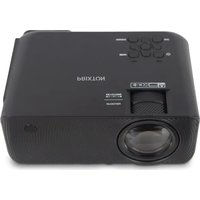
| Product type | Portable LED projector |
| Brand | Prixton |
| Model | Dalí |
| Native resolution | 1920 x 1080 pixels (Full HD) |
| Brightness | 150 ANSI lumens |
| Lamp life | Up to 30,000 hours |
| Power supply | AC 100-240 V, 50/60 Hz |
| Dimensions (L x D x H) | 200 x 150 x 80 mm |
| Weight | Approximately 1.1 kg |
| Connectivity | HDMI, USB, VGA, 3.5 mm audio jack |
| Keystone correction | ± 15° (vertical) |
| Focus | Manual (focus ring) |
| Built-in speaker | Yes, 3 W |
| Operating temperature | 5°C to 35°C |
| Lens cleaning | Use a soft, dry cloth; avoid solvents |
| Ventilation | Do not block the ventilation grilles |
| Included accessories | Remote control, HDMI cable, power adapter, manual |
| Repairability | Repairability index: 7.5/10 (parts available via after-sales service) |
Frequently Asked Questions - Dalí Prixton
How to turn on the Prixton Dalí projector?
Plug in the power adapter, then press the Power button on the top or on the remote control.
How to connect my smartphone to the projector?
Use an HDMI cable with an appropriate adapter (Lightning to HDMI for iPhone, USB-C to HDMI for Android).
Why is the image blurry?
Turn the focus ring around the lens until the image is sharp. Make sure the projection distance is correct.
How to correct keystone distortion?
Use the keystone correction function in the menu or the dedicated adjustment wheels to align the image vertically.
Can I use the projector without an external source?
Yes, you can play multimedia files directly via the USB port (video, photo, music) or use the built-in speaker for audio only.
How to clean the projector lens?
Turn off the projector and let it cool down. Use a soft, dry cloth (microfiber) to gently wipe the lens. Never use chemical products.
Why does the projector turn off by itself?
This may be due to overheating. Check that the ventilation grilles are not blocked and that the fan is working. Turn it off and let it cool.
What to do if the screen displays 'No signal'?
Make sure the source is on and the cable is properly connected. Press the Source button on the remote control to select the appropriate input (HDMI, USB, etc.).
How to update the firmware?
Download the latest firmware version from the Prixton website, copy it to a USB flash drive, insert it into the projector, and follow the instructions in the 'Settings' > 'Update' menu.
Does the projector have a warranty?
Yes, the Prixton Dalí is covered by a 2-year manufacturer's warranty. Keep your receipt and contact customer service for any claims.
User questions about Dalí Prixton
0 question about this device. Answer the ones you know or ask your own.
Ask a new question about this device
No questions yet. Be the first to ask one.
Download the instructions for your Projector in PDF format for free! Find your manual Dalí - Prixton and take your electronic device back in hand. On this page are published all the documents necessary for the use of your device. Dalí by Prixton.
USER MANUAL Dalí Prixton
Manual assistant
Powered by Anthropic
Waiting for your message
Product information
Brand : Prixton
Model : Dalí
Category : Projector