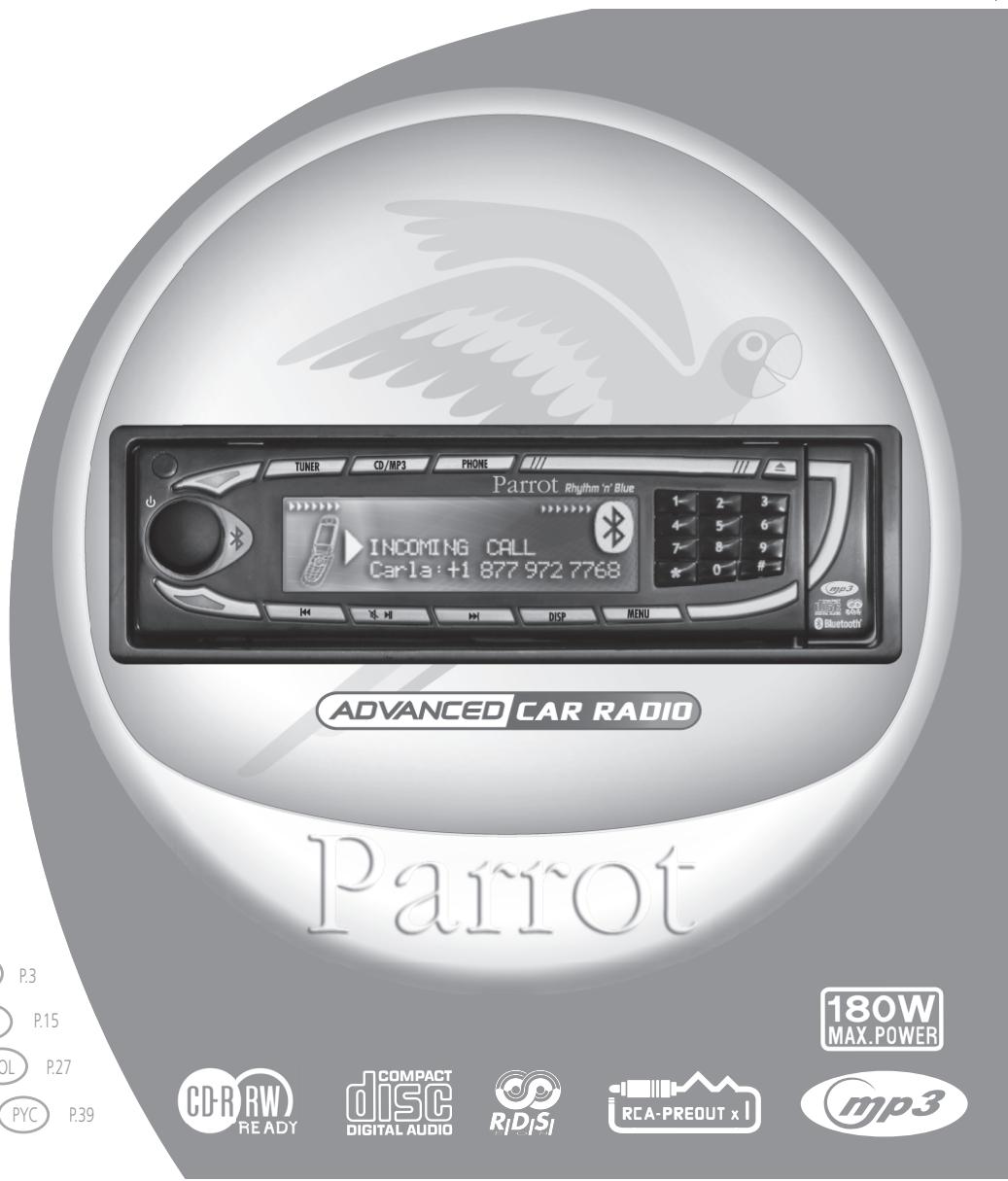
USER MANUAL RHYTHM N BLUE PARROT
CD/MP3 Hands-free Receiver
RHYTHM N'BLUE User manual
For BluetoothMobile Phone

Bluetooth
Warning
The manufacturer Parrot S.A. and its affiliates should not be held liable towards end users or third parties to prejudice caused by misusage of the product, nor for usage that would be in violation of local traffic regulations and laws.
Disclaimer
The information in this document is subject to change without notice and does not represent a commitment on the part of vendor. No warranty or representation, either expressed or implied, is made with respect of quality, accuracy or fitness for any particular purpose of this document. The associated with it at any time without obligation to notify any person or organisation of such changes. In no event will the manufacturer to be liable for direct, indirect, special, incidental or consequential damages arising out of the use or inability to use this product or documentation, even if advised of the possibility of such damages. This document contains material protected by copyright. All right are reserved. No part of this manual may be reproduced or transmitted in any forme, by any means or for any purpose without express written consent. Product names appearing in this document are mentioned for identification purposes only. All trademarks, product names appearing in this document are registered property of their respective owners.
FCC Compliance Statement

Federal Communications Commission
This device complies with part 15 of the FCC rules. Operation is subject to the following two conditions :
(1). this device may not cause harmful interference, and
(2). this device must accept any interference received, including interference that may cause undesired operation.
Note : The manufacturer is not responsible for any radio or tv interference caused by unauthorized modifications to this equipment. Such modifications could void the user's authority to operate the equipment.

We, Parrot S.A. of 174 quai de Jemmapes, 75010 Paris, France, declare under our sole responsibility that our product, the Parrot Rhythm n' Blue, to which this declaration relates is in conformity with appropriate standards EN300328, EN301489-17, EN 60950 following the provision of Radio Equipment and Telecommunication Equipment directive, with requirements covering EMC directive 89/336/EEC and Low Voltage directive 73/23/EEC.
Bluetooth®
The Bluetooth® word mark and logos are owned by the Bluetooth® SIG, Inc. and any use of such marks by Parrot S.A. is under license. Other trademarks and trade names are those of their respective owners.
Correct Disposal of This Product ( Waste Electrical & Electronic Equipment )

Applicable in the European Union and other European countries with separate collection systems). This marking shown on the product or its literature, indicates that it should not be disposed with other household wastes at the end of its working life. To prevent possible harm to the environment or human health from uncontrolled waste disposal, please separate this from other types of wastes and recycle it responsibly to promote the sustainable reuse of material resources. Household users should contact either the retailer where they purchased this product, or their local government office, for details of where and how they can take this item for environ, mentally safe recycling. Business users should contract their supplier and the terms and conditions of the purchase contract. This product should not be mixed with other commercial wastes for disposal.
Rhythm n'Blue Directions for use
PRECAUTIONS
Only use on a 12V electrical system with a negative earth.
When replacing the fuse, use one with the same amp rating. Using a fuse with a higher amp rating could damage the system. Do not dismantle the system. The laser beam of the CD player is dangerous for your eyes. Ensure that foreign objects are not inserted into the system: they could cause the system to malfunction or jeopardise your safety, such as electrocutions or exposure to the laser. If your vehicle has been exposed to very high or very low temperatures for a prolonged period, wait until the inside of the car has returned to a normal temperature before using the device. The sound volume of the car stereo should not be too loud: you should be able to hear outside warning signals or sirens.
NOTES ON CDs
Playing a damaged or dusty CD could result in the disc jumping during playback. Hold CDs as shown in the illustration opposite.
Do not touch the unprinted side. Avoid getting any types of marks on the readable side of the CD. Do not expose a CD to direct sunlight or excessive temperatures. Wipe dirty CDs from the centre outwards with an appropriate cloth. Never use solvents, such as benzene or alcohol. This car stereo cannot read 3 CDs (8 cm).
Never use 3 CDs or discs with an irregular shape. They could get stuck and cause the unit to malfunction.
BEFORE SWITCHING ON
Do not set the volume too high - doing so might prevent you from hearing sounds outside the car. The car must be stationary before working on the system.
CAUTION
Do not remove the unit's cover. Do not repair the system yourself. Please contact your retailer or a specialist technician.
PRESENTATION
Thank you for choosing a Parrot car stereo.
You can now take full advantage of a Bluetooth® CD/MP3 car stereo with a built-in hands-free kit. All the features sported by a top-of-the-range hands-free kit are available: phonebook synchronisation, caller ID display, exceptional audio quality inside the car, dual call management, compatibility with all Bluetooth phones, and much more.
YOUR CAR STEREO'S BLUETOOTH® FEATURES
This system is equipped with the Bluetooth® technology, which enables the wireless exchange of data between electronic systems. In the present case, your Bluetooth® phone is connected to the car stereo. Depending on your phone () , this synchronises the phone's phonebook in the car stereo's memory, which will subsequently allow you to call people directly from the phonebook, see the caller's name displayed, and so on. You can also answer calls, hang up and control the call volume with the car stereo's green and red buttons and the scroll wheel. The built-in voice recognition feature allows you to use several functions without taking your hands off the wheel.
(^*) :Applies to certain phones.
For further information, visit our website:
«www.parrot.biz, at the section entitled Technical Support, User Guides»
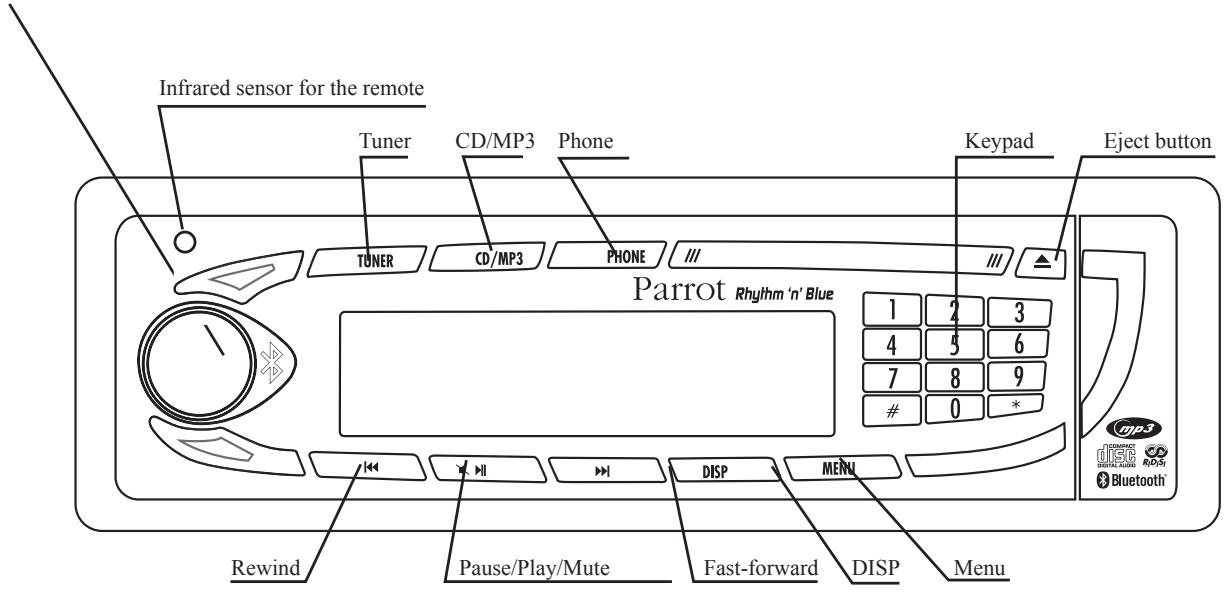
To turn the car stereo on, press the rotary button. To turn the car stereo off, hold down the same button for two seconds.
Without the detachable front panel, the system cannot be used.
Removing the front panel :
- Press the eject button (in the top right) to tip the front panel.
- Move the panel sideways to the left.
Pull the right side of the panel away from the car stereo and then the left side.
- Store the panel in the carry case and take it with you.
Replacing the front panel :
- Insert the left side of the front panel into the car stereo.
- Then insert the right side of the panel into the car stereo.
- Push the panel up until you hear a click.
Removing the entire stereo :
- Remove the car stereo's front panel and casing.
- Insert the keys into the appropriate holes until they remain stuck.
Pull the stereo towards you.
INSTALLATION GUIDE
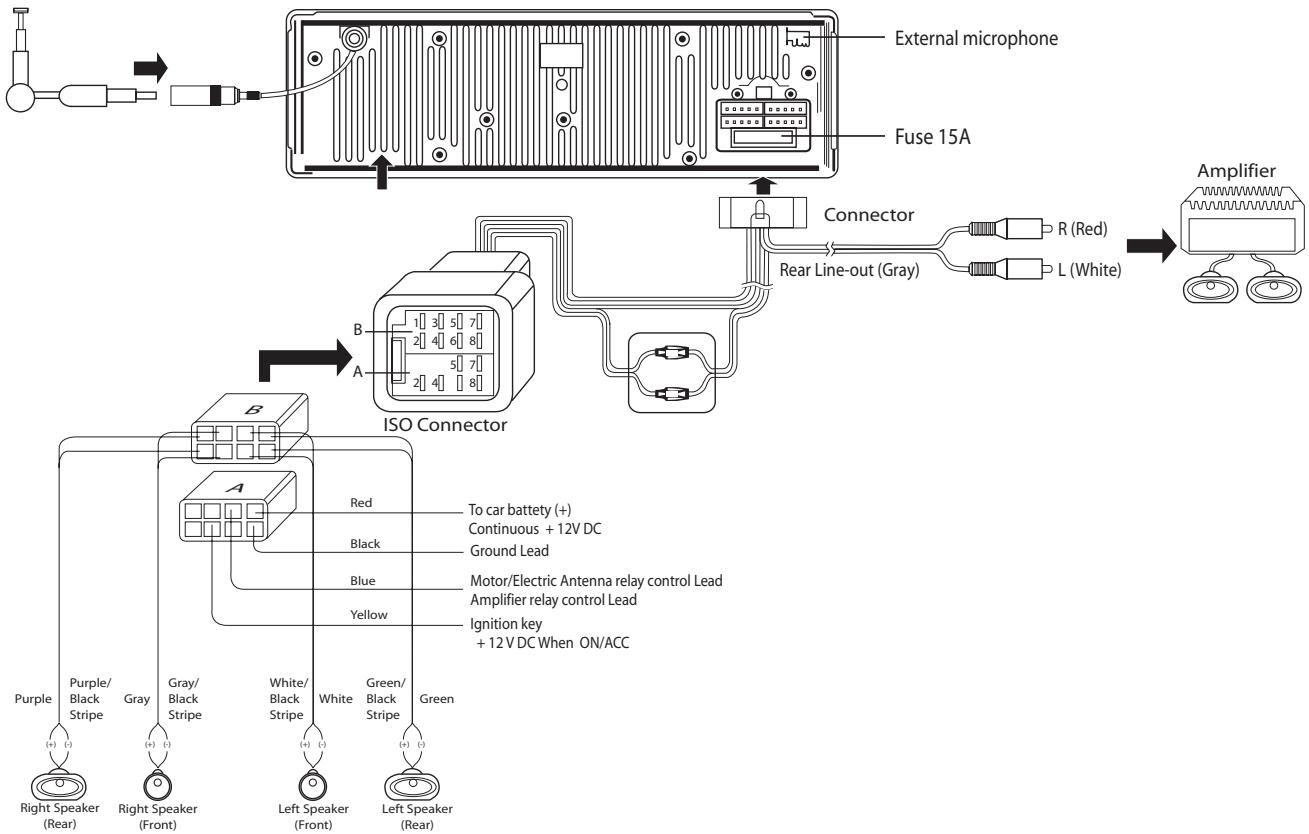
Note: to ensure that your settings are memorised, check that the ignition 12V and the constant 12V supply are not reversed. Otherwise, you will have to enter all your settings again
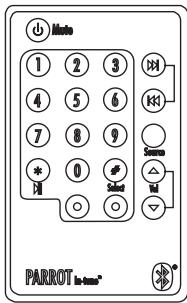
REMOTE CONTROL
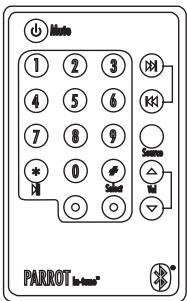
Using the remote control:
- The on/off button is used to turn the car stereo on and off.
- Source is used to change from one mode to another: Tuner, CD/MP3 and then Phone.
- In CD/MP3 mode, the fast-forward and rewind arrows let you skip from one track to another by means of a quick press. They are also used to simply go for wards/backwards in a track. In Tuner mode, they allow you to skip from one radio station to another.
- The play/pause button is used for playing CDs.
- When you receive an incoming call, press the green button to answer and the red button to hang up.
- You can also dial a phone number on the remote control. To do so, change to Phone mode (via the Source button or by pressing the Phone button directly on the car stereo's front panel) and then dial the number on the keypad. Once the number has been dialled, press the green button to call.
Note:
The prefix can be obtained by pressing the zero button for two seconds.
Replacing the battery in the remote control When the remote control no longer works properly or you experience problems controlling the car stereo with the remote control, replace the remote control's battery. Ensure that the battery is facing the correct polarity when fitting the replacement.
- Remove the battery cover by pressing the button.
- Insert the new battery with the (+) side facing you. Replace the cover.
CAUTION:
The battery must be stored out of the reach of children. If a child accidentally swallows the battery, seek medical advice immediately. Do not recharge, open, heat or throw onto a heat source. Any of these actions could cause sparks and start a fire.
Do not store the battery with other metallic materials. This could cause sparks and start a fire. Do not handle the battery with tweezers. This could cause sparks and start a fire.
DIFFERENT FEATURES MODE
First of all, turn the car stereo on. To do so, press the rotary button.
To turn the car stereo off, hold down the same button for two seconds.
There are three major features, which can be accessed directly via the car stereo's front panel: Tuner, CD/MP3 and Phone mode
Each mode enables the car stereo to be used in a different way:

Tuner (or Radio) mode :
Press the Tuner button to listen to the radio. The fast-forward and rewind arrows let you search for stations on a step-by-step basis. If you hold down either arrow, the system will automatically search for the next station.
When you are tuned into a station, hold down a number on the front panel's keypad (long press) to assign a shortcut number.
Subsequently, to go straight to a memorised station, simply press the corresponding number. When the station is memorised, the assigned shortcut number is displayed at the same time as the station's frequency.

CD/MP3 (or disc playback) mode :
Press CD/MP3 to listen to a CD.
You can move from one track on the CD to another by pressing fast-forward or rewind. To move quickly forwards or backwards in a track, hold down the fast-forward or rewind button for more than half a second.
When playing an MP3 disc, the LCD screen successively displays the following information: title of the song, album and artist, and always the time elapsed. You can also select the track directly on the CD via the keypad.

Phone mode :
Press Phone to change the system to phone mode.
Once connected with your Bluetooth® phone, you will be given information on your mobile phone's battery and signal levels.
Your operator is also displayed (^*)
You can access your phonebook simply by turning the scroll wheel.
You can then browse through the alphabet.
Select the corresponding letter for the required contacts.
If your contacts have more than one phone number, press the scroll wheel again to access the numbers and then the green button to call.
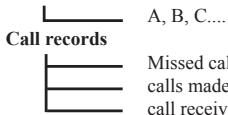
To view your call records, press the rotary button.
All the calls made, missed and received are displayed.
Pressing the Menu button opens the Settings menu.
You can fully use all the car stereo's features and define the audio settings, backlight and all the Bluetooth® features.
You can browse through the menus using the scroll wheel.
Pressing the scroll wheel opens the selected menu, allowing you to make any required adjustments to the selected feature.
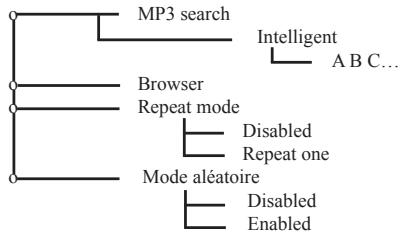
Menu description and structure
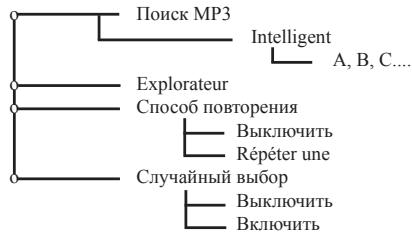
Used to define the way in which you wish to listen to your CDs: search, play back options, etc.
-TUNER:
- The RDS (RDS Scan) option displays the radio station's name and searches for alternative frequencies if the reception signal fades.
This feature is also called «RDS Alternative Frequencies (AF)».
- Once enabled, the «RDS Region» feature keeps the settings of the current station when searching for alternative frequencies.
For example, a radio station broadcasting local programmes to a specific region will not be replaced by the same station broadcasting national programmes when searching for alternative frequencies.
- The «Traffic Program» indicator (RDS TP) determines whether the radio station can broadcast traffic information.
- If the «Traffic Alert» feature (RDS TA) is enabled and the current station can broadcast traffic information («Traffic Program» indicator enabled), the car stereo automatically switches to Tuner mode when traffic information is broadcast.
- If the «Traffic Alert» feature is enabled and the current station does not broadcast traffic information («Traffic Program» indicator disabled), the following screen is displayed on the car stereo:

-Tuner
Search

Auto-store
By program type

All Program Types
Pop Music
Rock Music
Documentary

Band

FM1
FM2
FM3
MW1
LW
Tuner se

Local
Distant
Stereo - Mono

Stereo
Mono
RDS options

RDS Scan

Disabled
Enabled

Traffic Alert

Disabled
Enabled
RDS Region

Disabled
Enabled
Bluetooth®:
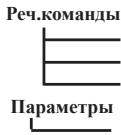
This menu lets you manage all the Bluetooth® features on your car stereo: phonebook management, assigning of voiceprints, display, language.
- Phonebook: access to the phonebook memorised in the car stereo.
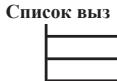
- Call records: list of calls missed, made and received.
- In the Settings subdirectory:
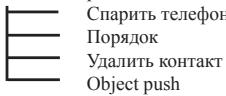
The paired devices option displays the name of the Bluetooth® phone with which your car stereo is connected in hands-free mode. Once enabled, the automatic answer feature immediately answers any incoming call.
With some phones, a specific mode must be enabled before pairing (Pair a phone), so that as many features as possible can be supported. Once again on specific phones, the Object Push feature is used to receive contacts when automatic synchronisation is not available.
Bluetooth

Phonebook
Voice commands

Settings
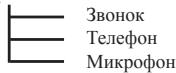
Volume


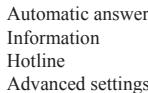
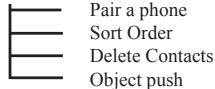
Note : some functions depend on your phone and might therefore be disabled.
Press Phone to change the system to Phone mode.
Phones compatible with the Bluetooth® technology use either the Hands-free or the Headset profile for transferring the call to the car stereo. The Hands-free profile offers the most features.
When using your car stereo in Tuner or CD/MP3 mode, the unit automatically switches to Phone mode if someone calls you. After the call, the car stereo returns to Tuner or CD/MP3 mode. The driver does not need to take any action. The same applies when you make a call via the car stereo.
Pairing :
Pairing is the first connection between your Bluetooth® phone and the car stereo. This procedure is initiated via your phone. Search for any Bluetooth® peripherals. Once «Parrot Car Stereo» is found, select it and your phone prompts you to enter a four-digit code. Enter 1234 and confirm. After the necessary data has been exchanged, you are now Bluetooth® connected with the car stereo.
With some phones, a special mode needs to be enabled prior to pairing for access to more features. Refer to Bluetooth > Settings > Pair a phone.
Synchronising the phone's phonebook :
With some Bluetooth phones, the phonebook is automatically synchronised in the kit's memory. If your phone does not support automatic synchronisation, you can also use the Object Push feature on your phone to send contacts from your phone to the car stereo by Bluetooth®.
When synchronising the phonebook, the Bluetooth® icon scrolls over the screen.
Refer to your phone's user guide or our website for details on how to proceed:
Answering / Hanging up :
To answer a call, press the green button above the scroll wheel. Once you have finished your conversation, press the red button to hang up.
Discreet mode :
During a call, press the green button to switch the conversation over to the phone. Press the green button again to return the call to hands-free mode. This feature is only available on phones with a Hands-free profile.
Caller ID :
When an incoming call is received, the caller's name or number is displayed. This feature is only available on certain phones.
Making a call via the car stereo's interface :
Two options are available:
Change to Phone mode. Dial the phone number directly via the keypad and then press the green button. To dial a number with + as the prefix, quickly press the zero key twice.
You can also use the voice recognition feature (see below).
Voice recognition :
You can make calls using the car stereo's voice recognition feature. To do so, contacts must be memorised in the kit's memory (automatic synchronisation of the phonebook or contacts sent individually from the phone). You must have first recorded the keywords: home, work, office, and so on, as well as the magic word «phone».
Say: Phone... (Beep)... Anna... (Beep)... Home... and the car stereo automatically dials Anna's home number.
Similarly, if Anna calls you, you will hear «Anna». Press the green button to answer the call. Press the red button to end the call. The car stereo automatically returns to Tuner, CD/MP3 or Phone mode.
You can also use the following sequence for using the voice recognition feature, but without keywords:
Press the green button and the radio or CD is muted. You will hear a beep.
Say the required person's name after the beep and if necessary, specify house, work or office (if available).
Note: When recording the keywords and magic word, park your vehicle in a quiet place with the windows closed and the heater/air conditioner off. This is necessary to obtain a higher recognition rate.
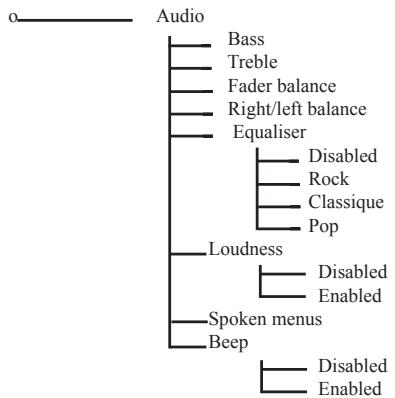
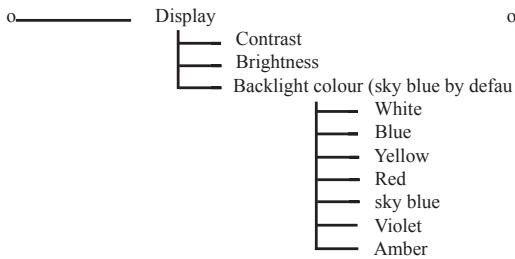
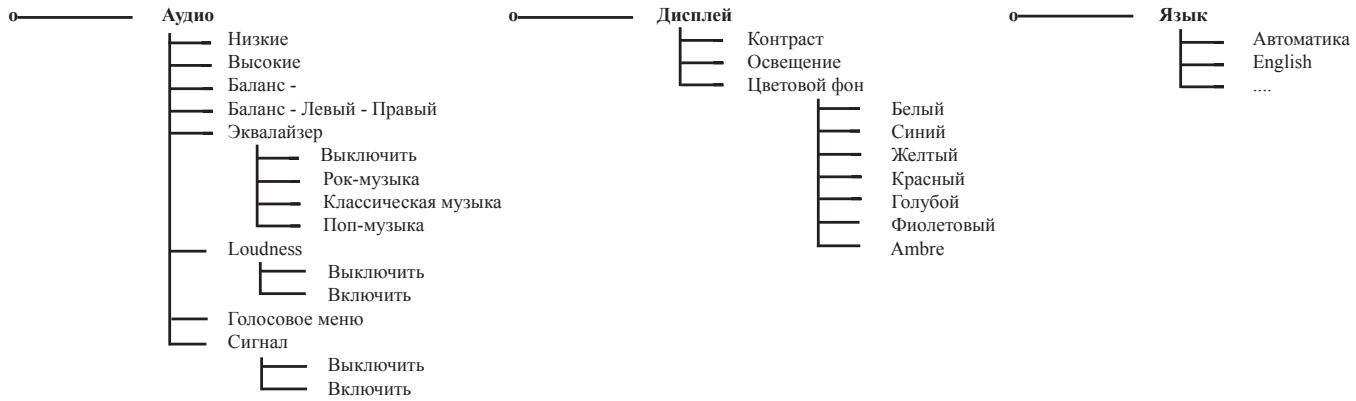
-Preferences:
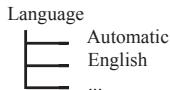
This menu allows you to select your language, the display colour and all the audio features to fine-tune the hearing levels inside the vehicle.
UPDATING YOUR CAR STEREO
To take advantage of the latest improvements (new compatible phones, new features, etc.), you can update your car stereo by Bluetooth®.
To do so, enable the option in Bluetooth > Settings > Advanced settings > Software update, and then use a computer fitted with Bluetooth to download the latest version to your car stereo (available from our website).
For further information, visit our website: www.parrot.biz
TROUBLESHOOTING
In the event of a malfunction, immediately disconnect the car stereo.
This unit must not be used in abnormal conditions, such as if there is no sound or unpleasant smells are detected from the unit, to avoid any risk of electrocution.
On no account should you try to repair the unit yourself.
General:
The car stereo does not come on.
The car's ignition is switched off. Turn the key in the ignition to the ACC position (on).
Check the wiring. The fuse has blown. Replace the fuse.
No sound:
Check that the car stereo's volume is not at the lowest setting.
Also ensure that the Mute function has not been enabled (sound cut off).
Radio:
- Excessive noise with a station:
The station that you are listening to is too far away for an optimal signal.
Choose another station with a better signal.
- Preset stations lost:
The car stereo's power supply is not set up correctly.
Check that the battery wire is correctly fitted (ignition 12V and constant 12V ).
Disc :
The disc is inserted, but it does not play.
The disc is upside-down.
The disc must be inserted with the name of the artist/CD facing upwards.
The disc is dirty or damaged. Clean the disc or change the CD.
The CD jumps or the sound quality is poor.
The disc is dirty or damaged. Clean the disc or change the CD.
- Vibrations when driving the car cause the CD to jump.
The angle for fitting the car stereo must be less than 30^
Check that the car stereo has been securely fitted in the appropriate place.
CD/MP3: error messages.
The icon below is displayed: this means that there is no CD in the player.

- The icon below is displayed: this means that your CD does not contain any files in MP3 format.

TECHNICAL SPECIFICATIONS
CD / CD-R / CD-RW / MP3, ID3 Tag.
Manual flip-down front panel.
Output power: 4x45W.
Line out: 4 channel x 4V/4ch x 2V
DSP: Classic, rock, pop, flat.
Power / Speaker wire: ISO.
Colour screen.
Bluetooth flash updates for the latest version.
External microphone.
Uses your car's speakers for greater listening comfort.
Bluetooth® profiles supported:
- Hands-free 0.96 and 1.0.
- Headset 1.0.
- Object Push 1.0.
Synch ML 1.0.
HOTLINE
- Our hotline is at your disposal.
You can contact the hotline by email or telephone
(open from Monday to Friday between 9 am and 6pm - GMT + 1
- For further information, visit our website at www.parrot.biz.
Manual flip-down front panel.
Output power: 4 × 45 ~W
Line out: 4 channel x4V/4ch x2V
DSP: Klasika, rock, pop, domáci.
Power / Speaker wire: ISO.
Barevnydislej.
- Handsfree 0.96 a 1.0.
- Headset 1.0.
- Object Push 1.0.
Synch ML 1.0.
HORKÁ LINKA (HOTLINE)
W不断增强 the quality of service and customer service. We want to make it even better for you. We also want to make it even better for your family.
MEPbI IPEIOCTOPOXHOCTH
HcnoJIb3yETc TIOIbKO c 3JIeKTPueckO CHCTEMOI 12 B c oTnPiateJIbHbIM 3a3EmIeHHem. IIpn 3aMeHe npEOxpaHHTe IINoIb3yIte CMeHNb IpeIOXpaHHTeB c TAKHM JKe 3NaueHHem CNIb TOKA. HcnoJIb3OBAHHe IpeIOxpaHHTeB c 6OJIbIMN 3NaueHHem CNIb ToKa MOKet IpnBEcTH K NOBpeJENHO CHtEMBI. He pa36bpaHTe CHtEMY. JIaePbH N LyCHTBbAIOEro YcTOpCTBa OAnCeI dIra. He BCtABLIeB T CnCTEmY. IOCTOPONHHe IpeDMeBT: OH MOrYT INPBcETN K BIXOJO H3 CTPOR CnCTEMBI HIN Bb3BaTb Ipo6JIeMbl 6eOIIaNACHOCTB, B TOM YHCJIe, IopApKeHHe 3JIeKTPueckHM TOKOM HIN O6JIyUeHHe Ia3epbHM N LyuAMH. Ecln BaII ABTOMO6JIb TB TeUeHHe IpoJOJXHTeBHorO IepHOJa BVemeH N IOJIbePRAIC BO3JeCTBNO OeEH BbICOKHX HIN OeEHb HN3KH XTeMHepATyp, IpeE N HCIOJIb3OBAHHe YcTOpCTBa JOXdTIceB BOCCTaHOBJENH HopMaJIbHOI TEMHepATpy B Ka6Hne. YpOBeH Ib POMKoCTH ABTOMO6JIbHorO PaIHOIpHEMHNAKe HIOJIkeH 6bITc CJIIHIOM BbCOKHM: Bbl JOJIKHb CJIbIIaHT b HapyKHe IpeJyIPeIHTeJIbHbIe CnIHAIJI.
3AMEUAHN B OTHOIIEHNN KOMIIAKT-ДИСКOB
IpocIyIHHBaHHe NIOBpeKJIeHHOrO HIN 3aIIbJIeHHOrO KOMIaKT-DHcKa MoJTe IpnHBecTH K IpepbAHnIO BOCIpOH3BeDEHnI 3BykA, Dejkte KOMIaKT-DHcKn KaK IOKA3HO HA pHyCHe HApOTNb. He TPOaIe To cTOPOH 6e3 OTneHTaKt. He DeJIaIte HNKaHX OTmETOK h CTOpOHe CHTbAHnIO KOMIaKT-DHcKa. 3aIIHTHe KOMIaKT-DHcKn OT IpnMOrO CoJIeHHOrO CBeta H Ne XpaHITe ERO B CIIHIXOM JapKOH OkpyKaHOIIe CpeDE. IpoTnpaIe 3aRp3HeHHbIe KOMIaKT-DHcKn OT ΜeHTPa K OKpyKHoCTN CneuaJIbHOI MArKo TKaHbIO. Hn B Koem Clyuae He HcIIIOJIb3YIte PactBoPitEJIi, TaHke KA K6eH3OI HIN CInPT. ETOT ABTomObIIbIb II pHEMHIK He MOJTe CHTbIBATb KOMIaKT-DHcKN DHaMETpOM 3» (8 cm). Hn B Koem Clyuae He HcIIIOJIb3YIte KOMIaKT-DHcKN DHaMETpOM 3» (8 MM) HIN DeΦOPMHOBAHHbIe DnCKH. OHI MoYr 6bITb 3aIbIKoHPoBAHbI b IpnHrPBbATEJIe I pIHBECTN K HEnCIpABHoCTIM.
IIPEEI BKJIIOUEHHEM
He yctahabHaiBte CJIHIOK BMcOKH yOpOBHe IpOMKOCTN, TAK KAe 3TO MOKET 3aJIyIHTb HApKyHe 3BkyH. IIpeJek Te YIpOHN3BOHtB KaKoe-JIb60 BMeIaTeJIbCTBO B CTsEMyEOXIOHM OCTAHOBHTB ABOTMOHbL.
BHIMAHHE
He cHmaiTe KpbIkiy yctpoiCTBa. He IIbTaIIeTcB peMOHTnPoBaT bChTeMy
cAmocToIeJIbHO.ДлpeMOHTaO6paIaIteCbBBAIII MaRa3HN HJIIN B CneIHaJIIN3HpOBaHHyIO MaCTepckyIO.
IPIEICTABJIEHNE
Благогарнм bac 3а пokупky abTomобиьно Гпремннka mapkn Parrot.
BbI CMOKHe T BOCIOJIb3OBAITcBcFyHKIIHMMn CnCTeMbI Bluetooth® CD/MP3 co BCTpoEHbIM yCTPOICTBOM TpOMKOROBOPaIeC CBa3H.
3ra CHCTema 6bnaaet BcMeH npeoBbMn DyHKIIIMn rPOMKOrOBpIeH CBzHn: CnHXPOHN3aIIINr TElefoHHN KKHrH, OTObpaKeHHe HmEH NkOPpeCIOHJeHTa, HCKLIHOHTJIbHO KaueCTBO 3bYkaB KaaHHe MaIHINbI, yIpaBJIeHne IdoBIHbIMN Bb3OBAmH, COBMcTHeMOCTc BO CBeMn TElefoHAM Bluetooth...
ФУHKПИОHAЛьнБIE BO3MOЖHOCTH BLUETOOTH®BAIIIEFO ABTOMOБИЛьНО ГIПHEМΗКА
3Ta cnCTema 06OpyIOBaHa texHOIOrHei Bluetooth®, KOTopA IO3BOJIaET IPOH3BOIHTB 6ecnpoBOIHnO 6oMeH dAnHHbIM MekJy 3IEKTPoOBHM yCTpoIcTbAMn. B DaHHOM cLIyae, BaII TeJefoh BluTooth® IOIcoEOINHErT C ABTOMo6HbHOMy IPrHEMHNkY. 3To IO3BOJIaET, B 3ABCHMocTH OTOeJIH BaIIeO TeJefoHa (*), CnHXPOHN3HPOBaT bTeJeFOHNKHI YBaIIero TEJefoHa B pAMTh ATOBmO6HbHOrO IPrHEMHNka. 3To IO3BOIHT Bam JElaftb TeJefoHNHbE BtIOBbI HENOCeIcTBeHNHO 3TOIteJeFOHNH KOHN, BN3yAIHN3HPOBaTb Ha OKpAHe NMR Bb3bIAHOHIO...
BbMOKeTe TaKke OTBeuHb Hb3IOBbI, IIPOIN3BOIDt b43eINHHe, peYJInPobATb rpoMOKCTb BAIHH PaaTROBOPc NIOIOJIbO 3eJeHO, KaChO KIOHNK IN KOIEcKa ABTOMoBILHOro IpiHemNHka. BCTPOEHNA CHTema pacIO3HaBAHnR JIoLoa IIO3BOJET BOCIOJIb3OBaTbC MHOrOCHJeHbIMN fHyKHJIMM, HEOTyckra pyJIA.
(^*) :IeCTBNTeJIbHOJII HeKOTOpbIX MoJeIeTTeEOHOB.
BoIee IIOpo6bHy IO HhOIpMaHIO CMOTpHTe Ha HAaEM caHTe:
BkHueHHe HHTaHnA bTOMo6HbHOrO pHemHnKa IPOH3BOHtCnHa KaTHEm Ha BpaHtateJIbHyIO KHOIIky.
JIy BbIKJIOUeHHe IINpHEMHnKa HaxKMITE Ha 3Tu KHOIIky B TeueHne 2 cKeYH.
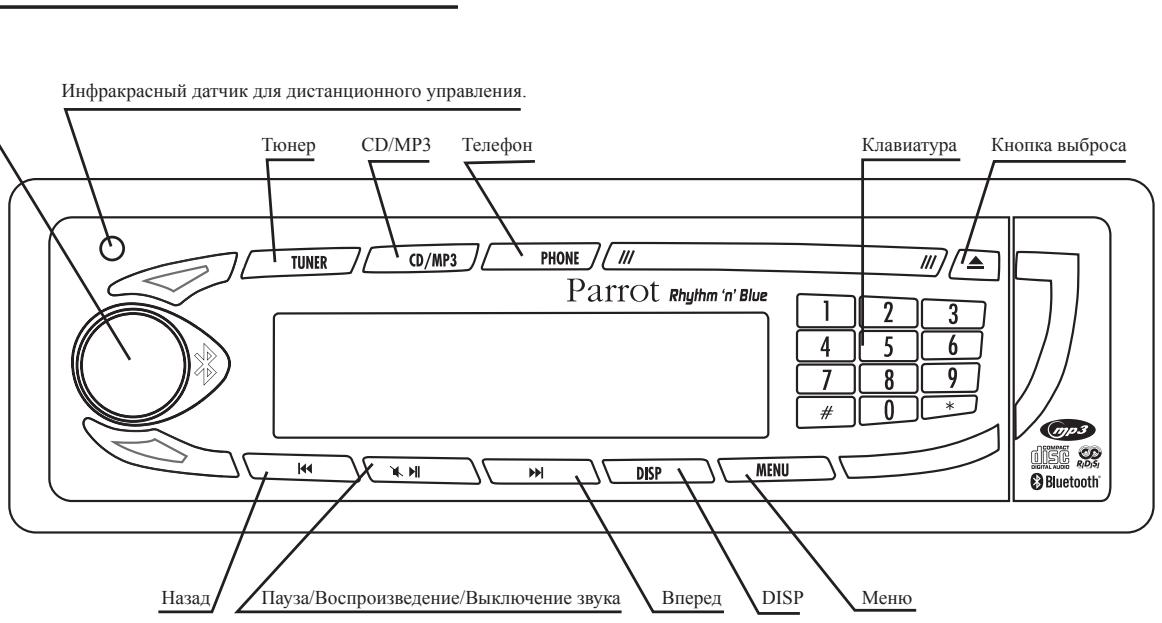
Bc3cbmHnIpeJHneIaHeJIINCHCTMaHEMOKETpaOToTb.
CnTHe nepEn He naHeI:
HaKMMHe Na KHOIIky BbIbOpaC (BbEpy Cnpaba) IJIa OTKNDbBaHnpeJeHnPiHeJIN.
- IpepeBHHbTe IpepeHIOI NaHeJIb BJIeBO.
- IotraHHTe IpaByIO cTOpOHy IpeJHeI IaHeJIOT aBTOMO6HJbHOro IpHemHHka, a 3aTeM JleByIO cTOpOHy.
- Y6epHTe IpeIeIHHIOI PAHeJIb B UeXOJI H BO3bMHTe ee c c06oi.
YctaHOBka IpepeHne HnHeJIH NaMeTo:
BctabbteJeByu cToPOHy IepeIHei IaHeJIb B aBTOMO6HJIbHbI IpiHMeHHK.
3aTeM BCTaBbTe IIpaByIO CTOpOHy IpeJeHHe IaHeJIb A bATOMo6HJIbHbI II pPiMeMHNK.
- IIOHNHmHTe IpeepHIOI PaHeJIb IOIeJUka 6IOKHpOBKN
YdaJIeHHe yctpoiCTBaNoJIHOCTbIbO:
- ChHMMTe IepeIHHIO IaHeJIb H hapyKHyIO paMy aBTOMo6HJbHO rPiHEmHnKa.
BcTaBbTe KJIIOH N B COOTBeTCTBYIOIIHe BbIeMKN IO HX 6IOKHpOBKH.
- BbITAHHTe yCTPOIcTBO.
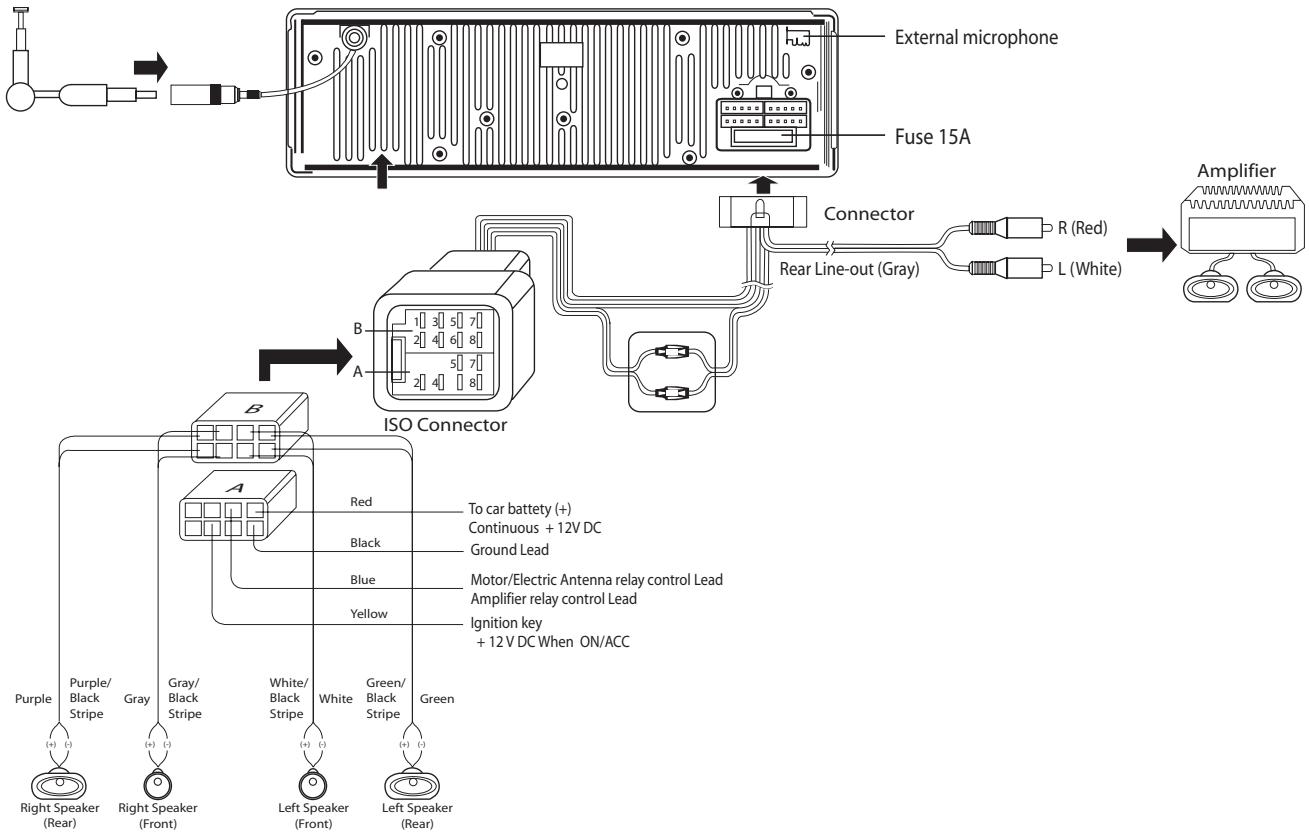
3ameyahne: UTo6bI coXpaHnTb B IaMaTH BaIH NapanMeTpbl, He MeHJIte MeCTAm H IIHTaHHe 12 B KIIIOHa H IOCTOHHoe IIHTaHHe 12 B. B IpOTHBHOM cIyae, Bam PpHJETcA ChOBa IIPOH3BecTH Bce BAIH pEryIHPOBKN.
JINCTAHIIIOHHOYIPABJEHNE
HcIOJIb3OBAHHe IyIbTa IINCTaHINHOHOr yIpaBJeHnA:
- KhoIIKa BkIIIOueHHBbIKIIOueHHNIO3BOJIaET yIpaJIaTb IHTaHHem ABTOMO6HbHO rPHeMHnKa.
- ItoHHK (Source) HOBIOJE THepeKIOHouATb peKHMb paOTo b ChcTEmb: peKHM TiOHeP, CD/MP3 H TeJooho
B pekHMe CD/MP3, ctpEIKH NIEpeJn Haa3a] n03BLOHOT peexOHTb OT oJHO neCNH K JpyTgK kpaTkhM hakatHE. OHN cHIOy3oTcKaTe JI IPOKpyTKN PecCNH BpeHd/Ha3ad. B pekHM e THeP, OHN 03BLOHOT peEKIOHATpADNOCTAHINI BPEEP HJH H3a3.
-KHONka BOCnPOH3BeEHeHne/Hay3a ynpabJIeT BOCnPOH3BeEHeHem KOMIaKT-ДИСКА.
- IpiH BXOIIHEM B3IOBE, 3eJIeHЯ KHOIIKa ClyKHT JIJI COeIHHeHHN, IN KpaCHa KHOIIKA -IJI PAIbEIIHHEN.
- Bы можete takke Naбрать homep Teileфоа c n lyblta nctaHnOHHO rynpaBHeHH.Длг STOrO nepeIHTeВ peKhen Telefoh (c NMOIObIho KhoNKn source - HcTOHNH INH KaKHtHM HeHocpeCTBeHHoHa KhoNKy Phone - Telefoh Ha nepeIeHne IaHEnIb aTOMoBuHORn pIphEMNHka), a 3atEM Na6epHTe homep Ha KIAHBAType. Na6pab homep, NaKMcIte Ha 3eJeHy OKnHKy dInu Bly3OBa.
IpHmEuaHHe:
3HaK + BBOHTCa HAKaTHEm Ha Hylb B TeueHHe 2 cekyH.
3aMeHa 3aMeHtI IITaHINr IYbTa IINCTAHUHOHORO ynpabJIeHHN: EcII INyIbT bINCTAHUHOHORO ynpabJIeHHN pa6oTaer IIOxo, HIn ecIH OH Iepctal yIypabJIbTb ABTOM0BbIbMbIM pHEmHnKOM, 3aMeHHTe 3aMeHtI IITaHINr IYbTa IINCTAHUHOHORO ynpabJIeHHN HObMbI 3aMeHtOM.
Co6JIIOaIe IIOJIaRPhOcTb IIINy cYtaHOBKe HOBOrO 3JIeMeHTa IIITaHn.
- YdaJIHTe DepeKaTeJIb 3JIeMeHTa HNTaHnHa, HkaKb Ha KHOIIKy.
- BACTABTE HOBJI ZEMIEIT HANTAHNCTOPOHO (+) HIO HAIPBAHENHO K BAM. YEAHOBITE DEPKATIELHA MECTO.
BHIMAHHE:
XpaHHTe 3IeMeHTb IITaHHB HeIOCTyIHOM JJIeTeH MeCte.
EcJIN pe6eHOK cIyauHHIO pOJIOTHI 3JIeMeHT IITaHH, HeMeJIeHHo 0bpaTHeK bPauy.
He 3ap8kaite, He otKbHaeite, He nagbae H he 6oepaite 3eHMtI tnaHnHa na packaJIeHHne IpeMeTMe. ToKo MeTKePiPBeCTN K BO3HKNKOBEOHHIO HCKP INHBOCNLIAMEHHHO.
He xpaHHTe 3IeMeHTb IITaHHB MBeCTe CpyrHM MeTaJIINueCKHM IIpeIMeTAMH.
TO MOKET IIpHBecTH K BO3HHKHOBEHHIO HCKP HIN BOCIIJIaMEHeHHIO.
He JeKHTJI EJEMENT IITAHINI HIIHAMN HII HIIETOM. 3TO MOKET PIPHBCTN K BO3HKNHOEHHNO HCKP NHNBOCIAJMEHEHHIO.
PA3JIINHbIE PEXHMbI PA6OTbI
IpeKJBe Bcero, BbIOJIJKHbIKIIOHTb IITaHHe ABTOMO6NJBHOI PIPHEMHNka.
HakmHTHe BApaIaTeBHyIO KHOKNy IJIA BKIOHcENy. JIb BkIOHcENH HAKMHTe A3Y KHOKNY B TceHHe 2 cekHNy.
Cuiyctuyot 3 OcbHHxk peMHx a60Tb, KOTOpbe doctYHb HnEoPcTeBHeHc nHTepFeKa ATRMObHbHO pIeHMHxpeKHM ToIEpHK eKM CDpM rKeHM TeTeFO
KakbI peKHM H03B0JIaR pa3JIHcHoe HcIOJIb3OBAHHe ABTOmO6HJIbHOTo IpHEMHHa:

PekHM TOnep (HIN PaHaNo) :
HaKmHte Ha KhoIky Tiohep, YTO6bI cIyUaTH paJIO. CTeJIKN «Ha3aJd» H «BpepeJIDnO3BOJHOT IPOIN3BOJIMHTb NIOIHARBOOE nepeKJIOeHHe NaCTOTb IIN IONcKa STAHINII. IIPII pIOLOJIKHeTb HOM HaxatHN H OIHy H3 KHOIOK CNCTema ABOTMATHueckn NepeKJIOHaetcay HA cIEYIOUIOu CTAHINIO.
B VoBpeMaIPOcIyIbHbAHnHa paIHocTAnHH, HauKmHTe Ha OHy H3 IINΦp KJIaBAtypb nepeJHne IaHEn (PpoIolJHteJIbHO HaeKaHtHe), 7OTo6I pIcHcBOITb 3oT CTAnHHN KHONKY b6tProTO doCTyNA. IocLe 3TO Tdo IBAKIOueHHN BVEDeHHN B PAMrT CTAnHH NocAHTb HA T3U ΜhΦpy. IuPha 6bStroTO doCTyNA BVEDeHHN B PAMrT CTAnHH OTo6paKaTeC oINOBpeMeHHo C ChTOTO 3TO CTAnHH.

PeKHM CD/mp3 (HIN npocJyIHBAHHe HcKOB):
HaKmHnE Ha CD/mP3JIaB KBrIOeHHepeKHMn POcIyINBBAHN KOMPiAKT-DHcKa. Bb MokeTe peKeKIOOHATb IeCN HA KOIMKnT-DCHE KAKaTHEM HA CTpeIKH (Haa3ad) HJIN (VIIpeB). DJIb SbCTPOI pKOpKYTK 3aHNc EepKHTe cTpeIKY (Haa3ad) HJIN (VIIpeBd) B TceHne OdoJIbHe 0,5eckyHbI. IIpn IpoCpUyINBaHH NcKa MP3, JK-DHcJIeOTo6paKaEToOepeHHO CJIeDyUHNE CBEHEni: HABBaHne neCNH, JIb6Om aprTHCa i, NocTOHNO - HcTeKHee BPMe IOpcIyINBaHH DHCKa. Bb MokeTe TaKBe bIb6pTaB HeOpCEtDeBHNO eNoCHn HA BaHEM KOIMKnT-DHcKe CJIaBAnHTpy

PeKHM Phone (HIN TeJefoHHA):
HaKmHrHe Na Phone (TeJefooh) IJIe nepeKJIIOHcHn CteMTh B pExHM TeJefoOHn.
IocJIe coJIeHNHeN C BAIIH M TeJefoOHn BoUthoth@, Ha DCJIeJIe BbIOJaTcE TAnHHe B OTHOJIeH yOUPB3 3ApJIA kAKyMjITOpA n IpHEMa cETn BaIIHO rMoHbTO HOBTo TEJefoHA.
Ot6bpaKaTeT aTKae HA3BaHHe BAIIero OIepaTopa (^*) . DocTyI K BAIIe J TeJefoHnOH KHTHc OUYIeCTBJIeTE TPyEM BpAUHHe N KOJEcHs Ka. BbMOke TpeMeEATCbTc IO aIaBHpy. Bb6BePHTe HxJyHKIO Y6BKY DIn LOCTOyI K HOMepAM a6OHeOTR. Ecln a6OHeHTb I MeHOt ECKIoKb HOmePOB TeJefoOHb, HaKMHTe HA KOJEcHc Ee pa3 IJ4 LoCTOyI K 3THM HOmePAM, a 3atEm HAKMtMe 3EJIeHy I KOHNky IJIN Bb3OBA. IJIN POCMToPa JxprHala B3IOBb HAKMHTe BpAAITeJIbHy IOKNIy. Ha DCJIeJIe BbIOBHTC cINHcOK XcNDJOHIIH, He pINHITHX I NOLYeHNHIX bXBOB08.
MEHIO
HaKaTHe Na KHOIIKy MeHIO IO3BOJIaER BOITN B MEHIO IpaAMetpbI.
BbMOKeTe HcIOJIb3OBAtB BCE cyHKIIN ABOTMO6HJIbHOI IpiHMeHHKa, Bb6HpTaB IIapAmEtbp IIPOcJUWbAHnI, IOcCBETKN H BcEx cyHKIIN Bluetooth®.
IpeMeIeHHe B MeHIO IPOH3BOJHTcC IIMOoJIbIO KOJIeChKa.
HaKaThHe Na 3To KOJIeChKO OobcIeHbAeT IOcTyII K BbIbpaHHOMy MeHIO H IIO3BOJIaTeBAM yIipabIaTb BbIbpaHHoI ΦyHKUHei.
OnHcAHHe H IpeBOBHaJcXema MeHIO
- CD/MP3:
ПиЗВОЛЯТ упраьлгь ПИССЛУШВАHнЕ ВАИХ KOMПАКТ-ДИСКOB: ПОИСК, ПОРДOK BOCПОНЗBEDEHн...
- CD/MP3:
-TIOHEP:
HeKoToOpbIe CbeJeHHa o RDS:
-ФункинRDS(RDS Scan)ПОЗБЛЯЕТОБражениHAЗВИХЯразноctаин,aТаКжпонск АльтетратиьхчастOTСлчae слбогоПрhemaСнгела.;
3Та Функин назыbaertся тakж «RDS Alternative Frequencies (AF)».
. AKTHBHPOBABФyHKIIO《RDS Region》,BBI MOKTe coxpaHbIb IpaAMTbpTEkyIeI ctaHIIIN pIH IOHNCKe AJIbTERPAHTBHBIX YCACTOT. HApnMep,pAioNcTaHIIa,pepeaIoMaMeCTHbIE IpORpaMMbOJHOrO paHOHa He 6yDeT aMeHEHa Tu Ye cTAHIIIO,KOTopaeIpePaAet HaIOHOHaJIbHbIe IpORpaMMb B cIJyUae IOHNCKa AJIbTERPAHTBHBIX YCACTOT.
- HnIHKatop «Traffic Program» (RDS TP) I03B0JIaER y3HaTb, MoKTe JIN TeKUIIa paIIOHcTaIHINI PepeJaBaTb CBeDEHHO O COCTOAHNIO DOpOKHO IOHNKeHHN IIN Het.
- Ecln akTHBnPOBaHa pfynKIIaI ppeIpyIpeKJEnHn «Traffic Alert» (RDS TA), n TekyIaI cTAnIaM MoKeT IpePeIabATb CbeDEHn O COCTOHN IIpOeKHO TOBnKeHn (INHnKAtOp «Traffic Program» akTHBPOBaH), ABTOMObIbHbI IIpHemHk abTomatUHeckN pekeJIIOuaAetc B peKHM TIOheP, KOrla pepeJaIoTcB cBeDEHn o DOpokHom DIBKHeHH.
- EcJHfYHKIIHg «Traffic Alert» akTHBnPOBaHa, H TeKUJIa CTaHIJIa He nepeJaet CBeJEHHN O IdoPOKHom DIBHXeHHN (HINdIKaTOp «Traffic Program» De3akTHBPOBaH), Ha ABTOMObHbHM npHEMHNKe IOBJIaeTcI cJeDyIOIH NkpaH

-TIOhep
Понь

Auto-store
Program type

Bce Tnblb
Пи-МуЗыкA
POK-My3bika
.
JokymeHTaJIbHbI

Hoioka

PaHno UybCTBHTeJbHoctb

Ctepeo-Moho

Bb60pRDS

Cnoc6RDS

BbIKJIOHTb
BkHIOHTb
Onaci
IOCTb 3aIpyJKeHHOTo DBHKeHH

BbIKJIOHTb
BkHouHtB
RDS PerHOn

BbIKJIOHITb
BkJIIOHTb
Bluetooth:
IocTyI K 3TOMy MeHIO IO3BOJIaER TYpABJIbYB CEMH fHyHKIIaMn Bluteoth BAIIErO aBTOMo6HbIHO rIPhemHHKa: IpypABJIeHHe BAIIe TElefoHHOH KHNTO, pNcCBaHBaHHe roLOOCbIX MEtOK, HINDAKIAI, 3bIK, BbOb HCTOHHKA.
TeJefoHHa KnHa: DocTyK TeJefoHHo KnHRe B PAmrTH aBtOMObHJbHOro IpnemHnka.
KyphaJI BbI3OB: CINcOK He npHnTbIX, HcXOJrIIx, IIOJyueHHbIX BbI3OBOB.
BIOJMeHIOIpaAMTbp: CnapeHbte yctpoiCTBa, oTo6paKeHHe Ha3BaHHa TeJefoHa Bluteoth, c KOTOpbIM BaII ABTOMO6HJIbHbI IpiHEMHK COEINHE B peKHMrPOMKOrOBopAieCB3H.
PnAaHTBaHn, AToMaTHueckn OTBET POnH3BOJNT HEmeJIeHHoe CoeINHeHHe Pn BxOJaIeM BbI3OBe.
HeKOTOpbIe TeJefoHbI Tpe6yIot AKTHBnPOBaHHa ONpeJeJIeHHORO peKHMa IpeEi CB3bBAHHem C TeJefoHOM Bluetooth (PiOncoEINHeHne TeJefoHa), IJIa IIOJIepKKN MaKCHMaJIbHORO KOJIInueCTBa yHKIIH.
Object Push IO3BOJIAET (JIЯ HeKOTOpbIX MoIeJIe TeJIefoHOB) IIOJIyATb KOHTaKTb II pI rOcTyCTBHN ABTOMaTHuecko CnHXPOHHaZaIH.
Bluetooth

TeIeΦ.KHHra
A,B,C....
HeipnHHTbIe BbI3OBbI
PpeBbIyUHe BbI3OBbI
Плучehнble Bbl3OBbl
TeJIeΦ.KHnRa
KJIIOUeBbIe cJIOBa
THI rOIOcoBOrO paCIO3HaBaHnR
TpomKocTb

Cnapntb TeJefoH...
Hhopmaa
Hotline
ToHKe HactpoiKN
- HnHbHyaJbHbIe npaMeTpbl:
3To MeHIO IOI3BOJIaET BbIbpaTb I3bIK, IZBET HNIIHKaIHH, a TaKKe BCE yHKINH ayIHO IITHMn3aIH KaueCTBa 3ByKa B BaIeM abTOMO6HJe.
OBHOBJEHHBEAIIIEFOABTOMOBNJbHOrOIPHEMHnKA
UTo6bBocOJIJI3OBATbCJIOJIJIHHM yCOBEpIJIeHCTBOBAHIMM (HOBJBe COBMeCTHMbe TEJIeFOHJI, HOBJE cyHKIIHOHAJIbIe BO3MOKHOCTH...), Bbl MOKeTe O6HOBT bAa II ABTOMO6JIbHI pIeMHIK NO JIIHHI Bluetooth.
TEXHINUeCKHEXAPAKTEPHCTHKI
CD/CD-R/CD-RW/MP3, ID3 Tag.
OTKNHnBpyHyIO npeHnnaHeIb.
BbIXoHnA MoIIOHOCtB: 4x45 Br.
BbIXoI: 4 kaHaJa x 4 B/4 kaHaJa x 2 B
DSP:Klaaccnka,pok,nonpOBHBH
- Handsfree 0.96 n 1.0.
- Headset 1.0.
- Object Push 1.0.
Synch ML 1.0
TOPRAJJIHHJ
- HaIIa «TopayaaJIHHH» BceIgBaB aIIiem pacIopJKeHH.
BMyokotee C8a3b4Tc H nei 0JIeKTOHHO uOTHne IHI IO TEIOHOY (Huaia TOpRyA JINHHa pa6oTaet c OHeIeJHIIHKo PnIHTHUc c 9 o18 Yacob nO pHaHcySCKOMY BPEMH).
- BoJee IIOpO6Hyo HNΦOpMaIHH CMOtprHe Ha HAIIeM caIte www.parrot.biz.


Parrot S.A. - 174, quai de Jemmapes - 75010 Paris - France
Fax +33 1 48 03 06 66 / Phone +33 1 48 03 60 60
http://www.parrot.biz