
D114 - Auxiliary heating ZIBRO - Free user manual and instructions
Find the device manual for free D114 ZIBRO in PDF.


| Product type | Dehumidifier (auxiliary heating) |
| Brand | ZIBRO |
| Model | D114 |
| Dimensions (W x H x D) | 340 x 580 x 245 mm |
| Net weight | 13.5 kg |
| Power supply | 220-240 V / 50 Hz / 1 phase |
| Power consumption | 300 W |
| Electric current | 1.3 A |
| Dehumidification capacity | 14 L/24h (at 32°C / 80% RH) |
| Refrigerant | R-134a / 160 g |
| Compressor | Piston |
| Automatic defrost | Yes |
| Adjustment knob/hygrostat | Yes |
| Max. treated air volume | 150 m³/h |
| Operating temperature range | 5 to 32 °C |
| Water tank capacity | 3.5 L |
| Noise level | 40 dB |
| Main functions | Dehumidification, adjustable hygrostat, automatic shut-off when tank full, automatic defrost, continuous drainage possible |
| Maintenance and cleaning | Clean the air filter every 2 weeks (vacuum or water); exterior with soft dry cloth |
| Safety | Overheat protection, automatic shut-off when tank full, 3-minute delayed restart to protect compressor |
| Spare parts and repairability | Removable water tank, washable air filter, drainage hose (Ø 13 mm) optional; repairs by supplier |
| Warranty | 2 years against manufacturing defects |
| General information | Do not use extension cord; plug into grounded outlet; do not cover the appliance; transport upright |
Frequently Asked Questions - D114 ZIBRO
User questions about D114 ZIBRO
0 question about this device. Answer the ones you know or ask your own.
Ask a new question about this device
Download the instructions for your Auxiliary heating in PDF format for free! Find your manual D114 - ZIBRO and take your electronic device back in hand. On this page are published all the documents necessary for the use of your device. D114 by ZIBRO.
USER MANUAL D114 ZIBRO
Congratulations with the purchase of your dehumidifier. You have acquired a high quality product which will give you many years of pleasure, if you use it responsibly. Please read the user's manual first in order to ensure the optimum life span of your dehumidifier. On behalf of the manufacturer, we provide a two-year warranty on material- or manufacturing defects.
Enjoy your dehumidifier.
Yours sincerely,
PVG International B.V.
Customer Service Department
1 PLEASE READ THE USER'S MANUAL FIRST.
2 IF YOU HAVE ANY DOUBTS, CONSULT YOUR DEALER.
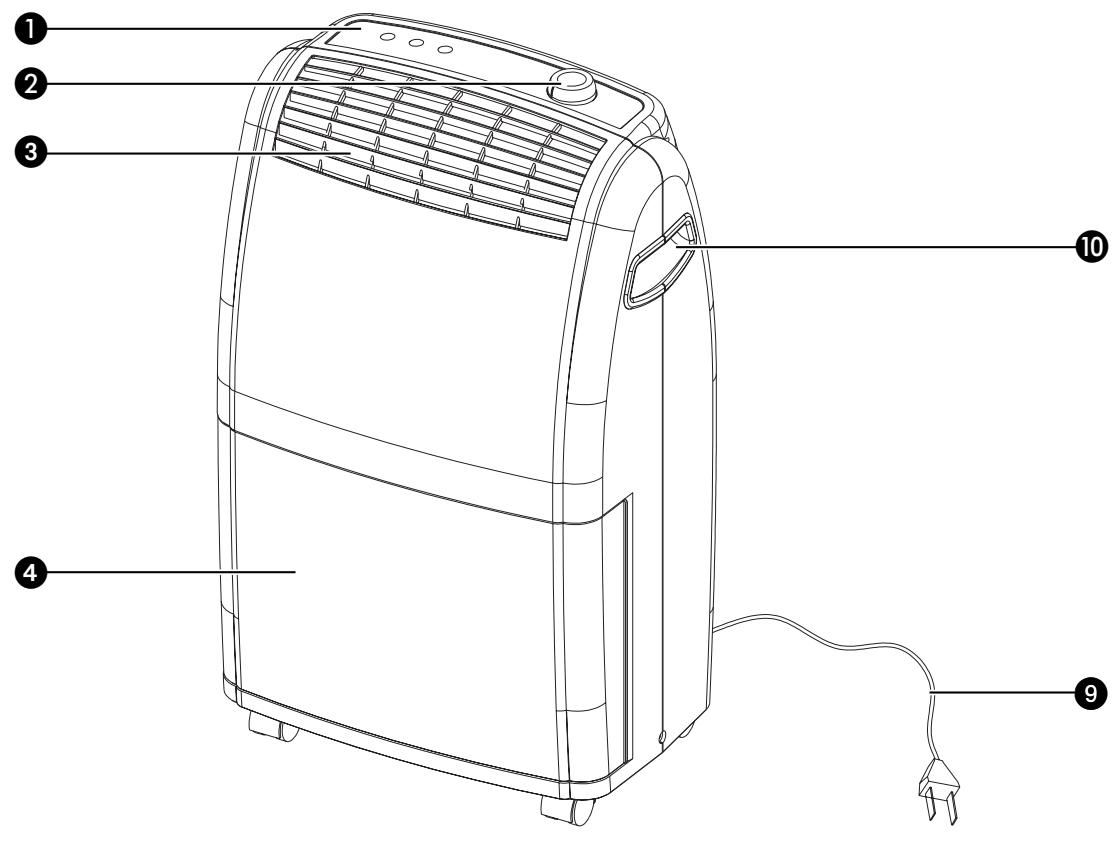
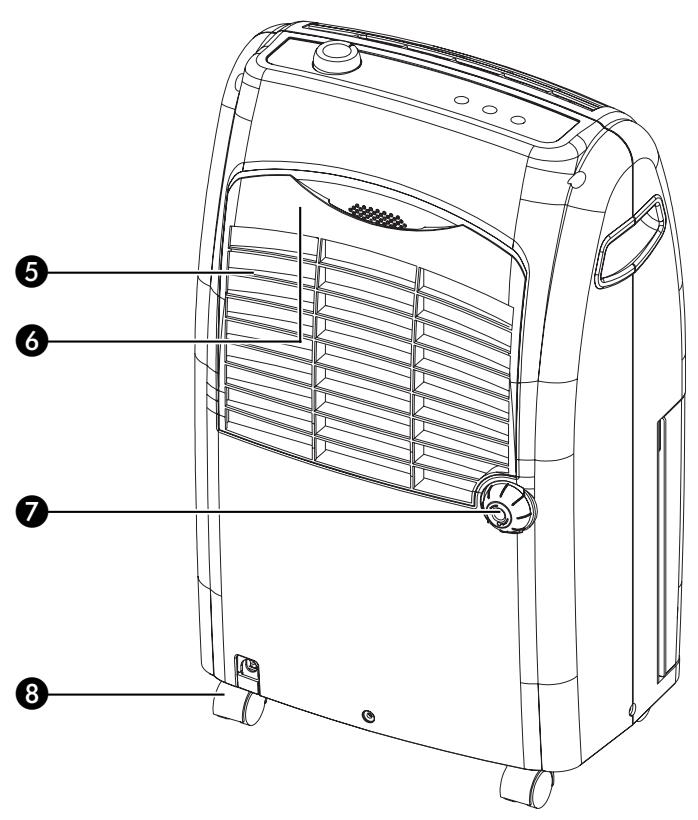
IMPORTANT COMPONENTS
Control panel
② Adjustment button/hydrostat
3 Dry air outlet
4 Removable water container
5 Humid air inlet
6 Air filter
Drain spout (Ø13 mm) with cap
Castor
Plug and cord
10 Handle
WHAT YOU MUST KNOW IN ADVANCE
GENERAL
- To obtain optimum performance from your dehumidifier, do not place it near a radiator or any other heat source.
- Ensure that all windows are closed in order to achieve maximum efficiency.
- The capacity of the dehumidifier depends on the temperature and the humidity in the room. At lower temperatures, less moisture will be removed.
- Ensure that the air filter is kept clean. This prevents unnecessary power consumption and guarantees optimum efficiency.
- If the power supply has been interrupted, the defumidifier will restart after three minutes. The automatic delay protects the compressor.
SAFETY REGULATIONS
- Do not connect the device with an extension cord.
- Never use the device with a damaged cord or plug.
- The device must be connected to the power supply with an earthed plug. Ensure that the powercord is not entangled or rolled up.
Always switch the device off before pulling the plug out from the wall outlet. When you pull out the plug from the socket, grip the plug to avoid damaging the cord.
It is forbidden for children to play with the device. The device may only be used by adults.
It is dangerous and forbidden to modify the device.
It is forbidden to cover the device or to insert foreign objects into the device as a fire or electric shock could occur. - Do not make the device wet.
- Avoid the use of spray cans (insect spray, hair spray, etc.) in the vicinity of the dehumidifier. This may damage the device and/or cause fire.
TIPS FOR SAFE USAGE
- Keep plastic bags and other packaging materials out of reach of children.
- The device was developed to dehumidify rooms. This means that it may not be used for other purposes.
Always contact your supplier if repair or maintenance is required. - Do not place the device in the vicinity of heat sources, materials, installations, or near curtains, that may cause a fire hazard or in environments where explosions may occur.
Always switch the device off and remove the plug from the socket before cleaning it. - The device must always be in the upright position, also during storage and transportation. If the device is not transported correctly, first place the device upright for 24 hours before switching it on.
- Empty the water container before transporting the device.
- Place the unit at least 20 ~cm away from the wall or other objects. Keep a distance of 50 ~cm between clothing and the unit, and ensure no moisture will drip into the device.
The floor must be stable and level. This will prevent vibrations, noise, and leakage.
CONTROL LIGHTS ON THE CONTROL PANEL

This light indicates that the defrost function has been activated. This is necessary to prevent excessive formation of ice in the device.

This light indicates that the water container is full. The device switches off automatically.

The device is in operation when this light is on.
OPERATION

1 Ensure that the hydrostat is in the OFF position before inserting the plug into the wall outlet.
2 Ensure that the water container has been positioned correctly. If the light switches on when you use the device for the first time, remove the water container from the device and replace it in the correct position.
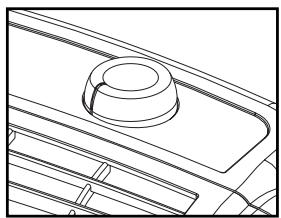
3 Turn the hydrostat to the desired position. The hydrostat is continuously adjustable. Set the hydrostat to 'NORMAL', which produces a relative humidity of approximately 50% and provides a comfortable living environment.
The device starts to dehumidify when the relative humidity in the room is higher than the set value.
The device switches off automatically when the set value is reached, and restarts when the humidity in the room rises again.
Setting the hydrostat to the 'MAX.' position keeps the device in continuous operation.
4 Turn the adjustment button to the 'OFF' position to turn the device off.
WATER DRAINAGE
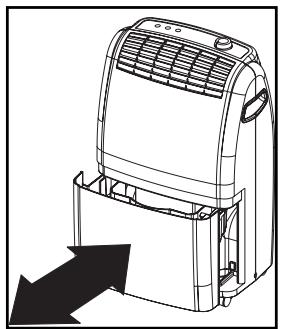
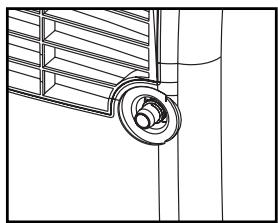
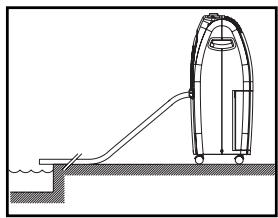
When the water container is full, the light switches on and the dehumidifier switches off automatically. Empty the container and replace it in the correct position. The device will restart.
If desired, it is possible to connect a drainage hose to the device for permanent water drainage. Follow these steps:
1 Unscrew the cap on the back.
2 Remove the rubber stop from the drainage spout.
3 Connect the drainage hose and ensure that the end of the hose is lower than the spout, otherwise the water will not drain and flooding may occur.
Place the end of the drainage hose in a water outlet.
When you no longer wish to use the permanent water drainage, disconnect the drainage hose from the device. Push the rubber stop back into the drainage spout and replace the cap. Ensure that the water container is positioned correctly.
CLEANING
Switch the dehumidifier off and remove the plug from the socket before cleaning.
THE EXTERIOR
Clean the exterior with a soft, dry cloth. If the device is extremely dirty, use a mild cleaning agent. Wipe the device with a slightly damp cloth. Never spray the device with water.
THE AIR FILTER
When used regularly, the filter may become clogged with dust and particles. Therefore the filter should be cleaned every two weeks. Follow these steps:
1 Remove the filter from the back of the device and clean it with a vacuum cleaner or water.
2 Dry the air filter and replace it. Ensure that the filter is completely dry.

Never use the device without the air filter.
STORAGE
If the machine will not be used for a long period of time, take the following steps:
1 Remove the plug from the socket and empty the container. Allow the container and the dehumidifier to dry completely.
2 Clean the air filter.
Store the device in a dust-free location, preferably covered with a sheet of plastic.
TROUBLESHOOTING
Check the following before contacting technical support:
| Problem | Cause | Solution |
| The unit does not work. | The powercord is not connected. | Insert the plug into the wall outlet. |
| The hydrostat setting is too low. | Turn the hydrostat to the desired setting. | |
| The water container is full. | Remove the water from the container. | |
| The water container has not been replaced correctly. | Place the water container in the correct position. | |
| The device does not dehumidify. | The air filter is clogged. | Clean the air filter. |
| The temperature or relative humidity in the room where the device is operating is too low. | It is normal that the device does not dehumidify in these conditions. | |
| The dehumidifier works, but reduces the relative humidity insufficiently. | The room is too large. | We recommend using a dehumidifier with a greater capacity. |
| There are too many sources of humidity. | We recommend using a dehumidifier with a greater capacity. | |
| There is too much ventilation. | Reduce ventilation (e.g. close curtains and shut doors). |
CONDITIONS OF WARRANTY
There is a two-year warranty on your dehumidifier from the date of purchase. All material or manufacturing defects will be repaired free of charge.
The following applies:
- All claims for compensation, including consequential damage, will not be entertained.
- Any repairs or replacement of components during the warranty period will not result in an extension of the warranty period.
- The warranty will expire if any alterations have been made, not genuine components have been fitted or if the dehumidifier has been repaired by a third party.
- Components subject to normal wear and tear, such as the air filter, are not covered by the warranty.
- The warranty is only valid on presentation of the original, unaltered, and date-stamped purchase receipt.
- The warranty does not cover damage caused by actions that deviate from those as described in the user's manual or by neglect.
- Transportation costs and the risks involved during the transportation of the dehumidifier or components shall always be for the account of the purchaser.
To prevent unnecessary expenses, we recommend that you always carefully read the user's manual first. If this does not provide a solution, take the dehumidifier to your distributor for repair.
| Model | D 112 | D 114 | |
| Mains voltage | V / Hz / Ph | 220-240 / 50 / 1 | |
| Power consumption | W | 230 | 300 |
| Amperage | A | 1.1 | 1.3 |
| Noise level | dB | 40 | |
| Dehumidifying capacity | L/24h* | 12 | 14 |
| Refrigerant | g | R-134a / 160 | |
| Compressor | type | Piston | |
| Automatic defrost | yes | ||
| Adjustment button/hydrostat | yes | ||
| Dimensions WxHxD | mm | 340 x 580 x 245 | |
| Net weight | kg | 13.0 | 13.5 |
| Capacity water container | L | 3.5 | |
| Air delivery (max.) | m³/h | 150 | |
| Operating range | °C | 5-32 | |
| CFC-free | yes | ||
| * at 32°C / 80% RH | |||
Subject to change without prior notice.
PERFORMANCE GRAPH
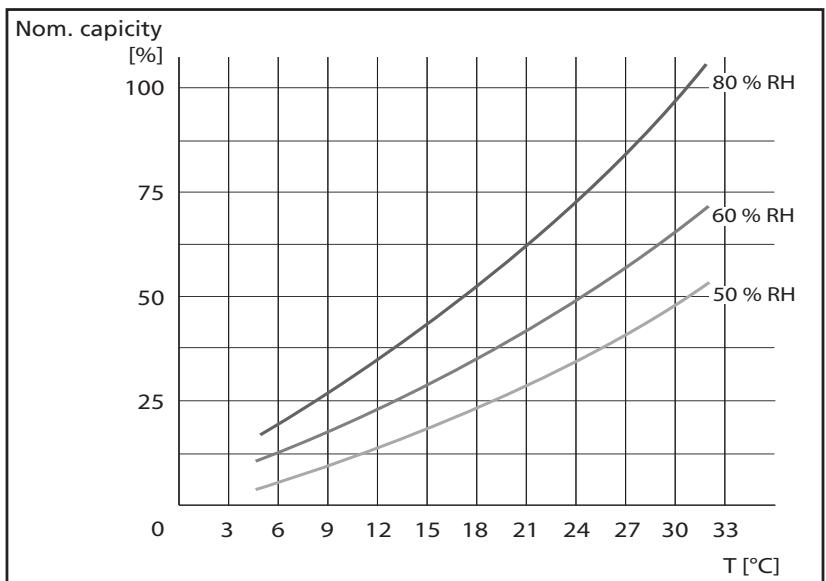
(to be used as indication only)
Egregio signore, gentile signora,
WAT U VOORAF DIENT TE WETEN
ALGEMEEN
Holloway Bank, Wednesbury
West Midlands WS10 OAW
tel.: +44 121 506 1818
fax: +44 121 505 1744
email: gases@lister.co.uk
ITALIA
PVG Italy SRL
Via Niccolò Copernico 5
50051 CASTELFIORENTINO (FI)
tel: +39 571 628 500
fax: +39 571 628 504
email: pvgitaly@zibro.com
N NORGE
Sunwind -Gylling A/S
Rudsetta 71-75 / P.O. Box 64
N-1309 RUD
tel: +4767171370
fax: +47 67 17 13 80
email: pvgint@zibro.com
NEDERLAND
PVG International B.V.
P.O.Box 96
5340 AB OSS
tel: +31 412 694 694
fax: +31 412 622 893
email: pvgnl@zibro.com
PORTUGAL
Gardena, Lda
- IMPORTANT COMPONENTS
- WHAT YOU MUST KNOW IN ADVANCE
- GENERAL
- SAFETY REGULATIONS
- TIPS FOR SAFE USAGE
- CONTROL LIGHTS ON THE CONTROL PANEL
- OPERATION
- WATER DRAINAGE
- CLEANING
- THE EXTERIOR
- THE AIR FILTER
- STORAGE
- TROUBLESHOOTING
- CONDITIONS OF WARRANTY
- WAT U VOORAF DIENT TE WETEN
- ALGEMEEN
- ITALIA
- N NORGE
- NEDERLAND
- PORTUGAL
Brand : ZIBRO
Model : D114
Category : Auxiliary heating