
A40 - Auxiliary heating ZIBRO - Free user manual and instructions
Find the device manual for free A40 ZIBRO in PDF.


| Brand | ZIBRO |
| Model | A40 |
| Product type | Supplementary heater (air purifier) |
| Dimensions (W x H x D) | 402 x 592 x 215 mm |
| Net weight | 7 kg |
| Power supply | 220-240 V / 50 Hz |
| Power consumption (min./max.) | 18 / 80 W |
| Current intensity (max.) | 0.4 A |
| Noise level (min./max.) | 24 - 38 dB |
| Airflow (min./max.) | 60 / 300 m³/h |
| Maximum recommended area | 100 m³ |
| Filtration system | Screen filter + HEPA filter + activated carbon filter |
| Main functions | Auto mode, timer (1/2/4h), pollen function, smoke function |
| Pollution sensor | Air quality indicator (pollen, dust, odors) |
| Remote control | Yes, range 7 m, batteries not included |
| Negative ions generated | 30,000 - 50,000 / cc |
| Warranty | 2 years (on manufacturing defects) |
| Maintenance and cleaning | Clean the exterior with a soft dry cloth; vacuum the screen filter; replace HEPA and activated carbon filters every 1-2 years |
| Spare parts | Filters (screen, HEPA, activated carbon) available from the distributor |
| Safety | Do not use an extension cord; do not cover; do not insert objects; unplug before cleaning |
Frequently Asked Questions - A40 ZIBRO
User questions about A40 ZIBRO
0 question about this device. Answer the ones you know or ask your own.
Ask a new question about this device
Download the instructions for your Auxiliary heating in PDF format for free! Find your manual A40 - ZIBRO and take your electronic device back in hand. On this page are published all the documents necessary for the use of your device. A40 by ZIBRO.
USER MANUAL A40 ZIBRO
Congratulations on the purchase of your air purifier. You have acquired a high quality product that will give you years of pleasure if you use it sensibly. Read this manual first in order to optimise the life span of your air purifier.
On behalf of the manufacturer, we provide a two-year guarantee on possible material or manufacturing defects.
Enjoy your air purifier.
Yours sincerely,
PVG International B.V.
1 FIRST READ THE MANUAL.
2 IF IN DOUBT, CONSULT YOUR DEALER.
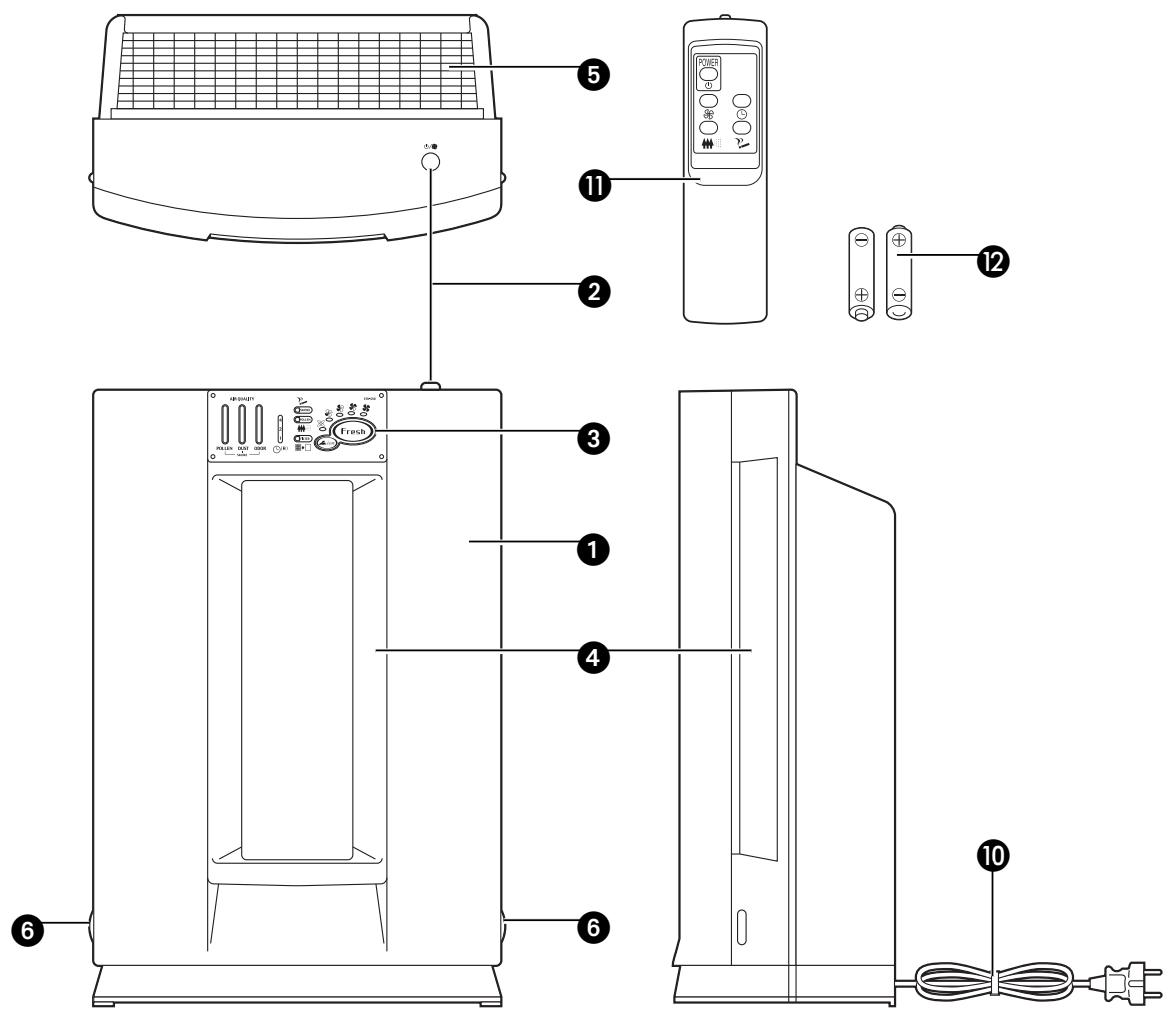
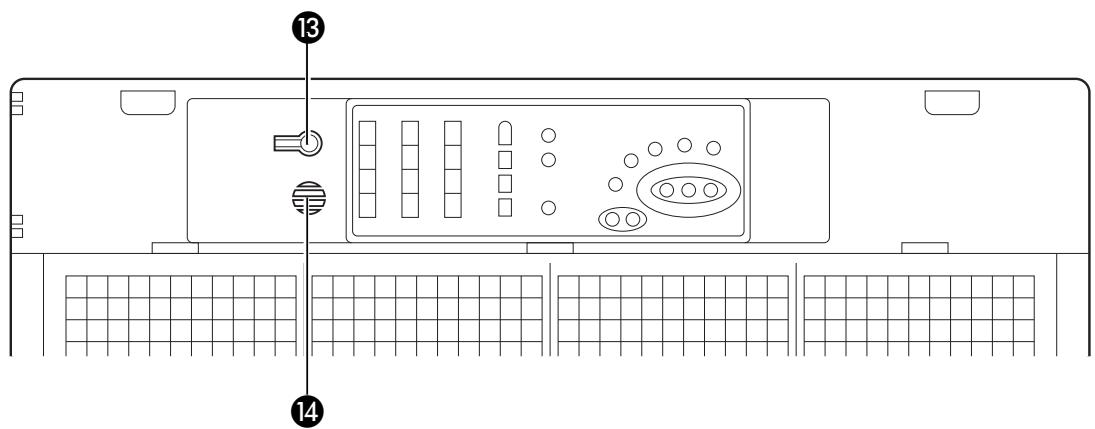
IMPORTANT COMPONENTS
Front panel
Control button
3 Control panel
Air inlet
Air outlet
Push tabs
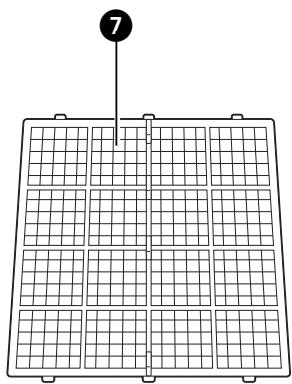
Screen filter
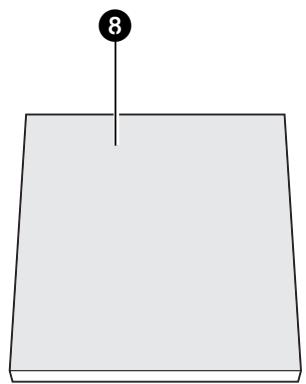
HEPA filter (High Efficiency Particulate Air filter)
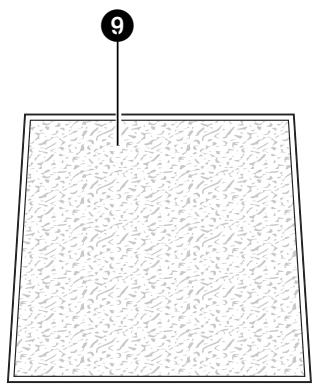
Active carbon filter
Plug and cord
Remote control
Batteries
13 Reset button
Air sensor
A. WHAT YOU MUST KNOW IN ADVANCE
GENERAL
Take the following actions to obtain an optimum result.
- Place the air purifier in an elevated location (e.g. on a table or cupboard) in order to allow it to filter small particles such as smoke. Place the air purifier near or on the ground to enable it to filter large dust particles such as pollen.
Always maintain a gap of 30~cm around the device.
SAFETY REGULATIONS
- Do not connect the device with an extension cord.
- Never use the device with a damaged cord or plug.
- The device must be connected to the power supply with an earthed plug. Ensure that the powercord is not entangled or rolled up.
Always switch the device off before pulling the plug out from the wall outlet. When you pull out the plug from the socket, grip the plug to avoid damaging the cord.
It is forbidden for children to play with the device. The device may only be used by adults.
It is dangerous and forbidden to modify the device.
It is forbidden to cover the device or to insert foreign objects into the device as a fire or electric shock could occur. - Do not make the device wet.
- Avoid using spray cans (insect spray, hairspray, etc.) in the vicinity of the air purifier. This may damage the device and/or cause fires.
The device may not be used in humid rooms such as bathrooms.
TIPS FOR SAFE USAGE
- Keep plastic bags and other packaging materials out of reach of children.
The device was developed to purify air and not for any other application.
Always contact your supplier if repair or maintenance is required. - Do not place the device in the vicinity of heat sources, materials, installations, or near curtains, that may cause a fire hazard or in environments where explosions may occur.
Always switch the device off and remove the plug from the socket before cleaning it.
The floor must be stable and level.

B. INSTALLATION
AIR PURIFIER
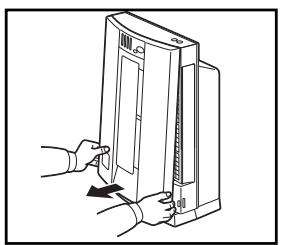
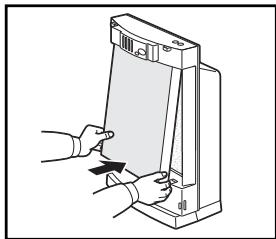
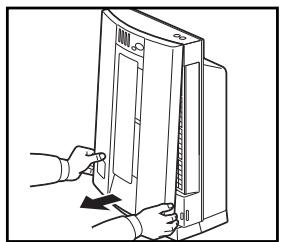
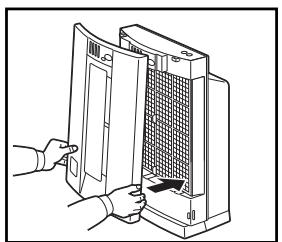
1 Remove the front panel by pressing the push tabs 6 on both sides of the device.
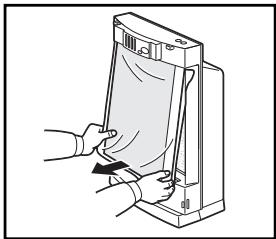
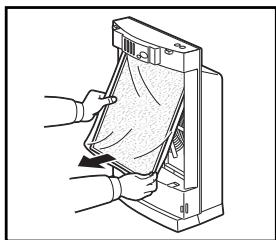
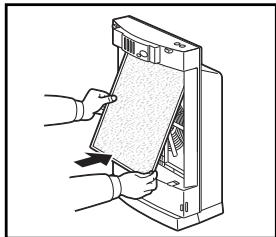
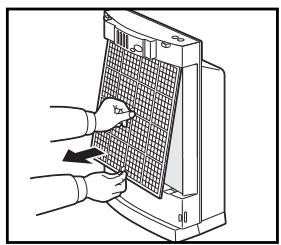
2 Remove the screen filter 7 from the device and then remove the HEPA filter 3 and the active carbon filter 9. Remove the packaging from both filters.
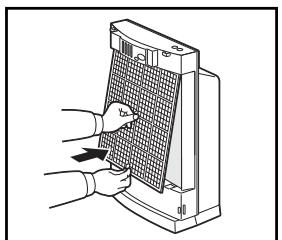
3 First put the active carbon filter back into the device, followed by the HEPA filter (green side facing the front) and the screen filter.
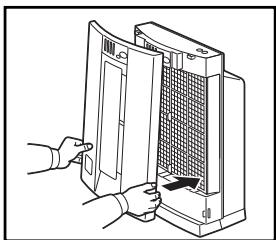
4 Fasten the front panel by inserting the two hooks at the top into the recesses in the device. Now click the bottom left and right of the front panel into position.
The device is now ready for use.

ATTENTION!
The HEPA filter and active carbon filter must be placed correctly in order to guarantee correct operation.
REMOTE CONTROL
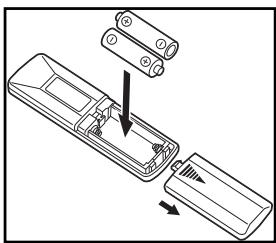
1 Open the cover on the back of the remote control
2 Insert the batteries, ensuring that the + and - poles are positioned correctly.
3 Close the cover.

ATTENTION!
- Handle the remote control with care. It may stop working if it becomes wet or is dropped or damaged in some other way.
- The maximum range is 7 metres.
- Incorrectly placed batteries may cause damage.
C. AIR FILTER
The A40 air purifier is equipped with a 4 layer filter package to clean the circulated room air.
HEPA (High Efficiency Particulate Airfilter) filter captures allergens like bacteria, dust and pollen.
- Enzyme filter neutralizes airborne micro organisms.
Active carbon filter removes unpleasant odours from the air.
- Screen filter captures large dust particles.
The HEPA filter and activated carbon filter continue to work for a long period of time after opening. Both must be replaced approximately 1 - 2 x per year. The frequency of use and operating conditions determine how often a filter must be replaced. The 'Filter' light switches on (red) when the filter is saturated. When this happens, take the following steps:
1 Switch the device off and remove the plug from the socket.
2 Unfasten the front panel 1 with the push tabs 6 on both sides of the device.
3 Remove the screen filter 7 from the device and then remove the HEPA filter 8 and the active carbon filter 9.
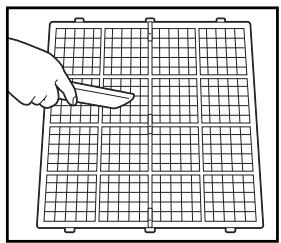
4 Clean the screen filter with a vacuum cleaner.
Install the new active carbon filter, followed by the HEPA filter and finally the screen filter (see section B).
Press the reset button ⑧ after installing the screen filter ⑦. If you do not do this, the 'Filter' light will remain on and the following filter replacement will not be displayed.
7 Dirty filters can be disposed of with household waste (not biologically degradable waste) without any problem.
New filters are available at your dealer.

ATTENTION!
Always replace dirty filters with new filters. Never re-use a dirty filter, even after it has been cleaned.
D. OPERATION
1 Insert the plug into the socket.
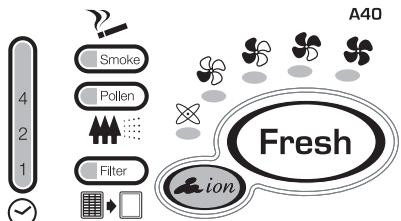
Press the control button to switch the device on. The light and a ventilator speed light will switch on. In the mode, the air purifier automatically selects the ventilator speed required to filter the air in the room.
3 Pressing the control button 1 again will change the mode as follows:

The appropriate ventilator speed light, or will switch on.

ATTENTION!
The Timer , Smoke? and Pollen modes can only be operated with the remote control.
REMOTE CONTROL
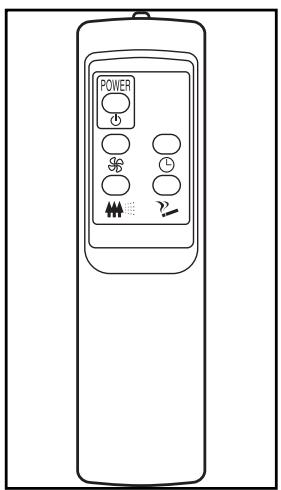
Use the remote control to operate the following functions:
Use this button to switch the device on and off.
Pressing this button will change the ventilator mode as follows:

The appropriate ventilator speed light, or will switch on.

Use this button to operate the timer function. To operate the timer, take the following steps:
1 Switch the device on.
Press the button.
3 Light 1 at on the display will switch on, which means that the device will switch off automatically after 1 hour. Press the button again to set an operating period of 2 or 4 hours. The appropriate light will switch on.
4 Press the button again to switch the timer function off.

ATTENTION!
The Timer setting will be deleted when you switch the device off with the button.
press this button to activate a specially programmed pollen removal function. The light on the display will switch on. Press the button to switch this function off.
Press this button to activate a specially programmed smoke removal function. The light on the display will switch on. Press the button to switch this function off.

ATTENTION!
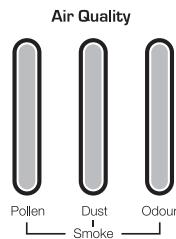
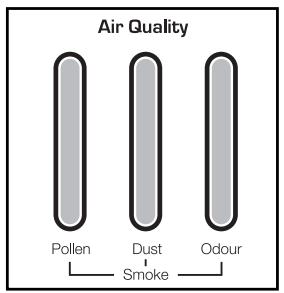
The air quality is indicated on the display during air purification. The lights will turn green when the air is clean. The higher the level of contamination in the air, the more lights will turn red. There are separate indicators for the pollen (Pollen), dust (Dust) and odour (Odour) status.
E. CLEANING
Switch the air purifier off and remove the plug from the socket before cleaning.
THE EXTERIOR
Clean the exterior with a soft, dry cloth. If the device is extremely dirty, use a mild cleaning agent. Wipe the device with a slightly damp cloth. Never spray the device with water.
THE SCREEN FILTER 7
Clean the screen filter with a vacuum cleaner.
THE HEPA FILTER 8
Clean the grill of the front panel with a vacuum cleaner. It is not possible to clean the HEPA filter. It must be replaced when it becomes dirty (see section C).
THE ACTIVE CARBON FILTER 9
This filter can not be cleaned. It must be replaced together with the HEPA filter (see section C).

ATTENTION!
Never use the device without the air filter.
F. STORAGE
If the machine will not be used for a long period of time, take the following steps:
1 Switch the device off.
2 Remove the plug from the socket.
3 Clean the machine.
4 Remove the HEPA filter (see chapter C).
5 Remove the active carbon filter (see section C).
6 Dirty filters can be disposed of with household waste (not biologically degradable waste) without any problem.
Store the device in a dust-free location, preferably covered with a sheet of plastic.
G. TROUBLE SHOOTING
Check the following before contacting technical support:
| Problem | Cause | Solution |
| The device does not work | The power cord is not connected. | Insert the plug into the socket. |
| The power cord is not connected properly. | Insert the plug into the socket correctly. | |
| A fuse is defective. | Replace the fuse. | |
| The batteries in the remote control are dead. | Replace the batteries. | |
| The device does not remove odours and/or dust. | The HEPA filter and the active carbon filter are dirty. | Replace the filters. |
| The HEPA filter and the active carbon filter are missing. | Install the filters in the device. | |
| The HEPA filter and the active carbon filter have been installed incorrectly. | Install the filters correctly. | |
| The device makes a creaking sound. | This noise may occur when small dust particles enter the device and does not indicate a defect. | Contact your dealer if this noise is constantly audible. |
| The mode (automatic operation) does not work. | The air in the room was dirty when the plug was inserted into the socket. | First purify the air. Then switch the device to the mode. |
| The air sensor is dirty. | Manually switch the device to the highest ventilator setting in order to purify the air. Then switch the device to the mode. | |
| No / insufficient air circulation. | The air flow is blocked. | Remove the blockage. |
| Replace the filters. | ||
| The device operates continuously in the mode (automatic operation). | There are excessively high concentrations of harmful gasses or fumes in the room. | Manually switch the device to the desired mode. |
| The temperature in the room may fluctuate significantly (e.g. due to the opening and closing of windows/doors). | ||
| Filter light burning | Dirty filters. | Install new filters + press reset button. |
| Forgot to press reset button after replacement new filters. | Press reset button. |
H. GUARANTEE CONDITIONS
We provide a two-year guarantee on your air purifier from the date of purchase. All material or manufacturing defects will be repaired free of charge.
The following applies:
- All claims for compensation, including consequential damage, will not be entertained.
- Any repairs or replacement of components during the warranty period will not result in an extension of the warranty period.
- The warranty will expire if any alterations have been made, not genuine components have been fitted or if the air purifier has been repaired by a third party.
- Components subject to normal wear and tear, such as the air filter, are not covered by the warranty.
- The warranty is only valid on presentation of the original, unaltered, and date-stamped purchase receipt.
- The warranty does not cover damage caused by actions that deviate from those as described in the user's manual or by neglect.
- Shipment costs and the risks associated with the shipment of the air purifier or parts of the air purifier are always borne by the purchaser.
To prevent unnecessary expenses, we recommend that you always carefully read the user's manual first. If this does not provide a solution, take the air purifier to your dealer for repair.
I. TECHNICAL SPECIFICATIONS
| Type | A 40 | |
| Mains power | V / Hz / F | 220-240 / 50 / 1 |
| Power consumption (min./max.) | W | 18 / 80 |
| Amperage (max.) | A | 0.4 |
| Noise level (min./max.) | dB | 24 - 38 |
| Air debit (min./max.) | m³/hour | 60 / 300 |
| Net weight | kg | 7 |
| Dimensions (wхhxd) | mm | 402 x 592 x 215 |
| Suitable for rooms to | m³ | 100 |
| Generated negative ions | quantity/cc | 30,000 - 50,000 |
Waste electrical products should not be disposed with household waste. Please recycle where facilities exist. Check with your local authority or retailer for recycling advice.
Gentile signora, egregio signore,
A. WAT U VOORAF DIENT TE WETEN
ALGEMEEN
H. WARUNKI GWARANCJI
Holloway Bank, Wednesbury
West Midlands WS10 OAW
tel.: +44 121 506 1818
fax: +44 121 505 1744
email: gases@lister.co.uk
ITALIA
PVG Italy SRL
Via Niccolò Copernico 5
50051 CASTELFIORENTINO (FI)
tel: +39 571 628 500
fax: +39 571 628 504
email: pvgitaly@zibro.com
N NORGE
Sunwind -Gylling A/S
Rudsetta 71-75 / P.O. Box 64
N-1309 RUD
tel: +4767171370
fax: +47 67 17 13 80
email: pvgint@zibro.com
NEDERLAND
PVG International B.V.
P.O.Box 96
5340 AB OSS
tel: +31 412 694 694
fax: +31 412 622 893
email: pvgnl@zibro.com
PORTUGAL
Gardena, Lda