
IT140 - Tablet LEXIBOOK - Free user manual and instructions
Find the device manual for free IT140 LEXIBOOK in PDF.


| Brand | LEXIBOOK |
| Model | IT140 |
| Product type | Educational touch tablet |
| Screen | 7 inches, capacitive touch |
| Resolution | 1024 x 600 pixels |
| Processor | Quad-core 1.3 GHz |
| RAM | 1 GB |
| Internal storage | 8 GB (expandable via microSD) |
| Power supply | Built-in rechargeable lithium-ion battery, 2000 mAh |
| Battery life | Up to 4 hours of use |
| Connectivity | Wi-Fi 802.11 b/g/n, Bluetooth 4.0 |
| Operating system | Android 9.0 (Go edition) |
| Main features | Pre-installed educational apps, parental controls, camera, multimedia playback |
| Box contents | Tablet, USB cable, power adapter, quick start guide |
| Maintenance and cleaning | Use a soft cloth slightly dampened with water, avoid detergent products |
| Safety | Do not expose to moisture, direct heat or sunlight; not recommended for children under 3 years |
| Warranty | 2 years |
| Dimensions | 19 x 12 x 1.5 cm |
| Weight | 320 g |
Frequently Asked Questions - IT140 LEXIBOOK
User questions about IT140 LEXIBOOK
0 question about this device. Answer the ones you know or ask your own.
Ask a new question about this device
Download the instructions for your Tablet in PDF format for free! Find your manual IT140 - LEXIBOOK and take your electronic device back in hand. On this page are published all the documents necessary for the use of your device. IT140 by LEXIBOOK.
USER MANUAL IT140 LEXIBOOK
NAJA'n Play works with 3 AA alkaline batteries
This toy must only be used with the specified batteries.
BATTERY INSTALLATION
1) Switch Off the game
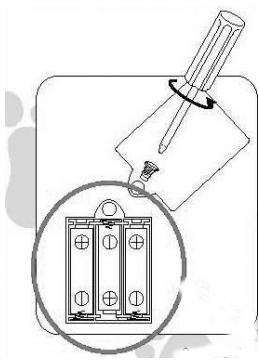
2) Use a screwdriver to open the battery compartment door located under the head of the snake.
3) Install the 3 AA alkaline batteries and follow the polarity as shown inside the battery compartment.
4) Close the battery compartment.
5) Switch On the game.
Do not use rechargeable batteries. Do not charge the batteries. Take the batteries out of the unit before charging them. Charge the batteries only under adult supervision. Do not mix different types of batteries, or new and old batteries. Batteries are to be inserted with the correct polarity. Exhausted batteries should be removed. Do not short-circuit the supply terminals. Use only specified batteries.
Do not throw batteries into fire. If the toy is not being used for a length of time, remove the batteries.
When the sound is weak or when the game does not react, please think about changing the batteries.
If your unit malfunctions, stop the game by selecting the OFF position, then switch it on again to restart. If this does not help, take the batteries out of the compartment and then replace them, this procedure will RESET your product.
The packaging has to kept since it contains important information.
INSTRUCTIONS
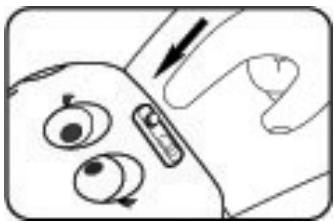
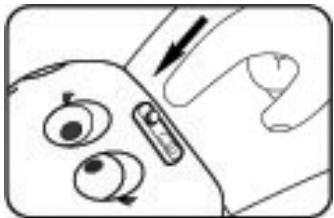
Press the activity selector located on the neck of the snake to select an activity.
You can select two activity modes :
When baby is walking on the 10 keys on the snake's body, he can listen to the variety of animals noises.
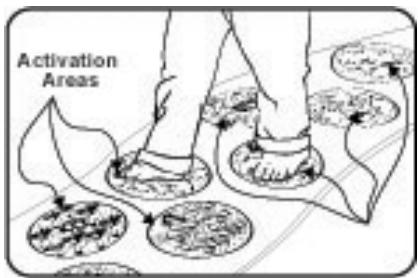
When Baby is walking on the 10 keys on the snake's body, he can listen to the different music notes.
After 2 minutes of non-use, the game will automatically switch off.
To play again, just press on the activity selector.
WARRANTY
Note: Please retain this instruction manual for further reference, as it contains important information.
This product is covered by our 2 years warranty.
If you wish to use our warranty or our after sales services, please contact your distributor with your proof of purchase. Our warranty covers the problems of material or assembly due to the manufacturer, excluding all damages resulting from the non respect of the instructions or any misuse or repair of the item (such as disassembling, heat or moisture exposure...).
CARE
1) To clean your game, only use a slightly damp soft cloth - do not use detergent or any harsh abrasives.
2) Do not expose to direct sunlight or any other heat source.
3) Do not get wet.
4) Do not drop or try to dismantle the product.
It is recommended that all packaging be kept for future reference.
In our constant concern for improvement, the colors and detail of the product shown on the packaging may be modified.
Warranty: 2 years
PILAS
NAJA'nPlayutiliza3pilasalcalinas‘AA’
INSTALACAO DAS PILHAS
Unit 10 Petersfield Industrial Estate
Bedford Road, Petersfield
Hampshire, GU32 3QA
United Kingdom
Tel: +44 1420 477922
Fax: +44 1420 477929
Technical support : 0808 100 3015
www.lexibookjunior.com