
IG1000 - Remote control LEXIBOOK - Free user manual and instructions
Find the device manual for free IG1000 LEXIBOOK in PDF.


| Product type | Interactive DVD remote control |
| Brand | LEXIBOOK |
| Model | IG1000 / IG1001 |
| Power supply | 2 LR03 (AAA) 1.5 V alkaline batteries |
| Main functions | Infrared code learning, pre-programmed codes, TV and DVD control, interactive DVD compatibility |
| Infrared range | Approximately 8 meters |
| Compatibility | DVD players and TVs from many brands |
| Color | Multi-color (children's design) |
| Dimensions (estimated) | 15 x 5 x 2 cm |
| Weight (estimated) | 100 g with batteries |
| Material | ABS plastic |
| Target audience | Children aged 3 and up (not suitable for children under 36 months) |
| Warranty | 2 years |
| Maintenance and cleaning | Clean with a soft, dry cloth; do not use abrasive products; do not expose to moisture, dust, or high temperatures |
| Safety | Do not mix new and old batteries; do not use rechargeable batteries; observe polarity; remove batteries if not used for an extended period |
| Spare parts and repairability | Not designed for user repair; contact customer service |
| General information | Works with most DVD players and TVs; requires initial programming by learning or codes |
Frequently Asked Questions - IG1000 LEXIBOOK
User questions about IG1000 LEXIBOOK
0 question about this device. Answer the ones you know or ask your own.
Ask a new question about this device
Download the instructions for your Remote control in PDF format for free! Find your manual IG1000 - LEXIBOOK and take your electronic device back in hand. On this page are published all the documents necessary for the use of your device. IG1000 by LEXIBOOK.
USER MANUAL IG1000 LEXIBOOK
My first interactive DVD remote
Thank you for your purchase of the Lexibook My first interactive DVD remote. Your new remote control is specially designed to play interactive DVDs. An interactive DVD offers interactive contents which can be directly run on a traditional DVD player and viewed on TV. An interactive DVD has a storage capacity much higher than standard DVDs, leading to outstanding levels of interactivity and graphic quality. My first interactive DVD remote was conceived with children in mind: easy grip, colourful and user-friendly keys. It is compatible with most DVD players and televisions. Please read the instructions below to understand the parameters and functions of My first interactive DVD remote.
DISCOVERING MY FIRST INTERACTIVE DVD REMOTE
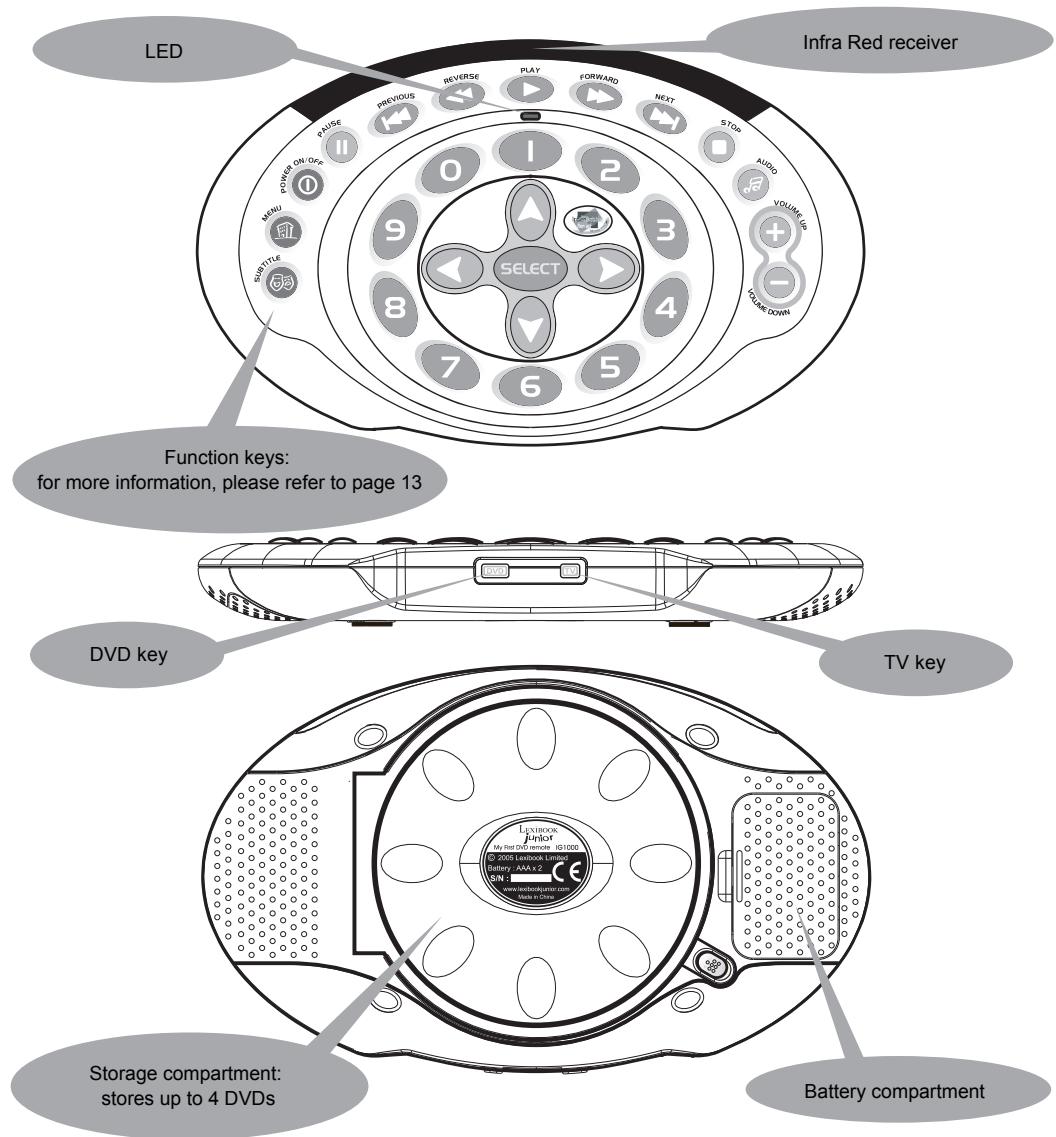
BATTERY INSTALLATION
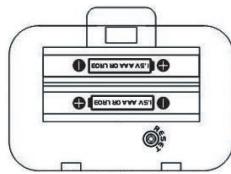
My First interactive DVD remote works with 2 alkaline 1.5V 2.25 Ah batteries type LR03 or AAA.
- Open the battery compartment at the back of the remote using a screwdriver.
- Fit the 2 LR03 or AAA alkaline batteries according to the polarity indicated in the battery compartment and according to the image herewith.
- Close the battery compartment.
Do not use rechargeable batteries. Non-rechargeable batteries are not to be recharged. Rechargeable batteries are to be removed from the toy before being charged. Rechargeable batteries are only to be charged under adult supervision. Different types of batteries or new and used batteries are not to be mixed. Only batteries of the same or equivalent type as recommended are to be used. Batteries are to be inserted with the correct polarity. Exhausted batteries are to be removed from the toy. The supply terminals are not to be short circuited. Do not throw batteries into a fire. Remove the batteries if you are not going to use the game for a long period of time. WARNING: If an abnormal operation is observed after having replaced the battery, use a pointed object (e.g. a paper clip) in order to press the RESET button located inside the battery compartment.
GETTING STARTED
Before you can use My first interactive DVD remote, you will need to program it to your DVD player (or TV set). It is recommended to set up the remote using the learning procedure. However, depending on the brand of your DVD player or television, you may have to program your remote using either the code list provided in this user guide or our library codes. It is recommended to use this method only if the learning procedure fails.
Learning procedure
During the learning procedure, My First interactive DVD remote receives the codes of your DVD player (or your TV) by facing its infrared port to the one of your original DVD remote (or your TV remote). Hence, you will copy the code from the old remote into the interactive DVD remote.
1. The Learning Command
1.1 If you wish to 'learn' the codes of a DVD remote, press the DVD key located on the side of My first interactive DVD remote. To learn the codes of a TV remote, press the TV key (also located at the side of the interactive remote). The LED indicator on your interactive DVD remote will flash once.
1.2 Press and hold simultaneously for a few seconds the and VOLUME DOWN keys on your interactive DVD remote until the LED indicator turns on and remains solid.
1.3 Enter the Magic Learn Code '0000' on your interactive DVD remote; the LED indicator flashes after each '0' entered. The interactive DVD remote is now ready to learn the commands.
1.4 Press a key on the interactive DVD remote which you want to learn the command. The LED indicator blinks quickly and successively.
1.5 Take your old remote and face it to the interactive DVD remote. The transmitter (on the top side of the unit) of your old remote must be 4-8 cm close to the receiver of the interactive DVD remote (top side of the unit, near the PLAY key).
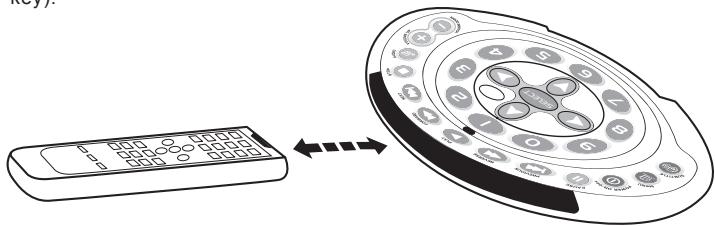
1.6 Press and hold the corresponding key on your old remote for a few seconds. The LED indicator stops blinking and remains solid. If the LED indicator does not light up (or keeps blinking), adjust and align the two remotes again or redo step 1.6.
1.7 If the command has been learnt successfully, the LED indicator will flash once and then turn off.
1.8 To learn other keys, please repeat steps 1.4 and 1.6. If you wish to end the learning mode, press the key which you pressed in step 1.1 (DVD or TV button).
Notes
- In step 1.4, if no key is pressed for more than 30 seconds, the LED indicator will flash twice and then turn off. You will automatically exit the learning mode.
- In step 1.5, if no infra red signal is received during more than 30 seconds, the LED indicator will flash twice. You need to select the key to program again (redo step 1.4).
- If you execute the learning procedure between another DVD (or TV) remote and the interactive DVD remote, the previously learnt codes will be erased after having set the new codes successfully.
- During step 1.2, if the LED indicator immediately flashes twice when the and VOLUME DOWN keys are pressed, it indicates that the interactive remotes' batteries are low. Replace the batteries and try the learning procedure again.
2. Teaching a dual signal
If you notice that a learnt key only works occasionally, your old remote may contain dual signals. Execute the following steps to learn this command:
2.1 Follow steps 1.1 to 1.3.
2.2 Press a key on the interactive DVD remote which you want to learn the command. The LED indicator will turn on and remain solid.
2.3 Take your old remote and face it to the interactive DVD remote. The transmitter (on the top side of the unit) of your old remote must be 4-8 cm close to the receiver of the interactive DVD remote (top side of the unit, near the PLAY key).
2.4 Press and hold the corresponding key on your old remote for a few seconds. The LED indicator stops blinking and remains solid. If the LED indicator does not light up (or keeps blinking), adjust and align the two remotes again or redo step 1.6.
2.5 If the command has been learnt successfully, the LED indicator will flash once and then turn off. You can release the key on your old remote.
2.6 Press again the same key you pressed in step 2.2 on your interactive DVD remote. The LED indicator will turn on and remain solid.
2.7 On your old remote, press and keep holding the key you wish to program (same key as in step 2.4) for a few seconds until the LED indicator flashes once. The dual signal command has then been learnt successfully.
2.8 Repeat steps 2.2 to 2.7 to learn other keys (dual signal). If you wish to end the learning mode, press the key which you pressed in step 1.1 (DVD or TV button). The LED indicator will flash once and then turn off.
Notes :
- In step 2.2 or 2.6, if no key is pressed for more than 30 seconds, the LED indicator will flash twice and then turn off. You will automatically exit the learning mode.
- In step 2.3, if no infra red signal is received during more than 30 seconds, the LED indicator will flash twice. You need to select the key to program again (redo step 2.2 or 2.5).
PRE-PROGRAMMED CODES
If you fail to program the interactive DVD remote using the learning procedure, you can program your remote using either the code list provided in this user guide or the library codes. If you have lost the original remote of your DVD player (or TV), you must use this method to program My interactive DVD remote.
3. Entering a device code using the code list
Most DVD player (or TV) brand names are assigned a 4-digit code. You will find a code list in appendix at the end of this user manual. Several codes are listed for each DVD player or TV brand. You will use trial and error to find which code unlocks your interactive DVD remote.
3.1 Turn on your DVD player (or TV)
3.2 To program the interactive DVD remote to a DVD player, press the DVD key (located at the side of the interactive remote) key. To program the interactive DVD remote to a TV set, press the TV key (also located at the side of the interactive remote). The LED indicator on your interactive DVD remote will flash once.
3.3 Press and hold simultaneously for a few seconds the and VOLUME DOWN keys on your interactive DVD remote until the LED indicator turns on and remains solid.
3.4 Look through the code list located in appendix at the end of the user guide and find the 4-digit code which corresponds to the brand name of your DVD player (or TV). Use the number keys "0-9" on your interactive DVD remote to key in the 4-digit code. If there are more than once code under a brand name, try the first code.
3.5 If the settings were successful, the LED indicator will turn off.
3.6 Try out the function keys on the interactive DVD remote. If your DVD player (or TV) responds to the keys pressed, you have entered the correct device code. Otherwise, repeat steps 3.2 to 3.4 and try the other codes available of the brand name of your DVD player (or TV).
Notes :
If in step 3.4, the LED indicator flashes twice, the setup procedure will be interrupted. Possible reasons include:
No key was pressed for more than 30 seconds.
- An invalid code number was entered.
- Invalid keys (other than number keys) were pressed.
During step 3.3, if the LED indicator immediately flashes twice when the and VOLUME DOWN keys are pressed, it indicates that the interactive remotes' batteries are low. Replace the batteries and try the procedure again.
4. Searching a device code through the library
If you cannot identify a correct device code from the code list in appendix, you may search for the correct code through the library.
4.1 Turn on your DVD player (or TV)
4.2 To program the interactive DVD remote to a DVD player, press the DVD key (located at the side of the interactive remote) key. To program the interactive DVD remote to a TV set, press the TV key (also located at the side of the interactive remote). The LED indicator on your interactive DVD remote will flash once.
4.3 Press and hold simultaneously for a few seconds the and VOLUME DOWN keys on your interactive DVD remote until the LED indicator turns on and remains solid.
4.4 Enter the corresponding Automatic Search Code ('0005' for a DVD player and '0001' for a TV).
4.5 Press the same mode key you pressed in step 4.2 (DVD or TV button).
4.6 Press and hold simultaneously for a few seconds the and VOLUME DOWN keys on your interactive DVD remote until the LED indicator turns on and remains solid.
4.7 Aim the interactive DVD remote towards your DVD player (or TV), then press and release the POWER ON/OFF key repeatedly until your DVD player (or TV) is turned off.
4.8 Once your DVD player (or TV) is off, press and hold simultaneously the keys and VOLUME DOWN on your interactive DVD remote to terminate the search mode and lock the code. The LED indicator will turn off.
Notes :
- Each time your press the POWER ON/OFF key, the interactive DVD remote will move to the next library code and send out a "power" signal to turn off your DVD player (or TV).
- During step 4.7, if you have accidentally pressed the POWER ON/OFF key on your interactive DVD remote after the DVD player (or TV) had turned off and the correct code had been found, you need to switch your DVD player (or TV) back on manually. Before the LED indicator goes off, press the "PREVIOUS" key a few times to step backwards in the library code. Repeat step 4.7 to continue your search.
- In step 4.7, if the LED indicator flashes six times after the POWER ON/OFF key is pressed, it means that you have search through the whole library.
- In step 4.7, if no key is pressed for more than 30 seconds, the LED indicator will flash twice, and you will exit the search mode. The last searched code will be saved.
During step 4.3 or 4.6, if the LED indicator immediately flashes twice when the and VOLUME DOWN keys are pressed, it indicates that the interactive remotes' batteries are low. Replace the batteries and try the procedure again.
USING MY FIRST INTERACTIVE DVD REMOTE
Once you have setup your interactive DVD remote, you can use it as your DVD remote, TV remote or both. If you have programmed MY First Interactive DVD remote using the pre-programmed codes, the buttons have the following functions:
Key

Function in TV mode
To program the settings of a DVD player into the interactive DVD remote.
Function in DVD mode
Press if you want to switch to the DVD mode.

To program the settings of a TV set into the interactive DVD remote.
Press if you want to switch to the TV mode.

No function

Press to enter the TV menu.
Press to enter to DVD menu.

To turn the TV on and off
To turn the DVD player on and off

Exit function.
To pause the DVD currently playing.

To go to the previous channel.
To go to the previous chapter.

No function.
To rewind the DVD currently playing.

Video
To play a DVD

No function.
To forward a DVD currently playing

To go to the next channel.
To go to the next chapter

No function.
To stop the DVD currently playing.

No function.
Press to toggle the audio languages available on the DVD.

To turn the volume up.
To turn the volume up.

To turn the volume down.
To turn the volume down

Press the number keys to select a channel.
Press the number keys to select a chapter.

Press the corresponding arrow key to navigate the menu.
* Can be used to play games on an interactive DVD.
To make a selection in the menu.
Press the corresponding arrow key to navigate the menu.
* To toggle the options available on an interactive DVD.

Notes:
- If you have programmed My First Interactive DVD Remote using the learning command, the keys may not have the functions described above as the user assigns the key function.
- All keys are learnable except the TV and DVD buttons.
INTERACTIVE DVDs
My First Interactive DVD Remote was specially conceived to run the contents of an interactive DVD. An interactive DVD can include the following features:
- Read along stories
- Read along songs
Music videos - Interacti
Vocabulary in several foreign languages
Web browsing tips
Generally, you will need the arrow keys to scroll through the features and the SELECT key to choose a feature. You might use other keys, such as the number keys, to play the interactive games. When you enter a feature, instructions will be displayed onscreen. If an interactive DVD offers contents in several languages, you will be able to switch from one language to the other using the AUDIO key.
TROUBLESHOOTING
PROBLEM
My First Interactive DVD remote does not work.
SOLUTION
- Make sure your DVD player/TV set is turned on.
- Make sure the batteries were inserted properly and according to the +/- marks.
- Press the DVD key if you want to use the DVD player or the TV key if you want to use the TV.
- The batteries are low, replace the batteries.
- Make sure you have programmed the remote to the device you wish to use (TV or DVD player). If you have programmed the remote to your DVD player, it will not work with the TV set. Please go back to the 'Getting Started' section for more details.
If several codes listed in the appendix under the brand of my A/V device, how can I select the correct code?
- Test the codes one by one until one works.
My TV set/ DVD player only responds to some commands.
- Your old remote might contain dual signals. Please follow the set-up procedure "teaching a dual signal" on page 11.
WARNING REGARDING EPILEPSY
To be read before attempting to use a video game, either by you or your child.
Some people are susceptible to suffer epileptic seizures or to loose consciousness when looking at certain types of flashing lights or elements commonly present in our everyday environment. These people are exposed to seizures when watching certain images on television or they play some video games. This phenomenon can become apparent even if the person has no previous medical history of such, or has never suffered an epileptic fit. If you or a member of your family has shown in the past any symptom linked to epilepsy (either a seizure or loss of consciousness) when exposed to "luminous" stimulation, please consult with your doctor prior to any attempt to use this game. We warn parents to be vigilant with their children while they play with video games. If you or your child experience any of the following symptoms: dizziness, altered vision, eye or muscle twitches, loss of awareness, disorientation or involuntary movement or convulsions, stop immediately playing the game and consult a doctor.
Precautions to take in any case while using a video game
When you use a video game which can be connected to a TV screen, stand or sit relatively far from the TV screen and as far as the connection cable allows it. Use preferably video games which have a small screen. Avoid playing video games if you are tired or lack some sleep. Make sure to play in room which is well lit. While playing video games, take 10 to 15 minute breaks every hour.
MAINTENANCE
- Do not expose My First Interactive DVD remote to dust, strong sunlight, humidity, high temperature or mechanical shock.
- Do not use old and new batteries together as old batteries tend to leak.
- Do not use corrosive or abrasive cleansers on your My First Interactive DVD remote.
- Keep the unit dust free by wiping it with a soft, dry cloth.
- Do not disassemble your remote as it contains no user-serviceable parts.
WARRANTY
NOTE: please keep this instruction manual, it contains important information.
This product is covered by our 2-year warranty.
For any claim under the warranty or after sale service, please contact your distributor and present a valid proof of purchase. Our warranty covers any manufacturing material and workmanship defect, with the exception of any deterioration arising from the non-observation of the instruction manual or from any careless action implemented on this item (such as dismantling, exposition to heat and humidity, etc.). It is recommended to keep the packaging for any further reference. In a bid to keep improving our services, we could implement modification on the colours and the details of the product shown on the packaging.
Not suitable for children under 36 months old, as it contains small detachable elements which could be swallowed.
Reference: IG1000series
© 2005 LEXIBOOK®
Environmental Protection
Unwanted electrical appliances can be recycled and should not be discarded along with regular household waste! Please actively support the conservation of resources and help protect the environment by returning this appliance to a collection centre (if available).

INTRODUCCION

m = 311 ;
INTRODUZIONE

m = 311 ;
INLEIDING
WAARSCHUWING VOOR EPILEPSIE
ANAKAAYTE TO "MY FIRST INTERACTIVE DVD REMOTE"
ΠΡΚΑΘΟΡΙΣΜΕΝΟΙ KΩΔΙΚΟΙ
Av pvopoeote va poypaumatiot To Td t n diaikocia ekpnoons, mtopeite va to kavete eite Te Iiaota Kwikov Tou Papextai oaeutcs onyies xpnns n Tn Biaiohkn kwikw. Av exete xaoei to apxiko TnAeipiotnpio tou DVD player oac (n Tnc tnaleopaans), PPETe va xpooiotoinote autn Tn meo do ia v a npoypaumatiot To My interactive DVD remote.
XPHESH TOY MY FIRST INTERACTIVE DVD REMOTE
Otau 3e pua to Td aos, mtopeite va to xpnoiopoioane w tnaexepiortnpoia to DVD player oac, nV tnleopaan n kai ta duo. Av exeTt npoypaumatae to My first interactive DVD remote xpnoiopoioiwtaq tous tpokaopioevoucs kwikoouc, ta nnktpa ekteoluv tic napakatw aeitoupyiec:
PAnktpo
Aeitoupyia tnaopaoaon

Tia va TpoypaumaiotcT OTo Tpuoiic via eva DVD player.
Aetoupyia DVD player
PntnoTe To yia va eTIIeEeTe Tn aeitoupyia DVD player.

Tia va Tnpoypaumaiotro Ta puoiieiyia uokueun tneopaans.
Pntnto to yia va eTIAEeTe Tn LEitoupyia tnEopaans.

Kaia etroupyia.
Pntnate to yia va etiieEETe utotitllouc aTO autoUs Tou utapxouv oTo DVD.

Pntnto yia va μteite oTo evou tns tnleopaans.
Pntnato yia va i 0to evoou DVD player.

Tia va avoiEe kai va KLeioTe Tny tnlepaan.
Tia va avoiEe Kaia vKaIeioeTo DVD player.

Tia va byeite afo nAeitoupyia.
Tia va δiakówéTE προωρινa to DVD Trou taiεi EKEIVN TσIyμn.

Tia va nATE OTO TpOnyouMevo Kavai.
Tia va tate oTo Tponyouevo Kepalaio.

Kauiia eitoupyia.
Tia kivnən Tpoc ta Tioaw tou DVD toun TiaZei EKevn TOn Otiyun.

Bivtεo
Tia va TaiEeEva DVD.

Kaia OUPyia.
Tia kivnon TPOs ta EmuPoc Tou DVD Tn Taizei EKevIn n otiym.

Tia va nate oTo Etoevo kavai.
Tia va tate oTo ETOeKepalao

Kajia etioupyia.
Tia va oTaqatnoeTe to DVD Tnou naiEi Ekivn Tn otiym.

Kaia OUPyia.
Pntnate to yia va etiAeEte yawaa nXou aTo autcTnou utapxouv oTo DVD.

Kwödkóv avapopác; IG1000series © 2005 LEXIBOOK
Designed in Europe - Made in China

Ref:IG1000seriesIM0285