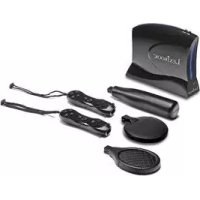
JG7000 - Game console LEXIBOOK - Free user manual and instructions
Find the device manual for free JG7000 LEXIBOOK in PDF.



| Product Type | TV Sports Plug and Play Game Console |
| Brand | LEXIBOOK |
| Model | JG7000 |
| Console Power | 4 AA/LR6 1.5V batteries (not included) |
| Controllers Power | 2 AAA/LR3 1.5V batteries per controller (not included) |
| Number of Controllers | 2 wireless controllers |
| TV Connection | A/V cables (RCA, color coded) |
| Built-in Games | 5: Horse Riding, Skiing, Goal Keeper, Bowling, Baseball |
| Interactive Mat | Yes (built into console) |
| Main Functions | On/Off, Reset, Start, Select buttons, directional arrows |
| Target Audience | Children (not recommended under 36 months, small parts) |
| Maintenance and Cleaning | Wipe with a slightly damp cloth, avoid moisture and heat |
| Safety | Epilepsy warning, do not disassemble, supervise children |
| Warranty | 2 years (contact retailer with proof of purchase) |
| Instruction Manual Languages | FR, DE, EN, ES, IT, NL, PT |
| Manufacturer Reference | JG7000 |
Frequently Asked Questions - JG7000 LEXIBOOK
User questions about JG7000 LEXIBOOK
0 question about this device. Answer the ones you know or ask your own.
Ask a new question about this device
Download the instructions for your Game console in PDF format for free! Find your manual JG7000 - LEXIBOOK and take your electronic device back in hand. On this page are published all the documents necessary for the use of your device. JG7000 by LEXIBOOK.
USER MANUAL JG7000 LEXIBOOK
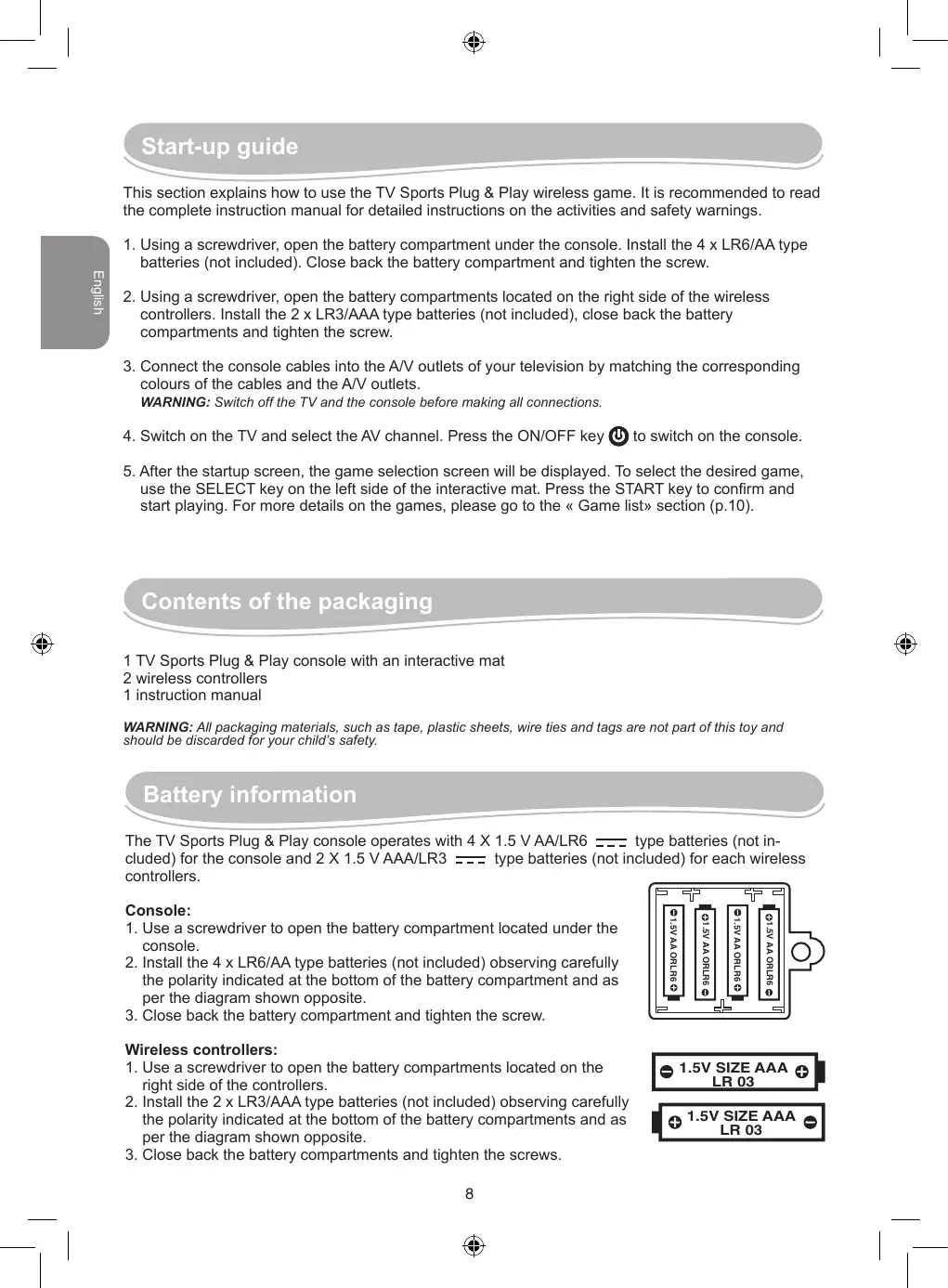
This section explains how to use the TV Sports Plug & Play wireless game. It is recommended to read the complete instruction manual for detailed instructions on the activities and safety warnings.
- Using a screwdriver, open the battery compartment under the console. Install the 4 x LR6/AA type batteries (not included). Close back the battery compartment and tighten the screw.
- Using a screwdriver, open the battery compartments located on the right side of the wireless controllers. Install the 2 x LR3/AAA type batteries (not included), close back the battery compartments and tighten the screw.
- Connect the console cables into the A/V outlets of your television by matching the corresponding colours of the cables and the A/V outlets.
WARNING: Switch off the TV and the console before making all connections.
- Switch on the TV and select the AV channel. Press the ON/OFF key to switch on the console.
- After the startup screen, the game selection screen will be displayed. To select the desired game, use the SELECT key on the left side of the interactive mat. Press the START key to confirm and start playing. For more details on the games, please go to the « Game list» section (p.10).
Contents of the packaging
1 TV Sports Plug & Play console with an interactive mat
2 wireless controllers
1 instruction manual
WARNING: All packaging materials, such as tape, plastic sheets, wire ties and tags are not part of this toy and should be discarded for your child's safety.
Battery information
The TV Sports Plug & Play console operates with 4 X 1.5 V AA/LR6 --- type batteries (not included) for the console and 2 X 1.5 V AAA/LR3 --- type batteries (not included) for each wireless controllers.
Console:
- Use a screwdriver to open the battery compartment located under the console.
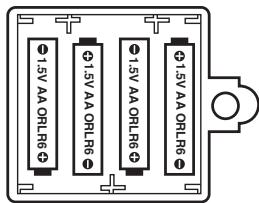
- Install the 4 x LR6/AA type batteries (not included) observing carefully the polarity indicated at the bottom of the battery compartment and as per the diagram shown opposite.
- Close back the battery compartment and tighten the screw.
Wireless controllers:
- Use a screwdriver to open the battery compartments located on the right side of the controllers.
- Install the 2 x LR3/AAA type batteries (not included) observing carefully the polarity indicated at the bottom of the battery compartments and as per the diagram shown opposite.
- Close back the battery compartments and tighten the screws.

1.5V SIZE AAA LR 03

V SIZE AAA LR 03
Non rechargeable batteries are not to be recharged. Rechargeable batteries are to be removed from the toy before being charged. Rechargeable batteries are only to be charged under adult supervision. Different types of batteries or new and used batteries are not to be mixed. Only batteries of the same or equivalent type as recommended are to be used. Batteries are to be inserted with the correct polarity. Exhausted batteries are to be removed from the toy. The supply terminals are not to be short circuited. Do not throw batteries into a fire. Remove the batteries if you are not going to use the game for a long period of time.
WARNING: If the unit malfunctions or receives an electrostatic shock, press the RESET key. If this proves to be ineffective, remove the batteries and insert them again.
Product features
Console :

ON/OFF key
Used to switch on or switch off your console.

RESET key
Used to end a game or to go back to the game selection menu.

START key
Used to start a game, to play a game round or to pause a game. Press the START key once to suspend the game in progress and press it again to resume playing.

SELECT key
Used to select a game, a game character or browse through game modes and options. Press the same key to display additional information on a game character (the keys functions may change according to the selected game).

UP ARROW key
Used to make a jump (the keys functions may change according to the selected game).

LEFT ARROW key
Used to move game character left. Or, combines with the RIGHT ARROW key, to make the character run (the keys functions may change according to the selected game).

RIGHT ARROW key
Used to move game character right. Or, combines with the LEFT ARROW key, to make the character run (the keys functions may change according to the selected game).
Wireless controllers:
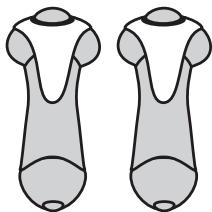
Move the controllers or press on the action buttons located on the top to control the game characters.
Game list

HORSE RIDING
Hop on your horse and ride as fast as you can to overtake the other horse riders! To win the race, jump over the road obstacles and don't forget to pick up the carrots and grain to increase your speed. Be careful! You only have 6 minutes to finish the race!
- On the game selection screen, use the SELECT key to select the Horse Riding activity and press the START key to confirm.
- Use the SELECT key to choose a horse (there are 4 horses available), then press the START key to confirm.
- Use the SELECT key to choose a place for the race (forest or desert), then press the START key to confirm.
- Use the SELECT key to choose the weather (sunny, snowy or rainy), then press the START key to confirm.
- Press repeatedly on the action buttons or shake the wireless controllers to accelerate.
- Use the or keys to move the horse left or right. Press the key to jump and avoid the obstacles.

SKIING
You have 4 minutes to ski all the way down to the finish line. Collect as much elements as you can to increase your speed and your power and jump over the obstacles in the snow!
- On the game selection screen, use the SELECT key to select the Ski activity and press the START key to confirm.
- Use the SELECT key to choose a skier (there are 4 skiers available), then press the START key to confirm.
- Press repeatedly on the action buttons or shake the wireless controllers to accelerate.
- Use the or keys to move the skier left or right. Press the key to jump and avoid the obstacles.

GOAL KEBPER
Get ready for a fun thrilling penalty shootout! Use the controllers and the interactive mat to control the goalkeeper gloves and stop all the penalties!
- On the game selection screen, use the SELECT key to select the Goalkeeper activity and press the START key to confirm.
- Use the SELECT key to choose a game mode: Practice or Tournament, then press the START key to confirm.
Note: if you choose the Tournament mode, you won't be able to choose your opponent.
- If you chose the Practice mode, use the SELECT key to choose an opponent between the 4 players available. Press the START key to confirm and start the penalty shootout.
-
Press the key to guard the right corner of the goal. To guard the upper right corner of the goal, press simultaneously the action buttons and the key.
-
Press the key to guard the left corner of the goal. To guard the upper left corner of the goal, press simultaneously the action buttons and the key.
- Press simultaneously the and the keys to guard the centre of the goal. Press simultaneously the action buttons and the and the keys to guard the upper centre of the goal.

BOWLING
Bowling won't have any more secrets for you! Get ready, aim and throw the ball for the strike.
- On the game selection screen, use the SELECT key to select the Bowling activity and press the START key to confirm.
- Press the START key or one of the action buttons to start the game.
- Use the and the keys to move your player right or left on the throwing line. Press an action button to confirm the position.
- The indicator on the Control bar (on the upper right corner of the screen) will start moving. Press an action button when it reaches the desired position to confirm the ball direction.
- The indicator on the Power bar will started moving. Press an action button when it reaches the desired position to select a power level for the ball throw.
- Use the wireless controller to make a throwing move and throw the ball.
Note: to make accurate moves, it is recommended to use one wireless controller when playing this game.

BASEBALL
Lead your baseball team to the victory! You must hit the ball and run to reach the next base. Try to hit a home run!
- On the game selection screen, use the SELECT key to select the Baseball activity and press the START key to confirm.
- Use the SELECT key to choose a game mode: Practice or Tournament, then press the START key to confirm.
- Once the pitcher has thrown the ball, swing the wireless controllers as if you were swinging a bat and try to hit the ball. You can also use the action buttons.
- When you hit the ball, press quickly the and the keys one after another to make your player run and reach the next base.
Note: The game will end if the opposing pitcher retires 3 of your players or if all your 11 players have completed their round.
Epilepsy warning
To be read before attempting to use a video game, either by you or your child.
Some people are susceptible to suffer epileptic seizures or to loose consciousness when looking at certain types of flashing lights or elements commonly present in our everyday environment. These people are exposed to seizures when watching certain images on television or when they play some video games. This phenomenon can become apparent even if the person has no previous medical history of such, or has never suffered an epileptic fit. If you or a member of your family has shown in the past any symptom linked to epilepsy (either a seizure or loss of consciousness) when exposed to "luminous" stimulation, please consult with your doctor prior to any attempt to use this game. We warn parents to be vigilant with their children while they play with video games. If you or your child experience any of the following symptoms: dizziness, altered vision, eye or muscle twitches, loss of awareness, disorientation or involuntary movement or convulsions, stop immediately playing the game and consult a doctor.
Precautions to take in any case while using a video game
When you use a video game which can be connected to a TV screen, stand or sit relatively far from the TV screen and as far as the connection cable allows it. Use preferably video games which have a small screen. Avoid playing video games if you are tired or lack some sleep. Make sure to play in room which is well lit. While playing video games, take 10 to 15 minute breaks every hour.
Maintenance and warranty
Only use a soft, slightly damp cloth to clean the unit. Do not use detergent. Do not to expose the unit to direct sunlight or any other heat source. Do not immerse the unit in water. Do not dismantle or drop the unit. Do not try to twist or bend the unit. If the unit malfunctions, try to change the batteries first. If this proves to be ineffective, read the instruction manual again.
NOTE: please keep this instruction manual, it contains important information. This product is covered by our 2-year warranty. For any claim under the warranty or after sale service, please contact your distributor and present a valid proof of purchase. Our warranty covers any manufacturing material and workmanship defect, with the exception of any deterioration arising from the non-observation of the instruction manual or from any careless action implemented on this item (such as dismantling, exposition to heat and humidity, etc.). It is recommended to keep the packaging for any further reference. Not suitable for children under 36 months old, as it contains small detachable elements which could be swallowed. In a bid to keep improving our services, we could implement modification on the colours and the details of the product shown on the packaging.
Reference:JG7000
Designed and developed in Europe - Made in China
Lexibook UK Ltd, Unit 10 Petersfield Industrial Estate, Bedford Road, Petersfield, Hampshire, GU32 3QA, United Kingdom.
Helpline: 0808 1003015,
www.lexibookjunior.com,
www.lexibook.com
Lexibook Ibérica S.L.
KEEPER (GOAL KEBPER)
Odbnyiecs yia to xekivnma
Eynoume TTwC vXpnaoiotoinoTe to aupmuT TAYviD TV Sports Plug & Play. VUOToume va diabetae OlokpoTo EYxepio oOnyiwV ia va maThe TEIIOpeIECS OETIKa ME Tc DpaotnpiotNTEC KAI Tc TPOEIOTTOHTEIC aorpaaleic.
- Me Ev a KaTaQaBiDi, avoIeTo kattaki TuV mttapaiuVTou Bpiketai katw ato TIV KovOla. BaTe MEOA t4 mttatapie tsTou LR6/AA (Eve Tepiaaavovtai). KAEIOTE TAI To kattaki TuV mttatapaiuKai oipTe TBIIDA.
- Me eva kaotai bi, aoiE To kattaki twv mttapiw Tnou pbioketai ot n dejia tawu aupa twv auupatw vexipntipivv. Bale meo ta 2 mttapie ts toun LR3/AAA (dv tepiaqavovta), kleiote nai to kattaki twv mttapiw kai opiE To bida.
- ţυνδόπετα τα καλώσια ης κονούλας στις εξόδους AV της τηλέροσαίς σας αντιοίχικόντας τα χρωμάτα τυν καλώιων με τις εξόδους AV.
IPOEIOIOIHsH: ExTe mV mLeopaan kai mV KovOla KaIeIotc meXoi va KavTe ales ts ouvdeoeis.
- Aváμte TnV Tnλερασι Kαι επλεξετο Kαναλι AV. Ππηθετο Tnλικτρο ON/OFF yia va aváμte TnV kovóλα.
- Meta tvn obovn Ekkivnq, eapaviEeT ao bov n Eilovn c TAIxviDuv. Ia va ETIAEETe To TAIyvi DIOI TOEAE, xpanioutoIote To TAIKtpo SELECT [EtAloyn] TPO Bpioketai apiotepa OTO diaopaoTiko xaAki. PAtIOTe To TAIKtpo START [Eekivna] ia etnBébaow kai apxioe va taiEe. Ia TEPIOATEc AETIOUpeIEc OXETIKa TE TAIxviDia, Tpapaalouue deTe tvv Evottna « Aota TAIxviDuv » (Oελ. 40).