FT08LED - Speaker Fenton - Free user manual and instructions
Find the device manual for free FT08LED Fenton in PDF.


Pick your language and provide your email: we'll send you a specifically translated version.
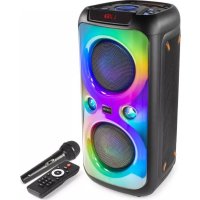
| Product Type | Portable speaker with LED lighting |
| Brand | Fenton |
| Model | FT08LED |
| Dimensions (approx.) | 20 x 10 x 10 cm |
| Weight (approx.) | 800 g |
| Power Supply | Rechargeable lithium-ion battery, charges via USB-C |
| Battery Life | Up to 6 hours depending on usage |
| Connectivity | Bluetooth 5.0, AUX 3.5mm port, microSD card reader |
| Main Functions | Wireless audio playback, synchronized LED light effect, FM radio, hands-free kit |
| Output Power | 10 W RMS |
| Frequency Response | 80 Hz - 20 kHz |
| Care and Cleaning | Clean with a soft, dry cloth. Avoid abrasive products. |
| Safety | Do not expose to water or extreme temperatures. Disconnect before cleaning. |
| Spare Parts and Repairability | Contact Fenton after-sales service for parts. No user repair. |
| Package Contents | Speaker, USB cable, AUX cable, user manual |
Frequently Asked Questions - FT08LED Fenton
How do I connect my phone to the Fenton FT08LED speaker?
Make sure the speaker is on and in Bluetooth mode. Enable Bluetooth on your phone, search for 'Fenton FT08LED' and tap to pair. Audio will stream automatically.
How do I activate the LED lights?
Press the LED button on the speaker to cycle through different lighting modes (steady, pulse, music). Hold down to turn off the LEDs.
How do I use the FM radio?
Press the 'Mode' button to switch to FM mode. Use the control buttons to auto-scan stations. You can save your favorites.
How long does it take to charge the battery?
Full charge takes about 3 hours via the USB-C cable. Use a 5V/1A power adapter for optimal charging.
Can I use the speaker while charging?
Yes, the FT08LED can be used while charging, but this may reduce battery lifespan in the long run. It is recommended to fully charge it before use.
How do I make a hands-free call?
When the speaker is connected via Bluetooth, an incoming call interrupts playback. Press the play/pause button to answer. Press again to hang up.
What should I do if the speaker won't turn on?
Check that the battery is charged. Plug in the charging cable and wait 10 minutes before trying again. If the issue persists, contact after-sales service.
How do I reset the speaker?
Turn off the device. Simultaneously hold down the Volume + and Volume - buttons for 3 seconds until the LEDs flash. The speaker will restart.
Sound is distorted, what should I do?
Reduce the volume on both the source device and the speaker. Check that the AUX cable or Bluetooth connection is stable. Avoid maxing out the volume.
How do I clean the speaker?
Use a soft, dry cloth to wipe the surface. Do not use chemical or abrasive products. Clean the speaker grilles with a soft brush.
User questions about FT08LED Fenton
0 question about this device. Answer the ones you know or ask your own.
Ask a new question about this device
No questions yet. Be the first to ask one.
Download the instructions for your Speaker in PDF format for free! Find your manual FT08LED - Fenton and take your electronic device back in hand. On this page are published all the documents necessary for the use of your device. FT08LED by Fenton.
USER MANUAL FT08LED Fenton
Manual assistant
Powered by Anthropic
Waiting for your message
Product information
Brand : Fenton
Model : FT08LED
Category : Speaker