SBS20B - Speaker Fenton - Free user manual and instructions
Find the device manual for free SBS20B Fenton in PDF.



| Product Type | Karaoke speaker with CD/CD+G player and Bluetooth |
| Brand | Fenton |
| Model | SBS20B |
| Dimensions (W x H x D) | 235 x 320 x 200 mm |
| Weight | 1.80 kg |
| Power Supply | AC 220-240 V ~ 50 Hz |
| Optical Drive | CD, CD-R/RW, CD+G |
| Wireless Connectivity | Bluetooth (range not specified) |
| Connectors | RCA audio output (L/R), RCA video output, 2 mic inputs (6.35 mm jack), USB charging port |
| Talk Over Function | Yes, automatic music attenuation during speech |
| USB Charging | Yes (cable not provided) |
| Microphone Included | Yes (1 microphone) |
| Operating Temperature | 5 °C to 35 °C |
| Usage | Indoor only |
| Maintenance and Cleaning | Soft dry cloth, do not use solvents |
| Safety | Do not open, do not expose to water, repair by qualified personnel |
| Warranty | Valid if instructions are followed, void if modification or unauthorized repair |
| Spare Parts | Contact Fenton after-sales service |
| Included Accessories | Microphone, user manual |
| Original Packaging | Keep for transport |
Frequently Asked Questions - SBS20B Fenton
User questions about SBS20B Fenton
0 question about this device. Answer the ones you know or ask your own.
Ask a new question about this device
Download the instructions for your Speaker in PDF format for free! Find your manual SBS20B - Fenton and take your electronic device back in hand. On this page are published all the documents necessary for the use of your device. SBS20B by Fenton.
USER MANUAL SBS20B Fenton
natural_image
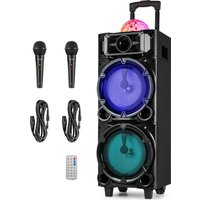
Black Penton portable audio recording device with blue LED indicators and control buttons (no readable text or symbols)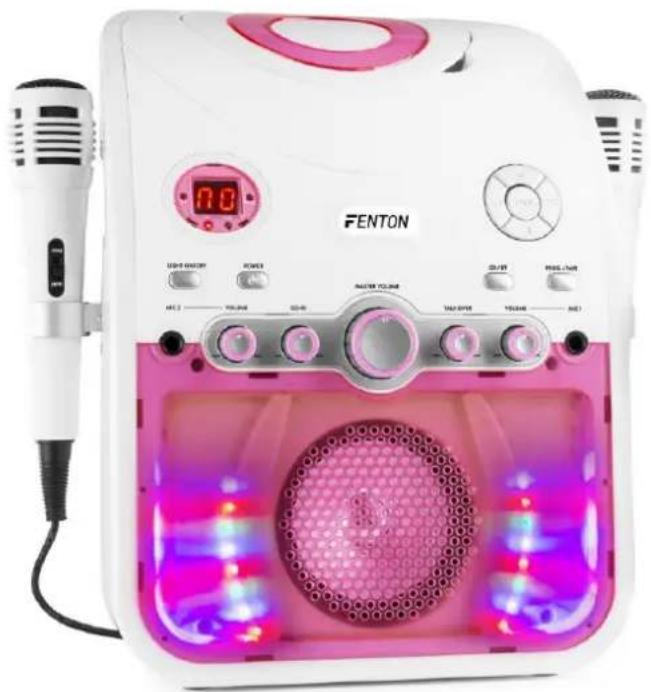
natural_image
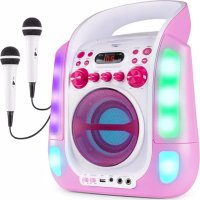
White FENTON portable electronic device with pink ambient lighting and a digital display, no visible text or symbols on the device itself.INSTRUCTION MANUAL GEBRUIKSAANWIJZING BEDIENUNGSANLEITUNG MANUAL DE INSTRUCCIONES MANUEL D'INSTRUCTIONS
Congratulations to the purchase of this Fenton product. Please read this manual thoroughly prior to using the unit in order to benefit fully from all features.
Read the manual prior to using the unit. Follow the instructions in order not to invalidate the warranty. Take all precautions to avoid fire and/or electrical shock. Repairs must only be carried out by a qualified technician in order to avoid electrical shock. Keep the manual for future reference.
- To protect against a fire, electric shock or personal injury, do not immerse cord, electric plugs or device in water or other liquids.
- Do not expose the appliance to extreme temperatures. The appliance shall be used in moderate climates.
- The use of attachments that are not recommended by the appliance manufacturer may result in fire, electric shock or personal injury.
- Do not open the unit by removing any cover parts. Do not attempt to repair the unit. Any repairs or servicing should be done by qualified personnel only.
• The appliance is not a toy. Do not let children play with it. Never let children insert foreign objects into the appliance. - Never clean the surface of the device with solvents, paint thinners, cleansers or other chemical products. Instead, use a soft, dry cloth or soft brush.
- Keep small objects (i.e. screws, mounting material, memory cards etc.) and packaging out of the range of children. Do not let Children play with foil. Choking hazard!
- Please keep the original packaging. To gain sufficient protection of the device while shipment or transportation, make sure to put it back in its original packaging.
- Do not use any volatile liquids, detergents or the like. Use a clean dry cloth.

This mark attracts the attention of the user to high voltages that are present inside the housing and that are of sufficient magnitude to cause a shock hazard.

This mark attracts the attention of the user to important instructions that are contained in the manual and that he should read and adhere to.
The unit has been certified CE. It is prohibited to make any changes to the unit. They would invalidate the CE certificate and their guarantee!
NOTE: To make sure that the unit will function normally, it must be used in rooms with a temperature between 5°C/41°F and 35°C/95°F.

Electric products must not be put into household waste. Please bring them to a recycling centre. Ask your local authorities or your dealer about the way to proceed. The specifications are typical. The actual values can slightly change from one unit to the other. Specifications can be changed without prior notice.
Do not attempt to make any repairs yourself. This would invalid your warranty. Do not make any changes to the unit. This would also invalid your warranty. The warranty is not applicable in case of accidents or damages caused by inappropriate use or disrespect of the warnings contained in this manual. Fenton cannot be held responsible for personal injuries caused by a disrespect of the safety recommendations and warnings. This is also applicable to all damages in whatever form.
UNPACKING INSTRUCTION
CAUTION! Immediately upon receiving the product, carefully unpack the carton, check the contents to ensure that all parts are present, and have been received in good condition. Notify the shipper immediately and retain packing material for inspection if any parts appear damage from shipping or the package itself shows signs of mishandling. Save the package and all packing materials. In the event that the product must be returned to the factory, it is important that the product be returned in the original factory box and packing.
If the device has been exposed to drastic temperature fluctuation (e.g. after transportation), do not switch it on immediately. The arising condensation water might damage your device. Leave the device switched off until it has reached room temperature.
POWERSUPPLY
On the label on the backside of the product is indicated on this type of power supply must be connected. Check that the mains voltage corresponds to this, all other voltages than specified, the light effect can be irreparably damaged. The product must also be directly connected to the mains and may be used. No dimmer or adjustable power supply.

Always connect the device to a protected circuit (circuit breaker or fuse). Make sure the device has an appropriate electrical ground to avoid the risk of electrocution or fire.
OPERATION
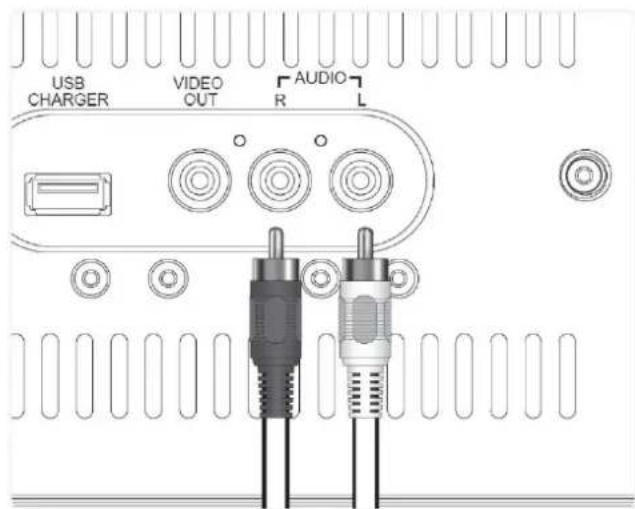
Connect an RCA audio cable to the RCA Audio Output on the SBS20 and an audio input on an external stereo system. Adjust the external stereo systems source to the input used. Audio played through the SBS20 will now be heard through the connected stereo system.
text_image
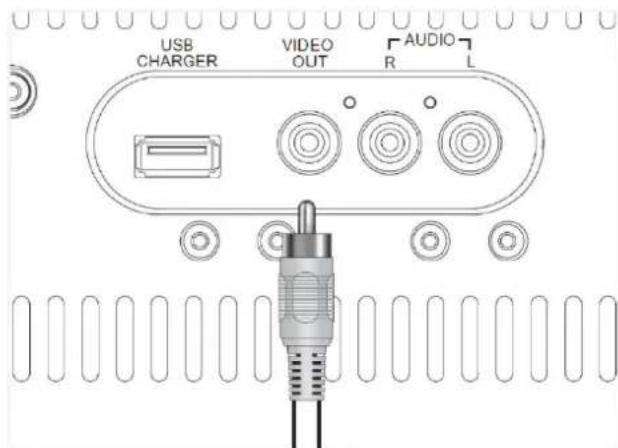
USB CHARGER VIDEO OUT AUDIO R LConnect an RCA video cable to the RCA Video Output on the SBS20 and a video input on a television. Adjust the television source to the input used.
text_image
USB CHARGER VIDEO OUT AUDIO R LCD / CD-G
- Load a CD, CD-R/RW, or CD+G disc into the karaoke machine, label side facing up. Close the CD door.
- Press the CD/BT button to switch to CD+G mode (The CD indicator will light up).
- Plug the included microphone into the Mic 1 or Mic 2 input.
- Press the Play/Pause button to begin playing the loaded disc.
Programming a Loaded Disc
- Press the Stop button to stop the playback.
- Press the Program button. Press the Skip/Search buttons to select a track from the loaded disc.
- Press the Program button to add the selected track to the program.
- Repeat the above steps to add up to 20 tracks to the playlist.
- Press the Stop button to cancel a program.
BT CONNECTION
- Press the CD/BT button repeatedly to switch to BT mode - then press the Pair button so the unit will enter pairing mode.
• Using the native controls on your BT device, select the "SBS20" in your BT settings to pair with. - If your device requests a password, enter the default password "0 0 0 0".
- When successfully paired and connected, the pairing indicator will display a solid blue light.
• After initial pairing, the unit will stay paired unless unpaired manually by the user or erased due to a reset of the device. - If your device should become unpaired or above steps or press the Pair button to start the pairing process pairing again.
- Use the native controls on the connected BT Device to select a track.
To play, pause or skip the selected track, use the native controls on the connected BT Device or press the Play/Pause or Tun/Skip/Search buttons.
USB CHARGING PORT
Use the appropriate USB charging cable (not included), connect one end to the device and the other to the USB Charging Port on the unit. Make sure the unit is plugged into the wall outlet.
TALK OVER
When you will talk or sing over the music, you would certainly want to attenuate the music. The SBS karaoke speaker does this for you automatically. The sensitivity can be control by the Talk Over control.
- Load a CD, CD-R/RW, or CD+G disc into the karaoke machine, label side facing up. Close the CD door.
- Press the CD/BT button to switch to CD+G mode (The CD indicator will light up).
- Plug the included microphone into the Mic 1 or Mic 2 input.
- Press the Play/Pause button to begin playing the loaded disc.
Programming a Loaded Disc
- Press the Stop button to stop the playback.
- Press the Program button. Press the Skip/Search buttons to select a track from the loaded disc.
- Press the Program button to add the selected track to the program.
- Repeat the above steps to add up to 20 tracks to the playlist.
- Press the Stop button to cancel a program.
BT CONNECTION
- Press the CD/BT button repeatedly to switch to BT mode - then press the Pair button so the unit will enter pairing mode.
• Using the native controls on your BT device, select the "SBS20" in your BT settings to pair with. - If your device requests a password, enter the default password "0 0 0 0".
- When successfully paired and connected, the pairing indicator will display a solid blue light.
• After initial pairing, the unit will stay paired unless unpaired manually by the user or erased due to a reset of the device. - If your device should become unpaired or above steps or press the Pair button to start the pairing process pairing again.
- Use the native controls on the connected BT Device to select a track.
To play, pause or skip the selected track, use the native controls on the connected BT Device or press the Play/Pause or Tun/Skip/Search buttons.
USB CHARGING PORT
Use the appropriate USB charging cable (not included), connect one end to the device and the other to the USB Charging Port on the unit. Make sure the unit is plugged into the wall outlet.
TALK OVER
The specifications are typical. The actual values can slightly change from one unit to the other. Specifications can be changed without prior notice.
The products referred to in this manual conform to the European Community Directives to which they are subject:
• Low Voltage (LVD) 2014/35/EU
• Electromagnetic Compatibility (EMC) 2014/30/EU
• Restriction of Hazardous Substances (RoHS) 2011/65/EU

Specifications and design are subject to change without prior notice.
www.tronios.com
Copyright © 2020 by Tronios The Netherlands