FT212LED - Speaker Fenton - Free user manual and instructions
Find the device manual for free FT212LED Fenton in PDF.


Pick your language and provide your email: we'll send you a specifically translated version.
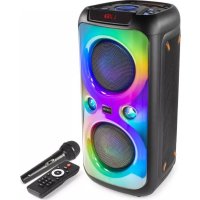
| Product Type | Portable active speaker with LED effects |
| Model | Fenton FT212LED |
| Rated Power | 200 W RMS |
| Frequency Response | 50 Hz – 20 kHz |
| Speaker | 1 × 12 inches |
| Inputs | Bluetooth, USB, SD, microphone (6.35 mm jack), line (RCA) |
| Outputs | Line (RCA), additional speaker (6.35 mm jack) |
| LED Lighting | Built-in RGB LEDs with automatic modes and manual control |
| Power Supply | Mains 230 V AC, 50 Hz |
| Dimensions (W × H × D) | Approx. 350 × 500 × 300 mm |
| Weight | Approx. 12 kg |
| Cabinet Material | ABS plastic with metal grille |
| Recommended Use | Mobile sound reinforcement, parties, indoor/outdoor events |
| Maintenance and Cleaning | Wipe with a soft, dry cloth. Do not use abrasive products. |
| Safety | Do not expose to moisture, shocks, or extreme temperatures. |
| Spare Parts and Repairability | Parts available from the manufacturer. Consult an authorized technician. |
| Included Accessories | Power cable, remote control, user manual |
| Warranty | 2 years (parts and labor) |
Frequently Asked Questions - FT212LED Fenton
How do I connect my phone via Bluetooth?
Enable Bluetooth on your phone, then turn on the speaker. Press the Bluetooth button on the device (or select the Bluetooth source). Search for 'Fenton FT212LED' in the list of devices and pair. The speaker will emit a confirmation sound.
Can I use a microphone with this speaker?
Yes, the FT212LED has a 6.35 mm microphone jack input. Plug in your microphone, turn it on, and adjust the volume via the dedicated microphone control.
How do I activate the LED effects?
Press the 'LED' button to cycle through the different modes (flashing, wave, rainbow, etc.). You can also synchronize the LEDs to the rhythm of the music.
What should I do if the sound is weak or distorted?
First check the general volume of the source (phone, microphone) and the speaker. Make sure the battery is not low (if applicable). Try reducing the microphone or line input volume. If distortion persists, move the microphone away from the speaker to avoid feedback.
Can I play music from a USB flash drive?
Yes, insert a USB flash drive formatted in FAT32 with MP3 files. The device will play them automatically. Use the navigation buttons to select tracks.
Does the speaker work on battery?
No, the FT212LED is designed for mains power only. It does not have a built-in battery. Make sure to plug it into a 230 V outlet.
How do I clean the speaker?
Use a soft, dry cloth to wipe the cabinet and grille. Never use liquid or abrasive cleaners. Keep the connectors clean and dry.
Can I connect multiple speakers together?
Yes, via the line output (RCA) or 6.35 mm jack, you can connect a second active speaker. Make sure it is compatible and adjust the levels to balance the sound.
What should I do if the remote control does not work?
Check the battery (CR2025 type) and its orientation. Point the remote at the IR sensor on the front. If the problem persists, replace the battery.
How do I reset the speaker?
Turn off the device, unplug it for a few minutes, then plug it back in. For a factory reset, hold down the 'Play' and 'Volume -' buttons while turning on. See the manual for more details.
User questions about FT212LED Fenton
0 question about this device. Answer the ones you know or ask your own.
Ask a new question about this device
No questions yet. Be the first to ask one.
Download the instructions for your Speaker in PDF format for free! Find your manual FT212LED - Fenton and take your electronic device back in hand. On this page are published all the documents necessary for the use of your device. FT212LED by Fenton.
USER MANUAL FT212LED Fenton
Manual assistant
Powered by Anthropic
Waiting for your message
Product information
Brand : Fenton
Model : FT212LED
Category : Speaker