Boston - Radio Audizio - Free user manual and instructions
Find the device manual for free Boston Audizio in PDF.


Pick your language and provide your email: we'll send you a specifically translated version.
| Product type | Digital AM/FM Radio |
| Brand | Audizio |
| Model | Boston |
| Dimensions (W x H x D) | 25 cm x 15 cm x 8 cm |
| Weight | 1.2 kg |
| Power supply | Mains adapter 230 V ~ 50 Hz or 4 LR6/AA batteries (not included) |
| Power consumption | 10 W (max) |
| Reception bands | FM (87.5 – 108 MHz) and AM (520 – 1710 kHz) |
| Number of preset stations | 20 (10 FM, 10 AM) |
| Speaker | 1 x 5 W, 8 cm diameter |
| Headphone jack | Yes, 3.5 mm jack |
| Antenna | Telescopic FM antenna, ferrite AM antenna |
| Display | Backlit LCD screen |
| Main functions | AM/FM radio, presets, volume, standby, sleep timer |
| Care and cleaning | Wipe with a soft, dry cloth. Do not use harsh liquids. |
| Safety | Do not expose to moisture, do not open, keep out of reach of children |
| Spare parts and repairability | Batteries, mains adapter and antenna are replaceable. Repair by a professional. |
| General information | User manual available for free download at notice-facile.com |
Frequently Asked Questions - Boston Audizio
How to turn on the Audizio Boston radio?
Press the Power button on the front or top of the device. The LCD screen lights up and the radio starts on the last station listened to.
How to set the time on the Boston radio?
Press and hold the Clock (or Time Set) button for a few seconds. Use the search buttons to set the hours, then press again to confirm and move to minutes. Confirm with the Clock button.
FM reception is poor, what to do?
Fully extend the telescopic antenna and orient it for the best signal. Move the radio away from metal obstacles and electronic devices. If necessary, use the automatic station search function.
How to preset radio stations?
Tune to the desired station, then press and hold one of the numbered buttons (1 to 10) for a few seconds until the screen confirms the save. Repeat for each station.
Can I use rechargeable batteries?
Yes, you can use LR6/AA (Ni-MH) rechargeable batteries. Ensure correct polarity as indicated in the compartment. Recharge batteries in a suitable external charger.
How to activate the sleep timer?
Press the Sleep button repeatedly to select the desired duration (e.g., 15, 30, 60 or 90 minutes). The radio will turn off automatically after the chosen time.
The radio does not turn on with batteries, what to check?
Make sure the batteries are inserted correctly respecting the + and - signs. Check that they are sufficiently charged. If the problem persists, try with the mains adapter to test the device.
How to use the headphone jack?
Plug headphones with a 3.5 mm jack into the socket on the side or front of the radio. The internal speaker is automatically disabled. Adjust the volume to a comfortable level.
What is the range of the AM antenna?
The built-in ferrite antenna allows local reception of AM stations. To improve reception, rotate the radio to find the best orientation. Avoid interference from electronic devices.
How to reset the radio to factory settings?
Unplug the mains adapter and remove the batteries. Wait about 30 seconds, then reinsert batteries or reconnect the adapter. The preset stations and time will be erased.
User questions about Boston Audizio
0 question about this device. Answer the ones you know or ask your own.
Ask a new question about this device
No questions yet. Be the first to ask one.
Download the instructions for your Radio in PDF format for free! Find your manual Boston - Audizio and take your electronic device back in hand. On this page are published all the documents necessary for the use of your device. Boston by Audizio.
USER MANUAL Boston Audizio
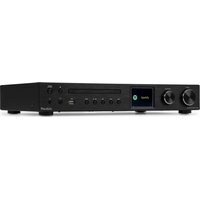
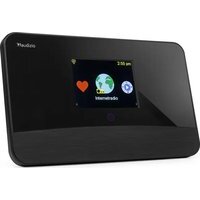
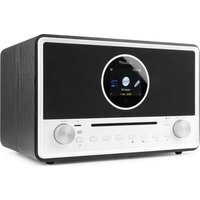
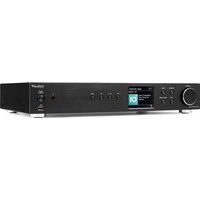
Manual assistant
Powered by Anthropic
Waiting for your message
Product information
Brand : Audizio
Model : Boston
Category : Radio